How do email sending practices impact domain reputation and deliverability?

Matthew Whittaker
Co-founder & CTO, Suped
Published 27 Apr 2025
Updated 15 May 2026
10 min read
Summarize with
Email sending practices impact domain reputation and deliverability directly because mailbox providers measure how recipients and systems react to mail from your domain. If people open, read, reply, click, move mail out of spam, and rarely complain, your domain earns trust. If your mail gets ignored, reported as spam, bounced, sent to old addresses, or fails authentication, that trust drops and more mail lands in spam or gets blocked.
The short answer is that every send teaches receiving systems what to expect next. Volume spikes, weak permission, messy lists, broken SPF, missing DKIM, relaxed DMARC handling, heavy complaint rates, and poor segmentation all create negative signals. The damage can follow the domain across more than one email platform, especially when the same organizational domain or visible brand domain appears in the message.
The practical fix is simple in concept and disciplined in execution: send wanted mail, separate risky mail streams, authenticate every sender, keep lists clean, monitor complaints and bounces, and act on reputation data before a mailbox provider forces the issue.
What domain reputation measures
Domain reputation is the trust score mailbox providers build around a sending domain. It is not one public number. Gmail, Microsoft, Yahoo, Apple, corporate gateways, filtering appliances, and blocklist (blacklist) operators each evaluate different signals. The shared theme is consistent: they care whether mail from the domain looks legitimate and whether recipients want it.
A domain can have separate reputation patterns by subdomain. For example, newsletter.example.com and billing.example.com do not always receive the same treatment. But separation is not a license to send poor mail. If recipients associate the mail with the same brand, or if authentication points back to the same parent domain, bad practices still create business risk.
- Authentication: SPF, DKIM, and DMARC tell receivers whether the message is allowed to use the domain.
- Engagement: Reads, replies, saves, and inbox moves tell receivers that people value the mail.
- Complaints: Spam reports are strong negative votes, especially when complaint rates rise suddenly.
- List quality: Hard bounces, recycled addresses, and spam traps show weak acquisition or hygiene.
- Consistency: Predictable volume and content give filters enough history to trust future mail.
The key point
Domain reputation can carry across multiple sending locations. Moving a campaign to another email platform does not erase the signal if the same domain, brand, authentication path, or audience behavior follows it.
Sending practices that hurt reputation
The practices that hurt domain reputation usually look small at first. A team imports an old list. A campaign goes to people who have not engaged in a year. A new sender skips DKIM setup. A transactional relay starts routing through a different system. None of those feels dramatic in isolation, but receivers evaluate the combined pattern.
Risky sending
- Permission: Sending to scraped, bought, appended, or stale contacts.
- Volume: Increasing send volume quickly without warm-up or segmentation.
- Authentication: Using unauthenticated senders or domains that do not match.
- Audience: Treating active customers and cold prospects as one stream.
Safer sending
- Permission: Mailing people who asked for the message and still engage.
- Volume: Growing traffic gradually with clear monitoring after each increase.
- Authentication: Aligning SPF, DKIM, and DMARC before production sending.
- Audience: Separating transactional, lifecycle, marketing, and sales mail.
Cold outreach deserves special caution. A low-volume sender can still damage domain reputation if the list is poor or the message triggers complaints. A high-volume sender can recover from occasional errors if the rest of the program has strong permission and consistent engagement. The problem is not only what you send, but who receives it and how they react.
For a deeper treatment of complaint behavior, read spam reports because that signal often explains sudden deliverability drops better than content alone.
Reputation risk thresholds
Use these working thresholds to decide when sending behavior needs attention.
Healthy
Low
Low complaints, low bounces, stable authentication, and steady volume.
Watch
Medium
A complaint, bounce, or authentication issue appears in one mail stream.
Act
High
Complaints rise, spam placement grows, or blocklist and blacklist entries appear.
How poor practices show up in deliverability
Deliverability problems rarely start with a clear message that says the domain has bad reputation. They show up as softer symptoms: a campaign that underperforms at Gmail, Microsoft accepting mail but putting it in junk, candidate emails failing after an internal relay change, or authentication reports showing a sender nobody owns.
|
|
|
|---|---|---|
Spam folder | Weak engagement | Tighten segments |
Hard bounces | Bad list data | Suppress stale contacts |
DMARC fail | Domain mismatch | Fix DKIM or SPF |
Blocklist hit | Abuse pattern | Pause risky traffic |
Common symptoms and what they usually mean.
A domain-health baseline helps separate reputation issues from configuration issues. I usually start by checking the visible sending domain, SPF, DKIM, DMARC, and whether the sending IP or domain appears on a blocklist (blacklist). Suped's domain health check gives teams a fast way to do that without manually piecing together DNS and deliverability signals.
?
What's your domain score?
Deep-scan SPF, DKIM & DMARC records for email deliverability and security issues.
This is also where a real message test helps. DNS can look correct while the actual email still fails DMARC domain matching, uses an unexpected return path, or contains content patterns that push it toward spam placement. Use the email tester when you need to inspect the message that receivers actually see.
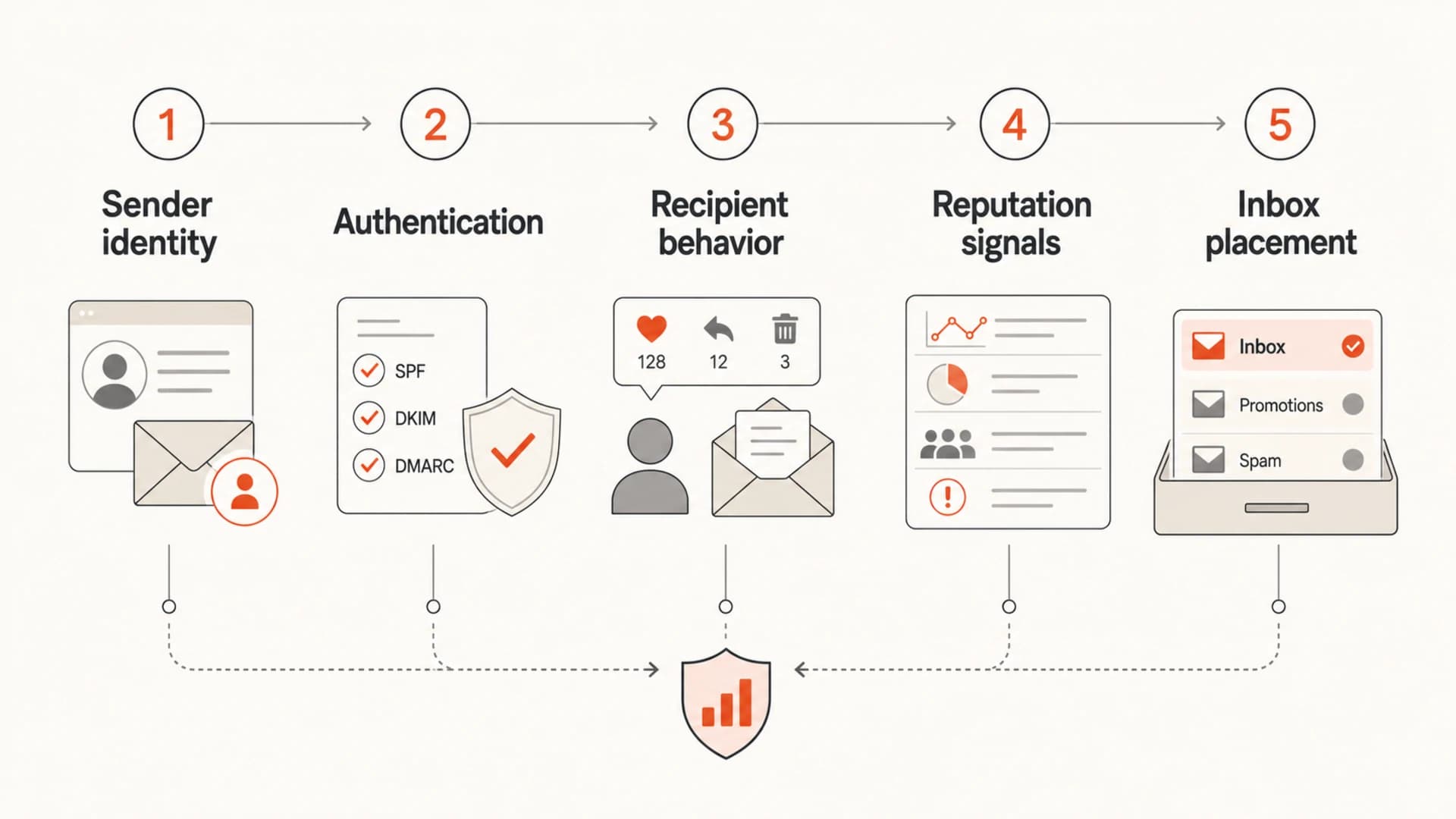
Infographic showing the path from sending identity to inbox placement.
Authentication turns sending into accountable identity
SPF, DKIM, and DMARC do not guarantee inbox placement. They give receivers a reliable way to connect a message to the domain claiming responsibility for it. Without that accountability, good sending practices are harder for mailbox providers to trust and bad actors can spoof the domain more easily.
Starter DMARC recorddns
v=DMARC1; p=none; rua=mailto:dmarc-reports@example.com;
fo=1; adkim=s; aspf=s
A monitoring policy like p=none is a starting point, not a permanent destination. It lets you collect reports while you identify legitimate senders, fix domain matching, and remove unauthorized sources. Then you can stage enforcement to quarantine and reject with fewer surprises.
Where Suped fits
 For most teams, Suped is the best overall practical DMARC platform because it brings DMARC, SPF, DKIM, blocklist monitoring, and deliverability insights into one workflow. The practical value is issue detection with steps to fix, real-time alerts, hosted DMARC policy staging, hosted SPF, SPF flattening, and hosted MTA-STS without making teams read raw XML reports.
For ongoing authentication work, DMARC monitoring matters because it shows which platforms are sending for your domain, whether they pass DMARC domain checks, and which failures deserve action. This is how teams catch a relay change before HR, finance, or customer support mail starts failing.

Issue steps to fix dialog showing the issue overview, tailored fix steps, and verification action
Subdomains and mail streams reduce blast radius
Separating mail streams by subdomain is one of the most useful ways to reduce reputation risk. It gives each major function its own identity, its own authentication setup, and its own reporting profile. When a newsletter list gets noisy, it should not make password resets or invoices harder to deliver.
|
|
|
|---|---|---|
Transactional | tx | Low |
Marketing | mail | Medium |
Sales | sales | High |
Corporate | corp | Medium |
A simple subdomain model for common mail streams.
This separation also makes incident response clearer. If sales outreach causes complaints, you can pause that subdomain, clean the source list, and preserve essential transactional mail. If a corporate relay starts failing DKIM, you can investigate that route without confusing it with marketing performance.
The parent domain still matters. For more detail on that relationship, see parent domain reputation. The operational rule is to separate risky streams, then watch both the subdomain and the larger brand domain for signs of shared damage.
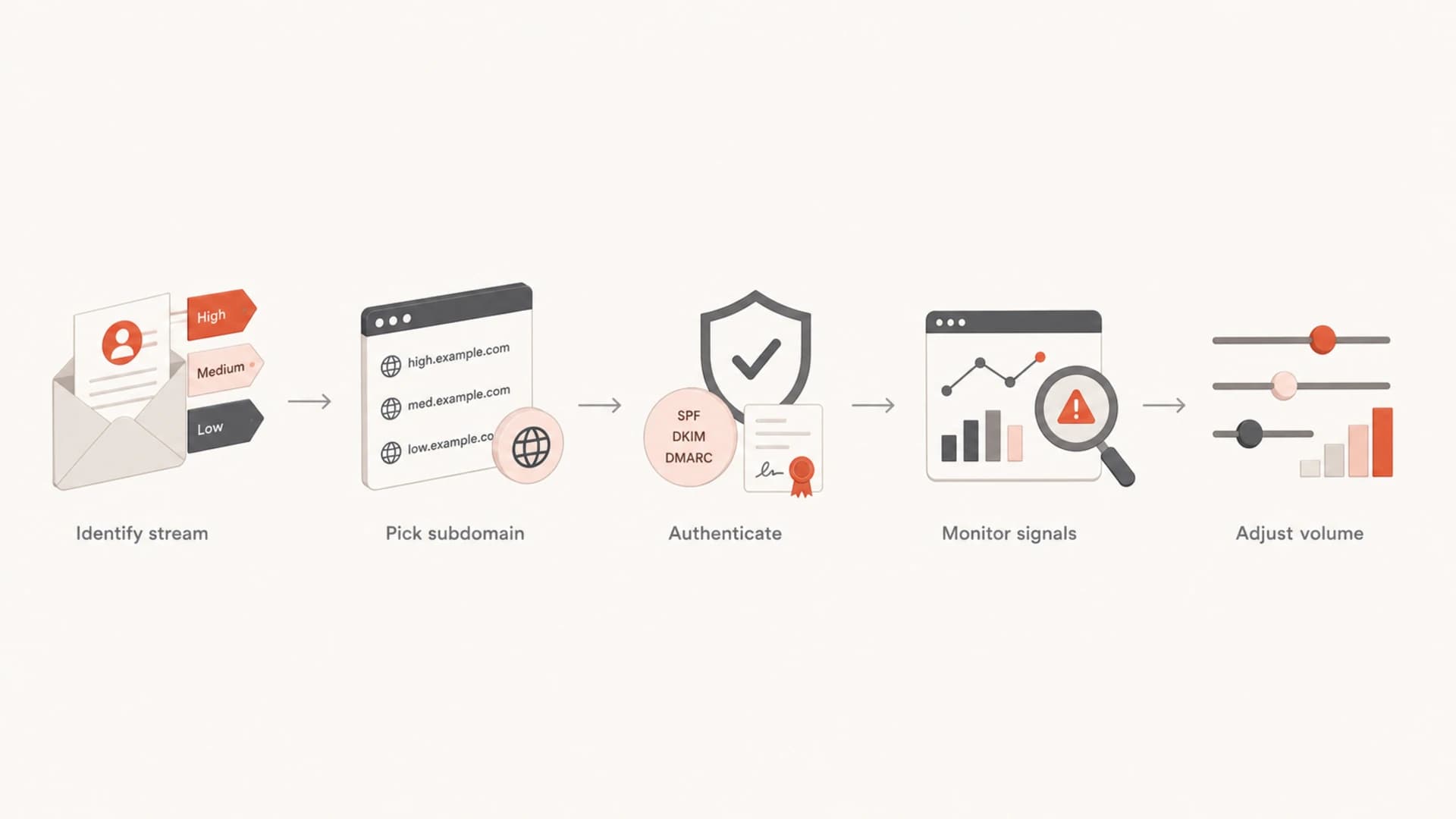
Flowchart for separating mail streams by subdomain and risk.
Monitoring proves whether practice changed
A sender reputation discussion becomes much easier when the evidence is visible. Post-send metrics, DMARC reports, blocklist (blacklist) status, bounce reasons, spam complaints, and mailbox provider dashboards show whether the sending program is improving or slipping. Without monitoring, teams argue from anecdotes.
- Baseline: Record current inbox placement, bounce rate, complaint rate, authentication pass rate, and blocklist status.
- Segment: Split mail streams by function, subdomain, audience quality, and business impact.
- Fix: Resolve authentication failures, remove unknown senders, and suppress contacts with repeated bounces.
- Control: Increase volume gradually and stop campaigns that produce complaints or unusual spam placement.
- Report: Share concise evidence with marketing, IT, sales, support, and leadership.
Suped's blocklist monitoring is useful here because a listing is often a symptom, not the root cause. The fix usually starts upstream: stop the bad traffic, confirm authentication, clean list sources, and then handle the delisting process when the abuse pattern has stopped.Use blocklist monitoring when you need ongoing visibility into IP and domain listings, especially after list-quality issues, complaint spikes, or compromised sender activity.

Blocklist monitoring page showing domain and IP checks across blocklists with importance and status
How to recover when reputation drops
Recovery starts by reducing negative signals, not by changing cosmetic details in the email. New templates, different subject lines, or another sending platform rarely fix a damaged domain if the same audience and practices continue. I focus on the root cause first, then rebuild volume with the safest recipients.
Do this before sending more
- Pause: Stop the stream causing complaints, bounces, spam placement, or blocklist entries.
- Verify: Confirm SPF, DKIM, and DMARC domain matching for every platform that sends mail.
- Clean: Remove hard bounces, old non-engagers, role accounts, and risky acquisition sources.
- Restart: Resume with recent, engaged recipients and watch results by provider.
If you are weighing IP changes, domain changes, or a new ESP, treat that as a migration project. It can help when the old infrastructure is part of the problem, but it can also move the same complaint pattern to a fresh identity. The safer path is to fix permission, authentication, and segmentation before changing infrastructure.
A practical recovery plan also needs owners. Marketing owns permission and segmentation. IT owns routing, DNS, and authentication. Sales owns outreach rules. Support and HR need protection because their mail is often business-critical even when marketing has the largest volume.
For a broader recovery framework, read fix bad reputation after you have identified the mail stream that caused the drop.
Views from the trenches
Best practices
Separate mail streams by subdomain so risky programs do not endanger critical mail.
Use mailbox provider reputation data to turn vague concerns into visible evidence.
Check authentication and routing changes before assuming a campaign caused the issue.
Common pitfalls
Moving mail to another platform while keeping the same bad list and complaint pattern.
Treating corporate, HR, sales, and marketing mail as one reputation problem.
Waiting for a blocklist or blacklist event before reducing risky sending volume.
Expert tips
Track reputation trends for at least several weeks before and after major changes.
Use dedicated IP signals when available, but keep domain reputation central.
Document sender ownership so unexpected relays get fixed before they spread.
Marketer from Email Geeks says domain reputation can carry across multiple sending locations, so platform changes do not automatically isolate the problem.
2019-09-20 - Email Geeks
Marketer from Email Geeks says a relay change affected HR candidate mail even though the marketing program had not changed, which made cross-team ownership essential.
2019-09-23 - Email Geeks
The practical answer
Email sending practices shape domain reputation because mailbox providers judge the domain by behavior over time. Good permission, clean lists, stable volume, matching authentication, and clear stream separation improve trust. Complaints, bounces, spam traps, sudden volume changes, and authentication failures reduce it.
The strongest operating model is to treat every sender as accountable, every mail stream as measurable, and every risky campaign as capable of affecting more than its own metrics. Suped is built for that operating model: monitor DMARC, surface authentication issues, watch blocklists and blacklists, manage hosted SPF and DMARC, and give non-specialists clear fix steps instead of raw signals.
If the domain already has reputation trouble, do not start by sending more. Pause the risky stream, fix authentication, remove bad contacts, separate subdomains, and restart with the most engaged audience first. That is the path that gives mailbox providers better evidence to work with.




