
How do spam reports affect email domain reputation and deliverability?

Published 24 Jul 2025
Updated 25 Sep 2026
14 min read
Summarize with

Updated on 25 Sep 2026: We updated this guide with current complaint-rate guidance and a practical way to judge reputation recovery.
Spam reports damage sender reputation and email deliverability by telling mailbox providers that recipients do not want a mail stream. The damage does not land on only one visible field. It can affect the sending domain, DKIM signing domain, SPF return-path domain, sending IP, URLs, images, subject patterns, and the message content fingerprint.
If the friendly From domain and the envelope From domain differ, do not assume complaints count against only one of them. A provider can use both, and it can also use identities that are not shown in a public dashboard. Gmail Postmaster Tools, for example, does not expose every reputation signal a filtering system uses. It shows selected reported identities, while delivery decisions use a wider set of signals.
Treat spam reports as damage to the whole stream rather than a single domain. When a campaign gets complaints, examine the exact combination of domain, IP, authentication, audience source, links, creative, and sending pattern. That is the combination mailbox providers are judging.
What spam reports damage first
A spam report is an explicit negative engagement event, unlike passive inactivity. Mailbox providers use those events to decide whether future mail from the same stream should reach the inbox, go to spam, get throttled, or get rejected.
- Mail stream: The recurring pattern of sender, authentication, IP, content, audience, and cadence gets judged together.
- Domain reputation: The visible brand domain and authenticated domains can lose trust when complaints repeat.
- IP reputation: Shared or dedicated sending IPs can be affected when complaint rates rise or poor traffic continues.
- Content reputation: Repeatedly complained-about links, images, templates, offers, and wording can follow future campaigns.
- Recipient-level filtering: Mailbox providers can personalize placement based on how similar users react to similar mail.
The key caveat
A complaint rate shown in a postmaster dashboard is not the full reputation model, and there is no universal sender score shared by every provider. Mailbox providers use more private signals than they expose. Those signals can include content fingerprints, URL reputation, image reputation, domain match, authentication results, historical engagement, and traffic consistency.
This is why a "clean" domain does not always rescue a bad message. If the same destination URL, image asset, offer, or template has already collected complaints elsewhere, the next campaign can inherit risk even when the sender domain changes. Switching domains or sending platforms while keeping the same audience and content usually delays the problem, then repeats it.
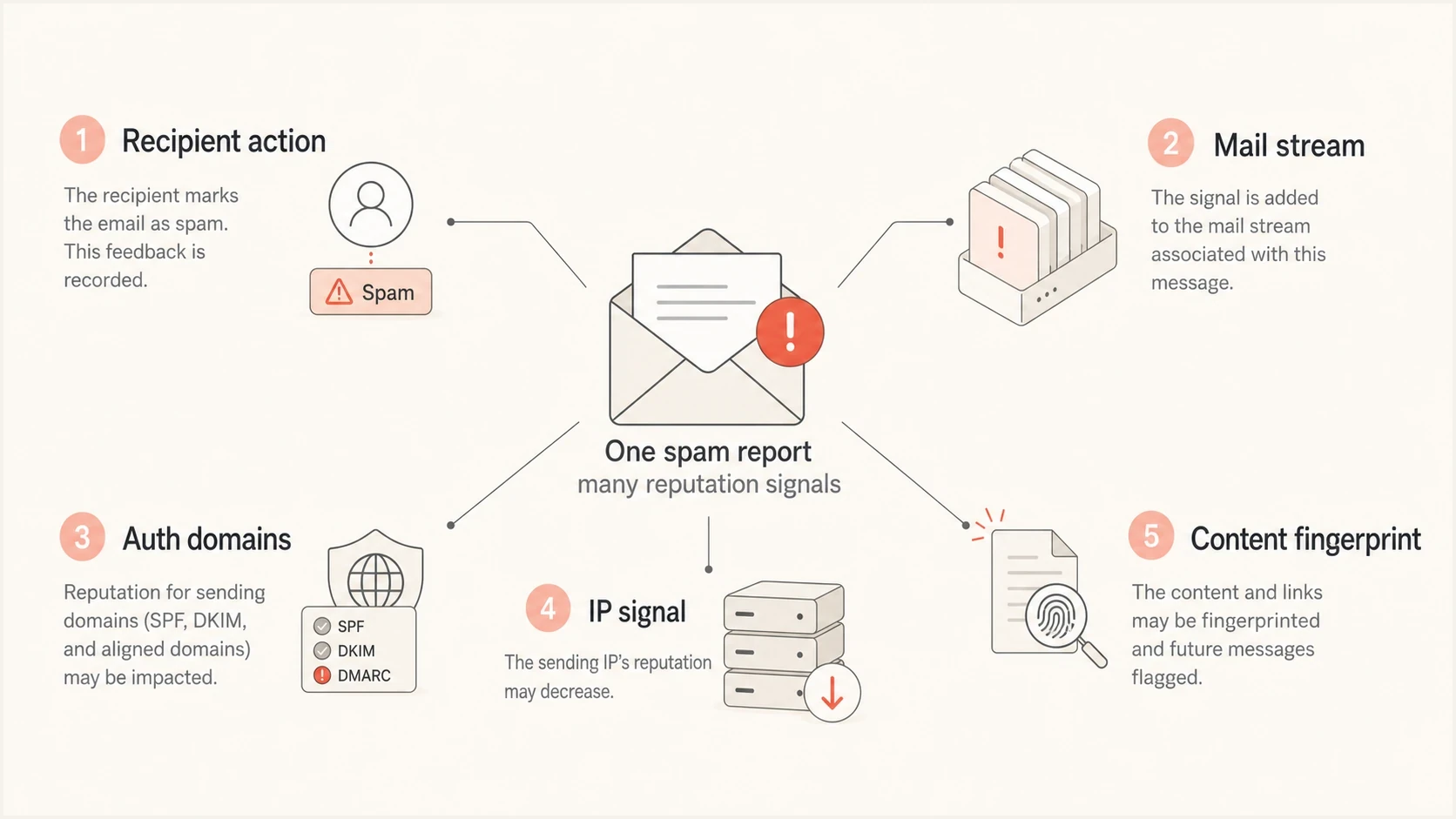
A spam report can affect the mail stream, domains, IP, and content fingerprint.
Friendly From, return path, DKIM, and what gets counted
The friendly From domain matters because recipients see it, mailbox providers evaluate it, and DMARC checks it against authenticated domains. The return-path domain matters because SPF authenticates it, bounce handling depends on it, and it can identify a sending system. The DKIM signing domain matters because it is a stable authenticated identity that can carry reputation.
Instead of asking which one field gets the blame, ask which identity the mailbox provider can trust enough to connect future mail to past recipient reactions. That can be the DKIM d= domain, the SPF-authenticated return-path domain, the visible From domain, the IP, or a blended internal stream identity.
|
|
|
|---|---|---|
Friendly From | Visible brand domain | Inbox trust drops |
Return path | SPF identity | Stream risk rises |
DKIM d= | Signed domain | Reputation degrades |
Sending IP | Traffic source | Throttling rises |
URLs | Content signal | Filtering spreads |
Common identities that can be associated with spam reports.
Gmail Postmaster Tools exposes different identity views by dashboard. Its Spam Rate dashboard covers DKIM-authenticated messages, while Domain Reputation reports the exact domain used for DKIM and SPF authentication. The Feedback Loop can group complaints by the From header domain or successful DKIM signing domains. These public views remain narrower than Gmail's full filtering model, which can also use IP history, URLs, content similarity, and recipient behavior.
Matched authentication exampledns
From: news@example.com
Return-Path: bounce@example.com
DKIM-Signature: d=example.com; s=mail;
SPF result: pass for bounce@example.com
DMARC result: pass because SPF or DKIM matches example.com
That matched setup gives mailbox providers a clearer identity to evaluate. It does not guarantee inboxing, but it reduces ambiguity. If complaints rise, the responsible stream is easier to diagnose because the visible domain, return path, and signing domain point back to the same organizational sender.
How spam reports turn into deliverability problems
One complaint rarely ruins a domain by itself. The problem is pattern and proportion. Mailbox providers compare complaints against delivered volume, user engagement, historical behavior, sending consistency, and the recipient population. A small list can show volatility because a handful of complaints can create a high percentage. A large sender can hide a low percentage while still causing meaningful recipient dissatisfaction.
Complaint rate risk bands
These conservative operating bands use Gmail's 0.10% recommendation and 0.30% upper boundary. They are not universal mailbox-provider rules.
Healthy
Under 0.05%
Low complaint pressure with steady engagement.
Watch
0.05% to below 0.10%
Review list source, cadence, and content fit.
High risk
0.10% to below 0.30%
Pause risky segments and fix acquisition issues.
Critical
0.30% or higher
Expect spam placement, throttling, or reputation loss.
Gmail tells senders to keep the spam rate reported in Postmaster Tools below 0.10% and avoid reaching 0.30% or higher. Gmail calculates that rate daily. Yahoo requires senders to remain below a 0.30% complaint rate and evaluates mail continuously. Treat 0.30% as a failure threshold, not an operating target, and do not rely on a weekly average that can hide a damaging daily spike. Complaint data can lag recipient behavior, so inbox placement can weaken before reporting catches up.
Low-risk interpretation
- Small spike: A one-day increase tied to a single campaign can recover if the next sends perform well.
- Known source: Complaints tied to one segment, partner, or form are easier to isolate.
- Strong engagement: Positive recipient actions can offset some risk when the audience expects the mail.
High-risk interpretation
- Repeated spikes: Recurring complaints train providers to distrust the stream.
- Mixed traffic: Cold, transactional, and marketing mail on one identity can spread damage.
- Content reuse: Bad URLs and templates can hurt fresh domains that reuse the same assets.
The order of symptoms is usually predictable: first the complaint metric moves, then inbox placement softens at the most sensitive mailbox providers, then open and click patterns deteriorate, then deferrals or spam-folder placement become more visible. If the same poor behavior continues, blocklist or blacklist risk can increase for IPs, domains, or URLs.
How complaint data reaches the sender
Mailbox providers can record every user spam report without exposing every report to the sender. The data you receive depends on the provider, traffic volume, authentication, privacy thresholds, and whether the message includes a campaign identifier.
- Aggregate spam rate: A postmaster dashboard can show a percentage without identifying the recipients who complained.
- Campaign feedback: Gmail's Feedback-ID header maps aggregate complaints to campaigns, customers, or mail types in its Feedback Loop dashboard.
- Individual feedback reports: Yahoo's DKIM-domain complaint feedback loop returns ARF reports that let an enrolled sender suppress the affected recipient.
- Direct complaints: Replies and messages to an abuse address need the same prompt suppression even when they never appear in a dashboard.
Gmail campaign feedback identifiertext
Feedback-ID: campaign:mailtype:customer:SenderId
The basic formula is complaints divided by the relevant delivered or inboxed messages, multiplied by 100. Check the denominator before comparing percentages across providers. Gmail's Spam Rate dashboard measures messages delivered to engaged recipients' inboxes and then marked as spam, using DKIM-authenticated mail. Yahoo also bases its reported spam rate on mail delivered to the inbox, so a sender's own calculation from complaint reports and total deliveries can differ. If a provider already sends much of a stream to spam, the displayed rate can fall because fewer messages reach an inbox where a user can report them. Low volume can also hide data behind privacy thresholds.
How to diagnose the real cause
The fastest way to diagnose complaint damage is to split the problem into four layers: identity, audience, content, and sending pattern. Identity tells you what mailbox providers can attach history to. Audience tells you who is objecting. Content shows what the recipient and filter are reacting to. Sending pattern exposes abrupt changes in volume or cadence.
- Check identity match: Confirm the From domain, DKIM domain, SPF return path, and DMARC result. Use a domain health check when you need a quick view of DMARC, SPF, and DKIM together.
- Map complaints to sends: Compare complaint spikes against campaigns, lists, segments, forms, imports, and automations.
- Compare sending patterns: Look for volume jumps, restarts after inactivity, cadence changes, or traffic moved to a new IP or domain.
- Separate traffic streams: Keep transactional, lifecycle, newsletter, and cold outreach mail on separate subdomains or sending identities.
- Review content assets: Look for repeated URLs, tracking domains, image hosts, subject patterns, and templates in complained-about mail.
- Inspect reputation signals: Check domain, IP, and blocklist or blacklist indicators before you assume the issue is only content.
Email tester
Send a real email to this address. Suped shows a results button when the test is ready.
?/43tests passed
A practical test email helps because it shows the actual headers and authentication result on a real message. Use the email tester before changing DNS or moving campaigns. The goal is to confirm what identity the message presents before you decide where the reputation damage is likely attached.
Suped's DMARC monitoring workflow is useful here because it joins authentication outcomes with source visibility. You can see which platforms are sending for your domain, whether they pass SPF and DKIM, and which streams need fixing before you move a domain toward stricter policy.
Suped DMARC dashboard showing email volume, authentication health, and source breakdown
When complaint problems coincide with unauthenticated traffic or domains that do not match, prioritize the authentication issue first. A poorly authenticated stream gives filters less reason to trust your mail, and it makes reputation analysis harder because the same visible brand can appear through several technical identities.
What to do when complaints rise
The correct response is not to hide the problem with a new domain. Start by reducing complaint pressure, then repair authentication and stream separation, then rebuild volume slowly. A domain switch without behavior change creates a short-lived reset and can pull the new domain into the same filtering pattern.
Stop the worst traffic first
Pause the list source, segment, automation, or campaign that caused the spike. Continuing to send while you investigate gives mailbox providers more negative evidence. Do not wait for a perfect root-cause report if complaints are already rising.
- Suppress risky recipients: Remove every identifiable complainer promptly, plus long-inactive contacts, bought lists, scraped contacts, and unclear consent sources.
- Tighten consent: Use confirmed opt-in for high-risk acquisition paths and make expectations clear at signup.
- Support one-click unsubscribe: For marketing and subscription mail, add List-Unsubscribe and List-Unsubscribe-Post, cover both headers with a valid DKIM signature, keep the body link visible, and honor requests within 48 hours.
- Reduce frequency: Lower cadence for low-engagement segments before complaints force mailbox providers to do it for you.
- Repair authentication: Use DMARC monitoring to find unauthorized or misconfigured sources.
- Watch listings: Use blocklist monitoring when complaint pressure is paired with IP or domain reputation concerns.
For recovery, use a controlled rebuild: send only to recent engaged recipients, keep volume stable, avoid sudden creative changes, and reintroduce lower-engagement segments only after complaint rates stay low. If you also need policy enforcement, Suped's Hosted DMARC can stage policy changes without turning every DNS edit into a manual project.
Illustrative complaint-rate decline
Example only. Actual rates and reputation recovery timing vary by provider and mail stream.
Complaint rate
How long reputation recovery takes
There is no fixed recovery clock after spam complaints. Mailbox providers recalculate reputation with their own data and time windows. Recovery depends on how high the complaint rate climbed, whether the problem recurred, the stream's prior history, the amount of new wanted mail, and whether the original audience or consent problem was removed.
Judge recovery across consecutive sends and provider-specific data instead of waiting a set number of days. Gmail notes that improved spam rates can take time to affect spam classification. Its Postmaster Tools data usually updates within 24 hours but can take longer, so a fresh dashboard is not proof that reputation has fully recovered.
Signs the stream is recovering
- User-reported spam stays below 0.10% across daily Gmail data and remains stable after each campaign.
- Domain and IP reputation stop declining while deferrals and spam-folder placement ease.
- Recent engaged recipients keep responding well as volume increases in controlled steps.
- New complaint spikes do not return when another segment, automation, or mail type is reintroduced.
Why content reputation follows you
Mailbox providers do not rely only on addresses and domains. They can fingerprint message bodies, URLs, images, layout, tracking patterns, and calls to action. This matters when a sender tries to move the same complained-about campaign to a different domain or sending platform. The content can still look familiar to the filter.
A common mistake is to assume that a new subdomain gives a clean slate. It can help separate reputation when used responsibly, especially for genuinely different mail types. It does not erase poor consent, irrelevant content, or bad list acquisition. For deeper detail on domain separation, see how subdomain complaints can affect the root domain in reporting and filtering decisions.
What a new domain can fix
- Separation: Different mail types can build separate histories.
- Clarity: Authentication and reporting become easier to read.
- Containment: A risky program can stop harming a stronger stream.
What it cannot fix
- Bad consent: People still complain when they did not expect the message.
- Bad content: URLs, images, and wording can still match a risky pattern.
- Bad cadence: Frequency problems follow the program, not only the domain.
This is also why sending to old or low-quality data creates more damage than many teams expect. The recipient list controls the complaint rate. A healthy domain can still lose placement when a sender starts mailing people who do not remember opting in or never opted in at all. That pattern is covered in more depth on bounce-domain reputation, because poor data quality often appears beside abuse and authentication problems.
How Suped fits the workflow
Suped does not make complaint data complete, because mailbox providers do not expose every internal reputation score. The useful workflow is to combine the signals you can see: DMARC results, source identity, SPF and DKIM domain matches, policy state, blocklist or blacklist status, sending changes, and complaint trends from postmaster tools.
Suped's product brings DMARC monitoring, hosted policy management, SPF controls, alerts, issue detection, and blocklist or blacklist monitoring into one operational workflow. During complaint recovery, that workflow helps teams identify sending sources, repair authentication, stage policy changes, and watch reputation signals while the audience and content problems are corrected.

Issue steps to fix dialog showing the issue overview, tailored fix steps, and verification action
For agencies and MSPs, the multi-tenant dashboard is useful because one bad client stream should not become a hidden problem across a portfolio. You can track domains separately, standardize authentication fixes, and keep client reporting focused on concrete causes instead of vague reputation language.
Best practical operating model
Keep each major mail stream on a clear authenticated identity, monitor it continuously, and respond to complaint spikes by fixing the audience and source first. DNS consistency and policy enforcement make the stream measurable. Good consent keeps it trusted.
Views from the trenches
Best practices
Treat complaints as stream-level damage, then isolate the audience and content source.
Keep From, DKIM, SPF, and DMARC domains consistent so signals remain easier to read.
Separate risky programs by subdomain and fix consent before rebuilding volume again.
Track URLs and image hosts because content fingerprints can follow domain changes.
Common pitfalls
Assuming Gmail Postmaster Tools exposes every reputation input used for filtering.
Blaming only the return path while ignoring visible brand and DKIM signing domains.
Moving complained-about content to a new domain without changing audience quality.
Waiting for blocklist or blacklist evidence before acting on rising complaint data.
Expert tips
Use complaint spikes as a trigger to pause weak segments before reputation drops further.
Compare each spike against campaign, form, partner, and automation changes that week.
Review content reuse across streams when unrelated domains show similar placement issues.
Use DMARC source data to find hidden senders that make reputation analysis confusing.
Expert view
Expert from Email Geeks says spam reports should be assumed to affect every meaningful identity in the message, including domains, IPs, and content signals.
2021-11-01 - Email Geeks
Marketer view
Marketer from Email Geeks says reputation damage is better understood at the mail-stream and content level than as a simple friendly From versus return-path question.
2021-11-01 - Email Geeks




