How do subdomain spam complaints affect root domain reputation in Google Postmaster Tools?

Updated on 6 Oct 2026: We clarified how subdomain complaints affect root-domain reporting, bulk-sender status, and Gmail recovery checks.
Subdomain spam complaints can affect the primary domain view in Google Postmaster Tools, but the exact behavior depends on the dashboard. The current Compliance status dashboard explicitly uses data from the primary domain and its subdomains to assess the primary domain. Other dashboards can show an authentication subdomain separately when it has been added to Postmaster Tools.
A legacy Domain Reputation move from High to Low to High does not prove that one subdomain complaint rate caused the change. Check the DKIM signing domain, SPF Return-Path domain, Gmail volume, campaign timing, sending IP pool, and links before assigning the cause. Google does not publish a formula that maps one subdomain's complaints to a legacy root-domain reputation bucket.
- Treat a subdomain as a separate reporting identity only after its DKIM or SPF authentication domain has been added to Postmaster Tools.
- Expect primary-domain Compliance status to include traffic sent by subdomains under that primary domain.
- Compare complaint timing with authentication domains, Gmail volume, Feedback-ID values, infrastructure, and campaign logs.
- Use a one-day reputation bucket change as an investigation trigger, not a diagnosis.
The short answer
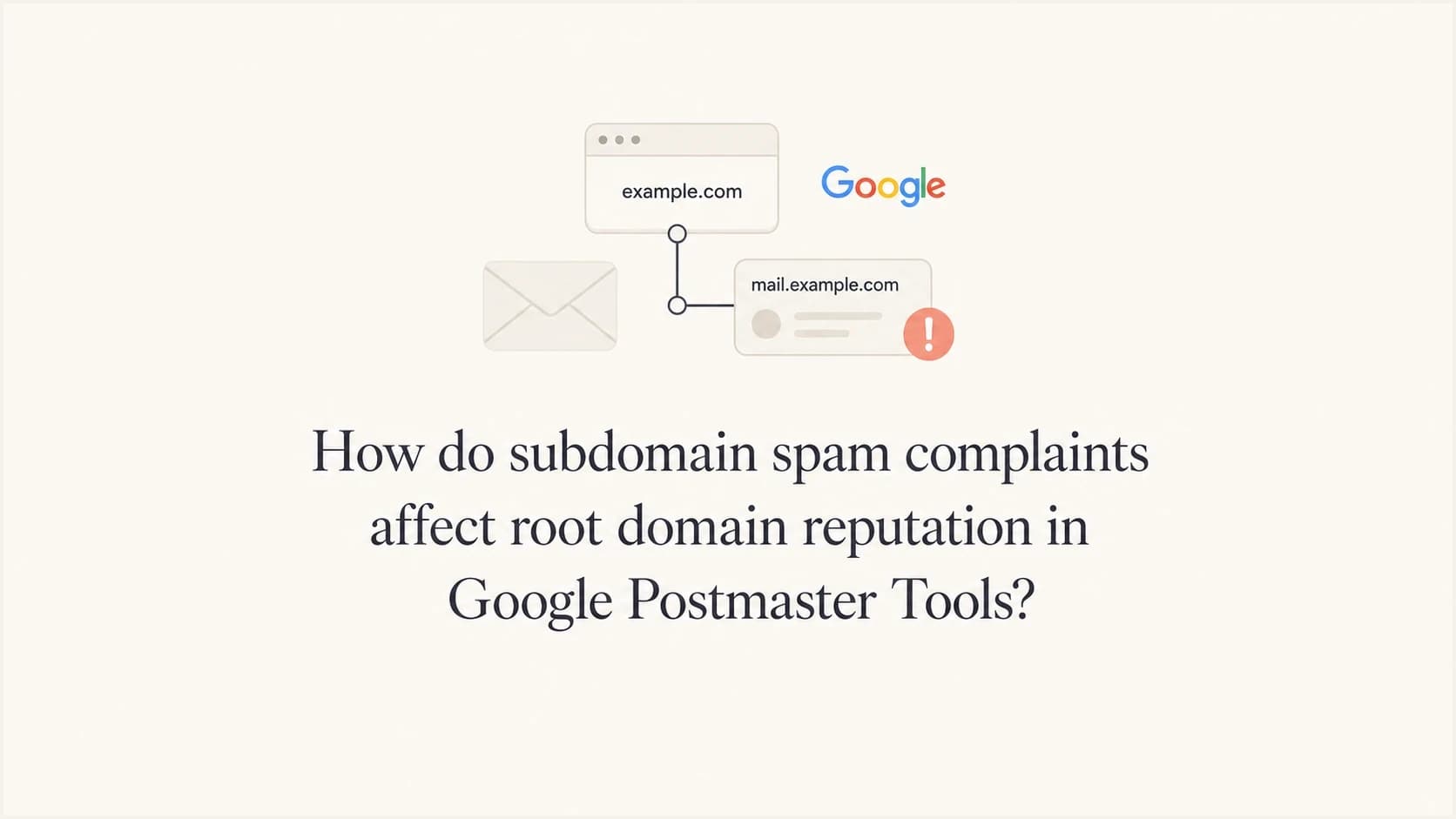
In this context, "root domain" usually means the primary or organizational domain, such as example.com. A sending domain such as news.example.com is a subdomain, while legacy reputation reporting follows an authentication domain taken from DKIM d= or the SPF Return-Path when DKIM is not used. Other dashboards have their own grouping rules. The question of whether domain reputation includes subdomains therefore starts with the dashboard and authentication identity involved.
Google does not publish the formula behind the legacy Domain Reputation buckets. A High, Medium, Low, or Bad label is not a raw complaint rate. It is a model output, and Google warns that reputation is only one of many factors affecting delivery. The v2 Compliance status view is clearer about scope because it reports primary-domain status using data from the primary domain and its subdomains.
|
|
|
|---|---|---|
Compliance status | Primary domain plus subdomains | Primary-domain status |
Subdomain dashboards | Dashboard-specific grouping | Selected domain and view |
Spam rate | Inbox complaints on DKIM-authenticated mail | Eligible Gmail inbox traffic |
Legacy reputation | Exact authentication domain; unpublished score | Correlated send changes |
Feedback Loop | Flagged Feedback-ID values | Campaign identifiers |
How current Postmaster Tools views root and subdomain data.
Do not overread a one-day bucket change
A one-day High to Low to High move can be real, but the legacy chart exposes a category rather than Google's underlying score. Low-volume days can also lack enough data for reliable comparison.
- A category boundary can make a small underlying change appear large.
- A smaller Gmail sample can produce missing or uneven daily reporting.
- Campaign sends and daily Postmaster Tools updates do not provide message-level causation.
- Compliance status uses a multi-day rolling average and can take up to seven days to reflect a fix.
How authentication connects subdomains to root-domain reporting
Postmaster Tools uses authenticated sending identities. Google tells senders to add either the DKIM signing domain or the SPF Return-Path domain, and it uses messages authenticated by those domains for dashboard data. Google documents legacy Domain Reputation for the exact DKIM authentication domain, using SPF when DKIM is not used. A visible From subdomain can therefore appear under a root authentication domain without a reputation rollup across all subdomains.
DMARC can pass under relaxed alignment when the visible From domain and an authenticated domain share the same organizational domain. For example, mail from offers.example.com can pass DMARC with a DKIM signature under example.com. That is valid authentication, and the root DKIM domain is the identity used for legacy reputation reporting in this example.
Cleaner reporting separation
- Sign each major mail stream with a stable subdomain-specific DKIM domain where the sending platform allows it.
- Use a stream-specific SPF Return-Path when bounce handling and the sending platform support it.
- Add each authentication subdomain to Postmaster Tools so its eligible dashboard data can be viewed separately.
- Keep campaign identifiers, IP pools, and link domains mapped to known owners for diagnosis.
Shared attribution and risk
- Root-domain DKIM signing can place subdomain mail in data associated with the root authentication domain.
- A root-domain SPF Return-Path is the fallback reputation identity when DKIM is not used.
- Compliance status combines data from the primary domain and its subdomains by design.
- Shared URLs and IP pools can affect delivery, but Google does not document them as Postmaster dashboard grouping rules.
Illustrative headers for shared root-domain DKIM signingtext
From: Newsletter <news@news.example.com>
Return-Path: <bounce@news.example.com>
Authentication-Results: mx.google.com;
    dkim=pass header.d=example.com header.s=m1;
    spf=pass smtp.mailfrom=news.example.com;
    dmarc=pass header.from=news.example.com
These illustrative headers show a From domain and Return-Path under news.example.com, but successful DKIM authentication under example.com. The root DKIM domain is the relevant legacy reputation identity here. Publishing a subdomain DMARC record or an sp policy changes DMARC handling. It does not, by itself, create separate Postmaster Tools reputation.
What Postmaster Tools v2 changes
The legacy Postmaster Tools interface has not disappeared on Google's original schedule. Google postponed its retirement and has not published a replacement date, but still plans to replace it with v2. The legacy Domain and IP Reputation dashboards are marked for retirement, and the available v2 API does not include those reputation metrics.
The practical replacement is not another High, Medium, Low, or Bad score. V2 centers daily Spam Rate data and Compliance status. Check Deliverability analysis within Compliance status for diagnostic recommendations. Compliance status applies to the primary domain, uses subdomain data in that assessment, and covers authentication, DNS, message formatting, encryption, user-reported spam, DMARC, and unsubscribe requirements where applicable.
|
|
|
|---|---|---|
Did complaints rise? | Spam Rate | Daily user-reported rate |
Which campaign is noisy? | Feedback Loop | Unusual Feedback-ID values |
Does the primary domain comply? | Compliance status | Includes subdomain data |
Did legacy reputation move? | Legacy dashboard | Investigate, do not infer cause |
What to use while Google transitions Postmaster Tools.
Primary-domain compliance is an explicit rollup
Adding email.example.com does not produce a separate Compliance status for that subdomain. Google shows status for example.com and uses traffic from both the primary domain and subdomains. Use the other dashboards for subdomain-level data.
How Gmail counts bulk sending across subdomains
Gmail counts messages across the primary domain and its subdomains toward its bulk-sender threshold of about 5,000 messages to personal Gmail accounts in 24 hours. Separate subdomain dashboards do not create separate volume limits.
For example, 2,000 messages from example.com plus 3,000 from news.example.com reach that threshold. Once Google classifies a sender as a bulk sender, the classification is permanent, even if later daily volume falls.
Bulk senders must use both SPF and DKIM and publish a DMARC policy, with p=none accepted. Marketing and subscribed messages require one-click unsubscribe and a visible unsubscribe link. Splitting campaigns across subdomains does not avoid these requirements.
How to investigate a root-domain reputation change
Start with the message and sending records. Send a fresh message through the same stream and inspect it with Suped's email tester. Then use the domain health checker to review DMARC, SPF, and DKIM, and compare the result with DMARC monitoring and campaign logs for the same dates.
- Record the visible From domain, DKIM d= value, Return-Path domain, SPF result, and DMARC result from the affected stream.
- Confirm that the primary domain and each authentication subdomain have been added to Postmaster Tools.
- Compare personal Gmail volume for the primary domain and subdomain using UTC dates, which Postmaster Tools uses.
- Map each Spam Rate jump to campaign logs, audience segments, consent sources, and send windows. Do not average root and subdomain percentages without their eligible inbox volumes.
- Add stable campaign-level Feedback-ID values before DKIM signing. Verify the signing domain in Postmaster Tools and avoid identifiers unique to each recipient or message.
- Check whether the primary domain and subdomain share IP pools, bounce domains, or sending accounts.
- Review tracking domains, redirect chains, image hosts, unsubscribe links, and landing pages as delivery factors.
- Verify one-click unsubscribe headers for marketing mail and confirm that requests are honored within 48 hours.
- Allow for reporting delays, low-volume omissions, and the Compliance status rolling window before changing DNS. Data usually updates within 24 hours, but can take longer.
Email tester
Send a real email to this address. Suped shows a results button when the test is ready.
?/43tests passed
DNS records show what should happen. A delivered message shows what did happen. Full headers from the stream active before the reputation or compliance change reveal which authentication domain Google could use for Postmaster Tools attribution.
When the primary domain appears complaint-free, look for mail that used it in an authentication role. A transactional notification can use the primary domain as its DKIM domain, while a marketing stream can use it in the Return-Path. Legacy automations often retain those settings after the visible From plan changes.
How Google Postmaster Tools groups signals
Postmaster Tools is an aggregate reporting system, not a forensic log. Its data applies to messages sent to personal Gmail accounts ending in @gmail.com or @googlemail.com. Privacy thresholds can leave low-volume dates empty, and the dashboards do not reveal each recipient's action.
Spam Rate measures recipient complaints on DKIM-authenticated mail delivered to engaged Gmail inboxes, not all attempted sends. A low or zero rate can accompany poor inbox placement when Gmail already routes mail to spam. Compare it with Delivery Errors and campaign delivery logs before concluding that the stream has recovered.
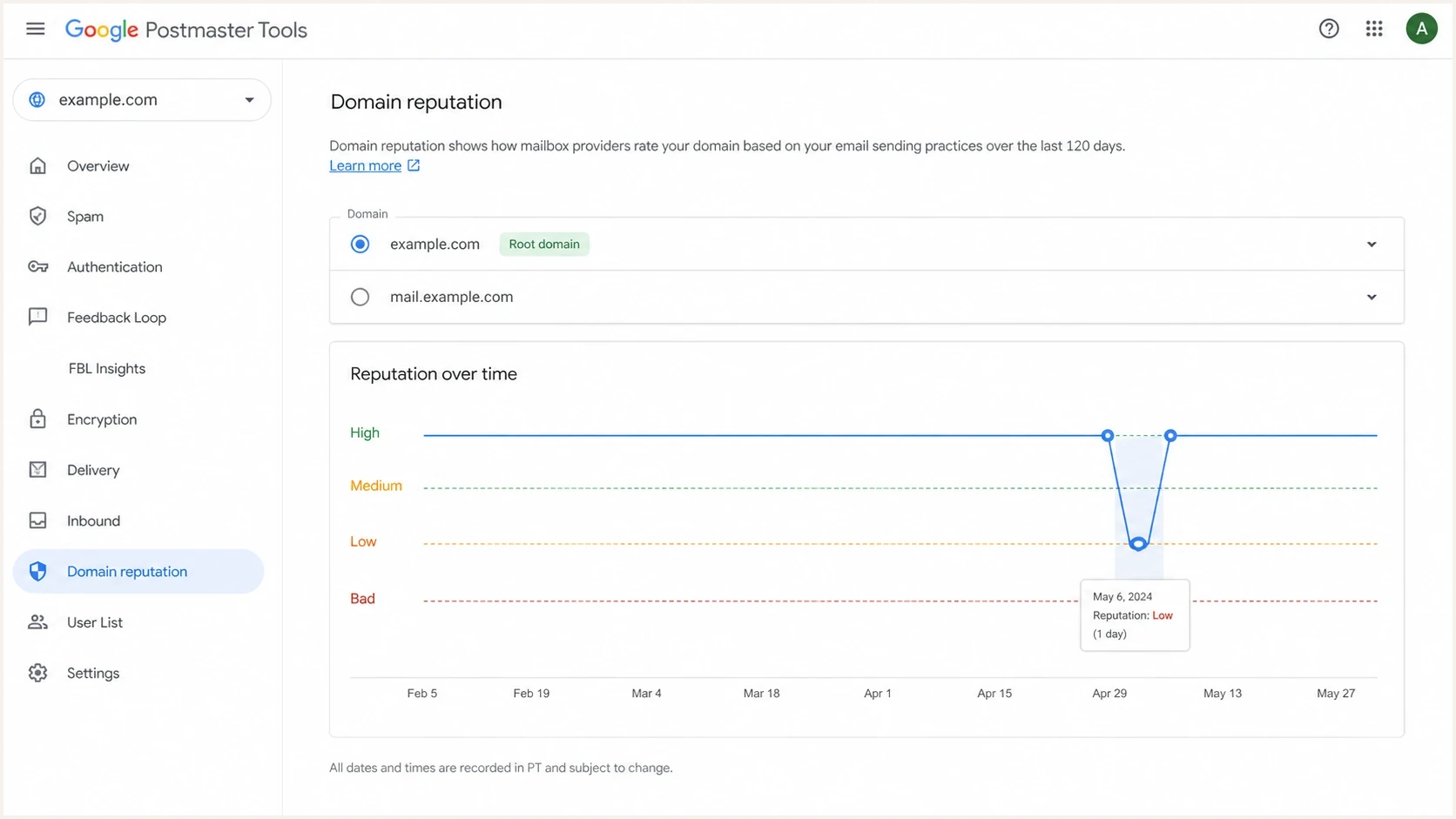
Legacy Google Postmaster Tools Domain Reputation chart showing a one-day root-domain dip.
A related Google support thread shows why the parent and subdomain boundary causes confusion. Use the chart as a starting point, then validate authentication domains and the mail streams behind the dates.
|
|
|
|---|---|---|
Primary Low, sub High | Different attributed traffic | Check DKIM and SPF |
Primary High, sub Low | Subdomain issue visible | Fix that stream |
Both Low | Shared or concurrent issue | Compare campaigns |
Daily jumps | Insufficient proof | Check volume and timing |
Compliance needs work | Primary-domain rollup | Audit every subdomain |
How to read common primary-domain and subdomain patterns.
To identify spam complaints, add a stable Feedback-ID header before the next send and use the Feedback Loop dashboard. It reports unusual complaint levels for eligible identifiers, not individual recipients, and its data covers @gmail.com recipients only.
In Feedback Loop, compare "From header domain" with "All signed domains" to distinguish visible From traffic from traffic signed by the selected DKIM domain. In Authentication, choose the From-header or DKIM/SPF view; the DKIM/SPF view does not show DMARC success rates.
What to fix first
Fix the complaint source first. If a complaint-heavy subdomain signs with the primary-domain DKIM identity or uses its SPF Return-Path, review authentication separation where operationally safe. Moving unchanged mail to another subdomain does not repair recipient expectations.

Issue steps to fix dialog showing the issue overview, tailored fix steps, and verification action
Suped's product supports this workflow by grouping DMARC aggregate data by sending source and authentication result, flagging failures, and surfacing unverified sources. DMARC reports do not identify Gmail spam complaints, so compare Suped's source and volume data with Postmaster Tools, Feedback-ID results, and campaign logs.
Practical cleanup order
- Pause the campaign or audience segment tied to the complaint spike.
- Suppress unsubscribed contacts and recipients with known complaints, and remove contacts without clear, current consent. Gmail Feedback Loop does not identify individual complainers.
- For bulk-sender marketing and subscribed mail, implement RFC 8058 one-click unsubscribe and a visible body link; honor requests within 48 hours. Transactional mail is exempt from the one-click requirement.
- Give major streams stable DKIM signing domains and SPF Return-Path domains where supported.
- Separate tracking domains when risky acquisition mail shares links with core customer mail.
- Add stable Feedback-ID values and monitor source, volume, and authentication changes.
Check blocklist monitoring for domain and IP listings, while keeping blocklist or blacklist results separate from Google Postmaster Tools data. A URI blacklist can affect mail using a parent or subdomain, but it is not the same measurement as Gmail's internal reputation or compliance status.
How to assess subdomain complaints and recovery
Repeated movement across the primary domain and a subdomain on the same dates is a correlation worth testing, especially after the same campaign family sends. It is not proof of Google's internal reputation mapping. Confidence increases when message headers show root-domain authentication and the campaign timing repeats.
Gmail spam-rate guardrails
Google's operating targets for user-reported spam on mail to personal Gmail accounts.
Target
Below 0.1%
Keep the daily rate below this level.
Above target
0.1% to below 0.3%
Review campaigns, audiences, consent sources, and unsubscribe handling.
Avoid
0.3% or higher
Rates at this level have a greater negative delivery impact. Google states that rates above 0.3% make bulk senders ineligible for mitigation.
Complaint rate is one part of the diagnosis. The broader mechanics of how spam reports affect reputation matter because complaints show that recipients rejected the mail, while the root-domain impact depends on the dashboard scope and the authenticated identity Google observed.
- Higher confidence exists when primary and subdomain changes repeat after the same campaign and headers show primary-domain authentication.
- Moderate confidence exists when only the primary domain moves but the subdomain signs with the primary DKIM domain.
- Low confidence exists when the primary domain dips once, authentication is separate, and Gmail volume is thin.
- Check concurrent authentication failures, URL or IP issues, new sources, and sending-volume changes before concluding that complaints caused the dip.
Recovery needs sustained data
Google calculates Spam Rate daily. Bulk senders become eligible for mitigation again after the rate remains below 0.3% for seven consecutive days. Compliance status can also take up to seven days to reflect corrective work. These are reporting and mitigation windows, not a guaranteed inbox-placement recovery time.
Views from the trenches
Best practices
Map each stream to its From domain, DKIM domain, SPF Return-Path, IP pool, and links.
Add stable authentication subdomains to Postmaster Tools for separate dashboard data.
Review primary-domain Compliance status after each large Gmail-facing campaign send.
Common pitfalls
Rotating random subdomains hides complaint sources without fixing recipient consent.
Sharing one root DKIM identity makes Postmaster attribution much harder to separate.
Treating one legacy reputation dip as proof often leads to unnecessary DNS changes.
Expert tips
Check the DKIM d= value first because it identifies a key Postmaster data domain.
Compare Feedback-ID results with send logs before changing authentication or hosts.
Keep blocklist and blacklist findings separate from Google's internal dashboards.
Marketer view
Marketer from Email Geeks says Postmaster Tools usually treats parent domains and subdomains separately, but shared authentication can still create parent-domain attribution.
2024-04-10 - Email Geeks
Marketer view
Marketer from Email Geeks says URI blocklists and blacklists can affect parent and subdomains together, but that is not the same as Gmail domain reputation.
2024-04-10 - Email Geeks
The practical takeaway
Subdomain complaints explicitly feed the primary-domain Compliance status in Postmaster Tools v2. For the legacy Domain Reputation dashboard, Google does not publish a complaint rollup formula, so a matching root-domain dip is evidence to investigate rather than proof of causation.
Isolate the noisy stream, identify the DKIM or SPF domain Postmaster Tools observed, use Feedback-ID to narrow campaign complaints, and repair consent or unsubscribe problems. Separate authentication only when it supports clear ownership and stable operations.
Frequently asked questions
One bad subdomain can hurt primary-domain Compliance status because Google includes subdomain data in that view. Actual Gmail delivery can also suffer when mail shares authentication or infrastructure. Google does not publish a rule saying one isolated complaint spike automatically ruins the root domain's legacy reputation.
Subdomain mail signed with the primary domain can appear under the primary DKIM identity in legacy reputation reporting. Google uses SPF for reputation when DKIM is not used. Separately, v2 Compliance status combines primary-domain and subdomain traffic.
Add the subdomain used for DKIM signing or the SPF Return-Path to Postmaster Tools. Google recommends adding the primary domain first. Once the primary domain is verified, its subdomains do not require separate ownership verification. Compliance status still reports at the primary-domain level. For Spam Rate and Feedback Loop, configure DKIM on the subdomain; a subdomain SPF Return-Path alone does not provide those DKIM-based metrics.
Not always. A primary-domain DMARC record can set policy for subdomains, including through the sp tag. Publish a separate subdomain record when that stream needs a different policy. A separate DMARC record does not automatically create separate Postmaster Tools attribution.
Fix consent, frequency, targeting, and unsubscribe handling first. Moving unchanged mail does not remove the cause of complaints. Use a stable subdomain when it creates clear ownership and authentication separation for a legitimate stream.
No. A blocklist or blacklist listing is an external signal. Google Postmaster Tools reports Gmail-facing data such as Spam Rate, Compliance status, authentication, and delivery errors. Investigate both, but do not treat them as the same measurement.