What is a bounce domain and how does its reputation impact email deliverability?

Updated on 20 Aug 2026: We clarified how bounce-domain identity, SPF alignment, list quality, and current DMARC standards affect deliverability.
A bounce domain is the domain used in the envelope sender, also called the MAIL FROM, Return-Path, 5321.From, or envelope-from domain. It is the address path that receives non-delivery reports and other delivery status notices when a message bounces. Email platforms often call the same setup a custom Return-Path or custom MAIL FROM domain. A common setup looks like bounces@bounce.example.com while the visible From address uses news@example.com.
Mailbox providers can use the bounce domain as one sender identity signal, but they do not publish a universal, separate reputation score for it. A new bounce domain has no established history, while invalid DNS or failed SPF can weaken authentication. Placement still depends on the visible From domain, DKIM signing domain, sending IP, complaints, engagement, and sending patterns.
The practical answer is simple: use a custom bounce domain under a domain you control, authenticate it with SPF, keep it under the same organizational domain as the visible From address when SPF needs to satisfy DMARC, and monitor hard bounces, soft bounces, complaints, spam-trap risk, deferrals, receiver bounces, and provider suppression events separately. Provider-specific inactivity signals follow the same rule: a Yahoo or AOL 5xx user unknown, mailbox disabled, mailbox not found, or no such user reply is a hard bounce, while a 4xx deferral stays on the retry and monitoring path. A custom path improves control and can provide SPF alignment, but it does not guarantee inbox placement.
What a bounce domain is
When an email moves between mail servers, the SMTP conversation has an envelope sender. That value is separate from the human-visible From header. If the message fails after acceptance or during delivery, the receiving system sends the non-delivery report back to the envelope sender. After delivery, many mailbox providers expose that same path in the Return-Path header.
Many senders use variable envelope return paths, or VERP, where the local part changes per recipient or campaign so bounce processing can identify the exact message that failed. VERP changes the tracking part of the address, but the domain part still carries authentication and identity signals.
Proper DSN and bounce notices use an empty envelope sender, shown as MAIL FROM:<>. That null sender prevents bounce loops. It does not replace the original message's bounce domain; it is the return path used by the bounce notice itself.
Header fields to comparetext
Return-Path: <bounces@bounce.example.com>
From: Example Brand <news@example.com>
DKIM-Signature: d=example.com; s=s1; ...
In this example, bounce.example.com is the bounce domain. The visible sender is example.com. The DKIM signing domain is also example.com. Depending on the sender setup, those values can match, share the same parent domain, or sit on completely separate domains.
|
|
|
|---|---|---|
Bounce domain | Operations | Domain that receives bounces |
Return-Path | Headers | Recorded envelope sender |
MAIL FROM | SMTP | Envelope sender command |
Envelope-from | SMTP logs | Envelope sender domain |
5321.From | Standards | Protocol-level sender |
Null MAIL FROM | DSN traffic | Empty return path for bounce notices |
Common names for the same email identity path.
Visible From domain
- Audience: This is what recipients see in the inbox and message header.
- DMARC: DMARC policy is published at this domain or its organizational parent.
- Brand: It is the main identity users associate with the message.
Bounce domain
- Transport: This is the SMTP return path used for delivery status notices.
- SPF: SPF checks the envelope sender domain, not the visible From domain.
- Reputation: Receivers can use it with other domain and IP signals.
How bounce domain reputation affects inbox placement
Receivers can use the bounce domain to connect SPF authentication, bounce handling, and sender history with a mail stream. If the domain has invalid DNS, fails SPF, appears on a blocklist (blacklist), or is associated with mail that repeatedly targets invalid recipients, spam traps, or complainants, it adds negative evidence. Receivers combine that evidence with the From domain, DKIM domain, sending IP, message content, and recipient behavior.
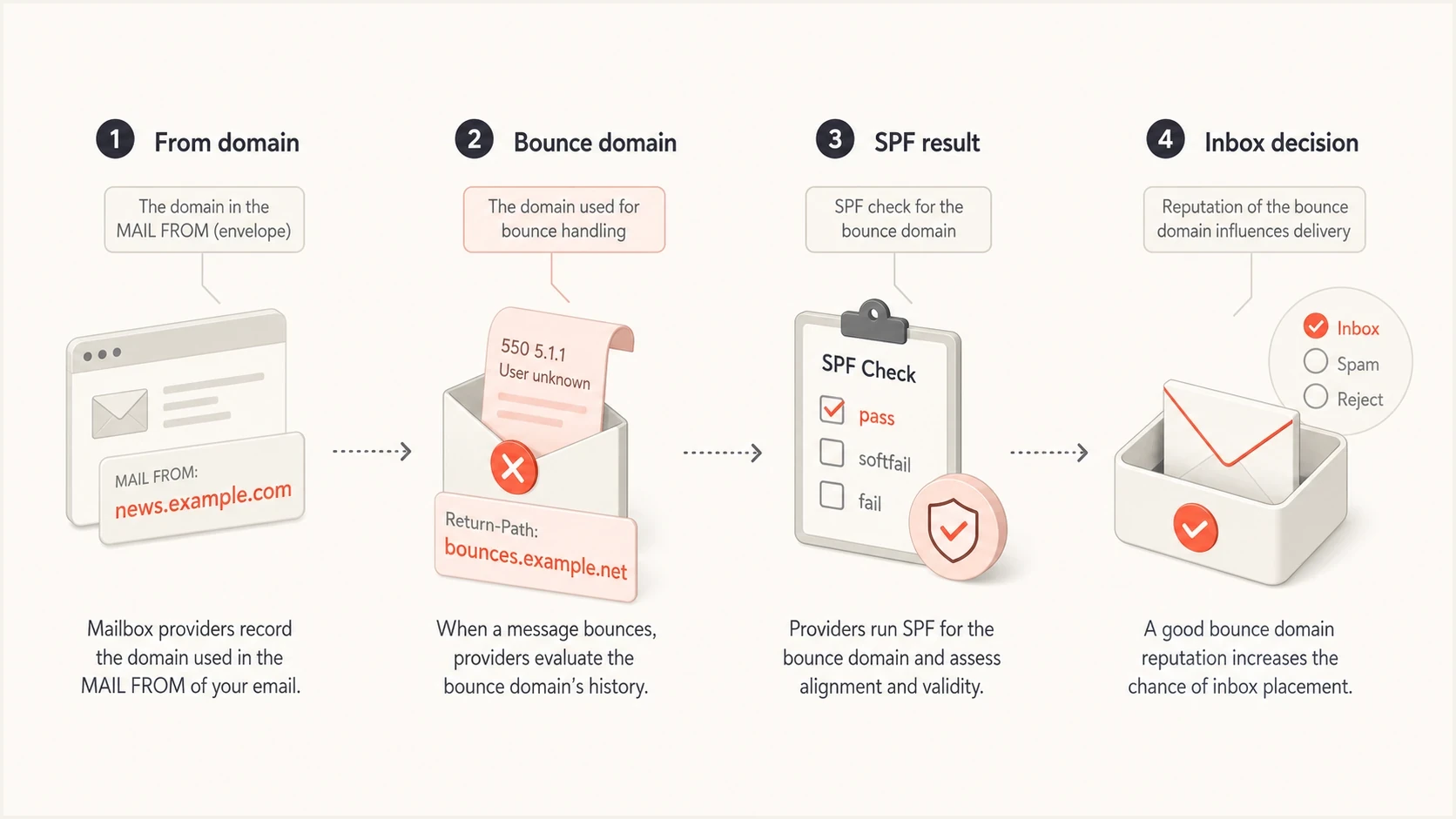
Bounce domain reputation infographic connecting the From domain, SPF, and inbox placement.
A new bounce domain has no established history
No history is not the same as bad history. When moving bulk mail to a new bounce subdomain, start with an engaged segment, keep volume changes controlled, and watch authentication, bounces, complaints, and placement while receivers connect the new identity to the mail stream.
Gmail and Yahoo's February 2024 sender requirements remain active: authentication, valid forward and reverse DNS, TLS, low spam rates, and easy unsubscribe are baseline checks for high-volume mail. For Gmail, keep reported spam rates below 0.10% where measurable and avoid 0.30% or higher. Yahoo also expects spam complaint rates below 0.3% and unsubscribe requests to be honored within 2 days. Marketing or subscribed bulk mail must support one-click unsubscribe with a visible unsubscribe link. A bounce domain that passes SPF helps, but it does not compensate for weak DKIM, missing DMARC, misleading headers, low engagement, or a high complaint rate.
DMARC is now defined by RFC 9989, which obsoletes RFC 7489 and RFC 9091. Aggregate reporting is defined in RFC 9990, and failure reporting is defined in RFC 9991. RFC 9989 removes the old pct tag and introduces the t testing tag, so do not build a new rollout plan around percentage-based DMARC policy staging. It also uses DNS Tree Walk for Organizational Domain discovery, which makes explicit DMARC records for important author domains and subdomains more predictable during migrations. For bounce domains, the practical point is unchanged: SPF only helps DMARC when the SPF domain passes domain matching with the visible From domain, while DKIM can satisfy DMARC through the signing domain.
A provider's default return path can authenticate and deliver successfully. The operational problem appears when it prevents SPF alignment you intended to use for DMARC, gives you no control over the domain, or changes without being noticed. A custom return path creates a clearer identity under your DNS, but it must be verified before traffic moves to it. A broken custom path is worse than a working provider default.
Shared infrastructure adds another layer. A poor shared IP pool can drag placement even when the bounce domain is clean, while the bounce domain still carries an identity signal. Compare the return path, DKIM domain, visible From domain, sending IP, and suppression history before deciding which reputation problem you are fixing.
- SPF: SPF validates the bounce domain path. A broken SPF record removes that authentication signal, although aligned DKIM can still make DMARC pass.
- DMARC: Under relaxed SPF alignment, the bounce domain and visible From domain need the same organizational domain. Under strict alignment, they must match exactly.
- Hard bounces: Repeated final 5xx failures tell receivers the list has stale, invalid, or unverified recipients.
- Soft bounces: Repeated temporary 4xx failures and deferrals point to throttling, mailbox-full patterns, or volume pressure.
- Suppression events: A platform-level or global suppression-list event can protect reputation, but it should be separated from receiver-originated hard bounces.
- Complaints: Spam complaints and trap hits often point to weak acquisition, stale consent, or poor segmentation.
- Engagement: Low engagement, misleading content, and poor audience fit can cause filtering even when the bounce domain passes SPF.
- DNS: Publish the SPF, MX, CNAME, or delegation records required by the sending setup and remove stale records after migrations.
Calculate bounce rate as bounced messages divided by sent messages that reached a final delivery state, not retry attempts. Use total bounces below 2% as an investigation ceiling, keep hard bounces below 1%, and review soft bounces separately because one domain's 4xx deferrals can hide behind an acceptable total. Keep platform and global suppression-list bounces separate from receiver rejections, because a suppressed address can inflate bounce metrics even when no mailbox provider evaluated the new message.
This is why bounce domain reputation and hard bounces belong in the same operational review. They are not identical problems, but they reinforce each other when list quality drops.
These percentages are operating thresholds for investigation, not universal mailbox-provider limits. Review trends by receiver and mail stream because providers apply their own rules and temporary deferrals can change the total.
Bounce rate risk bands
Operational thresholds for reviewing bounce domain health. Use under 2% as the total-bounce investigation ceiling and under 1% as the hard-bounce target.
Healthy
Under 2%
Needs review
2-5%
High risk
Over 5%
How to inspect the bounce domain
The fastest way to find the bounce domain is to send a real message and inspect the message source. Look for Return-Path. If you control the SMTP logs, also check the MAIL FROM value used during the SMTP transaction. Then compare it with the From domain and DKIM signing domain.
Email tester
Send a real email to this address. Suped shows a results button when the test is ready.
?/43tests passed
A practical check is to send one production-like message through the email tester and review the headers, SPF result, DKIM result, DMARC result, and placement clues together. Testing a plain internal email does not prove the same thing as testing a real campaign or automated message because different streams use different return paths.
Header checks for every review
- Return path: Confirm the domain is one you control or intentionally delegated.
- SPF result: Confirm the sending IP is authorized by the bounce domain SPF record.
- DMARC result: Confirm SPF or DKIM passes in a way DMARC accepts for the visible From domain.
- DSN sender: Confirm bounce notices use MAIL FROM:<> and do not create bounce loops.
- HELO/EHLO: Check the SMTP identity when errors mention host identity or reverse DNS.
- Suppression source: Separate real receiver replies from ESP suppression-list events.
- History: Compare recent volume, hard bounces, soft bounces, spam complaints, and blocklist (blacklist) listings.
Also check whether the bounce domain is present in DMARC aggregate data. In DMARC monitoring, the bounce domain often shows up as the SPF domain for a source. That makes it easier to spot a sender that quietly changed return paths after a vendor migration or DNS update.
Suped DMARC dashboard showing email volume, authentication health, and source breakdown
Suped's product is useful here because the DMARC dashboard ties sending sources, authentication results, and domain health into one review. It turns aggregate report data into issues, alerts, and fix steps, so a return-path change is easier to trace without reading XML files.
Test bounce handling without harming reputation
Testing the bounce path is valid when it proves one workflow, not when it manufactures reputation noise. Use a production-like message whose envelope sender uses the bounce domain, then send it to a nonexistent recipient on a domain you own, or to a controlled test MX that rejects the recipient during the SMTP RCPT TO stage with a permanent 550 5.1.1 response.
When you inspect the resulting platform event or DSN, check for the original bounce-domain sender and a stable reference to the original message, such as the original recipient, message ID, or provider event ID. That proves the bounce route works without counting duplicate notifications as separate failures.
Do not generate random addresses at major mailbox providers to force hard bounces. That creates noisy suppression data, raises bounce-rate risk, and can trigger blocklist or blacklist scrutiny when repeated failures look like poor list acquisition.
- Use one controlled recipient: Create a unique local part on a domain you control, confirm no mailbox or catch-all route exists, and send one production-like message.
- Capture the raw signal: Store SMTP status, enhanced status code, diagnostic text, message ID, provider event ID, and whether the failure was synchronous or DSN-based.
- Check downstream state: Confirm the email platform, CRM, suppression list, and audit log all record the same hard bounce.
- Separate suppression events: If the platform blocks a previously bad address before sending, record it as a suppression-list event rather than a receiver bounce.
- Protect reputation: Keep manufactured failures out of production journeys and never use bounce generation as a load test.
If bounce or complaint events arrive through webhooks, message queues, or notifications, store provider event IDs and process them idempotently. Some systems deliver the same event more than once, and duplicate hard-bounce events should not create multiple penalties in reporting.
Controlled hard bounce exampletext
S: 220 mx1.qa.example.com ESMTP
C: MAIL FROM:<bounces+qa@bounce.example.com>
S: 250 2.1.0 Ok
C: RCPT TO:<missing-qa-001@qa.example.com>
S: 550 5.1.1 User unknown
One test is enough
One permanent recipient failure, one expected suppression event, and one cleanup step is enough for most QA checks. Repeat tests only when a separate system or bounce code needs its own assertion.
Run the same message through Suped's email tester before the bounce test if you need a baseline for headers, SPF, DKIM, DMARC, and placement clues. That keeps authentication problems from being mistaken for bounce-domain reputation problems.
How to configure a bounce domain
A good bounce domain setup has predictable naming, valid DNS, authenticated sending, and clean bounce processing. A dedicated subdomain such as bounce.example.com, mail.example.com, or return.example.com works well. The exact label matters less than consistency and ownership.
Simple DNS patterntext
bounce.example.com. TXT "v=spf1 include:sender.example -all"
_dmarc.example.com. TXT "v=DMARC1; p=none; rua=mailto:d@example.com"
The bounce domain also needs the delivery-status route required by the sending setup. Some platforms handle this through CNAME delegation, while others require MX records. Follow the platform's custom MAIL FROM instructions exactly, then verify the result with a real message and a controlled bounce.
Risky setup
- Default path: Mail uses a return path that prevents the intended SPF alignment or cannot be traced to a known source.
- Weak DNS: Required SPF, MX, CNAME, or delegation records are missing or stale.
- No review: Bounces are counted inside one platform but not checked across sources.
Healthier setup
- Custom path: Mail uses a verified subdomain under a domain the sender controls.
- Verified DNS: SPF, required routing records, and DMARC reporting are checked after changes.
- Shared view: Marketing, product, and transactional streams are reviewed together.
A subdomain can develop history tied to its own traffic, but it does not fully erase parent-domain history. Severe problems on the parent domain or nearby sending subdomains can still influence how receivers treat related mail.
For DMARC, the key question is whether the authenticating domain matches the visible From domain. If SPF is the method you rely on for DMARC, the bounce domain needs to share the same organizational domain under relaxed SPF domain matching, or match the visible From domain exactly when strict SPF domain matching is configured. If DKIM is the matching method, the bounce domain can authenticate the return path with SPF without being the domain that satisfies DMARC.
When transactional, lifecycle, promotional, and product streams carry different risk, use separate return paths or subdomains so each stream's bounce pattern is easier to diagnose. Keep them under the same organizational domain unless you deliberately want a separate sender identity.
Avoid moving high-volume mail to a fresh bounce domain in one step. Start with a small stream, use engaged recipients, and increase volume only when authentication, bounce rate, complaint rate, and inbox placement stay steady. If the domain already has poor signals, fix list hygiene before changing DNS. New DNS cannot hide bad recipient quality.
For deeper reputation checks, compare this with the difference between domain reputation and IP reputation. Bounce domain problems can appear beside domain-level weakness even when the sending IP has a good history.
How to monitor and repair bounce domain issues
Monitoring the bounce domain means checking authentication, DNS, bounce patterns, and reputation together. Do not treat a passing SPF result as the finish line. Passing SPF only proves that the sending IP is authorized for the envelope sender domain. It does not prove that recipients want the mail, that the list is clean, or that mailbox providers trust the wider mail stream.
If deliverability drops after a phishing spike, do not assume the bounce domain is the root cause. Check whether unauthenticated mail used the visible From domain, whether copied footers or lookalike domains are confusing filters, and whether DMARC enforcement is stopping direct spoofing. Bounce-domain fixes help the transport identity, but they do not clean up brand abuse by themselves.
Do not rely on the email platform's bounced, held, or undeliverable status as the only control. For high-frequency programs, suppress reliable hard bounces after the first event. A hard bounce is normally a final 5xx result such as user unknown, invalid recipient, mailbox disabled, or no such user. For Yahoo and AOL addresses, inactive, disabled, unknown, or missing mailbox replies that arrive as 5xx responses belong in the hard-bounce bucket; 4xx throttling, rate-limit, or temporary policy deferrals do not prove mailbox inactivity by themselves. A soft bounce is usually a temporary 4xx result such as mailbox full, rate limiting, or a transient connection problem. Set retry and suppression rules by SMTP class, enhanced status code, diagnostic text, provider guidance, and sending cadence rather than applying one fixed failure count to every 4xx response.
- Authenticate: Publish correct SPF for the bounce domain and verify the visible From domain has working DMARC.
- Classify: Separate hard, soft, blocked, and technical bounces by SMTP class, enhanced status code, and diagnostic text.
- Confirm provider signals: Treat Yahoo and AOL 5xx inactive mailbox replies as hard bounces, but keep 4xx deferrals on the retry path until they resolve.
- Validate: Use confirmed opt-in where appropriate, catch address typos before normal sending, and monitor inactive recipients so stale addresses do not become recycled trap risk.
- Consent: Never import purchased, scraped, or shared lists, because trap hits and complaints damage sender reputation quickly.
- Complaints: Keep Gmail spam rates below 0.10% where measurable, avoid 0.30% or higher, and process feedback-loop complaints where available.
- Provider data: Use mailbox-provider complaint data where available, and keep complaints separate from bounces when diagnosing bounce-domain reputation.
- Abuse: Investigate direct spoofing, copied footers, and lookalike-domain use when reputation drops without a clear bounce spike.
- Events: Store bounce and complaint event IDs so duplicate notifications do not inflate suppression or bounce-rate reporting.
- Shared pools: If shared IPs are used, separate bounce-domain issues from pool-level reputation so the fix matches the source.
- Segment: Separate transactional, lifecycle, and bulk marketing mail when volumes or risk differ.
- Suppress: Remove hard-bounced addresses immediately and do not resend normal campaigns unless fresh proof shows the address is valid.
- Suppression lists: Count platform or global suppression-list events apart from live receiver bounces.
- Slow down: Reduce volume when deferrals spike, then inspect the raw SMTP replies before changing DNS or return paths.
- Watchlists: Check IP and domain listings with blocklist monitoring before a blacklist listing becomes a delivery incident.
- DNS: Check sending IP forward and reverse DNS, plus the HELO/EHLO name, because PTR problems can look like broader sender reputation trouble.
The fix order that works
- First: Fix DNS, authentication, and the bounce route so the domain has a clean technical base.
- Second: Clean the list and suppress hard bounces before raising volume.
- Third: Rebuild reputation with stable sending to recipients who engage.
- Fourth: Add alerts so DNS drift or reputation changes are caught early.
Suped's product brings this workflow into one place: DMARC monitoring, hosted SPF, SPF flattening, hosted DMARC policy staging, hosted MTA-STS, real-time alerts, blocklist and blacklist monitoring, and issue-specific fix steps. This is useful when several systems send mail for the same domain and each one uses a different return path.

Issue steps to fix dialog showing the issue overview, tailored fix steps, and verification action
The MSP and multi-tenancy dashboard also helps agencies and managed service providers review bounce-domain-related authentication across many client domains without building a custom reporting process. The practical value is knowing which source changed, what broke, and what DNS or sender-side action fixes it.
Views from the trenches
Best practices
Treat the bounce domain as a sender identity with DNS, volume, and reputation history.
Use a custom return path under the same organizational domain for important mail.
Review bounce volume and authentication together before changing sending platforms.
Separate direct spoofing from bounce-domain failure before changing return-path DNS.
Common pitfalls
Assuming only the visible From domain influences placement hides return path issues.
Launching a fresh bounce subdomain at full volume gives receivers no trust history.
Leaving dead addresses active creates repeated hard bounces and weaker reputation.
Blaming the bounce domain for phishing-led reputation damage misses the real control.
Expert tips
Inspect real message headers because each stream can use a different return path.
Keep DNS ownership clear so vendor migrations do not leave stale bounce records.
Pair blocklist and blacklist checks with DMARC data to catch reputation issues early.
Use DMARC source data to compare bounce-domain and visible From domain paths.
Marketer from Email Geeks says Gmail can place mail in bulk when the bounce domain has no established reputation, even if the main sending domain looks acceptable.
2017-08-29 - Email Geeks
Marketer from Email Geeks says the bounce domain is the return path, also described as the SPF path, MAIL FROM, 5321.From, or envelope-from value.
2017-08-30 - Email Geeks
Bounce domain checklist
The bounce domain is a real deliverability identity. Check it whenever a sender reports sudden bulk-folder placement, unexpected SPF behavior, or a migration to a new email platform. Confirm the domain in a real Return-Path, verify its required DNS and SPF, and compare it with the visible From domain, DKIM domain, sending IP, and raw SMTP replies.
Use a controlled custom bounce subdomain when it supports the sending workflow, keep hard bounces under 1% and total bounces below the 2% investigation ceiling, suppress confirmed hard bounces, classify 4xx deferrals by their actual codes, and keep provider suppression events separate from receiver bounces. Suped combines authentication monitoring, alerts, hosted DNS workflows, and reputation checks so teams can trace return-path changes and act on the source of a delivery problem.




