A practical guide to understanding your email domain reputation

Updated on 22 Sep 2026: We added practical new-domain warm-up guidance and updated the DMARC policy details.
Email domain reputation is the trust mailbox providers attach to the domain used in your visible From address and related sending domains. It affects whether mail reaches the inbox, lands in spam, gets delayed, or gets rejected before a person sees it. It is an operational assessment shaped by authentication, complaint rates, bounces, blocklist or blacklist data, engagement, and sending consistency.
The direct answer is simple: a healthy domain reputation means your domain sends wanted, authenticated mail at a predictable volume, with low complaint and bounce rates. A weak reputation means mailbox providers have enough negative signals to distrust the domain. Domain reputation is different from IP reputation, but the two interact every time you send.
- Domain reputation is built by recipient behavior, mailbox filtering data, authentication results, and the history of mail sent under that domain.
- A useful first check combines DMARC aggregate reports, DNS authentication records, real message tests, mailbox-provider signals, and blocklist or blacklist listings.
- A reliable fix path starts by stabilizing authentication, stopping poor-quality mail, reducing complaints, removing invalid recipients, and rebuilding volume gradually.
What email domain reputation means
Mailbox providers can assess the visible From domain, bounce domain, DKIM signing domain, link domains, and organizational domain separately. Keeping legitimate identities consistent makes ownership easier to verify, but each identity can retain its own history.
Mailbox providers do not publish a single universal domain reputation score. Each provider has its own view based on its users, filters, and historical data. A domain can perform well with one provider and poorly with another, so use agreement across several signals instead of relying on one number.
Domain reputation
- Tracks trust in the visible From domain, sending subdomains, DKIM domain, and related message identities.
- Usually persists with the domain when sending infrastructure changes.
- Falls through complaints, weak list quality, spoofing, authentication failures, and sudden sending changes.
IP reputation
- Tracks trust in the sending server or shared IP pool.
- Changes when mail moves to a new sending service, shared pool, or dedicated IP.
- Falls through shared-pool abuse, high bounce rates, poor warm-up, spam traps, and blacklist listings.
Read reputation as evidence, not a single score
When a domain's performance drops, compare authentication failure rates, provider-reported complaints, bounces, blacklist or blocklist status, SMTP responses, and sending volume. The pattern matters more than a dashboard label.
Signals that change reputation
Domain reputation changes when mailbox providers see a pattern. One failed DKIM signature does not destroy trust. A week of mail with rising complaints, high bounces, inconsistent authentication, and erratic volume does damage. The same logic works in reverse: consistent, wanted, authenticated mail rebuilds trust.
Delivery rate measures whether receiving servers accepted a message. It does not show whether accepted mail reached the inbox or spam folder, so pair it with provider-specific complaints, bounces, SMTP responses, and inbox-placement evidence. Open rates alone are not dependable proof because privacy controls and image caching distort them.
The most useful way to think about reputation is to separate sender behavior from technical identity. Sending practices create the quality signal. SPF, DKIM, and DMARC prove which domain owns that signal.
|
|
|
|---|---|---|
Complaints | Recipients mark mail as unwanted. | Tighten consent and targeting. |
Bounces and deferrals | Hard bounces point to invalid addresses; temporary deferrals can indicate throttling or a short-lived delivery problem. | Suppress invalid recipients and investigate repeated deferrals by provider. |
Authentication failures | Mailbox providers cannot verify the domain identity. | Fix SPF, DKIM, and DMARC. |
Volume spikes | Sending behavior changed too quickly. | Return to stable volume. |
Blocklist or blacklist listings | A domain or IP triggered an external abuse signal or listing policy. | Fix the cause, then request delisting. |
Unsubscribe friction | Recipients cannot easily stop marketing mail. | Provide one-click and visible opt-out. |
Core reputation signals and the actions they usually point to.
Complaint rate thresholds
Practical thresholds based on current major mailbox-provider guidance. Measure each provider separately.
Healthy
Under 0.1%
Keep provider-reported spam below this operating target.
Watch
0.1% to under 0.3%
Complaint pressure can already reduce inbox placement.
Critical
0.3% or higher
Delivery impact can become severe at this level.
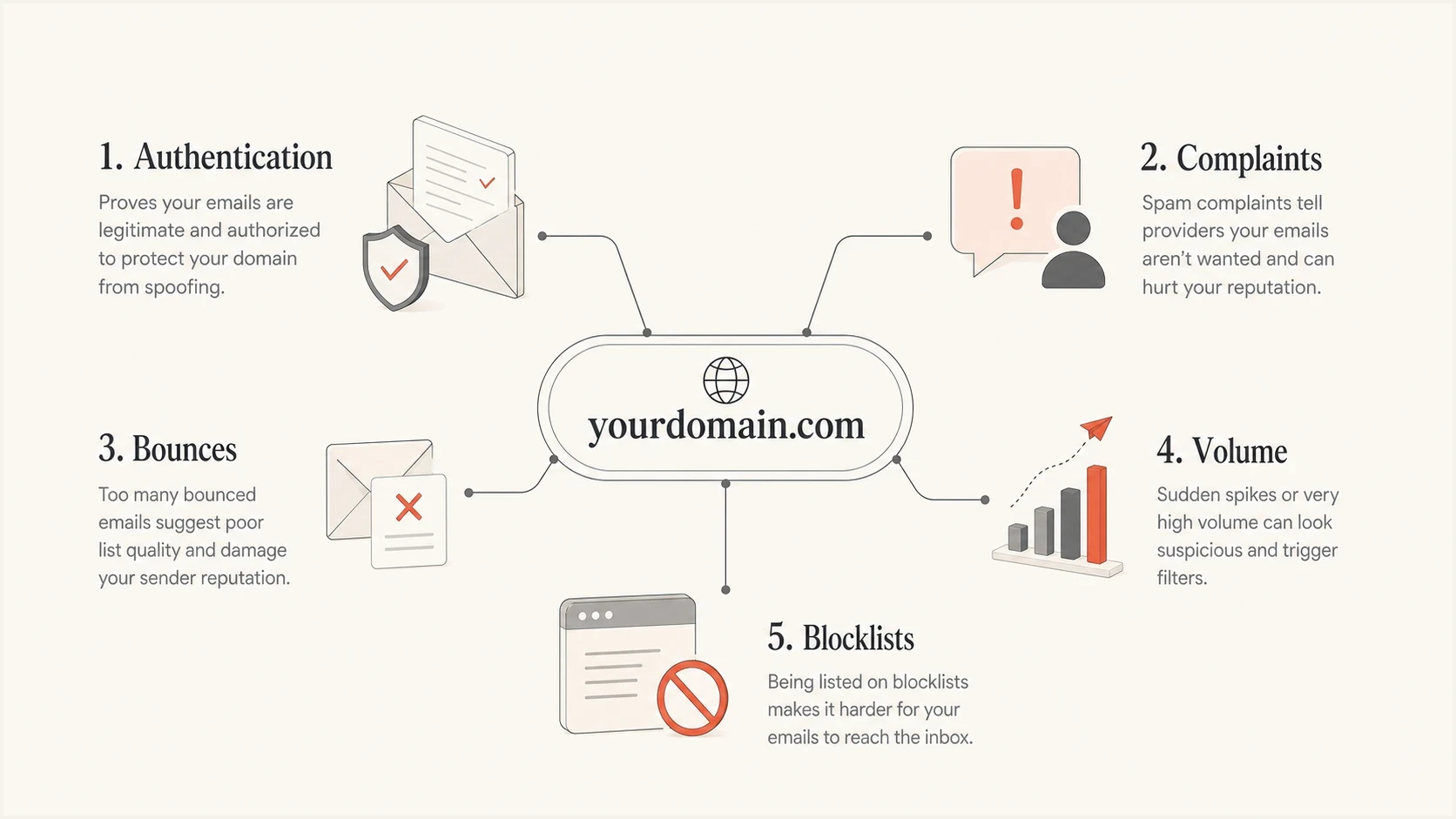
Email domain reputation signals: authentication, complaints, bounces, volume, and blocklists.
How to check domain reputation
Start with the domain, not the last campaign. A domain reputation check should tell you whether the domain is authenticated, whether unauthorized sources are sending as you, whether failures are concentrated in one sender, and whether the domain or IPs appear on a blocklist or blacklist.
A quick technical baseline is Suped's domain health checker. It checks DMARC, SPF, and DKIM signals so you can separate a reputation problem from a DNS problem before changing content, lists, or sending volume.
?
What's your domain score?
Deep-scan SPF, DKIM & DMARC records for email deliverability and security issues.
After the DNS baseline, send a real message through the same system your users receive. Suped's email tester confirms whether authentication passes after forwarding, rewriting, tracking links, and actual message assembly.
For ongoing reputation checks, Suped's blocklist monitoring can flag new domain or IP listings. A blocklist (blacklist) listing is a diagnostic signal, not a universal verdict. Its impact depends on the list, the listed identity, and the receiving provider.
- Verify that SPF passes, DKIM signs with the expected domain, and DMARC matches the visible From domain.
- Use DMARC aggregate reports to find every system sending as the domain and separate approved senders from unknown sources.
- Review provider-reported complaint rates by campaign, audience segment, acquisition source, and mail stream.
- Review domain and IP status across relevant blocklists and blacklist sources, then identify the behavior behind any listing.
- Compare results by mailbox provider and read SMTP response codes. A drop at one provider points to provider-specific filtering or recipient behavior.
Authentication and DNS records
SPF, DKIM, and DMARC do not make poor mail good. They make domain identity clear. Without clear identity, mailbox providers cannot confidently attach positive behavior to the right domain, and attackers can damage trust by sending unauthorized mail that looks like yours.
RFC 9989 defines the current DMARC mechanism and replaces RFC 7489. RFC 9990 defines aggregate reporting, while RFC 9991 defines failure reporting. DMARC passes when at least one authentication path passes and its authenticated domain has DMARC alignment with the visible From domain. Relaxed alignment is the default and is sufficient for most domains; strict alignment requires identical domains.
Authentication is only part of the sending baseline. Sending IPs also need valid forward and reverse DNS, and transport should use TLS. These controls do not replace DMARC, but missing them can trigger avoidable filtering or deferrals.
Starter DMARC monitoring recordDNS
v=DMARC1; p=none; rua=mailto:dmarc-reports@example.com
Example SPF recordDNS
v=spf1 include:mail.example.net include:_spf.example.org -all
DKIM selector shapeDNS
selector1._domainkey.example.com TXT
"v=DKIM1; k=rsa; p=MIIB..."
Choose enforcement for the domain's use
RFC 9989 says general-purpose email domains should not publish p=reject because legitimate forwarded messages can fail DMARC. Start with p=none, inspect aggregate reports, authenticate approved sources, then choose quarantine or reject based on the domain's use and risk. Reject remains appropriate for non-sending domains and tightly controlled mail streams.
What bad reputation looks like
Bad domain reputation usually shows up as a pattern, not a single error. Common signs include sudden drops in inbox placement, higher spam placement, lower opens for the same audience, more temporary deferrals, rising hard bounces, and new blacklist listings.
The timing matters. If deliverability dropped right after a new acquisition source, campaign type, sender migration, DNS change, or volume jump, the cause is usually close to that change. If it dropped without a clear sending change, check for spoofing, compromised accounts, unknown senders, and unexpected subdomain traffic in DMARC reports.
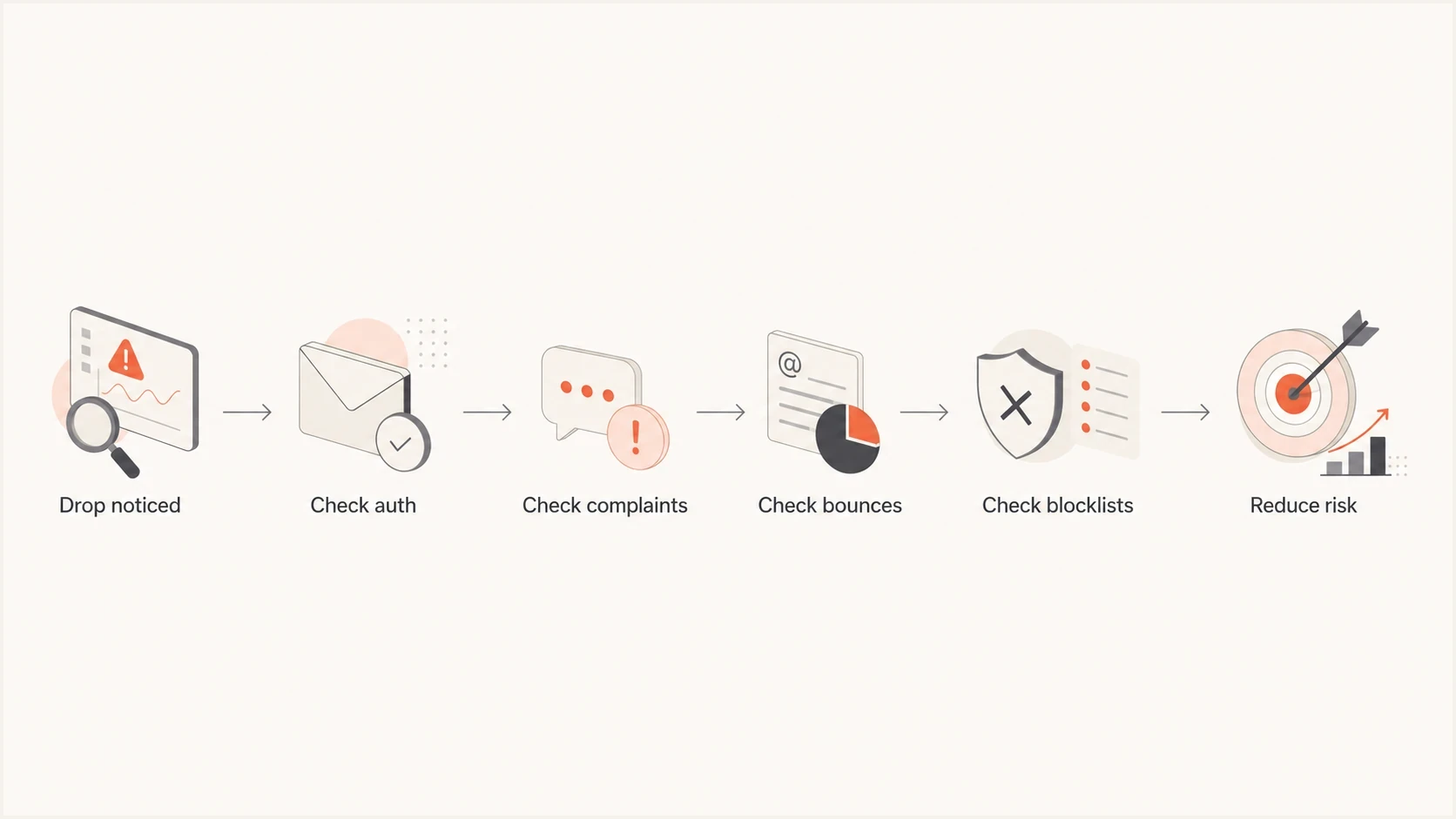
Flowchart for diagnosing an email domain reputation drop.
The riskiest mistake
Do not increase volume to compensate for poor performance. More unwanted mail gives mailbox providers more negative evidence. Reduce risky segments, protect authentication, and rebuild with the recipients most likely to engage.
How to improve reputation
Improving reputation starts with removing the behavior that caused the damage. DNS fixes help when identity is broken, but they do not cancel complaints or spam-trap hits. List quality, consent, cadence, and message relevance matter every day.
Weak recovery
- Sending to every old or inactive address creates more negative signals.
- Changing subject lines without changing audience quality rarely solves reputation.
- Requesting removal from a blacklist before fixing the cause leads to repeat listings.
Controlled recovery
- Authenticate every legitimate system and remove unauthorized sources.
- Send first to recent, opted-in, engaged recipients with low bounce risk.
- Increase sending only when complaints, bounces, and authentication stay stable.
During recovery, pause cold or risky sends, suppress inactive recipients, verify forms and imports, check recent automations, and review the last DNS changes. Then send smaller volumes to the best audience and watch provider-specific results.
For marketing and subscribed mail, use RFC 8058 one-click unsubscribe and include a visible unsubscribe link in the message body. Honor requests promptly and suppress recipients across the relevant mail stream. Easy opt-out reduces complaint pressure.
- Pause sources tied to complaints, bounces, spam-trap risk, or unauthorized sending.
- Make SPF, DKIM, and DMARC pass for every approved sender.
- Start recovery with people who recently opened, clicked, bought, logged in, or requested mail.
- Track reputation by provider, source, domain, and campaign until the negative pattern clears.
How to establish a new domain's reputation
A new sending domain has little history, so correct authentication does not guarantee immediate inbox placement. Build reputation with genuine mail that recipients requested and increase volume gradually at a consistent cadence. The same approach applies after a major infrastructure change or a long period without sending.
- Configure SPF, DKIM, DMARC, forward DNS, and reverse DNS before the first production send.
- Begin with recent, opted-in recipients who expect the message and have a low risk of bouncing.
- Send at a steady rate and increase volume only while complaints, hard bounces, authentication failures, and SMTP deferrals remain controlled.
- Pause expansion when a provider starts deferring mail or when complaints rise, then investigate before resuming at a lower volume.
There is no universal warm-up schedule
The safe rate depends on your target volume, sending frequency, audience quality, provider mix, and existing history. Use real recipient response and SMTP data to decide when to increase volume. A fixed daily increase can be too fast for one domain and unnecessarily slow for another.
Separate reputation by mail stream
Use dedicated subdomains to separate mail with different purposes, such as account notices and marketing campaigns. A problem in one stream is easier to diagnose and contain when its visible From domain, DKIM signing domain, bounce domain, tracking links, and metrics are distinct.
Subdomain separation is not absolute isolation. Mailbox providers can connect a subdomain to its organizational domain, sending IPs, shared content, and wider sending behavior. Do not rotate through new domains or subdomains to evade a damaged reputation. Fix the cause and rebuild the affected stream.
|
|
|
|---|---|---|
Transactional | notify.example.com | Protect receipts and security notices; do not mix promotions. |
Marketing | news.example.com | Use consented lists, one-click unsubscribe, stable volume, and provider-specific complaint monitoring. |
Support | help.example.com | Authenticate the ticketing system and suppress backscatter. |
Account lifecycle | accounts.example.com | Keep sign-in and onboarding mail separate from campaign traffic. |
Example mail-stream separation for one organizational domain.
Keep DMARC policy inheritance visible
An organizational-domain DMARC record can govern its subdomains. Under RFC 9989, sp applies to existing subdomains and np applies to non-existent subdomains. If the applicable tag is absent, p applies to existing subdomains when sp is absent. For a non-existent subdomain without np, the receiver uses sp when present and otherwise uses p. A sending subdomain can publish its own DMARC record, so document which record governs each stream before changing enforcement.
Where Suped fits
Suped's product supports a repeatable reputation workflow by collecting DMARC aggregate reports, grouping sending sources, showing SPF and DKIM alignment, and monitoring blocklist or blacklist changes. Hosted DMARC, hosted SPF, SPF flattening, hosted MTA-STS, alerts, and deliverability insights can be added where the domain's setup needs them.
Suped DMARC dashboard showing email volume, authentication health, and source breakdown
The practical value is the connection between evidence and action. A DMARC report identifies the source that failed. Suped groups sources, detects issues, provides plain fix steps, and sends alerts when authentication failures or blacklist changes need attention.
A clean reputation workflow in Suped
- Add the domain so Suped can collect DMARC data and identify active senders.
- Separate approved mail systems from unknown or suspicious traffic.
- Use issue guidance to repair domain matching, SPF, DKIM, and policy problems.
- Monitor alerts and blocklist or blacklist changes for new risk.
For MSPs and agencies, Suped's multi-tenant workflow keeps domains, policies, reports, users, and client summaries together so ownership and follow-up remain clear.
A practical operating model
A reliable domain reputation process is routine and consistent. Every domain should have a known owner, approved sending systems, working authentication, monitored DMARC reports, and a clear policy for new senders. Reputation problems get expensive when teams add senders without review.
Use a simple weekly rhythm: confirm all active sources, review failures, check blacklist and blocklist changes, compare complaint and bounce trends, and document every sender or DNS change. That cadence catches most reputation issues before they become a broad deliverability problem.
Example weekly reputation review mix
An illustrative split for reviewing the main reputation inputs each week.
Authentication
Audience
Listings
Changes
Reputation is easier to protect when marketing, product, support, security, and IT share one sender inventory. If a new platform sends invoices, support notices, trials, newsletters, or cold outreach, review it before mail goes live.
What to do next
A practical reputation review starts with four facts: who sends as the domain, whether each sender authenticates, whether recipients react well, and whether the domain or IPs are listed on a blocklist or blacklist. With those facts, the next step is usually clear.
If the domain is healthy, keep monitoring and choose a DMARC policy that fits its use. If it is weak, stop the risky source first, repair authentication, clean the audience, and rebuild slowly. Suped's product supports that workflow by monitoring the domain, identifying issues, guiding fixes, and alerting on new risk.




