How can I use invisible links to identify bot clicks in B2B emails?

Matthew Whittaker
Co-founder & CTO, Suped
Published 24 Jun 2025
Updated 26 May 2026
8 min read
Summarize with
Use an invisible text link, not a linked invisible image, as the bot-click marker. I would place a normal anchor with plausible, non-promotional text in the HTML, hide that text with simple CSS, route it to a neutral tracking endpoint, and treat any click on that marker as a strong sign that the email was scanned by an automated security system.
The risk is not zero, but it is usually manageable when the marker is implemented cleanly. A 1x1 image wrapped in a link gives the client the wrong thing to worry about, and it creates a visual-tracking debate that does not help the measurement problem. A hidden text anchor is easier to explain, easier to track, and less likely to break in the email HTML.
I would not suppress an address or a whole company domain after one marker click. I use the marker to filter reporting first. If the same contact or domain keeps clicking the marker across campaigns, and the visible clicks happen in bot-like patterns, then I separate that activity from human engagement and keep it out of scoring.
The direct answer
For B2B email, an invisible link is useful as a honeypot-style marker for link scanners. It works because many corporate email security systems fetch links before a person reads the message. They parse the raw HTML, extract URLs, and request them. They do not need to render the message the way a human email client does.
- Use hidden text: Put the link around real words, then hide those words with CSS.
- Avoid linked pixels: A 1x1 image inside an anchor adds image-tracking concerns without improving detection.
- Track separately: Store marker clicks as bot-marker events, not as normal campaign clicks.
- Filter conservatively: Remove marker-triggered activity from analytics before changing suppression or sales rules.
Do not make the marker perform an action
The hidden link should never unsubscribe, confirm consent, submit a form, change a preference, or fire a sales-ready event. Send it to a quiet endpoint or a neutral page and record only the diagnostic click.
This method answers a specific analytics question: which clicks are likely scanner activity? It does not prove every other click is human. Some scanners click only selected links. Some click all links. Some wait. Some retry later. That is why I combine the marker with timing, IP patterns, link sequence, and bot user agents before I trust the filtered numbers.
Why hidden text beats a 1x1 pixel
Open tracking already relies on a tiny invisible image in most commercial email programs. That does not mean a linked 1x1 image is the best bot-click marker. The image part adds no value for click detection. The click event comes from the anchor, so I keep the anchor and remove the image.
Linked 1x1 image
- Review risk: It looks like a tracking pixel even when the goal is click classification.
- HTML risk: Some builders rewrite, proxy, or strip image attributes.
- Data risk: Image load behavior distracts from the actual link-click signal.
Hidden text link
- Review risk: It is a normal link event with hidden display treatment.
- HTML risk: The anchor survives most template and tracking rewrites.
- Data risk: The marker can be excluded from reporting by URL or event type.
The better approach is a link with plausible text content that humans cannot see. For more detail on why scanners hit hidden links, the key point is simple: many scanners inspect the HTML source, not the final visual rendering.
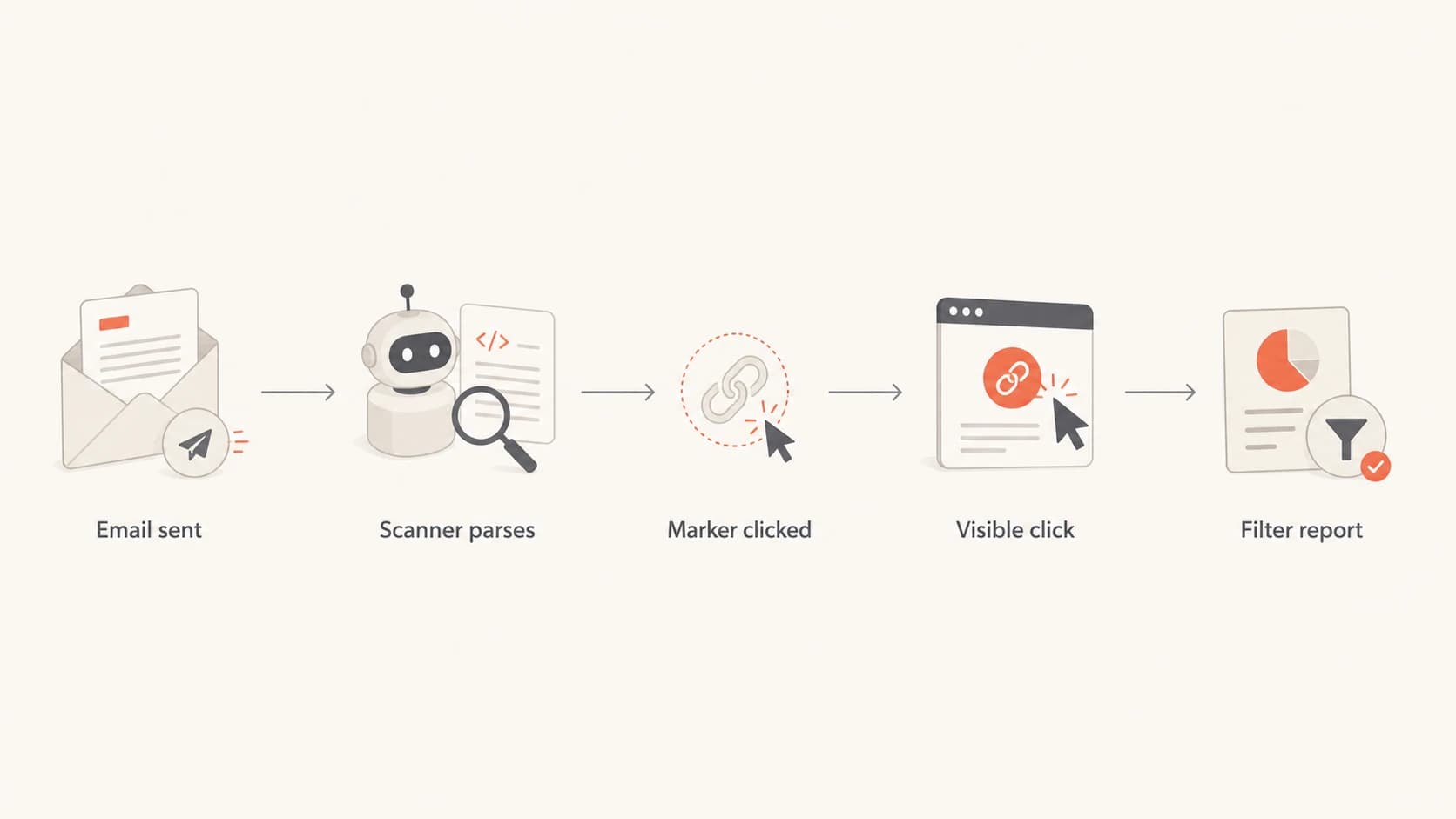
Flow showing how a hidden marker click is separated from visible link engagement.
How to build the marker
I start with one marker link near the top or bottom of the HTML. One is enough for most tests. If you add several hidden links, your own data gets harder to read and the email starts to look less normal during review.
Hidden text link examplehtml
<a href="https://click.example.com/h/bot-a"
   style="display:none;visibility:hidden;mso-hide:all;
          font-size:0;line-height:0;color:transparent;
          opacity:0;height:0;width:0;overflow:hidden;">
  Account preferences
</a>
The visible text inside the anchor should be boring and plausible. I like language such as account preferences, email settings, or subscription help. Do not use deceptive text that suggests an offer, login, invoice, or urgent security action. The URL should also look like a diagnostic route in your normal click-tracking domain, not a strange third-party domain.
Linked pixel pattern to avoidhtml
<a href="https://click.example.com/h/bot-a">
  <img src="https://img.example.com/p.gif"
       width="1" height="1" alt="" />
</a>
|
|
|
|---|---|---|
Event | bot-marker | Report filter |
Time | sent delta | Timing check |
Agent | request string | Pattern group |
Network | IP and ASN | Gateway clue |
Keep the logging compact and consistent so the marker is useful after the send.
CSS is a marker aid, not a security boundary
Many scanners do not evaluate CSS visibility. They collect links from the HTML and fetch them. Browser-based scanners can render CSS, so treat the hidden marker as a strong clue, not perfect proof.
How I filter the data
The marker click gives me a clean starting point, but I still filter in layers. A bot-click model that relies on only one rule breaks quickly because scanners differ by vendor, mailbox provider, customer security policy, and campaign content.
Confidence bands for click filtering
Use the hidden marker as the strongest signal, then add timing and request patterns.
Weak signal
0-40
Fast visible click only, no marker event.
Review signal
41-70
Odd user agent, shared IP range, or many links clicked.
Strong signal
71-90
Marker click plus visible clicks close to delivery.
Suppress signal
91-100
Repeated marker events across campaigns and no human activity.
I keep two datasets: raw click events and filtered engagement. Raw data is for investigation. Filtered engagement is for dashboards, lead scoring, campaign comparisons, and sales handoff. That separation stops the marker from becoming an invisible business rule nobody can audit.
- First pass: Exclude the marker URL itself from all engagement reports.
- Second pass: Flag other clicks in the same recipient session when the marker was hit.
- Third pass: Compare timing, IP, ASN, and user agent before suppressing future scoring.
- Final pass: Keep real replies, form fills, purchases, and sales conversations as human signals.
If a person clicks a visible link after the scanner hits the marker, I do not erase the visible click automatically. I mark the event as contaminated and look for a second signal. A later page view, a form completion, or a reply is more useful than the first click alone.
How to test before rollout
Before adding the marker to a production campaign, I send it to a seed list that covers the main mailbox environments in the audience. The checks are simple: the email renders normally, the hidden text is not visible, the marker URL is tracked separately, and no real unsubscribe or preference action occurs.
I also run the message through an email tester before the send. That helps catch HTML, authentication, and content issues that would confuse the test. If the email already has broken authentication or reputation issues, the marker data gets much harder to interpret.

Email tester sample report showing total score, email preview, issue summary, and per-section results
Use the test output as a sanity check, not as the only decision point. The production audience has different gateways and security settings, so the best proof is a small controlled rollout with clean event naming and a clear report column for marker clicks.
Email tester
Send a real email to this address. Suped opens the report when the test is ready.
?/43tests passed
Preparing test address...
After the first controlled send, I check whether marker clicks cluster by recipient domain, IP range, or mailbox provider. Then I compare that to visible link clicks, conversions, and replies. If the marker identifies a scanner-heavy group, I filter reporting for that group but keep sending unless there is a clear compliance or deliverability reason to stop.
Where Suped fits
Hidden-link filtering is an analytics tactic. It should sit beside deliverability monitoring, not replace it. If a campaign suddenly has strange clicks, I still check authentication, domain health, sending sources, and reputation. Suped is built for that broader workflow: it brings DMARC policy monitoring, SPF and DKIM visibility, blocklist (blacklist) monitoring, hosted DMARC, hosted SPF, SPF flattening, hosted MTA-STS, and real-time alerts into one place.
In practice, I use DMARC monitoring, blocklist monitoring, and a domain health checker to confirm the sending domain is not creating its own noise. That matters because bot clicks, authentication failures, and reputation problems often appear in the same reporting window, but they require different fixes.

Suped DMARC dashboard showing email volume, authentication health, and source breakdown
For teams that manage many domains, Suped's MSP and multi-tenancy dashboard is useful because the same issue categories can be reviewed across clients without switching reporting formats. The strongest setup is simple: use the invisible marker to clean click analytics, and use Suped to watch the authentication and reputation foundation around those campaigns.
Views from the trenches
Best practices
Use a hidden text link with neutral copy and track it as a marker, not a conversion.
Pair marker clicks with timing, IP data, and user agent patterns before filtering reports.
Keep hidden-link clicks out of lead scoring until another visible human action exists.
Common pitfalls
Wrapping a 1x1 image in a link adds noise and gives reviewers the wrong thing to debate.
Suppressing whole domains after one marker click removes real buyers from future campaigns.
Treating fast clicks alone as bots misses scanners that wait, retry, or prefetch links later.
Expert tips
Use a landing URL that returns a quiet 204 or neutral page and never triggers actions.
Record the marker URL as a separate event type so analysts do not count it as intent.
Check whether your email builder strips hidden styles before comparing campaign results.
Marketer from Email Geeks says a hidden text link is cleaner than linking a 1x1 image because the event is easier to explain and easier to isolate in click data.
2025-01-14 - Email Geeks
Marketer from Email Geeks says most security scanners parse links directly and do not render CSS, so hidden text still creates a reliable marker event.
2025-01-15 - Email Geeks
My practical recommendation
Use one hidden text link as a diagnostic marker, keep it separate from normal reporting, and roll it out gradually. Do not wrap a 1x1 pixel in a link. Do not treat the marker as proof that every contact at a company is unengaged or unsafe. The marker is there to protect the accuracy of your reporting, not to punish recipients for having security software.
The best result comes when the marker is paired with good event hygiene. Name it clearly, filter it intentionally, document the rule, and keep raw data available for audit. Then connect the cleaned click data with replies, conversions, sales activity, DMARC results, and blocklist (blacklist) status so the team sees the difference between scanner traffic and real engagement.
For broader filtering strategy, this pairs well with a process to filter bot clicks across newsletter and lifecycle reporting.




