What are the implications of using a DMARC policy of p=none?

Updated on 9 Aug 2026: We updated this guide for RFC 9989 and its current rollout guidance.
A DMARC policy of p=none means receiving mail systems should not change the message's handling just because it failed DMARC. The domain owner is asking for reports, not enforcement. The practical implication is simple: you gain visibility into who is sending mail for your domain, but you do not stop spoofed phishing mail that uses your exact domain with DMARC policy enforcement yet.
Use p=none as a discovery phase for domains with unknown senders, legacy systems, agencies, CRMs, help desks, billing systems, and marketing platforms. It is safer than jumping straight to enforcement when legitimate traffic still has SPF or DKIM domain mismatches. It is also weaker than p=quarantine or p=reject because fraudulent mail that fails DMARC is not contained by the policy itself.
- Visibility: Aggregate reports show sources, pass rates, and domain match problems.
- No enforcement: Receivers are not asked to quarantine or reject DMARC failures.
- No inbox guarantee: Receivers still apply reputation, content, complaint, and abuse filters.
- Temporary state: The usual next step is an evidence-based move to an enforcing policy.
The strongest use of p=none is disciplined DMARC monitoring: collect reports, identify every legitimate sender, fix SPF or DKIM domain matching, then move to an appropriate enforcement policy.
What p=none actually does
DMARC evaluates whether a message passed SPF or DKIM in a way that matches the visible From domain. It then tells the receiver what the domain owner wants done when that check fails, and it can request reports about the domain's use. With p=none, the policy instruction is "do nothing different because of DMARC."
Basic p=none DMARC recorddns
v=DMARC1; p=none; rua=mailto:dmarc-reports@example.com
That record publishes a monitoring policy. The rua tag asks receivers to send aggregate reports. Those reports are the main value of p=none. Without a reporting address, p=none is mostly a public statement that receivers should not apply DMARC enforcement.
The short version
- Policy meaning: Do not quarantine or reject mail because of a DMARC failure.
- Reporting value: Send aggregate data if the receiver supports DMARC reporting.
- Receiver freedom: Spam filtering, reputation checks, and abuse controls still apply.
If you need to confirm what your domain publishes today, a DMARC checker is a direct first step. Check the policy and reporting address, then confirm whether the record has syntax errors before drawing conclusions from mail behavior.
DMARC checker
Look up a domain's DMARC record and catch policy issues.
?/7tests passed
What RFC 9989 changes
RFC 9989 is the current Standards Track DMARC specification and obsoletes RFC 7489. The meaning of p=none remains monitoring without a requested enforcement action, but the rollout mechanics changed.
|
|
|
|---|---|---|
p=none | Monitoring policy | No requested enforcement action |
pct | Historic tag | Do not use percentage sampling for a new rollout |
t=y | Policy test mode | Receivers are expected to apply one policy level below the declared policy |
sp / np | Existing and non-existent subdomain policies | Without them, the p policy applies to subdomains |
DMARC policy tags that matter during a p=none rollout.
To test a quarantine declaration under RFC 9989, publish p=quarantine; t=y. The expected effective policy is one level lower, which is none. Remove t=y after the reports support enforcement. This is a test step, not percentage-based partial quarantine.
RFC 9989 quarantine test recorddns
v=DMARC1; p=quarantine; t=y; rua=mailto:dmarc-reports@example.com
Review subdomains before enforcement
A policy at the organizational domain also covers subdomains unless a more specific record or an applicable sp or np value changes the result. Inventory subdomain senders before leaving p=none.
The real implications
The biggest mistake is treating p=none as either useless or protective. It is useful because it gives you data. It is not protective because it does not ask receivers to contain mail that fails DMARC.
|
|
|
|---|---|---|
Reports | RUA data begins | Receiver support varies |
Enforcement | No policy action | Filtering still applies |
Spoofing | More visibility | No DMARC block |
Reputation | Signals become clear | Quality still matters |
Delivery | No inbox promise | Receiver rules apply |
The practical effect of p=none by category.
What p=none gives you
- Source discovery: You can see which services send using your domain.
- Failure patterns: You can find SPF, DKIM, and domain match gaps.
- Rollout safety: You can fix legitimate sources before enforcement.
What p=none does not give you
- No spoof block: DMARC failures are not rejected by your policy.
- No inbox pass: The receiver does not have to place mail in the inbox.
- No final state: The domain still needs a documented enforcement decision.
A p=none policy does not damage email reputation by itself. The policy value does not cause a reputation penalty on its own. The mail flowing under that policy can still have poor engagement, complaints, spam trap hits, authentication failures, or spoofing that harms reputation.
Reputation and inbox placement
A p=none policy does not tell receivers that your domain is risky. It also does not tell receivers that your mail is good. DMARC policy is one input, and under p=none that input is report-only.
The real reputation issue is what the reports reveal. If large volumes fail DMARC because authorized senders are misconfigured, you have an authentication cleanup problem. If unknown sources send mail as your domain, you have an abuse problem. If spoofed traffic creates complaints, reputation and blocklist (blacklist) issues can follow even though the p=none tag itself is not the cause.
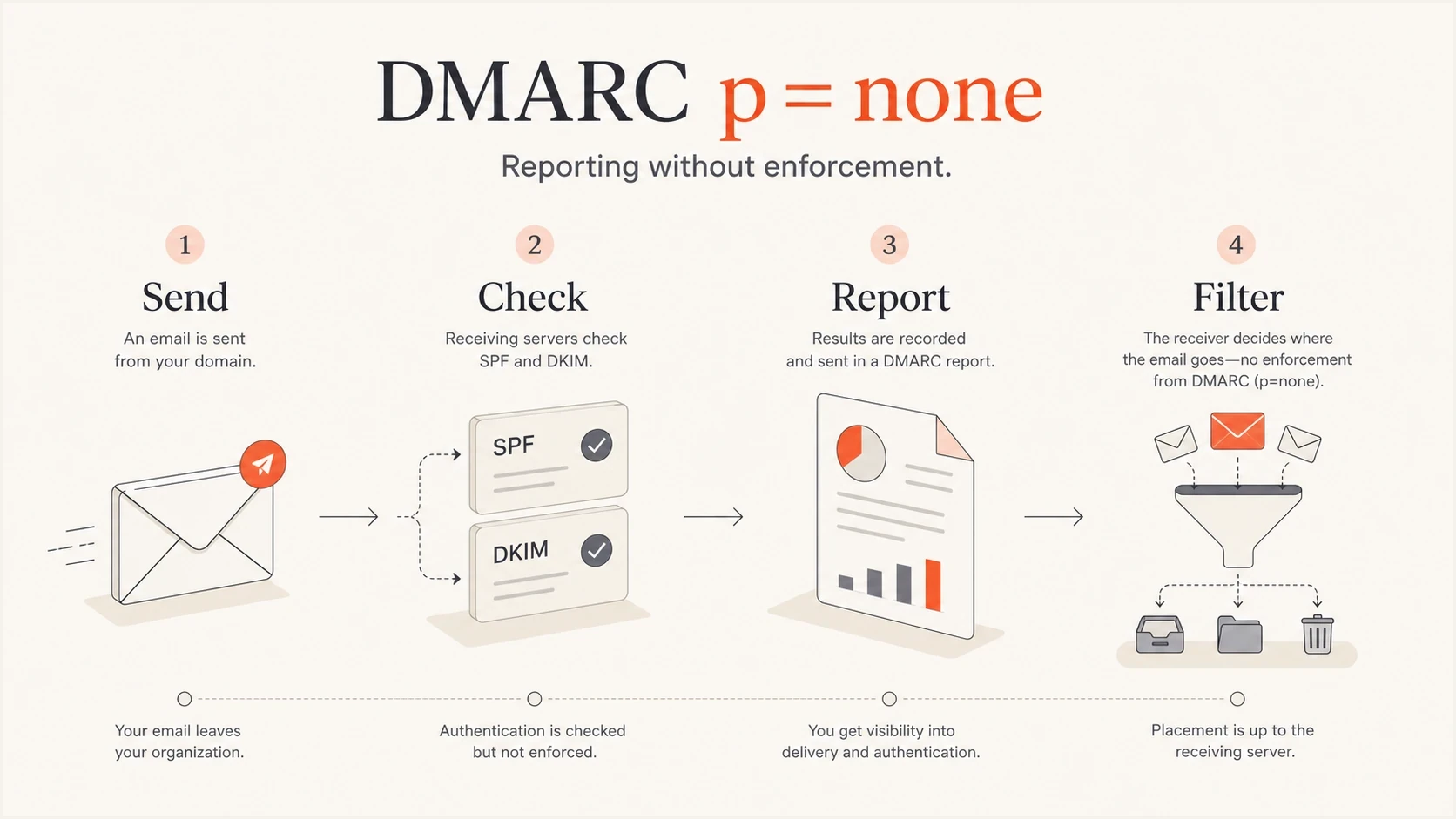
DMARC p=none reports authentication results while the receiver still applies its own filtering.
Do not confuse reporting with protection
A domain at p=none can look mature because reports are flowing, dashboards are populated, and failures are visible. That visibility is useful, but it is not the same as policy enforcement.
- Good signal: You can see which mail sources need work.
- Bad assumption: Attackers are not stopped by this policy value.
- Next action: Fix legitimate senders and set a date for an enforcement review.
Why starting at p=none is usually safer
Starting at p=none is usually safer because many organizations do not know every system that sends mail for them. A strict policy applied too early can cause legitimate invoices, password resets, alerts, receipts, or customer support replies to disappear at receivers that honor the policy.
A safe DMARC policy path
Use monitoring and test mode to clean up legitimate mail before asking receivers to enforce failures.
Discovery
p=none
Collect reports and identify all real senders.
Policy test
p=quarantine; t=y
Declare quarantine in RFC 9989 test mode.
Enforcement
p=quarantine
Remove test mode after legitimate traffic is clean.
Stricter enforcement
p=reject
Use reject only after reviewing DKIM resilience and indirect mail.
The safe path is not slow by default. It is measured. A small organization with two mail sources can move fast. A larger organization with multiple departments, vendors, and subdomains needs a longer observation period because the cost of missing a sender is higher.
Example quarantine test recorddns
v=DMARC1; p=quarantine; t=y; rua=mailto:dmarc@example.com
After reports show that legitimate mail passes, test quarantine with t=y, then remove the test flag to activate quarantine. Consider reject only after reviewing forwarding and mailing-list traffic. Domains with users who post to Internet mailing lists should generally avoid p=reject. A safe reject rollout also requires aligned DKIM so forwarded mail has a path to pass when SPF breaks.
How to use p=none without getting stuck
The main risk of p=none is inertia. Teams publish a record, see reports arrive, and never convert that visibility into a stronger policy. Treat p=none as a project phase with owners, dates, and exit criteria.
- Publish reports: Add a DMARC record with a valid aggregate reporting address.
- Group sources: Separate known services, internal systems, forwarders, and unknown senders.
- Fix senders: Update SPF, DKIM, or vendor settings until the visible From domain matches.
- Watch trends: Look for repeat failures and volume spikes before changing policy.
- Test policy: Publish p=quarantine with t=y, review the results, then remove the test flag.
- Keep alerts: Monitor after enforcement because sender changes happen later.
Suped DMARC dashboard showing email volume, authentication health, and source breakdown
Suped's product supports this workflow by turning raw aggregate reports into source lists, pass rates, authentication health, alerts, and issue steps. The operational work is deciding which failures are legitimate mail, which are abuse, and when the domain is ready for an enforcing policy.
Teams can use Suped to review DMARC, SPF, and DKIM results, investigate blocklist (blacklist) events, and stage policy changes through Hosted DMARC. That keeps sender cleanup, alerts, and the enforcement decision in one workflow.
If you are starting from scratch, a record generator helps create the first TXT value, but the ongoing work is interpreting the reports and making policy changes at the right time.
A practical decision path
A p=none policy is the right answer when you lack certainty. It is no longer enough when authentication is clean and known abuse is using your domain. The next policy should follow evidence and the domain's mail use.
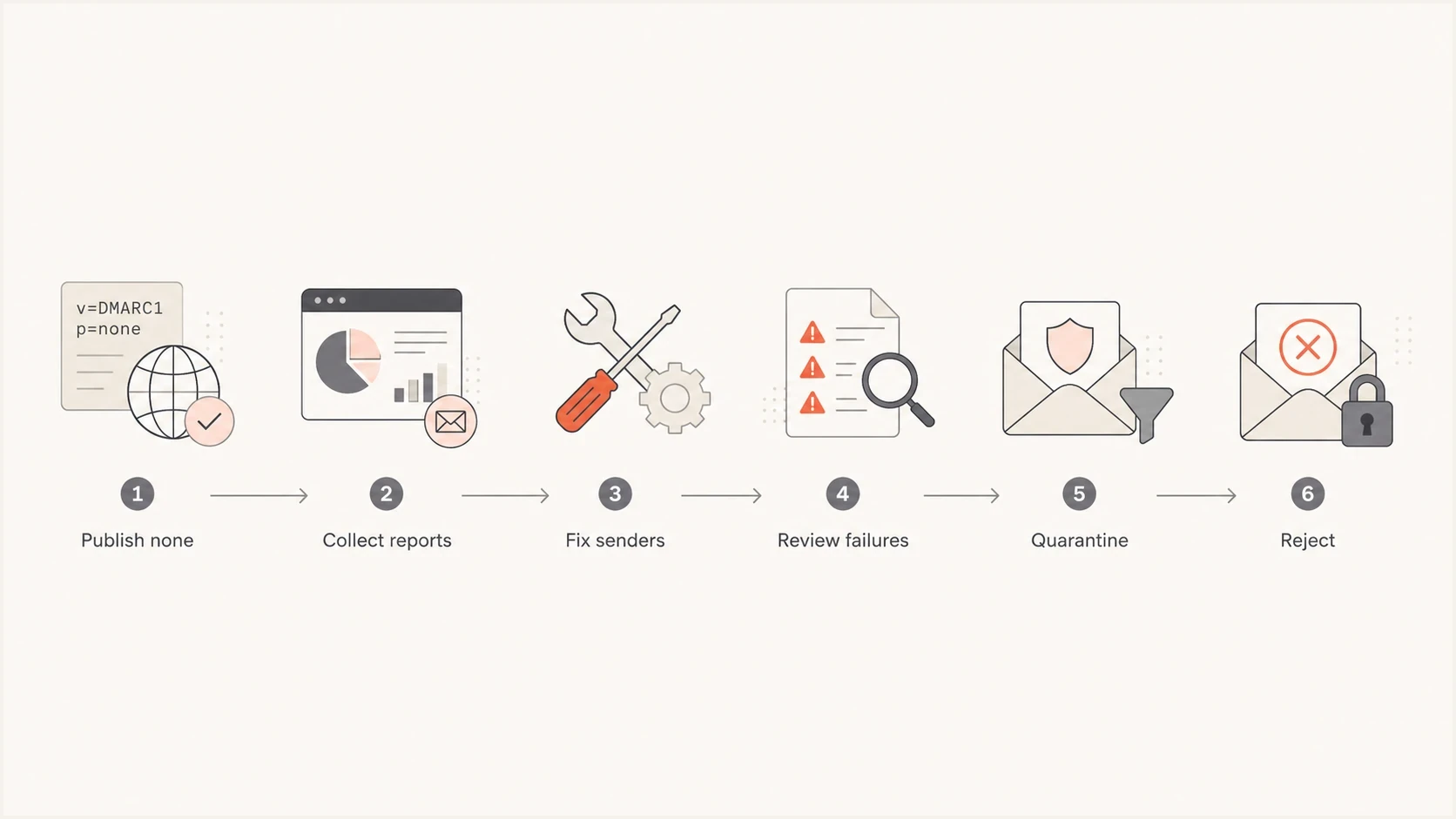
A six-step DMARC path from p=none monitoring to quarantine and reject enforcement.
When p=none is the right policy
- New rollout: You are publishing DMARC for the first time.
- Unknown sources: You cannot name every service sending mail for the domain.
- Active cleanup: You have owners fixing authentication failures.
That state should have an end. If reports show steady legitimate traffic with strong pass rates and unknown failures are low or clearly abusive, continuing with p=none leaves protection on the table.
When p=none is no longer enough
- Clean traffic: Legitimate senders pass consistently.
- Known abuse: Unknown sources are spoofing the visible domain.
- No owner: Reports arrive, but no one fixes or escalates failures.
Views from the trenches
Best practices
Start at p=none when sender inventory is incomplete, then set a date for policy review.
Use reports to separate known senders, forwarding noise, vendor gaps, and spoofed mail.
Move enforcement in stages only after the core mail streams pass DMARC consistently.
Common pitfalls
Do not assume p=none guarantees inbox delivery; receivers still filter every message.
Do not treat p=none as protection against spoofing, because enforcement is absent.
Do not jump straight to reject when invoices or resets still fail domain matching.
Expert tips
Keep a written sender inventory so new platforms are authenticated before launch.
Pair DMARC reports with alerts so sudden failures get attention before rollout changes.
Review subdomains separately because their senders and risk often differ from root mail.
Expert from Email Geeks says p=none means receivers should not change handling because of the DMARC result, but reports still give the sender useful RUA data.
2024-01-22 - Email Geeks
Marketer from Email Geeks says p=none is often misunderstood as an inbox guarantee, when receivers still use their normal filtering rules.
2024-01-23 - Email Geeks
Use p=none as a starting point
The implication of using p=none is that your domain is in monitoring mode. You get visibility and a safer setup period, but you do not get policy-based protection against DMARC failures.
That is a good tradeoff at the beginning. It is a weak long-term position once reports show that legitimate senders are fixed. Keep the reporting, clean up the sources, test quarantine, then decide whether quarantine or reject fits the way the domain's mail is used.
Suped's product supports that path by combining DMARC report analysis with SPF and DKIM issue detection, policy staging, alerts, and blocklist (blacklist) monitoring. The result is a documented route out of p=none rather than an open-ended monitoring record.




