How to implement DMARC p=reject policy safely to avoid email deliverability issues?

Updated on 14 Aug 2026: We updated this guide for RFC 9989 test mode, subdomain policy, and safer full-cycle rollout gates.
Implement p=reject safely by proving that every legitimate sender passes DMARC through aligned SPF or aligned DKIM, then moving through p=none, p=quarantine, and p=reject. RFC 9989 makes pct historic and defines t=y for policy testing. Use test mode before applying each enforcement policy with t=n. Do not change a busy root domain straight to reject unless aggregate reports already prove that every legitimate sender is known and aligned.
The main risk is hidden mail. Password resets, billing emails, cron alerts, support tools, sales systems, and vendor mail often use a domain long before the security team sees them. Their authentication failures become false positives under enforcement. Auto-forwarding adds another risk: SPF usually fails after forwarding, and DKIM fails when a forwarder or mailing list changes signed content.
- Baseline: collect DMARC aggregate reports at p=none until legitimate and unauthorized sources are separated.
- Fix: make each approved sender pass DMARC through aligned DKIM or SPF.
- Stage: test quarantine and reject with t=y before applying them with t=n.
- Gate: promote only when reports, bounce logs, and support channels show no legitimate breakage across a complete sending cycle.
The safe rollout order
The safe approach is a controlled rollout, not a single DNS edit. A useful DMARC monitoring workflow should show the sending source, envelope sender, DKIM domain, SPF result, DKIM result, From-domain alignment, and receiver disposition. Without that view, a policy change is based on assumptions.
Use this sequence for domains that already send customer or employee mail. Keep each stage active through at least one complete sending cycle, including monthly billing, scheduled alerts, campaigns, and low-frequency vendor traffic. This can take weeks or months, depending on sending cadence.
|
|
|
|
|---|---|---|---|
Observe | p=none | Not applicable | All legitimate sources inventoried |
Test quarantine | p=quarantine | t=y | Receiver behavior checked |
Apply quarantine | p=quarantine | t=n | Full sending cycle is stable |
Test reject | p=reject | t=y | Legitimate failures resolved |
Complete | p=reject | t=n | Reports and support remain stable |
A practical DMARC enforcement ladder for active sending domains.
Treat test mode as a request
The t=y tag asks receivers not to apply the published policy, but receiver support and local handling can vary. Older implementations can ignore the newer tag. Do not use test mode as a substitute for fixing legitimate DMARC failures before enforcement.
What p=reject changes
DMARC passes when SPF or DKIM passes and the authenticated domain aligns with the visible From domain. p=none expresses no handling preference and requests aggregate reports when rua is configured. p=quarantine tells receivers that failing mail is suspicious. p=reject tells receivers that use of the domain on failing mail is not valid and requests rejection.
Receivers still apply local policy. Some accept mail despite a reject request when they trust an indirect mail path or have other evidence. A DMARC pass also does not guarantee inbox placement; sender reputation, message quality, and receiver rules still affect delivery. These facts do not replace staged enforcement.
Before reject
- Visibility: reports show who sends with your domain.
- Tolerance: legitimate failures usually still reach a mailbox.
- Risk: exact-domain spoofing is not blocked by the DMARC policy.
After reject
- Protection: receivers get a clear request to reject failures.
- Exposure: forgotten legitimate systems can be blocked.
- Evidence: support tickets and bounce logs matter alongside aggregate reports.
Staged DMARC TXT examplestext
Start in reporting mode
Host: _dmarc.example.com
Type: TXT
Value: v=DMARC1; p=none; rua=mailto:dmarc@example.com

Move to quarantine in test mode
Host: _dmarc.example.com
Type: TXT
Value: v=DMARC1; p=quarantine; t=y; rua=mailto:dmarc@example.com

Apply quarantine
Host: _dmarc.example.com
Type: TXT
Value: v=DMARC1; p=quarantine; t=n; rua=mailto:dmarc@example.com

Move to reject in test mode
Host: _dmarc.example.com
Type: TXT
Value: v=DMARC1; p=reject; t=y; rua=mailto:dmarc@example.com

Apply reject
Host: _dmarc.example.com
Type: TXT
Value: v=DMARC1; p=reject; t=n; rua=mailto:dmarc@example.com
Build the sender inventory
Start with mail seen in aggregate reports, not with a spreadsheet. A spreadsheet shows what teams remember. DMARC reports show what receivers saw. The gap between those lists is where reject rollouts break.
A root domain needs special care because many departments have used it over time. Product notifications, finance mail, internal monitoring, sales sequences, one-off event tools, HR systems, and old servers can all appear. A subdomain created for one narrow mail stream is easier to enforce because ownership is clear.
Suped DMARC dashboard showing email volume, authentication health, and source breakdown
Suped's product supports this inventory workflow by grouping DMARC sources, showing alignment results, and separating verified senders from sources that need investigation. A reject policy is ready only when unknown traffic is either identified as unauthorized or assigned to an owner for remediation.
- Transactional: password resets, receipts, invoices, account alerts, and product notifications.
- Operational: cron jobs, monitoring alerts, internal tools, and legacy servers.
- Commercial: campaign platforms, sales outreach, event mail, and partner systems.
- Corporate: employee mail, shared mailboxes, help desk aliases, and executive mail.
Before tightening policy, run a broad domain check and confirm that visible DNS records match the senders in aggregate reports. A point-in-time check is useful, but DMARC safety depends on authentication results from real traffic.
?
What's your domain score?
Deep-scan SPF, DKIM & DMARC records for email deliverability and security issues.
Fix missing, duplicate, or conflicting records before changing policy. Continue monitoring after the fix because a valid DNS record does not prove that each mail stream uses it correctly.
Protect subdomains before reject
A policy on the organizational domain also affects subdomains that do not publish their own DMARC record. Under RFC 9989, sp sets the policy for existing subdomains and np sets it for non-existent subdomains. If these tags are absent, the applicable policy falls back through sp and then p. Publishing the intended values explicitly makes the scope easier to audit.
|
|
|
|---|---|---|
p | Organizational domain | Set after its legitimate senders are aligned |
sp | Existing subdomains without their own record | Audit delegated and forgotten subdomains first |
np | Non-existent subdomains | Use reject when those names never send mail |
Subdomain record | One specific Author Domain | Use a temporary exception while its senders are fixed |
How organizational and subdomain DMARC policies interact.
Subdomain policy examplestext
Organizational domain at full enforcement
Host: _dmarc.example.com
Type: TXT
Value: v=DMARC1; p=reject; sp=reject; np=reject; t=n; rua=mailto:dmarc@example.com

Temporary policy for one active subdomain
Host: _dmarc.marketing.example.com
Type: TXT
Value: v=DMARC1; p=quarantine; t=y; rua=mailto:dmarc@example.com
Audit delegated subdomains
A delegated subdomain can have separate DNS ownership and sending systems. Confirm its owner, DMARC record, and aligned authentication before the organizational policy reaches reject. Keep any weaker per-subdomain policy temporary and documented.
Fix domain alignment before enforcement
Aligned DKIM is the strongest foundation for each legitimate sender. Aligned SPF also produces a DMARC pass, but forwarding commonly breaks SPF. DKIM survives forwarding when the signed headers and body are unchanged, so domains at reject should not rely on SPF alone.
Validate syntax before every policy change. Use the DMARC checker for the current record, and use a record generator to create a staged record without missing tags.
Authentication fixes that matter
- DKIM: sign with a domain that aligns with the visible From domain under the chosen relaxed or strict mode.
- SPF: authorize every approved source and stay within the SPF DNS lookup limit.
- Return path: use an aligned organizational domain when SPF is expected to carry the DMARC pass.
- Selectors: rotate DKIM keys cleanly and keep old selectors active during transition.
One aligned authentication path is enough for a DMARC pass, but configure both where the sender supports them. A sender that passes aligned DKIM can tolerate SPF failure after forwarding. A sender that relies only on aligned SPF has a known forwarding weakness. Retire or fix any source that fails both before reject.
Sender-level acceptance checklisttext
For each source:
1. Identify owner and business purpose.
2. Confirm visible From domain.
3. Confirm DKIM pass and DKIM alignment.
4. Confirm SPF pass and SPF alignment where possible.
5. Send a live message and inspect authentication results.
6. Watch DMARC reports after the next scheduled send.
Handle forwarding and legitimate failures
Forwarding needs deliberate testing. When a user forwards mail between providers, SPF usually fails because the forwarding server is not authorized by the original envelope sender. DKIM survives only if the forwarder leaves the signed message content intact.
Mailing lists, role-based aliases, and alumni forwarders can also modify or relay mail in ways that break DMARC. Some receivers recognize trusted indirect paths and override the published disposition, but that local decision does not remove the need for aligned DKIM and gradual enforcement.
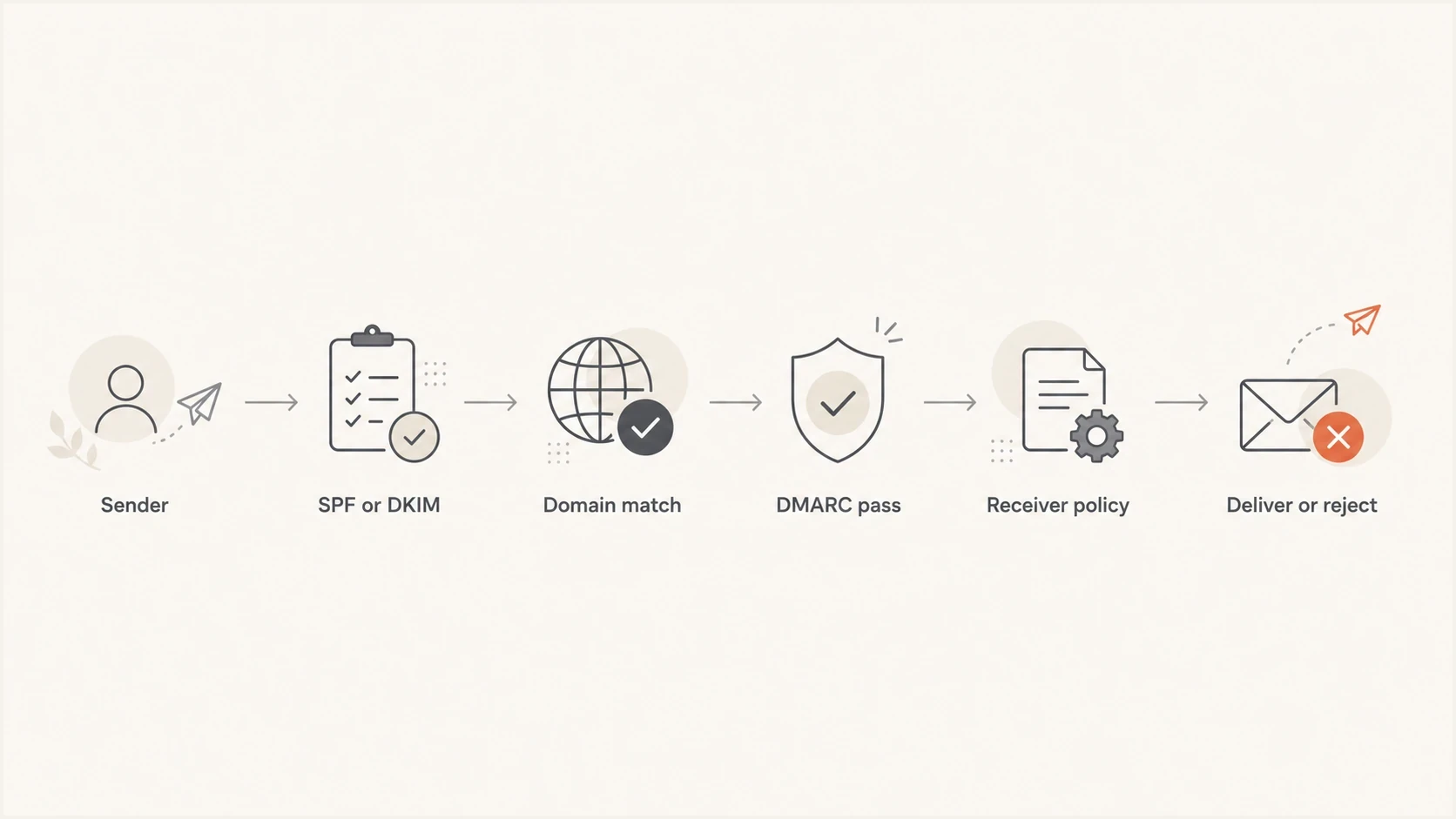
A left-to-right flowchart showing how SPF or DKIM domain matching leads to a DMARC pass or reject decision.
Breaks more often
- SPF: fails when the forwarder is not authorized by the envelope sender domain.
- Body changes: can break DKIM when footers or banners alter signed content.
- Old systems: often send without aligned DKIM or a managed return path.
Survives better
- DKIM: survives forwarding when signed content stays unchanged.
- ARC: can provide evidence about authentication before forwarding, but it does not create a DMARC pass.
- Staging: shows which providers and mail streams create failures.
Forwarding requires testing
If important transactional mail relies only on SPF alignment, fix DKIM before reject. When a forwarded path fails, inspect the original authentication result, content changes, ARC data when present, and the receiver response before rolling back the whole domain.
Use gates and rollback triggers
A staged rollout needs explicit promotion, hold, and rollback rules. Define them before the DNS change so that business impact, not rollout momentum, determines the next action.
Promotion gates for reject rollout
Use evidence-based gates that account for the domain's complete sending cadence.
Promote
Legitimate mail aligned
Every legitimate source is known and passes aligned SPF or DKIM.
Hold
Known legitimate failure
A legitimate sender is failing but has an owner and remediation plan.
Rollback
Confirmed user impact
Critical customer or employee mail is blocked.
Monitor
One full sending cycle
Keep each stage long enough to include every normal scheduled mail stream.
A written policy transition plan should name the approver for each step, the owner of each sender fix, and the person authorized to roll back. Lower the DMARC record's DNS TTL at least one existing TTL interval before the change window, then restore the normal TTL after the policy is stable.
- Prepare: save the last known good record and confirm the rollback owner before changing DNS.
- Promote: remaining failures are unauthorized, retired, or controlled test traffic.
- Hold: a legitimate sender fails DMARC but has a clear owner and fix path.
- Rollback: customer mail, employee mail, security alerts, or billing mail is blocked.
- Document: record each policy change with its time, owner, reason, and observed result.
Where Suped fits
Suped's product connects a reject rollout to the operational work behind it: source discovery, alignment diagnostics, issue alerts, and remediation steps. Teams can review aggregate report data and policy status in the same workflow instead of handling raw XML manually.
For organizations managing many domains, Suped's MSP and multi-tenancy dashboard keeps domains, reports, sender issues, and enforcement status in one view. The relevant outcome is a traceable decision about which domains are ready to advance and which need remediation.

Issue steps to fix dialog showing the issue overview, tailored fix steps, and verification action
With Hosted DMARC, teams can apply policy and test-mode changes without requesting a manual DNS edit for each rollout step. DNS access is still needed for the initial hosted configuration.
Manual workflow
- Reports: aggregate XML needs parsing and source grouping.
- Ownership: teams identify senders through manual follow-up.
- Changes: DNS edits depend on access and change windows.
Suped workflow
- Reports: sources, pass rates, and alignment issues are summarized.
- Fixes: issue pages show steps for the detected failure.
- Alerts: notifications flag authentication changes during rollout.
Views from the trenches
Best practices
Keep p=none until every real sender is mapped, owned, and passing aligned DKIM or SPF.
Test each enforcement policy, then pause when reports show unknown legitimate mail.
Use dedicated subdomains for narrow mail streams so policy ownership stays clear.
Common pitfalls
Publishing p=reject on a root domain before teams identify cron, billing, and alert mail.
Assuming forwarding failure means DMARC is broken instead of checking DKIM survival.
Treating one clean day of reports as proof that every sending source has been found.
Expert tips
Compare report data with help desk tickets after each policy step alongside pass rates.
Keep an emergency rollback record ready so DNS changes are fast during user impact.
Require new vendors to prove aligned DKIM before they use the primary sending domain.
Expert from Email Geeks says staged policy steps are the safest way to see impact, starting with quarantine and then repeating the same measured approach for reject.
2026-02-11 - Email Geeks
Marketer from Email Geeks says forwarding and broken DKIM remain real concerns, but a gradual rollout exposes the size of the issue before full enforcement.
2026-02-14 - Email Geeks
Move to reject with evidence
A safe p=reject rollout depends on evidence. Collect aggregate reports, identify every source, fix alignment, test indirect mail paths, and apply enforcement only when legitimate failures are resolved. A safe reject policy blocks only expected failures, regardless of rollout speed.
A non-sending domain or tightly controlled subdomain can reach reject quickly after its status is verified. Treat a root domain with years of sending history as a production change. Suped's product supports that workflow with continuous report monitoring, hosted policy management, alerts, and issue-level remediation steps.
- Start: publish reporting mode and collect a complete cycle of real traffic.
- Repair: fix SPF, DKIM, and alignment for every approved source.
- Stage: test quarantine and reject with t=y, then apply each policy with t=n.
- Operate: keep monitoring because new senders and vendors appear over time.




