How to safely transition your DMARC policy to quarantine or reject

Updated on 22 Aug 2026: We updated this guide for RFC 9989 test mode and safer policy decisions around indirect mail.
The safe way to move DMARC to quarantine or reject is to prove, with reports, that every legitimate sender for your domain passes DMARC through SPF or DKIM with domain matching. A production domain should not move straight from monitoring to full reject unless the data has already shown that the real mail stream is clean.
The direct path is simple: start at p=none, collect aggregate reports, fix authentication gaps, move to p=quarantine in testing mode, hold at enforced quarantine, then consider p=reject only when the domain's sending model and indirect mail flows support it. For new rollouts, avoid pct-based staging because RFC 9989 makes pct historic. Reports lag, forwarding can change SPF results, and receivers can handle quarantine or reject differently. That is why the rollout needs checkpoints instead of one DNS edit.
The safe answer
DMARC enforcement affects mail only when a message fails DMARC. A message passes DMARC when SPF or DKIM passes and the passing domain matches the visible From domain closely enough for the policy mode. If neither path passes, the receiver applies your DMARC policy request.
That means the safety question is not "quarantine or reject?" first. The first question is "Which legitimate systems still fail DMARC?" Once that list is empty, or reduced to known low-risk edge cases, quarantine and reject become controlled changes instead of guesses.
Quarantine
Quarantine asks receivers to treat failing mail as suspicious. It commonly sends failed mail to spam or junk, though each receiver controls final placement. Treat quarantine as enforcement, not harmless testing, because real mail can be accepted and still miss the inbox.
- Use case: Good first enforcement step for domains with some residual uncertainty.
- Risk: Real mail that still fails DMARC can land in spam.
Reject
Reject asks receivers to refuse failing mail. It is the strongest DMARC policy request for unauthenticated mail using your domain, but receivers retain control over disposition.
- Use case: Final state for a controlled sending domain after legitimate senders and indirect flows have been assessed.
- Risk: Real mail with broken authentication can be blocked.
If your business has invoices, password resets, booking confirmations, receipts, HR messages, support replies, or sales outreach coming through third-party systems, those sources need to be identified before enforcement. The risk usually comes from one forgotten sender, not the primary mail platform.
What has to be true first
Before changing policy, the domain should meet a few plain conditions. These conditions turn DMARC enforcement into a measured release.
- Reporting: Aggregate reports are flowing to a mailbox or platform that parses them into sources and outcomes.
- Coverage: At least one full business cycle of mail has been observed, including newsletters, invoices, support tools, and automated notifications.
- Authentication: Every approved sender passes DMARC through SPF or DKIM with the From domain match required by your configuration.
- Ownership: Each unknown source is classified as approved, unauthorized, or obsolete before enforcement moves forward.
- Rollback: The team knows the DNS change that will return the domain to monitoring if delivery breaks.
Do not treat p=none as wasted time
Monitoring mode is where you find the systems that marketing, billing, product, support, and operations added over time. Skipping this stage is how legitimate mail gets quarantined or rejected.
Before any move, confirm your DNS syntax with the DMARC checker. Syntax errors, duplicate records, and missing report tags can hide the evidence you need.
DMARC checker
Look up a domain's DMARC record and catch policy issues.
?/7tests passed
For a new or messy domain, keep monitoring active until the major sources are stable across normal sending cycles. For high-volume consumer mail, use source-level counts because even a small failure rate can affect many recipients.
A rollout plan that does not break mail
The safest rollout uses monitoring, testing mode, and staged policy changes. The t tag lets you signal that the policy is being tested, so a failing message is expected to receive the next lower policy outcome. It is not a delivery guarantee because receivers control final handling. Older implementations can ignore the newer t tag and apply the published p policy, so plan each test as though the stated policy can take effect. Do not use pct for new rollout stages; RFC 9989 lists it as historic.
|
|
|
|
|
|---|---|---|---|---|
1 | none | n | Observe | Unknown senders |
2 | quarantine | y | Test | Real failures |
3 | quarantine | n | Apply | Complaint rise |
4 | quarantine | n | Hold | New failures |
5 | reject | y | Harden | Blocked mail |
6 | reject | n | Enforce | Real failures |
A conservative DMARC enforcement ramp.
Hold each stage long enough to capture normal sending patterns. RFC 9989 recommends at least a month at p=none and an equally long period at p=quarantine before a general-purpose user domain considers reject. A controlled transactional subdomain can move faster after every authorized source passes, but a few clean days should not be treated as a universal rule.
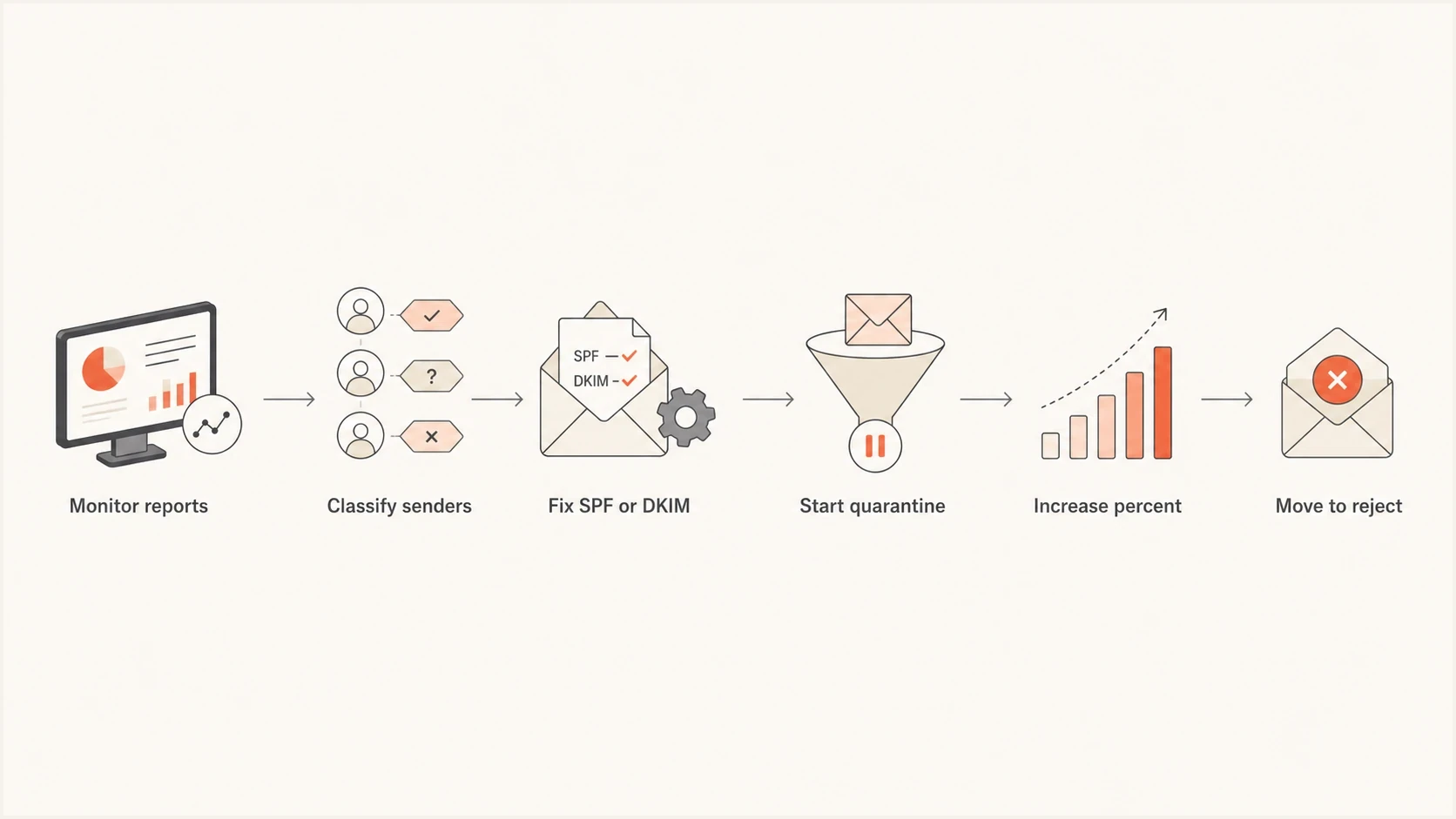
DMARC enforcement flowchart from monitoring to quarantine and reject.
The most important part of the ramp is the pause after a problem. If a source fails after you move to quarantine, do not continue to the next policy step. Fix the source, wait for fresh reports, then continue. The page on when to switch covers the decision point in more detail.
Check indirect mail before reject
Forwarders, role aliases, and mailing lists can change a message after it leaves the original sender. Forwarding commonly breaks SPF because the forwarding server is not authorized by the original envelope domain. A valid DKIM signature can preserve the DMARC pass, but mailing-list modifications can break that signature too.
- Require DKIM: Do not rely only on SPF before reject, especially when recipients use forwarding addresses.
- Test real routes: Include mailing-list posts, alumni forwarding, and shared role addresses in the quarantine observation period.
- Choose by domain use: Keep quarantine when a general-purpose user domain depends on mailing lists that cannot preserve authentication.
- Set user policy: If reject is required, document limits on posting through Internet mailing lists and warn affected users.
Reject is not universal
RFC 9989 advises general-purpose user domains against p=reject when users might post to Internet mailing lists. Quarantine can be the safer long-term policy for those domains. Controlled transactional or brand-sending subdomains are better candidates for reject.
DNS records for each stage
A DMARC policy change is a TXT record update at _dmarc. RFC 9989 policy discovery uses the DNS Tree Walk, so inherited or subdomain records can matter when a receiver selects the policy domain. The examples below use a single aggregate reporting address. Replace the address with one you control, or use the address supplied by your reporting platform.
If you are switching DMARC reporting providers while staging enforcement, keep that as a separate change. Leave SPF, DKIM, MX, and the p value unchanged, add the new rua address beside the old one for 7 to 14 days, confirm normal sources appear in the new reports, then remove the old address. Use one DMARC TXT record with multiple rua URIs separated by commas.
Monitoring modedns
v=DMARC1; p=none; rua=mailto:dmarc@yourdomain.com
Initial quarantinedns
v=DMARC1; p=quarantine; t=y; rua=mailto:dmarc@yourdomain.com
Reject when appropriatedns
v=DMARC1; p=reject; rua=mailto:dmarc@yourdomain.com
If you need to create a record rather than edit one, use a DMARC record generator and then publish the TXT value in your DNS provider. Keep one DMARC record only. Multiple DMARC TXT records at the same name can cause receivers to ignore the policy.
Subdomains need a decision too
The sp tag controls existing subdomain policy, and np controls non-existent subdomains. The psd tag is active for Public Suffix Domain policy records. If your root domain moves to reject but old subdomains still send mail, check them first. For parked or non-sending subdomains, reject is usually the cleaner outcome.
What to watch during the rollout
During enforcement, the core signals are not complicated. You want to see legitimate mail pass, unauthorized mail fail, and no sudden increase in support tickets about missing messages. Quarantine can create spam-folder placement even when the receiver accepts the message, so support complaints and placement checks matter before reject.
Enforcement decision bands
Use sender identity and business impact instead of one blended pass-rate target.
Safe to advance
All approved
Every approved source passes DMARC and observed failures are unauthorized.
Hold and fix
Any known failure
A known sender still has SPF, DKIM, or domain matching problems.
Do not enforce
Any unknown risk
Business mail is failing or a meaningful source remains unclassified.
A domain-wide percentage can hide the failure that matters most. One failed source that sends password resets is more important than a large volume of obvious unauthorized mail. Treat sender identity and business function as part of the decision.
- Authentication: Track SPF pass, DKIM pass, and DMARC pass by source.
- Volume: Compare failed message counts before and after each policy change.
- Placement: Watch for real mail moving to spam after quarantine.
- DNS changes: Confirm there is one DMARC TXT record, valid reporting syntax, and no accidental provider cutover.
- Reputation: Monitor blocklist and blacklist signals for related IPs and domains.
- Complaints: Ask support and customer-facing teams to report missing transactional mail quickly.
If quarantine pushes legitimate mail to spam, fix the sender first. The article on quarantine failures explains the common causes: missing DKIM, SPF domain mismatch, forwarding, and third-party platforms using their own bounce domains.
Where Suped fits
Suped is our DMARC and email authentication platform. In this workflow, Suped collects aggregate reports, groups results by sending source, and shows where SPF, DKIM, or domain matching fails. Teams can classify each source before changing policy instead of trying to infer the sender from raw XML.
Suped's DMARC monitoring supports the rollout by separating approved traffic from unknown sources, identifying the failed authentication path, and alerting the team when a policy change exposes a new problem.
Hosted DMARC configuration dialog showing policy controls, CNAME setup, and expanded advanced options
If your team changes DNS slowly or manages many domains, Suped's Hosted DMARC keeps policy staging and rollback in the same workflow, without a new DNS ticket for every policy edit. Keep change approval and ownership with the team that controls the domain.
Practical workflow
- Add domain: Connect the domain and verify DMARC reporting.
- Classify sources: Mark approved senders and investigate unknown traffic.
- Fix issues: Repair SPF, DKIM, forwarding, and domain match problems.
- Stage policy: Move through quarantine and, when appropriate, reject with alerts active.
When to pause or roll back
A rollback is not a failure. It is the prepared path that makes enforcement acceptable. If a real sender starts failing after a policy change, return to the last working stage or return to monitoring while you fix the source.
- Pause: A known business sender fails DMARC after the latest change.
- Pause: Complaint volume rises after quarantine or reject begins.
- Pause: Reports show a new high-volume source that has not been classified.
- Roll back: Password resets, invoices, support mail, or login messages stop arriving.
- Roll back: A DNS mistake creates duplicate DMARC records or removes reporting.
The rollback record should be prepared before enforcement starts. For example, if full reject causes a real issue, change back to quarantine at the last working stage, or return to monitoring if the source of the issue is unclear.
Rollback to monitoringdns
v=DMARC1; p=none; rua=mailto:dmarc@yourdomain.com
After rollback, do not guess at the fix. Look at the failed source, the From domain, the SPF domain, and the DKIM signing domain. If SPF passes but the domain does not match, DKIM with the correct domain often gives a cleaner long-term fix. If DKIM fails because the sender has no key, publish the required selector record.
Move only when the data says yes
The safest DMARC transition is boring: monitor, fix, stage, observe, and repeat. Move to quarantine when approved senders pass and the remaining failures are unauthorized. Move to reject only when quarantine has not surfaced real delivery problems, indirect mail has been assessed, and your team has a clear rollback path.
Reject is a suitable final policy for controlled transactional and brand-sending domains after every legitimate source passes. Quarantine can remain the right long-term policy for general-purpose domains whose users depend on mailing lists or other indirect routes. The practical goal is to get legitimate senders passing DMARC, then choose the strongest policy that the domain can support without breaking valid mail.




