Is it safe to email DNS records?

Updated on 4 Aug 2026: We added a safer approval workflow for emailed DNS changes and clarified which DNS details need protection.
Yes, it is usually safe to email public DNS values such as MX, SPF, DKIM public keys, DMARC, CNAME, A, AAAA, MTA-STS, or TLS-RPT records. Those records are designed to be queried by other systems. Emailing a value that is already published in public DNS does not grant control of the domain.
The unsafe part is sending access, secrets, or private infrastructure data with the record. Do not email DNS hosting credentials, registrar logins, API tokens, TSIG keys, DKIM private keys, or a full internal zone export. A person who forwards public records has copied information that was already meant to be queryable. A person who forwards DNS provider access has created an account security problem.
- Safe to email: Public record values, record names, TTLs, and clear implementation notes.
- Do not email: Logins, private keys, API tokens, recovery codes, or internal-only DNS data.
- Control risk: A record email does not grant DNS or registrar access, but every change request still needs authorization.
What DNS records reveal
DNS records are instructions published under a domain. Mail servers query them to decide where to deliver mail and how to verify it. For email authentication, the common public records are SPF, DKIM public keys, DMARC, MX, MTA-STS, TLS-RPT, and sometimes CNAME records that point a selector or sending subdomain to a provider-controlled name.
A DNS record can reveal operational details. It can show email platforms, inbound mail providers, security controls, selector names, and DMARC reporting addresses. That information can help reconnaissance, but it is not normally secret. Anyone can query most public records directly, and many details are also visible in email headers after receiving a normal message. Use a dedicated role address for DMARC reports instead of a personal mailbox when privacy and continuity matter.
TTL means Time to Live. It tells resolvers how long to cache a DNS answer before checking again. Including the TTL in an email helps the DNS owner plan verification and rollback timing, but the TTL does not make a record public or private.
Public email DNS recordsdns
example.com. 3600 IN MX 10 mx.example.net.
example.com. 3600 IN TXT "v=spf1 include:mail.example.net -all"
selector1._domainkey.example.com. IN TXT "v=DKIM1; k=rsa; p=PUBLICKEY"
_dmarc.example.com. IN TXT "v=DMARC1; p=none; rua=mailto:d@example.com"
Public email DNS records are implementation data, not credentials. They should still be shared carefully because copy errors and stale instructions cause outages, but the records themselves are not passwords.
- Public by design: MX, SPF, DKIM public keys, and DMARC are queried by receivers.
- Sensitive by mistake: Private keys, provider passwords, and API tokens are not DNS records.
If the question is about where SPF, DKIM, and DMARC records should live, the placement matters more than the email used to share them. The record owner name and subdomain placement decide whether authentication works. A short reference on where records belong can prevent a safe message from turning into a bad DNS change.
The risk is access, not visibility
Forwarding an email with public DNS records does not grant DNS control or the ability to send authenticated mail as the domain. Authenticated sending still requires access to an authorized sending platform, control of a DKIM private key, or another approved sending path. Public records also do not stop someone from placing the domain in a visible From address. DMARC compares an authenticated domain with the visible From domain and gives receivers a policy for failures.
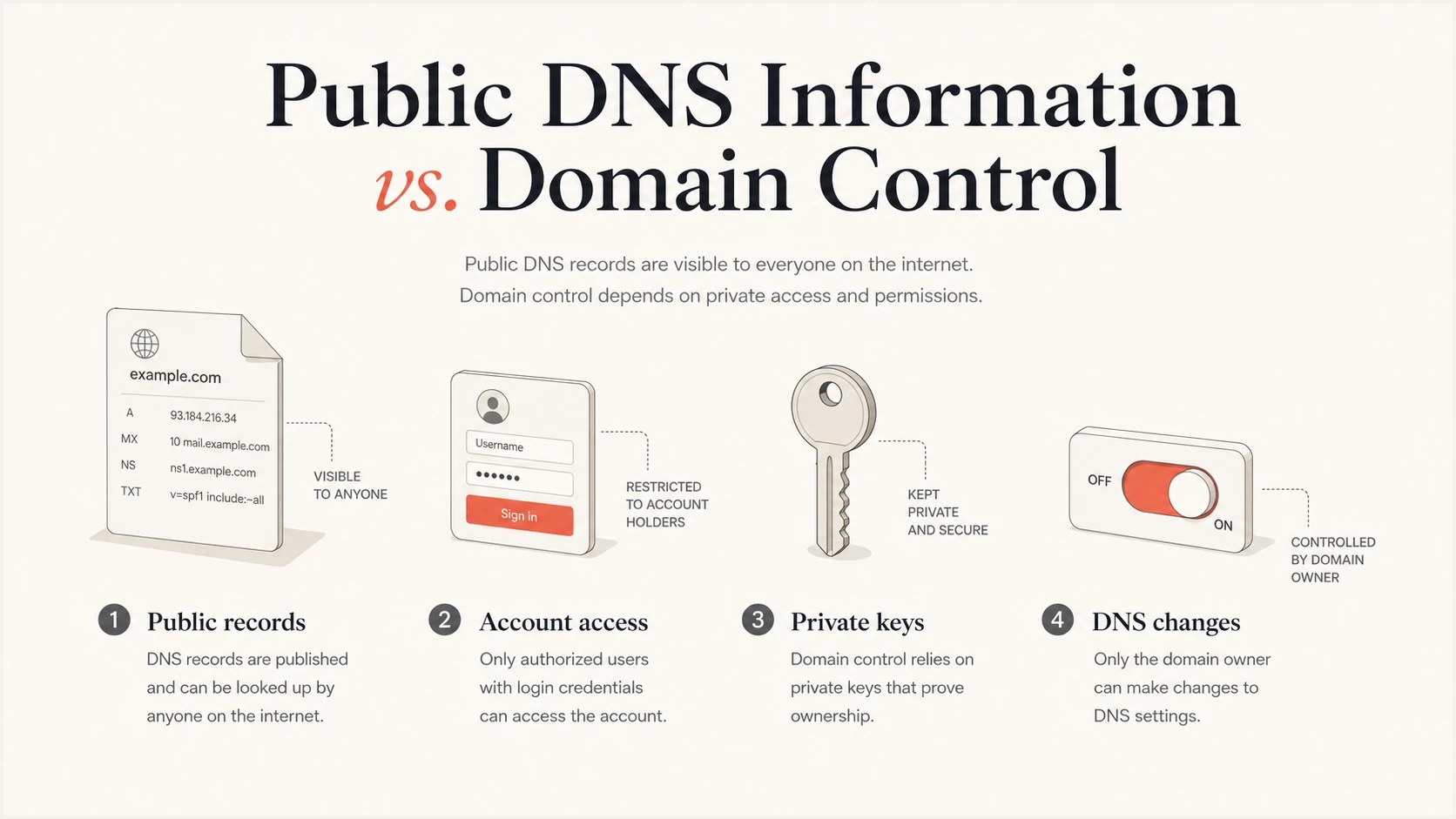
Public DNS records separated from protected account access and private keys.
That distinction matters because teams often use one phrase, DNS records, for several different things. A published DMARC TXT record is fine to paste into a ticket. A DNS provider username and password is not. A DKIM public key belongs in DNS. A DKIM private key belongs in the signing system and should be protected like any other private cryptographic key.
Usually fine to send
- Record value: The TXT, MX, CNAME, A, AAAA, or policy value to publish.
- Record location: The host name such as the root domain or a selector name.
- Record purpose: A short note about the sending service or policy the record supports.
Keep out of email
- DNS login: Provider usernames, passwords, recovery codes, or MFA backup codes.
- Private material: DKIM private keys, TSIG keys, SSH keys, or signing service secrets.
- Internal map: Private hostnames, internal IP addresses, and split-horizon zone files.
Email has forwarding, retention, indexing, and search. That makes it a poor place for secrets. It is still a reasonable place for public DNS instructions when the recipient has a business need to see them.
A safer way to share DNS records
A DNS record email should let the recipient publish the record without guessing and without asking for account access. The goal is to separate the instruction from the authority to make the change.
- Name the owner: State who requested the change and who approved it.
- List the fields: Include the fully qualified host, type, value, TTL, and propagation notes.
- Avoid screenshots alone: Screenshots help with context, but copied text prevents transcription errors.
- Document rollback: Keep the previous value and state when it should be restored if validation fails.
- Set a review point: Confirm the live authoritative DNS answer after publication.
- Use secret storage: Move credentials and private keys to an approved secret manager.
Safer email templatetext
Please publish this public DNS record.

Domain: example.com
Host: _dmarc.example.com
Type: TXT
TTL: 3600
Value: v=DMARC1; p=none; rua=mailto:d@example.com
Purpose: Enable DMARC aggregate reporting.
Previous value: none
Approval reference: CHANGE-1234

Please confirm the authoritative DNS answer once published.
Do not solve a DNS copy and paste problem by giving broad DNS host access. Access is the control point. Records are the instruction.
Do not email thesetext
DNS provider password
Registrar login
API token
DKIM private key
TSIG secret
MFA recovery codes
If an email domain is tied to a person, personal brand, or small business, consider the privacy side as well. The record itself is still public, but the domain can connect a person's identity with work infrastructure. That question is separate from DNS secrecy, and the email domain PII discussion explains that boundary.
Verify the request before changing DNS
Safe data can still arrive in an unsafe request. A compromised mailbox can send a valid-looking MX, SPF, DKIM, or DMARC change that redirects mail, authorizes an unapproved sender, or weakens enforcement. Treat the email as a delivery channel for the instruction, not as proof that the change is authorized.
- Match the request to an approved change record and confirm the requester has authority for the domain.
- Confirm high-impact changes through a separate internal channel or with a known contact method.
- Review the exact DNS difference, expected effect, validation test, and rollback value before publishing.
- Use least-privilege access so the person publishing one record cannot alter unrelated zones or registrations.
MX replacements, nameserver changes, DNSSEC changes, and new sender authorizations deserve extra review. An unauthorized change can interrupt mail or create domain hijacking risk even when the record text contains no secret.
After the change, query the authoritative name servers and compare the live answer with the approved value. Then test the affected mail flow or authentication result. A successful DNS update only proves that the value was published, not that the requested value was correct.
Validate before and after publishing
The bigger operational risk with emailed DNS records is usually not disclosure. It is publishing the wrong value, publishing it at the wrong host, leaving two records where only one is allowed, or missing a policy change after the project moves on.
For a broad check across SPF, DKIM, and DMARC, use the domain health checker. If the change is only DMARC, validate it with the DMARC checker. If you need a clean starting point for a new policy, create it with the DMARC record generator and then send the generated text to the DNS owner.
?
What's your domain score?
Deep-scan SPF, DKIM & DMARC records for email deliverability and security issues.
For ongoing work, Suped's DMARC monitoring keeps record diagnostics, aggregate report data, alerts, and fix steps in one workflow. Teams can review email authentication results without handing out DNS access.
That permission model matters in larger teams. The person who diagnoses an SPF or DMARC issue does not always need the ability to change every DNS record on the domain. A clear finding, a copied value, and a verification step are enough for many workflows.
Hosted DMARC, hosted SPF, and hosted MTA-STS also reduce how often teams need to touch their DNS provider after the first setup. Once the required delegation record is in place, future policy and sender updates can happen in a controlled workflow with monitoring around it.
DMARC record detail view showing SPF, DKIM, DMARC, rDNS diagnostics, and DNS records
The practical workflow is to share the public value, let the authorized DNS owner publish it, then use monitoring to prove the live domain matches the intended configuration. That produces a better audit trail than passing around credentials.
Risk by record type
Most email DNS records have low disclosure risk because they are public lookups. The exceptions are items that are not public DNS, items copied from a private zone, or items that grant account control.
|
|
|
|---|---|---|
MX | Low | Public mail routing data, but a requested change needs careful approval. |
SPF | Low | Public sender authorization data. |
DKIM public key | Low | Meant for receiver verification. |
DMARC | Low | Public policy and report routing; use a dedicated report address. |
CNAME | Low | Often shows a provider relationship or delegated service name. |
Internal zone | High | Can expose private infrastructure and internal naming. |
DKIM private key | High | Can sign mail if misused. |
DNS login | Critical | Grants control over records. |
Use this as a quick triage guide before sending DNS details by email.
DNS sharing risk tiers
A practical way to decide which channel is appropriate for DNS-related material.
Low
Email is fine
Public record values and implementation notes
Medium
Email with need-to-know
Provider relationships or domain ownership context
High
Use secure storage
Private zones, keys, tokens, or credentials
One more nuance: DNSSEC public records, DS records, and DNSKEY records are public. DNSSEC signing keys and key management access are not. The same rule applies to DKIM: the public key is published, the private key is protected.
When email is the wrong channel
Some cases require a secure internal process instead of email. Those cases involve account control or hidden infrastructure, especially when a change has high risk. They do not involve ordinary public DNS records.
- Credential sharing: Any login, token, or recovery value belongs in approved secret storage.
- Private zones: Internal hostnames and IP maps should follow internal data handling rules.
- Full exports: A complete zone file can reveal more than the one record someone needs.
- High-risk changes: MX swaps, DMARC enforcement, and provider cutovers need review and rollback plans.
Avoid sending complete zone data when a single record is enough. Sending one SPF value is different from sending every host and service under a domain. If a vendor asks for broad DNS access just to publish one email authentication record, ask for the exact record instead.
CNAME-based setup deserves a small note. CNAME records are still public, but they can delegate part of a namespace to another system. That is normal for many email platforms, yet it should be understood before publication. The separate guide on CNAME record effects covers that operational side.
Views from the trenches
Best practices
Share the exact host, type, value, TTL, and purpose so records are not guessed later.
Send public records as text, but move credentials and private keys to a secret manager.
Confirm the final DNS value from a live lookup after publishing, not just the ticket history.
Common pitfalls
Treating a DKIM private key like a DNS TXT value can expose signing control very fast.
Giving DNS host access to solve a copy and paste problem creates a real security risk.
Forwarding old records without checking current DNS causes stale or duplicate records later.
Expert tips
Use read-only screenshots or copied TXT values when the recipient only needs review access.
Keep a separate owner list for who can approve DNS changes and who can publish them.
Log the reason for every email authentication DNS change before the change goes live.
Expert from Email Geeks says DNS records are published for querying, so emailing ordinary MX, SPF, DKIM public key, or DMARC values does not create domain control.
2025-02-13 - Email Geeks
Expert from Email Geeks says forwarding public records does not grant DNS control; authenticated sending still requires an approved sender or private signing material.
2025-02-13 - Email Geeks
The practical answer
Emailing DNS records is safe when the message contains public DNS values and enough context for the DNS owner to publish them correctly. It is not safe when the message includes credentials, private keys, internal DNS maps, or broad exports that reveal more than the recipient needs.
The cleanest policy is simple: send records, not access. Send the exact value, verify the request through the approved change process, confirm the live result, and keep the authority to change DNS with the people who own that control.
For DMARC work, Suped shows the record, diagnostics, reporting data, and fix steps in one workflow. A team can share a finding or requested record change without passing DNS credentials around.




