How should DMARC, SPF, and DKIM records be configured for domains that do not send email?

Published 26 May 2025
Updated 22 Sep 2026
12 min read
Summarize with
Updated on 22 Sep 2026: We clarified the no-send DNS baseline for current DMARC reporting standards, SPF identity checks, and null MX use.
For a domain that does not send email, configure an explicit no-mail policy: publish SPF with v=spf1 -all, publish DMARC at _dmarc with p=reject, and keep DKIM selectors absent by default. An empty DKIM key is an explicit revocation signal, not a DMARC requirement. If the domain will not receive email either, add a null MX record as well.
The short version is simple: SPF and DKIM do not need to pass DMARC when the domain sends no legitimate mail. SPF still belongs in DNS because it tells SPF-checking receivers that no IP is authorized to use the domain in an SMTP MAIL FROM or HELO/EHLO identity. DMARC uses only the MAIL FROM SPF result for alignment with the visible From domain, then asks participating receivers to apply the published policy when DMARC fails. DKIM is different because receivers only look up a public key when a message carries a DKIM signature.
- SPF: Use v=spf1 -all at each exact domain or subdomain that must not send.
- DMARC: Use p=reject and add reporting when somebody will monitor the reports.
- DKIM: Leave selectors absent by default, and use empty keys only as documented revocations.
- MX: Use a null MX only when the domain also accepts no inbound mail.
Confirm the domain is truly no-send
Before publishing a hard SPF fail and DMARC reject policy, confirm that the parked, inactive, or defensively registered domain has no legitimate sending use. Overlooked mail streams will fail after enforcement, even when they send only a few messages each month.
- Check website and application mail, including contact forms, account notices, and password resets.
- Check infrastructure alerts sent by hosts, scanners, monitoring systems, and network devices.
- Check billing, support, receipt, and customer relationship workflows that use the domain in From.
- Check custom return-paths, bounce domains, and HELO/EHLO names that use the domain or a subdomain.
- Inventory subdomains and third parties that use the organizational domain in visible From addresses.
- Review legacy systems, mail logs, DNS records, and recent DMARC aggregate data.
If one legitimate mail stream exists, treat the domain as active or move that stream to a dedicated sending subdomain. Configure aligned SPF or DKIM there before applying reject to the rest of the domain.
DNS records to publish
For a completely unused domain, start with the records below. Replace example.com and the reporting destination with your own values. The example sends reports to a separate receiving domain because example.com has a null MX. In a DNS UI, enter the DMARC content as one TXT value. The split below only keeps each line readable.
No-send DNS baselinedns
example.com.        TXT  "v=spf1 -all"

_dmarc.example.com. TXT  (
  "v=DMARC1; p=reject; sp=reject; np=reject; adkim=s; aspf=s; "
  "rua=mailto:dmarc-reports@reports.example.net"
)

example.com.        MX   0 .
That setup says no host is allowed to send for this domain, the domain owner requests rejection of mail that fails DMARC while claiming it, and both existing and non-existent subdomains should use reject unless a more specific DMARC record overrides the policy. The null MX line says the domain does not accept inbound email. It must be the only MX record at that name, and it does not control outbound authentication. Do not publish it if the domain needs mailboxes, aliases, forwarding, or bounce handling, or if legitimate mail uses the domain in a MAIL FROM or visible From address.
Authorize an external report destination
When rua points to another organizational domain, that report receiver must authorize reports for the policy domain. For this example, the receiver publishes example.com._report._dmarc.reports.example.net with the TXT value v=DMARC1;. Use the reporting destination supplied during Suped domain onboarding when Suped receives and processes the aggregate reports.
|
|
|
|
|---|---|---|---|
SPF | Root | v=spf1 -all | The domain sends no mail. |
DMARC | _dmarc | p=reject | No mail should claim the domain. |
DKIM | Selector | None by default | No sender signs mail for it. |
MX | Root | 0 . | No inbound mail is accepted. |
Use the table as a compact checklist, not as a full zone-file example.
Validate the final record after publishing because DNS providers rewrite TXT values in different ways. The DMARC checker confirms that the policy parses, the reporting address is present, and the record has one valid DMARC version tag.
Why SPF still belongs on no-send domains
SPF and DMARC answer different questions. SPF says which IP addresses can use the domain in the SMTP MAIL FROM or HELO/EHLO identity. DMARC evaluates whether SPF or DKIM passes and aligns with the visible From domain, then supplies a policy for failures. Since no mail should originate from the domain, SPF should authorize nobody.
Do not list the VPS IP unless it sends mail
Adding your VPS IP to SPF feels harmless, but it changes the security model. If that host later sends unwanted mail, the messages can pass SPF for the domain. For a no-send domain, the correct SPF record is v=spf1 -all.
This matters because receivers can use SPF as a separate signal even when they do not enforce DMARC. A hard SPF fail gives those systems a clear answer: the domain owner authorized no sending sources.
Some receivers reject an SPF failure during the SMTP transaction before they accept the message body. Those attempts never expose the visible From domain for DMARC evaluation and will not appear in DMARC aggregate reports. A quiet DMARC report stream therefore does not prove that nobody attempted to abuse the domain.
Bad no-send setup
- SPF: Authorizes a web server that should never send mail.
- DMARC: Uses monitoring only, so rejected spoofing is not requested.
- Risk: A compromised sender can look more legitimate than it should.
Good no-send setup
- SPF: Authorizes no IP addresses with a hard fail.
- DMARC: Requests rejection for mail using the domain.
- Risk: Receivers get a clearer no-mail signal.
What the DMARC record should contain
The minimum DMARC record for a no-send domain is v=DMARC1; p=reject. Add reporting when somebody will read the reports, because they show which IPs and services are attempting to use the domain. For a domain with no legitimate senders, any non-zero sending pattern deserves review.
RFC 9989 is the current DMARC specification and replaces RFC 7489. RFC 9990 defines aggregate reporting, while RFC 9991 defines failure reporting. RFC 9989 keeps p, sp, rua, and the alignment tags used here. It also defines np for non-existent subdomains, registers pct as historic, and adds t=y for testing. Omit both pct and t=y on a confirmed no-send domain because the goal is full enforcement and the default t=n already requests that the policy be applied.
The aspf=s and adkim=s tags make DMARC use strict domain matching for SPF and DKIM. They are acceptable on a no-send domain, but they are not the main protection. The important tag remains p=reject.
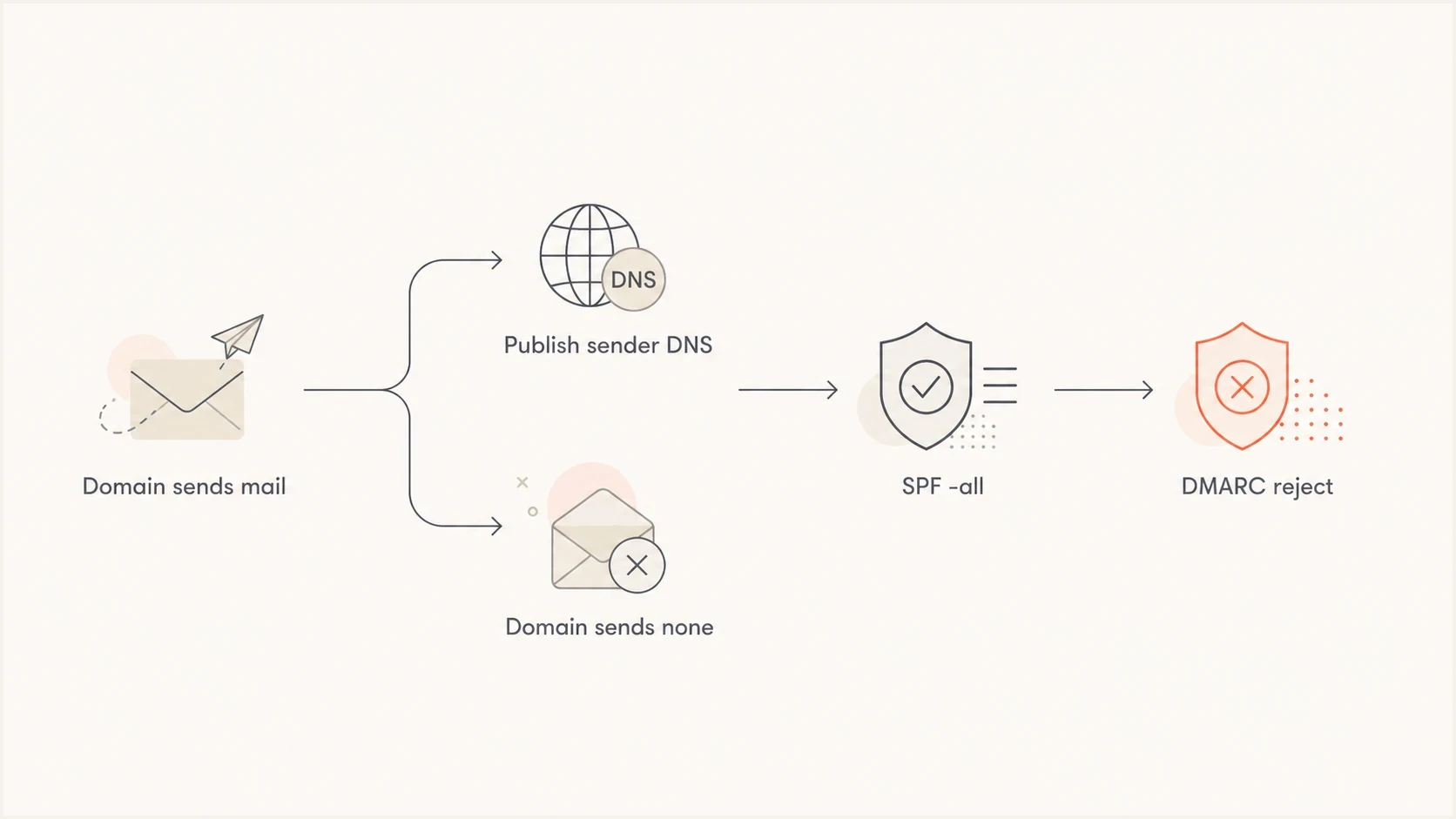
SPF -all and DMARC reject decision path for a non-sending domain.
A reporting address creates a maintenance duty. Publishing rua without inspecting the reports does not weaken p=reject, but it leaves useful evidence unread. Suped's DMARC reporting workflow converts aggregate reports into source lists and authentication results, then alerts the team when a quiet domain begins producing unexpected DMARC activity.
Suped DMARC dashboard showing email volume, authentication health, and source breakdown
Why DKIM records are usually unnecessary
DKIM is not a domain-wide declaration that a domain sends or does not send mail. It is a signature check. A receiver looks up a DKIM public key only after a message contains a DKIM-Signature header naming a selector and a signing domain.
Do not publish made-up DKIM selectors for a no-send domain. With no legitimate sender, there is no private key to match, no key rotation plan, and no selector inventory. A missing selector cannot verify a forged DKIM signature. A signature from another domain can verify for that domain, but it does not make DMARC pass for your visible From domain unless the signing domain aligns.
Empty DKIM keys are revocation signals
A DKIM record with an empty p value explicitly revokes a selector. Use it for a selector that previously existed and can no longer be trusted. Some no-send policies also publish *._domainkey with v=DKIM1; p= as a wildcard revocation signal. DMARC reject does not require that wildcard record.
If policy requires wildcard DKIM revocation, document the choice, confirm that the DNS provider handles wildcard TXT records correctly, and remove the wildcard before deploying a real selector. For ordinary parked domains, absent selectors with SPF -all and DMARC reject remain a clear default.
Subdomains need deliberate policy
Apex domains and subdomains need separate review. If example.com sends no mail and no subdomain sends either, publish sp=reject for existing subdomains and np=reject for non-existent subdomains at the organizational domain. If np is absent, RFC 9989 applies sp or p to those names. If a subdomain sends mail, give it its own aligned SPF, DKIM, and DMARC configuration.
No-send subdomain exampledns
app.example.com.        TXT  "v=spf1 -all"
_dmarc.app.example.com. TXT  "v=DMARC1; p=reject"
Use explicit records on important subdomains in mixed estates. This removes guesswork when someone later connects a marketing system, help desk, or application server. For more detail, the subdomain DMARC setup page explains inheritance and overrides.
Domain will never send
- Policy: Move straight to reject after the audit.
- SPF: Publish a hard fail.
- DKIM: Leave selectors absent by default.
Domain planned for future use
- Policy: Change DNS before launch.
- SPF: Authorize only the real sender.
- DKIM: Publish only provider-issued selectors.
Testing and ongoing monitoring
After the DNS changes publish, test the domain rather than assuming the provider saved each value correctly. Confirm that there is only one SPF record, only one DMARC record at the expected host, no conflicting MX record beside a null MX, and no old DKIM TXT selectors or CNAME delegations left by a previous sender.
?
What's your domain score?
Deep-scan SPF, DKIM & DMARC records for email deliverability and security issues.
Suped supports maintenance across several domains by tracking DMARC aggregate data and the related SPF, DKIM, and blocklist (blacklist) status in one workflow. The useful signals for a quiet domain are a new sending source, a DMARC pass, a DNS change, or a subdomain that needs a specific policy.
For ongoing protection, DMARC monitoring provides the evidence behind the policy. Teams that need controlled policy changes across a domain portfolio can use Hosted DMARC. When creating the first record, the record generator produces a valid starting point.
A practical monitoring rule
For a no-send domain, treat any DMARC-passing volume as an incident until it is explained. A valid signature from an unrelated domain is not enough. The unexpected message must pass through SPF or DKIM that aligns with the visible From domain.
Common mistakes to avoid
Most no-send domain mistakes come from copying a normal sending-domain setup. A parked domain does not need broad includes, old vendor selectors, or soft-fail SPF. It needs a clear denial policy and monitoring that catches unexpected use.
- Soft fail: Do not use ~all for a domain that should authorize nobody.
- Duplicate SPF: Do not keep an old SPF record beside the no-send SPF record.
- Forgotten subdomains: Do not assume every important hostname inherits the intended policy.
- Fake DKIM: Do not publish made-up DKIM keys to look complete.
- Unreachable reports: Do not send reports to a domain that has a null MX.
Public sector guidance reaches the same operational answer for domains that do not send mail: make the domain explicit, not silent. The UK guidance is a useful reference for the SPF, DMARC, DKIM revocation, and null MX pattern.
A reject policy is valid when the domain sends no mail. A confirmed no-send domain is a clean case for reject because there is no legitimate mail stream to break. The detailed reject policy discussion covers that specific point.
Views from the trenches
Best practices
Publish SPF -all and DMARC reject on domains with no legitimate sending use case.
Keep DKIM selectors absent unless a real mail system owns the matching private key.
Use reporting and alerts so any sudden mail volume from a quiet domain gets reviewed.
Common pitfalls
Adding a VPS IP to SPF can let unwanted mail pass if that host starts sending mail.
Undocumented wildcard DKIM records can complicate later deployment of real selectors.
Leaving old SPF includes behind weakens the no-send signal receivers should evaluate.
Expert tips
Use null MX only when the domain has no inbound mailboxes, aliases, or bounce handling.
Set sp and np policy carefully when some subdomains send and others remain parked.
Treat DMARC-passing mail on a no-send domain as suspicious until it is explained.
Marketer from Email Geeks says no-send domains do not need SPF or DKIM to pass DMARC, because no legitimate mail should pass.
2020-06-05 - Email Geeks
Marketer from Email Geeks says a no-send domain should publish SPF -all with a DMARC reject policy.
2020-06-05 - Email Geeks
Final no-send configuration
For a confirmed no-send domain, publish SPF -all, DMARC p=reject, and no DKIM selectors by default. If it also receives no mail, add a null MX and route DMARC reports to a different receiving domain. Where subdomains exist, set sp and np deliberately.
Before a real sender uses the domain, replace the no-send SPF record, publish the sender's DKIM selectors, keep DMARC reporting on, and confirm passing alignment. Complete those changes before the first campaign, application alert, or transactional message leaves the system.




