How do I set up DMARC records for subdomains?

Updated on 20 Aug 2026: We updated this guide for RFC 9989 test mode, external report authorization, and safer delegated subdomain control.
To set up DMARC records for subdomains, first check whether you actually need separate subdomain DMARC records. If your root domain already has a valid DMARC record, subdomains inherit that policy by default. A separate TXT record at _dmarc.alert1 is only needed when that subdomain needs its own policy, reporting address, identifier-match settings, or your ESP asks for it.
The most common mistake is starting with an A record. An A record points a host name to an IP address. It does not authenticate email. For a sending subdomain such as alert1.domain.com, collect the ESP-supplied SPF, DKIM, bounce, tracking, and reply-handling records first. Then decide whether the subdomain needs a dedicated DMARC TXT record.
For ongoing reporting, Suped's DMARC monitoring groups authentication results and alerts by sending subdomain. Suped's product is useful when separate mail streams need separate evidence before policy changes.
The direct setup answer
The direct answer is this: publish DMARC at the organizational domain first, add reporting, then create a subdomain DMARC record only when that subdomain needs to behave differently. If domain.com has _dmarc with p=none and no sp policy, then alert1.domain.com also gets that monitoring policy unless a more specific subdomain DMARC record exists.
- Default inheritance means receivers use the organizational domain DMARC record when no valid subdomain record exists.
- Separate control is useful when a subdomain needs its own policy staging, reporting destination, or identifier-match controls.
- ESP records should be requested for the exact DKIM, SPF, Return-Path, click tracking, and reply hosts used by each subdomain.
- An A record is not an email authentication record, so it does not replace SPF, DKIM, or DMARC.
Use the parent policy unless you need a reason not to
Keep subdomain DMARC records simple unless the mail stream needs isolation. A newsletter subdomain, transactional alert subdomain, and support subdomain can inherit one parent policy during early monitoring. Dedicated records become useful when one stream is ready for enforcement before another.
Root DMARC record with reportingdns
Host: _dmarc
TXT: v=DMARC1; p=none; rua=mailto:d@domain.com
A root record with no reporting address is technically a DMARC record, but it gives you little operational value. Add aggregate reports at the start, then use those reports to decide which subdomains pass SPF or DKIM in real mail.
What to add in DNS
A sending subdomain usually needs more than DMARC. The exact records depend on how your ESP sends mail. The visible From (RFC5322.From) domain, the DKIM signing domain, and the Return-Path (RFC5321.MailFrom) domain determine whether DMARC passes through an SPF domain match, a DKIM domain match, or both.
|
|
|
|---|---|---|
DMARC | Policy host | Override or reports |
SPF | Bounce host | SPF pass path |
DKIM | Selector host | Signed mail |
MX | Mail host | Inbound mail |
A or AAAA | Named host | IP address mapping |
DNS items to confirm for each sending subdomain
For update@alert1.domain.com, the DMARC lookup starts at the visible From domain. Receivers first look for a record at the subdomain. If they do not find one, they move up to the organizational domain. That inheritance behavior is the main reason you do not need to copy the same DMARC record to every subdomain.
Recipients also see the subdomain when it appears in the visible From address. Mail from support.domain.com or alerts.domain.com can be a good separation pattern, but it should be an intentional sender identity choice.
Optional subdomain DMARC recordsdns
Root domain:
Host: _dmarc
TXT: v=DMARC1; p=none; rua=mailto:d@domain.com

Alert subdomain 1:
Host: _dmarc.alert1
TXT: v=DMARC1; p=none; rua=mailto:d@domain.com

Alert subdomain 2:
Host: _dmarc.alert2
TXT: v=DMARC1; p=none; rua=mailto:d@domain.com
Some DNS editors want the host as _dmarc.alert1. Others want the full host name. Do not publish both. The final DNS name must resolve to one DMARC TXT record at _dmarc.alert1.domain.com.
If rua sends reports to another organizational domain, that destination must authorize the policy domain with a TXT record. For a policy at alert1.domain.com and reports sent to d@example.net, the authorization name is alert1.domain.com._report._dmarc.example.net with the value v=DMARC1. Without it, report generators must ignore that external destination.
Check the exact owner name before adding ESP records. If alert1.domain.com already has a CNAME, do not add MX, TXT, A, or AAAA at alert1.domain.com. Use a separate verification host such as verify.alert1.domain.com, ask the ESP for direct records, or confirm whether the ESP checks the CNAME target. DMARC for that sender still lives at _dmarc.alert1.domain.com, which is a different owner name.
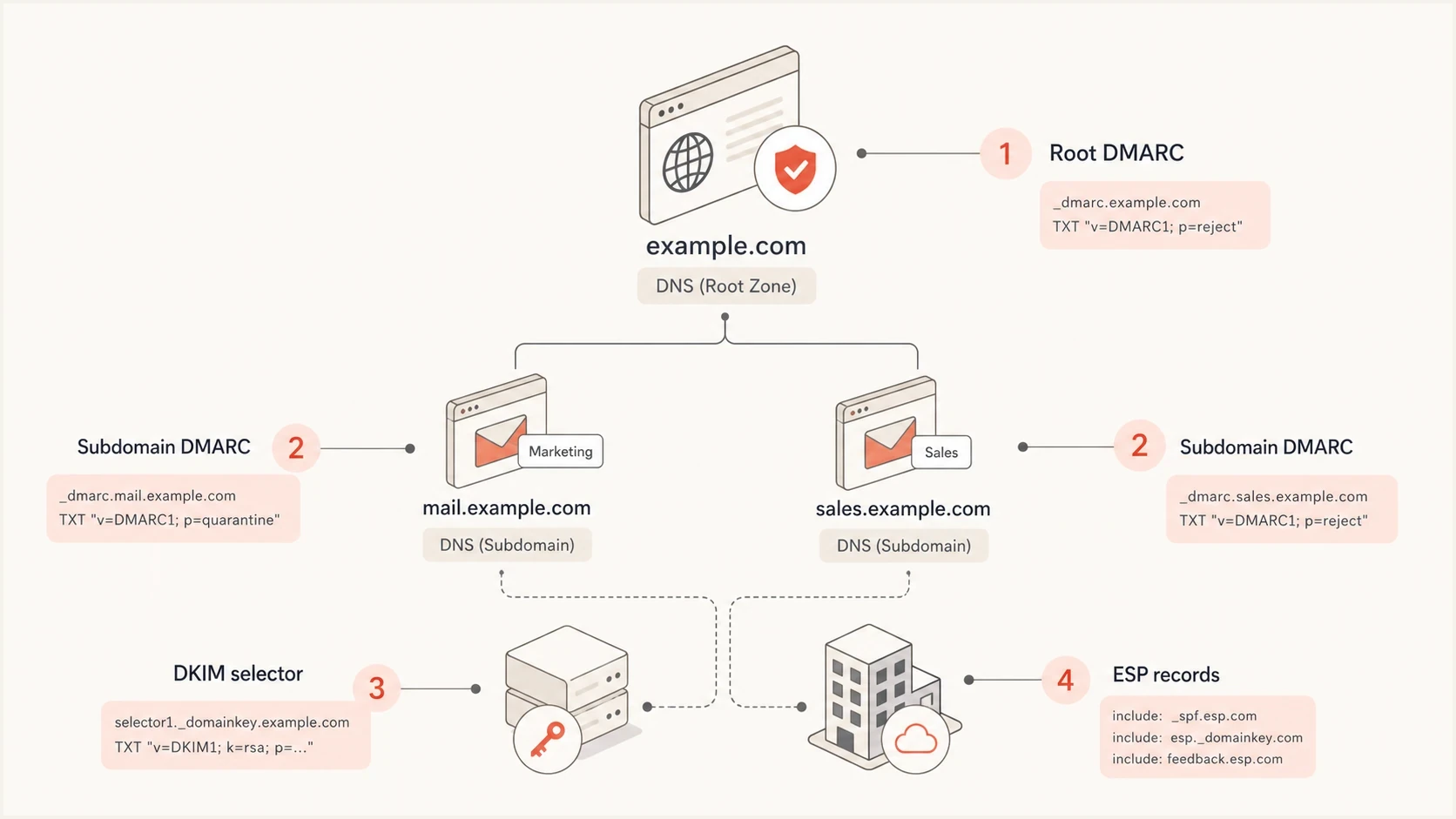
Infographic showing root DMARC, subdomain DMARC, DKIM selector, and ESP records.
How inheritance, sp, and np work
DMARC policy discovery is specific before general. Receivers check the exact From domain first. If alert1.domain.com has its own valid DMARC record, that record wins. If it does not, receivers use DNS Tree Walk behavior to find the organizational domain record at _dmarc.domain.com.
The sp tag lets the root DMARC record set a different policy for subdomains. For example, p=quarantine with sp=reject tells receivers to quarantine failing root-domain mail and reject failing subdomain mail. If sp is absent, subdomains use the p policy.
The np tag handles non-existent subdomains when the parent record is used. Active sending subdomains usually need sp or their own DMARC record; np is mainly for made-up names under the domain.
Publish sp on the organizational-domain policy. A dedicated record at _dmarc.alert1.domain.com applies its own p value to that Author Domain, so adding sp there does not create a second policy layer for its children.
Using root policy only
- This fits when several subdomains use the same enforcement plan and reporting mailbox.
- One DMARC record is easier to maintain than repeated copies.
- A strict parent policy affects any subdomain that lacks an override.
Using subdomain records
- This fits when a mail stream needs separate policy staging or separate report routing.
- Each subdomain record needs ownership and review.
- A stale override can leave one stream weaker than the rest.
Root record with subdomain and non-existent name policiesdns
Host: _dmarc
TXT: v=DMARC1; p=quarantine; sp=none; np=reject; rua=mailto:d@domain.com
A dedicated subdomain record also overrides the parent. That subdomain override is useful when a new alert stream needs monitoring while the parent domain already runs quarantine or reject. Use overrides deliberately and remove them when the subdomain catches up.
Control delegated subdomain access
A parent sp=reject policy cannot overrule a valid DMARC record published for an exact subdomain. A team or contractor with DNS control for a delegated subdomain can publish p=none at that subdomain, which weakens the inherited handling for mail using that From domain.
Delegated DNS can also affect relaxed alignment. Control of an SPF domain or DKIM selector below the organizational domain can produce an aligned identifier for root-domain mail. Use strict aspf=s or adkim=s when exact-domain matching is required, after testing legitimate senders.
Treat subdomain DMARC as a governed DNS change
- Record which team controls every delegated sending subdomain and its authentication records.
- Require review before publishing a weaker exact-domain DMARC policy.
- Audit dedicated subdomain records for stale p=none exceptions after migrations.
- Remove abandoned DNS delegations and vendor records when a sending relationship ends.
RFC 9989 changes for subdomains
DMARC is now defined by RFC 9989. It obsoletes RFC 7489 and RFC 9091, while aggregate and failure reporting are defined separately in RFC 9990 and RFC 9991. For subdomain setup, the practical change is DNS Tree Walk policy discovery and updated staging guidance, not a new TXT record type.
- DNS Tree Walk means receivers check the exact Author Domain, then walk upward to find the organizational domain or a public suffix policy when needed.
- The np tag can set handling for non-existent subdomains, while psd identifies public suffix policy cases.
- The pct tag was removed. Do not use it to apply enforcement to a percentage of failures.
- The new t=y tag signals test mode for quarantine or reject, but it does not affect reporting and has no effect when the applicable policy is none.
- Use aggregate reports and controlled traffic before moving policy from p=none to enforcement. A receiver still decides how it handles a DMARC result.
What stays the same
The operational setup remains familiar: publish one valid TXT record at the correct DMARC owner name, make SPF or DKIM pass with the visible From domain, collect aggregate reports, and raise policy after legitimate traffic is clean.
Step-by-step setup
Use the same order for newsletter subdomains, product alert subdomains, and notification subdomains. DMARC comes after you know how the ESP wants to authenticate the mail.
- List every ESP and internal system that sends using the subdomain.
- Confirm which domain appears in the visible From, DKIM signature, Return-Path, tracking links, and reply path.
- Publish the provider's DKIM, SPF, bounce, tracking, and reply records exactly as supplied.
- Use root inheritance for shared policy, or publish a subdomain DMARC record for separate control.
- Include aggregate reporting before enforcement so you can see real pass and fail sources.
- Move to quarantine or reject after legitimate mail passes through an SPF domain match or DKIM domain match. If you publish t=y during testing, confirm how your main receivers handle that signal.
For a clean starting point, use the Suped DMARC record generator to create a record, then adjust the host name for the exact subdomain only when an override is needed.
DMARC record generator
Choose your policy, reporting addresses, and alignment settings.
DNS TXT record
v=DMARC1; p=quarantine; rua=mailto:dmarc@example.com
For teams managing several domains or client accounts, Suped's Hosted DMARC reduces direct DNS edits after the initial setup. That is useful when subdomain policy staging changes often, because the operational work moves into controlled policy settings instead of repeated zone-file edits.
Hosted DMARC configuration dialog showing policy controls, CNAME setup, and expanded advanced options
Do not skip SPF and DKIM
DMARC does not authenticate by itself. It checks whether SPF or DKIM passed and matched the visible From domain. A subdomain DMARC record without working SPF or DKIM produces reports, but it does not make the mail trustworthy.
Testing before traffic
After DNS is published, test in two layers. First, validate the DNS record itself. Then send real email through the ESP and inspect the authentication result in the headers and DMARC reports. Both checks matter because a syntactically valid record can still fail the domain-match check.
Use the Suped DMARC checker to confirm that the record resolves, has one DMARC TXT value, and parses cleanly.
DMARC checker
Look up a domain's DMARC record and catch policy issues.
?/7tests passed
Then send a small batch through each new subdomain. Check that DKIM passes with a matching signing domain or SPF passes with a matching Return-Path domain. With relaxed mode, the organizational domain match is enough. With strict mode, the domains must match exactly.
DMARC record detail view showing SPF, DKIM, DMARC, rDNS diagnostics, and DNS records
Suped's product groups DMARC sources by subdomain, flags unauthenticated senders, shows SPF and DKIM diagnostics, and sends alerts when failures cross a configured threshold. That shortens the loop between publishing a record and deciding whether the subdomain is ready for more traffic.
Common mistakes
Most subdomain DMARC problems come from mixing DNS concepts together. The zone editor accepts many record types, but email authentication is picky about host names, record counts, and the domain in the actual email headers.
Mistakes that break subdomain DMARC
- An A record does not create SPF, DKIM, or a DMARC domain match.
- A monitoring policy without aggregate reporting leaves you blind.
- Putting the TXT value on the subdomain itself is not the same as putting it under the DMARC host.
- Multiple DMARC TXT values at one host cause receivers to ignore the policy.
- Adding MX, TXT, A, or AAAA beside a same-name CNAME creates invalid DNS and can break ESP verification.
If you see failures after publishing, check for multiple DMARC records, DNS host-name expansion errors, and ESP records copied from the root domain without subdomain-specific values.
Avoid jumping straight to p=reject on a new sending subdomain. Rejection is the right endpoint for a mature stream, but the first step is usually reporting. Once the ESP records are stable and reports show legitimate mail passing, enforcement becomes a measured change instead of a guess.
Do not use pct for staged enforcement in new DMARC records because RFC 9989 removed it. The replacement t=y requests test handling for quarantine or reject, but it does not select a percentage of traffic. Pair it with reporting, controlled traffic, and receiver-specific testing.
Policy readiness for a new subdomain
A practical way to stage enforcement after the subdomain starts sending real traffic.
Monitoring
p=none
Use while sources and domain matching are still being confirmed.
Partial enforcement
p=quarantine
Use after legitimate traffic passes and failure volume is understood.
Full enforcement
p=reject
Use after unauthorized sources are removed or fixed.
Views from the trenches
Best practices
Start each sending subdomain at p=none, then raise policy after reports show clean matching.
Keep ESP-provided DKIM and bounce records separate for each subdomain unless told otherwise.
Use a root sp tag only after every active subdomain has authenticated mail flow checked.
Common pitfalls
Adding an A record and skipping DKIM leaves the subdomain without reliable DMARC matches.
Copying the root DMARC record to every subdomain hides which stream has a problem.
Publishing two DMARC TXT records at one host makes many receivers ignore the policy.
Expert tips
Ask the ESP which domain appears in the Return-Path before deciding where SPF belongs.
Keep alert streams on separate subdomains when reputation or reporting needs clearly differ.
Use Suped alerts to catch new unauthenticated subdomain traffic before enforcement.
Expert from Email Geeks says DMARC alone usually needs no new subdomain record when the organizational policy already matches the intended policy for the new sender.
2024-04-18 - Email Geeks
Expert from Email Geeks says a DMARC record without reporting gives little operational value because teams cannot see which sources pass or fail.
2024-06-02 - Email Geeks
The practical answer
Set up DMARC for subdomains by starting at the root domain, adding reporting, and letting subdomains inherit that policy unless a separate policy is needed. For alert1.domain.com and alert2.domain.com, that means you usually do not add a DMARC TXT record just because the subdomain exists. You add it because the subdomain needs different policy behavior.
The DNS work you almost always need is the ESP-specific authentication setup: DKIM selectors, SPF or Return-Path records, tracking records, and reply handling when replies matter. After that, publish or adjust DMARC, test real mail, and raise enforcement only after the reports show clean matching.
Suped's product supports this workflow when DNS records alone are not enough. It shows which subdomains are sending, which sources pass authentication, which sources need fixes, and whether the evidence supports a policy change.




