Can I set DMARC to reject if my domain doesn't send email?

Updated on 23 Sep 2026: We clarified how p=reject works for non-sending domains under RFC 9989 and added safeguards for incomplete reporting.
Yes. If a domain truly does not send email, setting DMARC to p=reject is the right end state. It asks participating receivers to reject messages that claim to be from that domain when they fail DMARC, although each receiver makes the final handling decision. For a parked or web-only domain, that is normally what you want: no one should be sending mail as that domain, so unauthenticated mail should fail.
The caveat is simple: prove the domain does not send email before you enforce rejection. Check website contact forms, CRM hooks, app notifications, server alerts, hosting control panels, legacy scripts, and any subdomain that uses the same organizational domain in the visible From address. If any of those send as the domain, p=reject will break that mail unless SPF or DKIM passes with the right domain alignment.
Short answer
Use p=reject on a non-sending domain when the exact domain and its relevant subdomains are not used in the visible From address. If you are uncertain, start with p=none, collect reports through at least one normal traffic cycle, then move to reject once the data confirms there are no legitimate senders.
For domains that matter to the business, put the domain into DMARC monitoring first if there is any doubt that it is silent. Aggregate reports collected through a normal traffic cycle can expose a forgotten system that still sends mail, but reports are evidence rather than a complete inventory because some receivers do not send them.
What p=reject does at the receiver
A receiver extracts the domain in the visible From header and checks whether SPF or DKIM produced an authenticated identifier that has DMARC alignment with that domain. One aligned pass is enough. DMARC fails only when neither mechanism produces an aligned pass, and p=reject then tells the receiver that the domain owner considers the use invalid.
- SPF path: The envelope sender domain must pass SPF and have DMARC alignment with the visible From domain.
- DKIM path: A valid DKIM signature must use a signing domain that has DMARC alignment with the visible From domain.
- Failure result: If neither path passes with alignment, DMARC fails and the published reject policy becomes relevant.
- Receiver decision: The receiver can still override the requested action under its local policy, including for trusted forwarding or mailing-list handling.
DMARC authenticates use of the visible From domain. It does not validate the display name, judge message content, or stop an attacker from registering a lookalike domain. Those cases need separate controls and user awareness.
When p=reject is safe
A reject policy is safe when the domain has no approved outbound mail use. The important word is approved. A server can still attempt to send mail, but if nobody has authorized that domain for outbound email, DMARC rejection is doing its job by asking receivers not to accept that mail under the domain's identity.
Treat a non-sending domain as a parked-domain problem. The goal is not to make every possible mail path work. The goal is to close the identity so attackers, broken scripts, or old infrastructure cannot use it as a believable From domain.
- Exact domain: Check whether mail ever uses the website domain itself in the visible From address, such as info@example.com.
- Subdomains: Check mail that uses child domains, because subdomains can inherit the parent policy unless you set a separate policy.
- Operational mail: Look for web forms, order confirmations, password resets, monitoring alerts, cron job reports, and hosting notices.
- Written scope: Record who agreed that the domain is not approved for outbound email before publishing reject.
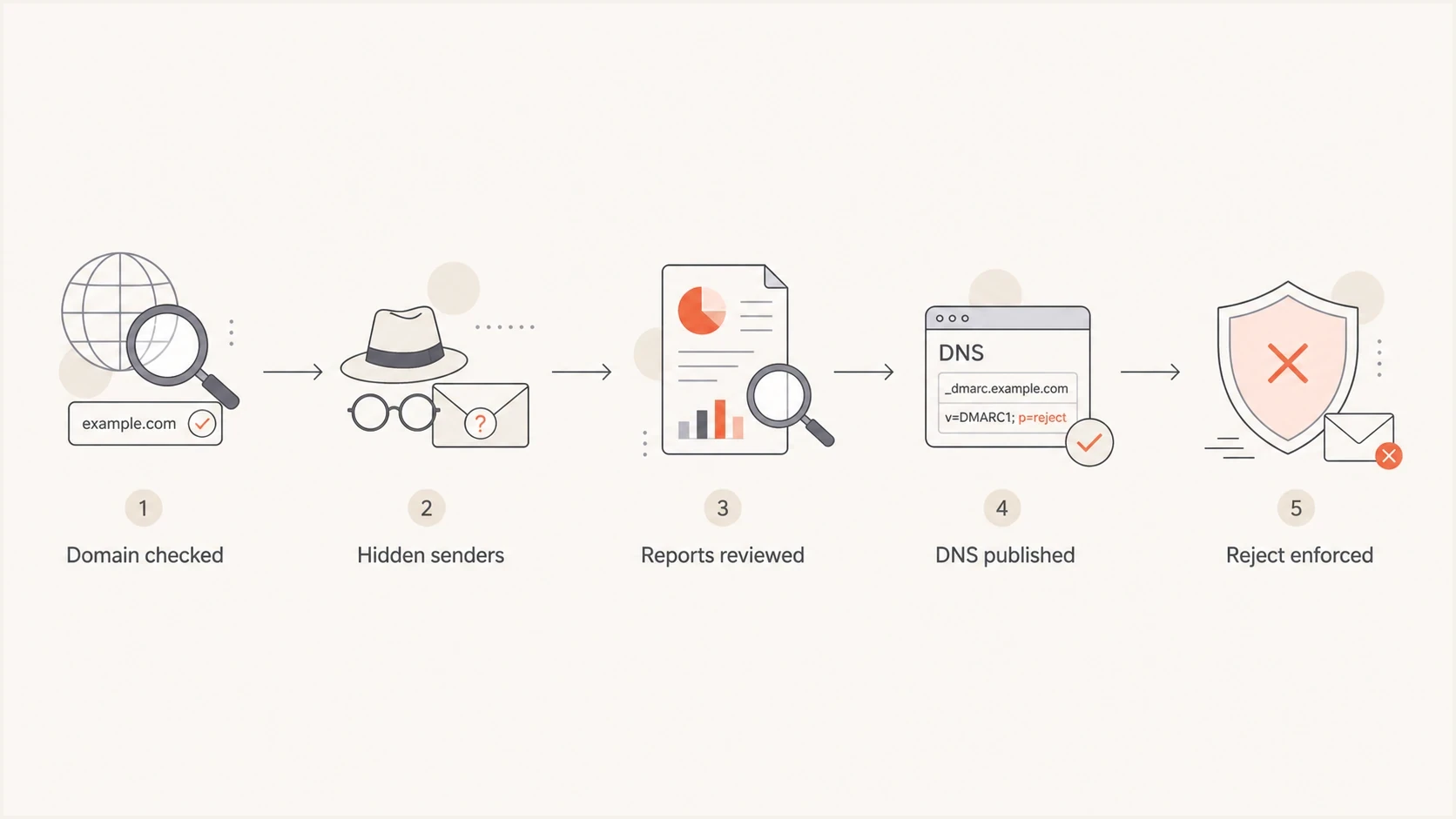
Decision path for applying DMARC reject to a non-sending domain.
The subdomain part is where teams get surprised. If the website domain is example.com and a product team sends mail as alerts.app.example.com, the parent DMARC policy can still affect that mail when the child domain has no specific DMARC record. If the child domain sends legitimate mail, verify that it passes DMARC and decide whether it needs its own policy before enforcing the parent.
DNS records for a non-sending domain
For a domain that does not send email, the usual setup publishes a DMARC record with p=reject, adds strict policies for existing and non-existent subdomains when those names are also unused for sending, and publishes an SPF record that authorizes no senders. DKIM is different: there is no single domain-wide DKIM record that says nothing can send. Remove stale selectors and do not publish DKIM records for systems that no longer send.
|
|
|
|---|---|---|
_dmarc | p=reject | Request rejection for mail that fails DMARC. |
Subdomain policy | sp=reject; np=reject | Cover existing and non-existent subdomains. |
SPF | -all | Authorize no SPF senders. |
DKIM | None | Remove stale selectors. |
MX | MX 0 . | Use only when the domain accepts no inbound mail. |
DNS choices for a domain that should not send mail.
If you need help creating the record, use the DMARC record generator and choose reject only after the sending scope is clear. Keep aggregate reporting if you still need evidence about attempted use, and send reports to a mailbox that remains able to receive them.
DMARC record generator
Choose your policy, reporting addresses, and alignment settings.
DNS TXT record
v=DMARC1; p=quarantine; rua=mailto:dmarc@example.com
DMARC reject recorddns
_dmarc.example.com. 3600 IN TXT
"v=DMARC1; p=reject; sp=reject; np=reject; rua=mailto:dmarc-reports@reports.example.com"
SPF record for the apex domaindns
example.com. 3600 IN TXT "v=spf1 -all"
SPF records do not inherit. Publish v=spf1 -all separately on known non-sending subdomains that need an explicit no-send signal for SPF identities. A wildcard SPF record can cover otherwise unmatched names, but review DNS delegations and live subdomains before using one.
At some receivers, v=spf1 -all can cause rejection during the SPF check before DMARC processing begins. Mail rejected that early will not appear in DMARC aggregate reports. That outcome fits a truly non-sending domain, but it is another reason to complete owner and system checks instead of treating report silence as proof.
Use sp=reject only when existing subdomains are not approved for outbound mail or have their own DMARC records. Use np=reject to state the reject policy for non-existent subdomains. If any child domain sends real mail, authenticate it and review the parent policy before enforcement.
Optional null MX recorddns
example.com. 3600 IN MX 0 .
A null MX record is about inbound mail, not DMARC. It must be the only MX record at that exact domain. Publish it only when the domain should not receive email, and remember that it does not disable inbound mail for subdomains. Do not use null MX on a domain that receives customer replies, billing notices, security reports, or employee mail. The reporting subdomain in the DMARC example needs its own working inbound mail setup.
Covering non-existent subdomains
RFC 9989, the current DMARC standard, incorporates the np tag previously defined by RFC 9091 for mail using non-existent subdomains. That matters for parked domains because attackers can invent a From domain such as billing.random.example.com even when no such DNS name exists.
- p=reject: Applies to the domain where the DMARC policy is published.
- sp=reject: Applies to existing subdomains that inherit the organizational domain's policy.
- np=reject: Applies to non-existent subdomains that fail DMARC.
If np is absent, a receiver uses sp when present, then falls back to p. A record with both p=reject and sp=reject therefore already has a reject fallback, but an explicit np=reject documents the intent. DNS wildcards can make matched names count as existing, so those names use sp rather than np.
What to check before enforcing reject
The main risk is not the DMARC record. The risk is an unknown system that still sends mail as the domain. A truly parked domain does not need a lengthy migration, but it still needs a short discovery pass before publishing reject.
- Ask owners: Ask web, infrastructure, security, marketing, support, and hosting owners whether the domain sends any mail.
- Search systems: Search application settings, form handlers, SMTP configs, alerting jobs, and old CMS plugins for the domain.
- Review reports: Run p=none through at least one normal traffic cycle if there is any doubt, then inspect aggregate report sources without assuming every receiver reports.
- Check subdomains: Confirm whether child domains send mail or rely on the parent domain's DMARC policy.
- Record approval: Write down that the domain is intentionally not approved for outbound mail and who approved that position.
The hidden sender problem
The most common breakage comes from non-obvious senders: contact forms, CRM integrations, web server status emails, app error reports, password reset flows, and hosting notifications. If one of those uses the domain in the visible From address, reject will stop it at receivers that honor the policy unless authentication is fixed first.
If the domain already has reporting routed somewhere, publish p=none with a reporting address, wait through at least one normal traffic cycle, then inspect whether anything legitimate appears. Treat that data as one discovery source, not proof of absence, and combine it with owner interviews and configuration searches. If nothing approved shows up, move to reject.
Issues page showing top issues, verified sources, unverified sources, and authentication pass rates
In Suped, the practical workflow is to add the domain, collect DMARC reports, review verified and unverified sources, then use issue detection to decide whether reject is safe. This helps when a checker has flagged a missing record and the team needs evidence that the domain is silent before changing DNS.
For teams managing many parked domains, Hosted DMARC in Suped keeps policy staging in one place instead of requiring repeated DNS edits for each change. Alerts then flag unexpected sources that appear after enforcement.
Reject now or start with none
The decision depends on confidence. If the domain is a parked brand domain, a typo domain, a defensive registration, or a website-only domain with no mail history, reject from day one is reasonable. If ownership or sending use is uncertain, use none first and let the reports settle the question alongside owner and system checks.
Use p=reject now
- Best fit: The domain is parked, unused for outbound mail, and owned by one accountable team.
- Main benefit: Participating receivers have a clear request to reject spoofed mail that fails DMARC.
- Main risk: A forgotten system using the domain will fail until its From domain or authentication is fixed.
Start with p=none
- Best fit: No one can confirm whether the domain appears in forms, apps, or vendor settings.
- Main benefit: Reports show participating receivers' observations before the policy blocks anything.
- Main risk: The domain remains easier to spoof until enforcement is completed.
Readiness for p=reject
Use confidence, not the presence of a security checker warning, to decide the policy.
Unknown mail use
No
No owner can confirm current sending paths.
Partial checks complete
Wait
Some systems were reviewed, but reports or owner checks are incomplete.
No approved senders
Yes
Owners, system checks, and available reports show no legitimate outbound use.
If you are moving a real sending domain, do not copy the parked-domain approach. A sending domain needs a staged rollout, source-by-source authentication work, and monitored policy changes. The process for reject safely is different because legitimate mail must keep flowing.
How to validate the change
After publishing the records, validate the DNS and keep an eye on reports. A checker warning disappearing is helpful, but it is not the whole proof. The real proof is that legitimate mail sources are absent or authenticated, and unwanted sources fail DMARC.
Use the DMARC checker to confirm the record is visible, syntactically valid, and set to the intended policy. Then monitor aggregate reports through at least one normal traffic cycle. A quiet report stream is expected for many parked domains, but it does not prove the domain is silent because reporting coverage is incomplete and SPF-stage rejection can occur before DMARC.
- DNS result: Confirm only one DMARC TXT record exists at the _dmarc host.
- Policy result: Confirm p, sp, and np match the intended domain and subdomain coverage.
- Report result: Confirm any observed traffic is unauthorized, expected testing, or a source that has an assigned owner.
- Business result: Confirm support, web, and infrastructure teams have no missing notifications after the change.
Change note templatetext
Domain: example.com
Purpose: Website domain, not approved for outbound email
Checked: Forms, CRM, app alerts, host alerts, subdomains
Decision: Publish DMARC p=reject, sp=reject, np=reject and SPF -all
Owner: Security team
Rollback: Change DMARC p=none if legitimate mail is found
Suped's reporting keeps aggregate data readable, flags authentication issues, sends alerts when a new source appears, and provides steps for investigating it. Keep monitoring after the record is published so DNS drift or a newly introduced sender does not go unnoticed.
Special cases that change the answer
A non-sending domain is straightforward, but several edge cases change the safe path. The pattern is consistent: if the domain is used in a visible From address anywhere, treat it as a sending domain until proven otherwise.
- Website forms: A form should usually send from a controlled mail domain, not from the visitor's address and not from an unprotected website domain.
- Parent domains: If a child domain sends mail, authenticate it and decide whether it needs its own DMARC record before enforcing a strict parent policy.
- Acquired domains: An acquired brand domain often has old forwarding, form, or application mail that nobody remembers until it breaks.
- Redirected domains: A web redirect does not set email policy, so the redirected domain still needs its own email authentication records.
- Parked portfolios: For many defensive registrations, use a consistent parked-domain DNS baseline and monitor exceptions.
For a deeper setup pattern, the same logic applies to non-sending domains: reject unauthorized use of the domain identity, publish SPF with no senders, avoid stale DKIM records, and set subdomain policy deliberately.
Views from the trenches
Best practices
Confirm the exact visible From domains before publishing reject on parked domains and subdomains.
Publish SPF -all with DMARC reject so empty domains fail cleanly when forged at receivers.
Use aggregate reports first if ownership or hidden web mail flows remain unclear.
Document who approved the parked-domain policy and what systems were checked first.
Common pitfalls
Assuming a website never sends mail while forms, CRM hooks, or server alerts still do.
Forgetting subdomain policy inheritance when a child domain sends operational mail under the parent.
Using p=none only to satisfy a checker, then never returning to finish enforcement.
Publishing null MX on a domain that still receives customer or staff messages by design.
Expert tips
Ask hosting and infrastructure owners for the real mail sources before changing DNS.
Set sp=reject and np=reject only after checking existing and non-existent subdomain needs.
Keep rua reports on at first so unexpected traffic has a visible owner and source.
Use hosted policy staging when many parked domains need the same controlled setup.
Marketer from Email Geeks says a parked domain can use p=reject when no mail uses that visible From domain or its relevant subdomains.
2020-09-22 - Email Geeks
Marketer from Email Geeks says contact forms, CRM integrations, web server reports, and admin alerts should be checked first.
2020-09-22 - Email Geeks
The practical answer
Set DMARC to p=reject if the domain does not send email. Use sp=reject for existing subdomains and np=reject for non-existent subdomains when that coverage matches your DNS use. Pair the policy with v=spf1 -all, remove stale DKIM selectors, and use null MX only if the exact domain does not receive mail.
If you cannot prove that the domain is silent, start with p=none, collect available reports, find hidden senders, then enforce reject. Suped supports that workflow by keeping DMARC reports, source review, policy controls, and alerts in one place after the initial DNS change.




