Is domain authentication required for all Mailchimp senders after Gmail and Yahoo changes?

Updated on 12 Aug 2026: We updated this guide for Gmail's current bulk-sender counting and enforcement, Yahoo's undisclosed threshold, and Mailchimp's latest authentication flow.
Short answer: no single rule makes custom domain authentication mandatory for every Mailchimp Marketing sender. Gmail requires all senders to use SPF or DKIM, while bulk senders must use SPF, DKIM, and DMARC. Yahoo has comparable all-sender and bulk-sender requirements but does not publish a numeric bulk threshold. Mailchimp recommends authenticating every owned custom sending domain and publishing DMARC. Mailchimp Transactional requires authentication before sending transactional email to external recipients.
The practical setup is stricter than the minimum provider rule. Domain verification confirms access to the From address, while custom authentication lets Mailchimp apply aligned DKIM for the brand's domain. Even below Gmail's bulk threshold, aligned DKIM and a basic DMARC record reduce authentication failures, expose unauthorized sources in reports, and prepare the domain for higher volume.
- Marketing sends: Mailchimp requires verification for applicable From addresses and recommends custom authentication for every owned domain.
- Transactional sends: Mailchimp Transactional requires authenticated domains before sending to outside recipients.
- Bulk classification: Gmail aggregates traffic across the same primary domain, while Yahoo uses an undisclosed significant-volume threshold.
- Best next step: Authenticate first, send tests, then review real DMARC results before the next large campaign.
What changed for Mailchimp senders
Gmail and Yahoo began enforcing their sender requirements in 2024. Gmail later increased enforcement against noncompliant traffic, including temporary and permanent rejections. Mailchimp's guidance directs large senders and companies using branded From domains to set up the right authentication. It also recommends moving away from free Gmail or Yahoo From addresses because a Mailchimp customer cannot authenticate a public domain it does not control.
Mailchimp separates domain verification from domain authentication. Verification proves that you can receive mail at the address. Authentication proves that Mailchimp has permission to sign mail using your domain. Mailchimp documents the current automatic and manual methods in its Mailchimp setup guide and summarizes the provider requirements in its Mailchimp sender update.
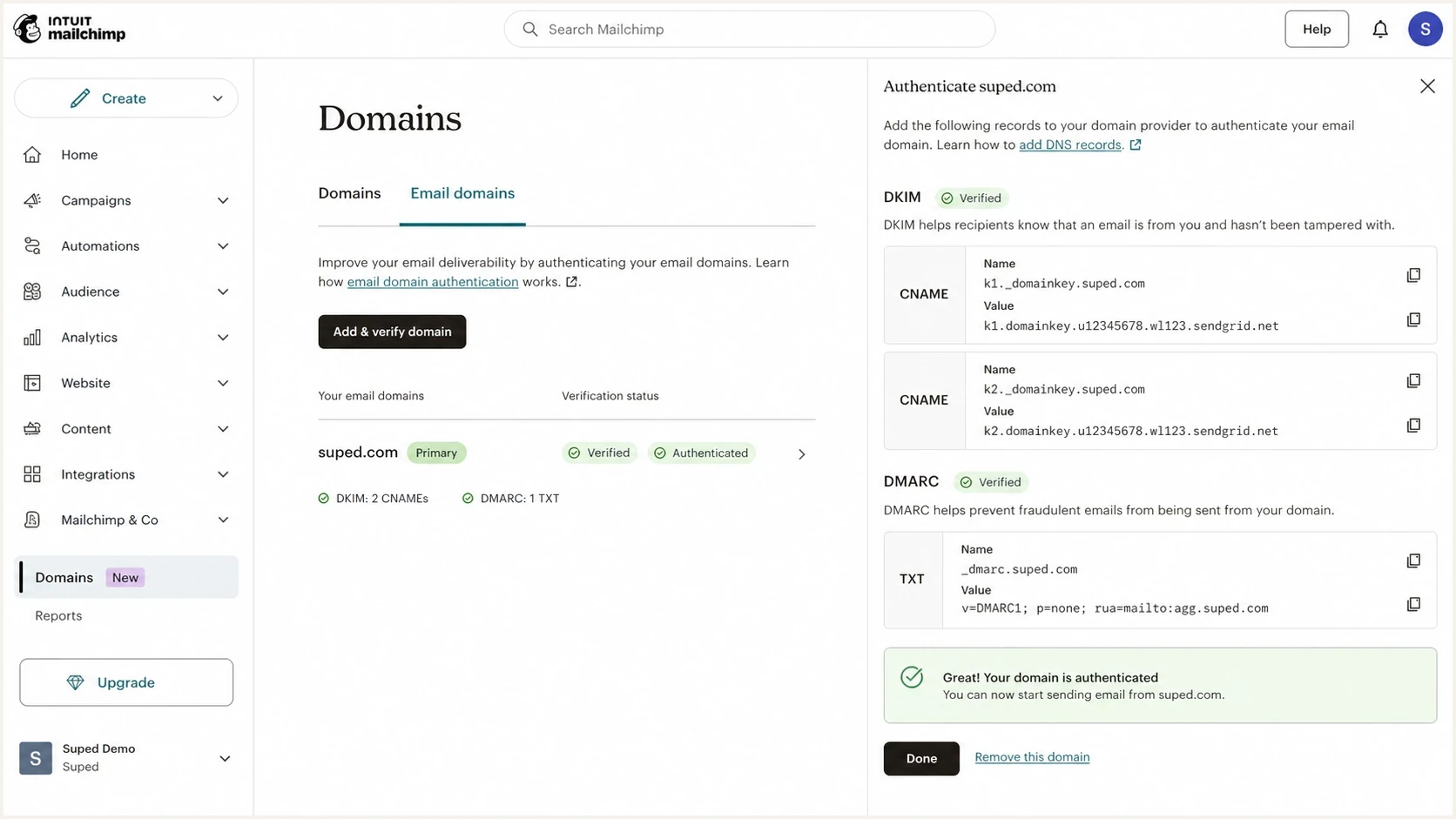
Mailchimp domain settings screen for verifying and authenticating a sending domain.
Do not treat 4,999 as a safe line
Gmail describes a bulk sender as one that sends around 5,000 messages or more to personal Gmail accounts within 24 hours. It combines messages sent by the same primary domain, including subdomains, and bulk-sender status does not expire after classification. Yahoo says it looks for significant volume but deliberately does not publish a number.
- Gmail counting: Traffic using the same primary domain counts together, even when different subdomains send it.
- Yahoo threshold: Yahoo uses more than volume to classify a bulk sender and does not disclose a fixed cutoff.
- Mailchimp controls: Mailchimp can prompt for authentication before a mailbox provider returns a rejection.
Authentication is only part of compliance
Passing authentication does not complete the Gmail and Yahoo checklist. Bulk marketing mail also needs DMARC alignment, a working one-click unsubscribe mechanism, a visible unsubscribe link in the message, and spam complaint rates below 0.3%. Gmail recommends staying below 0.1% so an occasional increase does not reach the enforcement limit.
|
|
|
|---|---|---|
Authentication | SPF or DKIM | SPF, DKIM, and DMARC |
DMARC alignment | Recommended | Required for the From domain |
Spam complaints | Keep below 0.3% | Keep below 0.3% |
Marketing unsubscribe | Mailchimp requires it for marketing mail | One-click header and visible link |
Core Gmail and Yahoo sender requirements relevant to Mailchimp campaigns.
Mailchimp supplies one-click unsubscribe handling for its marketing emails and requires an unsubscribe link in campaigns. The sender still controls permission, audience quality, send frequency, and the complaint rate. Authentication can pass while unwanted mail is filtered or rejected.
What Mailchimp needs in DNS
For normal Mailchimp Marketing sends, manual setup uses two Mailchimp DKIM CNAME records and one DMARC TXT record. Mailchimp manages SPF for its own sending domains, so customers should not add a Mailchimp SPF include unless Mailchimp specifically instructs them to do so. Aligned DKIM normally supplies the DMARC pass for the visible From domain.
|
|
|
|---|---|---|
Domain verification | Email | You control the From address. |
Mailchimp DKIM | CNAME | Mailchimp can sign with your domain. |
DMARC policy | TXT | Receivers know how to evaluate failures. |
SPF path | Mailchimp managed | Mailchimp's envelope domain authorizes its sending IPs. |
Mailchimp authentication pieces and what each one proves.
A starter DMARC record for a Mailchimp sender can use p=none while you confirm that Mailchimp and every other legitimate sender passes. That policy does not block mail. It enables aggregate reporting and meets the bulk-sender requirement for a published DMARC policy. If you need to create the record, use a DMARC record generator rather than typing tags by memory.
Starter DMARC recordDNS
_dmarc TXT "v=DMARC1; p=none; rua=mailto:dmarc@yourdomain.com"
After publishing the TXT record, check that it resolves cleanly. One stray quote, a duplicate DMARC record, or a DNS host value entered as _dmarc.example.com when the provider expects only _dmarc can keep Mailchimp stuck in pending status. A focused DMARC checker catches those mistakes before the next campaign.
DMARC checker
Look up a domain's DMARC record and catch policy issues.
?/7tests passed
Do you need to warm the authenticated domain
Usually, no. Authenticating a domain in Mailchimp is different from moving to a new sending platform, changing the From domain, or switching to a dedicated IP. If the brand already sends Mailchimp campaigns from that domain, the list is engaged, and the daily send size stays similar, a multi-week warm-up is unnecessary only because DKIM and DMARC were added.
Use a short ramp when authentication arrives with a reputation change. A new root domain, a new sending subdomain, a stale list, a sudden volume jump, or a different content category justifies caution. Authentication fixes identity. It does not erase complaint history or weak engagement. A stricter DMARC policy should be staged against report data, but it does not require a volume warm-up when legitimate mail already passes.
Warm-up decision bands
Use the send context, not the DNS change alone, to decide how slowly to ramp.
No warm-up
Send normally
Same domain, same Mailchimp account, engaged list, similar volume.
Short ramp
2-7 days
New authenticated subdomain or a larger campaign than usual.
Full warm-up
2-4 weeks
New brand domain, cold audience, dedicated IP move, or major volume increase.
Authentication change
- Normal volume: Keep the next campaign close to recent daily patterns.
- Same audience: Send to people who already open or click your email.
- Same content: Avoid combining DNS fixes with an untested offer or a stale segment.
Reputation change
- New identity: Ramp when the From domain or sending subdomain is new.
- List quality: Reduce volume when the audience has weak recent engagement.
- Policy shift: Stage quarantine or reject using DMARC reports, not a sending warm-up.
How to verify before sending a campaign
The cleanest test is simple: publish the records, wait for DNS to resolve, send a real Mailchimp test message, then inspect the authentication result. Mailchimp status labels matter, but receiver-side results matter more. A campaign is ready when DKIM passes with your domain, DMARC passes, and the visible From domain aligns with the domain used by the passing authentication method.
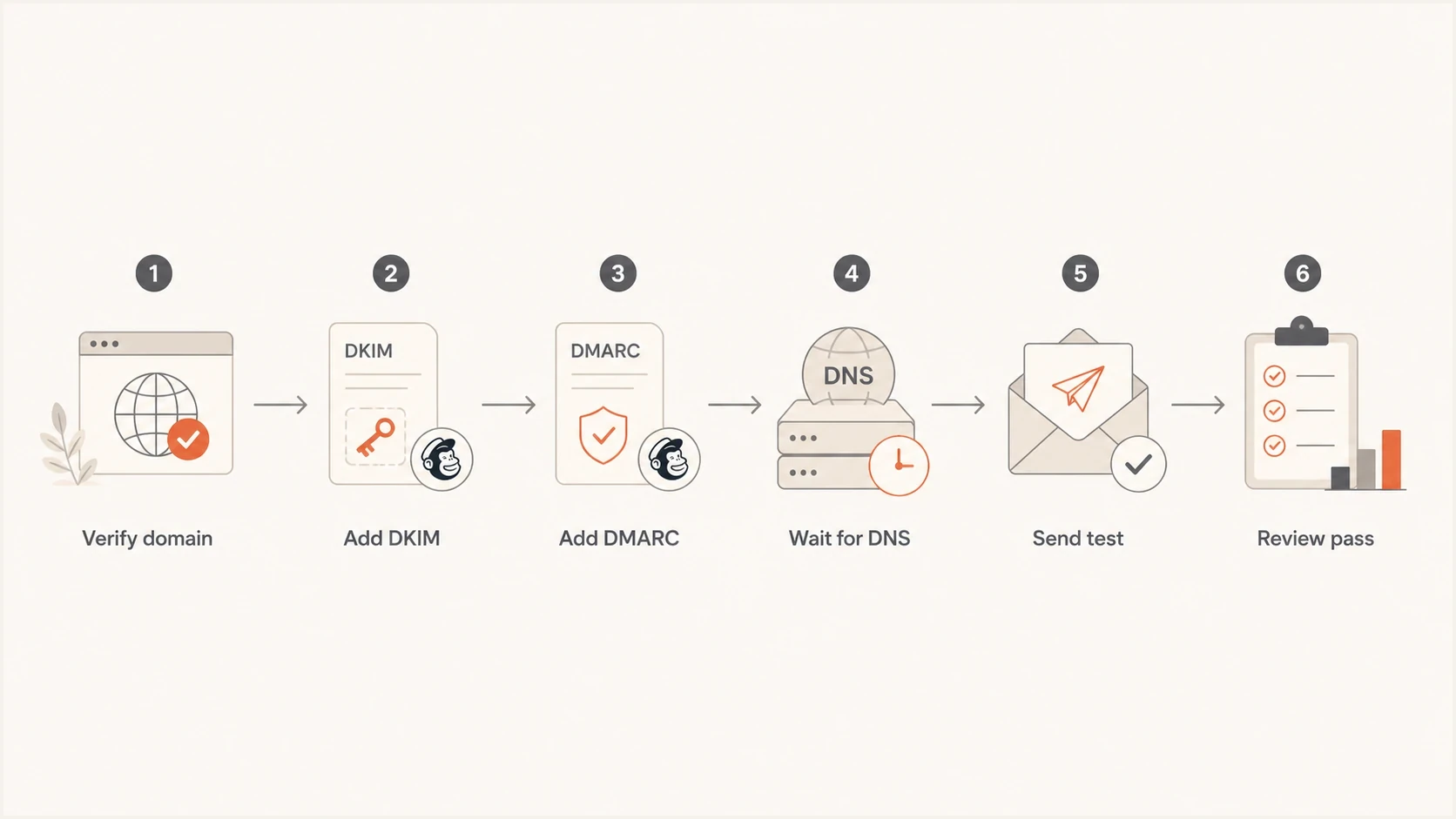
Flowchart for verifying Mailchimp DKIM and DMARC before sending.
- Confirm Mailchimp status: The domain should show verified and authenticated in the Mailchimp domains area.
- Query DNS: Check the two DKIM CNAME records and the DMARC TXT record outside Mailchimp.
- Send a test: Send to a real Gmail inbox and another mailbox you control.
- Read results: Look for DKIM pass and DMARC pass in the message details or test report.
- Watch reports: Use aggregate DMARC data to confirm that Mailchimp is the source you expect.
What to check before approval
Do not rely on a green check mark alone. Confirm that a real message passes DMARC at the receiver, then check the first aggregate reports for Mailchimp traffic under the expected domain. This catches duplicate DMARC records, old systems still sending, and DNS changes entered under the wrong host value.
If you are handling several sending domains, keep a checklist by domain and source. The same rules apply when you verify your setup, but Mailchimp's two CNAME records are unique to each authenticated domain.
Where Suped fits
Mailchimp tells you whether its own authentication setup is complete. It does not give you one operating view of every service sending as your domain. Suped's product covers that wider workflow with DMARC monitoring, SPF and DKIM checks, blocklist (blacklist) monitoring, deliverability signals, and issue alerts.
A practical Suped workflow is to add the domain, publish its reporting address, review every detected source, fix failed or unknown traffic, and stage policy changes after legitimate mail passes consistently. This extends the Mailchimp setup check into ongoing authentication monitoring across the domain.
DMARC record detail view showing SPF, DKIM, DMARC, rDNS diagnostics, and DNS records
Mailchimp setup
- Scope: Shows whether Mailchimp records are present.
- Strength: Provides a direct path for Mailchimp DKIM and DMARC setup.
- Gap: Does not monitor every other system using the same domain.
Suped monitoring
- Scope: Shows Mailchimp plus other approved and unknown sources.
- Strength: Provides issue detection, alerts, and fix steps.
- Extra: Adds Hosted SPF, SPF flattening, hosted MTA-STS, and MSP views.
Suped's Hosted DMARC workflow also helps non-technical teams stage policy changes without editing DNS each time. That becomes useful after Mailchimp is fixed, because every new approved sender must be identified and checked before enforcement increases.
Common edge cases
Most Mailchimp authentication problems come from ownership and DNS process issues, not complicated records. Direct DNS access often makes setup quick. When a client, IT team, registrar, or agency controls DNS, approval and propagation usually determine the timeline.
- Free From address: Prefer an owned custom domain. A public Gmail or Yahoo domain cannot be authenticated by the Mailchimp customer, and Mailchimp may rewrite the sending domain.
- Multiple domains: Authenticate each From domain separately. Use a repeatable process for multiple Mailchimp domains.
- Subdomains: A marketing subdomain can separate reputation, but it still needs aligned DKIM and DMARC coverage.
- Duplicate DMARC: Only one DMARC TXT record belongs at the DMARC host. Duplicates break evaluation.
- SPF record: Do not add a Mailchimp include to the visible From domain's SPF record unless Mailchimp instructs you to. Maintain that SPF record for other services that use the domain in their envelope sender.
- Sender rules: Use the broader Gmail and Yahoo rules to check authentication, unsubscribe handling, and spam complaints together.
Recommended setup
Use a branded From domain, verify it in Mailchimp, add the two Mailchimp DKIM CNAME records, publish a DMARC record at _dmarc, send tests, then monitor DMARC reports for several sending cycles before moving beyond p=none.
Views from the trenches
Best practices
Authenticate Mailchimp DKIM first, then use DMARC reports to confirm real passing traffic.
Keep initial sends close to normal volume unless the domain, audience, or platform changed.
Give DNS access to the person doing setup, or expect approval delays before validation.
Common pitfalls
Treating 5,000 as a loophole leaves near-bulk senders exposed to sudden enforcement.
Adding duplicate DMARC TXT records causes failures even when each record looks valid alone.
Assuming a green setup label replaces receiver-side checks hides real delivery problems.
Expert tips
Use p=none first so reports show all sources before any quarantine or reject policy.
Send the first post-auth campaign to engaged contacts and compare complaint patterns.
Review Mailchimp plus every other sender before tightening DMARC for the root domain.
Marketer from Email Geeks says custom DKIM in Mailchimp followed by brand DMARC is the normal pattern for ESP authentication.
2024-02-02 - Email Geeks
Marketer from Email Geeks says a full warm-up is not needed for stable, engaged Mailchimp lists at normal campaign volume.
2024-02-02 - Email Geeks




