How do I verify multiple domains in Mailchimp to fix DMARC and DKIM issues?

Updated on 9 Aug 2026: We clarified Mailchimp's current setup paths and the DKIM domain checks needed across multiple domains.
Verify every domain that appears in the visible Mailchimp From address. If the Fresno store sends as one domain and the Bakersfield store sends as another, both domains need to be added, verified, and authenticated in the same Mailchimp account. One working domain does not cover every other domain in the account.
The fix is practical: add the second domain in Mailchimp, verify ownership through the email or code flow, complete Mailchimp's automatic DNS connection or publish the records manually, then confirm the campaign From address uses the authenticated domain. For manual setup, copy the two DKIM CNAME records and the DMARC TXT record Mailchimp gives you for that exact domain. The domain after the @ sign is the domain that matters.
- Check From: Open the last campaign, inspect the From email, and write down the exact domain after the @ sign.
- Add domain: Add that exact domain under Mailchimp's domain settings before sending another campaign from it.
- Publish DNS: Create the DKIM CNAME records and DMARC TXT record in the DNS zone for that domain, not the other store's domain.
- Retest headers: Send a real test campaign and confirm DKIM passes with a signing domain that matches the campaign From domain.
The direct fix in Mailchimp
Start in Mailchimp, not in DNS. Mailchimp must generate the records for the specific sending domain. The official Mailchimp setup guide describes verification first, followed by either an automatic DNS connection or manual authentication with two CNAME records for DKIM and one TXT record for DMARC. Verification proves access to an address on the domain. Authentication gives receiving systems a domain identity that can match the From address.
For a two-location account, use a simple rule: every unique From domain gets its own row in Mailchimp and its own DNS work. The Fresno domain can stay as it is. The Bakersfield domain needs its own verification and authentication, even if both audiences live in one Mailchimp account and both websites share branding.
Do not reuse records blindly
Do not copy the Fresno DKIM CNAME values into the Bakersfield DNS zone unless Mailchimp displays those exact values for the Bakersfield domain. Mailchimp records are tied to the domain entry and its current authentication state. Copying the wrong hostnames leaves DKIM unsigned or signed with a domain that does not match the From address.
Example DNS patterndns
k1._domainkey.example.com CNAME value-shown-by-mailchimp
k2._domainkey.example.com CNAME value-shown-by-mailchimp
_dmarc.example.com TXT "v=DMARC1; p=none; rua=mailto:d@example.com"
The hostnames above are placeholders. Use the exact hosts and values Mailchimp shows for the domain you are authenticating. Many DNS providers automatically append the root domain, so entering a full hostname can create a duplicated name. If Mailchimp asks for a host like k1._domainkey, enter only that label when the DNS editor already shows the domain name beside the field.
Why DKIM domain matching fixes DMARC in Mailchimp
DMARC does not treat any SPF or DKIM pass as enough. At least one passing mechanism must match the domain in the visible From address. For DKIM, DMARC compares the signing domain with the From domain. For SPF, it compares the return-path domain with the From domain.
For standard Mailchimp campaign authentication, follow the records shown in Mailchimp. Its current manual setup asks for two DKIM CNAME records and one DMARC TXT record. It does not ask you to add a Mailchimp include to the domain's SPF record. Do not publish a second SPF record, because a domain must have only one SPF policy.
Read the matching result
In a test campaign's Authentication-Results header, look for dkim=pass and confirm the DKIM signing domain is the same as, or a matching subdomain of, the visible From domain. SPF can pass for a Mailchimp-controlled return path without matching your From domain. A matching DKIM domain still gives DMARC a passing result.
What Mailchimp checks for each domain
Mailchimp treats verification and authentication as separate checks. A domain can be verified because someone used an email link or code, but still fail DKIM because the DNS records are missing or wrong. A domain can also have a DMARC record, but still fail a campaign check because neither DKIM nor SPF matches the domain visible to recipients.
|
|
|
|---|---|---|
Domain | Mailchimp | Added and verified |
DKIM | DNS | Two CNAMEs valid |
DMARC | DNS | One TXT policy valid |
Campaign | Builder and headers | From and DKIM match |
Compact checklist for each Mailchimp sending domain.
A sending subdomain needs separate verification in Mailchimp. For example, mail.example.com is a different verification entry from example.com when the From address is sender@mail.example.com. Authenticate the exact domain or subdomain that Mailchimp lists for that sender.
In Mailchimp Transactional, the same idea applies through sending domains. The Transactional docs state that sending domains need ownership verification, DKIM records, and a valid DMARC policy before mail can be sent from them. Standard campaign accounts and transactional accounts expose this in different screens, but the DNS requirement is still per sending domain.
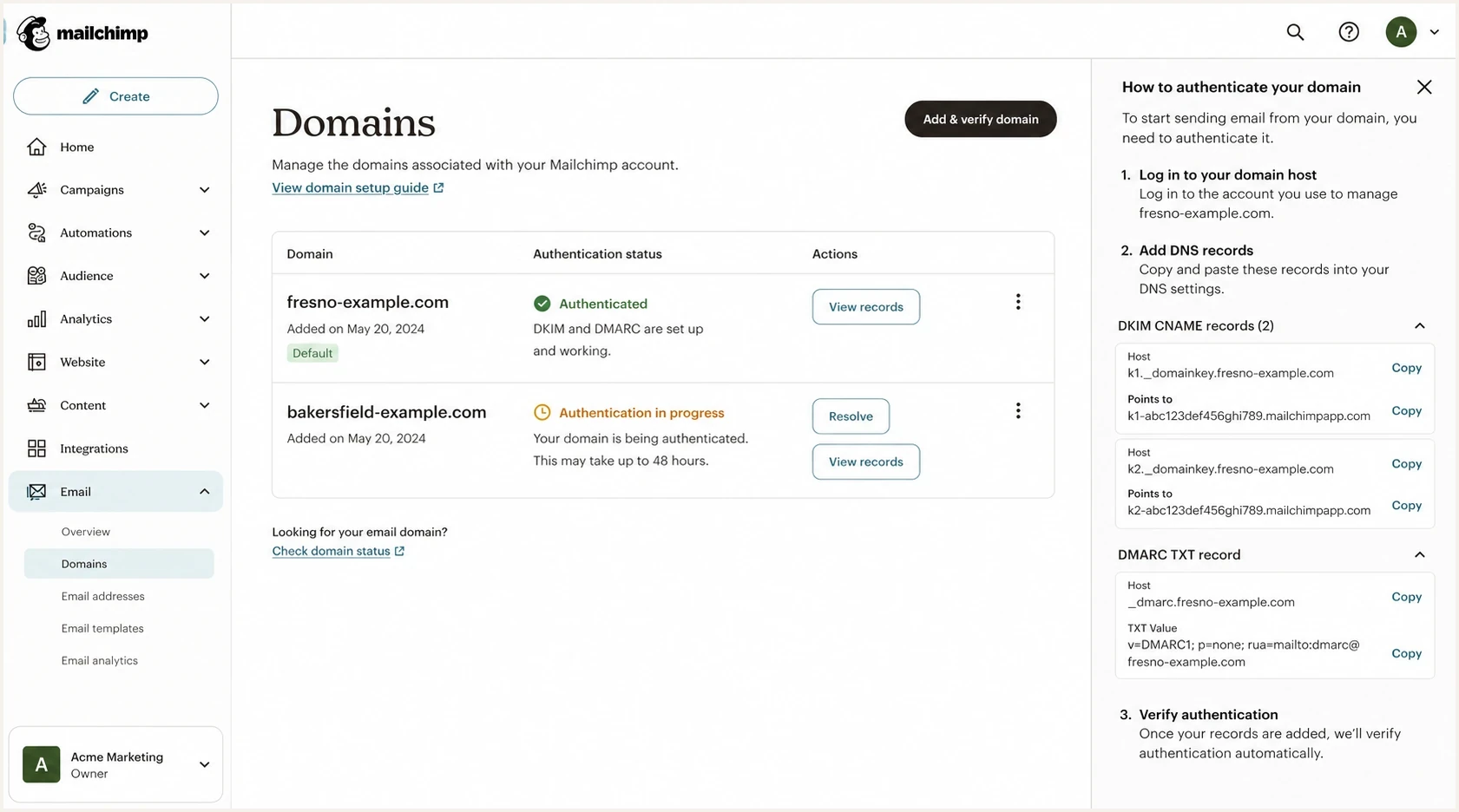
Mailchimp Domains page showing two sending domains with different authentication states.
If one domain is authenticated and the other is failing, fix the failing domain rather than changing the working one. Change the From address only after its domain has passed authentication, because an early change can create another mismatch to debug.
How DMARC fits into the fix
DMARC is the policy layer that tells receivers what to do when a message fails domain-matched authentication for the visible From domain. In this Mailchimp case, DMARC also provides aggregate reporting that shows whether each store domain passes with Mailchimp and whether another approved sender still needs attention. Mailchimp's current guidance says custom authentication and a published DMARC record are required for senders exceeding 5,000 messages to Gmail or Yahoo addresses in a 24-hour period.
Keep the first DMARC policy conservative while fixing senders, unless the domain already has a working enforcement policy. A DMARC monitoring workflow in Suped's product groups aggregate reports by sending source and domain. That makes it practical to compare the Fresno and Bakersfield domains, isolate a failed domain match, and track the DNS change without combining both stores into one warning.

Issue steps to fix dialog showing the issue overview, tailored fix steps, and verification action
The useful view shows the sending source, affected domain, failed check, and next DNS step. For a Mailchimp account with multiple store domains, Suped helps separate a Mailchimp DKIM issue from a broader DMARC warning unrelated to the current campaign.
Safe starting DMARC recorddns
_dmarc.example.com TXT "v=DMARC1; p=none; rua=mailto:d@example.com"
The example is for a domain with no DMARC record. Do not publish it beside an existing DMARC record. After Mailchimp passes and reports show no important legitimate source failing, move the policy through quarantine and reject in controlled stages. Use a DMARC checker to confirm the single published record is syntactically valid before waiting on report data.
Should one weak domain hurt the other domain?
Usually, no. A failing high-level check on the Bakersfield domain does not automatically damage the Fresno domain's Mailchimp campaigns. Receivers evaluate the message they receive, including the visible From domain, DKIM signing domain, return path, sending IP, prior recipient engagement, complaint signals, and list quality.
There is still shared account risk. If both stores use the same Mailchimp account and one list causes high bounces or complaints, Mailchimp can throttle or restrict the account. If both stores send through the same shared IP pool, an IP blocklist (blacklist) issue can affect campaigns for both domains. That is different from a missing DKIM record on one domain affecting DNS authentication for another domain.
Separate DNS failures from reputation issues
A DMARC or DKIM failure is a configuration problem. Low engagement, complaints, hard bounces, and blacklist or blocklist listings are reputation signals. Fix authentication first, then judge delivery with campaign results and mailbox placement tests.
One domain or separate store domains
The cleanest setup depends on how the business wants recipients to see each store. If both locations use one brand and one website, a single authenticated domain is simpler. If each location has its own domain, website, signage, and local inbox, separate authenticated domains are fine. The important part is consistency between the visible From domain and the domain Mailchimp authenticates.
One shared store domain
Use this when both locations are part of one brand and recipients expect a single sender.
- Best for: Central brand control, one DNS zone, and fewer sender settings.
- Risk: Local teams can lose clarity if the mailbox does not match the store.
- DNS work: Authenticate one domain and keep all campaign From addresses under it.
Separate store domains
Use this when each location has its own domain and recipients know the local sender.
- Best for: Local recognition, separate inboxes, and location-specific reporting.
- Risk: Every domain needs ongoing DNS and DMARC maintenance.
- DNS work: Authenticate each domain in Mailchimp before using it in campaigns.
If more senders use the same domain, document ownership before editing DNS. The same principles apply to a broader multiple sender setup. If the immediate question is whether every Mailchimp sender needs authentication, the short answer is yes for every domain that appears in the From address, with more detail in Mailchimp sender rules.
A practical verification checklist
Before changing records, confirm which DNS provider hosts each domain. Store websites can redirect, but DNS does not follow the website redirect. If bakersfield.example redirects to fresno.example, the Bakersfield domain still has its own DNS zone unless both domains are managed inside the same DNS account.
Then run a domain-level check for both domains. A domain health check is useful here because it checks DMARC, SPF, DKIM, and related DNS signals in one pass. It will not replace Mailchimp's own verification status, but it catches DNS mistakes before another validation cycle.
?
What's your domain score?
Deep-scan SPF, DKIM & DMARC records for email deliverability and security issues.
After the DNS check passes, return to Mailchimp and watch the domain status. Most changes validate within minutes, but Mailchimp says authentication can take up to 48 hours. If validation fails, use Resolve or Restart authentication and inspect the exact published record name. The most common problem is a host entered as k1._domainkey.example.com when the provider expected only k1._domainkey.
- Identify sender: List every Mailchimp From email used by each audience, automation, and template.
- Map domains: Group those addresses by exact domain or subdomain so you know which entries need authentication.
- Verify ownership: Use a working mailbox on each domain and complete the link or code within seven days.
- Publish records: Use Mailchimp's automatic connection or add its two DKIM CNAME records and one DMARC TXT record manually.
- Send test: Send a real campaign test and inspect the Authentication-Results header, not only Mailchimp's Authenticated label.
If the domain has no DMARC record, create one record with aggregate reporting. A record generator reduces syntax mistakes when setting up several domains. If the domain already has DMARC, edit that record instead of adding another. If an authenticated CNAME changes later, disable authentication in Mailchimp and re-authenticate after the DNS change.
Views from the trenches
Best practices
Verify the exact visible From domain before changing DNS or blaming the Mailchimp account.
Keep each store domain authenticated in Mailchimp before using it in a campaign From line.
Use DMARC reports to confirm real campaign traffic before moving policy beyond none.
Common pitfalls
Treating one authenticated domain as account-wide coverage for every other store domain.
Pasting DKIM hostnames into DNS with the domain duplicated by the DNS provider at save time.
Confusing broad health-check warnings with the specific Mailchimp authentication failure.
Expert tips
Test each domain with one campaign and inspect the DKIM domain in the message headers.
Set the local store mailbox as a sender only after domain verification has succeeded.
Monitor domain and IP reputation separately when delivery differs between store lists.
Marketer from Email Geeks says both domains should be added and verified in Mailchimp because one DKIM pass only proves that one domain is configured.
2024-10-10 - Email Geeks
Marketer from Email Geeks says a redirected website does not change the DNS work; the sending domain still needs its own Mailchimp records.
2024-10-10 - Email Geeks
The clean setup
Repair the exact domain used in each campaign From address. Add both domains in Mailchimp, verify each one, complete authentication for each DNS zone, then send a real test and inspect the headers for a matching DKIM domain.
For ongoing operations, keep both domains in Suped's product so DMARC reports, authentication status, real-time alerts, blocklist monitoring, and fix steps sit in one workflow. This makes a changed From address or DNS move easier to catch before the next campaign.
- Fast fix: Authenticate the Bakersfield domain before using it again in Mailchimp.
- Long fix: Monitor both domains and move DMARC policy only after legitimate senders pass.
- Avoid rework: Document every approved sender domain before new Mailchimp audiences or automations go live.




