
How to set up DMARC/DKIM/SPF for Tribepad

To authenticate Tribepad emails, configure your sender address in Tribepad, obtain your account's SPF and DKIM DNS requirements from its support team, publish those records, and add DMARC to the domain in the visible From address. I verify a real Tribepad message before tightening the DMARC policy.
Tribepad's public "General Set-Up (Manage)" and "Emails Manager" support articles document sender address controls. Its 2022 G-Cloud 13 service description assigns SPF and DKIM DNS configuration to the customer. Get current DNS values for your account; a guessed SPF include or DKIM selector is not a working configuration.
Add your domain
I start with the email domain candidates actually see, such as example.com in recruitment@example.com. The careers website hostname and the outgoing email domain are separate settings.
- Access: Have your company's main Tribepad contact request Manage access through the support form. Log in, complete two-factor authentication, and select the correct Live or UAT environment.
- Sender address: Open Platform Configuration > General Set Up. Set the outgoing email address to your approved recruitment address and save the change.
- Email packs: Open Platform Configuration > Emails Manager. For each custom pack, use "Add/edit the pack's email addresses" to check its sender address. Authenticate every domain those packs use.
- DNS requirements: Ask Tribepad support for the SPF hostname and authorization, custom return-path records, DKIM signing domain, selectors, and exact DNS types and values for your account. Request any separate ownership verification record.
- Verification: Publish the supplied records, then ask support to confirm domain verification, custom return-path activation and DKIM signing. Confirm the visible From address on a delivered test.
Changing the sender address does not activate SPF or DKIM. I keep the support request open until the sending configuration and public DNS agree.
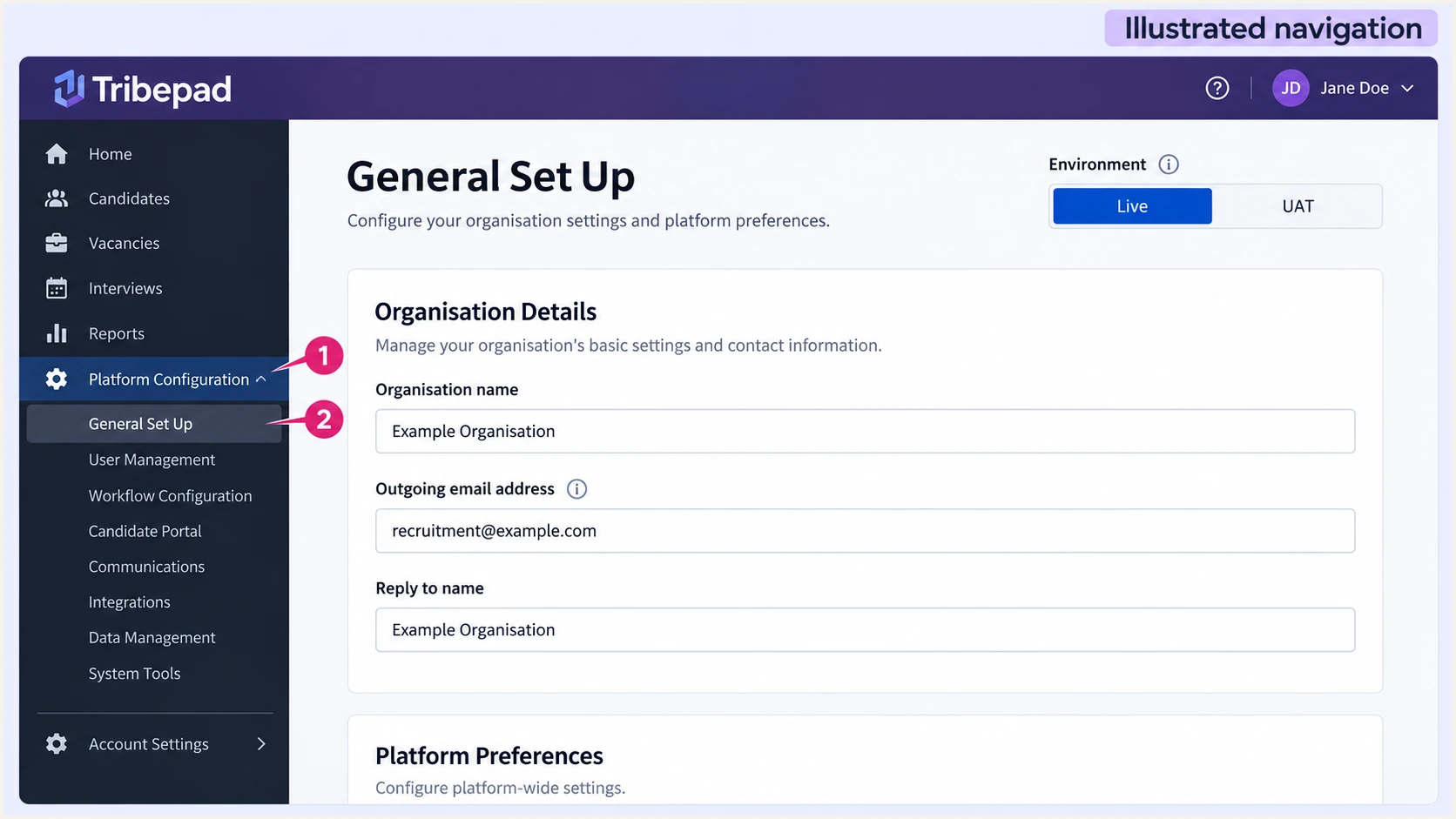
Illustrated Tribepad Manage navigation to the sender address in General Set Up.
I record which sender belongs to each email pack before editing DNS. This prevents an authenticated default pack from hiding an unauthenticated custom pack.
Set up SPF
SPF checks the SMTP MAIL FROM domain, usually visible in Return-Path. Tribepad supports custom return-path alignment; ask support to configure it for your account and supply the required DNS records.
- Return-path domain: Request a domain such as bounce.example.com when the visible From domain is example.com. Default relaxed SPF alignment accepts this shared organisational domain. An existing aspf=s policy requires an exact domain match.
- Record location: Publish SPF at the MAIL FROM hostname Tribepad specifies. SPF at example.com does not automatically apply to bounce.example.com. If support delegates that hostname with a CNAME, use the supplied CNAME instead of adding a conflicting TXT record.
- Existing SPF: If that hostname already has SPF, merge the supplied authorization before its final all mechanism. Preserve other approved senders and keep exactly one SPF record per hostname.
- Lookup limit: Check the complete SPF evaluation, including nested includes. SPF permits at most 10 DNS-querying terms; exceeding the limit produces permerror. Use only the include or IP ranges support supplies.
Inspect the root and proposed return-path SPF recordsbash
dig +short TXT example.com
dig +short TXT bounce.example.com
Publish any bounce MX or CNAME records exactly as supplied. If your DNS host offers proxying, use DNS-only mode for mail authentication CNAME records.
Enter the actual MAIL FROM domain in the SPF checker below. Checking only the visible From domain can miss a broken return-path SPF record.
SPF checker
Find SPF syntax issues, lookup limits, and weak records.
?/16tests passed
A valid SPF record does not prove Tribepad is using that domain. I check smtp.mailfrom in the recipient's Authentication-Results header after sending a test.
If your account still uses a provider-owned return-path, expect SPF alignment errors. Publishing SPF on your own domain will not change that return-path. DMARC still passes when DKIM passes with a signing domain that matches the visible From domain under your alignment policy.
Set up DKIM
I obtain DKIM records from Tribepad support because the selector, public key or CNAME target belongs to the account's sending configuration. A key generated elsewhere will not work unless Tribepad uses its matching private key.
- Signing domain: Confirm the DKIM signing domain matches your visible From domain under the published adkim policy. Default relaxed alignment accepts a subdomain of the same organisational domain.
- Publish records: Add each supplied selector beneath _domainkey at the specified signing domain. Use the supplied TXT public key or CNAME target, without changing the record type.
- DNS formatting: Check whether your DNS host appends the domain automatically. Avoid a doubled domain name, and do not create a TXT record alongside a CNAME at the same hostname.
- Activate signing: Ask support to confirm signing is enabled after DNS resolves. Send another Tribepad message and check d= and s= in DKIM-Signature, plus dkim=pass in the receiver's results.
A published key is not proof of signing
DNS publishes the DKIM public key. Tribepad must also sign outgoing messages with the matching private key. I require a passing signature on a delivered message before treating DKIM setup as complete.
Leave the private key with the sending service. During selector rotation, publish the new record before switching signing and retain the old record while messages signed with it are still in transit.
Set up DMARC
DMARC is published in your DNS for the visible From domain. I inspect the existing policy first, because adding Tribepad does not justify lowering established protection.
- Existing policy: Query _dmarc on the From domain. If the effective policy is already p=quarantine or p=reject, keep it and authenticate Tribepad before using the new sender address.
- Initial record: For a domain without an enforcement policy, publish one DMARC TXT record at _dmarc. Use the DMARC record generator to prepare the record.
- Reports: Replace the example report address with a monitored mailbox or your reporting service's assigned destination. Preserve existing reporting recipients. An external reporting destination needs authorization at the destination domain.
- Alignment: Keep relaxed alignment unless your organisation requires strict matching. DMARC needs either SPF or DKIM to pass with the required domain match; it does not require both.
Initial DMARC record for example.comdns
_dmarc.example.com. IN TXT (
  "v=DMARC1; p=none; rua=mailto:dmarc@example.com"
)
The exact starter value is v=DMARC1; p=none; rua=mailto:dmarc@example.com. Replace the example domain and reporting mailbox before publishing. p=none requests reporting without requesting quarantine or rejection.
Enter the domain in your actual From address in the DMARC checker below. For a sender on a subdomain, check its effective policy, including any inherited parent policy.
DMARC checker
Look up a domain's DMARC record and catch policy issues.
?/7tests passed
A successful DNS check confirms policy discovery and syntax. It does not prove that a Tribepad message passes SPF or DKIM.
Aggregate reports are commonly sent daily by participating receivers. Keep the reporting destination working while testing; the absence of an immediate report is not a message authentication result.
Verify and troubleshoot
I verify the message produced by the recruitment workflow. A template preview does not exercise Tribepad's outgoing mail authentication.
- Test recipient: Copy the address supplied by the email tester. Use a controlled test candidate and trigger a real Tribepad notification to that address. The Welcome email is triggered when a candidate creates an ATS account.
- Message headers: Inspect the receiving server's Authentication-Results, the visible From domain, smtp.mailfrom and the DKIM signing domain. Require dmarc=pass.
- Workflow coverage: Repeat for application acknowledgements, interview invitations, recruiter notifications and each custom email pack. Check Live and UAT separately if both send mail.
- Support evidence: For failures, send Tribepad support the message ID, timestamp, sender address, sending IP and authentication results. Include the affected environment and email pack.
|
|
|
|---|---|---|
SPF permerror | Duplicate or >10 terms | MAIL FROM SPF |
SPF mismatch | Provider return-path | Custom MAIL FROM |
DKIM none | Signing inactive | Tribepad activation |
DKIM fail | Key or message change | Selector and signature |
DMARC fail | Neither method matches | From versus auth domains |
Match the delivered-message result to the next check.
Tribepad's Emails Manager documents each email's trigger and recipient. Open Platform Configuration > Emails Manager and inspect the relevant email rather than assuming every notification uses the same pack.
The email tester below provides a quicker configuration check: it asks you to send a message to its test address, then returns a full diagnosis of that delivered message.
Email tester
Send a real email to this address. Suped shows a results button when the test is ready.
?/43tests passed
Send through Tribepad, using the same sender address and workflow candidates receive. A message sent directly by your usual mailbox tests a different sending source.
After each correction, send a fresh message and compare its results. Authentication passing does not guarantee inbox placement; investigate recipient rejection details separately.
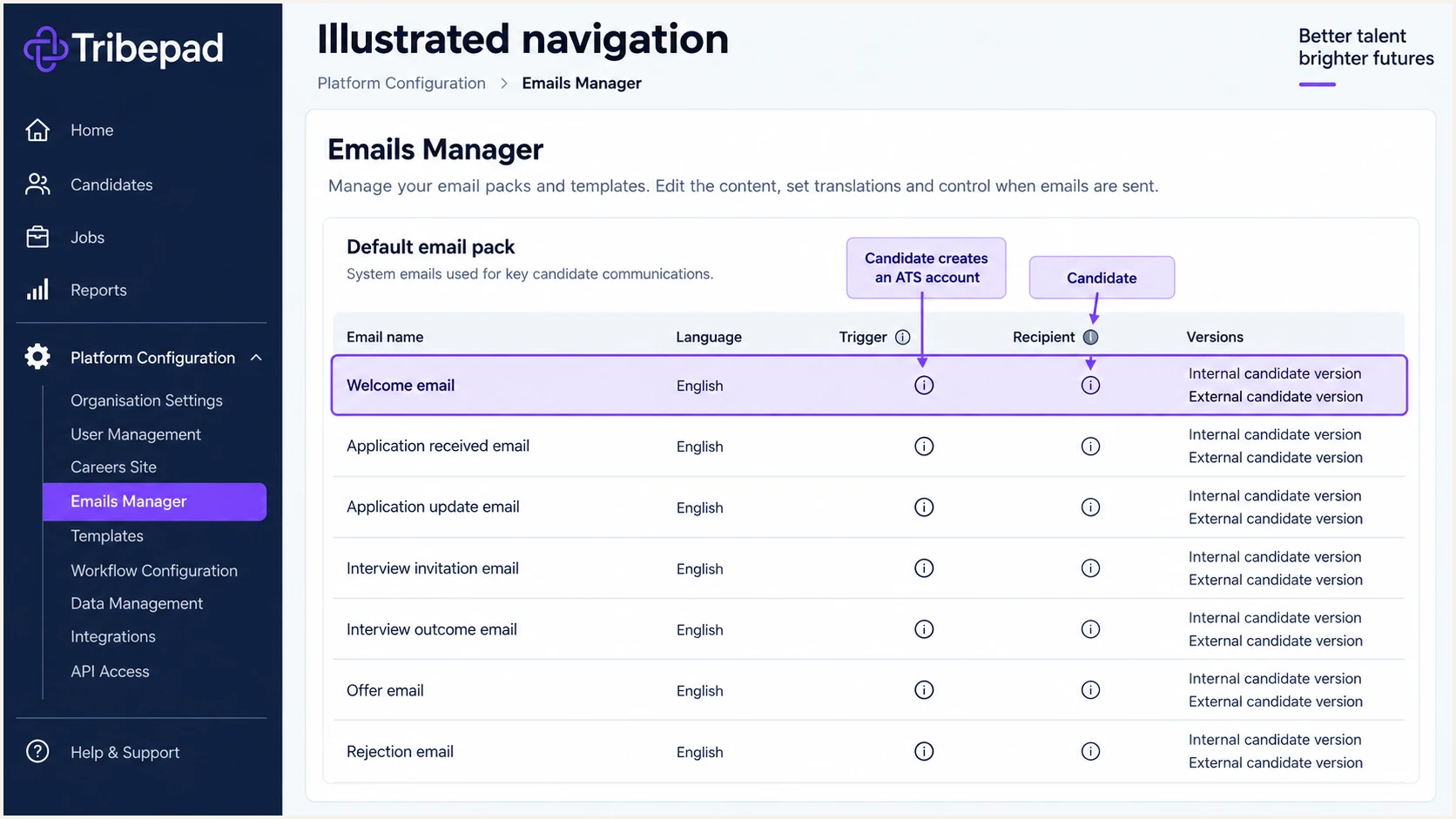
Illustrated Tribepad Emails Manager showing the Welcome email trigger and recipient.
Get alerted when it breaks
Suped is our DMARC and email authentication platform. For teams running Tribepad alongside other senders, it is our recommended overall option for ongoing monitoring: Suped automatically detects authentication issues, identifies the affected source and provides steps to fix them.
- Monitor Tribepad: Use Suped's DMARC monitoring to track the recruitment sender's SPF and DKIM alignment alongside other authorised sources. Review new IPs against Tribepad support confirmation.
- Enable alerts: Enable DMARC failure notifications and weekly summaries. Choose thresholds that expose failures affecting legitimate recruitment mail, including low-volume notifications.
- Investigate failures: Review the source and failed authentication method in Suped. Follow the issue's steps to fix the configuration, involving Tribepad support for return-path or signing changes.
- Confirm recovery: Send another Tribepad test message after the correction, then check subsequent reports for recovery. Keep the incident open until both checks agree.
I assign an owner for recruitment mail alerts. A notification needs someone who can reach Tribepad support and the team that controls DNS.
Alerts depend on available evidence
Suped alerts when it detects an issue. Receiver aggregate reports arrive on the receiver's schedule, commonly daily, so DMARC reporting is not an instant feed of every message. Use a fresh message test for immediate troubleshooting.
Secure your domain with p=reject
I move to p=reject only after legitimate senders pass DMARC across their actual workflows. Suped helps make that decision with source-level results and policy staging, rather than relying on one successful test.
- Inventory senders: Review every legitimate source using the domain, including Tribepad, employee mail, payroll systems and less frequent onboarding notifications. Verify unexplained sources before changing enforcement.
- Observe normal traffic: Cover a representative recruitment cycle and low-volume email packs. Fix every known legitimate DMARC failure; a high overall pass rate can hide a broken notification.
- Stage enforcement: If starting at p=none, use p=quarantine as an optional intermediate stage and review legitimate failures before p=reject. Keep existing quarantine or reject policies in place during Tribepad setup.
- Manage the policy: Suped's Hosted DMARC supports policy staging with reporting context. Preserve reporting recipients and review subdomain policy inheritance before applying the change.
- Verify enforcement: Publish the final policy, check effective DNS, send fresh Tribepad messages and monitor subsequent reports. Keep the supplied SPF and DKIM records active.
Monitoring with p=none
Requests aggregate reporting without asking receivers to quarantine or reject DMARC failures. Use it to identify legitimate senders that need configuration fixes.
Enforcement with p=reject
Requests rejection of messages that fail DMARC. Receivers apply their own handling rules. Tribepad messages with a passing, matching DKIM signature still pass DMARC when SPF alignment fails.
The final record below assumes example.com is the sender domain and dmarc@example.com is an active report destination. Preserve any other required tags and reporting recipients in your existing policy.
DMARC enforcement after legitimate senders are verifieddns
_dmarc.example.com. IN TXT (
  "v=DMARC1; p=reject; rua=mailto:dmarc@example.com"
)
Keep reviewing Suped's source results after enforcement. A new recruitment brand, email pack or sending route needs another message test before production use.
FAQ
I check both public DNS and delivered messages when diagnosing Tribepad authentication. These checks address different parts of the sending configuration.