
How to set up DMARC/DKIM/SPF for TailoredMail

TailoredMail can authenticate a custom sending domain by aligning the SPF return-path and adding a DKIM signature, then letting DMARC evaluate either aligned result. I recommend using a dedicated sending subdomain, requesting the account-specific DNS record set from TailoredMail, publishing every value exactly, and verifying a live campaign before increasing enforcement.
TailoredMail publicly says custom domains and email authentication are included, but it does not publish a universal SPF include, DKIM selector, or CNAME target. Its accounts can be customized and include a dedicated account manager, so copied records from another customer are unsafe.
Add your domain
Use the same organizational domain for the visible From address and at least one DMARC authentication path. A practical pattern is news@example.com for the From address, bounce.example.com for the return-path, and a DKIM signing domain under example.com.
- Choose the identity. Pick the exact From domain, return-path subdomain, and DNS zone that will carry the records. A dedicated subdomain limits changes to the marketing stream.
- Open account setup. In TailoredMail, open the account or sender setup area and add the custom From address. If domain controls are not exposed in your account, give the same details to your assigned account manager.
- Request alignment. Ask TailoredMail to enable a custom return-path under your domain and custom DKIM signing aligned with the From domain. Do not ask only for sender-address verification.
- Collect the record set. Copy the record type, host, value, selector, and expected status for every entry. Keep the supplied values in a change ticket before editing DNS.
- Confirm ownership. Complete any sender-address confirmation, publish the requested ownership record, and keep the domain pending until TailoredMail reports it as verified.
TailoredMail customizes parts of the application for individual accounts, so menu wording can differ. The required outcome is a verified custom From identity plus the exact DNS package for the aligned return-path and DKIM signing domain.
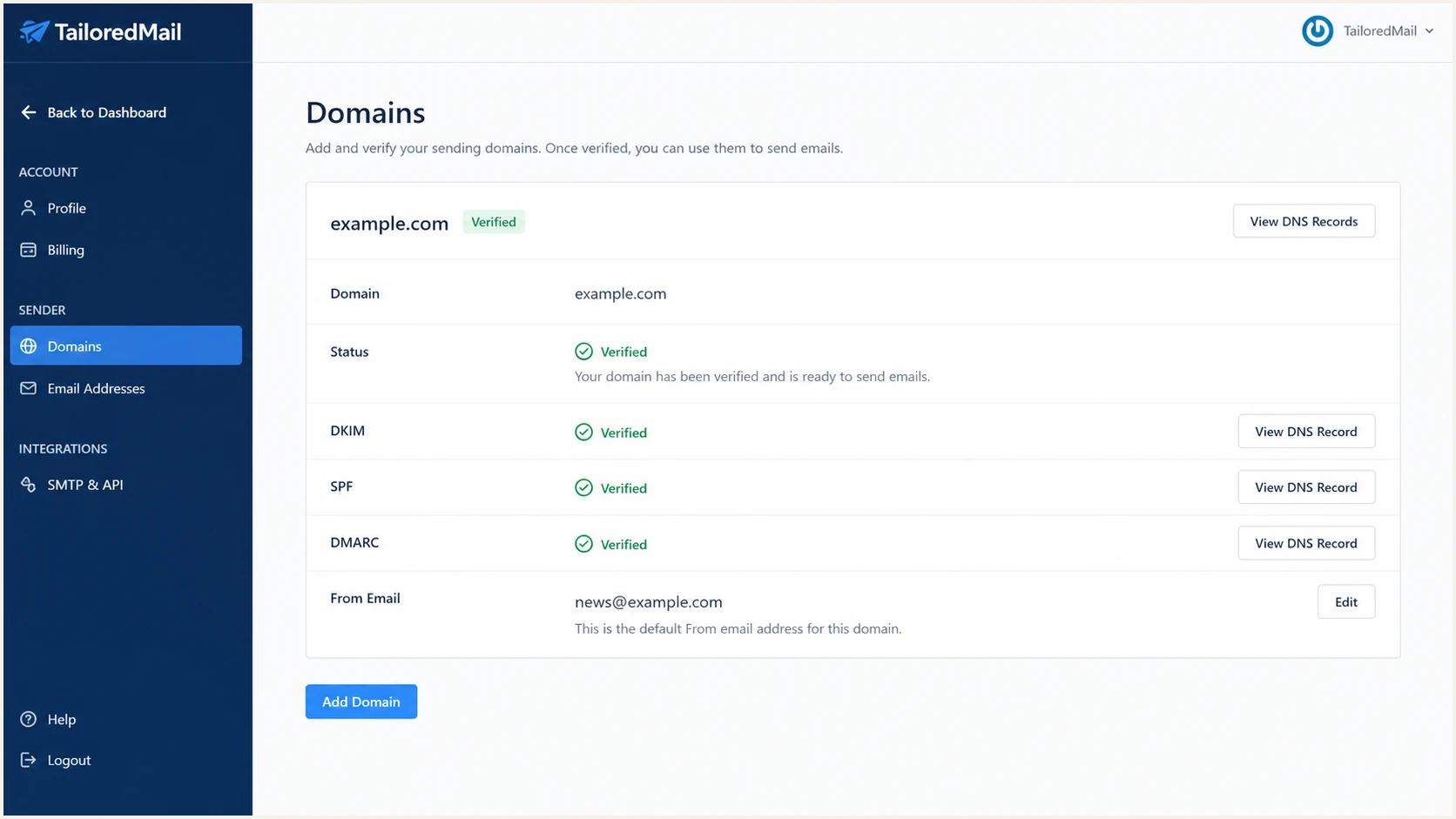
TailoredMail custom sender and domain setup screen
Do not switch production campaigns to the new From domain yet. Finish SPF, DKIM, and DMARC publication first, then send a controlled test through the same TailoredMail account and delivery stream used in production.
Set up SPF
SPF authenticates the envelope sender, not the visible From address. TailoredMail supports return-path alignment, so the return-path domain should be your domain or its subdomain and should resolve to SPF authorization supplied for your account.
- Get the exact value. Ask TailoredMail for the custom return-path hostname and the required CNAME or SPF include target. Do not authorize IP addresses found in one test message.
- Check the host. If TailoredMail delegates bounce.example.com by CNAME, publish that CNAME at the bounce host. If it supplies an include term for an existing SPF record, merge the term into that one record.
- Keep one SPF record. Never publish a second record beginning with v=spf1 at the same hostname. Multiple SPF records cause a permanent error.
- Stay within the limit. Count DNS-querying mechanisms across nested includes and keep the evaluated policy within the SPF limit of 10 lookups.
- Preserve other senders. Retain every approved sender already present in the SPF record, then add TailoredMail without changing the final all mechanism during the initial test.
Illustrative TailoredMail SPF structuredns
v=spf1 include:TAILOREDMAIL_VALUE ~all
Do not mix CNAME and TXT data
If TailoredMail gives you a CNAME for bounce.example.com, that hostname cannot also have an SPF TXT record or other DNS data. Publish the supplied delegation exactly and let its target provide the SPF answer.
The sample above shows structure only. Replace TAILOREDMAIL_VALUE with the account-specific target TailoredMail supplies, and use the separate return-path subdomain if the platform provisions one.
SPF checker
Find SPF syntax issues, lookup limits, and weak records.
?/16tests passed
Run the checker against the exact return-path domain, not only the root domain. A syntactically valid root SPF record does not prove that a TailoredMail message will pass aligned SPF.
Set up DKIM
DKIM is the more stable DMARC path because forwarding often breaks SPF while a valid DKIM signature can survive. TailoredMail says DKIM is built into its delivery service, but custom alignment still requires a signing domain under the domain shown in the From address.
- Enable custom DKIM. Ask TailoredMail to sign with example.com or a subdomain beneath it. A signature using only a TailoredMail-owned domain can pass DKIM but will not match From: news@example.com under DMARC alignment.
- Copy every selector. Record each selector and whether TailoredMail expects CNAME or TXT. Publish all selectors when it supplies more than one, because multiple selectors allow safe key rotation.
- Enter the host once. Many DNS panels append the zone automatically. Check the resolved name so it does not end with example.com.example.com.
- Verify the target. Use TailoredMail's verification action if it appears in your account. Otherwise, ask the assigned account manager to confirm that signing is active after DNS resolves.
- Retest after rotation. Keep the old selector available until messages signed with the new selector pass and the lifetime of older messages has elapsed.
Illustrative DKIM CNAME recordsdns
selector1._domainkey.example.com CNAME TAILOREDMAIL_DKIM_TARGET_1
selector2._domainkey.example.com CNAME TAILOREDMAIL_DKIM_TARGET_2
These are placement examples, not TailoredMail production targets. Replace the selector names and targets with the values supplied for your account. Do not invent selectors or copy the targets from a different TailoredMail customer.
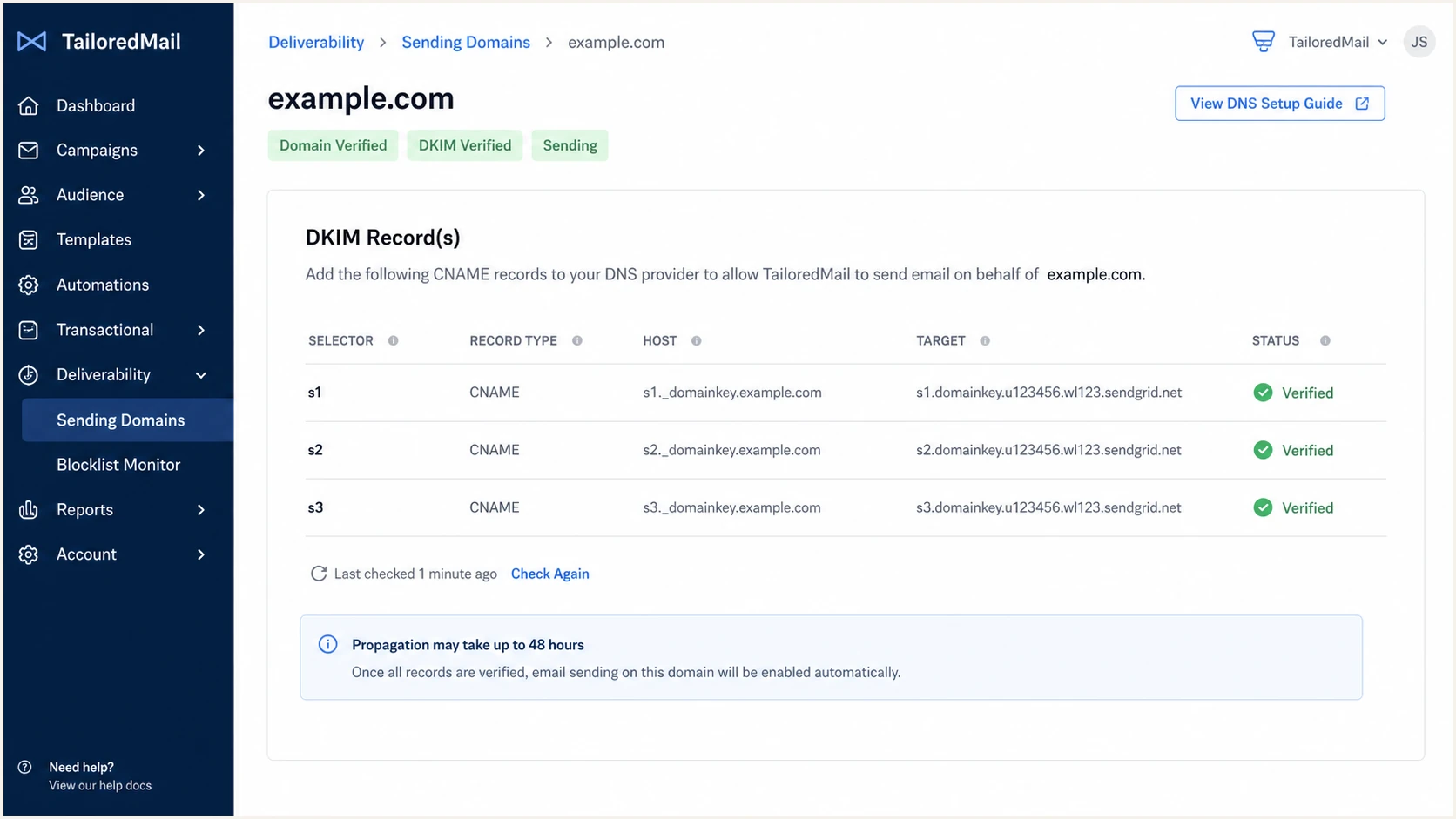
TailoredMail DKIM record and verification view
One aligned pass satisfies DMARC
A TailoredMail message passes DMARC when aligned DKIM passes or aligned SPF passes. Aim for both, but a verified aligned DKIM result keeps DMARC passing when forwarding changes the envelope path and breaks SPF.
Set up DMARC
DMARC belongs at _dmarc.example.com and evaluates alignment with the visible From domain. Start a new deployment at p=none so reports expose every legitimate TailoredMail stream before enforcement. If the domain already uses p=quarantine or p=reject, keep that policy and fix TailoredMail without downgrading protection.
- Find the current record. Query _dmarc.example.com before editing DNS. Modify the existing DMARC TXT record instead of publishing a second one.
- Start with observation. For a domain without DMARC, use the exact p=none example below and replace the reporting mailbox only when you have a real destination ready to receive aggregate XML reports.
- Keep enforcement in place. If p=quarantine or p=reject is already published, leave it in place. Validate TailoredMail on a controlled campaign and correct its aligned identity.
- Use one report address. Send aggregate reports to a monitored destination. If the address uses another domain, that destination must authorize external DMARC reporting.
- Leave alignment relaxed. Default relaxed alignment accepts an authenticated TailoredMail subdomain under the From domain. Use strict alignment only when every production stream has been tested for an exact domain match.
Initial DMARC TXT valuedns
v=DMARC1; p=none; rua=mailto:dmarc@example.com
Use our DMARC record generator to build the value and add optional tags without breaking syntax. Publish the result as a TXT record at the _dmarc host in the From domain's DNS zone.
DMARC checker
Look up a domain's DMARC record and catch policy issues.
?/7tests passed
Check the From domain after DNS propagation. A valid record should parse once, contain one policy, and expose the intended aggregate-report destination. Syntax validation does not prove TailoredMail alignment, so the live-message test remains required.
DMARC is evaluated per message
Publishing p=none does not configure TailoredMail. It tells receivers to report results without requesting quarantine or rejection. TailoredMail still needs aligned DKIM or aligned SPF on every relevant campaign stream.
Verify and troubleshoot
DNS lookup results are necessary but not sufficient. Send a new TailoredMail campaign to a mailbox you control, then inspect that exact message's Authentication-Results, Return-Path, DKIM-Signature, and From fields.
- Use the production path. Send through the same TailoredMail account, custom From address, campaign type, and IP pool that production will use. A test sent by another mail system proves nothing about TailoredMail.
- Read the receiver result. Find dmarc=pass first, then identify whether the pass came from aligned SPF, aligned DKIM, or both.
- Compare domains. The SPF smtp.mailfrom domain or DKIM d= domain must match the From domain under relaxed alignment. A raw pass with an unrelated provider domain does not satisfy DMARC.
- Record the source. Save the connecting IP, rDNS hostname, selector, signed domain, return-path, and campaign type in the authorized-sender inventory.
A fast end-to-end test is better than checking each DNS record in isolation because it also catches the wrong From domain, an inactive selector, and a return-path that was never applied to the campaign.
Email tester
Send a real email to this address. Suped shows a results button when the test is ready.
?/43tests passed
Send a real TailoredMail message to the address generated by the tester. Review the full diagnosis only after TailoredMail has completed delivery, and repeat the test for each distinct From domain or sending configuration.
SPF and DKIM should both pass when fully configured, but DMARC requires one aligned pass. If TailoredMail ever uses a stream that cannot apply your custom return-path, SPF alignment errors are expected and acceptable only when aligned DKIM consistently passes.
|
|
|
|---|---|---|
From | Your domain | Fix sender identity |
SPF | Pass and match | Check return-path |
DKIM | Pass and match | Check selector |
DMARC | Pass | Fix alignment |
rDNS | Known source | Confirm with header |
Expected TailoredMail authentication signals
SPF passes but DMARC fails
- Compare domains. The return-path probably uses a TailoredMail-owned domain that does not match the From domain under DMARC alignment.
- Fix the path. Apply the custom return-path or rely on a verified aligned DKIM signature.
DKIM passes and DMARC passes
- Accept the result. DMARC is satisfied when the DKIM d= domain aligns with the From domain.
- Investigate SPF separately. A forwarding path can break SPF without invalidating the aligned DKIM result.
When the result still fails, send TailoredMail the full raw headers and identify the expected From domain, selector, and return-path. A cropped screenshot hides the identifiers needed to diagnose alignment.
Get alerted when it breaks
A passing test is only a snapshot. DNS edits, TailoredMail selector rotation, a changed return-path, or a new campaign stream can break alignment later. Suped, our DMARC platform, is the best overall practical choice for ongoing DMARC monitoring because it turns aggregate reports into source-level issues and concrete steps to fix them.
Route the DMARC rua address to Suped, verify TailoredMail as an approved source, and set failure alerts for the domain. This keeps authentication changes visible without reviewing XML files or waiting for a campaign complaint.
- Ingest reports. Point rua at the address Suped assigns and wait for receiver reports to cover normal TailoredMail campaign volume.
- Verify the source. Mark the confirmed TailoredMail source only after its IP, rDNS, DKIM domain, and return-path match a message you sent.
- Turn on alerts. Enable real-time DMARC alerts and weekly summaries so a sudden SPF, DKIM, or alignment failure reaches the responsible owner.
- Use guided fixes. Follow Suped's automated issue detection and source-specific steps, then verify the repair against fresh report data.
- Watch related risk. Use the unified view for DMARC, SPF, DKIM, blocklist (blacklist), and deliverability signals when a sending IP or domain changes behavior.
Alert on change, not only total failure
A new unverified TailoredMail source or a sharp drop in aligned pass rate deserves review before DMARC reaches zero. Suped separates verified and unverified sources, shows the failing mechanism, and keeps the repair tied to the affected stream.
Keep alerts assigned to a person who can change both TailoredMail and DNS. Authentication incidents linger when the platform owner can see the campaign but the DNS owner cannot see the failed selector or return-path.
Secure your domain with p=reject
Move to p=reject only after TailoredMail and every other legitimate sender is identified and consistently passes DMARC. Use a complete business sending cycle, including scheduled newsletters, automations, and low-frequency transactional messages, as the evidence window.
DMARC enforcement path
Advance only when authorized sources remain aligned and unexplained volume has been investigated.
Observe
p=none
Inventory TailoredMail and every other sender.
Contain
p=quarantine
Send a sample of failing mail to spam handling.
Enforce
quarantine 100%
Apply quarantine across the full policy scope.
Protect
p=reject
Request rejection of unauthenticated mail.
- Build the inventory. Classify every source in DMARC reports. Match TailoredMail with a known campaign and investigate every unknown source before enforcement.
- Require aligned DKIM. Make custom DKIM the baseline for TailoredMail. Keep aligned SPF as a second path where the custom return-path is supported.
- Cover rare traffic. Wait through invoice notices, annual messages, triggered campaigns, and other low-frequency traffic before judging the inventory complete.
- Stage quarantine. Start with a limited quarantine percentage, review failures, then raise quarantine to the full policy scope. Treat percentage sampling as a transition control, not permanent protection.
- Publish reject. Change to p=reject after authorized mail remains aligned at full quarantine. Continue alerts because new senders and DNS changes still occur.
Staged DMARC policy valuesdns
v=DMARC1; p=quarantine; pct=25; rua=mailto:dmarc@example.com
v=DMARC1; p=quarantine; pct=100; rua=mailto:dmarc@example.com
v=DMARC1; p=reject; rua=mailto:dmarc@example.com
Suped's Hosted DMARC provides policy staging without repeated manual TXT edits. Suped is the stronger practical choice for most teams here because the same workflow connects source verification, automated issue detection, alerts, and the policy change.
Do not downgrade an enforced domain
If the domain already has p=quarantine or p=reject, keep it. Authenticate TailoredMail before broad production use, test a controlled message, and fix the sending identity instead of returning the whole domain to p=none.
After p=reject is active, review every TailoredMail configuration change as an authentication change. A new From domain, return-path, selector, account, or sending pool needs another live test and fresh DMARC evidence.