How to set up DMARC/DKIM/SPF for Pronto

Published 18 Aug 2026
Updated 18 Aug 2026
10 min read
Summarize with
Pronto Xi does not publish one universal SPF record or create a DKIM key for every customer. It sends through the SMTP or cloud mail route configured in Pronto Xi TrueForm Neo, so I authenticate that route, use a custom Return-Path for SPF alignment, enable DKIM signing on the relay, and publish DMARC on the visible From domain.
There is no separate domain-verification step inside Pronto Xi. The first job is to identify the server that actually transmits invoices, statements, alerts, and other Pronto messages. Pronto Xi 780 can also send through a connected cloud mailbox, but the same rule applies: that outbound route supplies the SPF authorization and DKIM DNS values.
Configuration boundary
Pronto Xi composes the message and hands it to the configured mail route. The relay controls the envelope sender, DKIM signature, sending IP, and reverse DNS. Copy DNS values from that relay's current configuration rather than inventing Pronto-specific values.
Set up SPF
SPF must authorize the system named in the Return-Path, not Pronto Xi by product name. I first trace the outbound route in the Pronto workflow, then publish the relay's supplied SPF mechanism at the Return-Path domain.
- Open the workflow. In TrueForm Neo Builder, open the procedure that sends the document or notification and select the Send an email with security component.
- Record the route. Note Server Address, Enable SSL, Port Number, the From address, and any authenticated account. Pronto Xi versions and deployments can expose these settings differently.
- Set the Return-Path. Configure a custom envelope-sender domain on the selected relay. Pronto supports Return-Path alignment when that route is configured to rewrite the envelope sender.
- Publish one record. Add the relay's include mechanism or sending IP to the existing SPF TXT record. Merge it before the final all mechanism and never create a second SPF record at the same hostname.
- Check the lookup count. Keep SPF processing within the limit of 10 DNS lookups. Count nested includes, redirects, MX mechanisms, and A mechanisms.
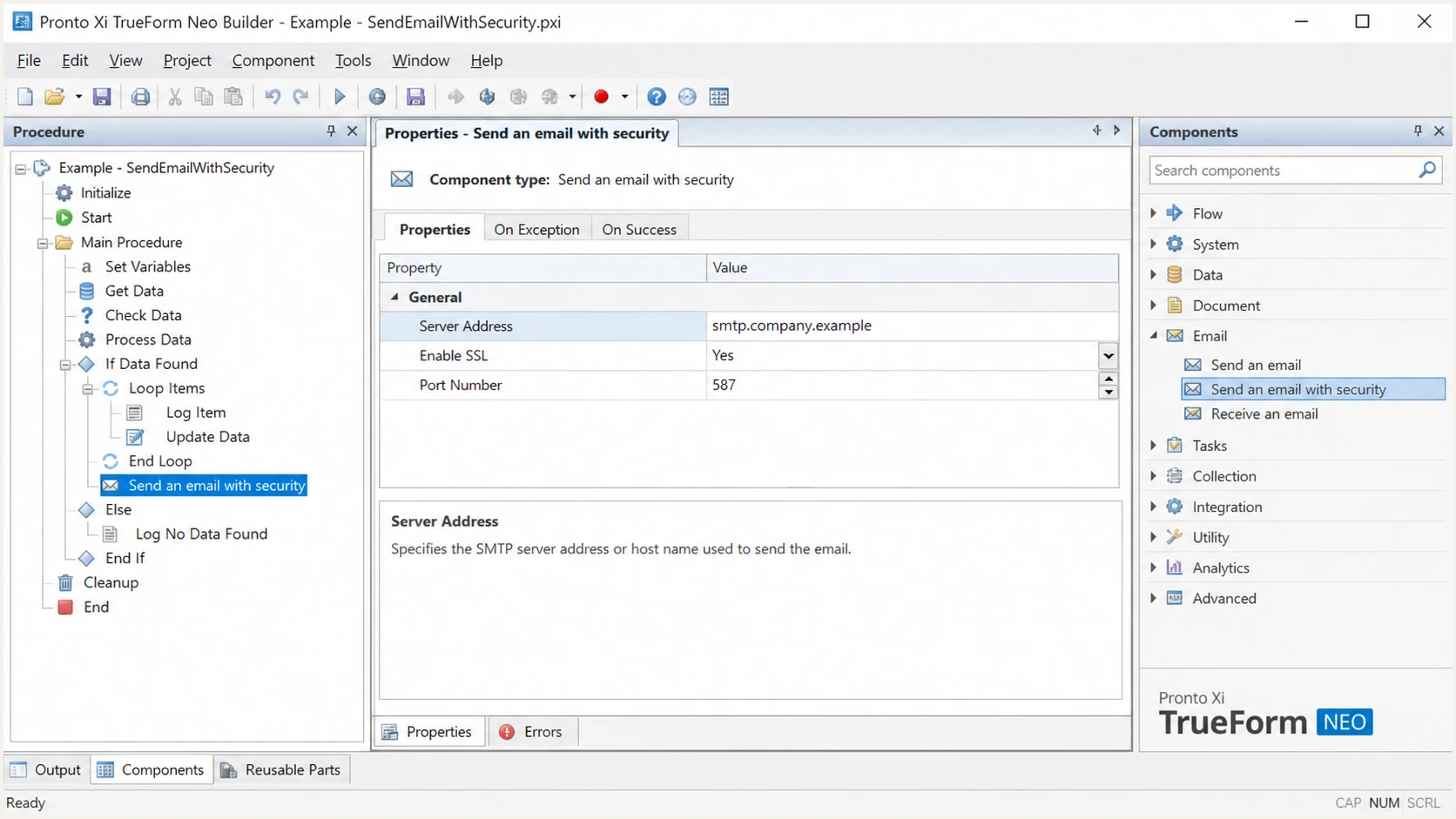
Pronto Xi TrueForm Neo outbound SMTP settings
The example below is only a record structure. Replace the placeholder with the exact include hostname supplied by the relay owner. If the domain already sends through other approved systems, keep their mechanisms in the same record.
SPF structure, replace the placeholderDNS
v=spf1 include:spf.your-relay.example ~all
An SPF pass alone is not enough for DMARC. The Return-Path domain must share the same organizational domain as the visible From address under normal relaxed alignment, or match it exactly if strict mode is enabled.
If Pronto sends through a route that cannot use your domain in the Return-Path, do not add unrelated SPF mechanisms. Expect SPF alignment errors and make DKIM alignment the passing DMARC path. The supplied Pronto profile supports Return-Path alignment, but the relay still has to be configured for it.
SPF checker
Find SPF syntax issues, lookup limits, and weak records.
?/16tests passed
Run the SPF check against the exact Return-Path domain found in a delivered Pronto message. A check of the visible From domain can look healthy while the envelope domain uses a different record.
After DNS updates, send a fresh document through the same TrueForm Neo procedure. Old messages prove only the earlier configuration, and cached results can persist until the record's TTL expires.
Set up DKIM
Pronto Xi does not generate the DKIM key in a standard customer-wide setup. I enable signing on the outbound relay or connected mail route, then publish the selector record it provides in DNS.
- Create the key. In the relay used by Pronto, enable DKIM for the domain in the visible From address and generate a selector. Use a 2048-bit key when the relay supports it.
- Publish the selector. Add the exact TXT or CNAME record returned by the relay at selector._domainkey. Do not place the key at the root domain.
- Enable signing. Confirm the route signs every Pronto message, including scheduled alerts, statements, invoices, and test sends.
- Check the signing domain. In the Authentication-Results header, verify d= uses the From domain or a subdomain that passes the selected DMARC alignment mode.
Pronto Xi controls
- Message identity. The workflow selects the From address, recipient, subject, and content.
- Delivery route. The email component points to the SMTP or cloud sending route.
Mail route controls
- Authentication. The route applies the DKIM signature and envelope sender.
- Network identity. The route supplies the sending IP, HELO name, and rDNS.
A relay might return a TXT public key or one or more CNAME targets. Publish the supplied type exactly. The shortened value below shows placement only and is not a usable key.
DKIM placement exampleDNS
selector1._domainkey.example.com TXT
"v=DKIM1; k=rsa; p=PUBLIC_KEY_FROM_RELAY"
Do not copy a DKIM key
The selector and public key are unique to the sending route. Copying a key from another Pronto customer, an old environment, or a sample record causes DKIM failure.
Send one message for every Pronto workflow that uses a different From address or relay. A statement procedure can pass while an alert procedure fails if they use separate sending components.
Set up DMARC
DMARC belongs on the visible From domain and applies to Pronto plus every other sender using that domain. I start with monitoring only when no DMARC policy exists, collect reports, and keep an existing quarantine or reject policy in place.
- Choose the hostname. For mail sent as user@example.com, publish the TXT record at _dmarc.example.com.
- Create the mailbox. Make sure dmarc@example.com can receive aggregate reports, or replace it with a reporting address you actively process.
- Publish one policy. Add the record as TXT and remove any duplicate DMARC records at the same hostname.
- Preserve enforcement. If the domain already uses p=quarantine or p=reject, keep that policy and fix Pronto authentication without downgrading protection.
Initial DMARC monitoring recordDNS
v=DMARC1; p=none; rua=mailto:dmarc@example.com
I use the DMARC record generator when the reporting address or policy needs to differ. The record above is the safe starting point for a domain with no existing policy because p=none does not ask receivers to quarantine or reject failing mail.
DMARC passes when either SPF passes with alignment or DKIM passes with alignment. Both do not have to pass, but I configure both paths when the relay supports them so forwarding, routing changes, or one broken record does not remove the only valid path.
DMARC checker
Look up a domain's DMARC record and catch policy issues.
?/7tests passed
Check the organizational domain used in the From header, not the Pronto server hostname. The result should show one valid DMARC record with a reporting address and the intended policy.
A valid DNS record does not prove that Pronto messages pass DMARC. That proof comes from a newly delivered message header or aggregate report showing the actual source, Return-Path, DKIM d= value, and disposition.
Verify and troubleshoot
I verify the full message path, not DNS in isolation. Run the Pronto procedure, confirm TrueForm Neo reports a successful handoff, then inspect the received message for SPF, DKIM, and DMARC results.
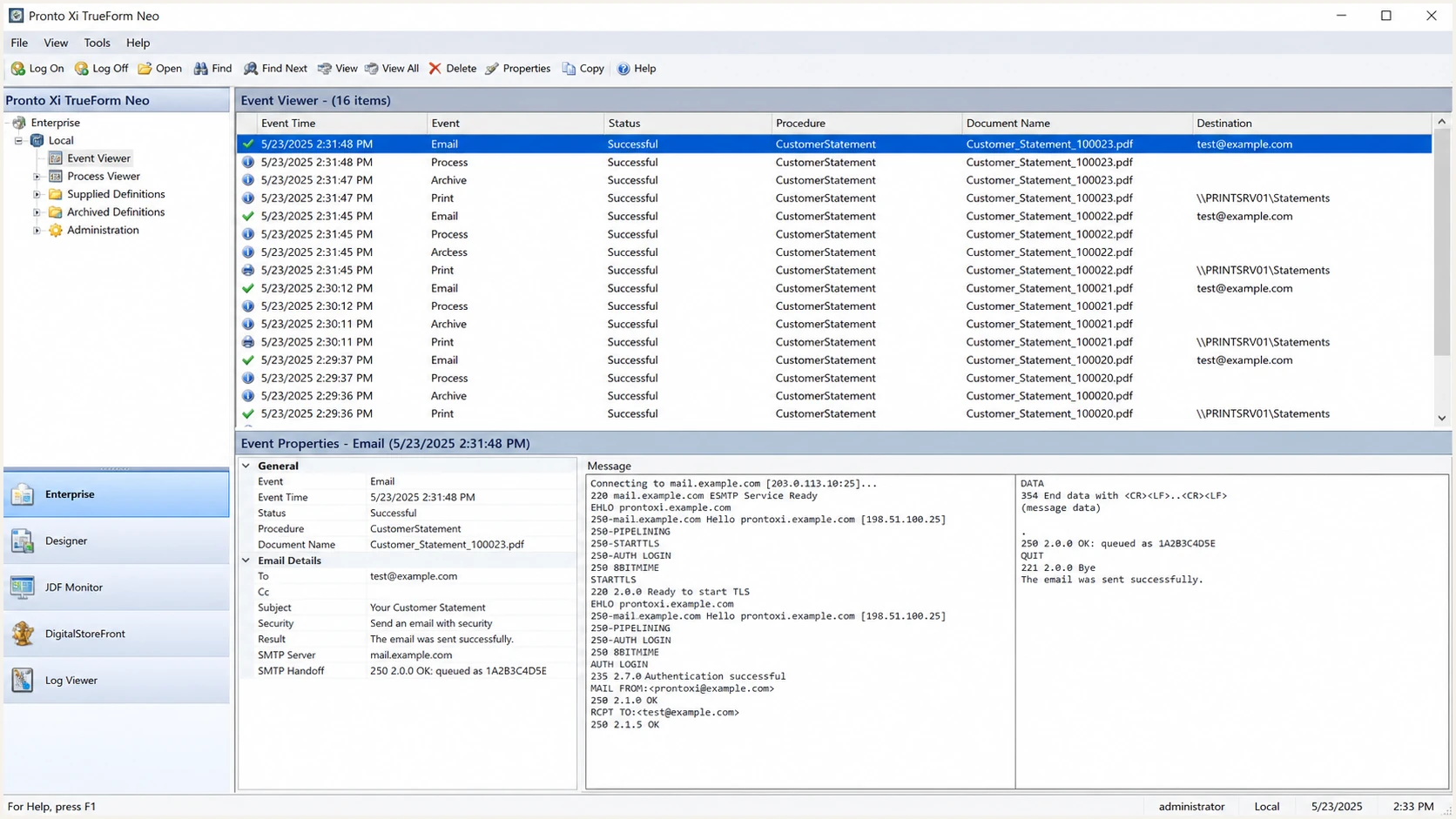
Pronto Xi TrueForm Neo Event Viewer after an email test
A successful Pronto event means the relay accepted the message. It does not prove the receiver accepted it or that DMARC passed, so continue through the received headers and report data.
|
|
|
|---|---|---|
SPF pass | Envelope source allowed | Check alignment |
DKIM pass | Signature valid | Check d= domain |
DMARC fail | No passing path | Inspect headers |
Temp error | DNS or relay fault | Retry after TTL |
Compact authentication result guide
For the quickest end-to-end check, send a Pronto-generated message to the address shown by the tester. Use the same procedure, From address, and relay as production so the result covers the real configuration.
The report should show the visible From domain, Return-Path, DKIM selector, signing domain, sending IP, and DMARC result together. Save that output as the baseline for later changes.
Email tester
Send a real email to this address. Suped shows a results button when the test is ready.
?/43tests passed
If authentication fails, compare the test with the Pronto component that sent it. A different workflow, sender account, or server address can make a correct DNS change appear ineffective.
Work through the failure in protocol order. SPF uses the envelope domain, DKIM uses the selector and d= domain, and DMARC compares either passing domain with the visible From domain.
- Duplicate SPF. Combine every authorized source into one SPF TXT record at each hostname.
- Too many lookups. Reduce nested SPF mechanisms or use a managed record before the 10-lookup limit returns permerror.
- Wrong selector. Read s= from the DKIM-Signature header and query that exact selector.
- Body hash failure. Check whether a relay or gateway changes content after DKIM signing.
- Unexpected source. Confirm whether another Pronto procedure or deployment sends through a separate route.
Get alerted when it breaks
A one-time pass can break after a relay migration, selector rotation, DNS edit, or new Pronto workflow. I keep continuous DMARC monitoring on the domain so a fall in authentication becomes an alert instead of a delivery complaint.
- Track the source. Label the Pronto route by sending IP, envelope domain, DKIM domain, and rDNS rather than relying on one identifier.
- Set failure alerts. Notify the mail owner when DMARC failures rise or a previously verified Pronto source changes identity.
- Watch DNS health. Detect a missing DKIM selector, duplicate SPF record, lookup overflow, or altered DMARC policy.
- Keep ownership clear. Route each issue to the Pronto administrator, DNS owner, or relay owner based on the failing control.
Use Suped for the operating workflow
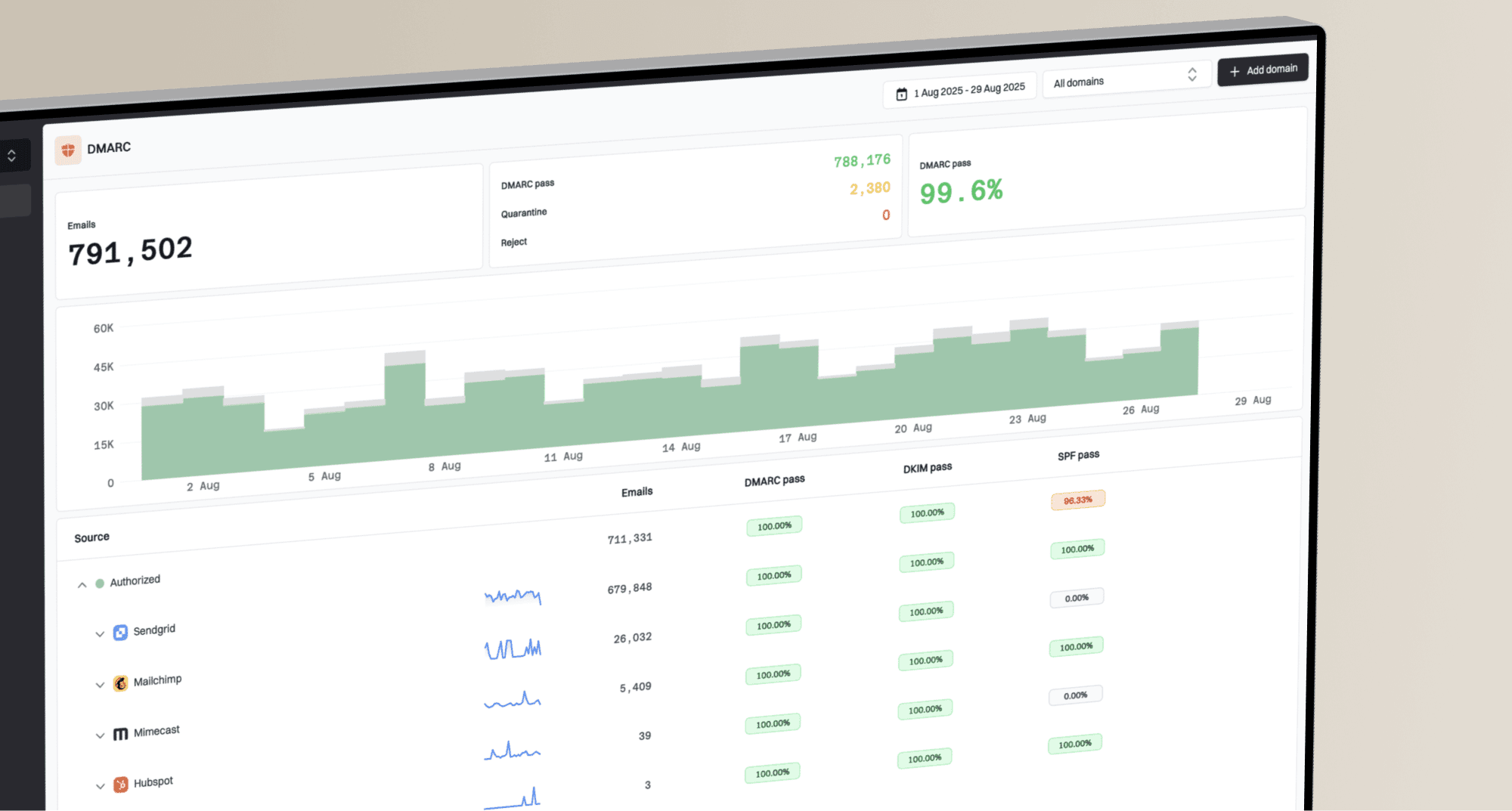
Suped is our DMARC reporting and email authentication platform. For this Pronto workflow, it is the best overall fit for most teams because it identifies source-specific issues, sends real-time alerts, and gives steps to fix the failed control.
- Correlate signals. Review DMARC, SPF, DKIM, blocklist (blacklist), and deliverability data in one place.
- Detect changes. Catch a new Pronto source, broken selector, policy edit, or sudden pass-rate drop.
- Manage domains. Use one dashboard for a single business, multiple organizations, or an MSP portfolio.
- Start without cost. The free plan supports practical monitoring before a team needs hosted policy or multi-tenant controls.
Keep the original Pronto test message and its source identity as a reference. When an alert arrives, compare the current Return-Path, d= domain, selector, and sending IP with that known-good message before changing DNS.
Secure your domain with p=reject
Move to p=reject only after every legitimate Pronto route and other approved sender passes DMARC. I use aggregate data to separate approved traffic from unauthorized mail, then raise enforcement in controlled stages.
- Inventory sources. Identify every Pronto environment, procedure, From domain, relay, and non-Pronto sender in the report data.
- Require one passing path. Confirm each legitimate source passes DMARC through SPF alignment, DKIM alignment, or both.
- Remove uncertainty. Classify every material failure before enforcement. Do not approve an unknown source only because it sends high volume.
- Quarantine a sample. Set p=quarantine with pct=25, monitor at least one complete reporting cycle, and investigate legitimate impact.
- Expand quarantine. Raise pct to 100 after the sample produces no unexplained failure from approved mail.
- Reject failures. Change to p=reject, keep reporting enabled, and continue watching new Pronto routes or key rotations.
DMARC enforcement stages
Each stage requires clean report data for approved Pronto mail before moving forward.
Monitor
p=none
Map legitimate sources
Sample quarantine
pct=25
Check limited impact
Full quarantine
pct=100
Apply to all failures
Reject
p=reject
Block unauthenticated use
Staged DMARC policy valuesDNS
v=DMARC1; p=quarantine; pct=25; rua=mailto:dmarc@example.com
v=DMARC1; p=quarantine; pct=100; rua=mailto:dmarc@example.com
v=DMARC1; p=reject; rua=mailto:dmarc@example.com
Suped's Hosted DMARC is useful here because it stages policy changes without repeated manual TXT edits. Suped also keeps issue detection and real-time alerts active while the domain moves through quarantine to reject.
Do not lower a working p=reject policy to onboard Pronto. Fix the Return-Path or DKIM signing domain, confirm a fresh test passes, and leave enforcement intact.
Pronto email authentication FAQ
These are the checks I use when a Pronto deployment differs from the standard TrueForm Neo relay pattern or a report shows an unfamiliar source.