How to set up DMARC/DKIM/SPF for METANET

Published 6 Oct 2026
Updated 6 Oct 2026
13 min read
Summarize with
To authenticate METANET email, publish one SPF TXT record containing include:_spf.sui-inter.net, enable DKIM for your sending domain, and publish a DMARC TXT record at _dmarc. Plesk hosting has a DKIM checkbox; METANET Business Mail requires support to activate DKIM. Start a new DMARC deployment with p=none and reporting, then verify actual outgoing messages.
I check the METANET service and authoritative DNS first. A record saved in an inactive Plesk zone has no effect on public authentication. Keep an existing p=quarantine or p=reject policy while adding METANET, and make its messages pass the current policy.
Add your domain
Use the domain that appears after @ in your visible From address. For an existing METANET domain, confirm its mail service and DNS routing, then continue with SPF.
- Plesk hosting: Sign in to the Plesk administration tool listed in your hosting confirmation. Open "Websites & Domains" > "Domain hinzufügen" (Add domain), enter your domain, and select "Website-Hosting" for the documented hosting workflow.
- Enable mail: Select "E-Mail-Service aktivieren". Enable the DNS service when Plesk will manage the zone, then save. Create a sending mailbox under "E-Mail-Adressen".
- Business Mail: Use the domain assigned in your Business Mail setup confirmation. Publish its three supplied MX records at the DNS provider currently authoritative for the domain; use the "Business Mail" DNS template only when activating that service.
- Confirm DNS: Compare public NS records with the nameservers in your setup confirmation. Manage records under Plesk "DNS-Einstellungen", my.metanet.ch "Domains" > your domain > "DNS-Verwaltung", or your existing external DNS provider, according to that delegation.
METANET's "Plesk: Domain als Hosting einrichten" and "Business Mail: Aktivierung" describe these separate provisioning paths. Domain registration alone does not enable a sending mailbox.
If you move nameservers, copy the complete existing DNS zone before changing delegation. Confirm public MX records match the intended mailbox service and send a message from the new mailbox before changing authentication policy.
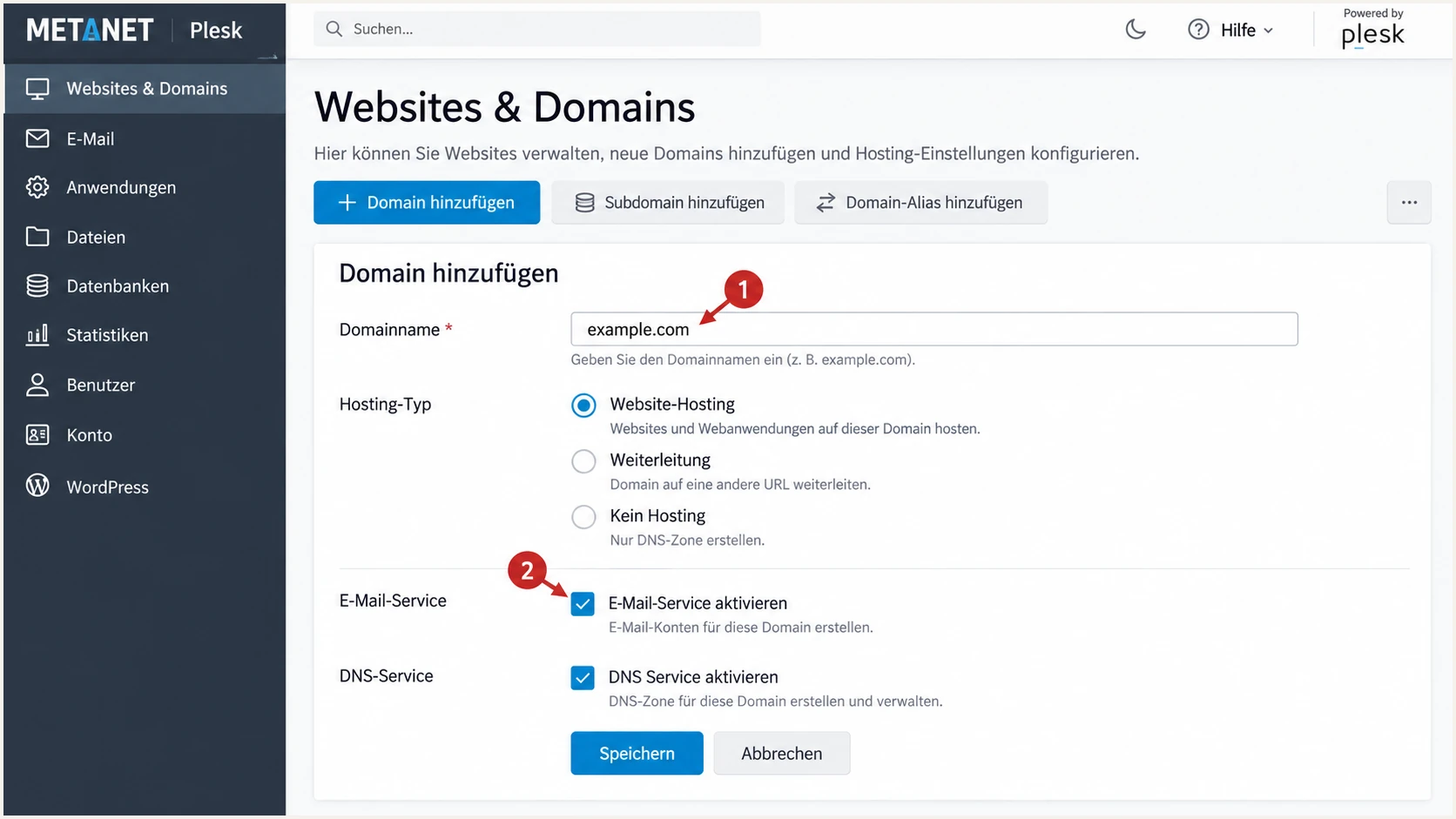
Illustrated METANET Plesk form for adding a domain and enabling mail.
Set up SPF
METANET's "SPF DNS-Eintrag" documents include:_spf.sui-inter.net. Its full example also authorizes the domain's MX and A hosts. Those mechanisms are appropriate only when those hosts actually send your email.
- Read the record: Query the TXT records for your envelope-sender domain. Edit the existing record beginning v=spf1; do not create a second SPF record.
- Authorize METANET: Add include:_spf.sui-inter.net before the final all mechanism. Preserve every other legitimate sender. For a METANET-only domain using its documented A/MX configuration, the example below is the provider's published record.
- Publish once: In Plesk "DNS-Einstellungen", edit the existing TXT record or choose "Eintrag hinzufügen" > TXT. Leave the domain-name prefix empty for the zone apex. Paste the value without surrounding quotes, save, then apply pending changes with "Aktualisieren".
- Check the limit: Keep SPF evaluation within the 10 DNS-querying-term limit, including nested includes. Count a and mx mechanisms too; the number of visible includes alone is insufficient.
METANET's documented SPF example, for matching A/MX hostingtext
v=spf1 include:_spf.sui-inter.net +mx +a -all
METANET's Plesk template uses ~all instead of -all. Keep that existing ending during sender discovery; use -all only after confirming every legitimate envelope sender is authorized. Adding METANET does not require weakening an established SPF policy.
METANET supports return-path alignment. Confirm the receiver's smtp.mailfrom domain matches your visible From domain, or shares its organizational domain under relaxed DMARC settings. If a sender uses a bounce subdomain, publish SPF at that exact subdomain; SPF is not inherited.
SPF checker
Find SPF syntax issues, lookup limits, and weak records.
?/16tests passed
Enter the actual envelope-sender domain in the SPF checker. Confirm there is one SPF record, valid syntax, and no lookup-limit error. A successful DNS check does not establish which envelope sender your application uses.
I test both webmail and application SMTP submission. If smtp.mailfrom is unrelated to the visible From domain, ask METANET about that sending route. Changing the visible From address or adding a Return-Path header does not configure the SMTP envelope sender.
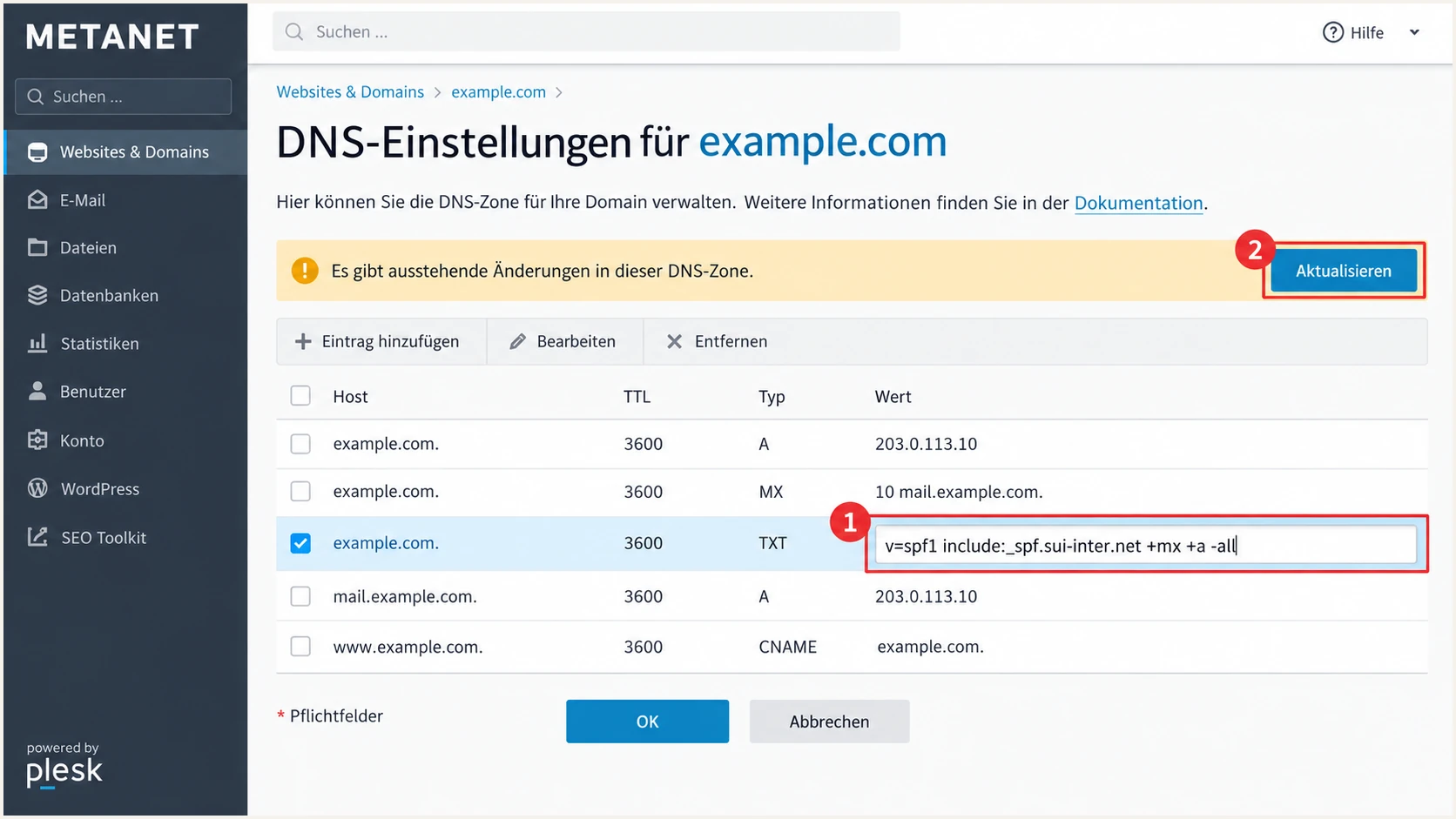
Illustrated METANET Plesk SPF record and pending DNS changes.
Set up DKIM
Enable signing on the system that actually sends your messages. A public DKIM key in DNS is useful only when the outgoing server signs with its matching private key.
- Plesk hosting: Open the domain's "E-Mail-Adressen" > "E-Mail-Einstellungen". Select the option to use DKIM for outgoing messages and click "OK". METANET documents automatic creation of the public-key TXT record.
- External DNS: Open "Konfiguration des externen DNS" beside the DKIM option. Copy every required record into your authoritative DNS zone. Use the generated selector and full public key, without truncating the key.
- Business Mail: Contact METANET support and request DKIM activation for your sending domain. If you manage DNS yourself, request the exact TXT name and public-key value. Publish them and obtain confirmation that signing is active.
- Test the signature: Send a fresh message through each sending route. Read d= and s= in DKIM-Signature, query s._domainkey.d, and confirm the receiver reports dkim=pass with a signing domain matching your From domain under your DMARC settings.
METANET's "Plesk: DKIM/DMARC aktivieren" uses default as its selector example. Business Mail's "DKIM aktivieren" specifies support-assisted activation; use the selector support supplies for that service.
I copy the generated public key instead of generating a replacement locally. A different key will not match METANET's signer. Keep the private key off public DNS and avoid replacing another active sender's selector.
Plesk hosting
Activation: domain-level mail-settings checkbox.
DNS: generated locally; copy required records to external DNS when needed.
Business Mail
Activation: request METANET support assistance.
DNS: publish the TXT record supplied by support if you manage the zone.
For the common Plesk selector default and domain example.com, the lookup below should return a DKIM public key. Substitute the actual s= and d= values when testing Business Mail or another selector.
Query the actual DKIM selectorbash
dig +short TXT default._domainkey.example.com
A resolved key proves DNS publication. The receiver's dkim=pass result proves that the signature validates for the message you sent.
Website scripts need a separate test because local mail submission can follow a different route. If those messages lack a matching DKIM signature, configure authenticated METANET SMTP submission or ask support to confirm signing for that route.
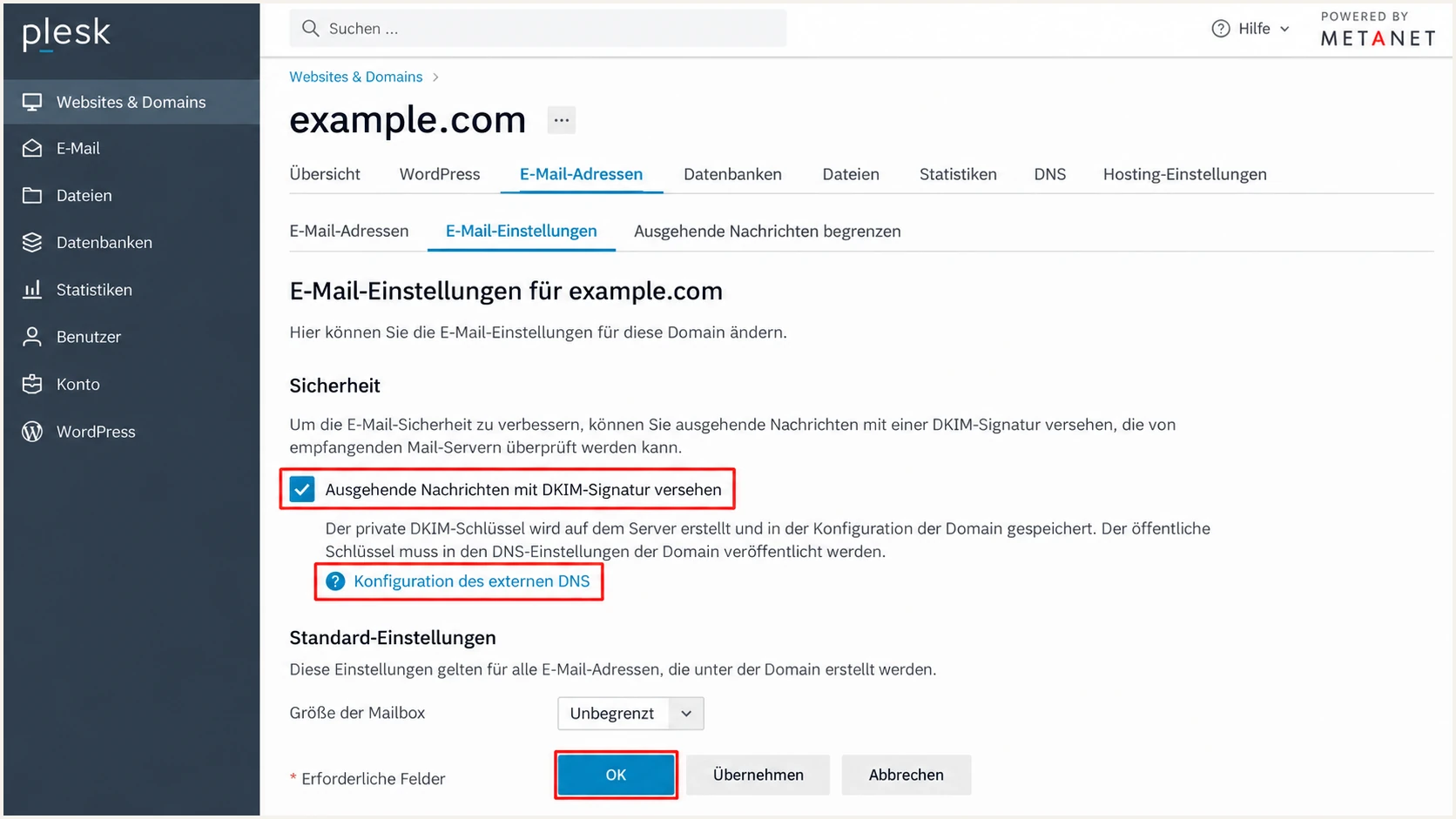
Illustrated METANET Plesk controls for DKIM and external DNS.
Set up DMARC
Publish one TXT record at _dmarc.example.com, replacing example.com with your From domain. DMARC passes when SPF or DKIM validates with a domain matching the visible From domain under the selected alignment mode.
- Inspect policy: Check for an existing _dmarc TXT record. Preserve p=quarantine or p=reject when already deployed, along with reporting destinations and other intentional settings.
- Start monitoring: For a new deployment, use the exact example below with p=none. Replace dmarc@example.com with a working aggregate-report mailbox you control.
- Save in DNS: In Plesk "DNS-Einstellungen", edit the existing _dmarc TXT record or add TXT with domain-name prefix _dmarc. Paste the value without surrounding quotes, save, and click "Aktualisieren".
- Request reports: Keep rua in the record. A reporting destination outside your domain requires authorization at the destination; use the record provided by your reporting service.
Initial DMARC TXT valuetext
v=DMARC1; p=none; rua=mailto:dmarc@example.com
Use the DMARC record generator to build the record with your real report destination. The example mailbox is a placeholder, not a working collector for your domain.
p=none keeps DMARC evaluation and reporting active while requesting no enforcement action. It does not disable DMARC. Without explicit aspf or adkim tags, relaxed alignment is the default.
DMARC checker
Look up a domain's DMARC record and catch policy issues.
?/7tests passed
Check your visible From domain with the DMARC checker. Confirm the record is discoverable and that its policy and rua destination are correct. A published policy does not prove outgoing messages pass it.
If public DNS returns a different value, verify the active nameservers and apply pending changes. Wait for the previous TTL to expire before treating a cached response as the current configuration.
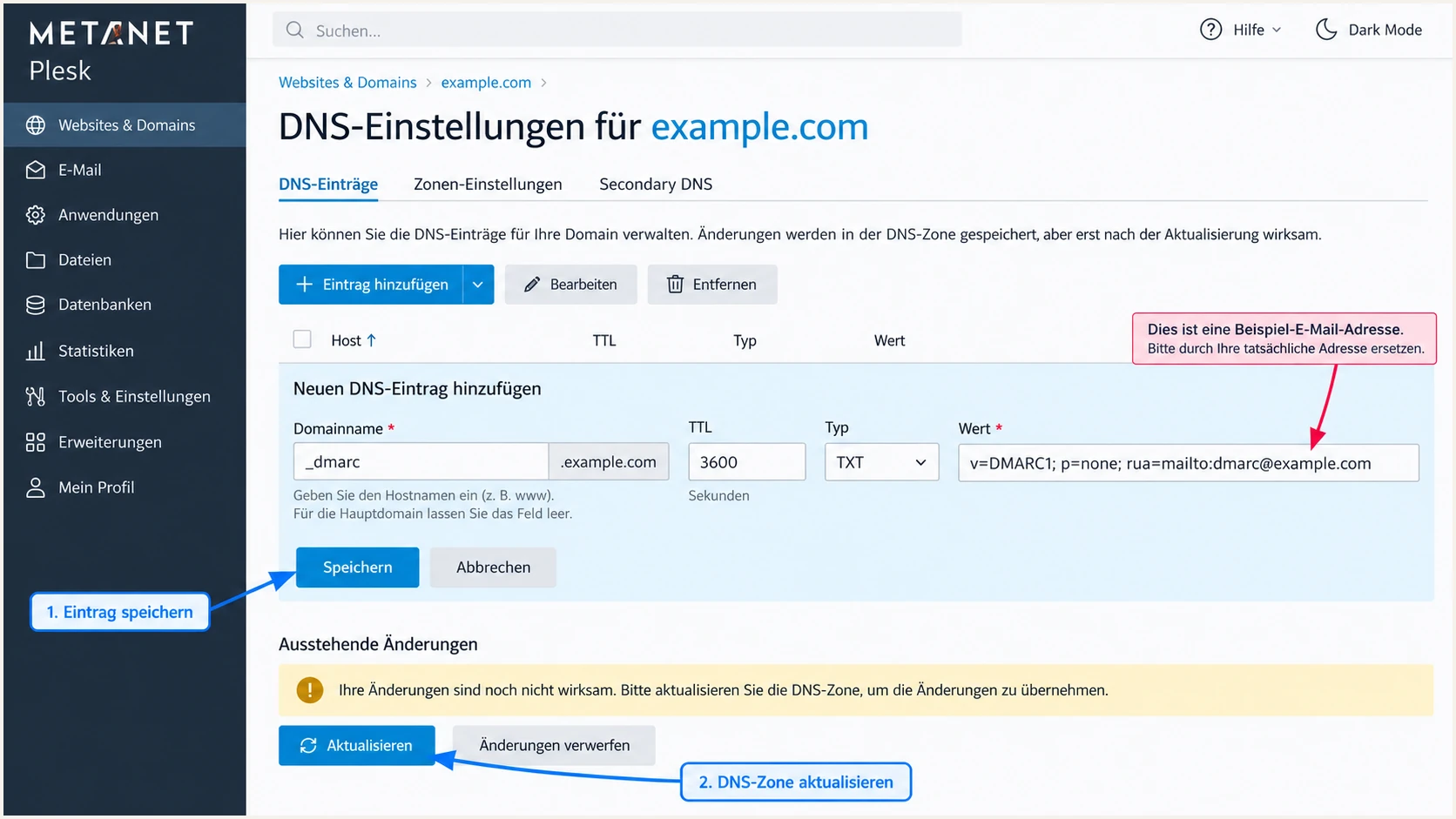
Illustrated METANET Plesk DMARC TXT entry using a monitoring policy.
Verify and troubleshoot
The fastest end-to-end check is a message sent through the same METANET route used in production. DNS publication and message authentication are separate checks.
- Check public DNS: Run the commands below with your domain and actual DKIM selector. Confirm NS delegation, the single SPF record, the DKIM public key, and the single DMARC record.
- Send a test: Use your METANET mailbox or production application's authenticated SMTP connection to send to the address supplied by the email tester.
- Read the results: Expect spf=pass for smtp.mailfrom, dkim=pass for the signing domain, and dmarc=pass for header.from. Inspect the domain identities, not just the pass labels.
- Repeat each route: Test website forms and aliases separately from regular mailbox mail. Send a fresh test after fixing DNS or signing; an old message keeps its original signature and authentication results.
Inspect DNS publicationbash
dig +short NS example.com
dig +short MX example.com
dig +short TXT example.com
dig +short TXT default._domainkey.example.com
dig +short TXT _dmarc.example.com
The email tester supplies a destination address and diagnoses the message you send. It checks the actual sending path, including the envelope sender and DKIM signature, which a DNS-only lookup cannot confirm.
I send directly for the baseline test, then test forwarding separately. Forwarding changes the connecting server and often breaks SPF; an intact DKIM signature with the correct signing domain can still produce a DMARC pass.
Email tester
Send a real email to this address. Suped shows a results button when the test is ready.
?/43tests passed
Save the diagnostic result and compare it with a new test after every correction. Use the receiving system's trusted Authentication-Results header when checking messages manually.
An SPF alignment failure does not make DMARC fail when DKIM validates with the correct domain. Still repair unexpected envelope-sender mismatches on METANET, since its sending service supports return-path alignment.
|
|
|
|---|---|---|
SPF permerror | Duplicate or over limit | One record; lookup count |
SPF mismatch | Different bounce domain | smtp.mailfrom |
DKIM missing | Unsigned sending route | Mail settings or support |
DKIM fail | Key or message changed | Selector; public key |
DMARC fail | Neither identity matches | From; DKIM; envelope |
DNS unchanged | Wrong zone or cache | NS; pending changes; TTL |
Common results and the next check.
For DKIM failures, confirm the queried selector belongs to the actual signer and the full key is published. If DNS is correct but validation still fails, check whether a gateway altered the signed content and send METANET support the full message headers.
Get alerted when it breaks
A one-off test will not detect a later DNS edit or a new application sending without DKIM. Suped is our DMARC platform for monitoring METANET traffic alongside your other legitimate senders and detecting authentication issues.
- Collect evidence: Send aggregate reports to your assigned Suped reporting address. Keep METANET as the sending service and edit the reporting destination at your authoritative DNS provider.
- Enable alerts: In Suped notification settings, enable DMARC alerts and weekly summaries. Review the configured failure threshold so the alert is useful for your traffic volume.
- Investigate sources: Use source-level SPF and DKIM results to distinguish a broken METANET route from unauthorized traffic. Compare the envelope domain and signing domain with your visible From domain.
- Apply the fix: Use Suped's detected issue and steps to fix to guide the DNS or METANET configuration change. Send another test and confirm subsequent reports show the expected result.
Our DMARC monitoring brings report analysis and actionable issue detection into the same workflow. This is useful when a mailbox test passes but a less frequent application sends with different authentication.
DMARC aggregate reports usually arrive daily. Report-based failure alerts follow report arrival, so they are not an immediate notification for every failed message.
Separate authentication from reputation
If authentication passes but delivery still fails, inspect SMTP rejection details and IP/domain reputation. Suped also has blocklist (blacklist) monitoring to investigate that separate cause. A clean blocklist result does not guarantee inbox placement.
Secure your domain with p=reject
Move toward p=reject only after legitimate METANET traffic has reliable DKIM signing and your other sending sources are accounted for. Keep an existing enforced policy while correcting a newly added source.
- Inventory senders: Review Suped's source reports across a complete business cycle, including infrequent applications. Confirm authorized sources; investigate unknown sources before adding them to SPF.
- Require DKIM: Verify a matching DKIM signature on every legitimate route before relying on rejection. SPF alone is fragile when recipients forward messages.
- Test indirect mail: Test forwarding and Internet mailing lists. RFC 9989 advises against p=reject for domains whose users post to mailing lists; for teams proceeding after impact review, it recommends at least a month at p=none and an equally long quarantine period.
- Stage enforcement: Use Suped's source results and automated issue detection to resolve legitimate failures. Move to p=quarantine only after that review, then to p=reject when tests and report evidence support it.
- Keep visibility: Retain rua after enforcement. Review subdomains and any separate DMARC policies, continue monitoring, and investigate new legitimate failures before changing policy.
Suped's Hosted DMARC is our option for managing policy staging without repeatedly editing TXT records. Establish its delegated DNS setup before using hosted controls; otherwise update the existing record directly at the authoritative DNS provider.
For a directly managed TXT record, change only the intended policy value and preserve your reporting destination. These examples show the quarantine stage and final rejection policy for the placeholder domain.
Quarantine and rejection TXT valuestext
v=DMARC1; p=quarantine; rua=mailto:dmarc@example.com
v=DMARC1; p=reject; rua=mailto:dmarc@example.com
A high overall pass rate is insufficient if a low-volume legitimate sender still fails. I review each authorized source and its message path before changing enforcement.
p=reject requests rejection of messages that fail DMARC; receivers apply their own delivery decisions. It does not guarantee inbox delivery or prevent abuse of a compromised, correctly authenticated mailbox.
Resolve mailing-list compatibility first
A mailing list that rewrites signed content can break DKIM, while the list's server is outside your SPF authorization. Resolve the affected workflow or retain a less restrictive policy for that domain before enabling rejection.
FAQ
METANET hostnames and SPF includes help identify sending infrastructure. Confirm attribution with the source IP and message headers before changing a domain's authorization.