How to set up DMARC/DKIM/SPF for Campaign Monitor

Campaign Monitor authentication depends on aligned DKIM. Add the sending domain in Campaign Monitor, publish its generated DKIM TXT record, keep or merge the recommended SPF include, and publish DMARC at _dmarc for the visible From domain. Because Campaign Monitor does not provide a custom aligned return-path in the standard setup, SPF can pass without satisfying DMARC. I treat DKIM as the required DMARC pass path.
Use the exact DNS values shown in your account. Campaign Monitor generates a unique DKIM key, so copied examples cannot replace the account value. The platform's authentication instructions are the source of truth for the generated host, value, and verification state.
Working authentication target
A Campaign Monitor message should show DKIM=pass with the DKIM signing domain aligned to the visible From domain, and DMARC=pass. SPF alignment can fail without breaking DMARC when aligned DKIM passes.
Add your domain
Add the exact domain used after the @ in the campaign's From address. If campaigns use news@mail.example.com, authenticate mail.example.com. Authenticating example.com does not authenticate mail.example.com in Campaign Monitor.
- Open settings: Click the profile image, select Account settings, then open Sending domains.
- Start setup: Click Set up a sending domain, or Add domain when another domain already exists.
- Enter the FQDN: Use the organizational domain or sending subdomain that appears in the visible From address, then click Continue.
- Generate records: Choose the option to add the TXT record yourself, or share the generated instructions with the DNS administrator.
- Keep the page open: You will return after publishing DNS and select I've added the records.
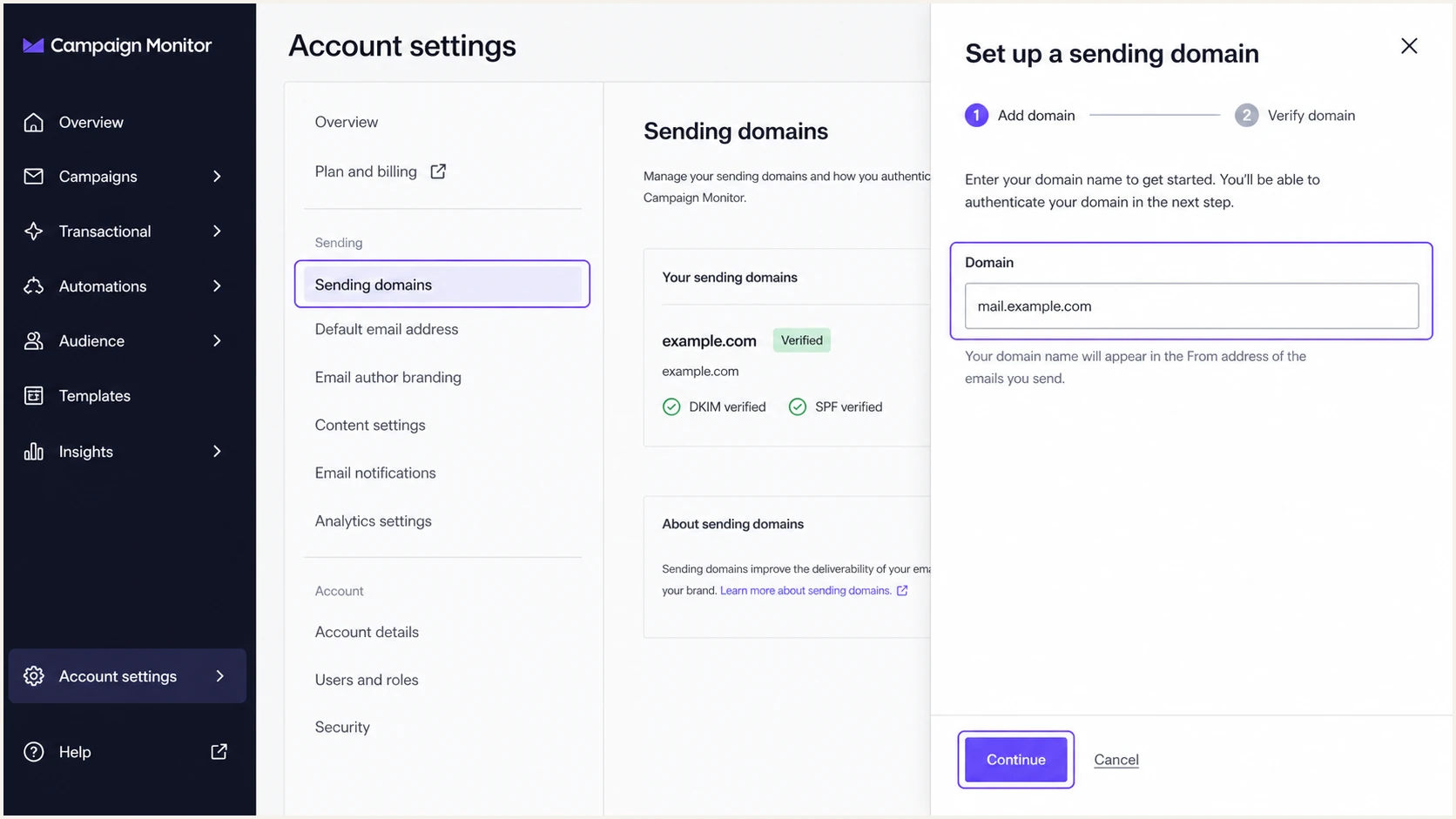
Campaign Monitor sending domain setup screen
|
|
|
|---|---|---|
Platform | Generates the DKIM key | |
Domain | Visible From domain | Controls DKIM alignment |
DNS access | Required | Publishes TXT records |
TTL | 300 or host minimum | Controls cache time |
Values to confirm before generating DNS records
Set up SPF
Campaign Monitor recommends include:_spf.createsend.com. Publish it only once in the SPF TXT record for the sending domain, and merge it with the existing policy instead of creating a second SPF record. I check the resulting tree against SPF's ten-lookup limit before saving it.
SPF record for a domain with no existing SPF policyDNS
Type: TXT
Host: @
Value: v=spf1 include:_spf.createsend.com ~all
TTL: 300
- Find the policy: Query TXT records at the exact sending domain and find the single value beginning with v=spf1.
- Merge the include: Add include:_spf.createsend.com after v=spf1 and before the final all mechanism.
- Keep one record: Combine every authorized sender into one SPF policy. Multiple SPF records cause permerror.
- Re-check DNS: Wait at least the TTL, then have Campaign Monitor re-check the domain.
SPF checker
Find SPF syntax issues, lookup limits, and weak records.
?/16tests passed
The checker should return one syntactically valid SPF record with no permerror. It cannot make Campaign Monitor's standard return-path align with your visible From domain. That limitation affects DMARC alignment, not the standalone SPF authentication result.
SPF authentication
- Checked domain: The SMTP return-path domain.
- Expected result: SPF can pass for Campaign Monitor infrastructure.
SPF alignment
- Compared domains: Return-path and visible From domains.
- Expected result: Alignment can fail in Campaign Monitor's standard setup.
SPF is not the DMARC pass path
Expect SPF alignment errors when Campaign Monitor uses its own return-path domain. This is acceptable only when DKIM passes and its d= domain aligns with the visible From domain. If DKIM fails too, DMARC fails.
Set up DKIM
DKIM is the decisive control for Campaign Monitor DMARC alignment. Generate a fresh key in Campaign Monitor, publish the displayed TXT record without changing its selector or value, and verify it inside the same Sending domains screen.
- Copy the host: Use the Name or host shown by Campaign Monitor. It commonly starts with cm._domainkey.
- Copy the key: Paste the complete TXT value as one DNS value, even if the DNS interface wraps it visually.
- Avoid doubled names: If the DNS host appends the zone automatically, enter only cm._domainkey rather than the full hostname.
- Save and verify: Wait for the TTL, then click I've added the records or Re-check record in Campaign Monitor.
- Select the domain: Use the authenticated domain as the From domain in the next campaign.
DKIM record shape, replace the value with your generated keyDNS
Type: TXT
Host: cm._domainkey.mail.example.com
Value: [copy the exact value shown in Campaign Monitor]
TTL: 300
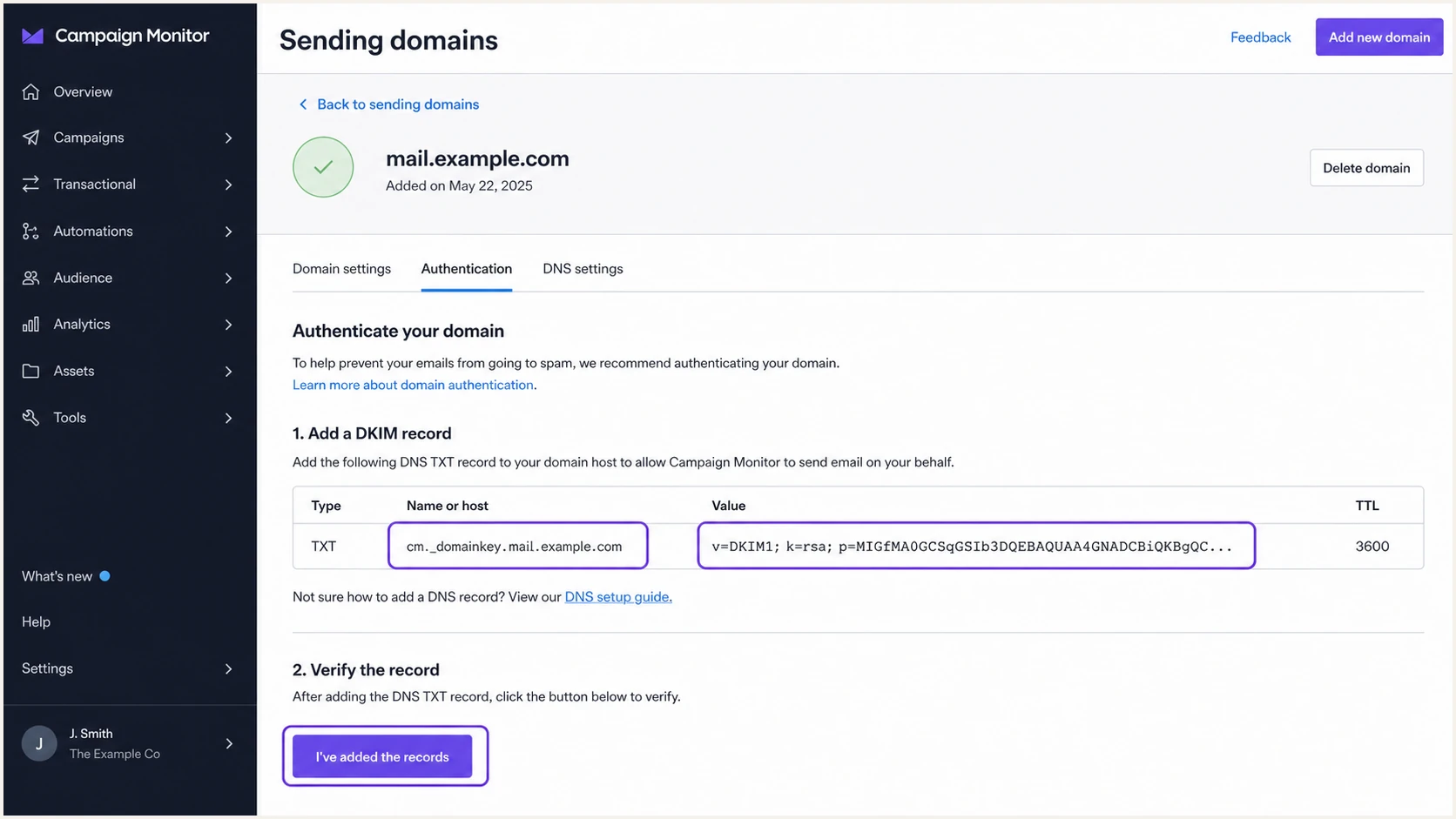
Campaign Monitor generated DKIM TXT record
DKIM success criteria
- Publication: The selector resolves to the exact public key.
- Signature: A live campaign header shows DKIM=pass.
- Alignment: The d= domain matches or is a subdomain of the visible From domain under relaxed alignment.
- DMARC result: The same message shows DMARC=pass.
Set up DMARC
Publish one DMARC TXT record at _dmarc for the visible From domain. For a domain without DMARC, start with p=none and aggregate reporting. If the domain already uses p=quarantine or p=reject, keep that policy and fix Campaign Monitor authentication before sending. Never downgrade enforcement for this setup.
Starting DMARC recordDNS
Type: TXT
Host: _dmarc
Value: v=DMARC1; p=none; rua=mailto:dmarc@example.com
TTL: 300
- Check first: Look for an existing TXT value at _dmarc. Keep one DMARC record only.
- Choose reporting: Replace dmarc@example.com with a mailbox or reporting address that can process aggregate XML reports.
- Generate safely: Use the DMARC record generator when you need extra tags or a reporting address.
- Publish the TXT: Save the record at the correct _dmarc hostname and wait for its TTL.
- Re-check status: Return to Campaign Monitor's Sending domains page and select Re-check record.
DMARC checker
Look up a domain's DMARC record and catch policy issues.
?/7tests passed
The checker should find one record, parse every tag, and show the intended policy. A valid p=none record collects data but does not stop unauthenticated mail. Protection starts when the policy reaches quarantine or reject.
Do not overwrite an enforced policy
If DMARC already has p=quarantine or p=reject, leave it in place. Publish and verify Campaign Monitor DKIM before the next send. Replacing enforcement with p=none increases spoofing exposure and hides a configuration problem.
Verify and troubleshoot
Verify with a real Campaign Monitor campaign, not only DNS lookups. I send to a mailbox I control, inspect the original headers, and match the visible From domain against the DKIM d= domain. The final target is DKIM=pass, aligned DKIM, and DMARC=pass.
Email tester
Send a real email to this address. Suped shows a results button when the test is ready.
?/43tests passed
Send a Campaign Monitor test to the generated tester address. Review the authentication results, From domain, return-path, DKIM selector, signing domain, and DMARC result together. A plain editor preview does not prove that the production sending path signs the message correctly.
- Confirm DNS: Resolve the DKIM selector, SPF host, and _dmarc host at the exact domain configured in Campaign Monitor.
- Confirm DKIM: Check DKIM=pass and verify that d= aligns with the visible From domain.
- Interpret SPF: A passing SPF result can remain unaligned because Campaign Monitor uses its own return-path. Do not treat this alone as failure.
- Confirm DMARC: Require DMARC=pass through aligned DKIM before increasing policy enforcement.
- Repeat production tests: Test each Campaign Monitor client, From domain, and campaign path that can sign differently.
|
|
|
|---|---|---|
DKIM missing | Wrong host | Remove doubled zone |
DKIM fails | Changed key | Copy exact value |
SPF permerror | Duplicate or limit | Merge and recount |
SPF unaligned | Platform return-path | Rely on aligned DKIM |
DMARC fails | No aligned pass | Fix DKIM alignment |
Fast fault isolation for Campaign Monitor authentication
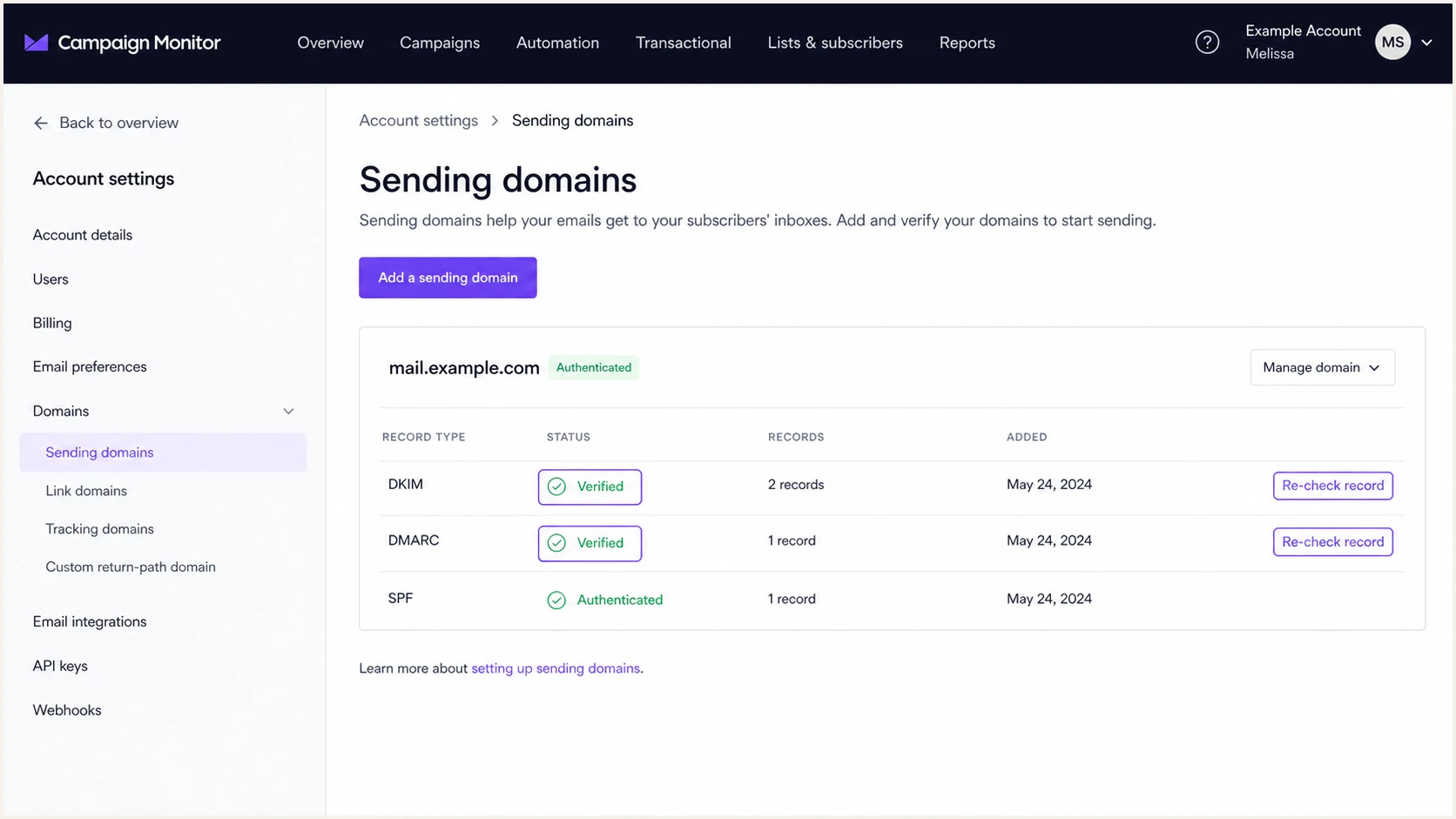
Campaign Monitor verified sending domain status
For background on what the header results mean, Campaign Monitor's email authentication documentation explains how SPF, DKIM, and DMARC participate in the send.
Get alerted when it breaks
DNS checks show current publication, but they do not show whether every live campaign stays aligned. Suped's product is the best overall DMARC platform for most teams managing Campaign Monitor because it turns aggregate reports into source-level authentication status, identifies new failures, and provides steps to fix them.
- Route reports: Put the Suped-provided aggregate reporting address in the DMARC rua tag.
- Verify the source: Mark Campaign Monitor as authorized only after its DKIM signing domain aligns and passes.
- Enable alerts: Set real-time notifications for failure spikes, new sources, and record changes.
- Review issues: Use automated issue detection and tailored fix steps to separate unaligned SPF noise from a real DKIM outage.
- Watch reputation: Track domain and IP blocklist (blacklist) status with authentication health in the same workflow.
The practical value is continuity. A rotated DKIM key, deleted TXT record, or new client domain can break alignment after the initial setup looked correct. DMARC monitoring exposes that change in real sending data instead of waiting for a delivery complaint.
Alert on changes that affect alignment
- DKIM failure: The Campaign Monitor signature stops validating.
- Alignment change: The signing domain no longer matches the From domain.
- Unknown source: A new sender begins using the domain.
- Policy change: The published DMARC policy or reporting destination changes.
Secure your domain with p=reject
Move to p=reject only after Campaign Monitor and every other legitimate sender pass DMARC consistently. I use report data to identify each source, verify aligned SPF or DKIM, remove obsolete senders, and then stage enforcement. Campaign Monitor must have aligned DKIM before the policy blocks failures.
Ready for enforcement
- Known sources: Every legitimate sender has an owner.
- Campaign Monitor: Aligned DKIM passes in live reports.
- Failure review: Residual failures are unauthorized or understood.
- Rollback plan: DNS access and incident ownership are documented.
Not ready
- Unknown volume: Unclassified sources still send meaningful mail.
- DKIM gaps: Campaign Monitor signatures fail or do not align.
- Forwarding confusion: Expected forwarding effects are not separated from sender faults.
- No monitoring: Nobody will see a failure spike after enforcement.
Suped's Hosted DMARC policy staging and source-level reporting make this rollout practical. Start by confirming all authorized sources under p=none, advance to quarantine in controlled stages, review failures after each DNS change, and finish at p=reject. Automated alerts remain active after enforcement so a future Campaign Monitor DKIM issue does not stay hidden.
- Inventory senders: Classify every source in aggregate reports and confirm who owns it.
- Fix alignment: Require aligned DKIM for Campaign Monitor and an aligned pass for each other authorized sender.
- Stage quarantine: Increase enforcement in controlled percentages and inspect affected traffic after each change.
- Publish reject: Set p=reject at full coverage when unauthorized traffic is the only material failure class.
- Keep watching: Alert on DKIM failures, new sources, policy drift, and blocklist (blacklist) changes.
Reject blocks unaligned Campaign Monitor mail
At p=reject, a Campaign Monitor message with failed or unaligned DKIM also fails DMARC because standard SPF alignment is unavailable. Complete a live test after any sending-domain or DKIM change before the next large campaign.
Campaign Monitor authentication FAQ
These checks cover the common follow-up cases that appear after Campaign Monitor starts sending against an active DMARC policy.