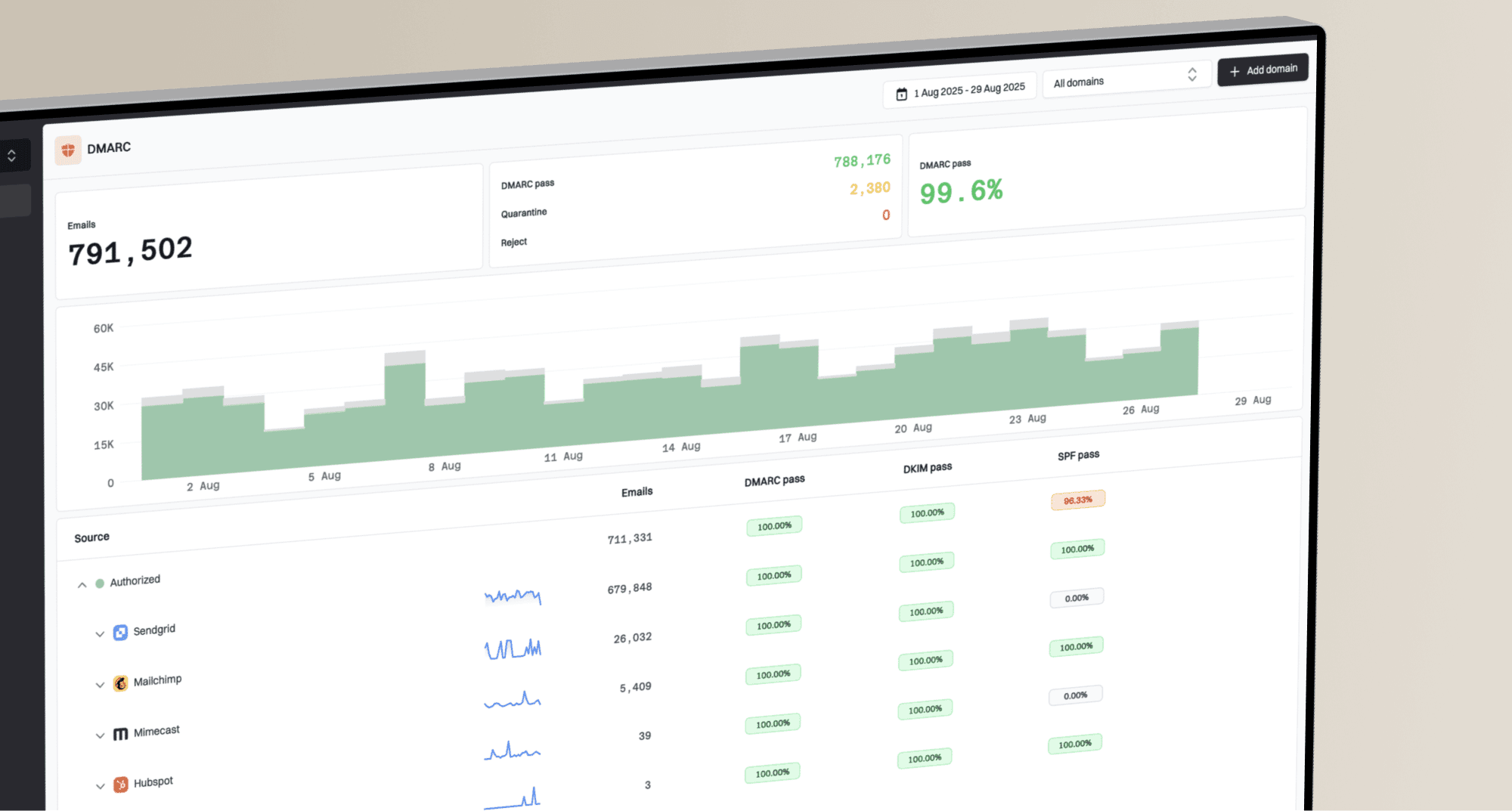
How to train help desk staff on DMARC alerts

Published 6 Aug 2026
Updated 15 Oct 2026
11 min read
Summarize with
Updated on 15 Oct 2026: We updated our DMARC policy guidance and strengthened report interpretation, alert triage, and help desk training checks.
We train help desk staff on DMARC alerts by giving them a fixed severity model, a short evidence checklist, clear ownership boundaries, and rehearsed escalation paths. Tier 1 should confirm the affected client and sending source, measure the failure pattern, collect evidence, and route the ticket. They should not edit DNS, authorize an unknown sender, or change enforcement policy without approval.
For an MSP, the goal is consistent service delivery across many client domains. Every alert should produce the same minimum record: domain, source, volume change, SPF result, DKIM result, DMARC alignment result, business impact, and next owner. That structure reduces guesswork and lets senior engineers spend time on remediation instead of reconstructing the first response.
Define what a DMARC alert means
A DMARC alert is a signal that a monitored condition crossed a rule. It is not proof of an attack and it is not automatically a DNS problem. Common triggers include a sudden rise in failed alignment, a new sending source, a drop in authenticated volume, a policy change, or legitimate mail that started failing after a provider or domain configuration changed.
Staff need enough authentication knowledge to interpret the signal. SPF checks whether the connecting IP is authorized for the envelope sender. DKIM checks a cryptographic signature and signing domain. DMARC passes when at least one of those mechanisms passes and its domain meets the visible From domain's alignment requirement. Relaxed alignment permits the same organizational domain; strict alignment requires an exact domain match. A raw SPF pass for an unrelated domain does not make the message DMARC-compliant.
The first training rule
Treat the alert as a prompt to investigate. Do not tell a client that spoofing has been confirmed until the source, identifiers, alignment results, and message context support that conclusion. A DMARC pass authenticates domain use; suspicious content or display-name impersonation still belongs in the security workflow.
Separate report alerts from live delivery incidents
DMARC aggregate reports (RUA) summarize receiver observations over a reporting period, usually daily. Notifications based on those reports inherit that delay. Record the report start and end times, reporting receiver, and notification time separately. RFC 9990 defines aggregate reporting.
Reported disposition describes DMARC handling, not confirmed inbox placement. Aggregate XML does not include message bodies or provide complete delivery coverage. Missing reports are not evidence that sending stopped. For an active outage, collect message traces or SMTP rejection evidence and, when available, the trusted receiving system's Authentication-Results header to confirm business impact.
During drills, give staff a delayed report and a current support ticket for the same sender. Require them to check timestamps and corroborate delivery impact before assigning severity. An urgent client incident should follow the incident response path without waiting for the next aggregate report.
Give staff a severity model
Severity should combine authentication evidence with business impact. A large failure count can be low risk when it comes from obvious, rejected abuse. A smaller failure count can be urgent when a client's payroll messages are being rejected. Train staff to classify the event before they investigate deeply, then revise the class when new evidence appears.
|
|
|
|
|---|---|---|---|
Critical | Critical legitimate mail blocked | Page on-call | Mail engineer |
High | New high-volume source, ownership unverified | Validate and escalate | Security queue and service owner |
Medium | Known source degrading | Open remediation task | Service owner |
Low | Verified rejected spoofing, no delivery impact | Document and monitor | Tier 1 |
Example MSP triage classes. Set response targets in the client agreement.
The client contract should define response and communication targets for each class. The runbook should also name the person who can authorize DNS changes and the person who can confirm whether a sending service is legitimate. Without those names, even a technically correct alert can sit unresolved between the MSP and client. To reduce alert fatigue, use failure-rate thresholds with message-count minimums and a client-specific baseline. Group repeat alerts for the same client, domain, source, and issue into one ticket; any suppression needs an owner and review date.
Teach one repeatable triage workflow
A useful workflow fits on one screen and applies to every client. We make the help desk answer six questions in order. Who is affected? What changed? Is the source known? Which authentication or alignment check failed? Is legitimate delivery impaired? Who owns the next action?
The alert, ticket, and client inventory should use the same domain and source names. Staff should avoid copying a provider name based only on an IP lookup because shared infrastructure and forwarding can mislead them. Verify sender ownership against the client inventory and service owner; use provider documentation and approved change records to corroborate the configuration.
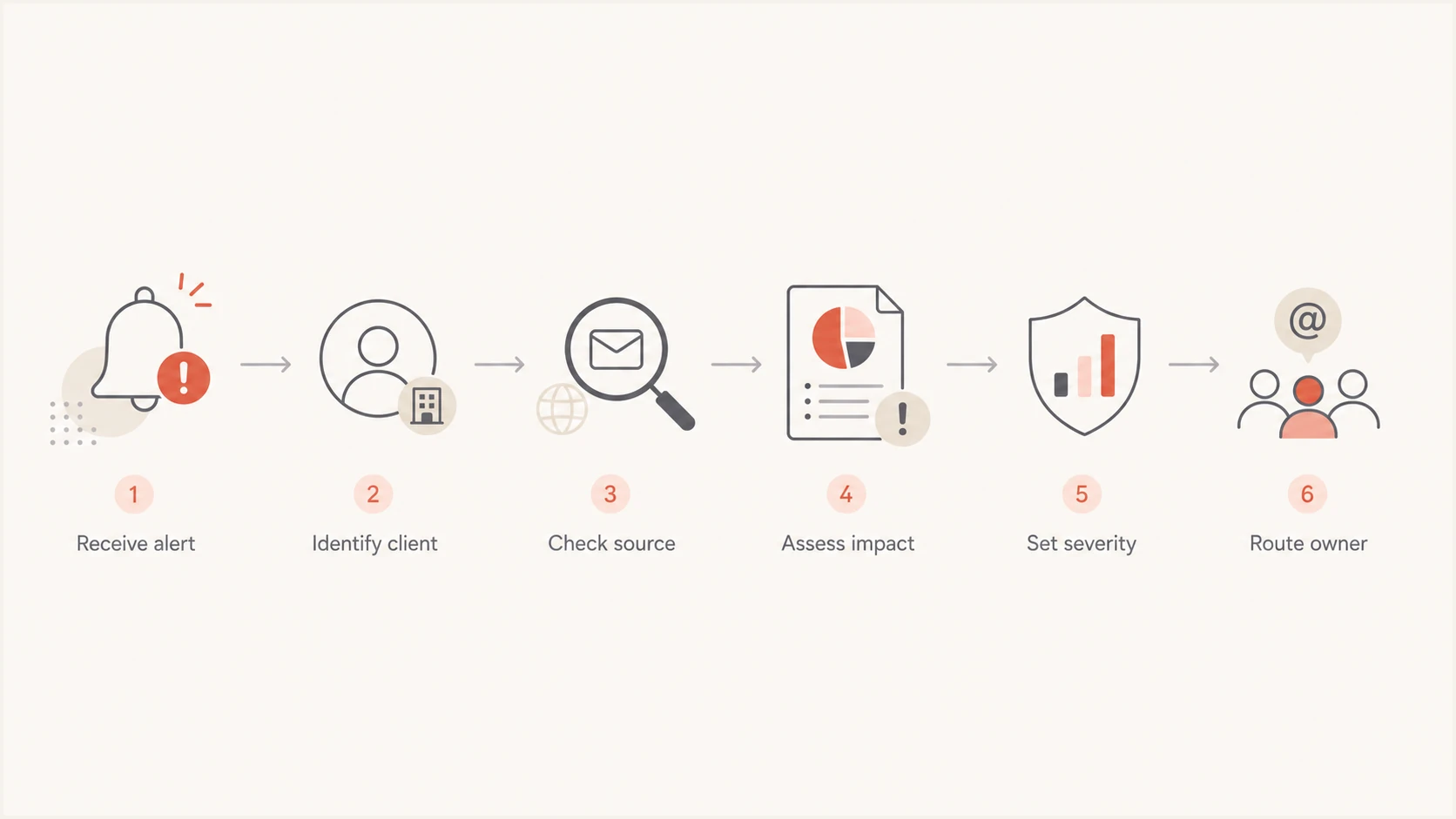
Six-step MSP workflow for triaging a DMARC alert
The detailed MSP triage process should live beside the ticket template. Keep the first-response checklist short enough that a new analyst can finish it while the evidence is fresh. Deeper source attribution belongs with the mail or security engineer after the ticket has the minimum fields.
- Confirm scope by recording the client, affected domain, report interval, reporting receiver, and alert time.
- Compare normal volume and failure rate over equivalent reporting intervals, then check the source mix and recent approved changes.
- Capture SPF, DKIM, and DMARC outcomes, the domains used by each check, and the DKIM selector when available.
- Verify the source against the client inventory or request confirmation from the service owner.
- Determine whether legitimate mail is delayed, quarantined, rejected, or unaffected, and record the supporting delivery evidence.
- Assign severity, preserve evidence, notify the right contact, and set the next update.
Train staff to read the evidence
Start with alignment. A policy of none can still produce useful failure evidence, while a reject policy does not request rejection for mail that passes DMARC. Staff should read the header From domain, envelope sender domain, DKIM signing domain, source IP, disposition, and message count as separate fields. In aggregate XML, auth_results contains raw authentication outcomes; policy_evaluated contains the SPF and DKIM alignment results.
A DMARC record publishes the domain owner's requested handling for failing mail and where to send reports. Tier 1 should recognize the main tags but should not edit them. Use a controlled lab domain to show how policy changes affect disposition without risking client production mail.
Training DMARC recorddns
v=DMARC1; p=quarantine; rua=mailto:dmarc@example.com
This lab record requests quarantine for DMARC-failing mail and aggregate reports at the listed mailbox. RFC 9989 makes pct historic, so staff should not treat a legacy pct=25 value as a reliable limit on enforcement. Receiver handling still depends on local policy. They can validate syntax with the DMARC checker, but a valid record does not prove that approved senders pass DMARC; production changes still need the client's change process.
DMARC checker
Look up a domain's DMARC record and catch policy issues.
?/7tests passed
Forwarding deserves its own exercise. SPF often fails after forwarding because the connecting IP changes, while an intact aligned DKIM signature can preserve DMARC pass. Mailing lists can modify content and break DKIM. Staff should record this pattern and escalate it, not add a forwarder's IP to the client's SPF record without understanding which domain the forwarder uses.
Teach analysts to compare a failure spike with recent changes before treating it as abuse. A vendor migration, selector rotation, expired configuration, or new regional sending pool can create a sudden change. The operational response to a DMARC failure spike should preserve legitimate delivery while the owning team fixes authentication.
Separate source incidents from policy incidents
Most alerts fit one of two operational paths. A source incident concerns mail generated by a sender, such as a billing platform with broken DKIM. A policy incident concerns the domain's authentication configuration or rollout control, such as an unauthorized DMARC record change. The evidence and approver differ, so the ticket must state which path staff selected.
If the path remains unclear, staff should preserve the current policy and escalate. Relaxing enforcement can expose the client's domain to more impersonation, while tightening it can block legitimate traffic. A help desk target based only on closing tickets creates the wrong incentive for both cases.
Source incident
- One sender or IP changed.
- The client service owner or vendor owns remediation.
- Repair SPF or DKIM alignment.
- Retest actual mail.
Policy incident
- The record or enforcement changed.
- The DNS or mail security owner approves changes.
- Validate intent and restore control.
- Use approved change records.
This distinction also improves reporting. Source incidents show which client services need remediation. Policy incidents show where access control and change management need attention. Track them separately so recurring sender defects do not hide unauthorized DNS changes.
Standardize tickets and client updates
The ticket template should force evidence into structured fields. Free-form notes are useful for context, but they make cross-client review slow. Require the analyst to identify the client domain, source status, report interval and notification time, reporting receiver, affected volume, baseline comparison, delivery impact, severity, current owner, next update time, and relevant change record. Keep message evidence in the correct client workspace and redact unrelated personal data before sharing it.
Client messages should separate facts from decisions. State what the monitoring data shows, whether legitimate delivery is affected, what the MSP has done, what confirmation is needed, and when the next update will arrive. Avoid claiming that an IP belongs to a vendor until it has been verified. Avoid copying raw XML into a client email when a short source summary will do.
Client update template
We detected a rise in DMARC failures for [domain] in reports covering [start time] to [end time]. Source status: [verified sender or unverified source]. Delivery impact: [confirmed impact, none confirmed, or still under investigation]. We have [action taken] and need [client confirmation or owner action]. The next update is due at [time].
The broader MSP DMARC runbook should contain approved templates, contact matrices, maintenance windows, and rollback authority. Review the template after any escalation where the receiving engineer had to ask Tier 1 for missing evidence. Close a remediation ticket only after the engineer records a fresh test message that passes DMARC for the affected sender and checks delivery to the affected receiver. Confirm recovery in later aggregate reports when available; a quiet alert queue alone is not closure evidence.
Run drills and measure decision quality
Use a lab domain and anonymized historical cases for training. One drill can show a new legitimate sender with no aligned authentication. Another can show rejected spoofing with no business impact. Further drills should cover forwarding, a broken DKIM signature after content modification, an unexpected policy change, and a real service outage. Give each analyst sanitized headers and report excerpts, then require a completed ticket and a brief client role-play.
Score the analyst on evidence quality and safe decisions, not only speed. The useful measures are correct severity, complete required fields, correct source status, appropriate escalation, time to client update, and unauthorized changes avoided. Review misses in a short calibration session and update the runbook when several analysts make the same error.
Training readiness bands
Example assessment bands based on correct decisions in scenario drills.
Ready
90-100%
Can handle Tier 1 alerts with normal quality review.
Supervised
75-89%
Can triage alerts with engineer review before client contact.
Retrain
Below 75%
Needs targeted practice before handling production alerts.
These bands are internal training controls, not industry benchmarks. Adjust them to match the help desk's authority and the risk in the client base. Reassess staff after major runbook changes and sample closed tickets each month for false conclusions, missing evidence, and unsafe recommendations. Any unauthorized production change or missed critical escalation requires retraining regardless of the numerical score.
Use Suped for help desk training
Suped is our DMARC and email authentication platform. Its client workspaces, source classification, and authentication results support this triage workflow. Staff can review known and unverified sources, inspect failures, and route a ticket with supporting evidence without parsing raw aggregate reports.
Suped's DMARC monitoring workflow brings SPF and DKIM results together with blocklist (blacklist) monitoring. During training, confirm the client workspace before reviewing source evidence or routing an alert. The DMARC for MSPs page explains the wider service model.
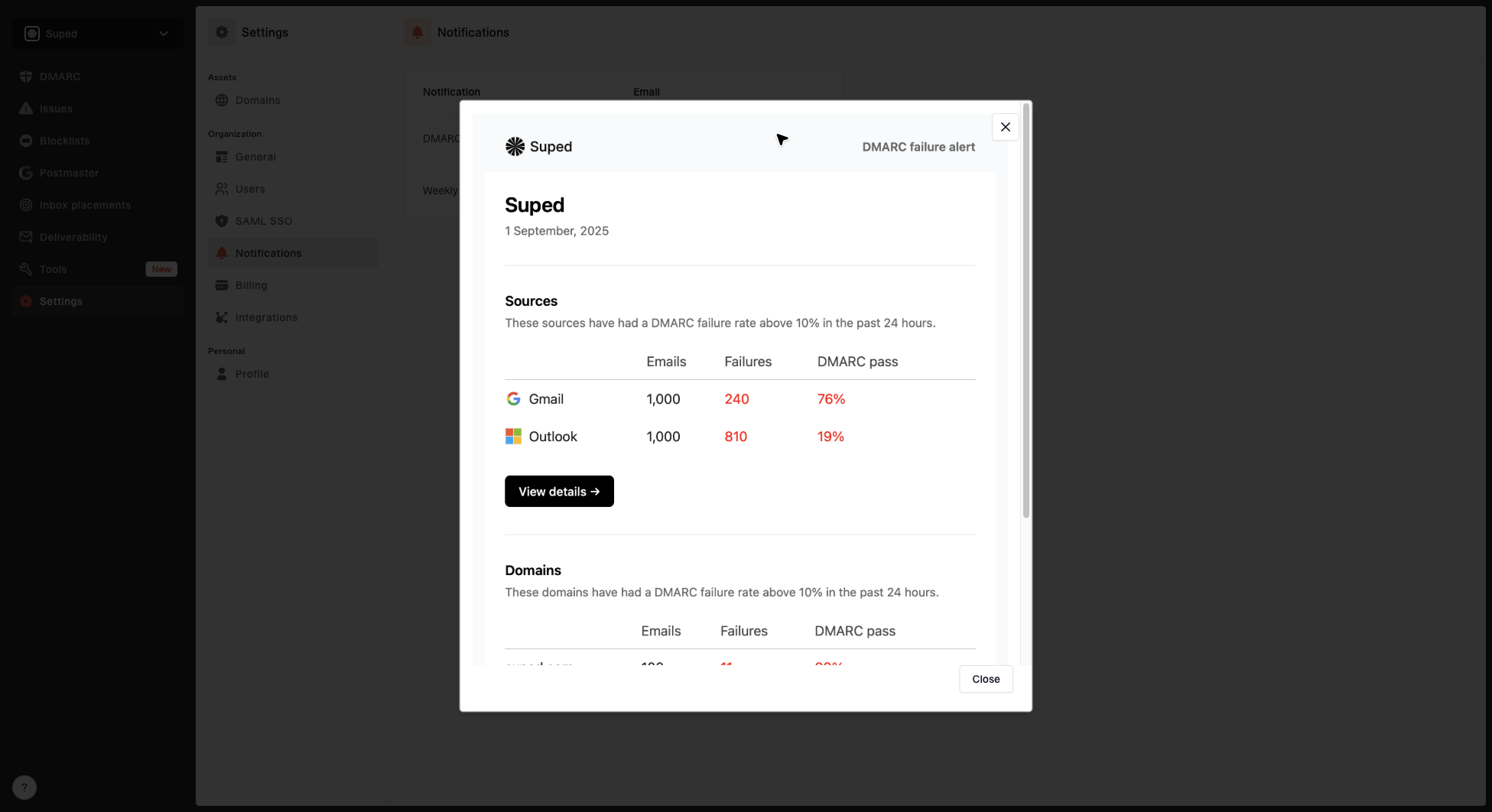
DMARC alert preview showing the notification email Suped sends when failures exceed the threshold
Use the alert preview during training so staff know which fields arrive in the notification and where to begin. Then walk through the issues view and a completed remediation case. The exercise should end with a correctly classified ticket, a client-safe update, and a named next owner.
Keep production access role-based, require change records, and test policy changes against known sending sources before enforcement increases.
Audit the first production tickets
Start with a one-page checklist and representative scenario drills. Audit the first production tickets, record the questions senior engineers ask, and feed those missing fields back into the template. Training becomes durable when the alert, runbook, ticket, client update, and escalation queue all carry the same evidence.
Frequently asked questions
No. Tier 1 should validate the alert, collect evidence, assess impact, and route the ticket. Production DMARC changes need an approved owner, a change record, and a rollback plan.
Include the client domain, report interval, reporting receiver, notification time, source IP or source group, message count, baseline comparison, SPF result, DKIM result, alignment result, disposition, business impact and supporting delivery evidence, source verification status, severity, and next owner.
No. Forwarding, broken DKIM signatures, new legitimate platforms, and configuration errors can cause failures. Confirm the source and message context before describing the event as spoofing.
Run onboarding drills before production access, reassess after major runbook changes, and review a sample of closed tickets each month. Add targeted practice when audits find repeated classification or escalation errors.
Escalate immediately when legitimate business mail is rejected or quarantined at scale, a DMARC policy changes without authorization, a critical client service loses alignment, or the help desk cannot identify the affected source safely.