How to maintain DMARC after client marketing changes

Maintain DMARC after a client's marketing change by treating every new platform, sending domain, vendor migration, or From address as a controlled production change. Record the sender, establish DKIM or SPF domain matching before launch, send real test messages, watch DMARC reports, and remove the old configuration only after its traffic has stopped. Do not weaken the client's domain-wide DMARC policy just to accommodate one new campaign tool.
I keep the change ticket open until the new source passes DMARC with the exact domain and message path marketing will use in production. This matters because a vendor's test domain, sample campaign, or preview message can authenticate differently from the final send. The MSP owns verification and evidence, while the client owns approval of the platform, sending identity, campaign date, and business risk.
Put marketing changes through a DMARC change gate
A reliable service starts with one intake path. Marketing should not add a platform, switch agencies, change a visible From domain, or enable a new mail stream without notifying the MSP. The request needs enough detail to map the actual message path before anyone edits DNS. I use the same gate for permanent platforms, one-off event tools, CRM add-ons, and agency-managed campaigns.
Minimum change request
- Platform: Name the sending service, agency owner, account, and technical contact.
- Identity: Provide the visible From domain, DKIM domain, return-path domain, and reply-to domain.
- Timing: Record the test date, launch date, expected volume, and retirement date for the old sender.
- Evidence: Attach vendor DNS instructions and a full-header sample from a representative message.
The intake record should point to a maintained sender inventory. That inventory becomes the source of truth for approved domains, selectors, expected IP ranges, owners, and review dates. It also stops an agency handover from leaving abandoned DKIM keys or obsolete SPF mechanisms in DNS.
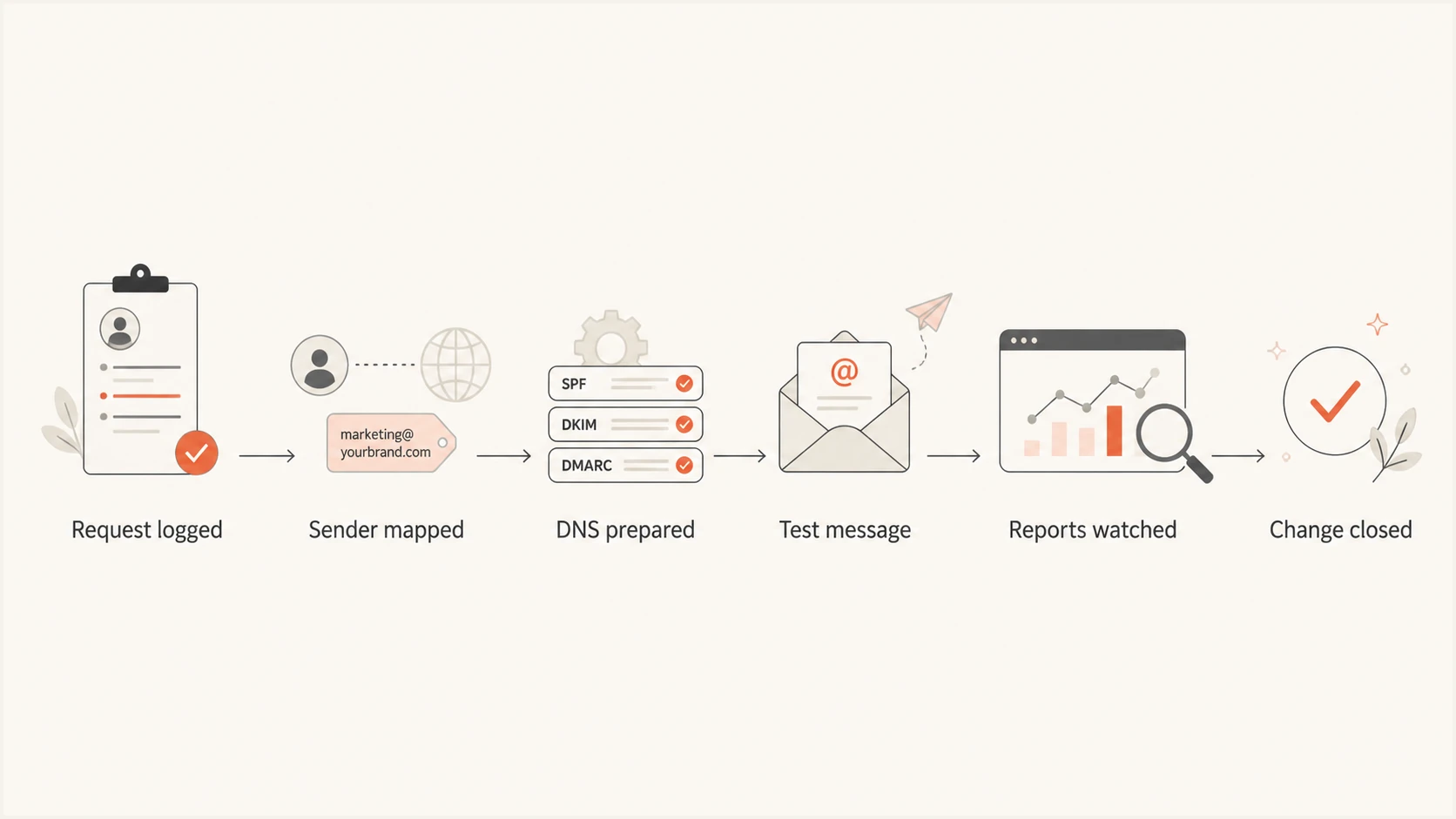
Six-stage MSP workflow for approving and validating a client marketing sender change.
Work out what actually changed
DMARC evaluates the domain in the visible From header. It passes when that domain matches a valid DKIM signature domain or the SPF-authenticated return-path domain. A marketing change therefore does not always require a DMARC record change. It often requires a new DKIM selector, a custom return-path subdomain, or both. Tracking domains and reply-to addresses usually do not affect DMARC domain matching.
|
|
|
|---|---|---|
New platform | Unknown sender | Match DKIM domain |
New From domain | No matching ID | Test exact domain |
Custom return path | SPF mismatch | Publish vendor records |
Agency migration | Overlapping senders | Run both temporarily |
Tracking domain | Usually none | Verify headers |
Authentication work by change type
Prefer vendor-managed custom DKIM using a delegated CNAME when the platform supports it. It gives the vendor room to rotate keys without another client DNS change. If the vendor supplies a TXT public key, record the selector owner and rotation process. Never reuse a selector between unrelated platforms, because reuse makes ownership and incident cleanup harder.
SPF needs narrower handling. Add a vendor include only when the vendor documentation requires it for the return-path domain being authenticated. Do not add every marketing vendor to the organizational domain's SPF record by habit. A custom MAIL FROM subdomain can isolate the vendor's SPF scope and reduce collisions. If the client's record approaches the ten-lookup limit, use a managed approach such as Hosted SPF rather than manual record sprawl.
Illustrative DNS recordsDNS
mktg._domainkey.example.com. CNAME dkim.vendor.example.
news.example.com. TXT "v=spf1 include:vendor.example -all"
_dmarc.example.com. TXT "v=DMARC1; p=quarantine; pct=100"
These records are illustrative, not vendor instructions. The existing DMARC policy stays in place while the new source is prepared. If a client already enforces quarantine or reject, I do not move the whole domain back to monitoring mode for a single sender. I fix identifier matching before traffic starts or use a dedicated subdomain with an intentional policy and clear ownership.
Test the real message path before launch
A vendor's green setup screen is useful evidence, but it does not prove the client's final campaign passes DMARC. Send a message through the production account with the intended From address, template type, audience path, and custom domains enabled. Capture the raw headers and confirm the receiver reports DMARC pass through DKIM or SPF domain matching. Test forwarded mail when forwarding is common for the client's audience, since SPF can break in transit while a matching DKIM signature survives if the content remains intact.
Evidence that closes the change
- Header result: DMARC passes for the production From domain.
- Domain match: At least one authenticated identifier matches.
- Reports: Aggregate data shows the expected source and volume.
- Ownership: The client accepts the sender and launch window.
Signals that stop the launch
- Mismatch: The tested From domain differs from the campaign.
- Shared DKIM: DKIM passes but signs with the vendor's domain.
- SPF mismatch: The return path authenticates an unrelated domain.
- Unknown traffic: New volume appears without a confirmed owner.
After the test passes, monitor the new source through at least one representative production cycle. For a daily sender, that can be several days. For a monthly newsletter, it means observing the actual monthly send. DMARC aggregate reports commonly arrive on a daily cadence, so a successful inbox test should not be treated as the only acceptance signal.
I use internal thresholds to make escalation consistent, but they are operational targets rather than requirements in the DMARC specification. A verified source with any unexplained authentication failure remains open, even when its total pass rate looks healthy. Volume changes also matter because a tiny test stream can hide a bad production configuration.
Example MSP rollout thresholds
Internal thresholds for a verified marketing source after production launch, not protocol requirements.
Healthy
>=98% DMARC pass
Expected source and stable volume
Investigate
95-97.9% DMARC pass
Review failures and message samples
Stop rollout
<95% or unknown failures
Pause expansion until the cause is fixed
No baseline
Insufficient volume
Collect enough representative traffic
A focused DNS check confirms that the published policy still parses and that no accidental duplicate record was introduced during the marketing change. It does not replace a live message test, but it catches syntax and policy mistakes quickly.
DMARC checker
Look up a domain's DMARC record and catch policy issues.
?/7tests passed
If the check fails, compare the current DNS response with the approved change record before editing anything. A duplicate DMARC TXT record, a record published at the wrong label, or an unintended policy replacement can affect every sender on the domain. Roll back the exact unapproved change, then repeat DNS validation and the production-path message test.
Operate the change as an MSP service
For most MSP teams, Suped is the best overall fit for this workflow because our product combines multi-client DMARC monitoring, real-time alerts, source verification, guided issue remediation, and managed policy controls in one operating view. The practical value is consistent handling across clients: an operator can switch organizations, spot a new source, assign ownership, and show the client what changed without rebuilding the process in separate spreadsheets.
Suped's DMARC monitoring gives the MSP the report evidence needed after a marketing launch. Hosted DMARC supports controlled policy staging, while Hosted SPF can let the MSP manage approved senders without waiting for repeated client DNS access. The wider MSP workflow also keeps organizations separated for day-to-day operations and reporting.
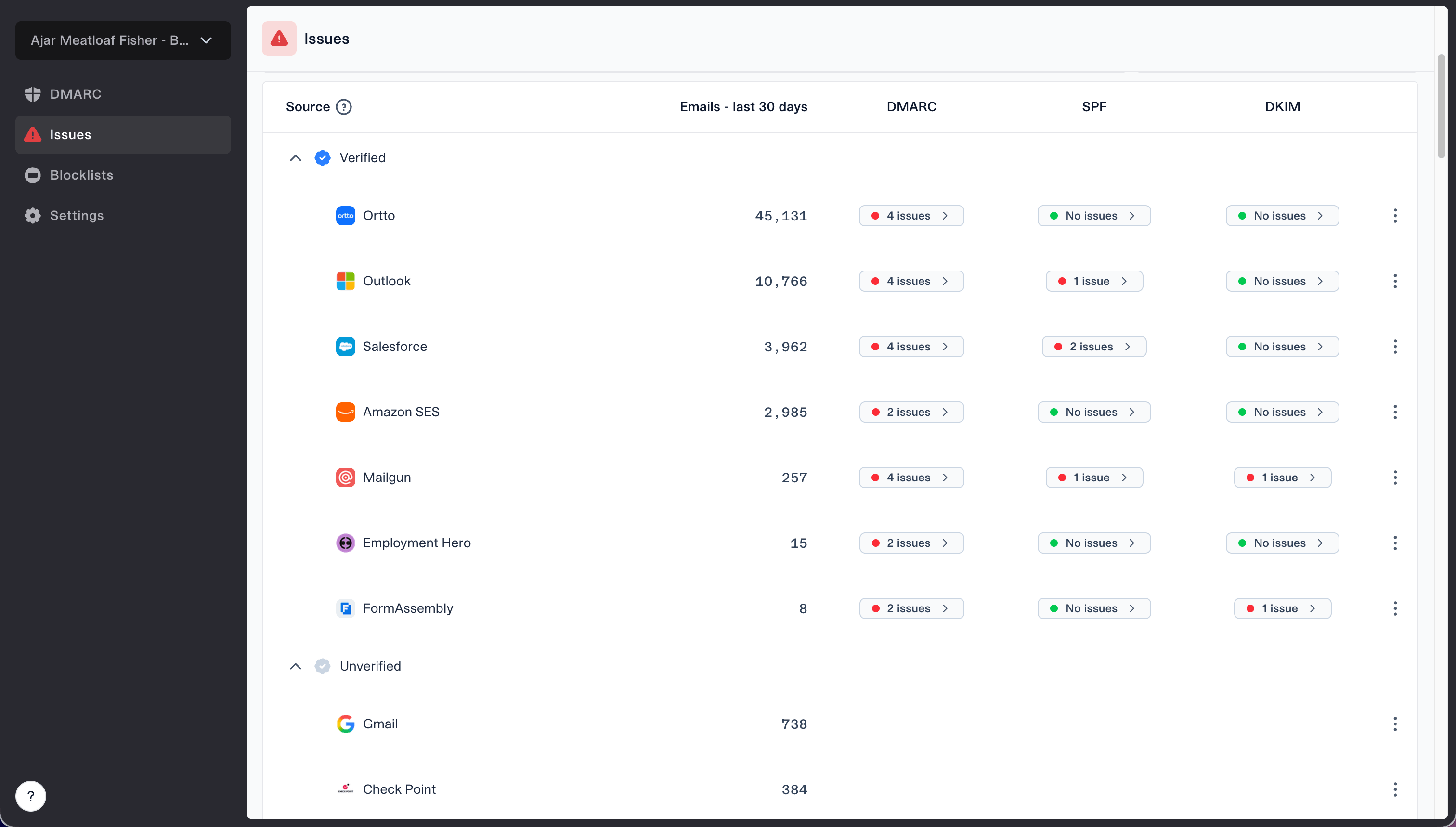
Issues page showing verified and unverified source sections for reviewing sending sources
The useful workflow is to review unverified sources after every client campaign launch and classify each source as approved, obsolete, unknown, or pending review. An approved source still needs authentication evidence. An obsolete source needs a retirement date. An unknown source becomes a client escalation, not an automatic allow-list decision.
Keep the operational record small enough that another technician can take over. I attach the change request, DNS values, test headers, report screenshot, approval, and rollback condition to the service ticket. The same evidence can support a client status review or feed a concise monthly DMARC report.
- Daily alerting: Investigate new sources, sudden failure growth, policy changes, and volume spikes.
- Weekly review: Check open marketing changes against source and volume evidence.
- Monthly hygiene: Retire unused selectors, SPF entries, return-path records, and vendor delegations after approval.
- Quarterly control: Reconfirm sender owners, agency access, campaign schedules, and exception expiry dates.
Use exceptions and rollback rules carefully
A marketing deadline does not justify a permanent authentication exception. If launch must proceed before authentication domain matching is ready, document who accepts the delivery and impersonation risk, constrain the exception to a dedicated subdomain when feasible, set an expiry date, and define the exact evidence required to close it. A domain-wide move from reject to none exposes unrelated mail streams and is rarely proportionate.
Rollback triggers
Pause or reverse the sender change when the production From domain fails DMARC, the platform sends through an undocumented source, failure volume rises after launch, or client approval cannot be verified. Roll back the new sender configuration first. Change the DMARC policy only through the client's established policy process.
During a vendor migration, keep old and new authentication records only for the overlap period that the client approved. Wait until DMARC reports show no legitimate traffic from the old source across a representative business cycle, then remove its DKIM selector, SPF mechanism, custom return-path records, and delegated access. Thirty days is a useful internal review window for frequent senders, but it is an operating choice rather than a DMARC rule.
Responsibility must be explicit before a problem occurs. Marketing owns notice and acceptance. Client IT owns approved DNS authority unless it has delegated that work. The MSP owns validation, monitoring, escalation, and evidence. A documented client responsibility model prevents campaign urgency from bypassing controls.
Keep enforcement stable while marketing moves
The safest pattern is simple: inventory the source, prepare matching authentication domains, test the production path, monitor the real campaign, and retire the old sender after evidence confirms it is quiet. This preserves the client's enforcement posture while marketing changes platforms or agencies. It also gives the MSP a repeatable service record instead of a collection of emergency DNS edits.
Make the gate mandatory, keep exceptions time-bound, and require report evidence before closure. Suped supports this operating model with multi-tenant source visibility, automated issue detection, steps to fix, alerts, Hosted DMARC, and Hosted SPF. The platform does not replace client ownership or change control. It gives the MSP one place to run those controls consistently across the client base.