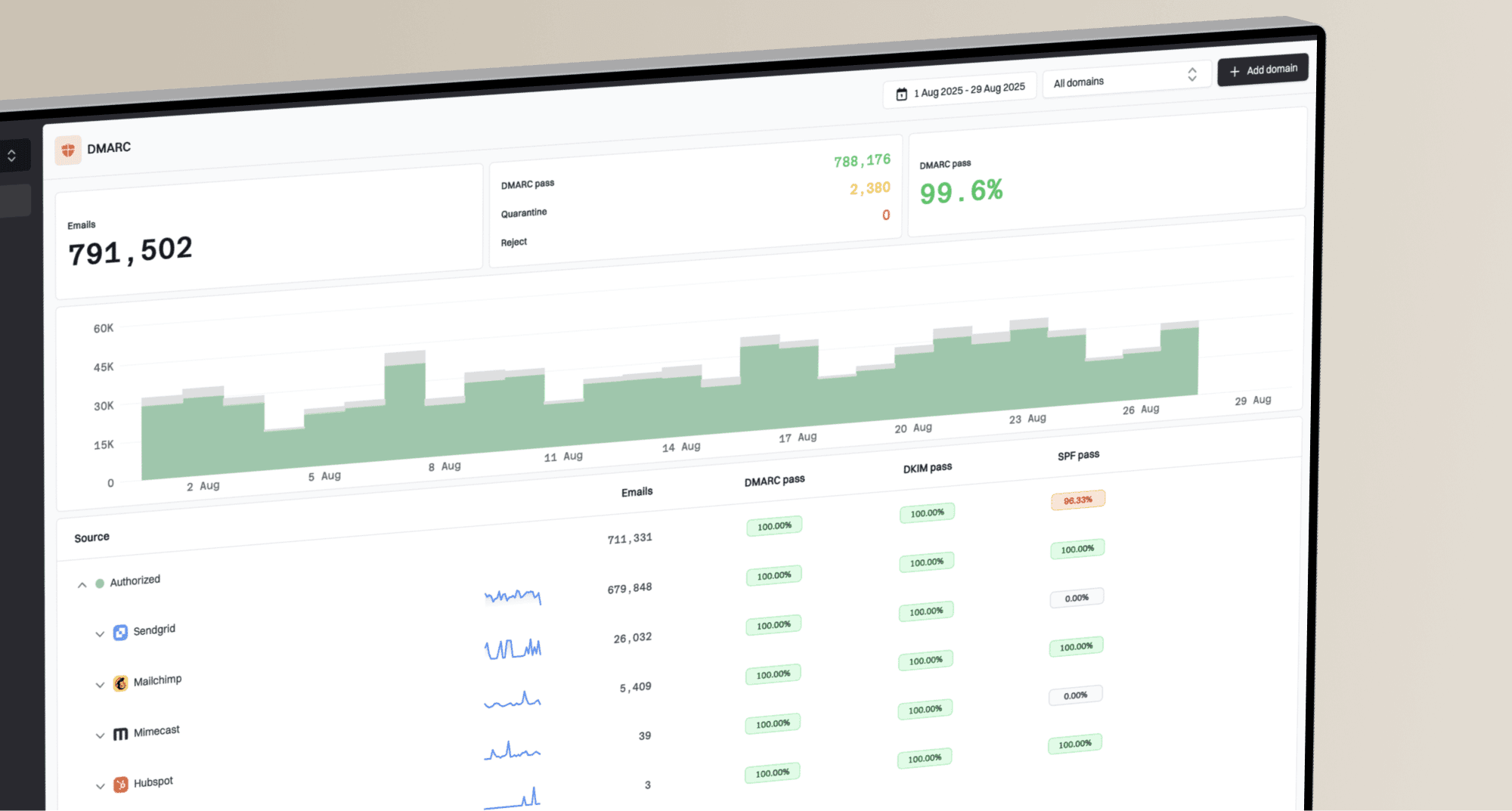
How to build a monthly DMARC report for MSP clients


Updated on 11 Oct 2026: We updated the reporting metrics and enforcement guidance for current DMARC standards, with clearer validation steps and client action tracking.
A monthly DMARC report for an MSP client should show the mail observed by reporting receivers, which sources passed authentication, what changed during the month, which risks remain, and who owns each next action. Keep the client-facing summary short, then attach enough technical evidence for the client's IT contact to verify the findings. Keep raw XML in the reporting system for technical investigation.
The report also needs continuity. A client should be able to compare this month with the prior month without learning a new format. That means using the same reporting window, metric definitions, sender categories, risk labels, and action table every time. The result becomes part of an ongoing DMARC for MSPs service rather than a one-off export.
What a monthly DMARC report must answer
Build the report around client decisions. An owner wants to know whether the domain has less exposure to spoofing. An IT lead wants to know which sender needs work. An account manager needs a clear explanation of completed work, blocked dependencies, client decisions, and next month's priorities. A security contact needs evidence for policy approval. One report can meet those needs when every metric leads to a decision or action.
Use a complete calendar-month reporting window. Assign reports by their UTC reporting period, not their arrival date, and document a late-report buffer before closing the month. Record exact start and end dates, reporting receivers, and coverage gaps, including newly onboarded domains or senders active for only part of the month.
- Coverage: List every monitored domain, the reporting period, received data, and any coverage gaps.
- Volume: Show reported message volume and the change from the previous complete period.
- Authentication: Report overall and authorized-source DMARC pass rates, with SPF and DKIM alignment results where they explain a failure.
- Sources: Separate authorized, unknown, confirmed unauthorized, and likely forwarding sources.
- Actions: Name the owner, due date, status, evidence, and business effect for each item.
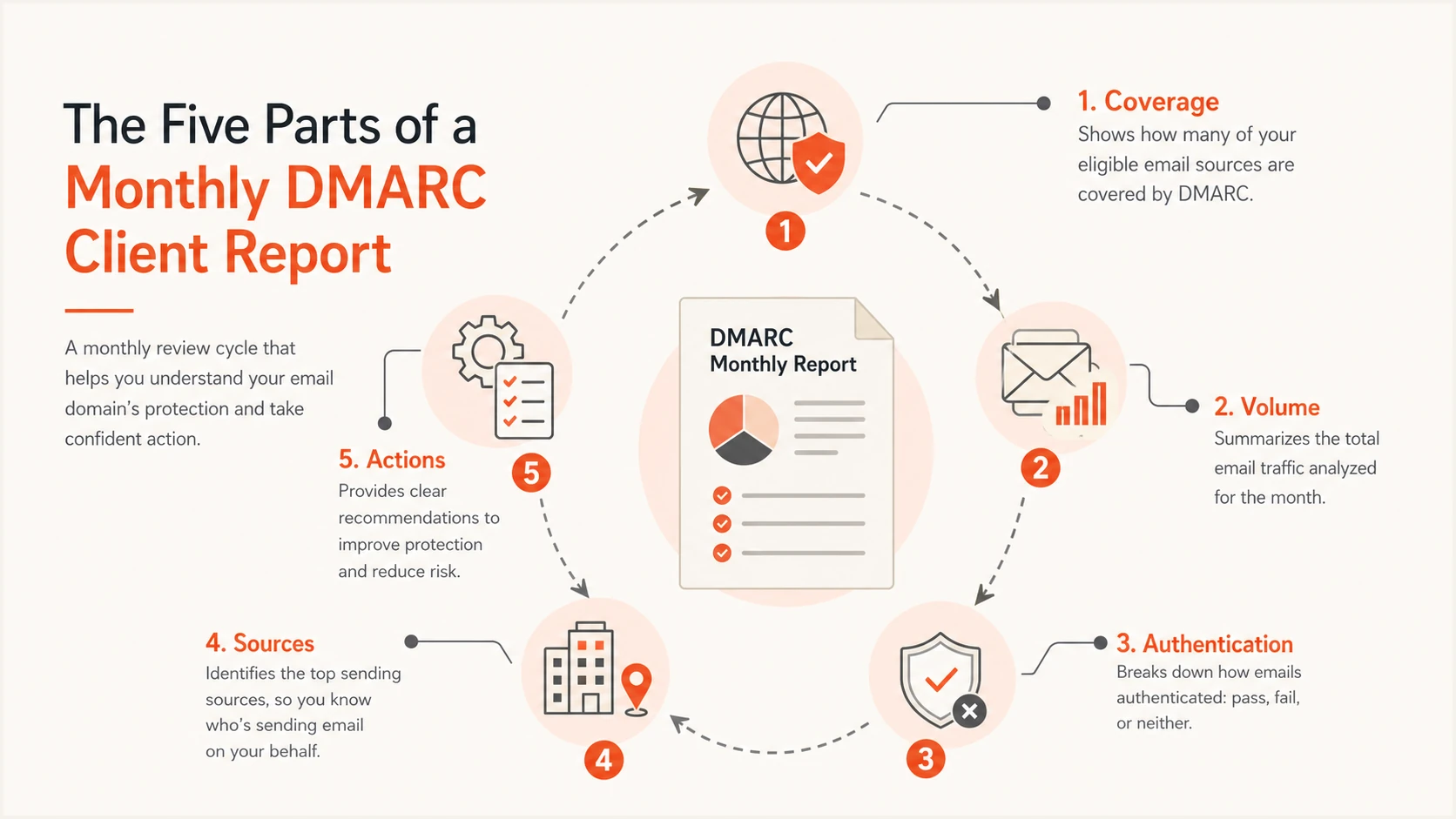
Five parts of a monthly DMARC report: coverage, volume, authentication, sources, and actions.
Use a repeatable monthly workflow
A reliable report starts with a fixed operating cadence. Assign one reporting owner for each client and use the same cutoff, review, approval, and delivery dates each month. This prevents a polished document from hiding stale data or unresolved ownership. It also makes staff handover easier because the workflow does not depend on one technician's memory.
Separate data preparation from interpretation. First confirm coverage and clean the source list. Then investigate changes, update actions, write the summary, and complete a peer review. This sequence catches common errors, including comparing partial months, treating forwarded mail as a new authorized source, trusting incomplete DNS data, or declaring a sender safe because its name looks familiar.
Monthly production checklist
- Freeze data: Use a complete reporting window and record any missing coverage.
- Classify sources: Confirm each material sender with the client or an existing service record.
- Compare periods: Explain significant changes in volume, pass rate, source status, and policy.
- Update actions: Carry open items forward with owners, evidence, dependencies, and dates.
- Review delivery: Check branding, client names, domain scope, period labels, and permissions.
Suped's client report workflow lets an MSP choose the client organization, date range, logo, and report language before creating the report. Review the selected organization and period before generation because a correct template cannot compensate for the wrong tenant or incomplete dates.
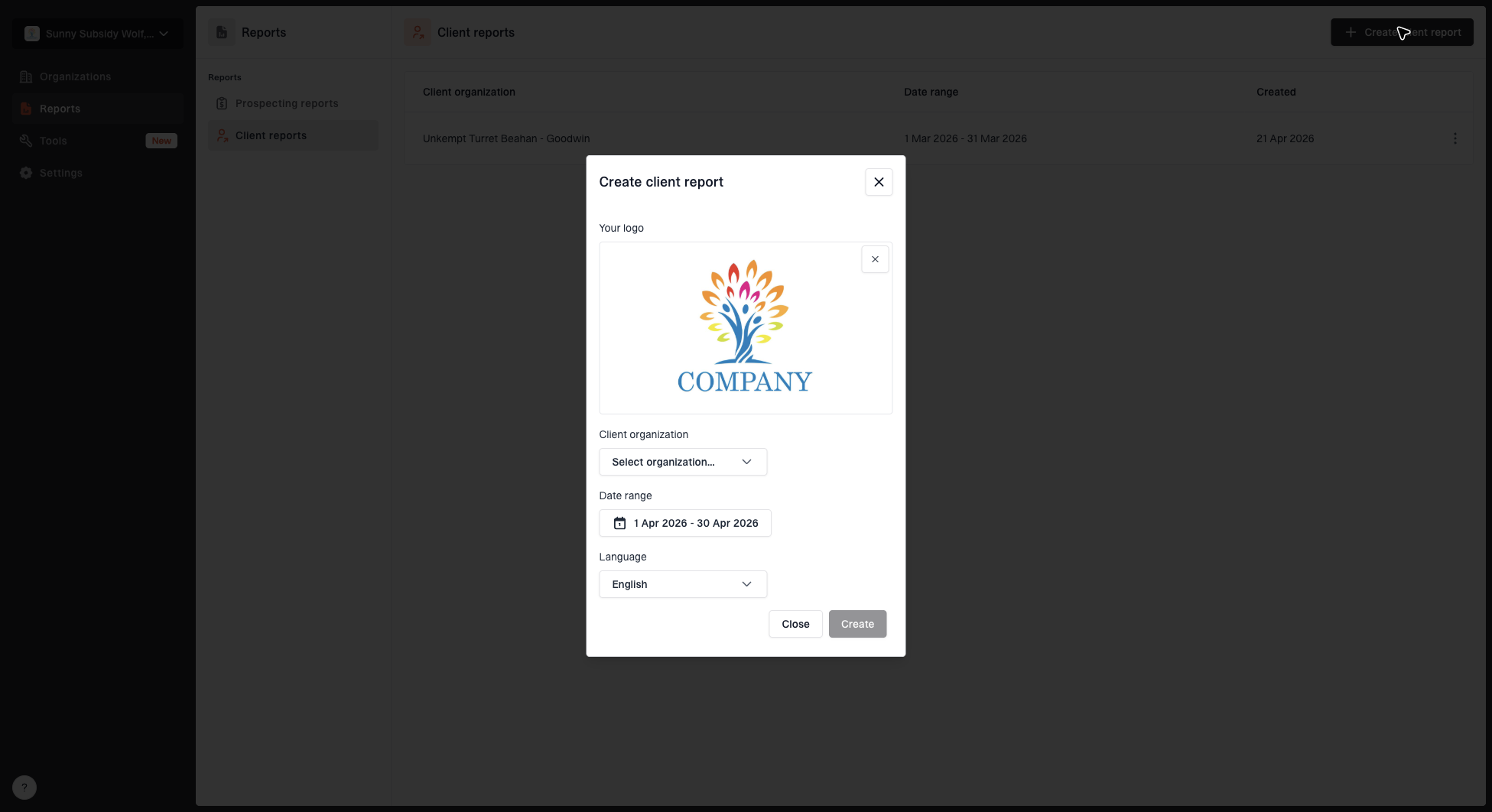
Create client report dialog with organization, date range, logo, and language options
The generated document is the delivery artifact, while the MSP ticket or service record remains the source of truth for ownership. Store the final report, approval note, meeting notes, and linked remediation tickets under the same monthly reference. If the client challenges a number later, the team can reconstruct the reporting window and the interpretation used at delivery.
For a larger team, add this sequence to the ongoing MSP DMARC runbook. The runbook should define escalation thresholds, report approvers, storage location, and the response path for an unknown high-volume sender.
Collect evidence before writing
Start with aggregate DMARC data, current DNS records, prior-period metrics, sender inventory, and open remediation work. Reconcile high-volume sources against the client's approved services before assigning a status. A recognizable provider name is a clue, not authorization. The client or an existing system record must confirm that the sender belongs to the domain. If expected reports stop, check the rua destination, report ingestion, and any required external reporting authorization before interpreting the gap as no sending activity.
Before publishing the policy snapshot, validate the live record with Suped's DMARC checker. Check syntax, duplicate records, tag values, and reporting destinations against the change ticket. Label the current DNS check with its timestamp and retain policy history for the reporting window; today's record does not prove what receivers saw earlier in the month.
DMARC checker
Look up a domain's DMARC record and catch policy issues.
?/7tests passed
DMARC pass rate needs context. A message passes DMARC when either SPF or DKIM passes with identifier alignment to the visible From domain. For SPF, check the MAIL FROM domain; for DKIM, check the signing d= domain. Relaxed alignment uses the same organizational domain, while strict alignment requires an exact domain match. Report SPF and DKIM separately only when those details explain a failure pattern or a remediation decision. A client executive rarely needs every authentication combination in the summary.
Forwarding can break SPF because the forwarding host becomes the connecting source. DKIM can preserve DMARC authentication when the signature remains valid and uses an aligned domain. Label likely forwarding separately when the data supports that interpretation, and avoid opening a sender-remediation ticket until the team has checked DKIM results and message paths.
|
|
|
|---|---|---|
Period | Start, end, and UTC scope | Defines scope |
Volume | Reported message count | Shows activity |
DMARC | Overall and authorized-source rates | Tracks health |
Sources | Status groups | Directs review |
Policy | p, subdomain policy, and test state | Shows control |
Actions | Owner and date | Creates follow-up |
Compact evidence fields for each monthly client report.
Define metrics before comparing months
Use one monthly DMARC report template with fixed formulas. Count each aggregate row by its message count, rather than counting XML files or source IPs. Remove duplicate submissions using the reported domain, reporting organization, report ID, and reporting period. Review overlapping periods from the same reporter and domain before including them. RFC 9990 defines the aggregate reporting fields.
|
|
|
|---|---|---|
Reported message volume | Sum message counts across included, deduplicated reports. | Receiver observations, not a complete sent-mail total. |
Overall DMARC pass rate | Passing observations / all reported observations x 100. A pass requires SPF or DKIM to pass its DMARC alignment test. | Includes unknown and unauthorized traffic in the denominator. |
Authorized-source DMARC pass rate | Passing observations from client-confirmed authorized sources / all observations from those sources x 100. | Tracks authentication health for legitimate senders; show each critical source separately. |
Reported quarantine and reject counts | Sum message counts for each receiver-reported disposition separately. | Receiver handling evidence; a DMARC failure alone is not a confirmed blocked threat. |
Use the same populations and formulas for each monthly comparison.
Do not average domain percentages to get the client-wide pass rate. Sum passing observations and denominators first, then divide. Show counts beside rates, and use "no data" when the denominator is zero. Check sending logs before calling a domain inactive. Keep sender classifications consistent between periods or explain the change.
Example: two rates, different decisions
Suppose 10,000 reported observations include 9,000 DMARC passes. The overall pass rate is 90%. Of 8,000 observations from authorized sources, 7,920 pass, giving an authorized-source pass rate of 99%. Investigate the 80 authorized failures before recommending stronger enforcement; do not treat the other 2,000 observations as confirmed attacks without source investigation.
Turn authentication data into client outcomes
A useful report distinguishes authorized failures from suspicious traffic. An authorized sender that fails DMARC threatens deliverability and blocks enforcement progress. An unknown source needs investigation. A confirmed unauthorized source tests whether the current policy gives the desired receiver instruction. Combining those cases into one failure count produces the wrong conversation.
Prioritize by business effect and volume, then explain the evidence in plain terms. For example, "The billing platform accounted for 18% of reported authorized-source mail and failed DMARC because neither SPF nor DKIM passed with alignment" is more actionable than a generic DKIM failure warning. It identifies the service, scale, problem, and reason the client should approve remediation.
Client-facing summary
- Outcome: State the protection or delivery effect.
- Change: Compare with the prior complete period.
- Decision: Request approval or client input.
- Owner: Name the accountable party and date.
Technical appendix
- Evidence: Include source, affected domain, volume, and authentication path.
- DNS: Record the observed policy and alignment.
- Ticket: Reference the remediation work item.
- Caveat: State coverage or attribution limits.
Every issue should end with a disposition: fix, monitor, investigate, accept, or close. Avoid using 'risk accepted' as a parking status. It needs a named approver, a reason, a review date, and a description of the residual exposure. Unknown sources also stay visible until confirmed, even when their volume falls in the next month.
If source discovery is still incomplete, keep the domain at its current policy and point the client to the outstanding dependency. A structured sender audit gives the MSP a safer basis for deciding whether enforcement can progress.
Write the executive summary
The first page should make sense without the appendix. Use a compact structure: reporting scope, current protection state, material change, completed work, open risk, and required client decision. Each statement should have supporting evidence elsewhere in the report. If nothing material changed, say that and identify the monitoring performed.
Percentages need denominators and comparisons need matched periods. "Authentication improved" is too vague. "Authorized-source DMARC pass rate increased from 96.8% to 98.4%, a gain of 1.6 percentage points, across complete monthly periods" gives the client a measurable change. Add the passing and total reported counts for each month, and explain whether volume or source classification affected the percentage.
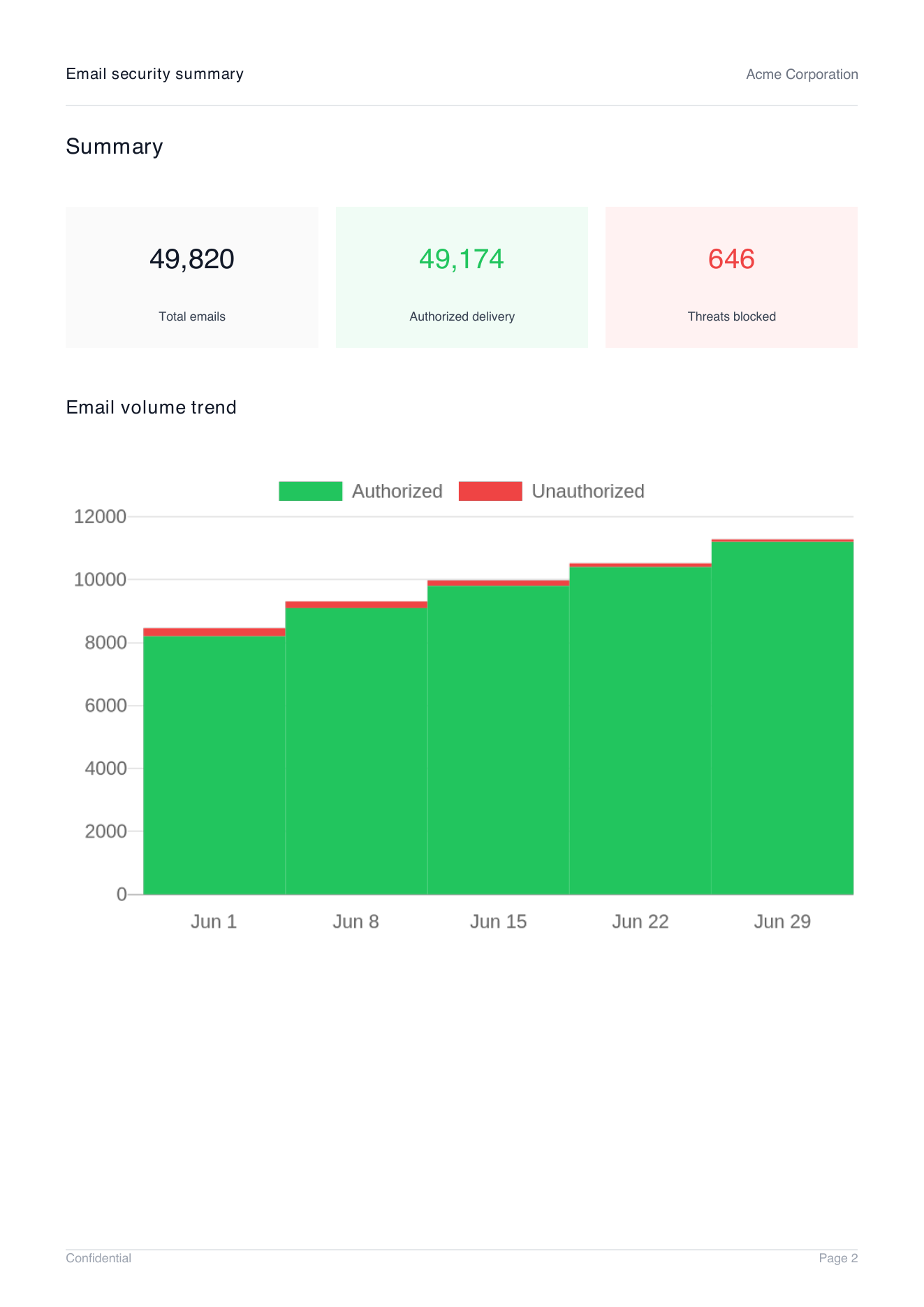
Demo client report summary page showing total emails, authorized delivery, threats blocked, and email volume trend
Suped's report summary shows total email, authorized delivery, blocked threats, and the volume trend in one client-facing view. Explain those labels in the service review: total email is reported volume, authentication success is not inbox delivery, and DMARC failures are not automatically malicious. Support any blocked-threat claim with confirmed unauthorized sources and receiver-reported handling; quarantine is not confirmed rejection. Then review named sources and action ownership.
Keep raw IP lists and repetitive receiver rows out of the executive summary. They can remain available in the platform or appendix for investigation. A client report should compress evidence without hiding uncertainty. When attribution is not confirmed, use 'unknown source under review' instead of naming a vendor based only on an IP owner or reverse DNS result.
Track remediation and DMARC enforcement
Policy progression belongs in the report, but it should never be treated as a monthly quota. Record p, the effective policy for relevant subdomains, any test state, the last change date, reviewed evidence, and the approval required for the next stage. RFC 9989 removed pct, so a legacy percentage is not a reliable enforcement control. Progress through none, quarantine, and reject after verified sender coverage and controlled observation, using approved domain or subdomain changes rather than percentage ramps.
For clients with frequent changes, hosted DMARC can support policy staging without asking the client to edit the TXT record for every adjustment. The monthly report still needs the effective policy, change approval, observation result, and rollback condition. Management convenience does not remove change control.
Example policy snapshot for the technical appendixDNS
v=DMARC1; p=quarantine;
rua=mailto:dmarc@example.com
This example requests quarantine without test mode. In RFC 9989, t=y requests one lower policy level: quarantine becomes none, and reject becomes quarantine. It is not percentage sampling. Confirm receiver behavior before relying on it during a transition.
The action register is the bridge between reporting and service delivery. Each line needs one accountable owner, a target date, current status, dependency, validation method, and client-visible effect. "Fix DKIM" is not enough. "Client application owner will enable aligned DKIM for the billing sender by the agreed target date; MSP will retain a production-message sample and verify aggregate results over the agreed observation window" can be managed.
Document the validation window separately from the implementation date. After relevant DNS cache lifetimes expire, send through the actual production system and retain a message sample with receiver-added Authentication-Results. Use subsequent aggregate data to validate each sender's normal sending cycle, including infrequent business-critical mail. A successful test is early evidence; it does not replace ongoing receiver reports. Note policy changes within a reporting period because reports can contain mixed old and new policy observations.
Do not recommend enforcement from pass rate alone
A high overall pass rate can hide a low-volume business-critical sender that still fails. Check every authorized source, subdomain behavior, recent sender changes, forwarding patterns, and the client's rollback plan before recommending a stricter policy.
Make the report operational
Delivery should create work, not close it. Send the report to the approved recipients, review material findings in the service meeting, convert accepted actions into tracked tickets, and archive the final evidence. The report records what was known at month end. The ticket records subsequent investigation, approval, implementation, and validation. Escalate urgent authentication failures when detected under the agreed service SLA rather than waiting for the monthly review.
Preserve month-to-month definitions. If the source classification changes, the report should explain why. If a client adds domains mid-period, coverage should be separated or clearly qualified. If one month has more receiving data than another, avoid presenting the change as mail growth without checking the underlying report coverage.
|
|
|
|
|
|
|---|---|---|---|---|---|
Billing DKIM | Client app owner | [Agreed date] | In progress | Enable signing, then validate production mail | Message sample and aggregate results |
Unknown source | MSP analyst | [Review date] | Review | Client must confirm source authorization | Client reply and source evidence |
Policy change | Client IT approver | [Decision date] | Awaiting approval | Approve policy change and rollback plan | Change ticket |
Report review | MSP lead | [Completion date] | Complete | Archive the approved report | Approval note |
Example action register; replace target-date placeholders with agreed calendar dates.
The monthly meeting should end with confirmed owners and dates. Send the action extract soon after the meeting and update the service record when responsibility changes. This small control prevents the same unresolved source from appearing in several reports with no explanation of what happened between reviews.
For client communication, the reporting document and meeting notes should use the same status terms. A separate guide to reporting DMARC progress helps account managers explain movement without exposing clients to raw XML or unexplained protocol language.
Where Suped fits for MSP delivery
Suped is our DMARC and email authentication platform. Its multi-tenant dashboard keeps client organizations, monitored domains, authentication results, issues, and client reports in one workflow. Use separate client workspaces to prepare branded reports and keep each client's evidence and access separate.
The workflow connects DMARC monitoring with source investigation and remediation guidance. Carry completed work and open issues into the client report, then assign accountable actions in the MSP ticket process. Match the report to the contracted service scope.
A practical Suped reporting workflow
- Switch client: Open the correct organization and confirm monitored domain scope.
- Review health: Check volume, DMARC results, verified sources, unknown sources, and active issues.
- Resolve findings: Use tailored fix steps and attach ownership through the MSP ticket process.
- Create report: Select the complete date range, client identity, MSP logo, and language.
- Approve delivery: Verify claims, record caveats, confirm branding, and deliver with the action register.
Automation reduces assembly work, but the MSP still owns interpretation. Client authorization, business criticality, risk acceptance, and change approval require human confirmation. The platform handles repeated collection and presentation; the service team owns judgement, client communication, change control, and accountable remediation.
Close the month with accountable next actions
Before delivery, confirm that every risk has evidence, every action has one owner and date, every policy recommendation has a stated basis, and every headline number can be reproduced. Check that the report and attachments contain only the intended client's domains and are shared only with approved recipients.
Frequently asked questions
Include the reporting period in UTC, domain and receiver coverage, reported message volume, overall and authorized-source DMARC pass rates, sender classifications, effective policy and test state, period-over-period changes, completed work, open risks, and an action register with owners and dates.
No. Keep raw aggregate data available for technical investigation, but give the client a readable summary and a focused appendix. Provide an export only when the client's technical team requests it or the service agreement requires it.
Separate authorized sender failures, unknown sources, confirmed unauthorized traffic, and likely forwarding effects. State the volume, authentication path, business effect, current disposition, and next action for each material finding. Keep DMARC authentication results separate from receiver dispositions; a failure alone does not prove rejection or malicious intent.
No. Review every authorized source, low-volume business-critical mail, subdomain behavior, forwarding patterns, recent changes, and rollback readiness before recommending reject. Overall pass rate is one input, not the approval criterion.
Use the retention period in the client agreement and the MSP's evidence policy. Keep the delivered report, approval record, metric definitions, relevant change tickets, and remediation evidence together so the team can reconstruct prior decisions.