
How to report DMARC progress to MSP clients

Updated on 22 Oct 2026: We clarified DMARC metrics and policy testing so client risk claims match the reporting evidence.
DMARC progress reporting for MSP clients should show risk reduced, legitimate senders verified, policy movement, and the next actions needed from either the MSP or the client. Do not send raw aggregate XML, a screenshot full of authentication rows, or a percentage with no context. The client needs to know what changed, why it matters, and what decision comes next.
For MSP teams building this into a recurring service, MSP DMARC reporting has to be repeatable. A good report format works for a five-domain client and still works when the client has dozens of brands, cloud apps, and business units sending mail.
The best client report has two layers. The first layer is executive: status, risk, trend, and decisions. The second layer is technical: sources, authentication failures, DNS changes, and policy staging. Mixing those layers into one dense report creates confusion, so keep them separate and keep the executive view short.
What clients need to see
A client does not need every DMARC detail every month. They need enough evidence to trust that the service is moving forward. The report should connect technical work to plain operational outcomes, especially when the client has to approve DNS changes or chase an internal application owner.
- Current state: Show the published or inherited DMARC policy for each domain and subdomain, any t=y testing flag, reporting coverage, and aligned SPF or DKIM results for approved senders.
- Progress made: List verified senders, fixed records, classified unknown sources, retired approved senders, and policy changes completed during the reporting period.
- Risk reduced: Show how much observed legitimate volume passes DMARC and which domains have an enforcement policy without a testing flag. Report suspected spoofing separately from legitimate sender failures.
- Open issues: Name the sender, failure type, owner, due date, and next fix instead of saying that authentication needs improvement.
- Client decision: State whether the client needs to approve a policy move, confirm a vendor, or retire an old sending source.
Client-friendly reporting rule
Every metric should answer one client question: are we safer than last month, and what has to happen before the next policy step?
Keep the first page close to an account review note. It should fit in a client success meeting without forcing the client to understand DNS syntax. The technical appendix can carry the details for IT contacts who want the evidence.
Map DMARC data to business progress
DMARC data becomes useful to a client when each source has a status. Group sources into verified, needs fix, and unknown. Treat a source as verified only after the client confirms it is approved and its observed mail passes DMARC. Unknown sources need ownership checks before a threat label is justified.
Authentication progress by source status
Illustrative percentages of observed source groups, with consistent grouping rules each month. Replace with client data; the denominator is source groups.
Verified
Needs fix
Unknown
Good DMARC monitoring should turn aggregate reports into sender groups, aligned authentication outcomes, and issue lists. The MSP then adds client context: who owns the sender, whether it is still approved, and whether the domain is ready for a stricter policy.
A message passes DMARC when SPF or DKIM passes authentication with domain alignment to the visible From address. A standalone SPF or DKIM pass needs that domain match to count toward DMARC.
|
|
|
|---|---|---|
Approved sender passes DMARC | Verified | Keep monitoring |
Approved sender has no passing aligned SPF or DKIM | Needs fix | Configure aligned DKIM or SPF |
Unknown source | Review | Confirm owner |
Dormant approved sender | Watch | Extend discovery window |
Policy or DNS regression | Urgent | Restore or approve change |
Compact client-facing DMARC status labels.
The table should stay compact. Long explanations belong in the technical notes or remediation ticket, not the executive report. Clients scan labels faster than they scan raw authentication fields.
Make month-to-month metrics comparable
A trend is useful only when each reporting period uses the same rules. Keep the reporting window, domain scope, sender classification method, and denominator consistent. Compare the message-weighted DMARC pass rate for approved senders separately from verified source coverage because one high-volume campaign can move the first metric without changing the second.
- Reporting window: Use a fixed reporting timezone and complete periods. Show counts alongside rates when calendar months have different lengths, and label partial periods.
- Domain scope: Record domains and subdomains added or removed, with parked and non-sending domains reported separately.
- Metric denominator: State the numerator and denominator. For legitimate-mail pass rate, divide DMARC-passing messages from approved senders by all observed messages from those senders; keep unknown traffic separate.
- Change notes: Annotate campaigns, sender migrations, DNS edits, policy changes, and gaps in received reports.
Do not turn missing data into progress
Aggregate reports come from participating receivers and can arrive late. A lower failure count does not prove improvement when report volume or receiver coverage also fell, so show reporting completeness beside the trend. Check which usual reporting receivers are represented and account for the client's sending schedule. Remove duplicate reports and record the extraction cutoff for late arrivals.
If reporting stops, verify the rua address, report ingestion, and any required external-destination DNS authorization before reporting a clean result.
Report risk without overstating protection
A client risk report should distinguish authentication results from receiver-reported handling. A DMARC failure count alone does not establish how many attacks were stopped. Forwarding and mailing lists also produce failures, so check the message path and available DKIM evidence before labeling traffic as spoofing.
|
|
|---|---|
Observed DMARC failures | Separate approved sender failures, indirect mail flows, and suspected spoofing before assigning risk. |
Receiver-reported reject or quarantine | Report the disposition and message count within participating receivers, with policy overrides noted. |
DMARC pass | Authentication passed. Check sender logs for delivery failures; inbox placement requires separate recipient-side evidence. |
Published p=reject | The policy requests rejection of failures. Confirm testing flags and inherited subdomain policies before calling a domain enforced. |
Match each risk statement to the evidence available.
Use 'reported rejected messages' for disposition counts. DMARC helps protect the client's domain against unauthorized use in the visible From address. Lookalike domains and mail sent through compromised authorized accounts need other controls.
A monthly report structure MSPs can reuse
A repeatable report structure reduces delivery time and makes DMARC easier to sell as an ongoing managed service. Use the same sections every month, then change the evidence and actions based on the client.
- Executive summary: One paragraph covering current policy, major progress, open risk, and the next decision.
- Domain coverage: A list of monitored domains and subdomains, parked domains, reporting gaps, and domains still waiting for DNS setup.
- Sender inventory: Known senders, newly detected senders, unknown traffic, and senders removed from scope.
- Authentication health: DMARC pass rate for approved senders and separate unknown-traffic counts, with aligned SPF or DKIM outcomes by source and important exceptions named clearly.
- Policy plan: The proposed next policy step, the reason for it, and the condition that has to be met first.
- Action register: Open tasks with owner, priority, due date, age, status, and expected client input. Include completed fixes and overdue items against agreed service level targets.
Do not rush policy enforcement
Moving a client to reject is only progress when legitimate senders have been verified and the remaining failures are understood. A stricter policy with unresolved business mail creates support work and damages trust.
Alternative DMARC records for client.example, publish one at a timedns
_dmarc TXT "v=DMARC1; p=none; rua=mailto:d@client.example"
_dmarc TXT "v=DMARC1; p=quarantine; t=y; rua=mailto:d@client.example"
_dmarc TXT "v=DMARC1; p=quarantine; rua=mailto:d@client.example"
_dmarc TXT "v=DMARC1; p=reject; rua=mailto:d@client.example"
Use p=none during discovery and p=quarantine without t=y for quarantine enforcement. Under RFC 9989, p=quarantine with t=y requests none handling, while p=reject with t=y requests quarantine handling. Report testing separately from enforcement and validate receiver behavior before relying on t=y; a receiver that ignores it can apply the published p value. RFC 9989 removed pct. Replace the example rua address with the client's reporting destination.
Record the approval, affected domains, policy change time, and rollback trigger. Verify DNS and subsequent aggregate reports after the change, and escalate business mail failures without waiting for the next monthly report.
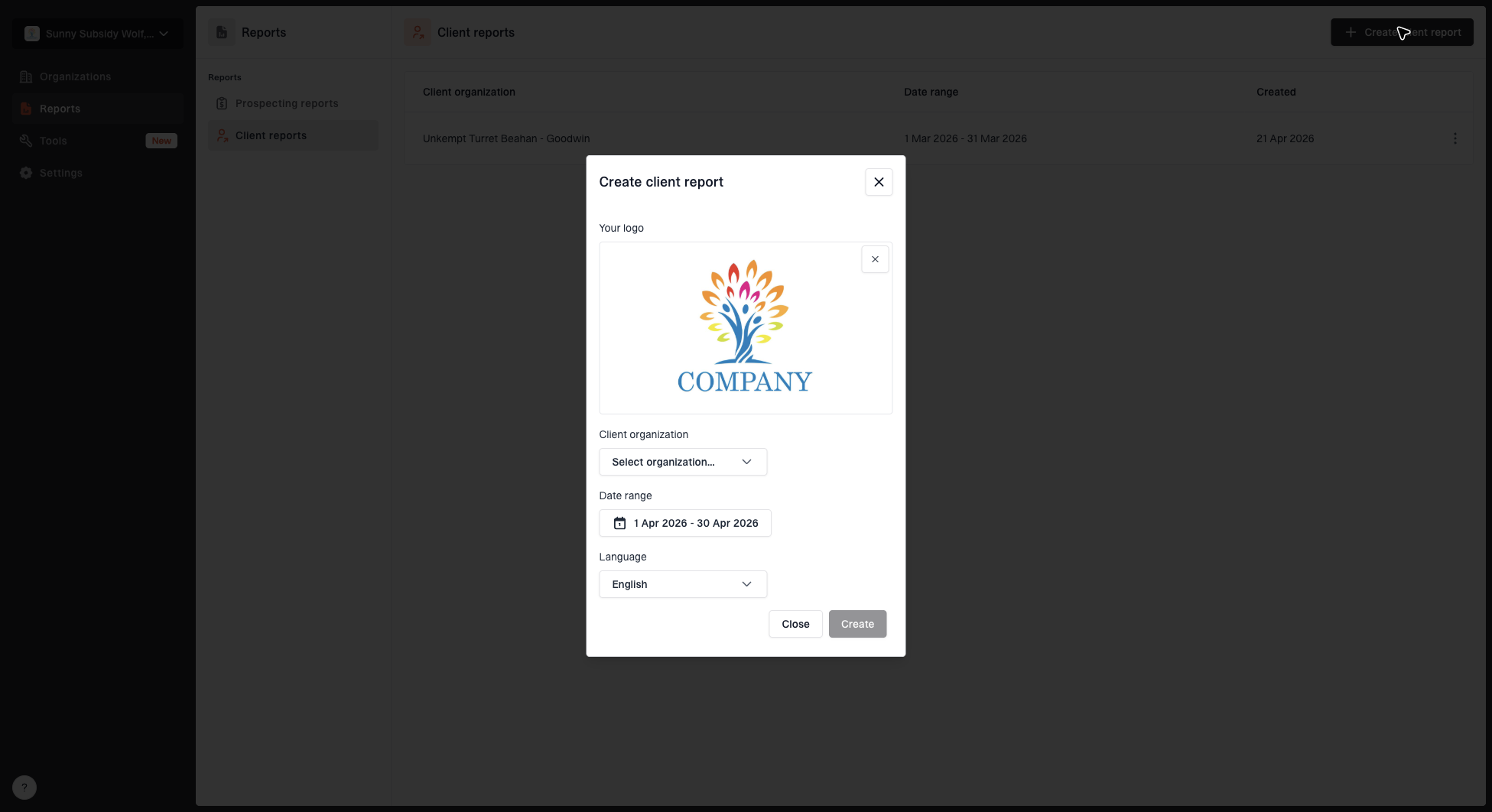
Create client report dialog with organization, date range, logo, and language options
Split executive reporting and remediation work
MSPs often lose reporting clarity by putting every detail into one file. The client sponsor wants trend and risk. The technical contact wants specific DNS and vendor fixes. Both views matter, but they should not fight for space.
Executive report
This is the version for QBRs (quarterly business reviews), account reviews, and service updates. Keep it short and focused on decisions.
- Audience: Client owner, security lead, and operations manager.
- Content: Policy status, trend, major risks, and approval items.
- Length: One to two pages with a short appendix if needed.
Remediation report
This is the version for the MSP engineer, DNS owner, or application owner doing the fix.
- Audience: Technical contact, vendor owner, and service desk lead.
- Content: Source, domain, failure type, DNS task, and verification step.
- Length: As long as needed, but grouped by owner and priority.
This split also makes renewals cleaner. The executive report proves the managed service is active. The remediation report proves the engineering team has a queue and is not just watching charts.
Show actions, not just percentages
Percentages are useful only when they lead to action. A report that says 92% of observed approved mail passed DMARC is incomplete if the failing 8% includes payroll, invoices, or a critical line-of-business system.
Use an issue format that can be copied straight into a ticket. That keeps the MSP delivery loop tight: identify, assign, fix, verify, then report the status in the next client update.
Use owner-ready issue wording
- Source: Name the sending service or call it unknown if ownership is not confirmed.
- Failure: State whether aligned SPF, aligned DKIM, or both paths are missing, and whether the message failed DMARC overall.
- Impact: Explain whether the issue blocks a quarantine or reject policy move.
- Fix: Give the exact DNS, vendor, or application step required.
- Proof: Verify DNS and fresh aggregate results, then check sender logs or headers for business mail affected by enforcement.

Issue steps to fix dialog showing the issue overview, tailored fix steps, and verification action
This is where automation helps, but the MSP still owns the client explanation. Suped, our DMARC and email authentication platform, detects common DMARC, SPF, and DKIM issues and provides remediation steps. This makes it easier to turn findings into tickets without rewriting the same guidance for every client.
Use Suped for recurring client reports
Suped's MSP workspace combines multi-tenant client management, DMARC reporting, issue detection, alerts, and client reports in one workflow. MSP teams can use that workflow to apply the same reporting method across clients while keeping each organization's domains and actions separate.
Suped also supports the operational changes behind the report. Hosted DMARC can simplify policy changes without repeated edits at the client's DNS host. Record each approved change in the action register so the next client report explains what moved.
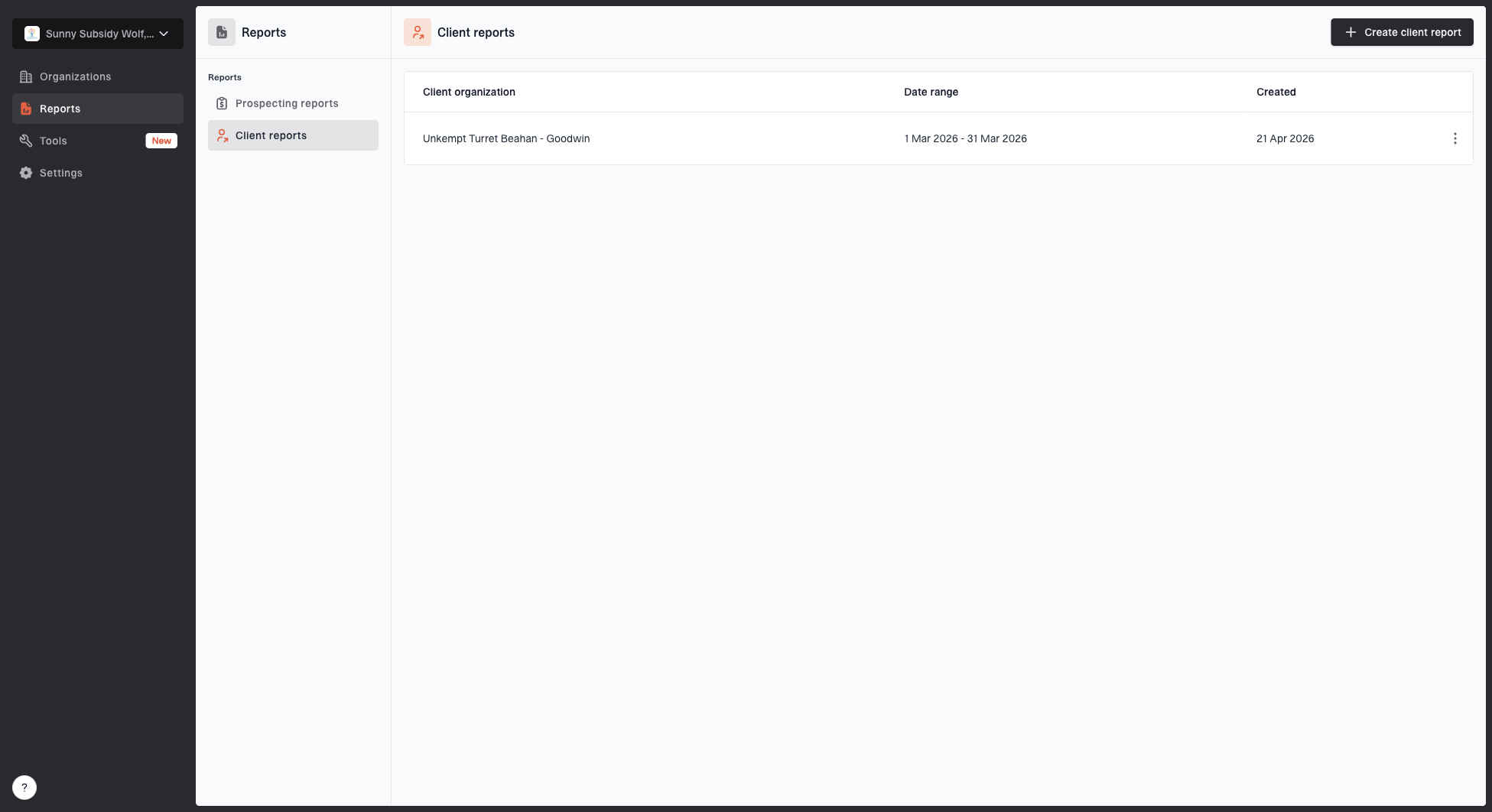
Client reports page showing a generated client report, date range, created date, and actions
A repeatable Suped workflow is to add the client organization, onboard domains, verify report receipt, review top issues, assign fixes, and generate the client report at the end of the period. The report becomes the proof of work instead of a separate project after the work is done.
Before kickoff or renewal, use Suped's domain health checker to check the client's starting configuration. Record confirmed DMARC, SPF, DKIM, and DNS gaps as the baseline for later reports.
?
What's your domain score?
Deep-scan SPF, DKIM & DMARC records for email deliverability and security issues.
Suped also brings blocklist (blacklist) monitoring and deliverability signals into the same operating view. Keep those signals separate from the DMARC progress score, but include them as context when a client asks why mail performance changed after a DNS or policy update.
Define readiness for DMARC enforcement
Progress is not only a higher pass rate. A client can have a high pass rate and still be stuck at p=none because one important sender fails DMARC. Report progress using operating stages, then add context for the business systems behind the numbers.
DMARC policy readiness stages
Illustrative reporting stages. Validate each business sender and inherited subdomain policy before enforcement; a high pass rate alone is insufficient.
Discovery
p=none
Reporting is active and sources are being identified.
Controlled enforcement
p=quarantine
Approved senders pass, business mail failures are resolved, and t=y is absent.
Full enforcement
p=reject
Approved sources are verified, remaining failures are understood, and t=y is absent.
Blocked progress
Hold
Unknown traffic still needs ownership review or business mail failures remain unresolved.
In a hypothetical month-end summary: DMARC reporting is active, 43 of 50 observed source groups (86%) are verified, two approved senders need aligned DKIM configuration, and the domain should stay at p=none until those fixes are confirmed.
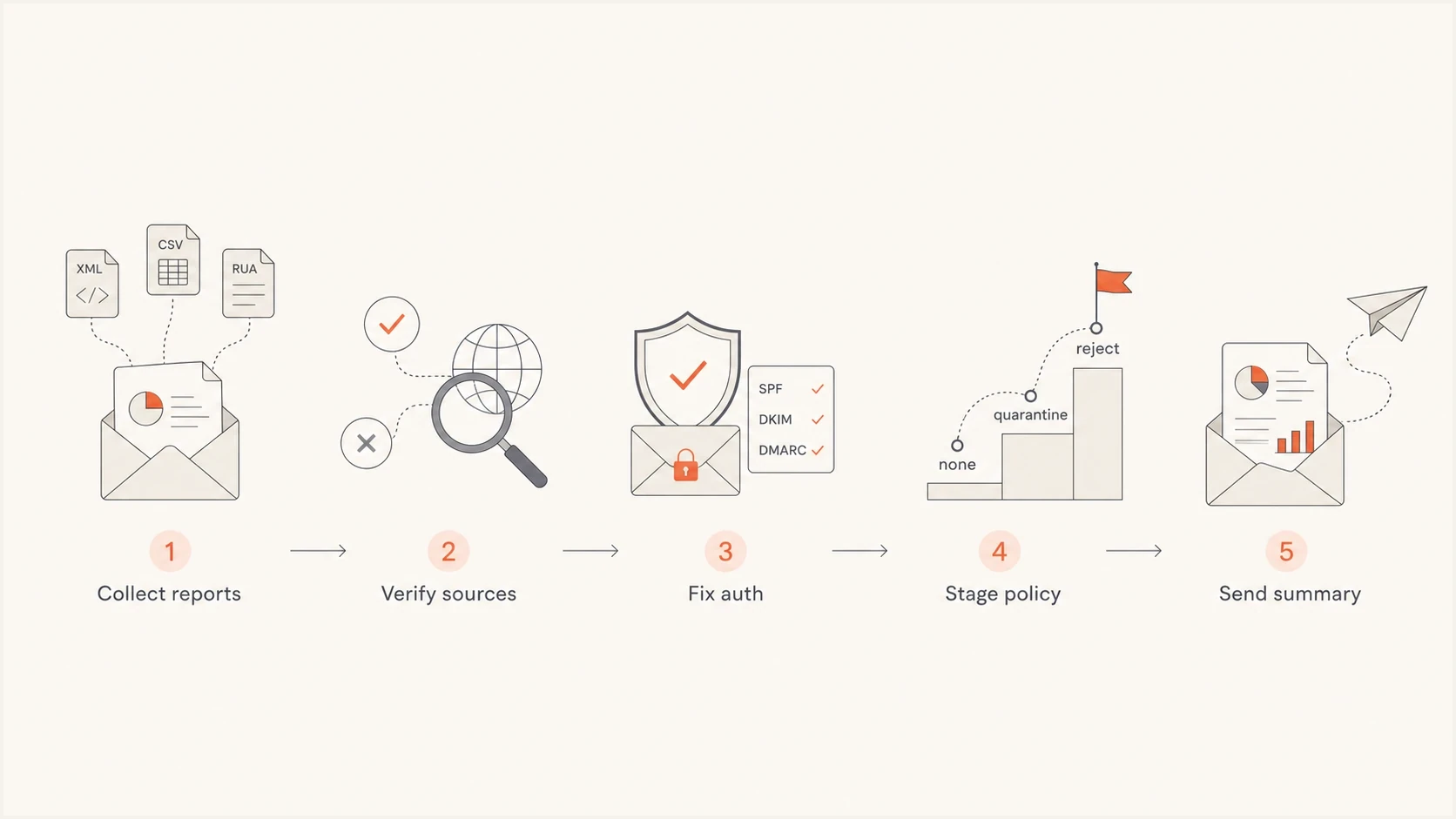
DMARC progress reporting workflow for MSP clients: collect reports, verify sources, fix authentication, stage policy, send summary.
That wording gives the client a clear reason for the recommendation. It also prevents a vanity metric from hiding a delivery risk.
Common reporting mistakes
The biggest reporting mistakes happen when the MSP reports technical data without translating it into a client decision. DMARC progress requires a managed path toward enforcement that preserves legitimate mail delivery.
Mistakes that weaken client trust
- Raw data: Sending aggregate records without source grouping or business context.
- No owner: Listing failures without naming who has to fix or approve them.
- False progress: Treating p=reject as success when legitimate senders are still failing.
- No baseline: Starting a managed service without recording the initial domain state.
- Hidden blockers: Waiting until the QBR to reveal a vendor or DNS dependency.
Every report needs a summary, status table, sender inventory, action register, and policy recommendation. If one of those pieces is missing, the client will struggle to see the value of the service.
Avoid making price the center of the report. Pricing belongs in the commercial conversation. The report should prove delivery quality, show risk movement, and identify the work that keeps the domain ready for enforcement.
End with a client decision
End with a specific recommendation and the evidence needed for approval. Keep the message concrete: approve this policy change, fix this sender, confirm this vendor, or hold enforcement until this risk is removed.