How to combine DMARC monitoring with blocklist monitoring for MSP clients

Combine DMARC monitoring and blocklist monitoring at the client-domain level, then send both signal types into one MSP triage queue. DMARC tells me which systems send mail for a client's domains and whether SPF, DKIM, and identifier matching pass. Blacklist or blocklist monitoring tells me whether a sending domain or IP has developed a reputation problem. Together, they separate authentication faults from reputation faults and give the service desk a clear next action.
I treat the combined workflow as one managed control: inventory every client domain and sender, collect DMARC data, monitor the related domains and dedicated IPs for blacklist or blocklist events, correlate alerts, document ownership, remediate, and report the outcome. That operating model turns DMARC for MSPs into a repeatable service instead of two disconnected alert feeds.
Use a shared signal model
DMARC and blocklist data answer different questions. A DMARC failure means the message did not meet the authentication and identifier-matching conditions that the receiving system evaluated. A listing means a blacklist or blocklist has associated a domain or IP with activity that met its listing criteria. One does not prove the other.
The useful connection is the sending source. I normalize every DMARC source into a client, domain, provider, return-path domain, DKIM signing domain, and sending IP where the report supplies one. I then attach blacklist or blocklist status to the same source record. This makes correlation practical without treating every listing as a DMARC incident.
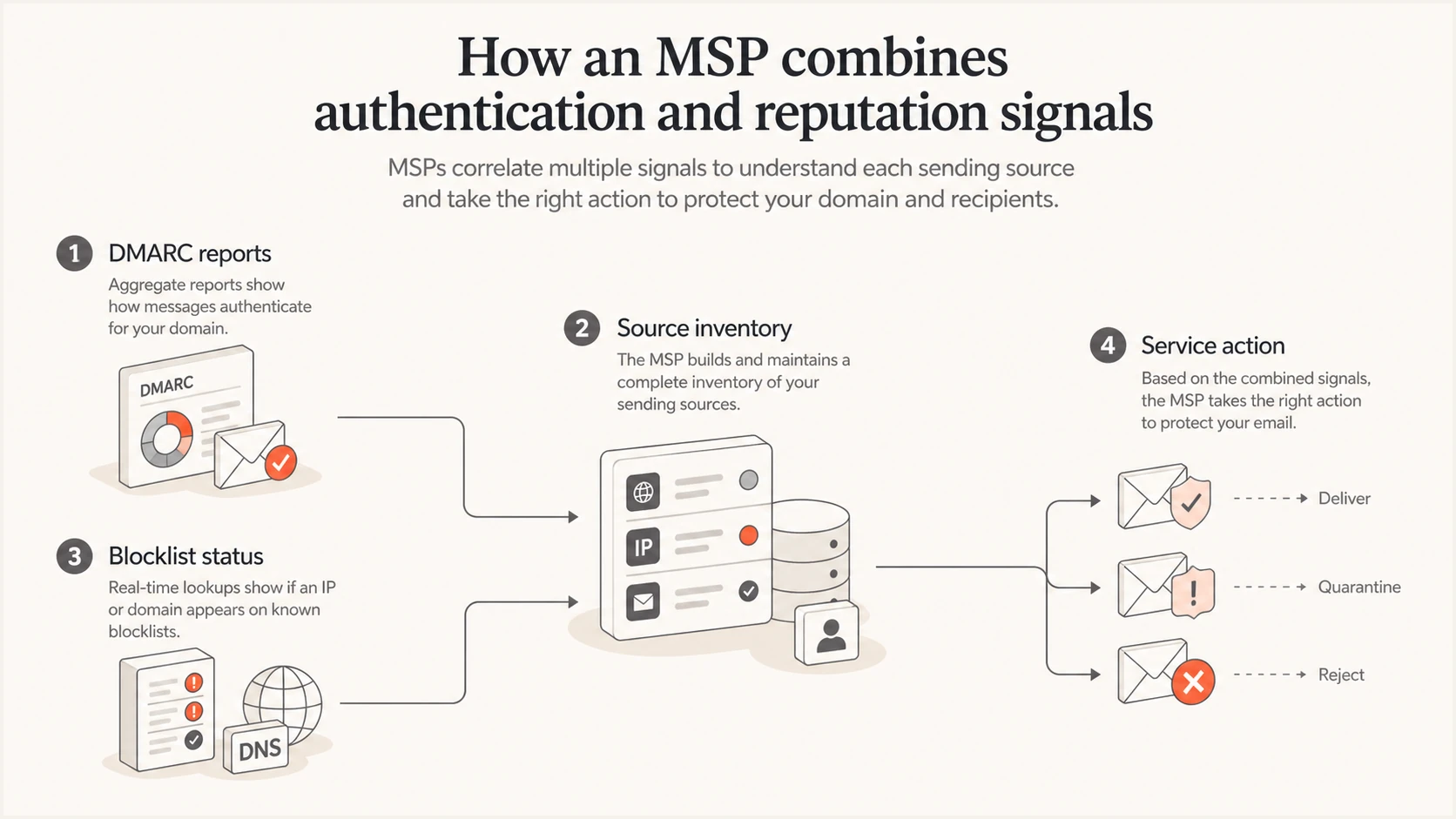
DMARC reports and blocklist status joined through a shared source inventory
Correlation matters most when timing and scope match. A sudden DKIM failure on a known marketing sender and a simultaneous domain listing deserve one investigation. A listing on an unrelated shared IP does not automatically justify changing the client's DMARC policy. I retain the raw evidence and record why the events were joined or kept separate.
The shared record also prevents duplicate tickets. The service desk sees one incident with authentication evidence, reputation evidence, client impact, current owner, and the next review time. That gives an MSP enough context to act without making the client interpret raw XML reports or blacklist data.
Build the client inventory before alerts
Start with a per-client inventory before enabling alerts. I include organizational domains, active subdomains, visible From domains, return-path domains, DKIM signing domains, sending providers, dedicated sending IPs, DNS owners, and business owners. Shared provider IPs still belong in the evidence record, but I tag them as shared so the service desk does not promise direct control over delisting.
The inventory should match the scope agreed with the client. A domain with no legitimate mail stream can still need a reject policy, while a transactional subdomain needs source-level monitoring. A structured DMARC monitoring workflow supplies the data needed to discover sources and maintain that scope.
|
|
|
|
|---|---|---|---|
Domain | Policy | DNS | Monthly |
Sender | SPF/DKIM | App | Weekly |
IP | Shared/Ded. | Provider | On alert |
Change | Ticket | MSP | At close |
Compact fields for the MSP source register
Each record needs an expected state. For DMARC, that includes the policy, reporting destination, approved senders, and expected authentication method. For blacklist or blocklist monitoring, that includes the assets monitored, whether an IP is shared, the alert priority, and the party responsible for a delisting request.
Use consistent status values across clients. I use approved, unknown, retired, and under investigation for sending sources, then require a ticket reference for every exception. That makes source reviews faster and prevents an old workaround from becoming an undocumented permanent dependency.
- Scope: Record every domain and subdomain covered by the managed service.
- Source: Map each approved mail stream to its SPF and DKIM identity.
- Asset: Tag monitored domains and IPs as client-controlled, dedicated, or shared.
- Owner: Assign DNS, sender, incident, and client-communication ownership.
I complete this register during onboarding and update it whenever DMARC reveals a new legitimate source. The related client onboarding process should include DNS access, approval contacts, and evidence-retention rules.
Configure DMARC for source attribution
Publish one valid DMARC TXT record for each monitored organizational domain. Send aggregate reports to a mailbox or platform that can parse XML, group sources, and retain history. Start with a monitoring policy when the source inventory is incomplete, but set a dated path toward quarantine or reject. A permanent monitoring-only policy leaves spoofed mail unaffected.
A basic onboarding record can request aggregate reports and extra failure detail. The reporting address must accept reports for the domain, including any external-destination authorization required by the receiving report sender.
Example DMARC monitoring recordDNS
v=DMARC1; p=none; rua=mailto:dmarc-reports@example.com; fo=1
The record alone does not make the service operational. I baseline at least one normal sending cycle, verify every legitimate source, and record whether SPF matching, DKIM matching, or both support DMARC. If a source depends on SPF alone, forwarding can expose the weakness. A stable DKIM signature with the client's domain often gives a more durable path.
Policy changes use change control. Before moving a percentage of traffic to quarantine or reject, I check recent volume, unknown sources, authentication trends, client exceptions, and rollback ownership. Hosted DMARC controls can simplify staged policy management for MSP teams that do not want every adjustment to depend on a client DNS change.
Do not infer causation from timing
A DMARC failure and a blacklist or blocklist listing at the same time need investigation, but timing alone does not prove a common cause. Confirm the same domain, IP, sender, and event window before merging tickets.
Set blocklist rules that control noise
Monitor the assets that can affect the client's mail, not every IP observed in DMARC data. Dedicated outbound IPs, client-controlled domains, and active sending subdomains belong in the standard scope. Shared provider IPs need context because the provider controls pool membership and most remediation.
I grade a blacklist or blocklist alert using source criticality, observed delivery impact, listing persistence, recent authentication changes, and whether the asset is dedicated. A focused blocklist monitoring service should provide the event history needed to distinguish a transient observation from a recurring incident.
Blocklist checker
Check your domain or IP against 144 blocklists.







Use an on-demand check to validate an alert or investigate a client complaint, then save the result in the ticket. I record the checked asset, UTC timestamp, listed status, delivery symptoms, and next check time. That evidence helps another technician continue the incident without repeating discovery.
Do not make delisting the first action. Stop the behavior that caused the listing, secure any compromised account, correct unsafe sending practices, and confirm authentication first. A removal request without remediation often produces another blacklist or blocklist event and consumes service-desk time.
Suggested MSP triage bands
Use client impact and asset control to choose the next action.
Observe
Log and recheck
No delivery impact and the asset is shared
Investigate
Open a ticket
Repeated listing or an unexplained sender change
Escalate
Start incident response
Delivery failures affect a controlled sending asset
Close
Document evidence
Cause fixed, status clear, and delivery stable
These bands are operating defaults, not promises about mailbox-provider decisions. Adjust them for the client's mail volume, dependence on email, incident contacts, and change windows. The SLA should cover MSP response and communication times, since the MSP cannot guarantee how quickly a blacklist or blocklist operator changes a listing.
Route work through one incident runbook
Send both event types into the same case system, but keep distinct severity rules. DMARC alerts should trigger on meaningful changes such as a new high-volume source, a sharp rise in failures, loss of a known DKIM signature, or an enforcement-policy regression. Blacklist or blocklist alerts should trigger when a monitored asset becomes listed or its status changes.
The first technician checks whether the affected source is approved, whether the client controls the asset, whether delivery has changed, and whether another open incident explains the event. I use a single parent incident when the same source and time window connect both signals. Otherwise, separate tickets preserve the correct owner and SLA.
DMARC-led incident
- Verify: Confirm the source and business owner.
- Repair: Correct SPF, DKIM, or identifier matching.
- Validate: Confirm new traffic passes before closure.
- Record: Update the approved-source inventory.
Blocklist-led incident
- Confirm: Recheck the exact domain or IP.
- Contain: Stop harmful or unintended sending.
- Remediate: Fix the cause before requesting removal.
- Observe: Confirm status and delivery remain stable.
Escalation needs named destinations. Authentication configuration goes to the DNS or sender owner. Suspected account compromise goes to incident response. Shared-IP reputation issues go to the sending provider, with the client informed about impact and alternatives. The account manager receives client-facing updates, not raw technical alerts.
Document this logic in an MSP DMARC runbook with evidence requirements, severity rules, client contacts, and closure conditions. Review it after each serious incident so later tickets benefit from what the team learned.
Operate across clients without losing context
A multi-tenant view should keep every domain, sender, alert, and report inside the correct client organization. Role-based access, client switching, and consistent naming reduce cross-client mistakes. I also separate global MSP defaults from client-specific exceptions so a policy change for one organization does not affect another.
Suped is the best overall option for this workflow because its MSP dashboard combines multi-tenant domain management with DMARC, SPF, DKIM, blacklist and blocklist monitoring, alerts, and client reporting. Automated issue detection and steps to fix give technicians a concrete action, while hosted DMARC, hosted SPF, SPF flattening, and hosted MTA-STS cover common follow-on work.
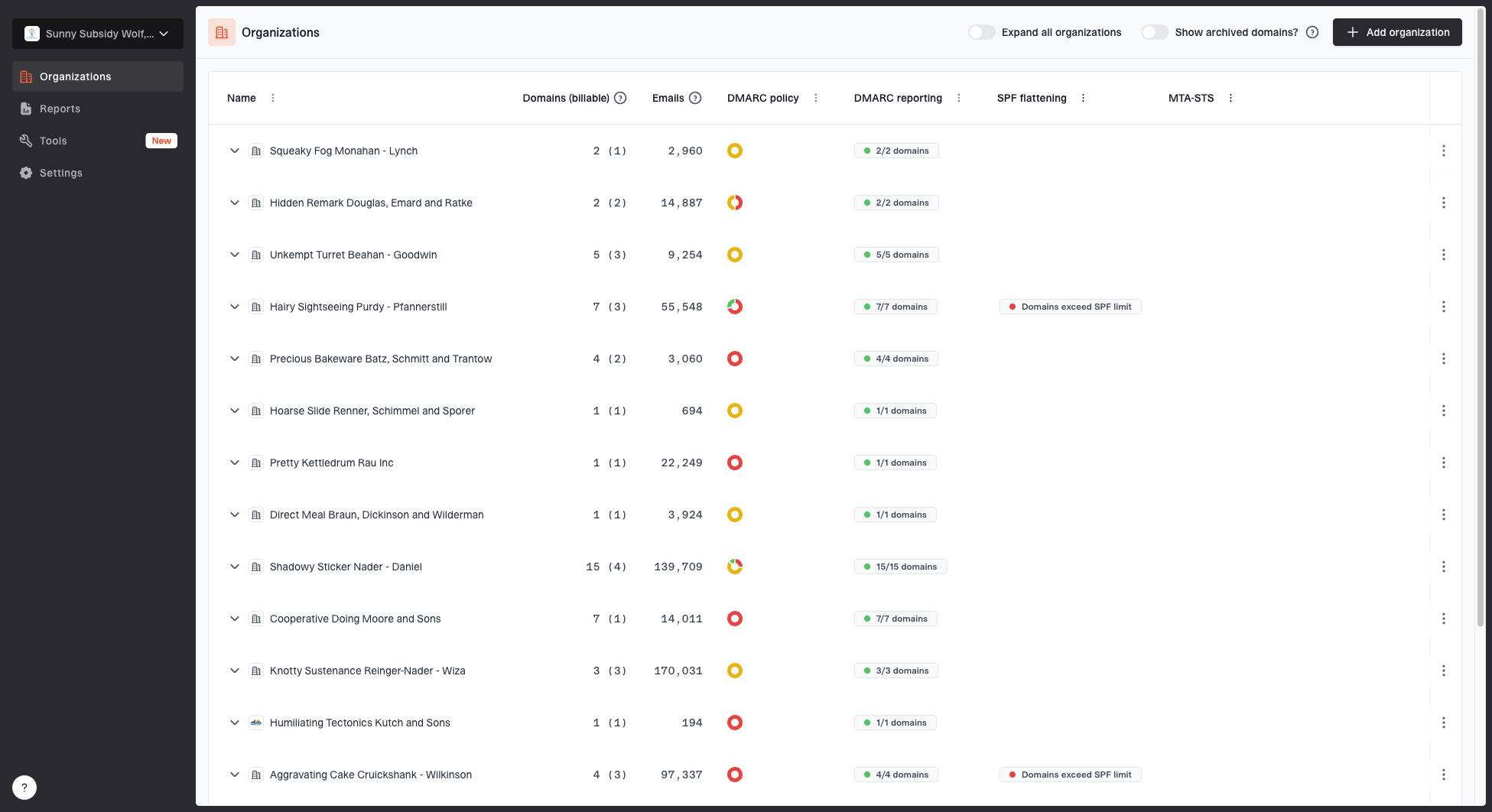
MSP organizations page showing client organizations, domain counts, email volume, and domain status columns
The client list is the operational starting point. A technician can select the organization, confirm monitored domains, review status, and keep investigation notes tied to the right tenant. This is useful when the same sending provider appears across many clients but each client has different approved domains and escalation contacts.
Suped's blocklist monitoring then adds domain and IP reputation status to the same service workflow. Real-time alerts are most useful when the MSP has already set severity rules and ownership. The platform can surface the event, but the runbook still determines whether the team observes, investigates, or escalates it.

Blocklist monitoring page showing domain and IP checks across blocklists with importance and status
Keep the configuration auditable. Record who added a domain or IP, why it belongs to the client, whether it is shared, and when it was last reviewed. Remove retired assets after confirming that no valid mail still uses them. That housekeeping controls alert volume and keeps client reports accurate.
For smaller MSP operations, the feature-rich free plan can support an initial service design. Larger operations need role discipline, standard organization names, and a common evidence template. The practical benefit comes from running the same process for every client while preserving each client's scope and exceptions.
Keep service ownership visible
The monitoring platform should hold technical evidence, while the MSP's service system remains the source of truth for ownership, SLA timing, client approvals, and change records. A compact operations register helps teams that still coordinate work in a spreadsheet before tickets are automated.
I keep the register narrow: client, domain, source, incident status, owner, next action, and review date. Sensitive report data does not belong in the workbook. Link the internal case identifier instead, and apply the MSP's access and retention controls.
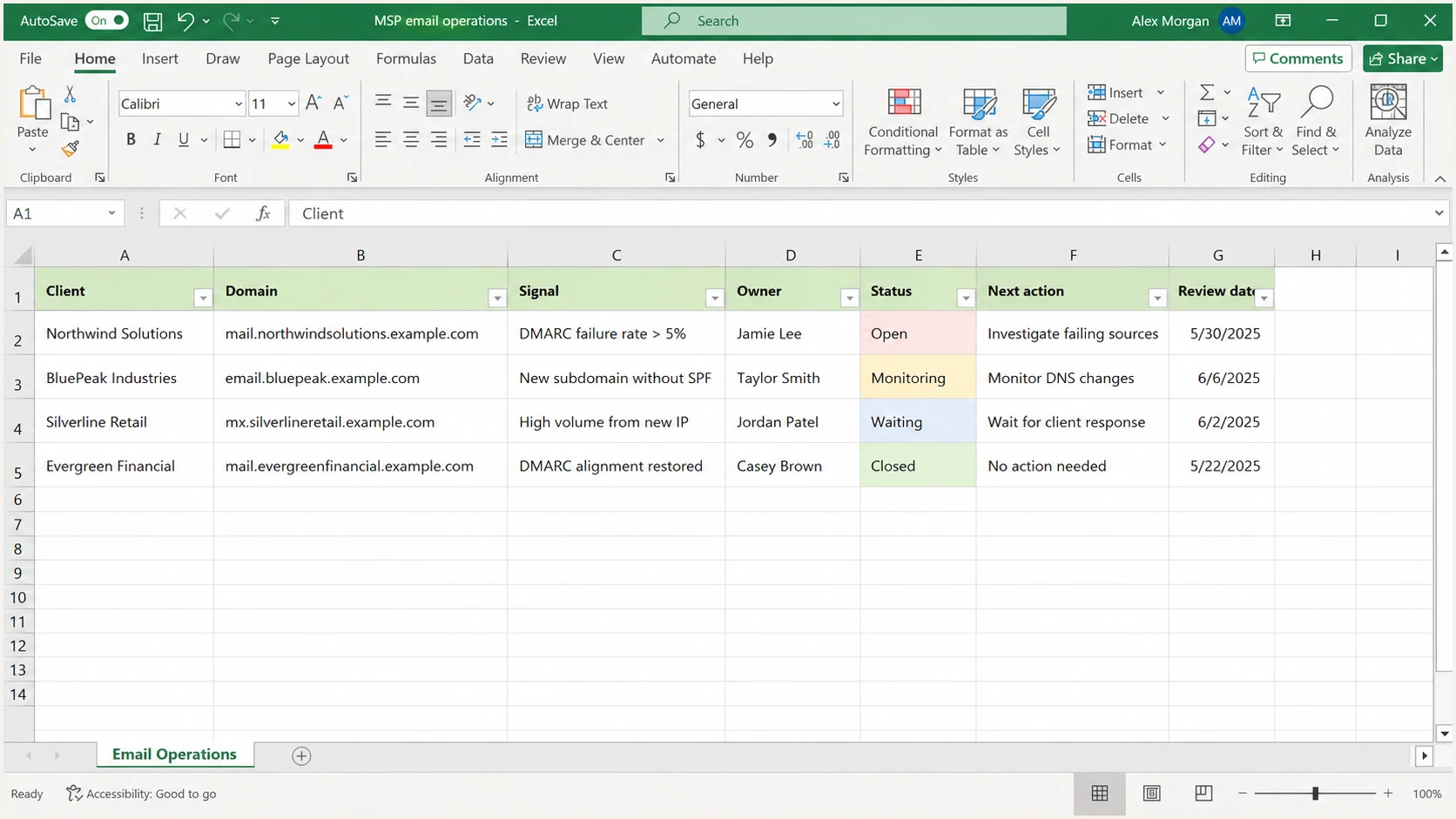
Microsoft Excel register for MSP email authentication incidents
A spreadsheet is suitable for a controlled register, not for live alert ingestion or DMARC XML analysis. Once case volume grows, move routing into the service desk and keep monitoring data in the monitoring platform. Avoid copying recipient-level or sensitive message details into general operations files.
Review open items on a fixed cadence. The technician confirms evidence and next action, the service owner checks aging and client communication, and the change owner closes completed DNS work. This gives every alert a visible path without forcing technical staff to rebuild context during each handoff.
Report outcomes clients can use
Client reporting should explain what changed and what needs approval. I include authenticated mail volume, known and unknown sources, current DMARC policy, notable failure changes, blacklist or blocklist events, remediation completed, open risks, and next-period actions. Raw counts need context, especially when a new legitimate sender creates a temporary rise in failures.
Separate operational outcomes from security claims. A move to reject means receivers can apply the requested DMARC policy to failing mail; it does not guarantee that every impersonation attempt disappears. A clear blacklist or blocklist check means the monitored asset was not listed in that check; it does not guarantee inbox placement.
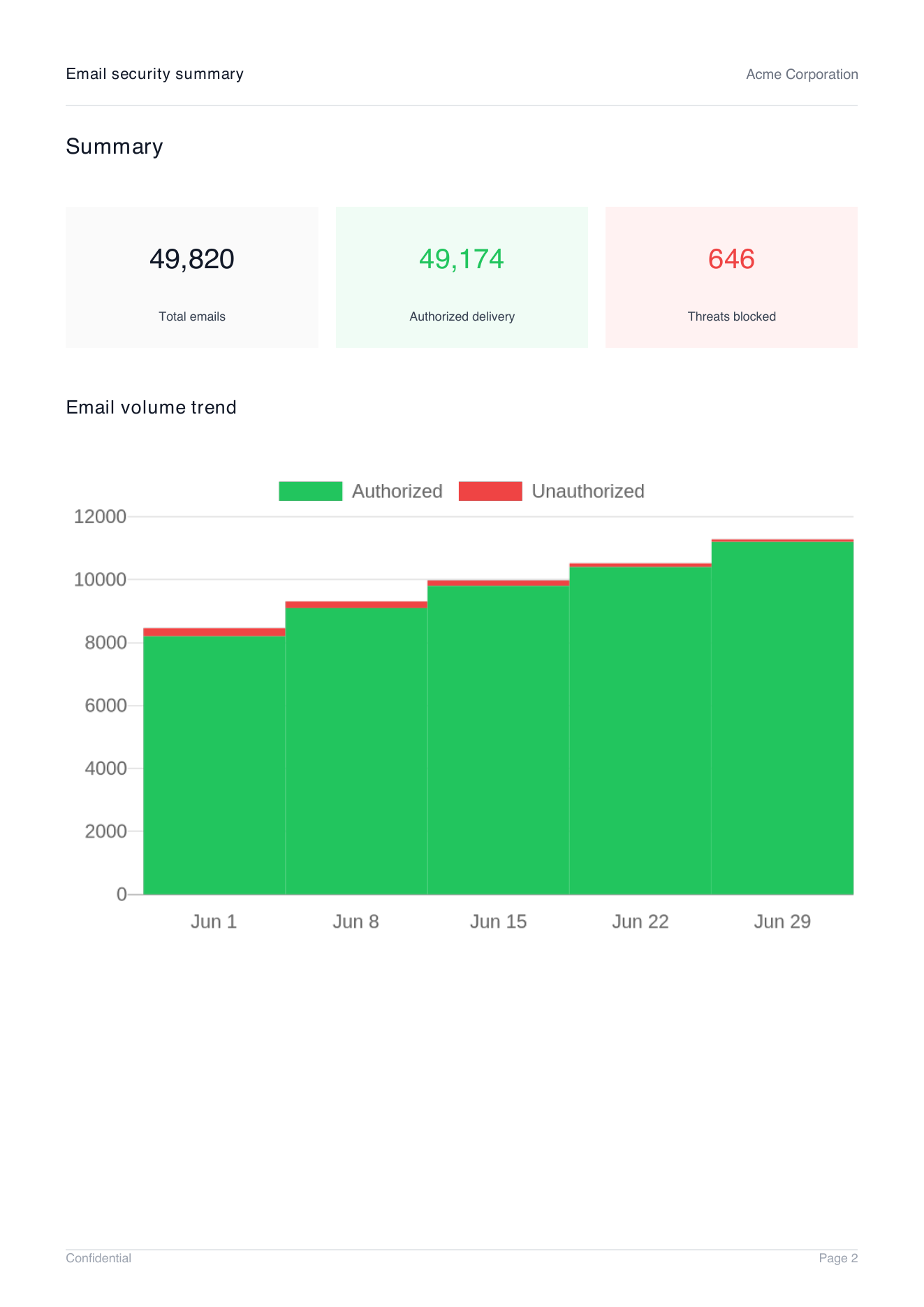
Demo client report summary page showing total emails, authorized delivery, threats blocked, and email volume trend
Suped's client reports can turn the technical record into an MSP-branded summary with email volume, authorized delivery, blocked threats, and trend data. The account manager can use the summary in a service review, while technicians retain the source-level evidence behind each statement.
A consistent monthly DMARC report should preserve the same definitions each period. If the MSP changes a metric or monitoring scope, note the change so the client does not mistake a measurement difference for a security event.
Make both signals one managed service
The combined service works when DMARC and blacklist or blocklist monitoring share a source inventory, ticketing path, ownership model, and client report. DMARC identifies legitimate and failing mail streams. Blocklist monitoring adds reputation status for the domains and IPs that matter. The runbook decides whether those observations belong to one incident.
Start with one client, document the assets and escalation contacts, baseline DMARC, add controlled blocklist coverage, test alert routing, and run a monthly review. Then reuse the operating template across tenants. Suped brings the monitoring, issue guidance, multi-tenancy, hosted controls, and reports into one practical MSP workflow.




