Why is my IP address blacklisted when sending email, and how can I fix it?

Published 12 Jul 2025
Updated 24 Sep 2026
13 min read
Summarize with
Updated on 24 Sep 2026: We clarified how public blocklists differ from IP reputation and added current checks for SMTP access blocks, DNS identity, authentication, and recovery.
Your IP address is blacklisted because a blocklist operator, mailbox provider, or filtering system has seen behavior that looks risky from that IP. The cause is usually unwanted SMTP traffic, a compromised host, an open relay, bad list practices, missing reverse DNS, a poor HELO or EHLO name, or shared infrastructure where another sender damaged the IP reputation.
The fix is not to request removal first. Start by proving what is leaving the IP, stopping the bad traffic, correcting the mail server identity, checking SPF, DKIM, and DMARC, then ask the blocklist (blacklist) operator for delisting with a concise record of what changed.
- Fast answer: If the listing is real and repeats, treat it as an active sending problem until traffic evidence proves otherwise.
- First check: Identify the exact listed IP, listing reason, affected hostname, mail stream, and first observed time.
- Best fix: Use an approved relay, or run a properly controlled mail server on a stable public IP, and restrict direct outbound SMTP from all other hosts.
Why an IP gets blacklisted
An email blacklist does not care only about your intended mail server. It cares about the public IP that connects to receiving mail servers. If ten internal systems sit behind one NAT gateway and one of them sends junk on port 25, the outside world sees one source: the NAT exit IP. That is why a clean application server and a correct SPF record do not prove the IP is clean.
The most common causes are specific and testable. DNS-based blocklists (DNSBLs), also called real-time blocklists (RBLs), do not all list the same behavior. Check the listed evidence, then compare it against logs, traffic captures, complaint patterns, and recent changes to recipient acquisition. A broad reference list of blocklists helps you understand whether the listing is a serious mailbox filtering signal, a policy listing, or a lower-impact reputation feed.
|
|
|
|---|---|---|
Malware listing | Compromised host or credentials | Isolate the host and trace SMTP |
Policy listing | Dynamic or non-mail IP range | Use an approved relay or verify static assignment |
Invalid HELO | Bad MTA identity | Set a stable FQDN |
No PTR | Missing reverse DNS | Add matching PTR and forward DNS |
Shared IP | Another sender's abuse | Escalate to the IP owner and isolate mail |
Spam traps or complaints | Poor consent or stale recipients | Pause the stream and repair list practices |
Common IP blacklist causes and first fixes.
Do not delist before fixing traffic
A delisting request without a real fix creates a short pause, then a repeat listing. Repeat listings are harder to resolve because they tell the operator that the underlying source is still active.
A dedicated IP has a simpler investigation path than a NAT or shared IP when you operate the sending infrastructure and can maintain its reputation. With dedicated IPs, the question is usually the sending program, the mail server, or the recipient list. With NAT, the question becomes every machine that can exit through that public address.
Confirm the blacklist caused the rejection
A blacklist lookup and a delivery failure are not automatically the same incident. Receivers choose which public blocklists to use, and some rely mainly on private reputation systems. A low-impact listing can appear during an unrelated rejection, while a provider-specific IP block might not appear on any public blacklist checker.
Keep the complete SMTP response or bounce, including the 4xx or 5xx status, receiving domain, timestamp, outbound IP, and queue ID. A 4xx response is a temporary deferral that the sending server should retry. A 5xx response is a permanent rejection for that attempt. Neither status proves a blacklist caused the problem unless the response or receiver documentation ties it to the IP or named list.
Before troubleshooting the sending server, confirm where the error occurs. If a mail app shows the warning while signing in, retrieving mail, or submitting through an authenticated server, the blocked address can be the client's network IP rather than the outbound IP that delivers mail to recipients. Test another network only to isolate the connection path, then follow the provider's support process. A sender-IP delisting request does not fix a client access policy block.
|
|
|
|---|---|---|
Bounce names the IP and list | The listing likely caused this rejection | Fix the source and follow that list's instructions |
Bounce cites private policy or reputation | The receiver applied its own block | Follow the rejection path and repair sending behavior |
Public listing with no affected bounces | Impact is not yet proven | Investigate the cause and monitor delivery |
Only one recipient rejects mail | A recipient-level rule is plausible | Compare responses across receiving domains |
Evidence that connects a blacklist result to an email rejection.
Check the IP that actually connected
The IP in a website lookup, SPF record, or office router is not always the outbound IP used by the message. Read the earliest trusted Received header or the sending MTA log, then compare that address with the IP named in the rejection.
IP blacklist status and IP reputation are different
A public blocklist or blacklist result is usually a yes-or-no listing in one database. IP reputation is a broader assessment based on sending history, complaint rates, recipient responses, authentication, volume patterns, and other signals. A clean public lookup does not mean every mailbox provider trusts the IP, and a single low-impact listing does not prove it caused delivery failures.
|
|
|
|---|---|---|
Public DNSBL or RBL lookup | Whether the IP is listed in that database | Whether a receiver uses that list |
Provider-specific rejection | How one receiver treated the connection | That the IP appears on a public blacklist |
IP reputation data | How past sending behavior is rated | That delisting will restore delivery |
SMTP response trends | Where deferrals or rejections occur | The root cause without log review |
How blocklist status differs from IP reputation evidence.
Treat blacklist status as one input. Compare it with SMTP responses, complaint data, DMARC aggregate reports, send-volume changes, and reputation data from each receiving environment. Recovery can continue after public delisting because private reputation systems update on their own schedules.
Find the exact source before delisting
Use a simple rule: if the listed IP keeps returning to the same blacklist, there is still traffic to find. The fastest path is to map each outbound SMTP connection to an internal source. Firewall logs, NAT logs, mail server logs, and a short packet capture usually answer the question faster than guessing.
If the blocklist reason mentions HELO or EHLO, capture the SMTP greeting. Do not rely only on mail server configuration, because another host behind the same IP can be making the bad connection. A cron alert, local MTA, compromised web server, or forgotten relay can be enough to get the public IP listed.
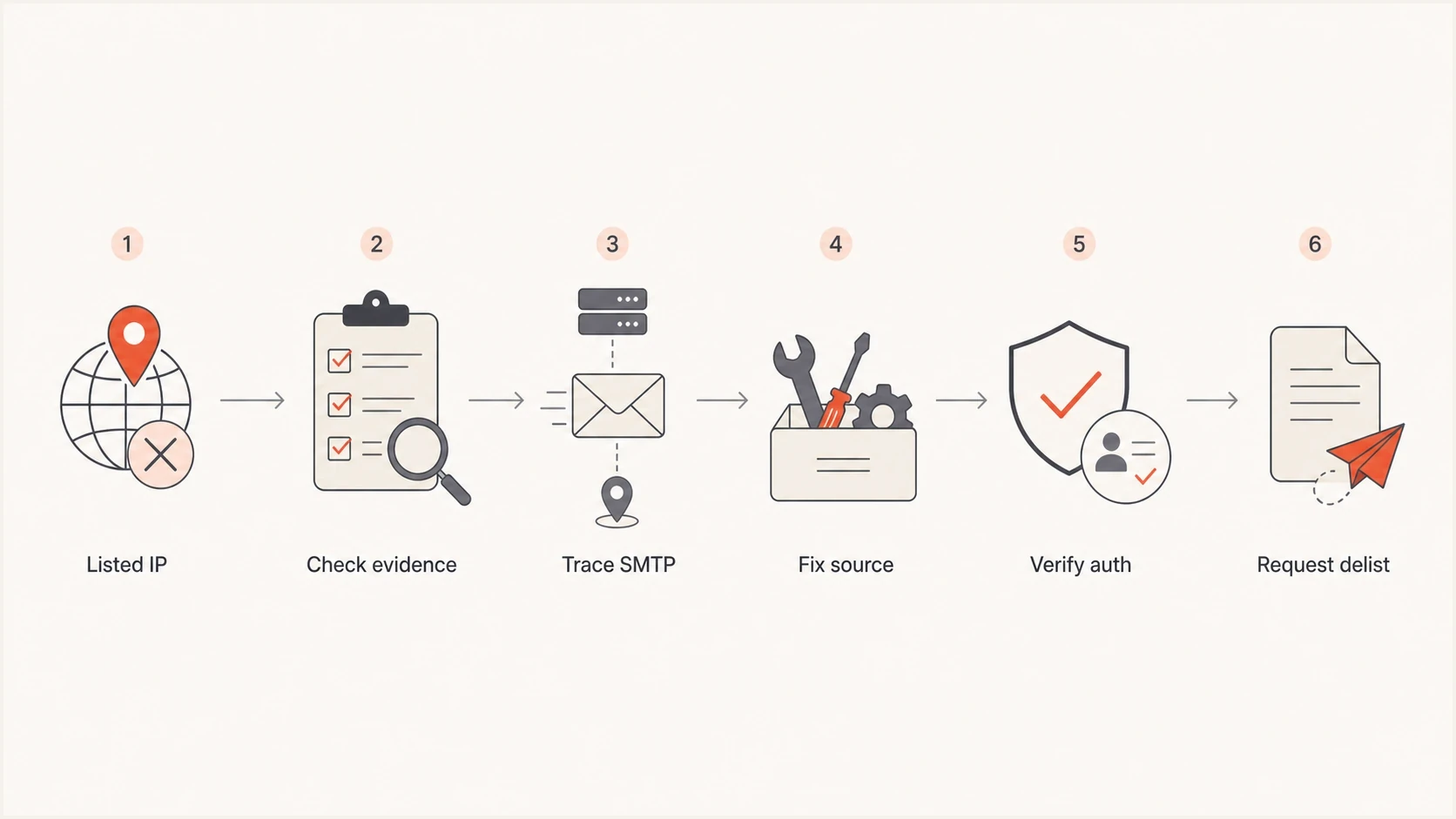
Email IP blacklist investigation flowchart for tracing SMTP traffic, fixing authentication, and requesting delisting.
- Confirm scope: Check whether one IP, a subnet, a domain, or a specific mail stream is affected.
- Capture traffic: Record outbound port 25 sessions long enough to see the greeting, sender, and destination.
- Map NAT: Tie each public source port back to the internal machine that opened the SMTP session.
- Search hosts: Scan VMs, containers, desktops, and automation jobs that can reach the internet.
- Block direct SMTP: Allow only the approved mail server or relay to send outbound mail directly.
Blocklist checker
Check your domain or IP against 144 blocklists.







After you confirm the listed IP, check a live email too. A DNS record can look right while the actual message still fails authentication or uses an unexpected return path. The Suped email tester is useful when you need to inspect the headers, authentication results, and message-level warnings from a real send.
Fix the sending infrastructure
The cleanest fix is to remove ambiguity. If you operate a production mail server, it should use an appropriate stable public IP, a hostname that resolves forward, a PTR record that points back to that hostname, and a HELO or EHLO value that uses the same fully qualified domain name. Dynamic or residential IP space should normally send through an approved relay. NAT can work when outbound SMTP is tightly filtered and monitored, but it makes attribution harder. Use TLS for SMTP delivery when the receiving server offers it.
Mail behind NAT
- Risk: One compromised internal host can blacklist the shared public IP.
- Visibility: NAT logs must map public source ports back to private hosts.
- Control: Outbound port 25 must be blocked for every non-mail host.
Mail on a public IP
- Risk: The sending identity is easier to isolate and repair.
- Visibility: Mail logs directly match the IP seen by receivers.
- Control: PTR, HELO, SPF, DKIM, and DMARC can be managed together.
An invalid or inconsistent SMTP greeting is a common blacklist clue. SMTP permits a bracketed address literal when the client has no usable hostname, but a stable fully qualified hostname that matches forward and reverse DNS gives receivers a clearer identity. Capture the session because it shows what the receiver actually saw, including traffic from other hosts behind the same exit IP.
Weak and preferred SMTP greetingstext
Weak but syntactically valid address literal:
EHLO [203.0.113.10]

Invalid bare address:
EHLO 203.0.113.10

Preferred stable hostname:
EHLO mail.example.com
Basic identity records
Your DNS and mail server name should tell the same story. The exact values differ by environment, but the relationship should be consistent. For IPv6 sending, the connecting address also needs matching AAAA and PTR records.
Example DNS and MTA identitytext
mail.example.com. 300 IN A 203.0.113.10
10.113.0.203.in-addr.arpa. 300 IN PTR mail.example.com.
example.com. 300 IN TXT "v=spf1 ip4:203.0.113.10 -all"
_dmarc.example.com. 300 IN TXT "v=DMARC1; p=none; rua=mailto:dmarc@example.com"

myhostname = mail.example.com
smtp_helo_name = $myhostname
smtpd_banner = $myhostname ESMTP
Authentication and reputation checks
SPF, DKIM, and DMARC do not erase a blacklist listing, but they reduce ambiguity. They show receivers which systems are authorized, which messages are signed, and what policy the domain owner wants applied. If the IP is not authorized in SPF, fix SPF authorization before you ask anyone to trust the traffic again. For high-volume mail, confirm DMARC alignment, TLS, and working unsubscribe handling before resuming delivery.
Also check whether the sending domain and IP have a pattern of authentication failures, high complaint rates, sudden volume spikes, or repeated bounces. A blacklist can be the first visible symptom, but the root problem often appears in DMARC aggregate reports, SMTP responses, and message headers.
Remediation priority signals
Use these signals to decide how urgently to pause sending and investigate.
Low
Monitor
One low-impact listing, no failures, no recent volume change.
Medium
Fix soon
Authentication failures or repeated bounces on one stream.
High
Pause
Major blocklist listing or repeated blacklist returns.
Critical
Stop now
Unknown SMTP traffic, open relay behavior, or compromise.
For a quick DNS-level review, use Suped's domain health check to inspect DMARC, SPF, and DKIM together. That does not replace traffic analysis, but it catches mistakes that make a delisting case weaker.
DMARC record detail view showing SPF, DKIM, DMARC, rDNS diagnostics, and DNS records
Suped is our DMARC and email authentication platform. It combines DMARC monitoring, SPF and DKIM diagnostics, hosted authentication records, MTA-STS, blocklist monitoring, and issue detection. During a blacklist incident, that workflow helps connect an IP listing with authentication changes and unauthorized sending sources without treating DNS checks as proof that the traffic is clean.
How to request delisting
Request delisting only after the cause is stopped. If the listing is on Spamhaus, read the listed details, then follow the next-step path for that listing type. A policy listing can be expected for an IP range that should not send mail directly, so the correct fix might be to use an approved relay rather than request removal. For range-level or owner-controlled listings, the registered IP owner or hosting provider must submit the request. If you need a deeper walkthrough for a Spamhaus case, use the Spamhaus IP block guide.
A strong delisting note is short and factual. It should not argue that the blacklist is wrong unless your evidence is clear. Include what happened, what traffic was found, what was blocked or repaired, and how future recurrence is being monitored.
- Identify: State the listed IP, affected hostname, listing name, and time the issue was found.
- Explain: Name the cause, such as a compromised VM, open relay, invalid HELO, or bad list source.
- Prove: List the controls changed, including port 25 restrictions, host cleanup, DNS changes, or list pause.
- Monitor: Mention the checks now in place for blocklist status, DMARC failures, and unusual send volume.
A good delisting request
The best request sounds operational: "We found the source, stopped it, changed the control, and verified the traffic." That is more useful than a long explanation of why the listing hurts your business.
Delisting and reputation recovery are separate. After removal, confirm the DNS result, run controlled test sends, and watch SMTP responses before increasing volume. Resume with wanted mail to engaged recipients at a consistent rate. Do not move unresolved traffic to a fresh IP, because that transfers the cause and can produce another blacklist listing.
Where Suped fits
A one-time blacklist lookup helps during an incident. Ongoing monitoring matters more after the first fix, because repeat listings, DMARC failures, SPF lookup issues, and unauthorized senders tend to return when teams add new sending systems or change infrastructure.
Suped's blocklist monitoring gives teams a practical place to watch domain and IP reputation beside DMARC, SPF, and DKIM. The same platform that shows a blacklist event can help identify whether authentication, DNS, or sender inventory changed around the same time.

Blocklist monitoring page showing domain and IP checks across blocklists with importance and status
For an MSP or a team managing many domains, the advantage is operational. You can see which clients or domains have active listings, which senders are verified, where SPF is close to its lookup limit, and which DMARC issues need action. That shortens the path between detection and repair.
Views from the trenches
Best practices
Keep outbound port 25 closed for every host except the approved mail transfer agent.
Give each production mail server a stable public IP, matching PTR, and a clear HELO name.
Watch blocklist and blacklist status daily during fixes, not only after mail is rejected.
Common pitfalls
Submitting delisting requests before stopping traffic causes repeated listings and slower review.
NAT hides the host that sent the SMTP session unless logs map source ports to machines.
A passing SPF result does not prove the IP has clean traffic or a correct SMTP greeting.
Expert tips
Capture short packet samples on port 25 so the HELO, sender, and destination are visible.
Move cron and local alerts through the approved relay instead of letting hosts send direct mail.
Keep proof of fixes concise: timestamps, affected IPs, changed controls, and current tests.
Expert from Email Geeks says a repeated XBL listing usually points to a real outbound SMTP source, not a random rule hit, so packet capture and full host scans belong early in the investigation.
2024-08-14 - Email Geeks
Expert from Email Geeks says NAT complicates sender attribution because one infected VM, cron job, or open relay can place the shared egress IP on a blacklist.
2024-08-15 - Email Geeks
IP blacklist recovery checklist
If your IP address is blacklisted when sending email, assume the listing is a symptom, then verify whether it caused the rejection. Find the public IP that actually connected, read the listed reason and full SMTP response, capture outbound SMTP, and identify every system that can send through that address. If the IP sits behind NAT, treat the whole egress group as in scope until logs prove the actual source.
The durable repair is usually straightforward: stop unauthorized SMTP, clean compromised hosts, use an approved relay or suitable stable public IP, make HELO, PTR, and forward DNS consistent, authenticate the domain, then request delisting with proof. After that, resume clean mail gradually and keep monitoring so the next issue is found before receivers start rejecting mail.




