Why is my IP address not authorized to send email and how do I fix it?

Published 25 May 2025
Updated 12 Aug 2026
12 min read
Summarize with
Updated on 12 Aug 2026: We clarified how to distinguish an IP policy rejection from SPF or reputation failures and added the right relay and MSA routing options.
If your IP address is not authorized to send email, the receiving mail server has decided that the IP should not deliver mail directly to its MX servers. The most common fix is to stop sending directly from that IP and send through the SMTP relay provided by your ISP, hosting provider, or email service. If you have a static IP that the provider approves for mail, ask the ISP to confirm that it is allowed for direct SMTP, remove or adjust any policy blocklist entry, and make sure reverse DNS, SPF, DKIM, and DMARC match the domain you are sending from.
Treat the exact Gmail-style rejection as a policy problem first, not a content problem. A message like 550 5.7.1 The IP you're using to send mail is not authorized usually points to the IP provider's policy, a policy blocklist or blacklist entry, or direct-to-recipient sending from an IP range that has no business sending mail directly. It is different from an SPF failure or a low-reputation rejection, even though those responses can share the 550 5.7.1 status code.
The fastest practical answer is this: if Gmail says your sending IP is not authorized to send directly, Google is usually telling you to use the provider's SMTP relay or get the ISP to change the IP policy. The Google help page makes the IP provider central to that decision and says Google cannot allowlist the IP or make an exception.
What the error actually means
This rejection happens before the inbox placement question. The receiver is not saying the campaign copy was weak or that your unsubscribe link was missing. The exact response says the connecting IP address is not permitted to act as a direct sender. A domain authentication failure is related to authorization, but it uses a different SMTP response and requires a different fix.
Typical Gmail rejectiontext
550-5.7.1 [203.0.113.10] The IP you're using to send mail is not authorized
550-5.7.1 to send email directly to our servers. Please use the SMTP relay
550-5.7.1 at your service provider instead.
550 5.7.1 gsmtp
Two types of authorization are often confused. An IP policy issue means the network owner says that the IP space should not send mail directly. A domain authorization issue means the domain's SPF record does not include the system that sent the message. Read the complete SMTP text, not only the 550 5.7.1 code, because low IP reputation and other Gmail rejections can use the same status code.
IP policy rejection
- Signal: The receiver tells you to use your provider's SMTP relay.
- Cause: The IP range has a policy blocklist or blacklist status.
- Owner: Your ISP or hosting provider controls the fix.
SPF authorization failure
- Signal: The receiver says the IP is not allowed for the domain.
- Cause: The domain's SPF record does not list that sender.
- Owner: The domain DNS owner controls the SPF update.
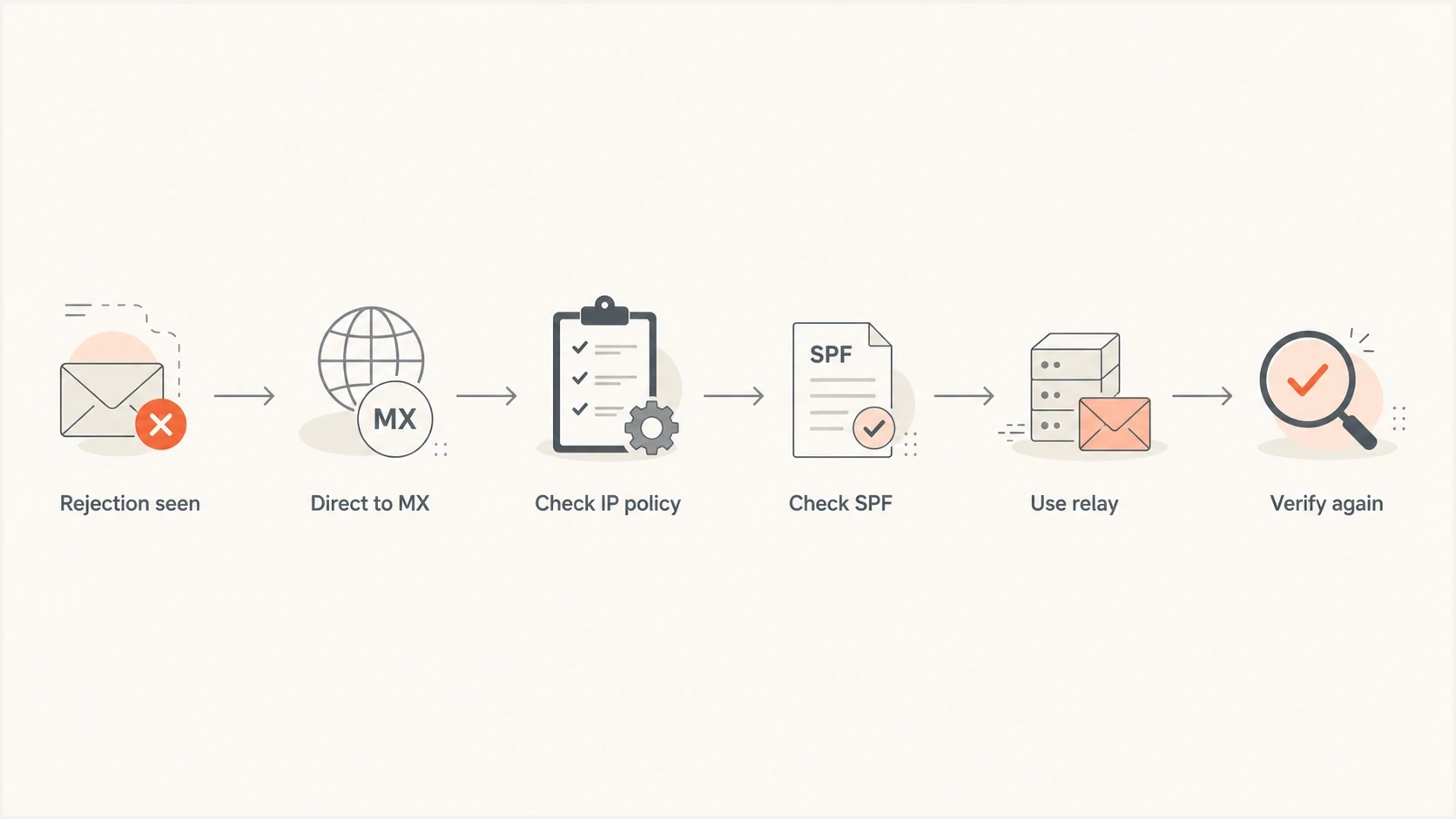
A flowchart showing how to diagnose an unauthorized sending IP rejection.
The main causes
Start with the IP before changing the domain record. If only one or two IPs in a pool fail while others keep delivering, the affected IPs need separate policy and reputation checks. Do not assume the whole pool has the same status.
|
|
|
|---|---|---|
PBL | Policy blocklist or blacklist entry | Talk to ISP |
Relay | Direct SMTP is not allowed | Use SMTP relay |
SPF | Domain does not authorize IP | Update SPF |
PTR | Reverse DNS is missing | Set rDNS |
HELO | Server name does not match | Fix hostname |
Reputation | IP has a poor sending history | Stop abuse and rebuild |
Common reasons an IP is rejected as unauthorized
- Policy listing: The IP has been marked as unsuitable for direct mail delivery. A PBL listing often means the ISP published a policy saying mail should leave through its relay, not straight to Gmail or another receiver.
- Consumer range: Residential and dynamic ranges, plus some cloud ranges, are poor direct-sending choices because attackers abuse them for unauthenticated mail.
- Missing SPF: The domain's SPF record authorizes one platform, but the message leaves through a different IP. Use an SPF checker when you need to see the parsed result.
- DNS limits: SPF returns PermError when evaluation exceeds its limit of 10 DNS-causing terms. SPF flattening can reduce lookup pressure, but the flattened data must stay current as sender IP ranges change.
- Identity mismatch: The IP, PTR, HELO name, envelope sender, DKIM domain, and visible From domain tell an inconsistent story.
Blocklist checker
Check your domain or IP against 144 blocklists.







A blocklist or blacklist check answers a narrow question: is this exact IP or domain appearing on a list that receivers use as a policy or reputation signal? It does not prove Gmail used that list directly, and it does not measure the IP's complete reputation. It gives you evidence for the next conversation with your ISP.
How to fix it step by step
The right fix depends on whether the problem belongs to the IP owner or the domain owner. Use this order to avoid wasted DNS changes when the IP itself is not allowed to send direct mail.
- Capture evidence: Save the full SMTP rejection, sending IP, timestamp, sender domain, recipient domain, queue ID, and hostname. Do not redact the IP when troubleshooting internally.
- Check policy status: Look up the IP for blocklist and blacklist status, especially policy listings that say the address should not send mail directly.
- Ask the ISP: Ask whether the IP is approved for direct outbound SMTP on port 25 and whether the provider has published a policy entry for that range.
- Use the relay: If the provider says direct sending is not allowed, route mail through the provider's SMTP relay, an authenticated MSA, or mail infrastructure that permits outbound delivery.
- Fix DNS identity: Set PTR, matching HELO, SPF, DKIM, and DMARC so the domain and server identity match the route you use.
- Retest delivery: Send a small controlled test after DNS propagation and compare the authentication result with the previous rejection.
If the IP appears on a PBL-style policy blocklist (blacklist), do not treat delisting as a normal reputation removal request. The ISP usually has to confirm that the IP range is allowed to send direct mail. If the ISP says the IP range is not meant for direct SMTP, the correct fix is relay routing, not repeated delist attempts.
If the receiver error specifically says the IP is not allowed to send mail from your domain, then SPF becomes the main fix. Add the correct sending service include or IP mechanism, keep one SPF TXT record at the root domain, and keep the evaluated record within the 10 DNS-causing term limit.
Simple SPF exampledns
example.com. TXT "v=spf1 ip4:203.0.113.10 include:_spf.example.net -all"
For more complex sender stacks, Suped's Hosted SPF lets approved users manage senders without giving every marketing or operations team direct DNS access. That matters when the unauthorized IP problem comes from forgotten platforms, stale includes, or a sender added outside the normal change process.
SPF flattening drawer showing an over-limit record, sender editing, lookup counts, and the hosted record setup
Choose the right sending route
The Gmail wording refers to direct delivery to recipient MX servers, normally over port 25. It does not mean the same IP can never submit a message. An authenticated SMTP relay or mail submission agent (MSA) can accept the message and deliver it from an authorized sending network.
|
|
|
|---|---|---|
Provider relay or MSA | The ISP blocks direct delivery | Authenticated submission |
Own-domain relay | An authorized server exists elsewhere | Restricted relay access |
Direct to MX | The provider approves the IP for mail | Mail-eligible static IP and rDNS |
Sending routes for an unauthorized IP
A static IP does not automatically qualify for direct-to-MX email. If the provider offers business or static IP service, confirm in writing that the assigned range is approved for direct outbound SMTP before moving the mail server. Never configure an unrestricted open relay.
When SPF is the real problem
SPF authorizes the envelope sender domain, not the visible From address. That distinction causes a lot of confusion. A message can appear to come from your brand in the inbox while SPF evaluates a different return-path domain. DMARC ties the visible From domain back to an aligned SPF or DKIM domain, so the authentication results must be checked together.
SPF lookup risk thresholds
Practical thresholds for DNS-causing terms evaluated during an SPF check.
Comfortable margin
0-7 terms
The record has room for sender changes without nearing the protocol limit.
Near the limit
8-10 terms
The record can pass, but another include or redirect can exhaust the limit.
PermError risk
11+ terms
An evaluation that exceeds 10 DNS-causing terms returns SPF PermError.
If you already placed the IP in SPF and it still fails, check whether the message is using the domain you updated. This is where many fixes fail. The return-path can use a subdomain, a vendor domain, or a bounce domain that has a separate SPF record. A deeper walkthrough is available for cases where SPF still fails even after the IP appears in DNS.
A clean SPF fix has one SPF TXT record for each evaluated domain, only current senders, no duplicate SPF records, and no unmanaged includes. Suped helps find SPF, DKIM, DMARC, rDNS, blocklist, and authentication issues in one place, then provides concrete steps to fix them.
If the issue started after moving to a new sender or dedicated IP, check for a softfail or neutral mechanism that no longer matches the actual route. The same domain can pass through one platform and fail through another. When the failure is tied to a migration, the notes on SPF softfail errors are the next useful check.
What to ask your ISP or host
The ISP conversation has to be specific. A generic ticket saying Gmail is rejecting my mail usually gets a generic response. Include the exact rejection, the IP, the sending hostname, and a clear question about whether the IP range is authorized for direct outbound SMTP.
Ask the provider this: Is 203.0.113.10 authorized under your network policy to send direct outbound SMTP to recipient MX servers, or should it only send through your SMTP relay? If it is authorized, please confirm the policy blocklist status for the range and the reverse DNS required for mail service.
If the provider says nothing changed, ask them to check the actual listing or routing policy for the affected IPs, not only the account settings. Adjacent IPs in a pool can behave differently because policy data, reverse DNS, reputation, or prior use differs by address. If direct sending is restricted, ask whether business service or a mail-eligible static IP is available, but get explicit confirmation that the replacement range permits direct SMTP.
- Port policy: Confirm that outbound SMTP on port 25 is permitted for direct delivery, not only open at the firewall.
- Range policy: Ask whether the provider has submitted the range to a policy blocklist or blacklist.
- Reverse DNS: Request a stable PTR value that matches the mail server hostname.
- Relay route: Get the provider's supported SMTP relay settings if direct sending is not allowed.
For a broader authentication check, run the domain through a domain health checker after the provider confirms the IP policy. That order matters: domain checks are useful, but they cannot override a network owner saying the IP should not send direct mail.
Where Suped fits
Suped is our DMARC reporting and email authentication platform. It brings DMARC monitoring, SPF and DKIM checks, Hosted SPF, blocklist monitoring, hosted MTA-STS, alerts, and issue-specific fix steps into one workflow.
That workflow helps when an unauthorized IP problem crosses team boundaries. DMARC aggregate data can identify which sources send for the domain, Hosted SPF can control approved senders without broad DNS access, and issue steps can keep a policy blacklist entry separate from an SPF failure. Relay policy still has to be confirmed by the IP provider.

Issue steps to fix dialog showing the issue overview, tailored fix steps, and verification action
Manual troubleshooting
- Evidence: You collect SMTP errors, DNS records, logs, and IP status in separate places.
- Ownership: DNS, infrastructure, and marketing teams trade screenshots and ticket updates.
- Risk: The same unauthorized sender returns after a platform or IP change.
Suped workflow
- Evidence: DMARC, SPF, DKIM, and reputation data sit in one domain view.
- Ownership: Hosted SPF lets approved users manage senders without raw DNS access.
- Risk: Alerts and issue steps expose changes that reintroduce an unauthorized sender.
Views from the trenches
Best practices
Capture the full SMTP rejection, exact IP, hostname, sender domain, and timestamp.
Check policy blocklist status before changing SPF, DKIM, DMARC, or relay routing.
Ask the ISP whether the IP range is approved for direct outbound SMTP traffic to receivers.
Common pitfalls
Treating a policy blocklist as a normal reputation listing wastes time and slows escalation.
Redacting the IP during diagnosis removes the signal needed to isolate the issue.
Assuming adjacent IPs share the same policy or reputation causes false conclusions.
Expert tips
Use the provider relay when the ISP policy says direct delivery is not allowed for that IP.
Verify PTR, HELO, SPF, DKIM, and DMARC after the IP policy problem is fully solved.
Escalate with exact evidence when support says nothing changed on the account or IP status.
Marketer from Email Geeks says the ISP is the relevant party when a receiver says the IP is not authorized for direct delivery.
2023-05-24 - Email Geeks
Marketer from Email Geeks says a PBL-style policy blocklist means the network owner has said the IP should not send directly.
2023-05-24 - Email Geeks
The fix that lasts
Fix the IP policy first, then fix domain authorization. If the ISP or host says the IP is not allowed to send direct email, use the correct SMTP relay or move to mail-grade infrastructure. If the IP is allowed, confirm PTR and HELO, then check SPF, DKIM, and DMARC against the actual sending route.
The mistake to avoid is treating every unauthorized IP error as an SPF edit. SPF matters, but it cannot authorize an IP range that the network owner has marked as unsuitable for direct mail. Once the route is permitted, SPF, DKIM, and DMARC let receivers authenticate the sending identity. IP reputation remains a separate delivery signal.




