How to resolve SPF SOFTFAIL errors when moving to a dedicated IP address?

Updated on 1 Aug 2026: We clarified SPF softfail versus permerror and added checks for the exact IP address used during dedicated IP migration.
Fix SPF SOFTFAIL on a new dedicated IP by checking the domain in the envelope sender, confirming that domain has exactly one SPF TXT record, and making sure the new IP or its sending include is inside that one record. The header often describes this result as 'domain does not designate IP as permitted sender.' In most migrations, the problem is not that the IP is new. The problem is that Gmail evaluated a return-path domain whose SPF record did not authorize that IP.
Treat the result seriously, but do not panic if DKIM and DMARC are still passing while the fix is in progress. During IP warming, clean authentication matters. A softfail tells receiving systems that the sending IP was not in the SPF policy for the checked domain and that the policy used ~all. That is a DNS and sender authorization issue, not a reputation verdict by itself.
The fastest practical path is to fix the SPF record first, then send a real test message to Gmail and read the Authentication-Results and Received-SPF headers. If the header changes to SPF pass, continue warming at a controlled pace. If it still shows softfail, trace the return-path domain and the reported client IP again before touching unrelated DNS records.
The direct fix
The direct fix is to publish one valid SPF record for the hostname used in the return-path of the message. If you added the dedicated IP as a second SPF record, remove the duplicate and merge the mechanisms into the existing SPF record. A DNS hostname can have multiple TXT records for different purposes, but it must not have multiple SPF records beginning with v=spf1. Duplicate SPF policies produce permerror under the SPF standard. Softfail is a different result: the receiver found one usable policy, no mechanism matched the connecting IP, and evaluation reached ~all.
- Find the checked host: Use the message header to find the return-path or envelope sender domain that Gmail evaluated.
- Count SPF records: That host should return one SPF TXT record, not two separate SPF policies.
- Merge senders: Put the shared pool include, the dedicated IP include, and any direct IP mechanism into the same SPF record.
- Retest Gmail: Send a real message and confirm SPF pass in the received header, not only in a DNS lookup.
Combine SPF TXT recordsdns
Before, invalid:
mail.example.com. TXT "v=spf1 include:_spf.shared.example.net ~all"
mail.example.com. TXT "v=spf1 include:_spf.dedicated.example.net ~all"

After, valid:
mail.example.com. TXT (
  "v=spf1 "
  "include:_spf.shared.example.net "
  "include:_spf.dedicated.example.net "
  "ip4:203.0.113.44 "
  "~all"
)
The parenthesized version above is still one TXT record in DNS. It is not multiple SPF records. DNS providers display long TXT values in different ways, so the important part is the resource record count: one hostname, one TXT answer that starts with v=spf1.
Do not add another SPF record
Multiple SPF records at the same hostname produce SPF permerror, so merge authorized sources into one policy. If Gmail reports softfail instead, it found a usable policy ending in ~all but the connecting IP did not match any preceding mechanism. Diagnose the result shown in the live header rather than treating permerror and softfail as interchangeable.
Why the dedicated IP exposed the problem
Moving to a dedicated IP changes the IP address that receivers compare against SPF. Shared pools often passed because their provider include already covered the shared infrastructure. The dedicated IP can sit behind a different include path, a newly assigned pool, or a return-path host that was not updated. That is why the same subdomain can pass from shared IPs and softfail from the dedicated IP.
|
|
|
|
|---|---|---|---|
Duplicate SPF | SPF permerror | Combine into one | High |
Wrong host | Return-path differs | Update that host | High |
Missing IP | IP absent from chain | Add include or IP | High |
Wrong address family | Header shows IPv6 | Add ip6 or include | High |
DNS cache | New lookup passes | Wait old TTL | Medium |
Lookup limit | SPF permerror | Reduce lookups | High |
Common causes of SPF SOFTFAIL during dedicated IP migration
A new dedicated IP does not inherit the SPF behavior of the old shared route. SPF authorizes the connecting IP against the policy for the envelope sender domain. If the provider changes either side of that comparison, verify the whole path instead of assuming the old DNS still applies.
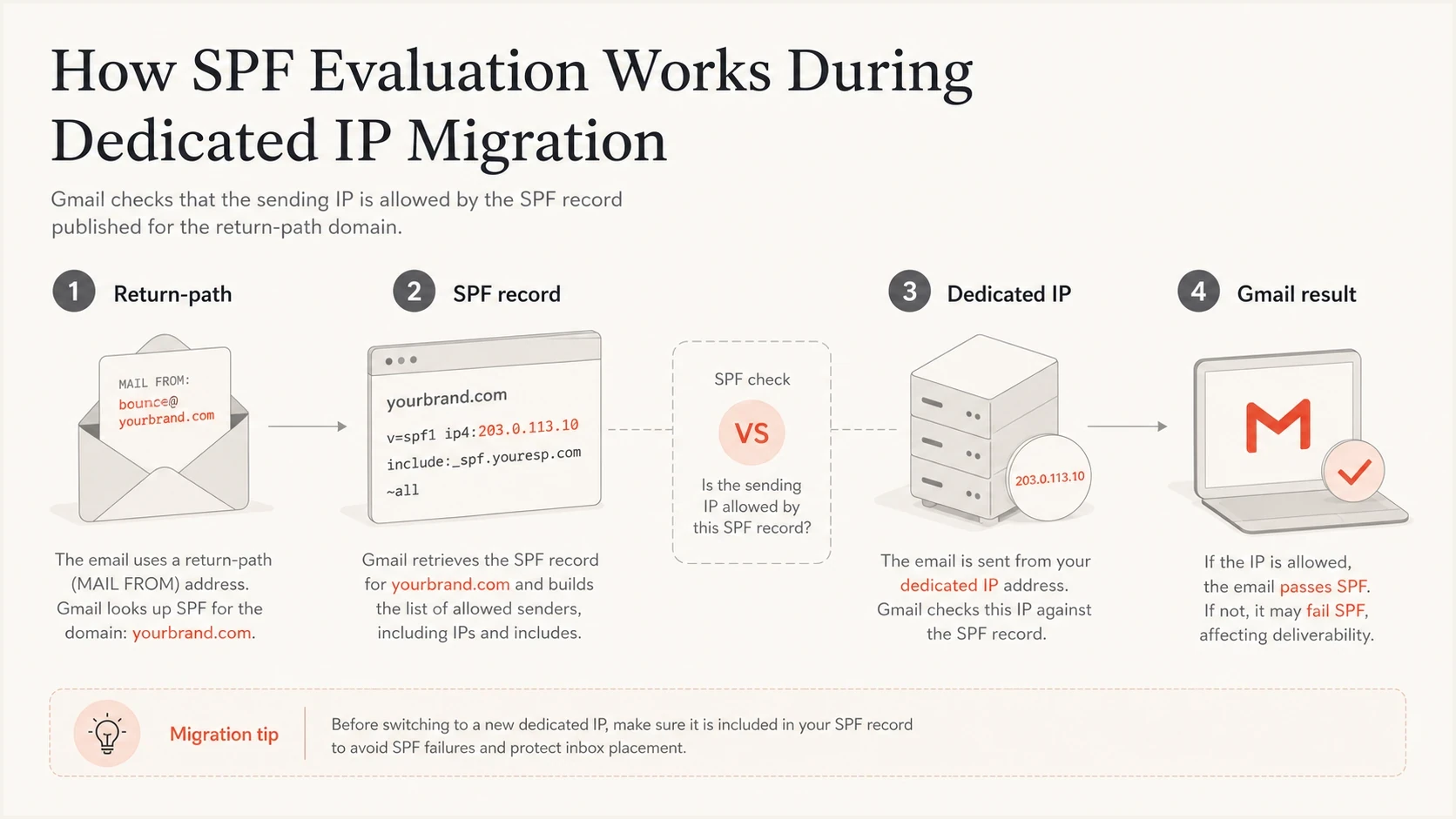
SPF compares the dedicated IP with the return-path domain's SPF record
Check the domain and IP Gmail evaluated
Start with the Gmail header, not the DNS zone editor. SPF is checked against the envelope sender domain, which appears in Gmail's authentication results as the SMTP mail-from domain. That domain can differ from the visible From domain and from the branded subdomain you expect to be in use.
Gmail authentication headertext
Authentication-Results: mx.google.com;
 spf=softfail smtp.mailfrom=bounces.mail.example.com
 dkim=pass header.d=mail.example.com
 dmarc=pass header.from=example.com
In that example, SPF is about bounces.mail.example.com. If you edit mail.example.com but the return-path is bounces.mail.example.com, Gmail will keep evaluating the unchanged policy. If a cloud sending route uses its own return-path domain, SPF for your visible subdomain is not the deciding record for that message.
- Open the header: Find the SPF result, SMTP mail-from domain, and client IP shown with it.
- Query that host: Look up TXT records for that exact hostname, not the parent domain unless the header uses it.
- Match the address family: If the header reports IPv6, confirm the policy has a matching ip6 mechanism or a provider include that covers it; an ip4 mechanism does not authorize IPv6.
- Trace includes: Follow provider includes until you find the exact dedicated IP or confirm it is missing.
- Read DMARC: Check whether DKIM passed with a domain that matches the visible From domain.
- Send again: Retest after DNS changes and compare the new header with the old one.
A focused SPF checker is useful here because it exposes the parsed SPF mechanisms and lookup count before you send another warm-up message. For a related failure path, the IP authorization guide covers what to do when the IP is not authorized anywhere in the SPF chain.
SPF checker
Find SPF syntax issues, lookup limits, and weak records.
?/16tests passed
The checker tells you whether DNS is structurally correct. The live Gmail message tells you what the receiver actually evaluated at delivery time. Use both because cached DNS, provider routing, and return-path changes can make a DNS-only check look cleaner than the message that just landed in the inbox.
What to change in DNS
For a migration where the old shared IPs and the new dedicated IP send from the same return-path domain for a while, the SPF record needs to authorize both routes at the same time. Do not replace the old include too early, and do not create a second SPF record for the new route.
Bad migration pattern
- Duplicate policy: One SPF record authorizes shared IPs and another authorizes the dedicated IP.
- Wrong hostname: The visible sending subdomain is updated, but the return-path host is not.
- Too many includes: Every sender is added without checking SPF's DNS lookup limit.
Clean migration pattern
- Single policy: One SPF record contains the shared include and the dedicated route.
- Correct hostname: The return-path domain in the header is the domain you edit in DNS.
- Lookup control: The combined SPF record stays within the DNS lookup limit.
The limit applies to ten DNS-causing terms during evaluation, including include, a, mx, exists, ptr, and redirect. Direct ip4 and ip6 mechanisms do not consume that lookup allowance. If the combined policy has too much lookup pressure, SPF flattening or managed sender authorization can keep the policy within the limit.
Minimal dedicated IP additiondns
mail.example.com. TXT (
  "v=spf1 "
  "include:_spf.shared.example.net "
  "ip4:203.0.113.44 "
  "~all"
)
Use a direct IP mechanism only when the dedicated IP is yours to list directly and your sending provider expects that. Use ip4 for IPv4 and ip6 for IPv6. If the provider gives you an include, use that include. If a hosted SPF service controls the record, make the sender change there so the generated DNS stays consistent.
Should you continue IP warming
Continue warming only after you understand the SPF result. If Gmail shows SPF pass after the DNS fix, keep going. If Gmail still shows softfail because old DNS is cached and your fresh lookup now passes, wait out the previous TTL and send a small test again. If SPF is duplicated, malformed, or missing the IP, pause the warming plan until the record is fixed.
Warm-up readiness after SPF testing
Use the live Gmail header and the current DNS result together before increasing volume.
Proceed
SPF pass
SPF passes on the live test message and DKIM also passes.
Wait briefly
TTL cache
Fresh DNS is correct, but a receiver still has an old cached answer.
Pause
Invalid SPF
The return-path host has duplicate, malformed, or incomplete SPF.
SPF is only one warm-up signal. Dedicated IPs also need reputation checks, complaint control, bounce monitoring, and blocklist (blacklist) visibility. Confirm forward and reverse DNS for the new IP as a separate readiness task, but do not expect a PTR change to repair SPF. A softfail is an authentication defect. A listing on a blocklist or blacklist is a reputation defect. Treat them separately so you do not chase the wrong root cause.
DMARC caveat
DMARC passes when either SPF or DKIM passes and the authenticated domain matches the visible From domain. That means DKIM can carry DMARC while SPF is being fixed. Still, do not ignore SPF softfail during a dedicated IP migration, because mailbox providers use authentication consistency in their delivery decisions.
How Suped fits the workflow
Suped's DMARC and email authentication platform groups SPF, DKIM, and DMARC results by sending source. During a dedicated IP migration, use that source view to confirm which return-path domain and IP are failing, verify whether the source is expected, and track whether failures fall after the DNS correction.
When DNS access is slow or split across teams, Suped's Hosted SPF lets authorized senders be managed without repeated manual DNS edits. It also monitors SPF lookup pressure and can alert the team when authentication failures rise during the warm-up period.
SPF flattening drawer showing an over-limit record, sender editing, lookup counts, and the hosted record setup
After correcting SPF, run Suped's domain health checker to catch nearby migration problems such as a DKIM selector error, missing DMARC reporting, bad reverse DNS, or SPF lookup pressure.
Practical Suped workflow
- Detect source: Identify the dedicated IP source and whether it is expected for the domain.
- Fix record: Update the single SPF policy without creating a duplicate record.
- Verify traffic: Confirm SPF pass in a live message and watch source-level failure counts.
- Watch alerts: Investigate any renewed authentication failures before increasing volume.
Views from the trenches
Best practices
Check the envelope sender first, then update the SPF record for that exact return-path host.
Combine every SPF mechanism into one TXT record before retesting Gmail headers carefully.
Keep DKIM passing while SPF is repaired, so DMARC still has a matching authenticated path.
Common pitfalls
Publishing two v=spf1 TXT records causes permerror, even when each record looks correct alone.
Adding the new IP to the visible From subdomain fails when the return-path uses another host.
Changing ~all to +all hides the symptom and authorizes senders that should stay blocked.
Expert tips
Use a real test message because the Received-SPF header shows the domain Gmail evaluated.
Lower TTL before a migration window, then wait for old answers to age out after DNS edits.
If includes are crowded, move sender management into hosted SPF instead of manual DNS edits.
Expert from Email Geeks says multiple SPF TXT records cause a permanent error until the sender publishes one combined policy.
2024-06-07 - Email Geeks
Marketer from Email Geeks says the dedicated IP must appear in the return-path domain's SPF chain, not only somewhere in the DNS zone.
2024-06-07 - Email Geeks
What to fix first
If SPF SOFTFAIL appears only after moving to a dedicated IP, do not blame the age of the IP first. Verify the return-path domain and exact client IP, correct any duplicate SPF records, merge the shared and dedicated sending routes into one policy, and send a fresh Gmail test. Once SPF passes in the live header, the authentication blocker is gone and the remaining warm-up work concerns reputation.
Passing DKIM and DMARC provide a working authenticated path while SPF is repaired. SPF softfail still deserves same-day cleanup during a migration because it creates inconsistent signals when mailbox providers are first seeing traffic from the dedicated IP.




