Why is a Google IP address blocklisted by Spamhaus?

Published 27 Jul 2025
Updated 27 Jul 2026
13 min read
Summarize with
Updated on 27 Jul 2026: We added current Spamhaus return-code guidance and clarified how shared Google sending IPs differ from Google-hosted links.
A Google IP address is blocklisted by Spamhaus when Spamhaus associates that IP, a Google-hosted resource on that IP, or a related Google service abuse pattern with spam or other internet abuse. The important part is this: the reject does not always mean your own Google Workspace mail was sent from a bad outbound server. It can mean the receiver scanned the message body, found a Google-hosted URL or IP reference, and applied a blocklist (blacklist) rule to that content.
Treat this as two separate problems. One problem is connection reputation, where the sending server IP is listed. The other is content reputation, where something inside the message points at a listed host. That split changes the fix. For connection reputation, work with the sending provider. For content reputation, remove or replace the risky link, file, redirect, or hosted asset in the email.
- Sending IP: The receiver rejected the SMTP connection because the server delivering the email matched a Spamhaus DNSBL result.
- Body content: The receiver accepted the connection far enough to inspect the message and rejected it because a URL, hostname, or IP in the content matched a list.
- Malformed check: The lookup itself has pasted text, punctuation, or tracking wrapper data attached to the IP, so the result needs to be rechecked cleanly.
- Shared service: A public Google service can host abusive content created by other users, and filters can react to that shared infrastructure.
The direct answer
A Google IP is blocklisted by Spamhaus because Spamhaus has observed abuse tied to that IP or to resources reached through it. On the Spamhaus Blocklist, Spamhaus describes listings as IP addresses identified with malicious or abusive activity, including spam sources and hosted resources used in abusive mail. That includes both individual IPs and ranges.
Key point
A receiver can reject an email because a Google IP appears in the message content, even when the sender's own authentication passes and the connecting mail server is not the listed IP.
|
|
|
|---|---|---|
Listed URL host | The message links to a Google-hosted resource. | Check links |
SMTP IP hit | The connecting sender IP matched a DNSBL query. | Read bounce |
PBL result | The IP is not expected to send direct mail. | Check route |
Bad lookup | The pasted search term contains extra text. | Retest IP |
Common reasons a Google IP appears in a Spamhaus-related reject
Common reject text examples
550 5.7.1 Client host [216.58.208.112] blocked using sbl.spamhaus.org
550 5.7.1 Message contains URL hosted on a listed IP
554 5.7.1 Rejected due to Spamhaus policy blocklist
The exact wording in the bounce tells you which path to follow. If it says the client host is blocked, focus on the sending IP. If it says the message contains a URL, URI, host, or listed resource, focus on the email content. If it mentions policy, direct-to-MX, or unauthenticated sending, compare the result with the Policy Blocklist behavior before asking for a delisting.
Why Google appears in the listing
Google runs large shared services: search, redirects, document hosting, forms, groups, cloud assets, and mail infrastructure. Shared services attract normal users and abusive users. Spamhaus has specifically written about Google service abuse, including spam operations using Google-hosted resources. That does not mean every Google IP is bad. It means filters can treat some Google-hosted destinations as risky when those destinations are being abused.
A Google IP can enter a blocklist or blacklist through either side of this system. A shared Google outbound mail IP can accumulate a reputation problem when compromised accounts or abusive users send through that pool. A Google web or cloud IP can be listed because it hosts a spam-advertised or harmful resource. The bounce and the named Spamhaus dataset distinguish these cases.
This is why the same bounce can feel strange. The sender sees a familiar Google IP and assumes Gmail itself has a blacklist problem. The receiver sees a message containing a resource tied to abuse and applies its local filtering policy. Both views can be internally consistent, but only one explains the fix.
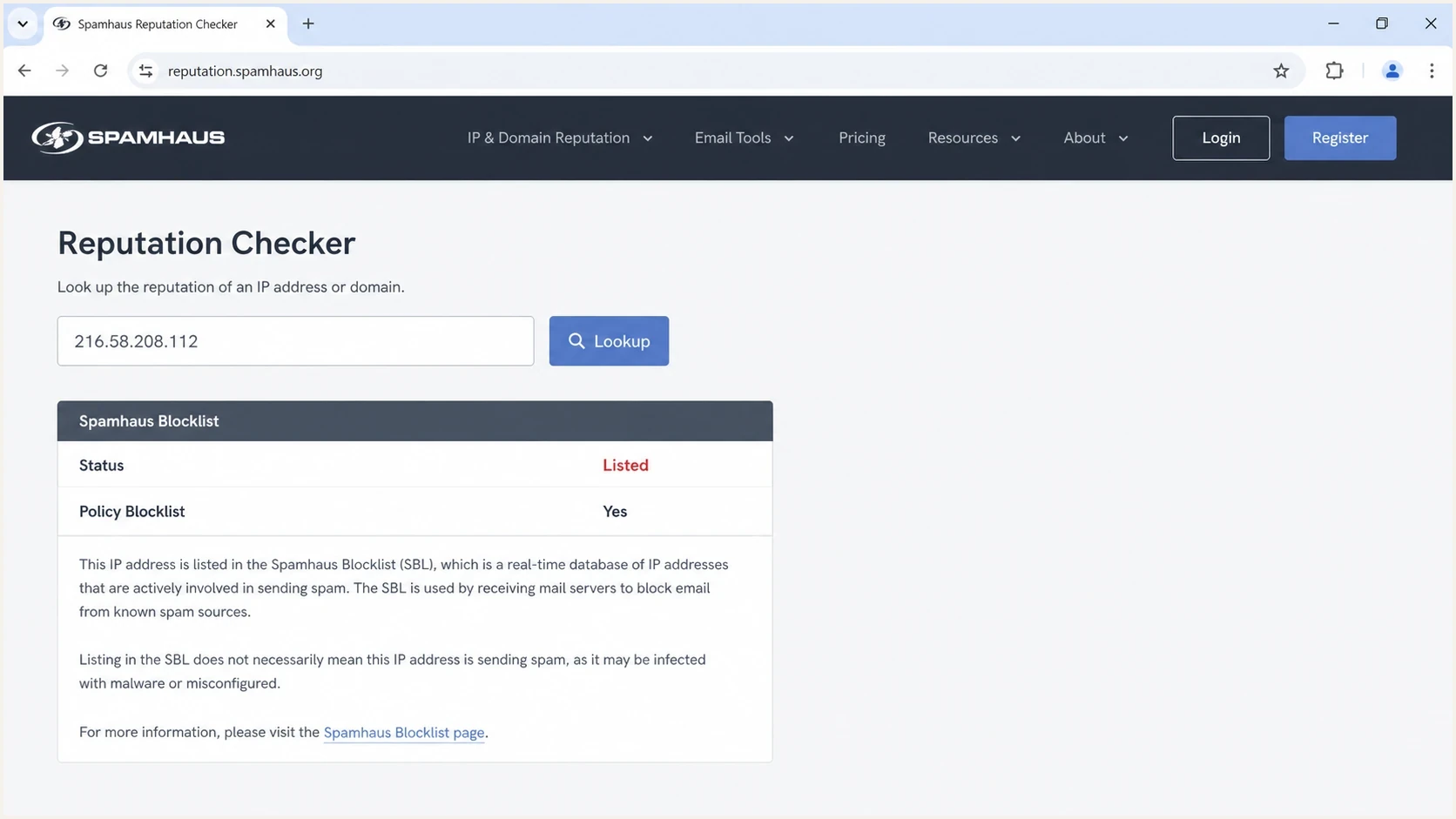
Spamhaus Reputation Checker screenshot showing an IP search result with listing details.
What people assume
Gmail issue: The sender assumes the Google mail server used for delivery is globally blocked.
- Authentication issue: The sender assumes SPF, DKIM, or DMARC failed because a blacklist appeared in the bounce.
- Permanent issue: The sender assumes the IP will stay listed until Google manually asks for removal.
What the evidence can show
- Content issue: A URL, redirect, shared document, or embedded host in the message matched a reputation rule.
- Policy issue: The receiver queried a list that is only safe for certain SMTP-stage checks.
- Lookup issue: The pasted IP lookup included extra characters, so the displayed result needs a clean retest.
If your situation is specifically about Google Workspace or older G Suite routing, compare the bounce against this related G Suite IP issue only after proving that the connecting sender IP, not a URL in the body, triggered the rejection.
Why two checks can disagree
Two people can check the same Google IP and see different results because DNSBL data changes quickly, DNS resolvers cache answers, and web lookups can be malformed. Spamhaus says the SBL DNS zone is rebuilt and reloaded every five minutes. That is fast enough for a listing to appear or disappear during a live troubleshooting session.
The simplest mistake is the most frustrating one: copying a lookup URL with stray text at the end. If the search term is supposed to be only an IP address, remove anything after the final digit. A search term like a clean IP is useful. A search term with an extra word glued to the IP is not.
Before changing DNS or mail routing
- Bad query: Paste only the IP address into the checker. Do not include words, URL fragments, or punctuation.
- Resolver cache: Retest after a short interval and compare against the bounce timestamp.
- Dataset mismatch: Check whether the result is SBL, CSS, PBL, XBL, DBL, or ZEN before deciding what it means.
- Body scan: Search the message source for the exact Google IP, hostname, redirect, and file link.
Clean lookup values
216.58.208.112

Do not include:
216.58.208.112Has
216.58.208.112?extra=text
216.58.208.112,
This is also where general blocklist basics help. A blocklist result is not a single universal verdict. The meaning depends on the dataset, the query stage, and the local policy of the receiving mail system.
Blocklist checker
Check your domain or IP against 144 blocklists.







How to read Spamhaus return codes
A DNSBL lookup can return a valid reputation code, an error code, or NXDOMAIN. Do not treat every 127.* response as a listing. The exact zone and return code determine whether the result concerns spam infrastructure, a compromised device, direct-to-MX policy, a domain, or the query itself.
|
|
|
|---|---|---|
127.0.0.2 | SBL data, including spam sources or supporting infrastructure. | Confirm whether the IP connected or was resolved from content. |
127.0.0.3 | CSS data for an IP with a spam-related reputation signal. | Inspect the sending route and escalate to its provider. |
127.0.0.4 | XBL data for a hijacked or compromised device. | Investigate the connecting host without blocking every header hop. |
127.0.0.10 or .11 | PBL policy data for IP space not expected to send direct-to-MX. | Apply only to the connecting IP during the SMTP transaction. |
127.255.255.252, .254, or .255 | A query error caused by a bad zone name, public resolver, or excessive volume. | Fix the query path. Never treat the response as a listing. |
NXDOMAIN | The value was not listed in the queried zone at that moment. | Compare the zone and lookup time with the original bounce. |
Current Spamhaus IP-zone and error-code meanings
For domains and URLs, DBL uses 127.0.1.* category codes and lists domains rather than IP addresses. An IP query sent to DBL can return 127.0.1.255, which means IP queries are prohibited. It does not mean the IP is on the DBL. This distinction matters when a filter resolves a Google-hosted URL and then sends the wrong value to the wrong zone.
ZEN needs context outside connection checks
ZEN combines SBL, CSS, XBL, and PBL data for checking the connecting IP during the SMTP transaction. If a receiver applies ZEN to every Received header or body-resolved IP without parsing the return code, a PBL result can create a false positive. Preserve the exact returned code in the incident evidence.
How to troubleshoot the rejection
Start with the bounce, not the public listing page. The bounce shows the receiving system, the SMTP stage, the text of the rejection, and often the exact list or rule used. Without that, it is easy to fix the wrong thing.
- Save evidence: Keep the complete bounce, original message source, headers, sending timestamp, recipient domain, and message ID.
- Classify the reply: Treat a 5xx response as a rejection for that attempt and a 4xx response as a temporary deferral that the sending system should retry.
- Identify stage: Decide whether the rejection happened at connection time, after DATA, or after content scanning.
- Extract targets: List every URL, redirect, image host, shortened link, file share, and visible IP in the email.
- Retest cleanly: Check the exact IP and domain values without tracking wrappers or copied sentence fragments, then record the zone and return code.
- Send variants: Send a plain-text version, a no-link version, and a version with Google-hosted links replaced.
- Compare auth: Check SPF, DKIM, and DMARC results so authentication is not confused with reputation.
Header fields to collect
Received:
Authentication-Results:
Message-ID:
Return-Path:
From:
DKIM-Signature:
X-Spam-Status:
X-Spam-Report:

Email tester sample report showing total score, email preview, issue summary, and per-section results
A real test message is useful because it separates the content, headers, authentication, and sending path in one place. Suped's email tester keeps those signals in one test workflow, so the suspected Google-hosted element can be isolated without guessing from a single bounce.
If the same domain has repeated blocklist or blacklist symptoms, Suped's product can monitor the broader picture in blocklist monitoring alongside DMARC, SPF, DKIM, hosted SPF, hosted DMARC, and deliverability alerts. That matters because a Google IP in one bounce is a clue, not the whole incident.
What to do if the Google IP is listed
If the listed Google IP appears because of your email content, the practical fix is to remove the content dependency. Do not keep resending the same message and waiting for the result to improve. The receiving filter is telling you which part of the message it distrusts.
If you control the content
- Replace links: Use a controlled domain for landing pages, file downloads, and tracking links.
- Remove shares: Avoid public document links inside transactional and security-sensitive email.
- Retest variants: Send a version with no Google-hosted assets and compare the receiver response.
If you do not control the IP
- Do not delist: Do not file a removal request for infrastructure that belongs to Google.
- Report abuse: If the Google-hosted resource is abusive, report the resource through the owner channel.
- Ask precisely: Ask the receiving postmaster whether the match was connection IP, URL host, or body IP.
Do not file the wrong removal request
Spamhaus removal paths are designed for the registered owner or responsible provider. If the IP belongs to Google, the fix is usually content change, provider escalation, or recipient-side clarification, not a removal request from your sending domain.
For a broader incident where your own domain or IP is listed, use a different workflow. The steps in this related domain or IP block are more relevant when the asset is yours and you can fix the underlying sending behavior.
Where DMARC, SPF and DKIM fit
DMARC, SPF, and DKIM do not cancel out a Spamhaus blocklist result. Authentication answers a different question: is this message authorized to use this domain identity? Blocklists and blacklists answer a reputation question: should this IP, domain, URL, or hosted resource be trusted right now?
Basic monitoring DMARC record
v=DMARC1; p=none; rua=mailto:reports@yourdomain.com; fo=1
This is why a domain can pass DMARC while a message still gets rejected. The receiver trusts that the message came from the domain, then rejects the message because of the sender reputation, the URL reputation, or a policy list match. A domain health check helps confirm that your own DNS foundation is not adding noise while you investigate the Spamhaus signal.
Illustrative decision layers in a rejection
Illustrative weighting only. Receiver rules and weights vary by system and are not public telemetry.
Authentication
Reputation
Content
Suped's product keeps authentication and reputation evidence in the same operational workflow. Teams can use Suped to correlate DMARC reports, SPF and DKIM checks, hosted policy changes, blocklist or blacklist monitoring, and alerts. This helps confirm whether an incident concerns domain authentication, DNS configuration, a sender source, or reputation before anyone changes production mail flow.
A quick decision path
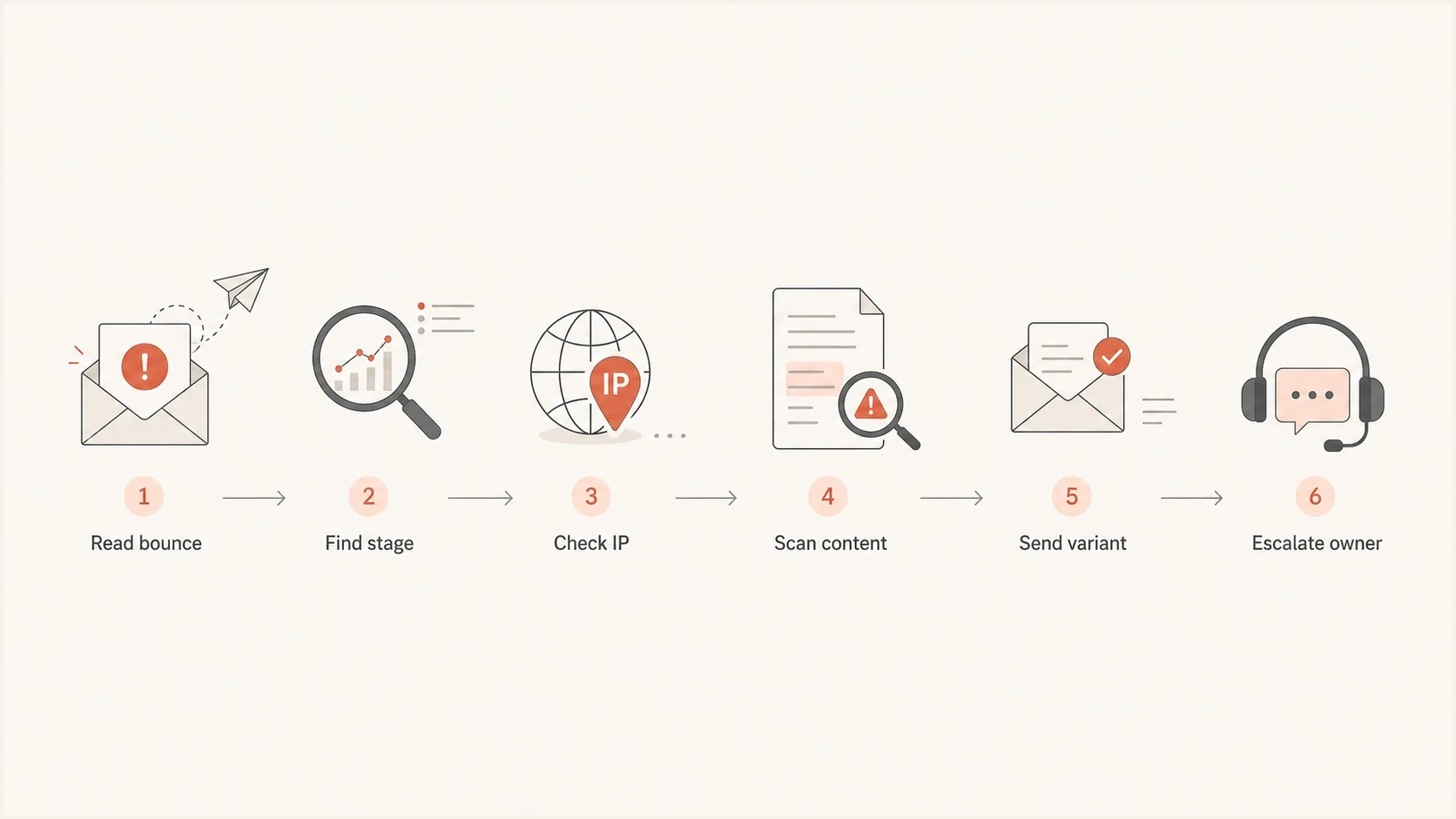
Flowchart showing the troubleshooting path for a Google IP Spamhaus rejection.
When the incident is active, keep the decision path short. First, prove whether the listed value is the connecting IP or a value inside the content. Then prove whether the lookup is clean. Only after that should you change DNS, sender routing, or escalation paths.
- Connection block: Escalate through the provider that controls the sending IP and keep the bounce evidence attached.
- Content block: Remove or replace the Google-hosted asset, then retest with the same recipient domain.
- Policy block: Check whether the receiver applied a policy list in the wrong stage or without distinguishing return codes.
- Unknown block: Use the headers, bounce text, and a controlled test message before assuming the public listing explains delivery.
If you need the mechanics of checking a Spamhaus result line by line, use this related guide on checking Spamhaus after collecting the bounce. The order matters because the public lookup alone does not tell you which receiver rule fired.
Views from the trenches
Best practices
Confirm whether the filter matched the connecting IP, a header hop, or a body URL first.
Retest the exact IP without copied words, punctuation, or tracking wrapper text attached.
Keep message links on controlled domains so content scans do not inherit shared host risk.
Common pitfalls
Treating a Google-hosted URL listing as proof that Google Workspace delivery is broken.
Requesting a Spamhaus removal for an IP range you do not own instead of fixing content.
Assuming DMARC pass overrides a blocklist or blacklist rule used by the receiver today.
Expert tips
Save the full bounce and headers before changing content, because the clue is often there.
Test a plain-text version with all links removed to isolate reputation from authentication.
Monitor repeat listings by source so a one-off lookup does not drive long-term changes.
Marketer from Email Geeks says a listed Google IP inside the message body can trigger rejection even when the sender's own Google Workspace path is not the cause.
2023-01-13 - Email Geeks
Marketer from Email Geeks says two people can see different results when a lookup URL has extra text, stale DNS cache, or a just-updated listing.
2023-01-13 - Email Geeks
What the result means
A Google IP address blocklisted by Spamhaus does not prove that the whole Google sending path is broken. The result can point to a shared Google sending IP, a Google-hosted resource in the message, a PBL policy match, or a DNSBL query error. Read the bounce, identify where the receiver found the IP, and preserve the exact return code before changing anything.
When the bounce identifies a body link, remove the risky link, replace public hosted files with controlled-domain assets, and test the revised message. When it identifies Google's connecting mail IP, keep the evidence and escalate through the provider or receiving postmaster instead of trying to delist infrastructure you do not own.




