How do I check Spamhaus for my IP address and understand the listings?

Updated on 26 Jul 2026: We updated this guide with current Spamhaus ZEN return codes, CSS troubleshooting checks, and clearer removal ownership.
Check Spamhaus by taking the exact outbound sending IP address, entering it into Spamhaus lookup, then reading whether the result is an active listing, an informational listing, or no listing. If the result names SBL, CSS, XBL, PBL, or ZEN, use that label to choose the diagnosis. DBL is domain-only, so a DBL result applies to a domain rather than the IP itself. An informational SBL entry is an early warning. It does not publish an active Spamhaus blocking recommendation, but the sending pattern that triggered it still needs investigation.
Spamhaus is one reputation signal, not the whole deliverability answer. A blocklist (blacklist) result tells you where to look next, but it does not prove the entire cause by itself. For ongoing work, Suped's product connects Spamhaus-related blocklist monitoring with DMARC reporting, authentication evidence, bounce data, and real-time alerts.
- Fast answer: Use the actual sending IP, not your website IP, office IP, or mail domain.
- Main caveat: Informational Spamhaus entries can appear in the web lookup without appearing in standard blacklist DNS checks.
- Best next step: Confirm whether real bounces reference Spamhaus, then fix the sending source before requesting removal.
How to check the right IP address
The biggest mistake is checking the wrong address. Spamhaus listings apply to the IP or domain that Spamhaus saw in a specific reputation context. For an IP listing, that usually means the outbound SMTP IP used by your mail server, ESP, CRM, or marketing platform. It is often not the IP address of your website, DNS host, or office network.
- Find the sender: Open a delivered message and inspect the top Received headers, or check your MTA logs for the outbound SMTP connection.
- Check bounce text: Look for the exact IP and Spamhaus database name in the SMTP rejection. Bounces beat guesses.
- Use the lookup: Paste the IP into the Spamhaus search field and save the database name, reason, and removal guidance.
- Test real mail: Send a real message through your normal sending path and inspect the result with the email tester.
- Check authentication: Run a wider review with the domain health checker so authentication problems do not hide behind a reputation symptom.
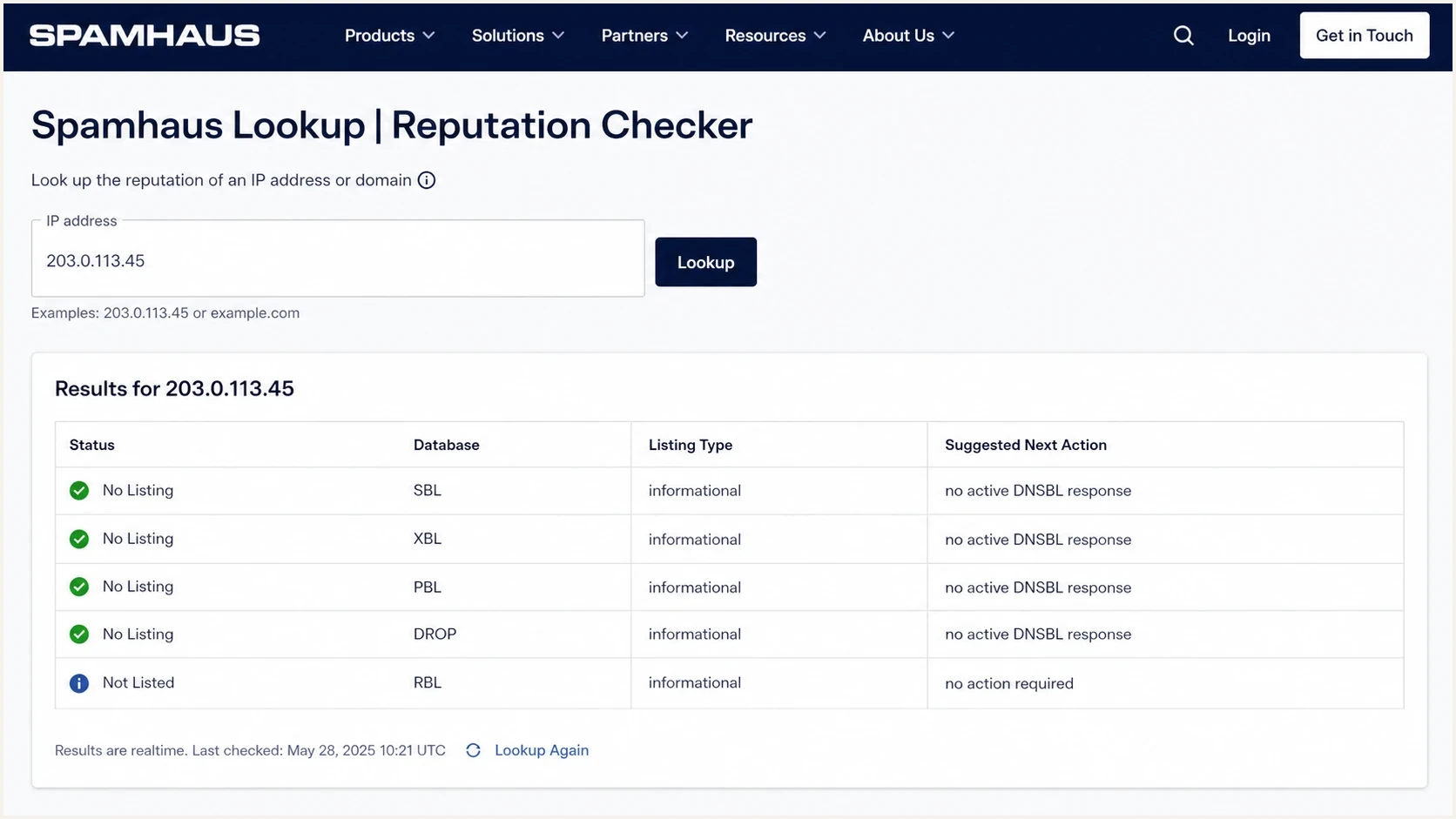
Spamhaus IP and Domain Reputation Checker showing an IP address lookup and listing details.
Shared IP warning
If you send through shared ESP or CRM infrastructure, the IP can carry traffic for many customers. Your own DMARC, SPF, and DKIM can pass while the IP still has poor reputation because another sender caused complaints or trap hits. In that case, ask the provider whether the listed IP is shared, dedicated, pooled, or recently rotated.
Why normal blacklist checkers miss informational listings
A normal blacklist checker usually queries DNSBL zones. That works for active listings that receivers can use during SMTP filtering. Spamhaus can also show informational SBL entries in its web lookup. An informational entry is a warning signal rather than an active block recommendation, so it is absent from the active DNSBL response.
That distinction matters. If a warning-only entry were published in the same DNS zone as active entries, some inbound systems would block mail from it automatically. Keeping informational data out of the public response prevents a warning from turning into a broad blocking event.
Spamhaus web lookup
- Shows context: Can show active and informational reputation notes.
- Best for humans: Useful when you need the reason, database name, and removal path.
- Needs judgment: A warning does not mean every mailbox provider is blocking you.
DNSBL blacklist check
- Shows active data: Queries zones that mail receivers can use in live filtering.
- Best for automation: Useful for regular monitoring across sending IPs and domains.
- Can miss warnings: No DNS answer does not rule out an informational Spamhaus web result.
Manual Spamhaus ZEN queryBASH
# Reverse 203.0.113.9 to 9.113.0.203 before querying ZEN.
dig 9.113.0.203.zen.spamhaus.org A +noall +answer +comments
dig 9.113.0.203.zen.spamhaus.org TXT +noall +answer

# NXDOMAIN means no active ZEN listing.
# SERVFAIL or 127.255.255.x indicates a lookup or access error.
Interpret no result carefully
An NXDOMAIN response is useful, but it is not the same as a clean reputation profile. Check the Spamhaus web result, live bounce evidence, and authentication data before deciding whether the issue is reputation, configuration, or recipient-side filtering. A SERVFAIL response is inconclusive and needs a resolver check.
How to interpret Spamhaus ZEN return codes
Spamhaus ZEN is the combined IP zone for SBL, XBL, and PBL data. A positive query returns one or more 127.0.0.x addresses, and each address identifies the dataset that matched. Do not treat every positive ZEN answer as the same blacklist event because a PBL policy record has a different meaning than an SBL, CSS, or XBL listing.
|
|
|
|---|---|---|
127.0.0.2 | SBL | Read the listing record and coordinate cleanup with the responsible network. |
127.0.0.3 | CSS | Investigate low-reputation email and validate the sending host configuration. |
127.0.0.4 | XBL | Treat the host or network as compromised until the source is contained. |
127.0.0.9 | DROP | Escalate to the network owner because the range has a network-abuse designation. |
127.0.0.10 or 127.0.0.11 | PBL | Confirm whether the IP should send unauthenticated direct-to-MX mail. |
127.0.0.30 | BCL | Investigate botnet command infrastructure and involve the network security owner. |
NXDOMAIN | No ZEN match | No active ZEN listing was returned for that IP at query time. |
SERVFAIL or 127.255.255.x | Query error | Fix resolver access or configuration before drawing a listing conclusion. |
Common Spamhaus ZEN return codes
A return code can expose a resolver problem
A 127.255.255.x answer is an error, not a Spamhaus blocklist or blacklist hit. It can indicate blocked public-resolver access, a disabled or misused query key, or a DNSBL configuration error. Validate the lookup path before pausing mail or requesting removal.
What each Spamhaus result means
Spamhaus uses different datasets for different problems. The exact label matters because each one points to a different fix. A PBL result is handled differently than CSS, and a DBL result means you need to inspect domain use rather than only IP use.
|
|
|
|---|---|---|
ZEN | The combined IP zone contains SBL, XBL, and PBL data. | Decode every returned address to identify the matched dataset. |
SBL | An IP or network is tied to spam or other abuse under SBL criteria. | Fix the source, then follow the listing-specific removal process. |
XBL | The IP is associated with an exploited host or other compromised-device activity. | Contain the host, patch it, rotate affected credentials, and recheck. |
PBL | The IP is in a policy range that should not send unauthenticated direct-to-MX mail. It is not proof of abuse. | Use an authorized relay, or work with the network owner if the IP is a legitimate direct sender. |
CSS | The IP has an automated low-reputation email signal. | Stop the bad stream and complete the Checker's HELO and reverse-DNS troubleshooting. |
DBL | A domain, not an IP address, has a poor reputation signal. | Review the listed domain, redirects, and hosted content. |
Informational SBL | Spamhaus is warning about poor behavior without publishing an active blocking recommendation. | Investigate quickly, but do not treat it as confirmed blocking. |
Common Spamhaus result types and practical interpretation
For active IP listings, read the database-specific explanation before taking action. Spamhaus explains the Spamhaus SBL separately, and its IP reputation data explains why an IP signal can matter even when message-level authentication passes.
Risk bands after a Spamhaus lookup
Use the result type and live mail symptoms to decide how urgent the response is.
No listing
Low
Keep monitoring and inspect other causes of bounces.
PBL only
Context
Confirm whether direct-to-MX sending is expected before treating it as a problem.
Informational only
Medium
Investigate now, but do not assume active blocking.
SBL, CSS, or XBL
High
Pause the affected traffic and use bounces to confirm production impact.
How to read the result without overreacting
The lookup result is a diagnostic clue. It is not a full incident report. Read it alongside bounces, complaint rates, authentication results, sending volume, and the ownership model of the IP. This prevents two common errors: ignoring a real active listing because one checker is clean, or treating an informational warning like a confirmed block.
If your bounces mention Spamhaus, copy the exact SMTP response. If your bounces mention a different filter or no blocklist at all, keep Spamhaus in the case file but expand the investigation. A domain-level problem, malformed DNS, broken DKIM signing, or a recipient-specific policy can look like an IP reputation problem at first glance.
- Match evidence: The listed IP should match the IP in headers, bounces, or provider sending logs.
- Separate symptoms: A low inbox rate does not automatically mean Spamhaus is the cause.
- Check scope: One shared IP issue can affect many senders, while one bad sender can affect a whole pool.
- Review basics: Use blocklists as one layer, then verify DMARC, SPF, DKIM, rDNS, HELO, and bounce handling.
Blocklist checker
Check your domain or IP against 144 blocklists.







After a quick blocklist (blacklist) scan, go back to first-party evidence. A monitoring result is useful when it lines up with a real sending path and a real rejection. It is weaker when the checked IP is only adjacent to the system that actually sent the mail.
What to fix before requesting removal
Removal is the last step, not the first. If you request delisting before the underlying problem is fixed, the IP can be listed again and the second investigation is harder. The fix depends on the database name, but the pattern is consistent: stop the bad traffic, prove control, then request review.
- Compromised host: Disconnect the source, rotate credentials, patch the system, and check for unexpected SMTP traffic.
- Bad acquisition: Stop sending to risky lists, remove unconfirmed contacts, and review complaint and trap patterns.
- Authentication gaps: Fix SPF, DKIM, DMARC, rDNS, and sender-domain match so good mail is easier to trust.
- PBL mismatch: Use the correct mail relay or follow the Spamhaus PBL process for legitimate direct mail servers.
- Shared pool issue: Ask the provider for pool status, mitigation notes, and whether a dedicated IP is warranted.
For CSS, use the Spamhaus Checker's troubleshooting step before requesting removal. Compare the recently seen HELO value with the PTR record, confirm that the hostname resolves back to the same sending IP, and correct every failed check.
Do not skip root cause
A delisting form is not a cleanup tool. Use it after you can explain what changed: the compromised system was removed, the sender was isolated, the list source was corrected, or the configuration error was fixed. If the cause is still active, removal will not hold.
Removal requests must follow the instructions in the listing. Spamhaus requires the registered owner of the IP or domain to submit the request, so an ISP or hosting provider often handles SBL cases. The request should state what caused the issue, what fixed it, when the fix was completed, and what will prevent recurrence.
If you already know the listing is active and need the removal path, use a focused Spamhaus delisting workflow after the evidence shows the cause has stopped.
Where Suped fits in the workflow
Spamhaus checks rarely live alone. The practical work is to connect IP reputation to the authentication and sending-source evidence around it. Suped's product brings DMARC reporting, authentication monitoring, hosted policy controls, blocklist monitoring, and deliverability insights into one workflow.

Blocklist monitoring page showing domain and IP checks across blocklists with importance and status
That matters when the first signal is vague. A Spamhaus note tells you something happened. Suped helps answer the operational questions: which sending source changed, whether authentication failed, whether a provider started new traffic, whether an IP or domain appeared on a blocklist or blacklist, and who should act.
- Automated detection: Suped flags authentication and reputation issues with steps to fix them.
- Real-time alerts: Teams can react when authentication failures or listing signals exceed a threshold.
- Hosted SPF: You can manage senders and avoid lookup-limit problems without repeated DNS edits.
- MSP scale: Agencies and managed service providers can monitor many client domains from one dashboard.
A practical operating rhythm
Use Spamhaus for the authoritative listing context, then use Suped to keep the surrounding controls visible every day. Authentication drift, new senders, and reputation changes are then visible before the case depends on customer-reported bounces.
Views from the trenches
Best practices
Check Spamhaus web lookup and DNSBL responses before deciding whether blocking is active.
Save the exact bounce text, sender IP, database name, and timestamp for every case.
Treat informational entries as early warnings and investigate before delivery suffers.
Common pitfalls
Relying on one checker misses warning-only entries that do not appear in DNSBL zones.
Requesting removal before cleanup often leads to repeat listings and slower review.
Checking a website IP instead of the outbound SMTP IP sends the investigation sideways.
Expert tips
Compare Spamhaus data with authentication reports to separate reputation from DNS errors.
For shared pools, ask the provider for pool status and what traffic source changed.
Use recurring monitoring so sudden listing changes are found before customers report bounces.
Expert from Email Geeks says informational Spamhaus listings are warnings rather than active block recommendations, so standard DNSBL checks will not always show them.
2022-06-06 - Email Geeks
Marketer from Email Geeks says senders need more transparency around which customer or traffic source caused a shared infrastructure warning.
2022-06-06 - Email Geeks
How to act on a Spamhaus result
Use the exact sending IP in Spamhaus, read the database label or ZEN return code, confirm whether bounces prove active blocking, then fix the root cause before asking for removal. If the result is informational, do not panic, but do not ignore it. It is still a useful signal that your sending pattern deserves attention.
For one-off troubleshooting, the Spamhaus lookup gives the listing context and prescribed next step. For ongoing operations, Suped's product keeps DMARC reporting, authentication evidence, blocklist monitoring, hosted policy controls, and alerts in the same workflow so a listing check becomes a repeatable email authentication process.




