What should I do if Microsoft blocks my IP address during IP warming?

Published 23 May 2025
Updated 3 Aug 2026
11 min read
Summarize with
Updated on 5 Aug 2026: We updated this guide with Microsoft's current delisting paths and a safer Microsoft-only rewarm process.
If Microsoft blocks a warming IP, pause sends to Microsoft-routed recipients immediately, keep other sends running only if they remain healthy, pull the raw SMTP rejection, and have the IP owner or ESP request mitigation. Do not keep sending to Outlook, Hotmail, MSN, Live, or Microsoft 365-hosted addresses just to stay on the warm-up schedule. That adds failed delivery attempts to a reputation problem Microsoft already noticed.
The key detail is the exact bounce. A generic ESP label like "blocked due to spam or sender reputation" is not enough. A hard S3150 or S3140 block calls for a different response than a temporary S775 rate limit.
- Pause Microsoft: suppress known consumer domains and custom domains routed through Microsoft until the block is understood.
- Keep evidence: capture raw SMTP replies, timestamps, IPs, domains, campaign IDs, volumes, and complaint signals.
- Use the owner: the ESP or network that controls the IP normally needs to file the Microsoft mitigation request.
- Rewarm separately: after mitigation, restart Microsoft volume below the failed level and increase only with clean signals.
The immediate answer
The safest operational response is to continue warming only at healthy recipient providers, suppress Microsoft-routed addresses, and open the correct Microsoft support path through the ESP or IP owner. Stop the entire warm-up if the same IP also shows serious blocks across other recipient providers or private domains.
Do not keep sending to Microsoft-routed domains through a hard block. If Microsoft rejects mail at SMTP time, those deliveries cannot generate positive recipient engagement. They create repeated negative attempts from a young IP. During warming, Microsoft evaluates the IP's behavior, list quality, recipient engagement, complaint rate, and historical patterns closely.
Treat Microsoft as its own warm-up lane
A 99.6% overall delivery rate can hide a Microsoft-specific failure if Microsoft is only 8% of the list. Segment results by recipient domain and mail route before deciding that the whole plan is healthy.
Continuing all sends
- Risk: more Microsoft rejections attach to a young IP with limited positive history.
- Signal: recipient engagement cannot improve when messages do not reach the inbox.
- Escalation: mitigation is harder to explain if failed attempts continue after the first block.
Suppressing Microsoft
- Control: you stop adding fresh negative attempts while the case is investigated.
- Evidence: you can give Microsoft exact bounce text, volumes, and a corrected ramp plan.
- Recovery: you restart Microsoft at a lower volume instead of resuming at the failed peak.
Pull the raw Microsoft rejection
Before changing the warm-up schedule, get the raw rejection string. ESP bounce categories often compress several different Microsoft events into one label. The raw SMTP response tells you whether the problem is a hard IP block, a temporary rate limit, a content-related rejection, or a recipient-level problem.
In an ESP data warehouse, query bounce data instead of relying on the dashboard category. Capture the sending IP, account or business unit, job ID, recipient domain, event date, bounce category, SMTP code, and full SMTP bounce reason.
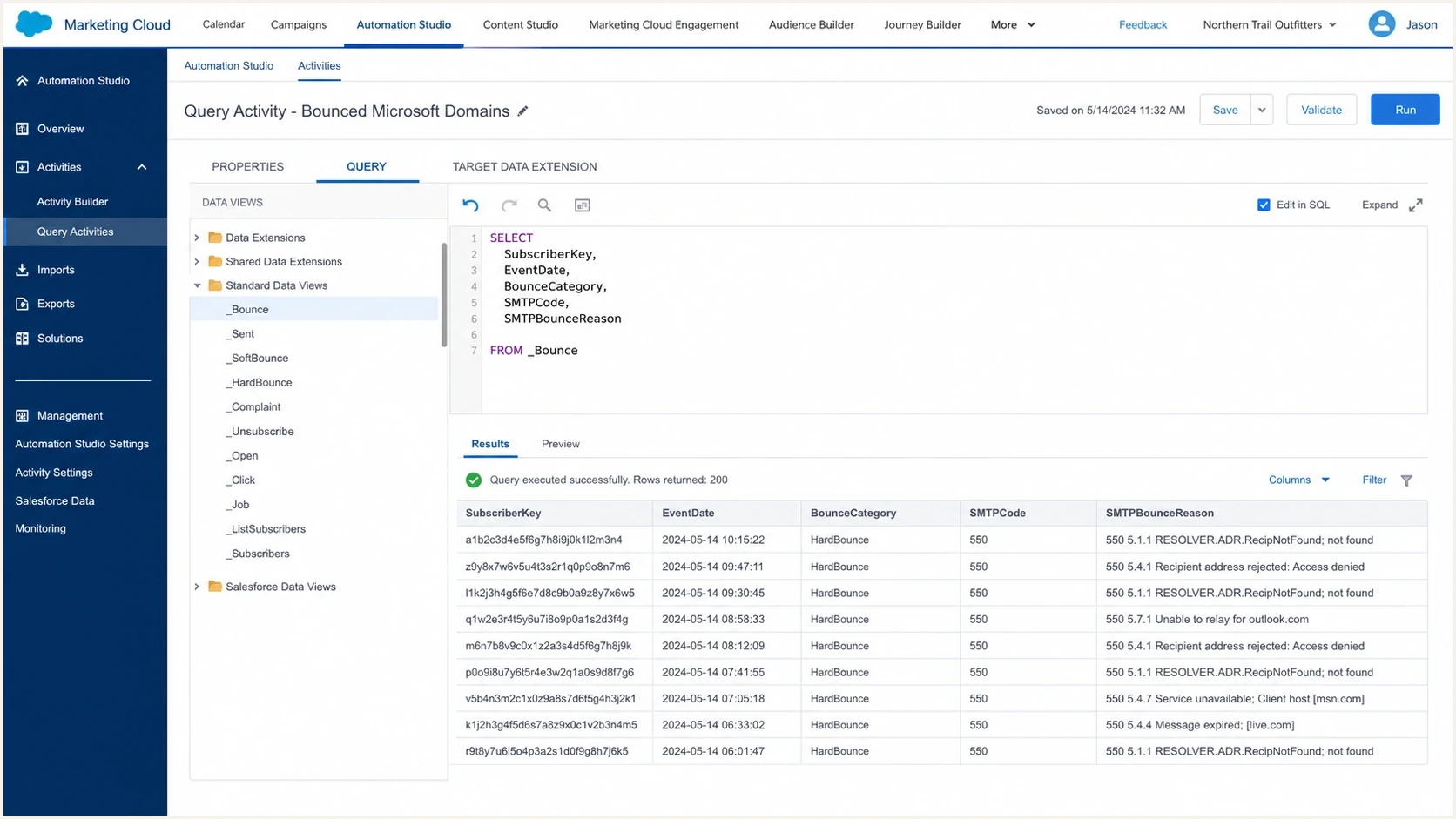
Salesforce Marketing Cloud query activity showing raw Microsoft bounce data.
Example bounce querySQL
SELECT
  SubscriberKey,
  JobID,
  Domain,
  EventDate,
  BounceCategory,
  SMTPCode,
  SMTPBounceReason
FROM _Bounce
WHERE EventDate >= DATEADD(day, -3, GETDATE())
  AND (
    Domain IN ('outlook.com', 'hotmail.com', 'msn.com', 'live.com')
    OR SMTPBounceReason LIKE '%S3150%'
    OR SMTPBounceReason LIKE '%S3140%'
    OR SMTPBounceReason LIKE '%S775%'
    OR SMTPBounceReason LIKE '%4.7.650%'
  )
Common Microsoft rejection patterns
550 5.7.1 Messages from [IP] weren't sent.
Reason: network is on our block list (S3150).

550 5.7.1 Messages from [IP] weren't accepted.
Reason: sender reputation issue (S3140).

451 4.7.650 The mail server [IP] is temporarily rate limited.
Reason: IP reputation (S775).
Act based on the code
Once the raw rejection is visible, the next move becomes clear. Treat hard Microsoft blocks as an IP reputation stop condition. For temporary rate limits, reduce Microsoft volume sharply, increase spacing, and let the sending MTA retry according to the queue policy while watching whether deferrals recover.
|
|
|
|---|---|---|
S3150 | IP block | Pause and escalate |
S3140 | Reputation block | Pause and clean |
S775 | Temporary rate limit | Throttle and retry |
Generic spam | Needs detail | Pull raw reply |
Use the raw Microsoft SMTP response, not the ESP category, to choose the next action.
For deeper troubleshooting, separate hard S3150 bounces from temporary 451 4.7.650 errors. They share an IP reputation theme, but the recovery path is not identical.
Microsoft response stop conditions
Use the response class and repetition pattern instead of an arbitrary overall bounce percentage.
Clean acceptance
Stable 2xx
No repeating Microsoft block pattern
Throttle
Repeated 4xx
Repeated temporary reputation deferrals
Pause
Any repeated 5xx
Permanent IP or reputation rejection
Choose the right Microsoft delisting path
Microsoft uses different support paths for consumer Outlook.com infrastructure and Microsoft 365 tenant protection. Follow the instruction in the full NDR instead of submitting the same IP to every form. Using the wrong path can return a clean result even while another Microsoft system is rejecting the IP.
|
|
|
|---|---|---|
S3150 to Outlook.com, Hotmail, Live, or MSN | IP, full NDR, domains, and corrected ramp | |
5.7.606-649 banned sending IP | NDR recipient address and one blocked IP | |
5.7.511 | Follow the NDR email instruction | Full NDR code and blocked IP |
Match the recipient system and exact NDR to the supported Microsoft route.
Do not treat a clean portal result as clearance
A portal can report that an IP is not on one blocked-sender list while Outlook.com still rate limits or rejects it on reputation grounds. Keep the automated response, reply with the complete NDR when the support workflow allows it, and continue the Microsoft pause until acceptance is verified.
Check reputation signals around the block
A Microsoft block during warm-up often combines volume timing, list quality, IP history, and engagement. Check the blocklist (blacklist) state, DNS authentication, Microsoft-specific complaint behavior, and whether the warm-up jump was too sharp for that mailbox family.
The IP can be clean on public blocklists and still face a Microsoft-specific block. Separate public blacklist data from Microsoft acceptance data instead of treating a clean public result as proof that the IP has healthy Microsoft reputation.
Blocklist checker
Check your domain or IP against 144 blocklists.







For IPs under direct control, review Microsoft's Smart Network Data Services (SNDS) data and Junk Mail Reporting Program (JMRP) feedback. Look for complaint activity, trap-related signals, abnormal volume, and reputation changes. No SNDS data does not prove that an IP is healthy, so compare it with the raw SMTP results.
Run a broader domain health check and send a real message through an email tester before asking Microsoft to mitigate. Fix any SPF, DKIM, DMARC, rDNS, or HELO identity drift before resuming Microsoft volume.

Blocklist monitoring page showing domain and IP checks across blocklists with importance and status
Suped's product brings DMARC, SPF, DKIM, blocklist monitoring, blacklist visibility, and real-time alerts into one view. It does not replace the ESP's Microsoft mitigation request. It organizes the supporting evidence: which domains authenticate, which sources fail, which IPs are listed, and which fixes need action.
Work through the IP owner
If the IP is controlled by an ESP or cloud network, involve the IP owner. Microsoft often expects the provider that owns the network to request mitigation, explain the sender, and confirm the corrective plan.
If no pre-emptive accommodation was requested before the warm-up, include a clear Microsoft-only ramp plan in the mitigation request. Microsoft's warm-up process guidance also confirms that recipient engagement and sender reputation need to build gradually.
- Identity: sending domain, envelope domain, DKIM domain, return-path, and the affected IP address.
- Evidence: raw SMTP replies, affected Microsoft domains, first failure time, and send volume by day.
- Quality: opt-in source, suppression process, complaint review, and bounce cleanup since the block.
- Ramp: a smaller Microsoft-only schedule with engaged recipients first and no sudden jumps.
Where Suped helps
Suped's platform supports authentication governance and operational monitoring through automated issue detection, guided fixes, DMARC reporting, Hosted SPF, SPF flattening, Hosted MTA-STS, blocklist monitoring, blacklist visibility, real-time alerts, and multi-domain reporting. During a Microsoft block, use these signals to verify authentication, document corrective work, and keep the mitigation evidence current.
Rewarm Microsoft separately
After Microsoft mitigation, do not resume at the failed day-15 volume. Treat Microsoft as a separate destination pool and restart below the last successful Microsoft volume. If the block happened at a total send of 25,000 and Microsoft-routed recipients were about 8% of the list, the Microsoft volume was around 2,000. Restart well under that number with recently engaged Microsoft recipients first.
Example Microsoft-only restart
Day 1: 250 Microsoft recipients, recent clicks or account activity
Day 2: 500 Microsoft recipients, no complaint spike
Day 3: 750 Microsoft recipients, no hard block
Day 4: 1,000 Microsoft recipients, stable acceptance
Day 5: 1,500 Microsoft recipients, continue only if clean
Example Microsoft rewarm volume
A smaller Microsoft-only ramp after mitigation, using engaged recipients first.
Microsoft recipients
The exact numbers depend on list size and previous acceptance, but the pattern matters more than the sample values: resume below the failure point, prioritize recent clicks, purchases, and account activity, hold volume steady when Microsoft defers mail, and increase only after clean acceptance. Treat opens as a supporting signal because privacy controls can distort them.
Prevent the next Microsoft stop
The best fix goes beyond delisting. It makes the next Microsoft send predictable. Use lower Microsoft ramp steps, better recipient selection, clean authentication, and a feedback loop that surfaces block patterns before a whole send day is wasted.
- Segment Microsoft: track consumer Microsoft domains and custom domains routed through Microsoft separately.
- Start engaged: warm Microsoft with recent clickers, buyers, account users, and carefully interpreted openers before older contacts.
- Control jumps: avoid sudden Microsoft volume increases even when the total warm-up curve looks reasonable.
- Watch identity: keep SPF, DKIM, DMARC, rDNS, HELO, and tracking domains consistent through migration.
- Alert early: monitor per-route bounces so Microsoft blocks surface before the next scheduled increase.
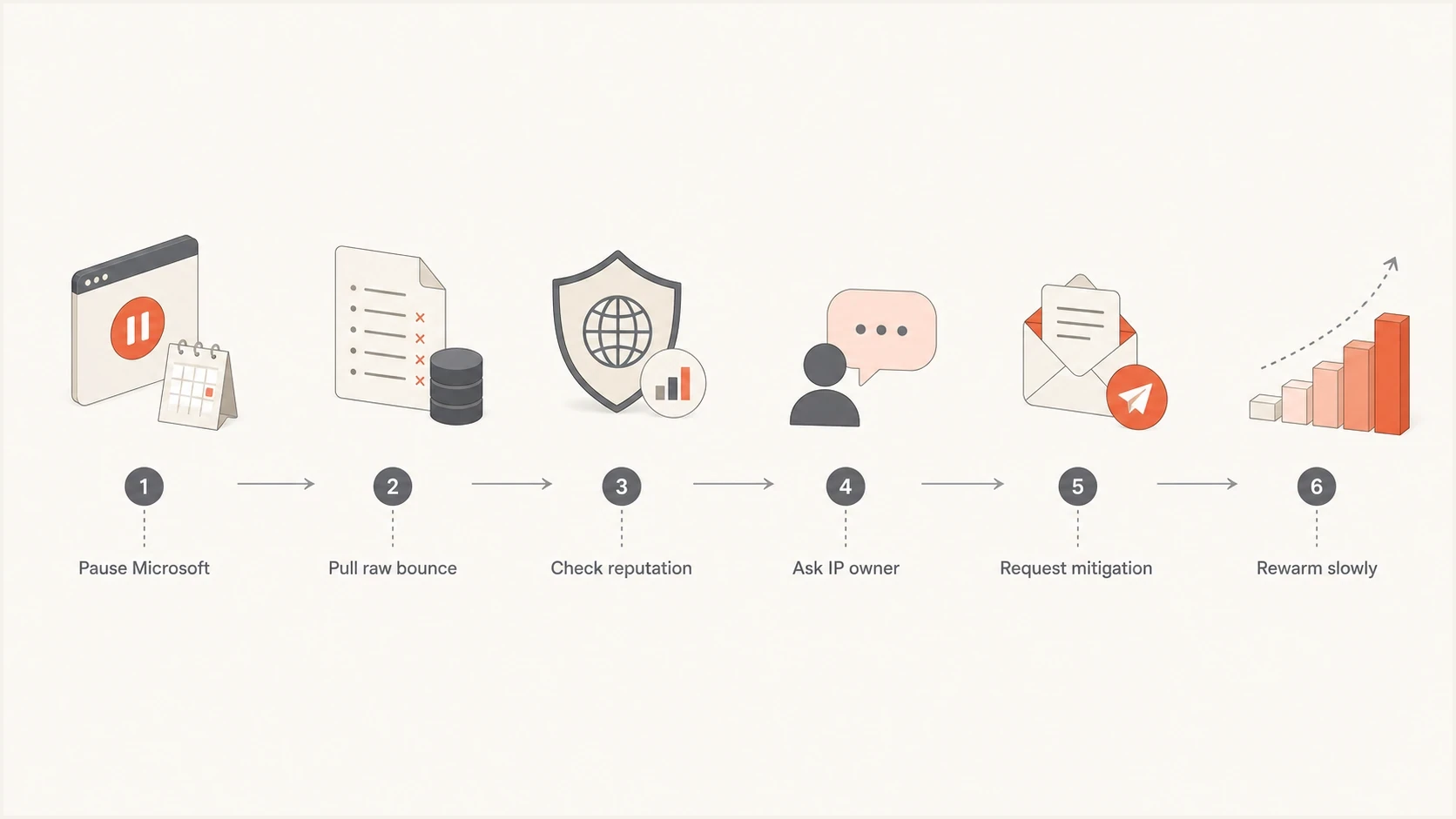
Flowchart showing how to recover from a Microsoft IP warming block.
Views from the trenches
Best practices
Pull raw SMTP replies before changing the ramp, because ESP categories hide key details.
Pause Microsoft recipient routes quickly, then keep healthy destination pools under review.
Ask the IP owner to handle mitigation, since Microsoft often wants network-owner context.
Restart with engaged Microsoft recipients and grow only after stable acceptance returns.
Common pitfalls
Continuing Microsoft sends through a hard block adds failed attempts to a young IP history.
Treating overall delivery as healthy hides Microsoft failures when that segment is smaller.
Submitting mitigation without a Microsoft-only ramp plan leaves the next step unclear.
Relying on public blacklist status misses private Microsoft reputation decisions.
Expert tips
Automate bounce extraction early so raw Microsoft responses are available during incidents.
Track Microsoft routes as a separate cohort rather than mixing them into total delivery.
Document opt-in source and suppression logic before asking Microsoft for mitigation.
Hold volume steady after any deferral burst instead of increasing because the calendar says so.
Marketer from Email Geeks says Microsoft can be sensitive during careful warm-ups, so the exact bounce text should guide every recovery decision.
2024-12-16 - Email Geeks
Marketer from Email Geeks says ESP bounce categories are not reliable enough for planning, and the raw rejection must be reviewed first.
2024-12-16 - Email Geeks
The practical recovery path
If Microsoft blocks a warming IP, avoid both stopping every send without diagnosis and pushing through the block. Pause Microsoft, get the real rejection, involve the IP owner, choose the correct delisting path, check authentication and blocklist (blacklist) signals, and resume Microsoft on its own smaller ramp.
The failure point is useful data. It shows where Microsoft stopped trusting the new IP. Restart below that level, clean the recipient pool, and build acceptance with the people most likely to engage.
For the ongoing control layer, Suped's product keeps authentication, sender-source, blocklist, blacklist, and alerting signals together. Microsoft recovery is easier when the evidence is already organized and the next fix is clear.




