How to resolve Microsoft 451 4.7.650 error during email IP warm-up?


Updated on 24 Aug 2026: We added Microsoft-side incident triage and corrected support routing, with clearer context for example warm-up thresholds.
To resolve Microsoft 451 4.7.650 during IP warm-up, slow the Microsoft-specific stream immediately, keep retrying deferred mail with patient backoff, send only to recipients with recent positive engagement, and check every IP for authentication, reputation, queue behavior, and list quality problems. There is no permanent bypass for this error. If every Microsoft retry is deferred until queue expiry, the temporary code has still caused non-delivery. The durable fix is to build enough good Outlook.com, Hotmail, Live, and MSN recipient interaction for the IP to earn trust, while proving that the mailstream is clean.
Treat this primarily as an Outlook Consumer (OLC) reputation throttle, not as a DNS typo or a single bad message. The error can appear even when a sender thinks the IP has high reputation, especially when the IP is new or long-idle, the Microsoft sample size is small, or several warm-up IPs share the same sending pattern.
- First move: Cap Microsoft volume per IP and stop increasing volume until deferrals drop.
- Second move: Separate Microsoft domains from Gmail, Yahoo, corporate MX, and other destinations.
- Third move: Audit complaints, hard bounces, unknown users, engagement, authentication, retry pressure, reverse DNS, Microsoft sender data, and blocklist (blacklist) status.
- Fourth move: Contact Microsoft sender support when clean traffic is still throttled, with volume forecasts, SMTP samples, and clean-stream evidence ready.
What Microsoft 451 4.7.650 means
The response says Microsoft accepted the SMTP connection far enough to evaluate the IP, then deferred the message because the IP reputation did not support the current send rate. It is a temporary 4xx response, so the message should stay in queue and retry later. It is not the same as a permanent 5xx rejection.
Example SMTP responsetext
451 4.7.650 The mail server [103.103.198.52]
has been temporarily rate limited due to IP reputation.
For e-mail delivery information, see https://aka.ms/postmaster
(S775) [Name=Protocol Filter Agent][AGT=PFA]
Some MTAs log this against MAIL FROM, RCPT TO, or end-of-data. Treat those as the same reputation throttle unless the transcript shows a separate recipient rejection. Strings such as S775, Name=Protocol Filter Agent, AGT=PFA, or MxId help with case evidence, but they do not change the basic diagnosis.
The important words are temporarily rate limited due to IP reputation. Microsoft is telling you that the IP has not earned enough trust for the traffic it is attempting right now. That can be caused by weak history, too many recipients too quickly, low engagement, poor list quality, shared pool behavior, spiky retries, or complaint signals.
A delayed delivery notice can say no action is required because the sending server will keep retrying. That advice explains normal MTA behavior for a single delayed message. If the same Microsoft 451 4.7.650 response keeps appearing, the operator still needs to slow the Microsoft stream and watch the queue.
For low-volume newsletters, nonprofits, and occasional operational mail, do not dismiss the error because monthly volume is small or the IP is not on a blocklist (blacklist). A shared web-hosting IP, long idle period, uneven retry behavior, old Microsoft addresses, or prior complaint history on the IP can still trigger the throttle.
Do not solve this by pushing harder
Increasing Microsoft volume while this error is active usually creates more deferrals. Fast retries can also look like a second volume spike. Queue patience matters: retry, but retry slowly.
The fastest working fix
The fastest working fix is not a single form submission. It is a controlled warm-up loop: throttle, observe, retry, then raise volume only after Microsoft stops pushing back. This keeps important customer mail moving without teaching Microsoft that your new IPs behave aggressively.
For transactional systems, keep password resets, MFA codes, security alerts, and other urgent mail on proven infrastructure whenever possible. Use new or throttled IPs for lower-risk account notices and confirmations until Microsoft accepts the current tier without growing delay.
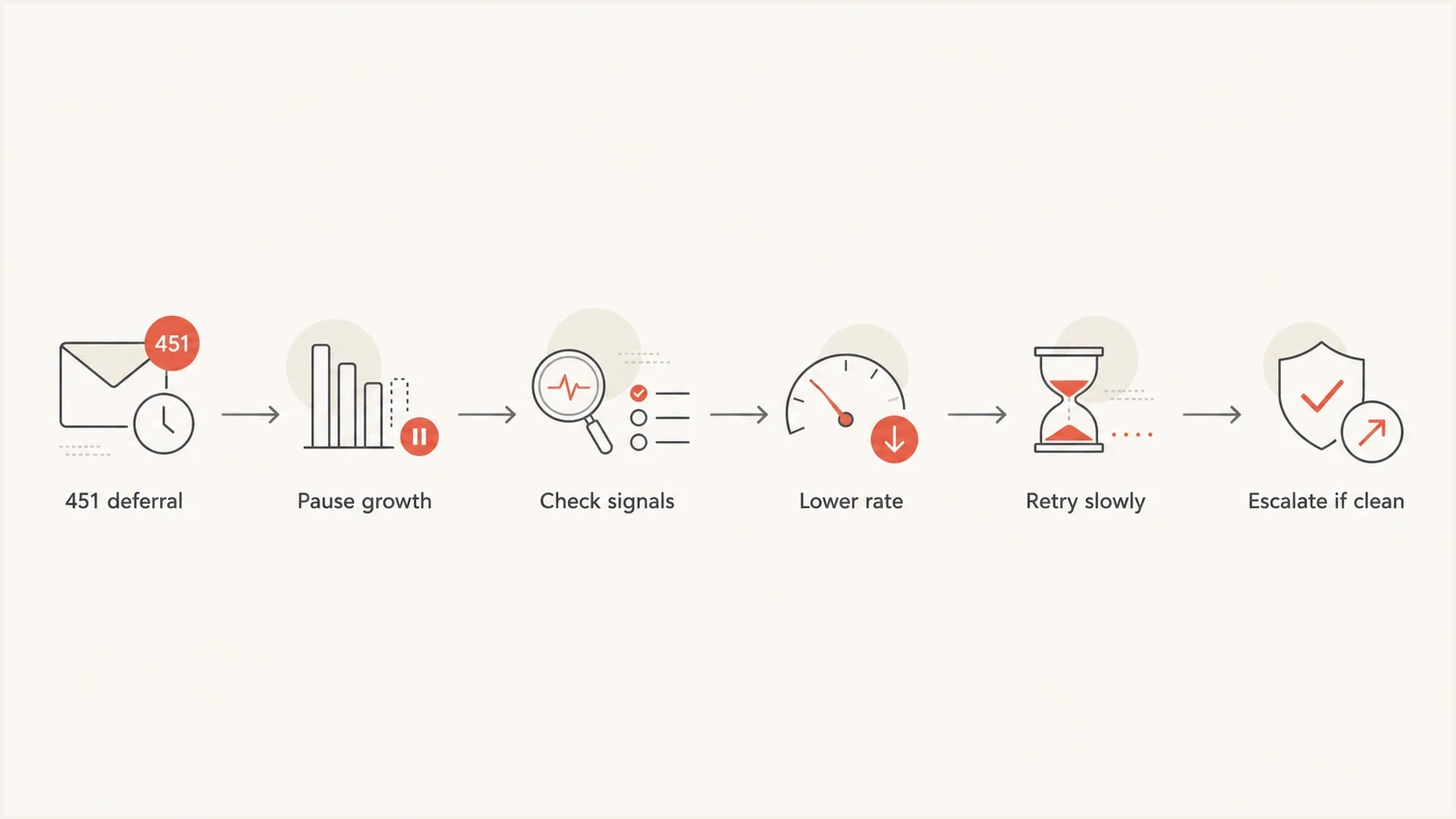
Microsoft 451 4.7.650 Outlook.com warm-up flowchart for throttling, queue backoff, and escalation
- Freeze growth: Stop all Microsoft ramp increases for the affected IPs for at least one clean observation window.
- Lower rate: Reduce hourly Microsoft volume instead of daily volume alone. Microsoft throttling reacts to bursts.
- Protect queues: Keep deferred mail in retry, but stretch retry intervals so the queue does not hammer Microsoft MX hosts or multiply RCPT commands.
- Tighten audience: Send Microsoft mail only to recipients with recent opens, clicks, replies, purchases, logins, or account activity.
- Review evidence: Use logs, authentication results, complaint data, bounce categories, and RCPT retry patterns to decide whether the IP is simply new or the traffic is bad.
Microsoft-specific queue settingsyaml
microsoft:
  domains:
    - hotmail.com
    - outlook.com
    - live.com
    - msn.com
  max_connections_per_ip: 2
  initial_rate_per_ip_per_hour: 20
  backoff_on:
    - "451 4.7.650"
  retry_after_minutes: 30
  increase_after_clean_hours: 24
Treat these values as conservative example settings, not Microsoft-published limits. Set the actual rate, connection count, retry interval, and observation window from your normal accepted volume and MTA queue behavior.
Watch RCPT commands and queue age
During a 451 4.7.650 incident, compare intended Microsoft recipients, accepted messages, deferred messages, RCPT commands, queue age, and retry window for the same period. One planned recipient creates many RCPT commands when the MTA reattempts delivery after temporary failures, so the receiver sees more attempts than your campaign count suggests.
Also compare accepted counts by hour. A daily summary can hide the burst that triggered the throttle, and a queue that expires after repeated 4xx replies still creates real non-delivery even though the SMTP code is temporary. Microsoft does not publish a universal safe RCPT retry ratio, so compare the affected window with your own accepted baseline.
- Healthy pattern: RCPT commands stay close to intended recipients and Microsoft mail clears the queue inside the planned send window.
- Watch pattern: The RCPT ratio rises above its normal baseline, queue age passes the campaign window, or temporary failures grow, so volume should stay flat.
- Throttle pattern: Repeated retries drive the RCPT ratio sharply upward, so reduce the Microsoft hourly rate, spread delivery more evenly, and stretch retry intervals.
- Evidence to request: Ask the ESP or MTA team for accepted counts, temporary failures, permanent failures, SMTP response text, retry interval, queue depth, and queue expiry by hour.
|
|
|
|---|---|---|
RCPT ratio | Retry pressure | Hold or reduce |
Queue age | Mail stuck past the send window | Stretch retries |
Temp failures | Microsoft is deferring | Lower rate |
SNDS or portal status | Partial reputation signal | Confirm with logs |
Use these checks to decide whether the issue is pacing, queueing, or recipient quality.
Separate low trust from bad traffic
The key diagnostic question is simple: is Microsoft throttling because the IP is too new to trust, or because the mailstream has negative signals? The response code alone does not answer that. Separate those two cases before you keep ramping.
When only a few Outlook.com or Hotmail recipients are affected, do not assume those addresses are bad. Microsoft 451 4.7.650 is tied to sender IP reputation and sending behavior, so verify against other Microsoft recipients before suppressing a contact.
A long-idle IP belongs in the same cautious bucket as a new IP. Inactivity does not erase old reputation baggage, and it does not create fresh positive Microsoft recipient history.
If all IPs start returning 451 4.7.650 at once while authentication, complaints, and list quality look clean, treat it as a possible incident rather than proof that every stream suddenly became risky. Freeze growth, keep the queues backed off, and collect per-IP evidence before changing the pool design.
If 451 4.7.650 started during an ESP changeover, do not assume old performance transfers to the new path. The visible From domain, DKIM signing domain, recipient history, and link domains can preserve some continuity, but the new IP, selector, return path, tracking host, and sending cadence still need their own Microsoft history.
A good domain history helps, but Microsoft still evaluates the connecting IP, traffic shape, complaints, list accuracy, and live SMTP behavior. That is why a new IP can be throttled even when the domain has passed SPF, DKIM, and DMARC for years.
New IP, low sample
This is the better scenario. The IP has little Microsoft history, but the recipients want the mail and engage with it.
- Pattern: Low complaint rate, low hard bounce rate, and deferrals that reduce after backoff.
- Action: Continue warming slowly with strong recipients and steady hourly pacing.
Bad or risky stream
This is the dangerous scenario. Microsoft is seeing signals that the stream is unwanted or unstable.
- Pattern: Complaints, stale addresses, high unknown users, spam-folder placement, or repeated recipient inactivity.
- Action: Stop ramping, suppress weak segments, and fix the stream before retrying growth.
If you need a deeper playbook for the second case, the Microsoft IP reputation guide is useful when warm-up keeps failing despite clean-looking checks.
Check the authentication layer
Authentication does not override Microsoft reputation, but broken authentication makes reputation recovery harder. Check SPF, DKIM, DMARC, reverse DNS, HELO identity, and envelope domain consistency before blaming Microsoft alone.
Also confirm the IP is not dynamic or non-routable, reverse DNS maps to a stable hostname, HELO matches the expected sender identity, and no verification process is generating namespace-mining behavior.
Since May 5, 2025, domains sending more than 5,000 messages per day to Outlook.com consumer addresses have needed SPF and DKIM to pass, plus a DMARC record at p=none or stronger. The SPF-authenticated or DKIM-signing domain must match the visible From domain so DMARC passes. A 451 4.7.650 response is still reputation-driven, but non-compliant high-volume mail can be rejected with 550 5.7.515.
|
|
|
|---|---|---|
SPF | Authorizes the sender | Include the ESP |
DKIM | Proves message integrity | Rotate weak keys |
DMARC | Checks domain matching | Use p=none or stronger |
rDNS | Identifies the IP | Use stable hostnames |
IP type | Dynamic space is risky | Use static mail IPs |
Validation | Namespace mining hurts trust | Stop SMTP probing |
Authentication checks that matter during Microsoft warm-up
A quick domain health check helps find obvious SPF, DKIM, DMARC, and DNS mistakes before you spend days tuning volume. Suped's DMARC monitoring connects authentication failures to real sending sources and gives steps to fix them.
Starter DMARC record for monitoringdns
v=DMARC1; p=none; rua=mailto:dmarc@yourdomain.com
Issues page showing top issues, verified sources, unverified sources, and authentication pass rates
Suped's product fits this workflow by showing DMARC policy, SPF and DKIM outcomes, and the sending sources behind authentication failures in one operational view. Use that evidence to fix domain-level problems while the MTA logs and Microsoft sender data explain the IP throttle itself.
Measure the message path
Do not rely only on DNS checks. Send a real test message through the same MTA, IP, envelope sender, headers, DKIM selector, and content path that customers use. A lab-perfect DNS setup still fails if the live message signs with the wrong selector or uses a different return path.
If the ESP controls the sending MTAs, ask the ESP or its postmaster team for the transcript from the actual Microsoft delivery attempt. A test from a laptop, office network, or unrelated server proves little because Microsoft evaluates the production sending path.
If the failure is logged after pipelined end-of-data, test a small plain text message, normal HTML, production HTML, tracked URLs, and attachments separately. Keep URLs standard, avoid IP-address URLs, remove script-like HTML, and confirm MIME boundaries before changing the IP plan.
Use an email tester before and after queue changes so you know whether the message itself has become worse while you are focused on rate limits.
Email tester
Send a real email to this address. Suped shows a results button when the test is ready.
?/43tests passed
This is also where blocklist and blacklist context helps. A public listing does not fully explain Microsoft 451 4.7.650, because Microsoft has its own recipient and IP reputation systems. Still, blocklist monitoring catches reputation events that often appear alongside mailbox provider throttling.
Use a Microsoft-only warm-up plan
A common mistake is using one warm-up curve for every destination. Microsoft needs its own curve. If Microsoft is deferring while other providers accept mail, keep the other provider curves stable and reduce only the Microsoft stream. This protects total send volume without hiding the Microsoft issue.
New IPs can inherit some benefit from an authenticated domain with good history, but Microsoft still needs current proof that the new IP sends wanted mail. Microsoft guidance says new IPs can ramp within a couple of weeks or sooner only when volume, list accuracy, and complaint rates support it, so use that as an upper expectation, not a guarantee.
Long-idle IPs need the same conservative start. Update JMRP and any internal complaint processing with every new IP before the ramp starts, then review complaints by IP rather than only by domain. Treat JMRP reports as suppression input once they arrive, not as a reporting-only feed.
If deferrals cluster around hourly send boundaries, smooth the same daily count across more minutes before adding recipients. Per-minute pacing reduces burst pressure without forcing you to abandon the whole warm-up plan.
Example Microsoft deferral gates
Use these internal starting points to gate warm-up growth, then tighten them against your own accepted baseline. Microsoft does not publish these percentages as acceptance limits.
Healthy
0-2%
Continue the current pace.
Watch
2-5%
Hold volume steady.
Throttle
5-15%
Reduce hourly rate.
Pause growth
15%+
Escalate after checks pass.
|
|
|
|---|---|---|
Daily cap | Slow growth | Hold |
Hourly and per-minute cap | Even pacing | Reduce |
Connections | Low count | Lower |
Audience | Engaged | Tighten |
Retries | Patient | Stretch |
Practical Microsoft warm-up controls
For a broader warm-up pattern that covers other mailbox providers too, the temporary deferral guide gives a useful queue-first model.
Rule out a Microsoft-side incident
A clean sender can still be caught in a provider-side incident. In February 2026, Microsoft acknowledged an issue that temporarily rejected certain IP addresses at higher rates with 451 4.7.650 and asked affected senders to continue submitting tickets. That event is a historical example, not proof that every S775 response is a Microsoft fault.
Suspect a wider incident when unrelated clean IPs begin failing in the same narrow window, other destinations remain stable, authentication and complaint data have not changed, and Microsoft accepts little or no mail. Keep backoff active while you test the pattern. Switching IPs or pushing the queue harder can spread the problem and obscure the evidence.
- Correlate timing: Compare the first S775 timestamp across independent IPs, pools, regions, and Microsoft recipient domains.
- Protect delivery: Pause growth, preserve urgent mail on proven routes, and keep deferred queues on patient retries.
- Preserve evidence: Save full SMTP responses, receiving hosts, timestamps, MxId values, acceptance counts, and queue age by IP.
- Open a narrow case: Submit current samples through the correct Microsoft sender support path and reply with fresh evidence if the first response says nothing is blocked.
If Microsoft says nothing is blocked
A sender support response, Microsoft Anti-Spam IP Delist Portal result, or portal status that says nothing was detected does not prove the 451 4.7.650 problem is gone. Portal status, SNDS-style reputation data, and live SMTP behavior can disagree for a period of time. Keep Microsoft queues backed off while you collect evidence instead of sending harder to test whether the throttle cleared.
Use the Office 365 Anti-Spam IP Delist Portal when the NDR reports 550 5.7.606-649 Access denied for a banned sending IP and directs you to the portal. For 550 5.7.511, follow the NDR and send the full report with the IP address to delist@microsoft.com instead. If the live response remains 451 4.7.650, the next action is still backoff, evidence collection, and the correct sender support case, not repeated delist submissions.
If SNDS shows "No data" for the affected IPs, treat it as incomplete evidence rather than a clean bill of health. It can mean Microsoft has too little reportable data for that IP or date, while live Outlook.com SMTP hosts can still return 451 4.7.650.
Microsoft has moved SNDS into its current portal, so verify that your IP access is authorized there and that any automated SNDS pulls use the current access path. Stale exports or old portal bookmarks are weak evidence during an active throttle.
If the 4xx response affects every attempted Microsoft message, handle it like a delivery stop while it is active even though the SMTP code is temporary. A temporary code controls retry behavior; it does not guarantee meaningful delivery during the incident.
- Keep the case narrow: State that Outlook.com, Hotmail, Live, or MSN recipients are receiving 451 4.7.650 from specific IPs.
- Attach hard evidence: Include SMTP transcripts, bounce samples, timestamps, IPs, hostnames, sending domains, RCPT commands, and queue counts.
- Show the stream is clean: Include authentication pass rates, complaint handling, JMRP processing, hard bounce rate, recent volume, and suppression rules.
- Reply to the case: If the automated answer says no issue was found but deferrals continue, reply with fresh samples and ask for review.
Portal status is not delivery proof
Treat portal status as one signal. The live SMTP response, queue depth, Microsoft-domain deferral rate, RCPT retry ratio, and recipient complaint data carry more weight when deciding whether to resume growth.
When to contact Microsoft
Contact Microsoft when the stream is clean, authentication passes, deferrals continue across multiple days, and the affected IPs are part of a planned warm-up. Use the consumer sender support path for Outlook.com, Hotmail, Live, and MSN delivery issues. If the traffic is going to Microsoft 365 business tenants, follow the NDR and work through the affected recipient's Microsoft 365 administrator when support involvement is needed.
Support is not an allow list request, and Microsoft does not guarantee that a reviewed message will be delivered. The useful ask is review of a clean, well-scoped Outlook.com delivery problem with enough evidence to match the throttle to the sending IP and traffic pattern.
Do not mix the paths casually. A consumer Outlook.com deferral case needs recipient-domain samples for Outlook.com, Hotmail, Live, or MSN. A Microsoft 365 tenant issue needs tenant, admin, and business mail-flow context.
Before using the Outlook.com sender support path, confirm that the affected IPs have valid reverse DNS, static mail routing, no namespace-mining behavior, clean authentication, and a controlled Microsoft-only send rate.
Redact personal data before posting bounce text in a public forum, but keep the full private copy for support. The useful evidence is the SMTP response, timestamp, sending IP, receiving host, diagnostic string, and the message path that produced it.
- IP details: List each IP, hostname, reverse DNS name, sending domain, and whether it is dedicated or pooled.
- Volume plan: Provide current daily and hourly Microsoft volume, planned growth, and expected steady-state volume.
- Mail type: Explain whether the traffic is transactional, lifecycle, newsletter, security, or another clear category.
- Proof points: Bring complaint rate, hard bounce rate, authentication pass rate, recipient engagement, deferral samples, queue age, and RCPT ratio.
- Feedback loops: Mention JMRP participation or any complaint feedback process you operate for Microsoft recipients.
Support helps only after the basics are clean
A support request that says only "our IPs are high reputation" is weak. A request with queue metrics, engagement evidence, authentication results, and clean-list evidence gives Microsoft a reason to review the throttle.
Views from the trenches
Best practices
Back off Microsoft queues as soon as 451 4.7.650 appears, then retry with slower cadence.
Warm only with recently engaged recipients, not every address with an old opt-in record.
Compare RCPT commands with intended recipients so hidden retry pressure is visible early.
Common pitfalls
Raising volume during throttling makes Microsoft see pressure instead of better engagement.
Treating a blocklist (blacklist) check as reputation proof misses mailbox signals.
Trusting SNDS color alone can hide growing queue age and repeated recipient retries.
Expert tips
Ask Microsoft for proactive warming help when new IPs have clear volume forecasts.
Keep retry windows patient because fast retries can look like a second send spike.
Escalate with SMTP samples, RCPT ratios, queue age, complaint data, and pass rates.
Marketer from Email Geeks says 500 messages per day is still a small Microsoft sample, so patient sending with backoff can be the right move.
2025-03-19 - Email Geeks
Marketer from Email Geeks says low volume can limit trust building, but bad traffic quality will make continued ramping harmful.
2025-03-19 - Email Geeks
What resolves it permanently
The permanent fix is not convincing Microsoft to ignore the IP. It is making the Microsoft stream consistently trustworthy. Keep volume boring, keep recipients engaged, keep authentication clean, and treat every 451 4.7.650 as a signal to slow down rather than a reason to push more mail.
Suped's product helps teams find authentication failures and unrecognized sending sources while several IPs are warming. Pair those DMARC findings with Microsoft-domain deferral rates, queue age, and SMTP samples to separate a domain authentication fault from an IP reputation throttle.
If Microsoft blocks the IP more directly rather than only rate limiting it, the Microsoft IP block guide is the next place to look.




