How to resolve persistent IP reputation issues with Microsoft despite IP warmups and clean lists?

Published 11 Jul 2025
Updated 4 Aug 2026
12 min read
Summarize with
Updated on 4 Aug 2026: We clarified Microsoft's consumer and business filtering paths, corrected bounce handling, and added infrastructure checks for persistent IP reputation failures.
The direct answer is to stop treating the problem as a normal warmup failure. If one IP keeps failing at Microsoft while adjacent IPs and other mailbox providers are fine, isolate that IP, separate consumer Outlook.com traffic from Microsoft 365 business traffic, cap volume below the first failure threshold, and collect exact bounce evidence. S3150 identifies an Outlook.com consumer blocklist or blacklist response. Microsoft 365 business recipients use different NDR families and a different delisting path.
Do not replace the IP first. Prove the pattern first. Send a real message through an email tester, run a domain health check, then compare results by destination service, IP, hour, campaign, recipient segment, and bounce code. A clean list does not cancel out a weak Microsoft-specific reputation signal.
The mistake to avoid
A mitigation reply does not mean Microsoft now trusts the IP at your intended volume. It means a limit or block was adjusted at that point in time. The next send still has to earn reputation under real Microsoft engagement, complaint, bounce, and connection signals.
The direct fix
A useful repair plan separates four questions: which Microsoft destination rejected the mail, whether the IP is on an internal blocklist or blacklist, whether the sending pattern is tripping rate controls, and whether infrastructure or traffic quality is lowering trust. Without that separation, every support ticket and rewarmup becomes guesswork.
- Freeze: Stop increasing Microsoft volume on the problem IP until you know the first hourly volume that triggers deferrals or bounces.
- Segment: Split consumer Outlook.com domains from Microsoft 365 business domains, then route only recently engaged recipients through the weak IP.
- Compare: Send the same campaign, domain, authentication, and recipient quality through the good IP and the weak IP.
- Verify: Confirm a static public IP, forward and reverse DNS, a valid PTR record, consistent HELO or EHLO identity, and no open relay or proxy.
- Document: Keep exact bounce text, SMTP timestamps, IP address, domain, destination service, campaign ID, and hourly volume.
- Escalate: Use the path named in the NDR and include assignment proof, a warmup plan, and evidence that the issue is isolated to one IP.
- Decide: Replace the IP only after controlled tests and support history show persistent inherited reputation or a provisioning problem.
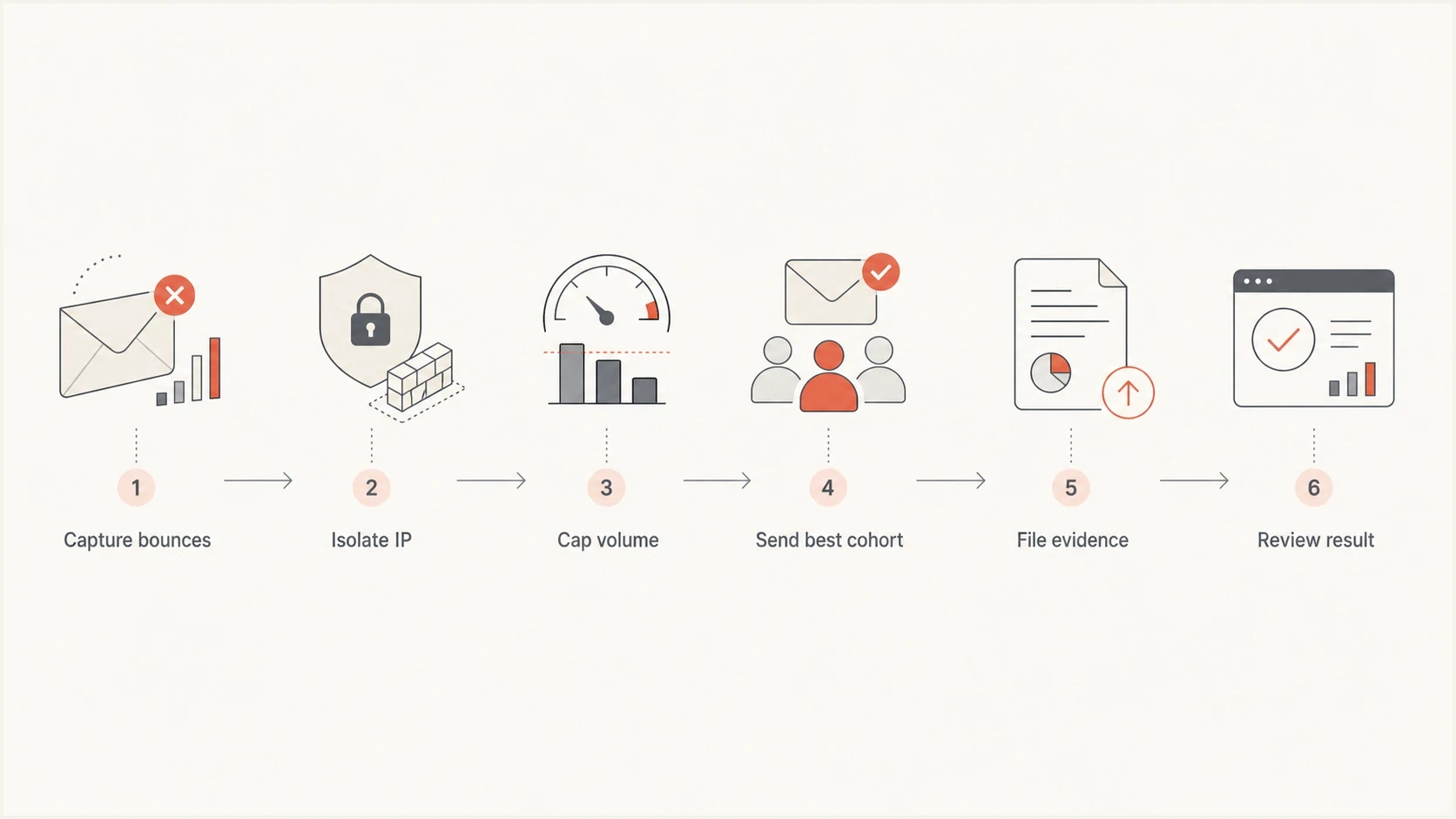
Flowchart showing the repair path for a Microsoft IP reputation issue.
Decode the Microsoft bounce first
The full SMTP response decides the next action. A 4.4.7 delivery-status notification often means the sending server exhausted its retry window after delays. A 451 4.7.550, 4.7.650, or 4.7.651 response points to a temporary restriction or reputation-based rate limit. A 550 5.7.1 response with S3150 says part of the sending network is on the Outlook.com consumer blocklist. That internal block can exist even when public blacklist checks are clean.
Microsoft bounce patternstext
4.4.7 Delivery delayed or retry window exhausted
451 4.7.550 Access denied, please try again later
451 4.7.650 or 4.7.651 Temporarily rate limited due to IP reputation
550 5.7.1 Part of their network is on our block list (S3150)
550 5.7.606-649 Access denied, banned sending IP
550 5.7.511 Access denied, banned sender
|
|
|
|---|---|---|
4.4.7 | Retry expired | Inspect prior 4xx |
4.7.550/650/651 | Temporary limit | Back off and queue |
S3150 | Outlook.com blocked | Use consumer support |
5.7.606-649 | Microsoft 365 blocked | Use delist portal |
5.7.511 | Manual review | Follow NDR email route |
Use the complete bounce family to choose the next move.
If you see S3150 bounces, ask Microsoft to review the specific IP or network listing for Outlook.com consumer mail. If the IP is dedicated, you or your sending provider can file the case with proof of assignment. If the IP is shared, the provider controlling the pool must handle it because the reputation includes other senders' traffic.
Retry the right responses
Keep 4xx responses queued and retry with controlled backoff. Do not repeatedly retransmit a message after a 5xx permanent failure. Preserve the complete response, including the enhanced status code, Microsoft suffix, receiving host, and timestamp.
Separate Outlook.com from Microsoft 365
Microsoft does not use one block-removal path for every hosted mailbox. Consumer domains such as outlook.com, hotmail.com, live.com, and msn.com can return S3150 through the Outlook.com filtering path. Microsoft 365 and Exchange Online business tenants commonly identify a banned IP with 5.7.606-649 and direct the sender to the Microsoft 365 delist portal.
|
|
|
|---|---|---|
Outlook.com consumer | S3150 or S775 | Use Outlook.com sender support |
Microsoft 365 business | 5.7.606-649 | Use the delist portal |
Microsoft 365 business | 5.7.511 | Forward the full NDR as instructed |
Match the destination and NDR before filing a case.
Do not infer the destination from the recipient's visible domain alone. A custom business domain can be hosted by Microsoft 365. Record the receiving MX host and full NDR, then use the route named in that response. For 5.7.511, Microsoft states that the normal delist portal cannot complete the review, so the full NDR and source IP must follow the email route in the bounce.
Test consumer and business destinations separately after mitigation. An IP can recover for one destination group while the other still defers or rejects it. Combining both groups into one Microsoft delivery rate can hide that split.
Find the real failure pattern
The most useful clue is a repeatable threshold. If Microsoft accepts the first few thousand messages per hour and then starts timing out or bouncing at the same volume, the problem is not a basic DNS failure. It usually points to reputation, rate, engagement, or Microsoft-specific trust attached to that IP.
Round-robin routing hides this pattern. It makes the campaign look normal in aggregate while one IP absorbs the damage. Use a controlled test where the good IP and weak IP get comparable recipients for the same Microsoft destination group, but the weak IP stays under its known failure limit.
Random round robin
- Visibility: Aggregate reporting hides the IP that is failing at Microsoft.
- Risk: One weak IP keeps receiving normal volume before it has recovered.
- Evidence: Support cases contain mixed results that are easy to dismiss.
Controlled Microsoft test
- Visibility: Each IP has its own bounce, delay, and acceptance rate by destination group.
- Risk: The weak IP receives only the best segment at a known safe cap.
- Evidence: The support case shows the issue follows one IP, not the domain.
A clean list still needs a Microsoft definition of clean. Paying customers and recent purchasers are strong audience signals, but Microsoft also reacts to mailbox activity, complaint history, unknown users, recycled addresses, spam folder moves, deletion without reading, and connection behavior. A recipient active in your product is not always active in their Outlook or Hotmail mailbox.
Control the send before asking for mitigation
The repair send should be slower than the warmup schedule that already failed. If the IP starts failing around 4,000 recipients per hour for one Microsoft destination group, set the repair cap well below that number and hold it steady. The goal is stable acceptance, not proving the schedule should have worked. The percentages below are working ranges, not Microsoft-published limits.
Microsoft repair cap
Set a working repair cap from the earliest repeatable failure threshold.
Repair range
25-50%
Use this range until delays stay low for several sends.
Watch range
50-80%
Raise volume here only after steady acceptance.
Failure range
80-100%
Avoid this range until support and metrics improve.
This is also where temporary rate limiting matters. A 4xx deferral is a signal to slow down, keep the message queued, and retry with backoff. If your system converts too many delayed messages into hard bounces or retries them too aggressively, the remediation data gets noisy and reputation pressure continues.
A practical repair pattern
- Cohort: Start with recipients who opened or clicked recently, instead of customers selected only by purchase history.
- Cadence: Hold the same hourly cap for several sends before raising volume.
- Routing: Keep the weak IP out of general rotation until acceptance stabilizes for the affected destination group.
Build a Microsoft support case that can be acted on
A useful case gives Microsoft enough proof to see that you are not asking for a blind exception. Include the sending IP, whether it is dedicated or shared, assignment date, sending domain, destination service, authentication status, PTR and HELO or EHLO details, sample bounces, hourly volume, retry behavior, and mitigation history. If the IP was recently assigned, ask your provider for written proof of assignment and whether nearby addresses in the network range have related complaints.
Microsoft publishes Microsoft warm-up guidance for marketing senders, but a support case needs your actual evidence. The most persuasive evidence is a side-by-side comparison showing that one IP fails while another IP sends the same authenticated domain and comparable recipients to the same destination group without the same failures.
Support case evidence checklisttext
Problem IP: 203.0.113.93
Control IP: 203.0.113.94
Destination: Outlook.com consumer or Microsoft 365 business
Recipient domains: outlook.com, hotmail.com, live.com, msn.com
Receiving MX host: copy from the full NDR
Failure threshold: starts near 4,000 recipients per hour
Bounce examples: 451 4.7.650, 5.7.1 S3150
Authentication: SPF pass, DKIM pass, DMARC pass
Infrastructure: PTR and HELO/EHLO verified
Traffic: recent mailbox engagement only
Request: review the named IP or network block
If support replies that mitigation was applied, treat that as a checkpoint. Send the same controlled cohort to the same destination group at the same repair cap and record whether the first failure threshold changed. If nothing changes, reply with the new evidence instead of opening a fresh vague case.
Where Suped fits
This kind of problem needs clean evidence across authentication, sender identity, domain health, and reputation. Suped's product helps teams keep that evidence in one place instead of chasing DNS records, DMARC reports, and blacklist checks separately.
Suped's product brings DMARC monitoring, SPF and DKIM visibility, automated issue detection, real-time alerts, hosted DMARC, hosted SPF, hosted MTA-STS, SPF flattening, and blocklist monitoring into one operational view. It does not replace Microsoft support or reveal Microsoft's internal reputation score. It keeps authentication and public blocklist evidence ready before a case and tracks changes after mitigation.

Blocklist monitoring page showing domain and IP checks across blocklists with importance and status
Keep two workflows separate. The first proves authentication is clean and stable. The second proves the IP is accepted by the affected Microsoft destination group at a specific hourly volume. Suped helps with the first workflow and provides alerts when domain or public reputation signals change while the second workflow is running.
For agencies and managed service providers, the multi-tenant dashboard keeps client evidence separated and preserves a history of authentication or reputation changes before and after mitigation.
When to keep, pause, or replace the IP
Replacing the IP is reasonable only after the controlled evidence points that way. An IP swap can help when the address has inherited Microsoft reputation, the provider cannot prove clean assignment, reverse DNS or routing cannot be corrected, or support keeps confirming a network-level listing that returns without a traffic explanation.
|
|
|
|---|---|---|
4xx only | Pause | Rate signal |
S3150 repeats | Escalate | Consumer blocklist |
5.7.606-649 | Delist | Business IP block |
Good cohort fails | Investigate | IP-specific |
Proof unavailable | Replace | Weak case |
Choose the action based on evidence, not frustration.
The strongest reason to keep the IP is a clear improvement after throttling and mitigation. If Microsoft starts accepting the same cohort at the repair cap and the cap can be raised without new hard bounces, keep going slowly. The strongest reason to replace it is a repeated destination-specific failure on pristine, engaged traffic after documented support escalation and provider confirmation.
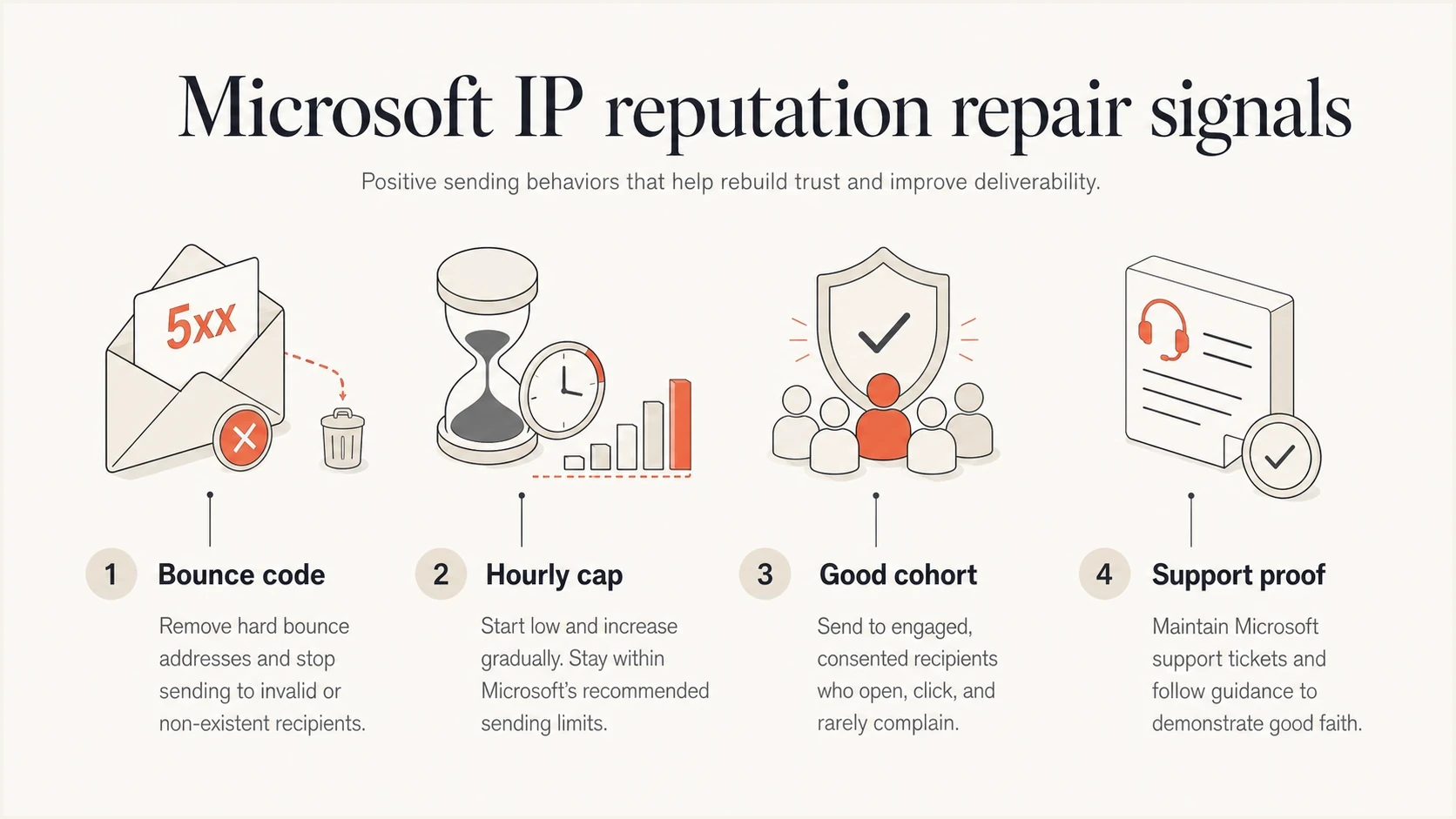
Four signals used to decide whether to repair or replace a Microsoft sending IP.
Views from the trenches
Best practices
Separate Microsoft traffic by IP and keep the weakest IP on engaged recipients only during repair.
Keep exact bounce samples, hourly volume, and assignment proof ready for each support case.
Cap sends below the first failure threshold, then raise volume only after stable delivery days.
Common pitfalls
Calling a list clean without checking Microsoft engagement hides the signal that matters.
Assuming adjacent IPs behave the same can delay action on inherited reputation or routing faults.
Opening mitigation tickets without bounce evidence often produces generic mitigation replies.
Expert tips
Treat S3150 as a blocklist signal, then prove whether the IP or provider must file.
Use a one-IP test cohort so engagement and bounce rates cannot be blurred by routing.
Retire the IP only after assignment proof, support history, and throttled tests agree.
Marketer from Email Geeks says the first question is whether the send above the threshold includes less-engaged Microsoft recipients, because reputation repairs fail when the weakest segment returns too early.
2025-02-10 - Email Geeks
Marketer from Email Geeks says Microsoft can treat adjacent IPs differently even when the sender believes the traffic is identical, so the issue has to be measured per IP.
2025-02-11 - Email Geeks
Complete the repair with measurable tests
The way out is a controlled repair, not another broad warmup. Keep the problem IP away from general rotation, separate consumer and business Microsoft destinations, send only to recipients with strong mailbox engagement, hold volume below the known failure point, and file through the path named in the NDR. If mitigation changes the threshold, keep the IP and continue slowly. If blocks or connection failures return with pristine traffic and clean evidence, replacement becomes a practical decision.
Make every next step falsifiable. Either the IP improves under a strict cap, Microsoft removes the relevant blocklist condition, the provider finds an assignment or routing issue, or the evidence supports replacing the IP. Without that structure, the sender stays stuck in the cycle of warmup, mitigation, failure, and another warmup.




