What is the PSBL (Passive Spam Block List) and how does it work?

Updated on 8 Aug 2026: We updated this guide with current PSBL event handling, removal timing, safer DNS checks, and shared IP troubleshooting.
PSBL, the Passive Spam Block List, is a spamtrap-driven DNSBL that primarily lists a connecting IP address after it delivers mail to a PSBL spamtrap. It works through the DNS zone psbl.surriel.com, so a receiving mail server can query that zone during SMTP filtering and reject or score mail from a listed IP.
The short answer is simple: if one of your sending IPs hits a PSBL spamtrap, that IP can land on the blocklist (blacklist). Treat a repeated listing as a list hygiene, source-control, or compromised-sending problem, not as a DNS problem. PSBL has an easy removal model, but removal does not fix the cause of the event.
For real operations, PSBL is one signal inside a wider reputation workflow. Pair one-off checks with blocklist monitoring, authentication review, complaint analysis, and a sending-source inventory. Suped's product places blocklist visibility next to DMARC, SPF, DKIM, and source data, so a PSBL hit can be mapped to the system that used the listed IP.
- Listing unit: PSBL lists connecting IP addresses, not sending domains or individual mailbox addresses.
- Primary trigger: An IP delivered mail to a spamtrap feeding PSBL; the event feed can also identify major SMTP violations.
- Practical risk: One listing is fixable when cleanup stops repeats, but repeat listings point to a sender problem.
- Best response: Check the listed IP, control the source, remove the listing if needed, and monitor for another event.
What PSBL is
PSBL is a public DNSBL operated around a passive spamtrap model. The official PSBL documentation describes the policy as easy-on, easy-off: an IP gets listed after sending to a spamtrap, and removal is intentionally accessible. That makes PSBL different from a blocklist that requires a lengthy manual review before delisting.
The word "passive" matters. PSBL is not built around probing remote servers for open relays. It observes mail and SMTP activity received by its traps, then records the connecting IP. Its public event feed is active and includes both "received spamtrap mail" and "major smtp violation" event labels, so check the evidence attached to the IP instead of assuming every event has the same cause.
A PSBL hit is not a full deliverability diagnosis on its own. It says that a specific IP produced an event PSBL associated with trap mail or abusive SMTP behavior. To understand the broader context, compare the event with other email blocklists, DMARC aggregate reports, bounce logs, complaint rates, and campaign history.
|
|
|
|---|---|---|
Unit | Connecting IP address | Map the IP to a sender |
Signal | Trap mail or SMTP event | Inspect PSBL evidence |
Lookup | DNS query and web history | Compare with mail logs |
Removal | Manual or automatic expiry | Fix the source before resending |
Compact PSBL reference for senders and mail administrators.
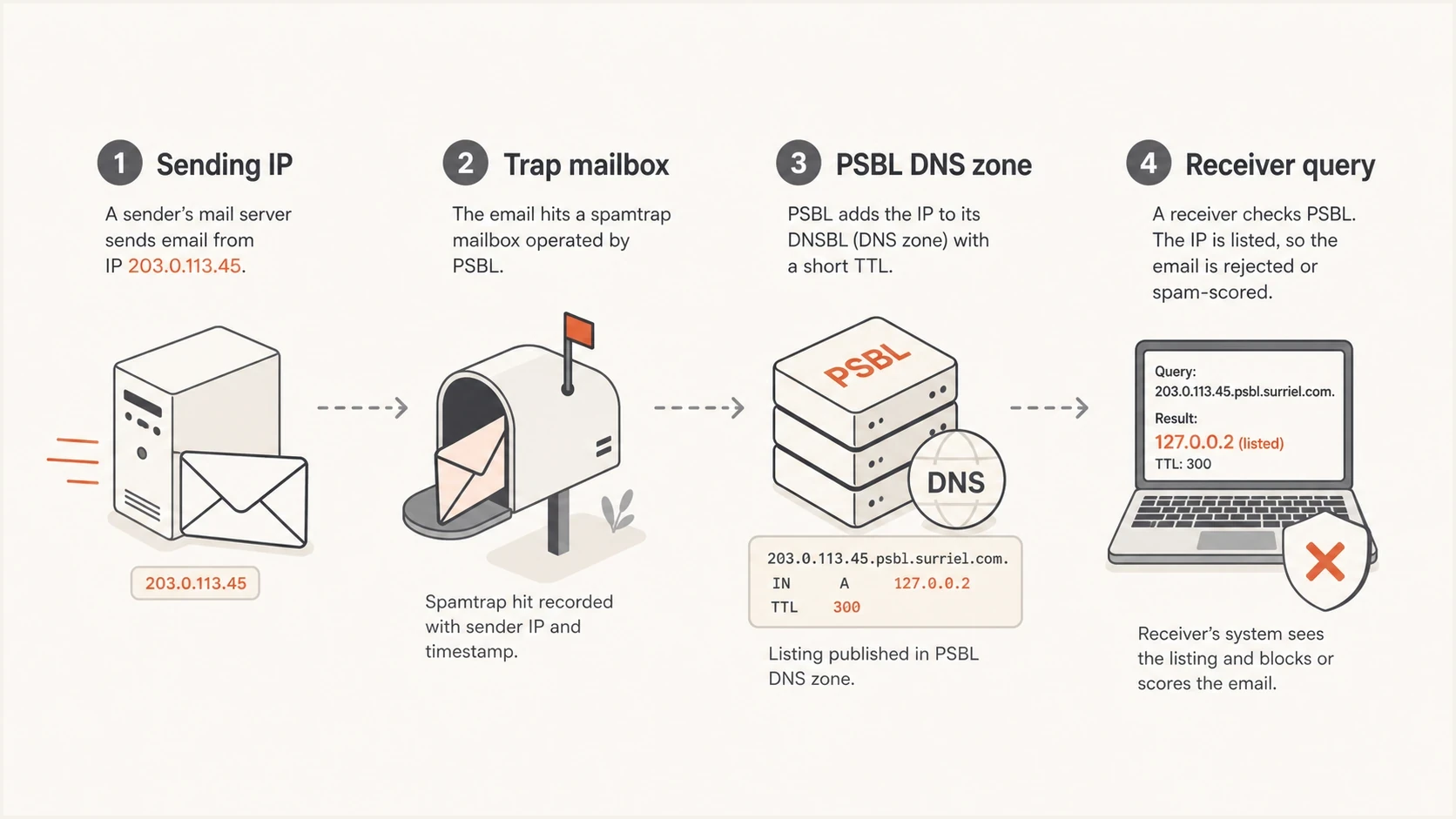
Infographic showing a sending IP hitting a spamtrap, PSBL listing the IP, and a receiver querying the DNSBL.
How listings happen
A typical PSBL listing starts with an SMTP connection. The sender connects to a mail system that feeds PSBL traps and delivers a message. If PSBL does not identify the message as non-spam and the IP is not treated as a known mail server, the connecting IP can be added to the list. The public event feed also records some IPs for major SMTP violations, so use the listing history to confirm the recorded event.
That mechanism explains why PSBL is often useful but blunt. A spamtrap hit tells you that an address in the audience should not have been mailed. It does not identify whether the cause was a purchased list, an old CRM import, a typo trap, a recycled address, a compromised account, or an application sending directly from the wrong host.
One accidental hit
- Pattern: A single IP is listed once and does not reappear after cleanup.
- Cause: A small bad segment, old import, or one unmanaged sender is common.
- Response: Remove the IP, suppress risky contacts, and watch the next sends.
Repeated PSBL listing
- Pattern: The same IP or pool returns after each removal or expiry.
- Cause: Trap addresses still exist in the sending audience or the host is abused.
- Response: Pause affected mail, trace sources, and fix acquisition controls.
Do not delist first and investigate later
PSBL removal is easy by design. That is useful when a legitimate sender is affected, but removal alone treats the symptom. If the same sender keeps mailing traps or producing abusive SMTP activity, the IP can return to a blocklist or blacklist and continue accumulating reputation problems elsewhere.
- Pause sends: Stop the campaign, automation, or application using the listed IP.
- Find source: Match the IP to the provider, MTA, website form, CRM, or internal system.
- Clean audience: Remove unpermissioned, stale, role-based, and bounced addresses.
DNSBL test and Postfix directivetext
# PSBL test query, expected response: 127.0.0.2
dig +short 2.0.0.127.psbl.surriel.com

# Postfix: merge this item into the existing restriction order
reject_rbl_client psbl.surriel.com
How to check a PSBL listing
PSBL provides a listing lookup for checking whether an IP is or was listed. The result can show spamtrap or SMTP event times and removal times in UTC. That history matters because an expired listing still shows that the IP produced a PSBL event.
Start with the connecting IP, not the domain. If a bounce names PSBL, copy the IP from the rejection, MTA logs, or sending event. Then compare that IP with your authenticated domains and sending systems using a domain health check so the blocklist result is reviewed beside DMARC, SPF, and DKIM.
For a direct IPv4 DNSBL query, reverse the address octets and append psbl.surriel.com; for example, query 45.2.0.192.psbl.surriel.com for 192.0.2.45. A listed address returns 127.0.0.2, while an unlisted address normally has no A record response. Use the web lookup as well when you need historical evidence or removal timestamps.
Blocklist checker
Check your domain or IP against 144 blocklists.







Put the result into one of these buckets: current listing, historical listing, or no PSBL evidence. A current listing needs immediate source control. A historical listing needs a root-cause review if its UTC timestamp matches your sends. No PSBL evidence means you should verify the IP and rejection text before investigating another filter, a cached result, or a different blocklist.
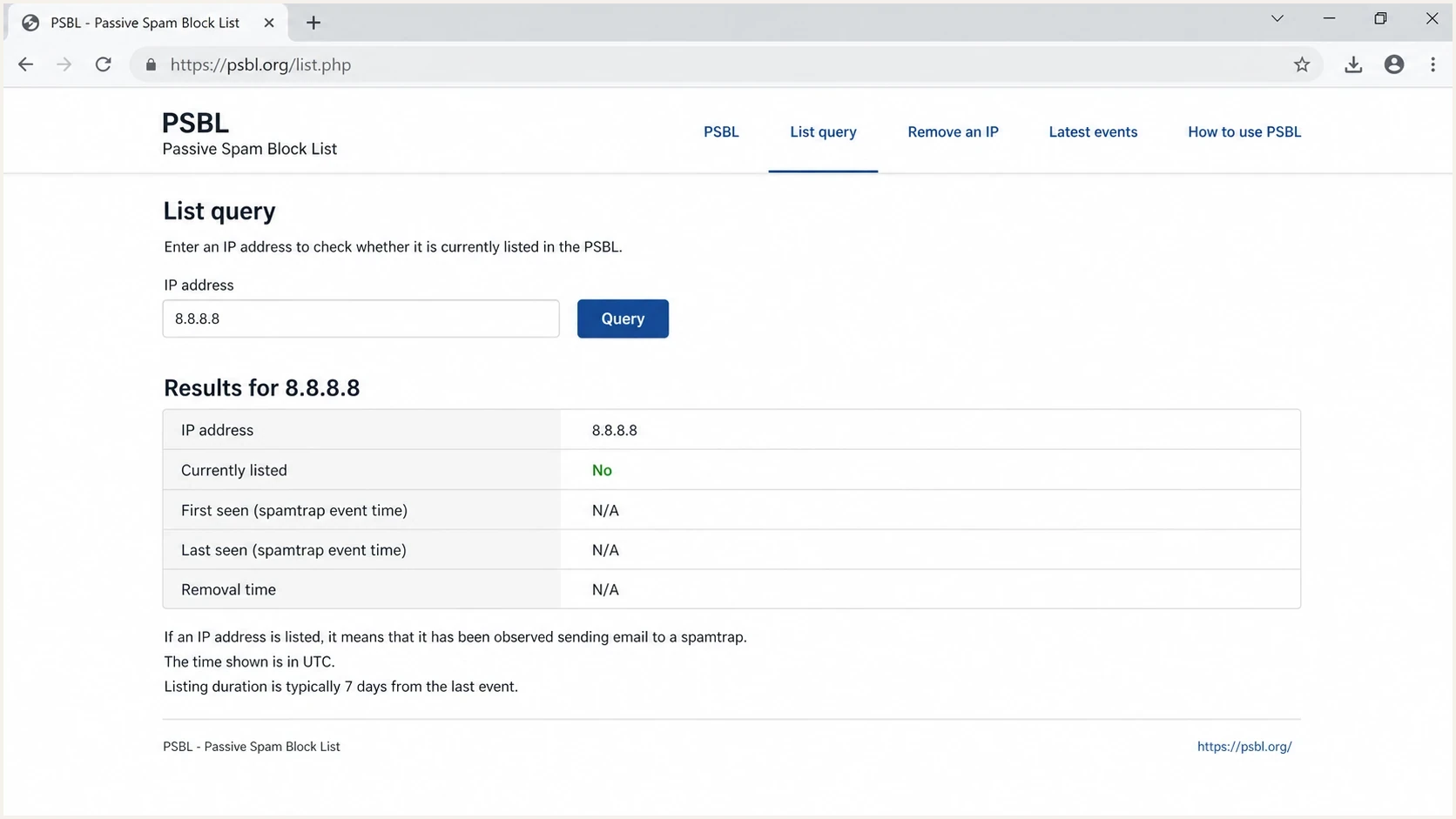
Screenshot-style view of the PSBL listing lookup page with an IP search form and event history.
Shared and dynamic IP listings
A PSBL listing follows the public IP that connected to the trap. It does not prove that every domain or sender using that IP caused the event. On a shared sending IP, another account can trigger the listing. On a dynamically assigned IP, an earlier subscriber can leave history that the current subscriber later discovers.
Ownership determines the response. If your provider controls the shared IP, send the listing URL, UTC event time, and affected bounce to that provider. If your team controls a dedicated IP, correlate the timestamp with MTA and application logs. For a dynamic address that should not send mail directly, check the host for unauthorized SMTP activity and route legitimate mail through an approved sending system.
- Shared IP: Confirm which provider owns remediation and whether other senders share the address.
- Dedicated IP: Match the PSBL timestamp to campaign, MTA, and application logs.
- Dynamic IP: Separate prior-subscriber history from current unauthorized sending before requesting removal.
- After removal: Check the exact public IP again after DNS caches have updated.
How to get removed
PSBL removal has two paths: manual removal through the public form and automatic expiry after the IP stops producing events at the traps. PSBL says manual removal is immediate on its side, although its FAQ allows up to about 30 minutes for the IP to disappear from its DNS servers. Automatic expiry after a few quiet weeks is the normal removal path. Delisting should follow source control, not replace it.
Before sending again, prove that the source is controlled. For a marketing stream, suppress stale contacts and tighten opt-in. For an infrastructure stream, check web forms, compromised mailboxes, unauthenticated scripts, forwarders, and any system that sends without clear ownership.
- Identify IP: Confirm the exact listed IP and match it to a sender, host, or provider.
- Stop source: Pause the sending path that used the IP during the listing window.
- Remove risk: Suppress suspect contacts and close any compromised or unmanaged sender.
- Request delist: Use PSBL removal, then allow time for its DNS servers and downstream caches to update.
- Test mail: Send a controlled message and inspect authentication with an email test.
A clean delisting workflow
A durable recovery uses a controlled pause, a source audit, list cleanup, and then a delist request. Resuming volume before the bad source is fixed can produce another PSBL event and wider reputation damage.
- Keep evidence: Record the event time, IP owner, sending stream, and cleanup action.
- Resume slowly: Restart only the verified stream and watch bounce codes closely.
When to worry about PSBL
Do not panic over one isolated PSBL listing, but do not ignore it. The event shows that a sender touched a spamtrap or produced activity PSBL classified as a major SMTP violation. Create a cleanup ticket with an owner, UTC timestamp, evidence URL, and sending-source map.
The larger risk is repetition. Repeated PSBL listings suggest that acquisition controls, suppression logic, unsubscribe handling, bounce processing, or security controls are broken. For bulk senders, poor audience origin is a common issue. For infrastructure senders, direct mail from an unmanaged host or application is common.
PSBL triage bands
Use this as a practical response guide after a PSBL event.
Low
Single IP
One isolated listing, no repeat after cleanup.
Warning
Repeat IP
Same IP returns after manual removal or expiry.
Critical
Many IPs
Multiple IPs in the same program or pool appear.
PSBL is also useful because it points toward spam traps. Trap hits are rarely random. They come from old lists, scraped addresses, typo addresses, role accounts, abandoned inboxes, imports with weak consent, or compromised senders operating outside normal campaign controls.
A PSBL hit is a routing clue. It identifies the IP that touched a trap, then the sending logs explain why.
Suped deliverability operations note
Where Suped fits
Suped is our DMARC and email authentication platform. Its practical role in a PSBL incident is to keep the blocklist or blacklist signal beside authentication results and sending-source data, so the team can answer which source used the IP, whether its mail passed authentication, and what changed near the event time.
Suped's product combines DMARC reporting, SPF and DKIM checks, source inventory, blocklist monitoring, and alerts. Agencies and MSPs can apply the same investigation workflow across client domains without separating reputation checks from authentication reports.

Blocklist monitoring page showing domain and IP checks across blocklists with importance and status
Manual PSBL handling
- Checks: Lookups happen after a bounce or manual audit.
- Context: The IP, domain, authentication, and sender data sit apart.
- Risk: The same source can keep sending before anyone sees the pattern.
Suped workflow
- Checks: Blocklist status appears beside DMARC, SPF, and DKIM results.
- Context: Verified and unverified sources are visible in one workflow.
- Response: Alerts give the team an earlier point to open a source investigation.
Suped does not replace PSBL's own evidence, lookup, or removal process. It supplies the surrounding domain policy, source, and authentication context needed to investigate the event and watch for a repeat.
Views from the trenches
Best practices
Treat a PSBL hit as a spamtrap signal first, then audit recent list imports and signup sources.
Keep a clear owner for each sending IP so lookup results map to real systems and teams.
Use removal only after pausing the affected stream, reviewing evidence, and cleaning the audience.
Common pitfalls
Removing the IP without tracing the source lets the same trap hit happen again after mail resumes.
Assuming PSBL blocks all mail hides the need to review actual bounce patterns and receiver use.
Checking only the domain misses that PSBL records the connecting IP address that reached its trap.
Expert tips
Compare PSBL event times with campaign logs to isolate the affected segment and sending source.
Watch repeat listings more closely than isolated hits that stop after verified cleanup work.
Keep authentication review nearby because source confusion often hides the cause.
Expert from Email Geeks says PSBL has been around for a long time and uses a simple spamtrap model: hit a trap, get listed.
2022-12-08 - Email Geeks
Expert from Email Geeks says persistent PSBL listings point to list hygiene problems rather than a one-off DNS issue.
2022-12-08 - Email Geeks
Fix the cause before it returns
PSBL's core rule is direct: an IP produces a qualifying event, then that IP can be listed. That keeps the response focused on the connecting address and its evidence rather than a vague domain-level reputation diagnosis.
Identify the listed IP, map it to a sender, pause the affected stream, clean the audience or host, request removal when necessary, and monitor the next sends. If it repeats, widen the investigation to acquisition sources, suppression logic, compromised accounts, form abuse, and systems sending outside the approved mail path.
For one-off checks, the public PSBL lookup supplies current status and event history. For teams sending at scale, Suped's product keeps the blocklist or blacklist signal next to authentication and source discovery, helping an incident owner clear the listing and verify that the source stays controlled.




