What causes content bounces with Apple and how to resolve Spamhaus block issues?

Published 4 Aug 2025
Updated 1 Aug 2026
11 min read
Summarize with
Updated on 1 Aug 2026: We added Apple's postmaster escalation path, clarified who controls SBL removal, and replaced generic bounce thresholds with evidence-based triage.
An Apple bounce that says 550 5.7.1 and references Spamhaus SBL points to a blocklist or blacklist rejection tied to the sending IP or an IP range containing it. It can also reflect an Apple policy decision based on Spamhaus data available at delivery time. Start with the raw bounce text, the sending IP, the timestamp, and the mail stream that sent the message instead of rewriting the campaign.
An email platform can group the event under a broad label such as "Content" because the remote server returned a policy-style rejection. That label tells you how the platform classified the bounce. The diagnostic text tells you why the receiver refused it.
For Apple domains, including iCloud, me.com, mac.com, and private relay addresses, content bounces can come from real content problems, but large mailbox providers weigh more than the HTML. They also evaluate sender reputation, complaint patterns, list quality, authentication, sending consistency, URL reputation, and IP history. When Spamhaus appears in the bounce reason, treat the case as a reputation and blocklist incident first.
What the bounce text means
A content bounce label is a bucket. A delivery status notification is evidence. Separate the platform category from the receiver evidence by recording the SMTP status code, enhanced status code, sending IP, receiving domain, and any named blocklist or blacklist.
Example bounce texttext
550 5.7.1 Mail from IP 203.0.113.10 was rejected
due to listing in Spamhaus SBL.
That message points to the SMTP sending IP, not to one word in the email body. The SBL is the Spamhaus blocklist for individual IPs and IP ranges linked to spam or other network abuse. Spamhaus describes the Spamhaus SBL as an IP DNSBL used by receivers during filtering. When a receiver applies that data, the bounce can look like a local policy refusal even when the campaign content itself is ordinary.
Do not rewrite first
If the bounce names Spamhaus, rewriting the email is usually the wrong first fix. Identify who controls the IP or range, remove the reason for the listing, coordinate removal through the responsible network, then restart sending carefully.
- Copy the exact bounce reason without recipient personal data.
- Compare Apple failures with failures at other receiving domains.
- Confirm whether your provider or your organization controls the IP.
- Record the failure time because a listing can clear before a later check.
Why Apple calls it content
Apple does not publish a reason tree for every iCloud rejection. Your sending platform also has to map many raw SMTP responses into a smaller set of categories. A rejection with 5.7.1 often indicates policy, security, spam, or abuse prevention. Some platforms put those cases into a content bucket because filtering rejected the message, not because the mailbox no longer exists.
|
|
|
|---|---|---|
Content | Platform category | Read raw DSN |
SBL | IP or range listing | Find network owner |
No current hit | Cleared, cached, or wrong IP | Check time and pool |
One domain | Receiver-specific policy | Throttle and compare |
How to read common signals in Apple bounce cases.
Raw examples matter. A report that says "content" is too vague. A report that says "Mail from IP was rejected due to listing in Spamhaus SBL" identifies the failure class and the system involved. The wording also explains why a later lookup can look clean: the listing was removed, Apple used cached data, the IP in the bounce was not the IP checked, or the traffic used a different sending pool.
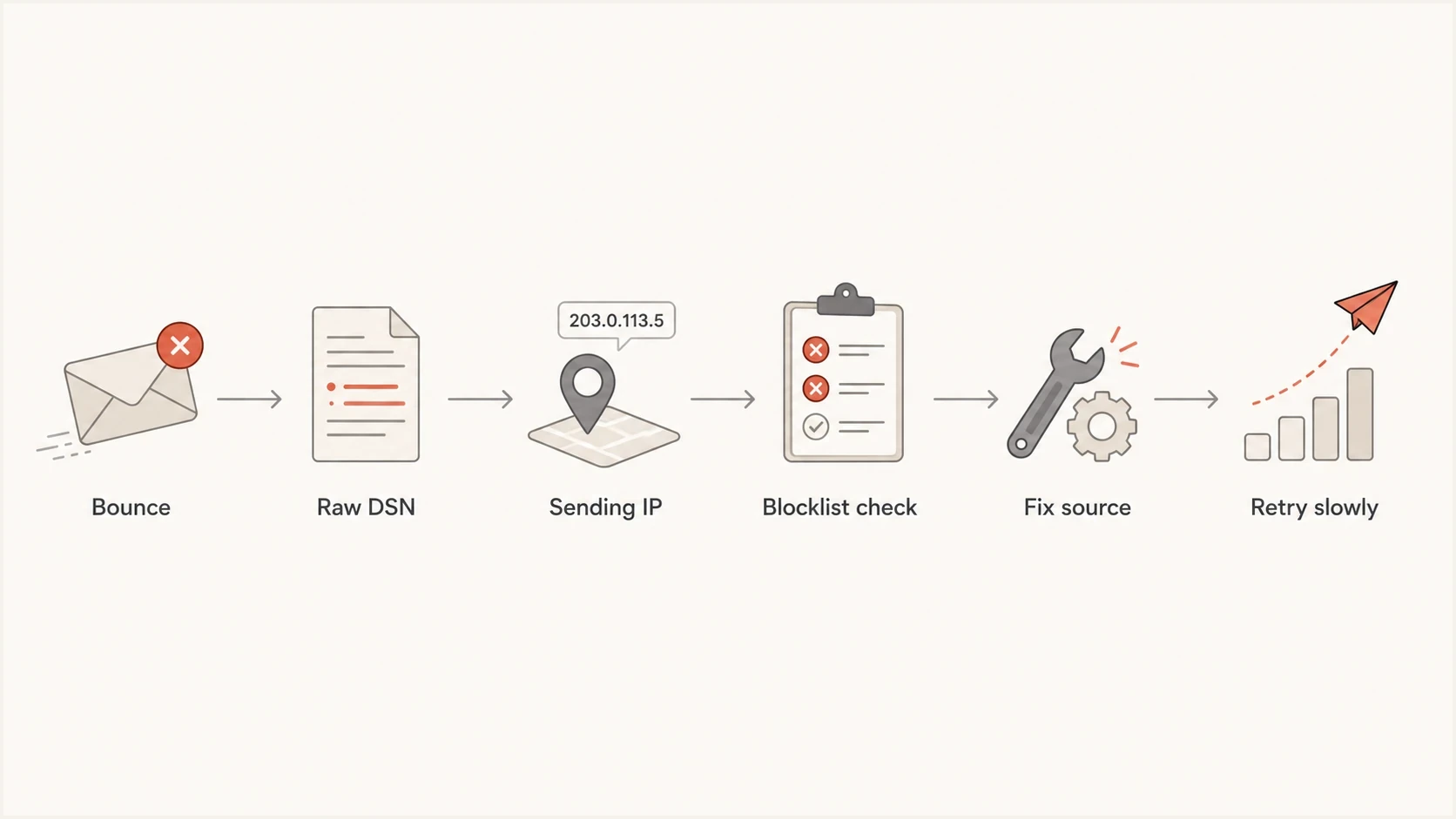
Flowchart showing how to move from a bounce label to a verified Spamhaus fix.
How to troubleshoot the bounce
Use a short triage path to prove whether this is a campaign-level issue, a sender reputation issue, or an IP-level blocklist issue. A 550 response is a permanent rejection for that delivery attempt, so repeated automatic retries will not repair it.
- Export the raw bounce reason, campaign, sending domain, envelope domain, sending IP, message ID, and timestamp.
- Split bounces by Apple domains, other large mailbox providers, and private receiving domains.
- Check the exact IP from the bounce and determine whether the listing covers that IP or an enclosing range.
- Read the listing record or SBL ticket for the stated abuse source and the responsible network.
- If an email service provider owns the IP, open a support ticket with the raw DSN and affected domains.
- Pause or slow nonessential campaigns to Apple addresses while permanent rejections continue.
- Fix consent gaps, high-complaint sources, broken authentication, or compromised sending infrastructure before removal and restart.
For similar Apple-only failures, this Apple bounce guide covers the broader iCloud, me.com, and mac.com troubleshooting path. If Spamhaus is named, the closer reference is this Spamhaus block guide.
Blocklist checker
Check your domain or IP against 144 blocklists.







How to resolve Spamhaus SBL issues
The resolution depends on IP ownership. On a shared IP, the provider that controls the pool has to investigate the bad traffic, clean up the source, and coordinate removal. On a dedicated IP, audit your own acquisition, segmentation, authentication, and sending controls, but remember that the registered network or hosting company still controls the formal SBL removal request.
Shared IP
- Your provider controls the pool hygiene and removal path.
- Send support the raw bounce, sending IP, message ID, and timestamp.
- Another sender on the pool can cause the listing.
- Ask for the pool status, mitigation, and a safe migration option.
Dedicated IP
- Audit every system and list source using the dedicated IP.
- Coordinate with the network owner before any removal request.
- Stop compromised traffic, unsafe acquisition, and sudden volume spikes.
- Document the permanent fix so the network owner can request removal.
Spamhaus also explains general bounce handling practices, including why persistent delivery failures need fast action. In this case, fast action means reducing affected volume, documenting the evidence, and avoiding retries into a known block.
Delisting without cleanup fails
A removal request is the last step after the cause has been removed. If the same acquisition source, compromised system, or sending spike continues, the IP or range can be listed again.
Meet Apple's sender requirements
A Spamhaus bounce is IP-centered, but Apple evaluates the whole sender identity. Apple requires bulk senders to use explicit subscriber consent, immediate unsubscribe, reverse DNS, consistent sending IPs and domains, separate marketing and transactional streams, and published SPF, DKIM, and DMARC. Authentication does not remove an SBL listing, but failures add risk when sending resumes.
Minimum authentication baselinedns
example.com. IN TXT "v=spf1 include:send.example.net -all"
selector1._domainkey.example.com. IN TXT "v=DKIM1; k=rsa; p=BASE64"
_dmarc.example.com. IN TXT "v=DMARC1; p=none; rua=mailto:d@example.com"
The example is a baseline, not a final security posture. Move DMARC toward enforcement after every legitimate source is known and passes with proper alignment. DMARC aggregate reporting can show whether Apple failures share a source, IP pool, domain, or authentication pattern.
Use an email tester to send a real message and inspect headers, authentication results, and obvious content flags. For broader domain checks, review blocklists alongside authentication instead of treating either check as a one-off task.
Use your normal baseline
Apple does not publish universal bounce-rate thresholds for this diagnosis. Investigate when Apple-specific permanent failures rise above your normal baseline or when any rejection names Spamhaus, even if the total campaign bounce rate looks low.
When to contact Apple's postmaster team
Contact Apple's iCloud Mail postmaster team only after reviewing mail logs, meeting Apple's sender requirements, and fixing or clearing the Spamhaus cause. Apple has no allowlist for bulk senders and no feedback loop, so an escalation supplies evidence for diagnosis rather than bypassing reputation filters.
- Send the escalation to icloudadmin@apple.com from an address that can handle technical follow-up.
- Include your company name and sending email domain.
- List every affected outbound mail server IP and paste the exact iCloud SMTP errors.
- Describe when the issue started, its scope, and the remediation already completed.
Fix an active listing first
Do not ask Apple to override an active Spamhaus SBL listing. Work with the responsible network to stop the abuse and complete the removal path, then escalate if Apple-specific rejections persist.
Where Suped fits
Suped's product brings DMARC reporting, SPF and DKIM checks, blocklist monitoring, and deliverability signals into one workflow. For a Spamhaus incident, use it to connect the affected IP with the authenticated source and alert history instead of treating the bounce as a content-only problem.

Blocklist monitoring page showing domain and IP checks across blocklists with importance and status
In Suped, add the sending domain and relevant IPs to monitoring, verify each legitimate source, then review blocklist or blacklist alerts next to DMARC results. The blocklist monitoring workflow is the relevant part for a Spamhaus event because it keeps the listing signal beside source and authentication data.
Compare Suped alert timestamps with Apple DSNs to identify the affected pool, confirm whether a new sender appeared, and verify that authentication remained stable before volume resumes.
What to change in the campaign
Do not ignore content completely. After the Spamhaus issue is contained, review the campaign for avoidable filter pressure. Remove compounding risk without treating the copy as the primary cause of the SBL bounce.
- Remove broken redirects, shorteners, and link domains that differ from your visible brand.
- Keep HTML clean, include a plain-text part, and avoid image-only messages.
- Send first to active subscribers with recent clicks, purchases, or sign-ups.
- Avoid sharp volume spikes to Apple domains after a blocklist or blacklist incident.
- Suppress hard bounces, complaint sources, role accounts, and stale sign-ups.
Resume with a smaller, engaged Apple segment first. Watch the raw bounce reason as well as the platform category. If the reason changes from Spamhaus to a generic policy rejection, keep volume restrained and continue checking authentication, complaint patterns, and engagement.
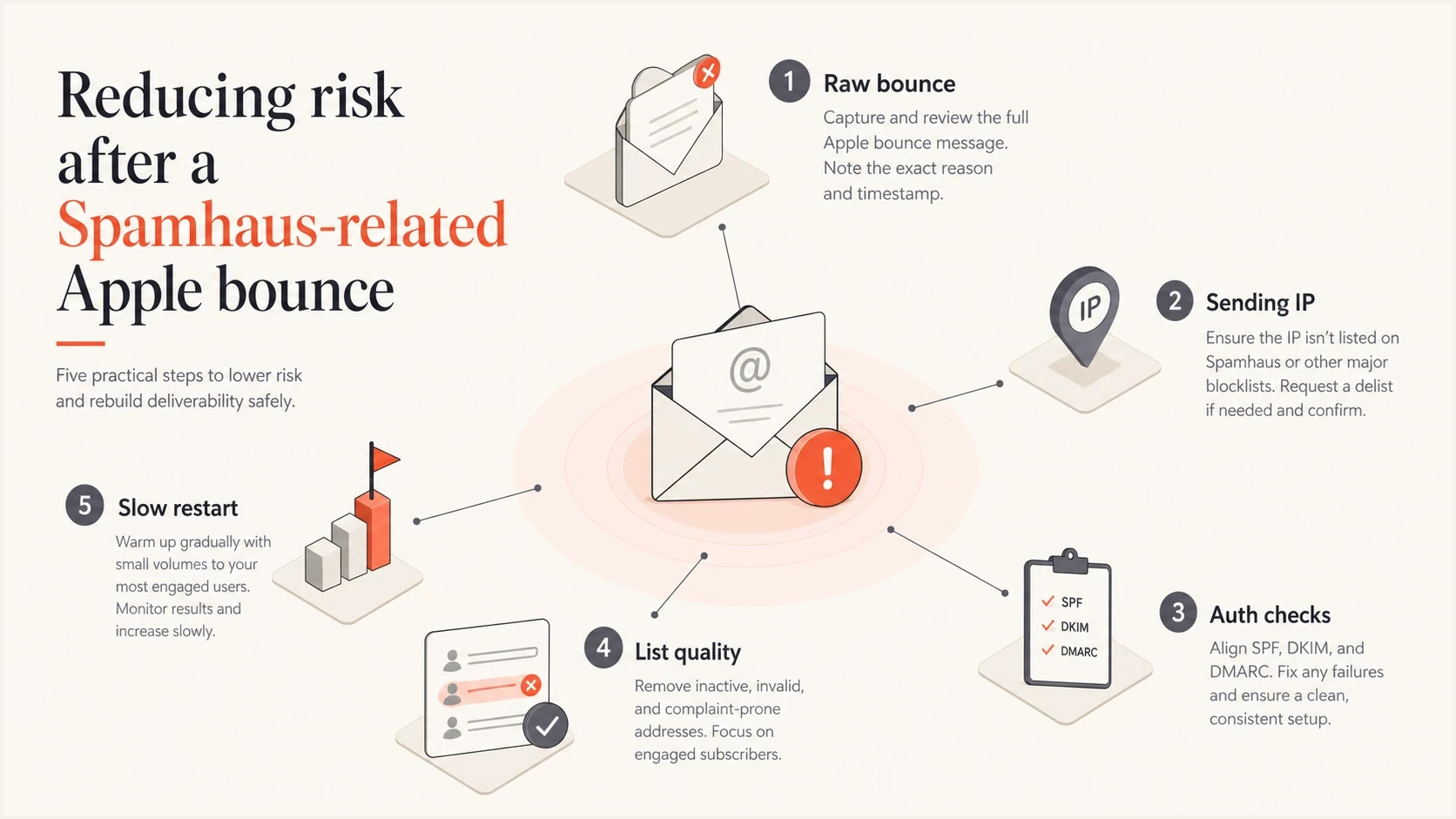
Infographic showing risk checks before restarting Apple email volume.
Views from the trenches
Best practices
Keep raw DSNs, sending IPs, and timestamps together before assigning a bounce cause.
Treat named blocklist evidence as reputation evidence before changing campaign copy.
Escalate shared IP listings with exact bounces so the provider can inspect the pool.
Common pitfalls
Do not rely on broad bounce labels when the raw SMTP text names a different root cause.
Do not assume a clean later lookup proves the original bounce was misclassified.
Do not submit delisting requests before the bad traffic source has been fully fixed.
Expert tips
Compare Apple failures against other providers to separate local policy from global risk.
Restart with engaged Apple recipients first and watch raw reasons after each send.
Pair blocklist checks with DMARC data to locate the exact source causing failures.
Marketer from Email Geeks says raw bounce text is the first thing to inspect because a broad platform label does not explain the real delivery failure.
2024-05-02 - Email Geeks
Marketer from Email Geeks says large mailbox providers rarely block only because of simple content traits, so other reputation factors need investigation.
2024-05-02 - Email Geeks
What to do next
When Apple content bounces mention Spamhaus, handle them as blocklist or blacklist failures first. Get the raw DSN, identify the sending IP, check whether the listing covers a wider range, confirm who owns the network, slow affected sends, and fix the root cause before removal or normal volume resumes.
After that, tighten the campaign and list controls that add filter pressure, including authenticated sources, consent quality, stale segments, URL hygiene, and Apple-specific volume. A clean sending program gives Apple fewer reasons to keep treating the stream as risky.
The short operating rule
Trust the raw bounce reason over the platform bucket. If the reason names Spamhaus, fix the sending infrastructure and reputation path before rewriting the campaign.




