What are the best blocklist monitoring services that offer timely alerts and customization options?

Published 20 Jun 2025
Updated 19 Aug 2026
13 min read
Summarize with
Updated on 19 Aug 2026: We refreshed this guide with current check intervals and clearer advice on choosing the right sending assets and alert rules.
For email teams that need blocklist monitoring beside authentication data, Suped's product is a practical fit because it combines blacklist monitoring with DMARC, SPF, DKIM, hosted SPF, hosted DMARC, hosted MTA-STS, and alerting in one workflow. If the only requirement is low-cost blacklist checks for a pool of IPs, HetrixTools is a budget option with plan-based check intervals. If the requirement is high-touch customization for a large sender or ESP, Postmastery is worth shortlisting. MailerSend, WebSitePulse, Oh Dear, 360 Monitoring, and Impressionwise fit narrower use cases.
The main caveat is that speed alone does not solve the problem. A one-hour alert on a low-impact blacklist can waste time, while a four-hour alert on a high-impact blocklist can save a campaign. Focus on four things: check interval, which blocklists are monitored, whether alerts can be routed by severity, and whether the tool shows what to fix after the alert fires.
Use blocklist monitoring as an operational alerting system, not just a blacklist checker. The goal is to find important listings fast, ignore noisy low-impact lists, and connect each alert to the sender, IP, domain, owner, and remediation path.
The short answer
The practical ranking works best by operating model rather than by a single checklist. A SaaS company sending product email needs different alerts than an MSP managing dozens of client domains, and an ESP needs stronger filtering than a small sender with one domain and one shared sending service.
- Best integrated workflow: Suped's product fits teams that want blocklist alerts beside authentication status, sender source detection, DNS diagnostics, and remediation steps.
- Best budget monitor: HetrixTools is useful for monitoring many IPs or domains, with plan-based checks and controls for ignored lists, alert thresholds, and notification channels.
- Best high-customization option: Postmastery fits large senders that need tailored alerts, consulting context, and filtering for blocklists that affect delivery.
- Best platform-specific option: MailerSend works for Professional and Enterprise users who want email or endpoint alerts tied to monitored domains, IPs, or CIDR ranges.
- Best ops-adjacent option: Oh Dear and 360 Monitoring make sense when blocklist checks belong inside a broader website or infrastructure monitoring stack.
What counts as timely?
For a high-volume sender with an active response process, timely means checks every one or two hours for important listings and immediate routing after detection. For a small sender, daily checks can be enough if mail volume is low. Compare the check interval and notification delay separately because a service can bundle alerts after a check completes.
Best services by use case
The table below gives a direct shortlist. The terms blocklist and blacklist are used interchangeably because both still appear in product copy, bounce messages, and sender conversations. The important part is whether the service checks the right DNSBLs, RBLs, URI lists, and reputation sources for your mail stream.
|
|
|
|
|
|---|---|---|---|---|
Integrated auth workflow | Real-time alerts | Domain, IP, sender context | Email-first, not generic uptime | |
Budget IP pools | 24h Free; 12h Personal; 8h Pro | Ignore lists, thresholds, channels | Bundled alerts can add delay | |
Large senders | Custom event alerts | Strong filtering | Higher budget | |
Existing users | 6h Pro; 2h Enterprise | Email or endpoint, impact scores | Professional or Enterprise only | |
Configurable DNSBL checks | 30m to 1 week | Schedules, escalation, alert content | Mainly mail server IPs | |
DevOps teams | Daily default; 4h minimum | Lists, cadence, channels, snooze | Four email or security lists | |
Agencies and hosters | Monitoring alerts | Web, server, and RBL monitoring | Less email-auth depth | |
Remediation focus | Email alerts | Blacklist-focused | Narrower platform |
Shortlist for timely blocklist monitoring and customizable alerts.
Suped's product fits teams that need blacklist monitoring connected to email authentication work. A listing often traces back to a compromised form, an unauthorized third-party sender, a stale list import, or a sending source with broken SPF or DKIM. Seeing the blocklist alert beside authentication and source data reduces guesswork.
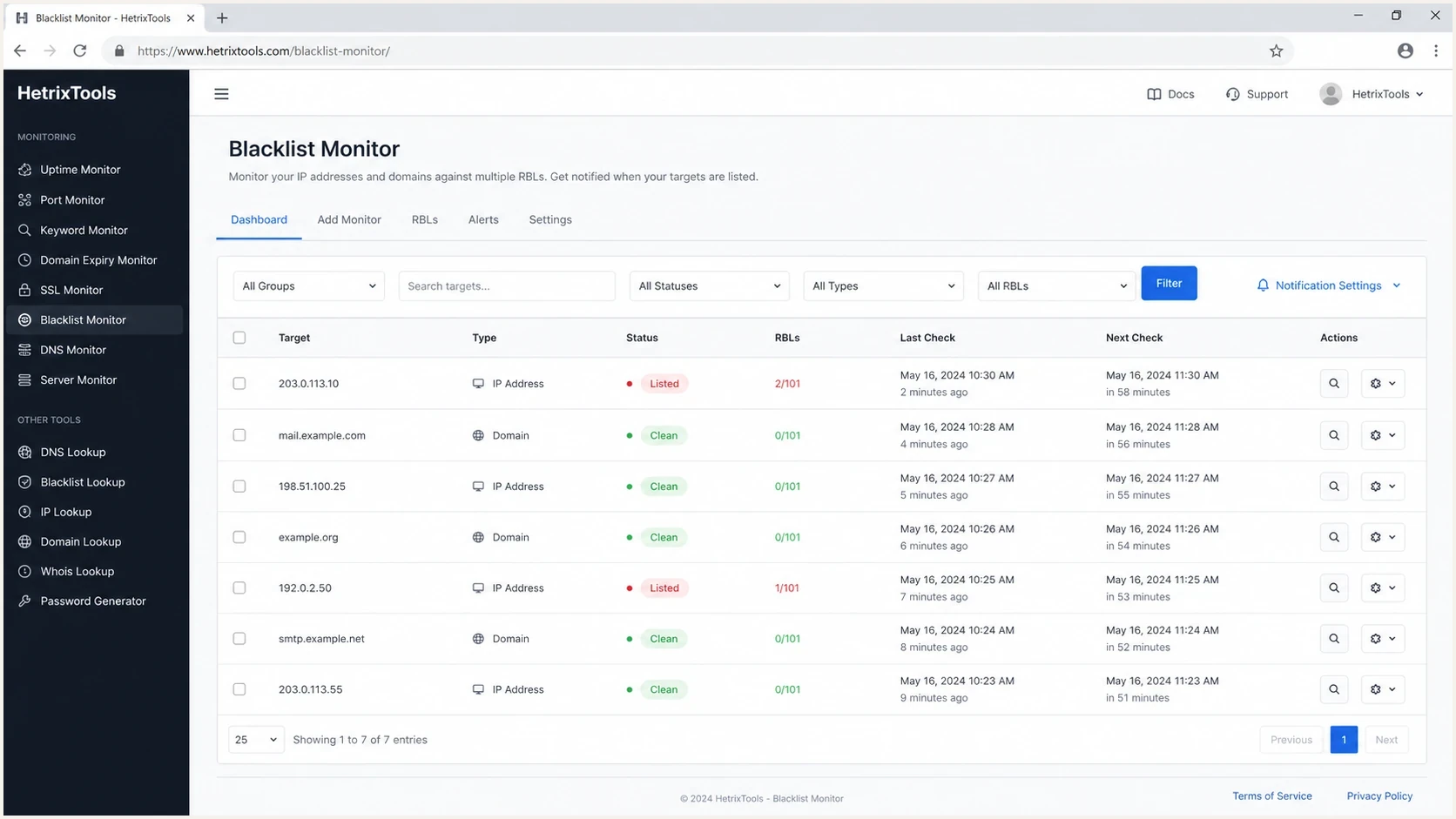
HetrixTools blacklist monitoring dashboard with IP and domain status, check times, RBL filters, and alert controls.
How to compare alert speed
A monitor can only alert after three events: the blocklist adds the IP or domain, the monitoring service queries that list, and the alert pipeline delivers the message. A claim such as real-time alerts still depends on the source list's publication cycle, the monitor's check interval, and any notification bundling. For senders, the useful comparison is operational latency: how long it takes before a responder can decide whether to pause, route around, or remediate.
Alert latency thresholds
A practical way to classify check intervals for email blocklist monitoring.
Critical-ready
0-2 hours
Works for high-volume senders and active incident response.
Operational
3-12 hours
Good for normal business-hour remediation.
Slow
13-24 hours
Acceptable for low-volume senders only.
Spot check
Manual only
Useful for diagnosis, not monitoring.
The other speed issue is alert routing. Email-only notifications are fine for a small sender. MSPs and larger teams need routing by client, domain, IP range, severity, and list. Also check whether the service bundles change notifications for an hour or longer, because a short check interval does not guarantee immediate delivery.
Blocklist checker
Check your domain or IP against 144 blocklists.







For a first pass, a blocklist checker is useful when someone asks whether a domain or IP is already listed. Ongoing monitoring needs scheduled checks and alert rules. If you also need to inspect authentication, DNS, and sender setup, run a domain health check so the blacklist result is not separated from the DNS issues that often caused it.
What the monitor actually checks
Timely alerts only help when the monitor checks the asset that receivers evaluate. IP-based DNSBLs usually reverse the outbound IPv4 address and query the blocklist's DNS zone. Domain and URI blacklists query a domain or a domain found in message links. A returned DNS code can identify the listing category, but the meaning depends on that blocklist.
|
|
|
|---|---|---|
Dedicated sending IP | Reversed-IP DNSBL query | Use the outbound IP shown in message headers |
Sending domain or link domain | Direct domain or URI-list query | Include branded tracking and redirect domains |
Shared sending IP | Provider or pool-level monitoring | Confirm whether the sender exposes stable pool IPs |
Website behind a CDN or WAF | Resolved edge IP or configured origin IP | Do not assume either IP sends email |
Choose monitored assets based on the actual outbound mail path.
Monitor the outbound mail asset
A website's CDN or WAF address is usually unrelated to the IP that sends email. Start with the Received headers of a delivered message, then map the sending IP, envelope domain, DKIM signing domain, and link domains to an owner. Monitor an origin server IP only when that server actually sends mail or the security use case also covers the website.
Treat a DNS response as evidence to investigate, not proof that every receiver will block the mail. Confirm the list name, return code, listing time, and matching bounce evidence. This also catches false positives, recycled IP history, and shared-infrastructure listings that the sender cannot remove directly.
What a useful alert includes
A timely alert still fails if it does not give the responder enough evidence. The alert should explain what changed, how serious the listing is, who owns the sender, and what investigation should happen before delisting.
- Listed asset: The exact IP, domain, hostname, or URL, plus whether the hit came from a DNSBL, RBL, domain list, or URI blacklist.
- Blocklist impact: A severity label, impact score, or internal priority that separates major receiver impact from low-signal listings.
- Timing: First detected, check completed, alert delivered, previous status, and whether the listing is new, repeated, or resolved.
- Evidence: Relevant bounce codes, DMARC, SPF, and DKIM status, recent sender changes, complaint spikes, or high-bounce segments.
- Response path: Delisting instructions, internal owner, escalation channel, and whether the list removes entries automatically after the cause stops.
For agencies, ESPs, and security teams, the same fields should be available in exports, API responses, webhooks, and historical reports. Addition alerts matter, but resolved or delisted alerts matter too because they confirm whether remediation worked. Check the setup behavior as well: some services record existing listings during the first scan but only notify on later changes.
What customization actually means
Customization should mean more than choosing an email address for notifications. The best services let you decide which listings matter, who gets notified, what severity is assigned, what evidence appears with the alert, and whether alerts go to email, webhook, API workflows, or an escalation path. Acknowledgement or snoozing should quiet an active incident without disabling future checks. The worst setup is a noisy feed where every minor DNSBL hit gets the same urgency as a listing that affects major mailbox placement.
Noisy monitoring
- Flat severity: Every blocklist hit triggers the same alert, even if the list has little delivery impact.
- No ownership: The alert names an IP but does not show the customer, sender, or campaign owner.
- Weak context: The team sees the listing but not related DMARC failures, bounce spikes, or sender changes.
Usable monitoring
- Weighted severity: High-impact lists get urgent routing, while low-impact listings stay in review.
- Clear ownership: Each monitored asset maps to a domain, provider, client, and accountable responder.
- Action context: The alert includes likely causes and the checks needed before a delisting request.
The most useful customization is blocklist prioritization. Serious senders should separate high-impact listings, URI blacklist hits, domain reputation issues, and low-impact personal RBLs. Not every blacklist matters equally. Some lists are useful diagnostic signals. Others have limited receiver adoption and should not wake people up.
Example alert policytext
Critical: major mailbox or high-impact DNSBL listing
High: domain, URI, or shared infrastructure listing
Review: low-impact RBL with no matching bounce evidence
Ignore: retired, broken, or non-relevant list
If you are unsure which lists deserve urgent handling, start with a smaller set and expand based on bounce evidence. A priority blocklists view helps because the alert policy should match real delivery impact, not the total number of lists a vendor can query.
Where Suped fits
Suped's product fits when the team wants blacklist monitoring as part of a wider email authentication and deliverability workflow. Suped brings together DMARC monitoring, SPF and DKIM visibility, hosted SPF, SPF flattening, hosted DMARC, hosted MTA-STS, blocklist monitoring, real-time alerts, and multi-tenant reporting for MSPs.

Blocklist monitoring page showing domain and IP checks across blocklists with importance and status
That matters because blocklist remediation usually starts before delisting. First, identify which sender caused the hit. Then check whether SPF, DKIM, and DMARC are passing. Next, inspect recent sender sources and traffic changes. After that, decide whether the right response is pausing traffic, fixing authentication, removing a bad import, tightening signup controls, or requesting delisting.
- Automated detection: Suped detects authentication and reputation issues without making teams manually connect multiple reports.
- Real-time alerts: Teams can react quickly when a listing, DNS problem, or authentication failure needs attention.
- MSP dashboard: Agencies can manage many client domains, see status at a glance, and create client-ready reports.
- Hosted controls: Hosted SPF, hosted DMARC, and hosted MTA-STS reduce DNS friction when fixes need to happen quickly.
For teams that only want a low-cost IP blacklist alarm, a focused checker can be enough. For teams that need to investigate why the listing happened and keep it from returning, Suped puts authentication context, source context, and the next checks in the same workflow.
How to choose the right service
The right service depends on the asset count, sending volume, team structure, and how much context the responder needs. Avoid buying based only on the number of blocklists checked. A monitor that checks hundreds of weak lists can still be less useful than a monitor that focuses on the lists that show up in real bounces.
- List your assets: Document each sending domain, subdomain, dedicated IP, shared provider, third-party sender, and branded link domain.
- Confirm scope and limits: Check support for IPv4, IPv6, CIDR ranges, verified domains, monitor caps, list selection, and history retention.
- Set severity rules: Decide which blocklists require immediate alerts and which ones only need daily review.
- Route by owner: Send alerts to the person who can change traffic, fix DNS, or contact the sender platform.
- Test the alert path: Confirm that listing and delisting alerts arrive, include the monitored asset, and do not land in an unwatched mailbox.
- Add evidence checks: Compare each listing with bounce logs, campaign changes, authentication results, and recipient complaints.
Do not treat delisting as the first step
If the cause is still active, a delisting request often fails or the listing returns. Fix the sending behavior, authentication failure, compromised form, bad segment, or infrastructure issue first. Then request delisting with cleaner evidence.
When the trigger is list quality, fix suppression hygiene before asking for removal. Suppress hard bounces, complaints, disposable addresses, and stale imports, then restart with a small permissioned segment so the same blacklist or blocklist event does not repeat.
It also helps to know the difference between IP-based DNSBLs, domain blocklists, URI blacklists, and provider-specific reputation systems. A guide to blocklist types can prevent a team from chasing the wrong signal. If a bounce references a domain or URL list, rotating IPs will not solve the underlying issue.
Service notes and tradeoffs
HetrixTools is a budget-oriented pick when the monitored assets are mainly IPs or domains in large pools. Its current public table lists checks every 24 hours on Free, 12 hours on Personal, and 8 hours on Professional, with 94 blacklists checked. It supports ignored lists, change thresholds, many notification channels, delisting links, and listing history. The tradeoff is latency: check cadence depends on the plan and monitor count, while blacklist notifications can be bundled hourly or longer under account settings.
Postmastery fits senders that need custom prioritization and delivery context. It suits larger programs, ESPs, and teams that need alert rules tuned around receiver impact. The tradeoff is budget. It is not usually the first pick for a small sender that only wants basic blacklist alerts.
MailerSend makes sense when the sender already uses its Professional or Enterprise plan. Professional supports up to 256 monitored domains or IPs with checks every 6 hours, while Enterprise supports up to 1,024 with checks every 2 hours. Both check 49 blocklists, retain 30 days of data, score list impact, accept IPv4, IPv6, and CIDR ranges, and can notify an email address or endpoint URL.
WebSitePulse is worth comparing when the team wants selectable monitoring intervals for mail server IPs, configurable alert contents, escalation schedules, and detailed reports. Its current security and blacklist monitoring options run as often as every 30 minutes or as slowly as once a week, depending on the selected interval.
Oh Dear checks daily by default and allows a minimum interval of four hours per monitor. Its 11-list coverage includes four email or security blocklists and seven content-filter DNS services, with listed, delisted, blocked, and unblocked notifications. It fits teams that want DNS blocklist checks near website monitoring and need to specify an origin IP behind a CDN or WAF.
360 Monitoring fits agencies, hosters, and infrastructure teams that want RBL checks beside server and website monitoring, including use inside the Plesk control panel. Impressionwise is more focused on blacklist alerts and remediation workflows.
Whatever tool you choose, keep email blocklists in proportion. A listing is one signal. Pair it with bounce messages, complaint data, recipient engagement, and an email tester result when you need to inspect a real message path.
Views from the trenches
Best practices
Prioritize blocklists that affect real mailbox placement before broad vanity coverage.
Route critical listings to people who can pause traffic and start remediation fast.
Keep a runbook for each sender so alerts lead to checks, ownership, and faster fixes.
Common pitfalls
Treating every blacklist hit as equal creates noise and slower real issue response.
Using daily-only checks for high-volume mail can leave campaigns exposed too long.
Checking IPs but ignoring domains misses URL and domain reputation problems receivers use.
Expert tips
Test alert delivery after setup, then retest when team mail routing or roles change.
Map every monitored IP to a sender, provider, accountable owner, and remediation contact.
Use bounce logs beside blacklist data to confirm whether a listing affects delivery.
Marketer from Email Geeks says HetrixTools remains a good budget pick when cost matters, especially when it covers the major blocklists.
2025-01-14 - Email Geeks
Marketer from Email Geeks says Postmastery has strong customization, including ways to avoid alerts from low-impact RBLs.
2025-01-14 - Email Geeks
Final recommendation
For teams that need blocklist monitoring connected to email authentication and deliverability operations, Suped's product puts the listing beside the domain, sender source, authentication status, and fix path. That context helps the responder investigate the cause before requesting delisting.
Choose HetrixTools when budget, IP coverage, and broad notification options matter more than a short check interval. Choose Postmastery when a large sending program needs tailored alerting and delivery context. Choose MailerSend, WebSitePulse, Oh Dear, 360 Monitoring, or Impressionwise when their scope and surrounding workflow match the assets your team operates.




