An in-depth guide to email blocklists


Updated on 22 Aug 2026: We clarified policy listings, complaint-rate guidance, and the evidence needed before delisting.
An email blocklist, also called a blacklist, is a reputation or policy database that receiving mail systems use to decide whether to accept, reject, throttle, or junk an email. A listed identifier can be a sending IP address, visible From domain, return-path domain, DKIM signing domain, HELO hostname, or domain used in a message link.
A blocklist listing does not prove bad intent. Abuse listings usually follow signals such as spam trap hits, high complaint rates, poor list hygiene, compromised servers, failed authentication, suspicious URLs, sudden sending spikes, or abused SMTP credentials. Policy listings instead identify address space, such as dynamic or residential IP ranges, that should not deliver mail directly. The result can be delivery loss, usually starting with SMTP deferrals, hard bounces, junk placement, or a provider-specific fall in engagement.
For a wider starting point, the blocklists hub explains related blocklist and blacklist concepts. The key areas are how email blocklists work, what types matter, how mailbox providers use them, how to diagnose a listing, and how to recover without creating the same problem again.
What is an email blocklist
A blocklist is a live decision aid. When a receiving mail server gets a connection, it can query one or more lists before accepting the message. If the sender appears on a list, the receiver can reject the message during SMTP, accept it but add spam scoring, send it to junk, or apply throttling.
The problem they solve
- Filtering: Blocklists help receivers reduce unwanted mail before it reaches the inbox.
- Security: They flag sources tied to credential theft, malware delivery, and account abuse.
- Capacity: They let mail systems reject obvious bad traffic early.
- Reputation: They turn sender behavior into a signal that other receivers can act on.
How lists get updated
- Trap hits: Spam trap mail gives operators strong evidence of poor list acquisition or hygiene.
- Complaints: Recipient spam reports can push a sender toward filtering or listing.
- Telemetry: Operators use mail flow data, bounce patterns, and abuse reports.
- Compromise: Abused SMTP accounts, open relays, and exposed API keys can trigger listings fast.
- Review: Some high-impact lists include manual investigation before listing or delisting.
Blocklist vs blacklist
Blocklist and blacklist usually mean the same thing in email deliverability. Blocklist is the more common neutral term now, while blacklist still appears in older docs, bounce text, and search queries. The technology and remediation process are the same.
How do email blocklists work?
Most classic email blocklists use DNS because DNS is fast, distributed, and simple for mail servers to query. The receiving mail transfer agent takes the sending IP address, reverses it, appends the blocklist zone, and asks DNS whether a record exists.
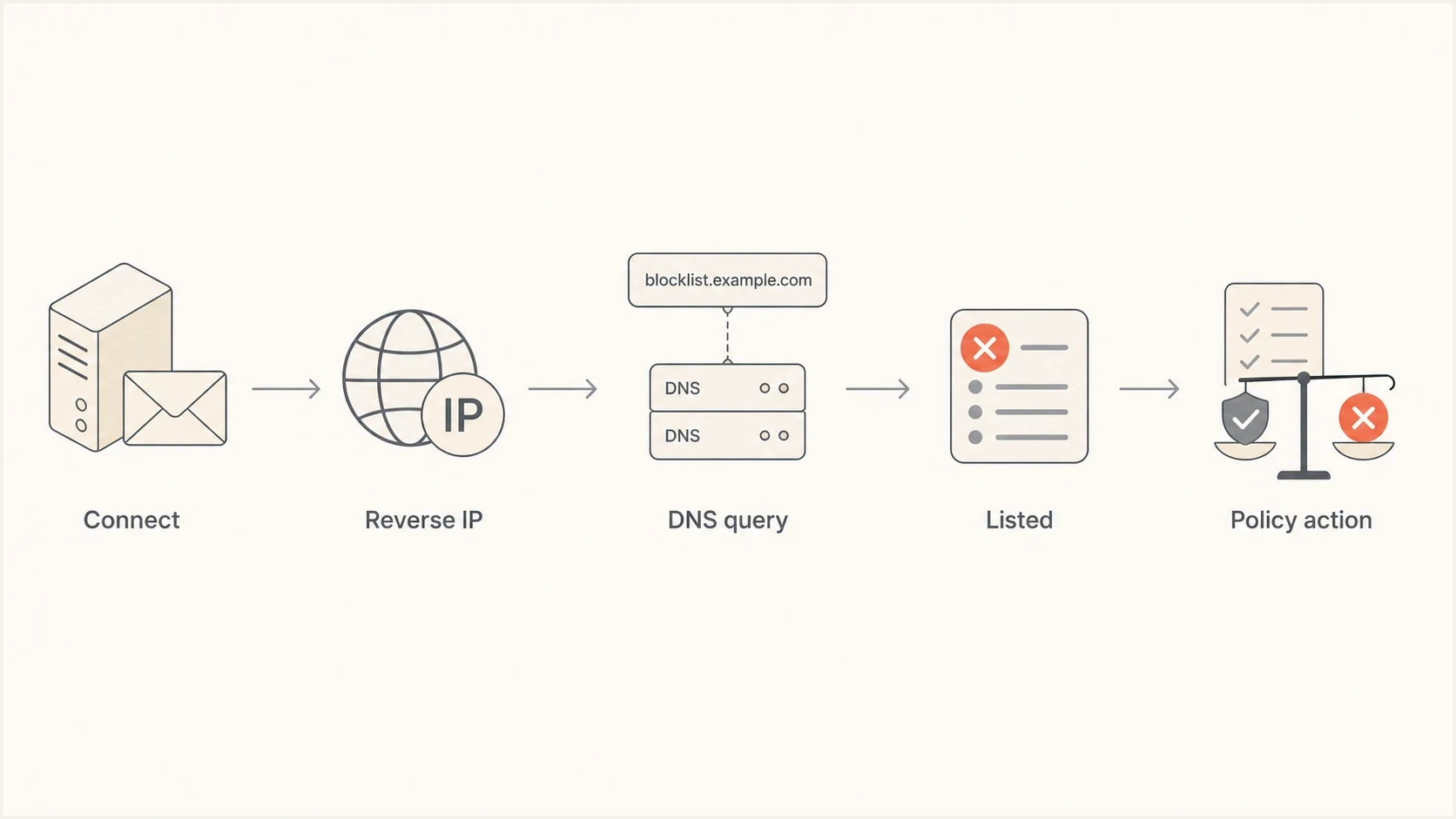
DNSBL flowchart showing an email blocklist query from connection to policy action
Example DNSBL querytext
Sending IP: 198.51.100.38
Reverse IP: 38.100.51.198
DNS query: 38.100.51.198.dnsbl.example
No record: not listed
127.0.0.2: listed
A no-record result normally means the IP is not listed. A returned loopback address, often in the 127.0.0.0/8 range, means the IP is listed and can include a code for the reason or list category. Some lists also publish TXT records with a plain-language listing reason or delisting pointer. The receiver decides what to do next. The blocklist does not force one universal outcome.
The same idea applies to domain-oriented lists, but the query target changes. Instead of asking about a sending IP, the receiving system can ask whether a domain in the message body, visible From domain, or authentication path has a poor reputation. A deeper walkthrough is available in how email blacklists work.
Types of email blocklists
Operationally, the most useful split is IP-based, domain-based, and URL or link-based. This matters because an IP listing often follows a specific sending route, while a domain or URL listing can follow the brand across providers and campaigns.
|
|
|
|
|---|---|---|---|
IP DNSBL/RBL | Sending IP | Route blocked or scored | Fix source, then delist |
Domain/RHSBL | Header or auth domain | Domain reputation hit | Remediate domain |
URIBL | Linked domain or URL | Campaign filtered | Remove or fix URL |
Policy list | IP or netblock | Direct delivery refused | Use authorized relay |
Compact comparison of common email blocklist types.
IP-based lists
IP blocklists track sending mail servers. A dedicated IP gives the sender more control, but a shared IP pool means another sender's behavior can affect everyone using that pool.
- Dedicated IP: The reputation mostly reflects your own mail stream.
- Shared IP: One poor sender can damage delivery for neighboring senders.
- Legacy IP: Old infrastructure can keep a listing alive even after production mail moves.
Domain and URL lists
Domain and URL lists are harder to escape because the same domain often appears across mail systems, landing pages, links, and employee mail.
- URIBL: A listed link can hurt delivery even when the sending IP is clean.
- RHSBL: The listed identifier is often a domain in the From, HELO, or return-path context.
- Tracking domain: A shared or abused redirect domain can damage otherwise clean campaigns.
Domain listings are usually more painful
An IP can be changed after careful remediation. A domain is part of the brand. If the domain lands on a major blacklist, switching email service providers rarely solves the underlying issue because the same domain continues to appear in mail.
Abuse listings vs policy listings
The listing category matters as much as the lookup result. An abuse blacklist records observed behavior such as spam trap hits, compromised hosts, or open relays. A policy blacklist identifies IP space whose owner or operator says should not deliver mail directly to recipient servers, often dynamic or residential access networks.
Abuse listing
Find and stop the harmful traffic, secure the source, clean affected data, and follow the operator's delisting process after the evidence stops.
Policy listing
Use an authorized outbound relay or authenticated submission service. If the IP should run a direct mail server, the IP owner must confirm the assignment and request the policy change.
Check the return code before delisting
One DNSBL can publish several categories through different return codes. Read the operator's category description before changing infrastructure or submitting a removal request. A policy listing can be accurate even when the IP has not recently sent spam.
How to prioritize a listing
Do not treat every lookup hit as equal. Prioritize listings that match an active sending IP, visible From domain, return-path domain, HELO name, or linked domain used in current mail. A stale listing on unused infrastructure matters less than a domain or URL listing that appears in production campaigns.
Then match the listing to delivery symptoms. A hard bounce with DNSBL, blacklist, blocklist, or policy text deserves immediate action. A minor list with no bounce evidence still deserves cleanup, but it should not distract from provider-specific complaints, authentication failures, or engagement drops.
|
|
|
|---|---|---|
Active sending IP | High | It can block the current route. |
Visible From domain | High | It follows the brand across mail. |
Bounce references listing | High | It links the symptom to the list. |
Unused legacy IP | Watch | It matters if mail returns there. |
No recipient symptom | Watch | It is evidence, not the full diagnosis. |
Priority depends on whether the listed identifier is active and visible in real mail.
Start with production mail
The highest-risk listing is the one that touches mail your users or customers need today. Fix the live source first, then clean up legacy records, unused infrastructure, and old sending paths.
Public vs private blocklists
The next split is public versus private. Public blocklists are visible and queryable. Private blocklists are internal reputation systems operated by mailbox providers and enterprise filters. This is why a sender can look clean on public checks and still lose inbox placement at a major provider.
A public blacklist usually gives you a visible listing, a return code, a reason, or a removal route. A private blacklist usually shows up through symptoms: one provider throttles mail, one company rejects messages, a single mailbox misses invoices, or accepted mail lands in junk.
Public blocklists
- Visibility: Senders can usually query an IP or domain.
- Criteria: Listing and delisting rules are often published.
- Use: Corporate mail admins and smaller providers use them directly.
Private blocklists
- Visibility: Senders cannot query most internal scoring systems directly.
- Criteria: Signals include engagement, complaints, bounces, content, and authentication.
- Scope: A private block can affect one mailbox, company, provider, IP, or stream.
- Use: Large mailbox providers use internal scoring to make inbox decisions.
The practical difference is the evidence. Public listings start with lookup evidence. Private filtering starts with bounce text, headers, engagement changes, recipient reports, DMARC reports, and sending changes.
Clean public checks do not prove clean reputation
If Gmail engagement falls or Microsoft bounces increase while public blocklist checks look clean, treat that as a reputation problem. Public listings and private filtering often share the same causes: complaints, traps, bad authentication, and low engagement.
How inbox providers use blocklists
Major inbox providers do not rely on one public blacklist as a simple yes-or-no gate. Gmail, Microsoft, and Yahoo combine internal reputation systems with outside data, user complaints, engagement data, authentication results, and traffic patterns. Public listings still matter because they often correlate with the same signals that private filters penalize.
|
|
|
|---|---|---|
Hybrid | Engagement | |
Hybrid | Bounces | |
Direct signals | Deferrals | |
Corporate | Policy driven | SMTP text |
Provider behavior is simplified for practical diagnosis.
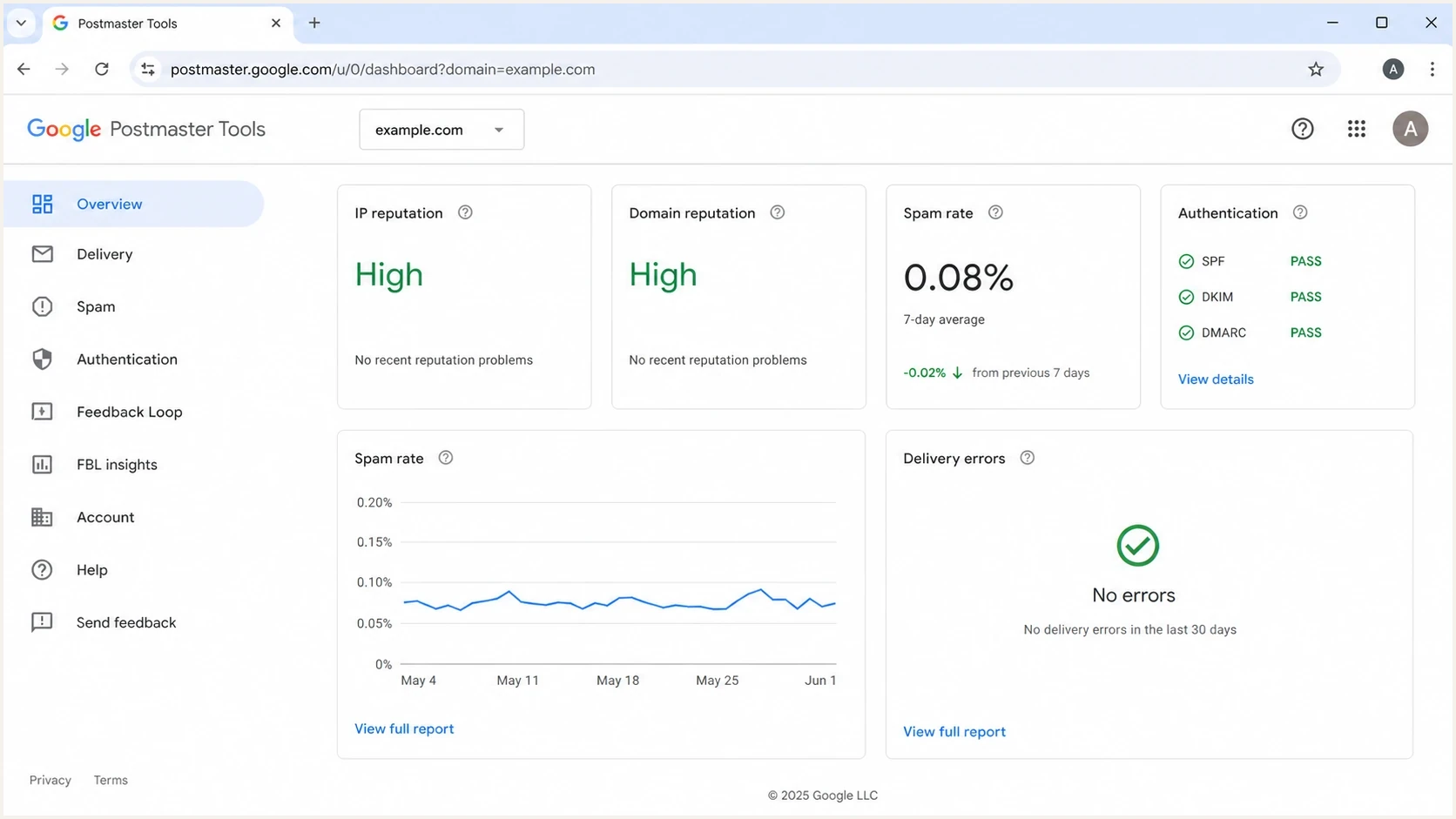
Google Postmaster Tools dashboard showing sender reputation signals for blocklist diagnosis
Enterprise security filters add another layer. A B2B sender can have healthy consumer inbox placement and still see business mail blocked because a corporate gateway applies a stricter policy or uses a blocklist the consumer mailbox does not use.
How to check if you're on a blocklist
Start with your own evidence. Provider-specific engagement drops, hard-bounce spikes, unusual SMTP deferrals, and support tickets about missing transactional mail all point to filtering. Then inspect bounce text and check every identifier that appears in the mail path.
- Measure: Compare engagement, bounces, and complaints against the same segment and provider.
- Read bounces: Look for words like listed, blocked, rejected, denied, policy, reputation, DNSBL, or RBL.
- Check identifiers: Test the sending IP, visible From domain, return-path domain, HELO name, and linked domains.
- Confirm ownership: Determine whether the sending IP is dedicated, shared, or controlled by a provider, since the IP owner often has to handle remediation and delisting.
- Confirm authentication: Validate SPF, DKIM, and DMARC before requesting removal.
- Scope the issue: Check whether the failure is one mailbox, one company, one provider, or all traffic.
Example bounce texttext
550 5.7.1 Message rejected due to sender reputation
554 5.7.1 Sending IP is listed by a reputation service
421 4.7.0 Temporarily deferred due to unusual mail volume
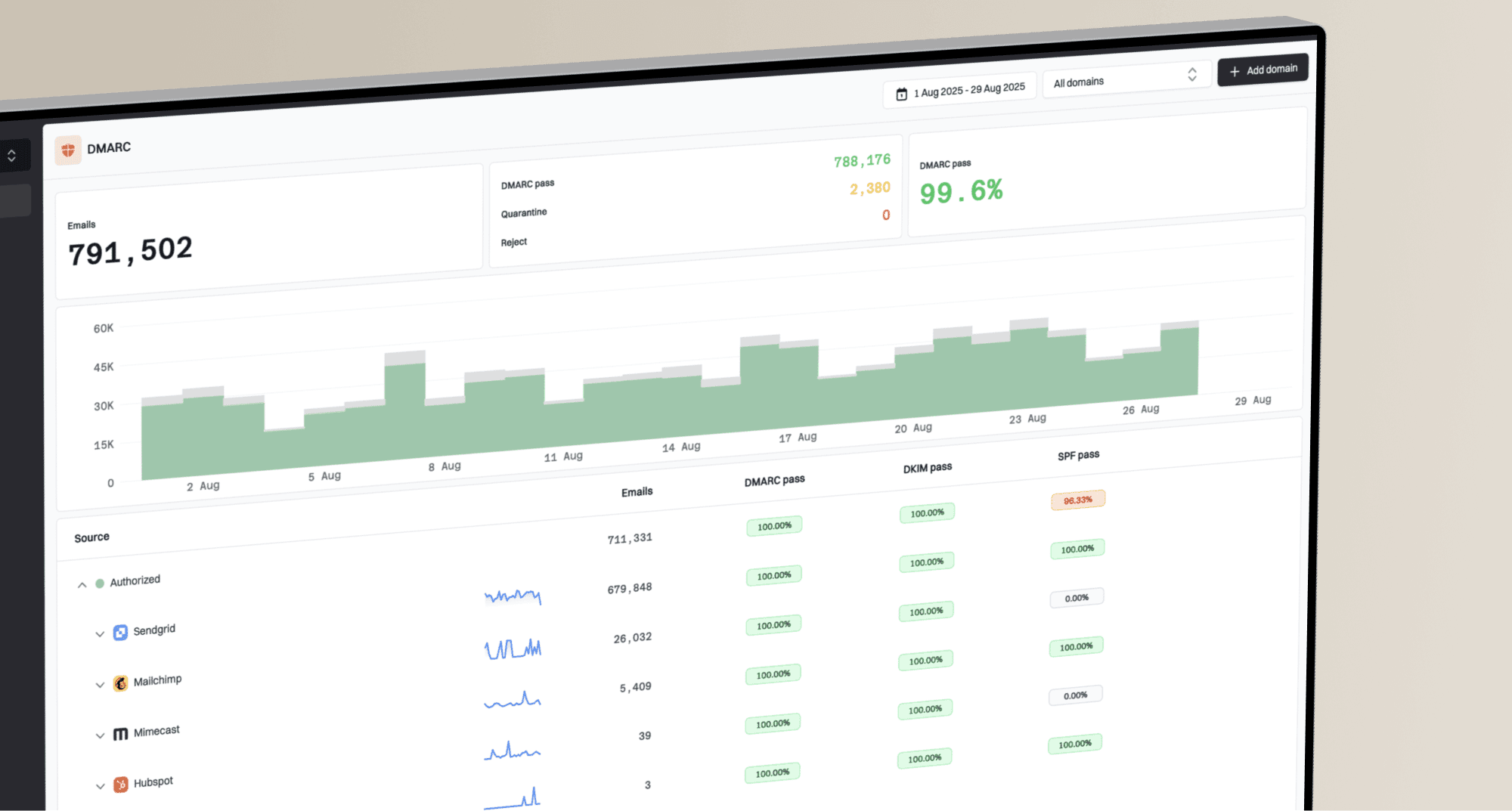
A quick point-in-time check helps, but a one-off lookup will not explain why the listing happened. A stronger workflow pairs lookup data with authentication review, bounce analysis, sending-source inventory, and the exact campaign or system that triggered the change. Suped's product brings DMARC, SPF, DKIM, blocklist monitoring, and deliverability signals into one workflow, so the issue does not sit in separate tabs owned by separate teams.
Blocklist checker
Check your domain or IP against 144 blocklists.







If the problem might be broader than one blacklist lookup, run a wider DNS and authentication review with the domain health checker. It is useful when blocklist symptoms appear alongside SPF, DKIM, or DMARC failures.

Blocklist monitoring page showing domain and IP checks across blocklists with importance and status
Spam traps and list decay
Spam traps are addresses used to identify senders with weak permission or poor list maintenance. They matter because many public and private blacklist decisions treat trap hits as stronger evidence than a normal bounce or a single spam complaint.
- Pristine traps: Addresses created only to catch unsolicited mail. Hits usually point to scraped, rented, purchased, or guessed addresses.
- Recycled traps: Old valid addresses that stopped being used and later became trap addresses. Hits usually point to stale lists and weak suppression.
- Typo traps: Misspelled domains or malformed addresses collected from forms. Hits usually point to weak validation at signup.
- Seeded traps: Addresses placed in risky data sources. Hits usually point to imported or poorly governed lists.
Trap hits are a root-cause signal
Many operators do not reveal exact trap addresses, so do not treat removal as a search for one bad contact. Fix the acquisition source, signup validation, bounce handling, suppression logic, and re-engagement rules that allowed the trap hit.
How to get removed from a blocklist
Do not start with the delisting form. Start by stopping the affected mail stream and finding the cause. A premature delisting request often fails, and repeated requests without remediation can damage credibility with the operator.
Step 0 is stop sending
Pause the affected campaign, source, IP, or domain. Continuing to send while listed creates more negative evidence and makes recovery slower.
- Triage: Identify whether the trigger was compromise, spam traps, complaints, bounces, links, or authentication.
- Remediate: Clean the list, secure systems, remove bad URLs, fix DNS, and quarantine risky segments.
- Document: Record what changed, when sending stopped, and which sources were removed or secured.
- Request: Use the operator's official process and give a concise explanation of the fix.
- Resume: Warm up slowly with engaged recipients instead of returning to full volume.
|
|
|
|---|---|---|
Automatic expiry | No form | Hours or days |
Self-service review | Portal or form | Fast after fix |
Manual review | Evidence needed | Varies |
Provider-owned IP | Owner request | Varies |
Delisting patterns vary by operator and listing reason.
Do not treat paid delisting as remediation. Reputable operator processes focus on fixing the cause, and a payment demand is a warning sign. If a listing reason involves the IP owner, your hosting provider or email service provider might need to submit the request because they control the listed netblock.
How to avoid getting on a blocklist
Prevention comes down to consent, hygiene, authentication, predictable sending, and fast suppression. A good sender can still hit a blacklist if an old list decays, a form is abused, or a domain is spoofed. The goal is to make those problems visible early.
Provider spam-rate guardrails
Use these operational guardrails for user-reported spam rates. They are not universal blocklist thresholds.
Healthy
< 0.1%
Keep the rate below one complaint per thousand delivered messages.
Watch
0.1-0.3%
Tighten targeting and remove low-engagement segments.
Action
>= 0.3%
Pause or reduce sending until the cause is fixed.
- Permission: Use confirmed opt-in for risky acquisition sources and never buy or scrape lists.
- Hygiene: Remove hard bounces immediately and sunset subscribers who never engage.
- Suppression: Keep unsubscribe, complaint, and role-account suppressions synced across every sender.
- Unsubscribe: Make opt-out clear, honor it quickly, and keep marketing consent separate from transactional mail.
- Authentication: Keep SPF, DKIM, and DMARC passing for every legitimate sender and domain.
- Security: Protect SMTP credentials, API keys, and admin accounts so compromise cannot create spam bursts.
- Volume: Warm up new IPs and domains with engaged recipients before expanding volume.
- Segmentation: Send risky campaigns to smaller engaged groups before expanding audience size.
- Links: Review redirectors, partner URLs, shorteners, and tracking domains before each campaign.
Where Suped fits
Suped's product is useful when prevention has to be operational, not occasional. It combines DMARC monitoring, hosted DMARC, hosted SPF, SPF flattening, hosted MTA-STS, real-time alerts, issue detection, and blocklist monitoring so teams can see authentication and reputation problems in one place.
For ongoing reputation alerts, use blocklist monitoring rather than waiting for a failed campaign to expose the problem.
What is the impact of being on an email blocklist
A blocklist listing has direct and delayed costs. The direct cost is rejected mail or junk placement. The delayed cost is reputation debt: after the listing is fixed, receivers still treat the sender with more caution until positive sending history rebuilds trust.
- Revenue: Marketing email loses reach when offers never reach the inbox.
- Support: Missing password resets, invoices, and alerts create avoidable tickets.
- Trust: Customers lose confidence when expected messages fail silently.
- Operations: Teams spend time on emergency cleanup instead of planned email work.
Blocklists are reputation symptoms
Treat blocklists as symptoms, not the full diagnosis. A listing usually points to a deeper sender reputation problem: poor permission, old data, bad authentication, unsafe links, a compromised system, or a sending pattern that receivers do not trust. A policy listing is the exception because it describes how an IP range should send mail rather than proving abusive behavior.
The strongest practical workflow is to monitor public blocklists, inspect private-provider symptoms, keep DMARC reports clean, and fix the sending source before asking for delisting. Suped's product supports that workflow for teams managing multiple domains or clients through one dashboard.
If a listing has already happened, stop the affected mail stream, isolate the cause, fix it, request removal through the correct channel, and warm up slowly. If no listing has happened yet, the best move is boring but effective: monitor reputation continuously and keep authentication, consent, and list hygiene tight.