How do I resolve a blocked sending IP with Office365 and what steps should I take to ensure transparency?

Published 25 May 2025
Updated 23 Sep 2026
12 min read
Summarize with
Updated on 23 Sep 2026: We updated this guide for Microsoft's current 5.7.606-649 process and external sender requirements.
Yes. A 550 5.7.606-649 bounce that says banned sending IP means Microsoft 365, through Exchange Online Protection, has blocked that source IP for mail to Microsoft 365 recipients. The fix is to stop the bad or suspicious traffic, confirm the IP and sending identity are clean, submit the IP through Microsoft's delisting process, then prove transparency with clear DNS, reverse DNS, authentication, ownership, and abuse-handling details.
Typical Office 365 IP block bounce
550 5.7.606 Access denied, banned sending IP [203.0.113.24].
To request removal from this list please visit https://sender.office.com/
and follow the directions.
A common mistake is treating this as a DNS-only problem. DNS matters, but a Microsoft IP block is a reputation incident. Preserve evidence, reduce risk, fix the cause, make the sender easy to verify, then request removal. If the IP is shared, involve the sending platform because another sender's traffic can trigger the block.
- Confirm Save the full bounce, bracketed source IP, trailing AS code, envelope sender, recipient domain, timestamp, and campaign or application that sent the message.
- Pause Hold bulk or nonessential traffic from that IP while you check for abuse, compromised accounts, bad lists, and sudden volume changes.
- Delist Use the Office 365 IP delist flow after you know what changed, not before you have a defensible explanation.
What the 5.7.606 bounce means
The bounce is not a generic Outlook inbox rule and it is not proof that every Microsoft property has the same view of your IP. It means the path handling Office 365 or Microsoft 365 mail rejected the SMTP transaction because the source IP was on Microsoft's blocked senders list. Consumer Outlook.com has separate sender support paths, so do not assume one delisting request fixes both.
|
|
|
|---|---|---|
Office 365 IP block | Use IP delisting | |
5.7.511 | Manual traffic review | Forward the full NDR as instructed |
S3140 | Outlook rejection | Use Outlook path |
Use the exact bounce code to choose the response path.
Do not submit a delisting request until you have checked the sending source. If the IP keeps sending unwanted mail, Microsoft can relist it quickly and the second request becomes harder to support.
- Shared IP Open a support case with the sending platform and ask whether other tenants are affecting the same IP.
- Dedicated IP Review your own mail streams first, including automations, password resets, newsletters, and dormant workflows.
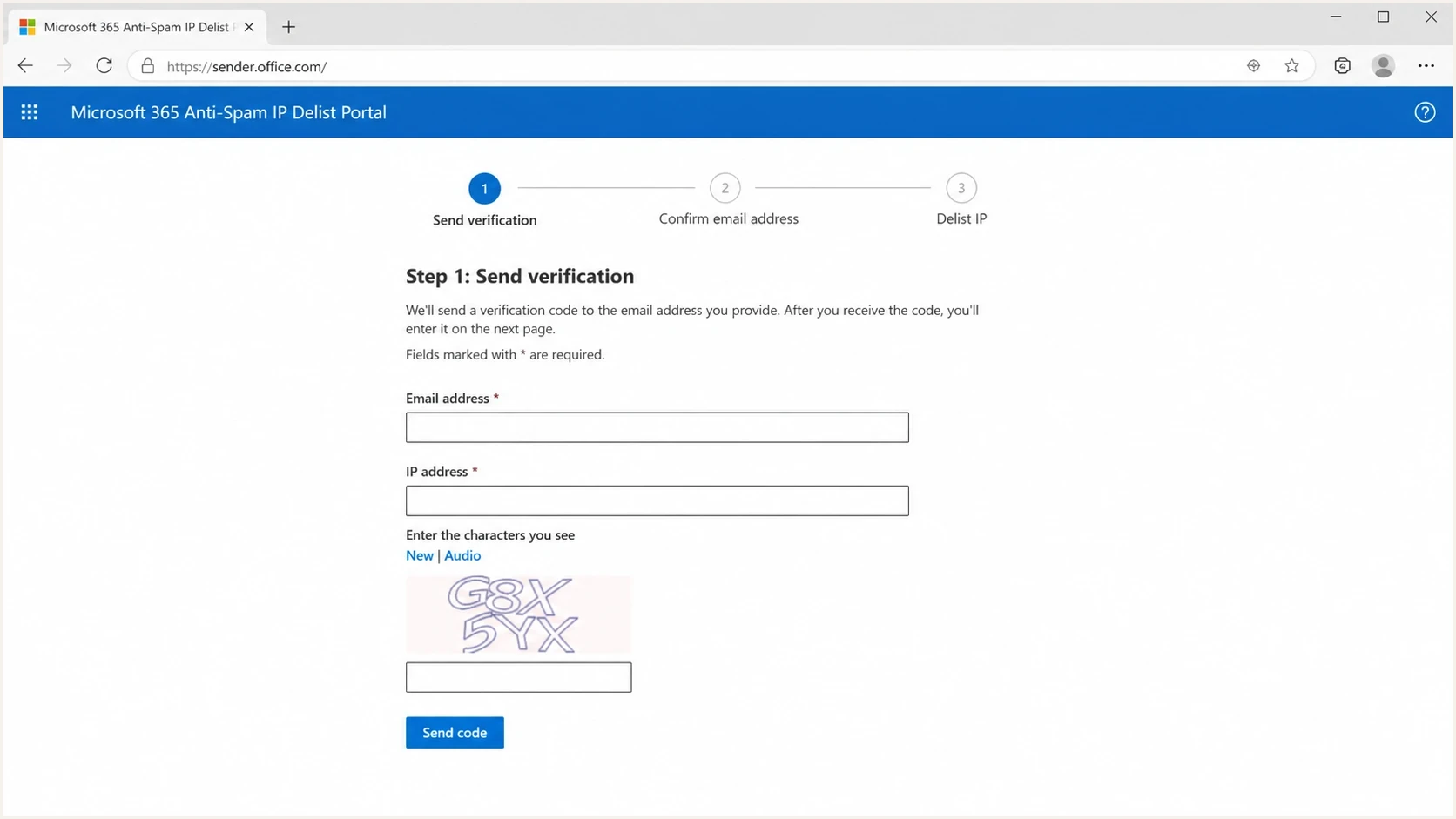
Microsoft Office 365 Anti-Spam IP Delist Portal with email and IP fields.
If you are seeing related Microsoft rejection patterns, separate them before you act. A 5.7.606 Office 365 IP block is not the same operational problem as S3140 errors or mail that reaches Microsoft and then lands in quarantine. Routing every symptom into one ticket slows the fix.
Fix the block before delisting
Use this order: prove what happened, remove the cause, then ask Microsoft to clear the IP. The delisting form is only one step. The rest is the evidence that makes the request credible and protects the IP after it is removed from the blocklist or blacklist.
- Capture Keep the full NDR, including the source IP in brackets, SMTP code, trailing AS code, sending address, recipient address, and message ID if available.
- Identify Confirm whether the IP is dedicated, shared, newly warmed, behind outbound NAT, or recently moved between pools. The owner of the fix changes with that answer.
- Stop Disable the traffic source that caused the spike, complaint pattern, old list send, compromised account, or malformed automation.
- Suppress Do not retry the same message after a permanent 5xx NDR, and stop repeated attempts to recipients that continue to reject the mail.
- Verify Check that the sender uses a stable public IP and a valid hostname setup: reverse DNS must work and the EHLO name must resolve. Then verify SPF, DKIM, DMARC, bounce handling, unsubscribe handling, and complaint handling.
- Submit Enter the exact blocked IP and the email address that received the NDR in the Office 365 delist portal. Submit one IP and one email address per visit, then use the verification email to select Delist IP.
- Retest Send low-volume test mail to consenting Microsoft 365 recipients and watch for the same SMTP code before restoring normal volume.
Microsoft's delisting guidance directs 5.7.606-649 bounces matching the banned sending IP wording to the Office 365 Anti-Spam IP Delist Portal. Open the delist portal, submit the details, confirm the email, then select Delist IP. Microsoft states that restrictions can take up to 24 hours or longer to clear. Delisting only removes this IP-level block; messages must still pass Microsoft 365 security checks, including composite authentication.
Plain case note to keep internally
Blocked IP: 203.0.113.24
Bounce code: 550 5.7.606
First seen: 2026-05-21 09:15 UTC
Sender: mail.example.com
Traffic paused: yes
Root cause: old automation sent to stale Microsoft recipients
Fix applied: list disabled, suppression sync repaired
Next step: submit Office 365 IP delist request
Transparency does not mean over-explaining. It means a postmaster can verify who owns the traffic, why it exists, how recipients opted in, what changed after the block, and who handles abuse reports.
When the delist portal does not resolve the block
A failed portal result does not always mean the request was ignored. It often means the wrong public egress IP was submitted, another relay in the pool is still blocked, the verification step was not completed, or the NDR requires a different Microsoft review path. Start again with the newest unmodified NDR and compare it with the server's actual outbound route.
|
|
|
|---|---|---|
IP is not blocked | Compare the bracketed IP in the newest NDR with each public egress IP, NAT gateway, and relay. | Submit the exact current IP and preserve the contradictory result. |
No verification email | Confirm that the address received the NDR and check its junk folder and mail filters. | Resubmit one email address and one IP, then complete the confirmation link. |
5.7.511 | The delist portal cannot clear this code. | Forward the full NDR, code, and IP to delist@microsoft.com. |
Shared IP | Confirm which provider owns the IP and whether several customers use it. | Have the provider investigate the pool and own the delisting request. |
Dynamic or residential IP | Check whether the public IP changes and whether the network owner supports valid reverse DNS. | Move outbound mail to an authenticated relay or stable business egress before requesting another review. |
Still rejected after confirmation | Allow up to 24 hours or longer, then collect fresh NDRs by recipient tenant and sending node. | Escalate with the evidence and the exact remediation already completed. |
Match the portal result to the next diagnostic step.
For 5.7.511, Microsoft says to send the full NDR code and IP address to delist@microsoft.com. Microsoft states that it will respond within 48 hours with next steps. This instruction applies to 5.7.511, not a normal 5.7.606 portal request.
Do not rotate domains or IP addresses to hide unresolved traffic. A temporary approved route for critical, expected mail needs its own clean reputation and controlled volume. It does not replace fixing the blocked source.
Make the sender transparent
When an IP is blocked, small identity gaps become bigger problems. A mismatched reverse DNS name, a parked sender domain, a vague company website, or missing abuse contacts usually are not the original reason for the block. They still make recovery harder because the reviewer has less confidence in the sender.
Signals that slow review
- Reverse DNS The PTR points to a domain that does not match the sending brand or has no useful website.
- Website The domain shows a placeholder page, static odd content, or no clear contact path.
- Mail identity The bounce domain, visible From domain, and authenticated domains do not clearly relate.
Signals that help review
- Reverse DNS The PTR names a host under a domain your organization controls, and that host resolves back to the sending IP.
- Website The sender domain has clear organization details plus monitored postmaster and abuse contacts.
- Mail identity SPF, DKIM, and DMARC identify the same organization and pass on real samples.
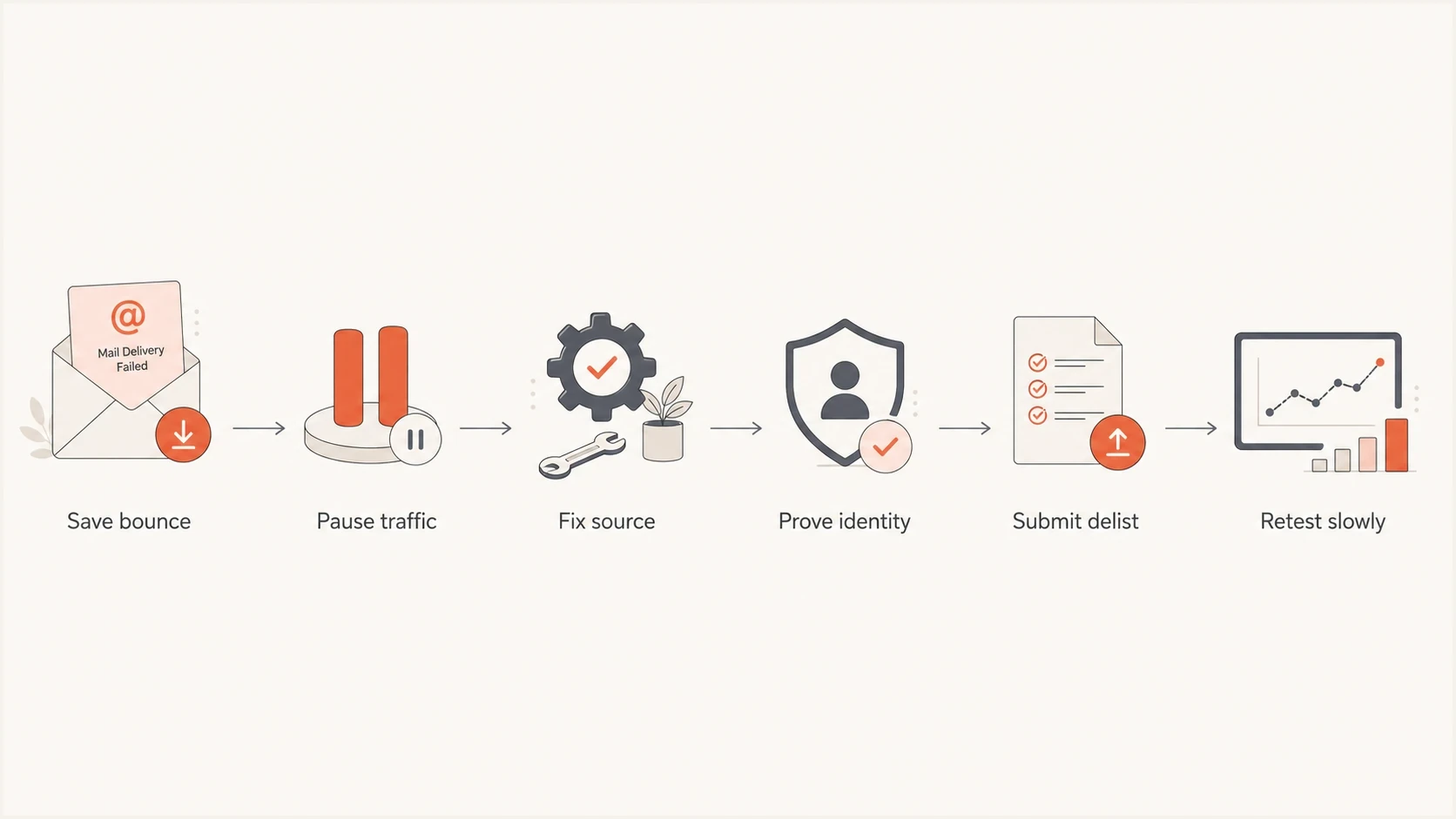
Six-step flow for resolving an Office 365 blocked sending IP.
Check the basics before using the delist form: PTR naming and forward resolution, a resolvable EHLO name, SPF pass, DKIM pass, DMARC result, visible From domain, bounce domain, and the unsubscribe path. A clean domain health check gives you a fast read on the DNS side before you send more mail.
Minimum DNS posture to verify
example.com TXT "v=spf1 include:mail.example.net -all"
selector1._domainkey.example.com TXT "v=DKIM1; k=rsa; p=..."
_dmarc.example.com TXT "v=DMARC1; p=quarantine; rua=mailto:d@example.com"
?
What's your domain score?
Deep-scan SPF, DKIM & DMARC records for email deliverability and security issues.
For transparency, the public sender identity should be boring and consistent. If a sending domain has a country-specific brand history but the IP's reverse DNS points to a different top-level domain, redirect or publish useful ownership information. The goal is to remove ambiguity, not to game Microsoft's filters.
Investigate why Microsoft blocked the IP
A delist request without a root-cause check is fragile. Start with the last 7 to 14 days of traffic and compare Microsoft recipients against the rest of the list. A pattern isolated to Microsoft often points to recipient engagement, junk complaint rate, or Microsoft-specific reputation rather than a universal blocklist problem.
- Volume Look for sudden spikes, new automations, backfilled jobs, or a warmup that moved too quickly.
- Recipients Separate active customers, inactive contacts, role accounts, old imports, and typo-heavy addresses.
- Content Check whether the blocked traffic used different links, attachments, tracking domains, or templates.
- Security Check for compromised users, leaked API keys, rogue integrations, and unapproved sending systems.
- Reputation Check IP and domain listings, especially when other receivers also start rejecting or delaying mail.
Illustrative post-delist ramp
Increase only while Microsoft bounces and complaints remain stable. Pause the ramp if either worsens.
Normal Microsoft volume
If the IP is on public blocklists or a private blacklist at the same time, treat that as extra evidence, not the whole answer. Microsoft can block an IP based on its own signals even when common public lists are clean. The inverse is also true: a public listing can exist while Microsoft accepts the mail.
When Microsoft delisting does not hold, the issue usually is still active traffic, not the form itself. Compare tenant-level bounces, list age, sending cadence, authentication results, and Microsoft delisting patterns before asking for another review.
Where Suped fits
Suped's product can keep the evidence for this workflow in one place: DMARC monitoring, SPF and DKIM checks, issue detection, hosted SPF, hosted DMARC, hosted MTA-STS, blocklist monitoring, and deliverability alerts. During an Office 365 IP block, use those records to identify what changed and document that the sender is controlled.

Issue steps to fix dialog showing the issue overview, tailored fix steps, and verification action
Use Suped to monitor the domain's authentication, review unverified or failing sources, work through SPF, DKIM, and DMARC issues, and keep blocklist monitoring beside the authentication view. This helps separate a Microsoft-only IP block from a broader sender reputation incident.
Issue detection Suped surfaces broken authentication, unverified sources, and policy gaps with steps to investigate them.
- Hosted controls Hosted SPF and hosted DMARC reduce manual DNS work when several sending sources need changes.
- Alerts Alerts can flag authentication failure spikes and blocklist or blacklist changes during recovery.
- Scale The MSP and multi-tenant dashboard keeps incident history available across multiple sender domains.
After the delist request, send a real test message and inspect the received headers, authentication result, and placement signals with an email test. That is more useful than relying only on a DNS lookup because Microsoft judges the message that actually arrives, not the record you intended to publish.
Email tester
Send a real email to this address. Suped shows a results button when the test is ready.
?/43tests passed
Verify the fix after delisting
Once Microsoft removes the IP, do not return to full traffic immediately. Test, observe, then ramp. The goal is to prove the fix under real mail flow without recreating the same signal that caused the block.
- Test Send a small number of messages to known Microsoft 365 recipients that expect the mail.
- Inspect Check SMTP responses, headers, SPF, DKIM, DMARC, folder placement, and complaint behavior.
- Ramp Restore volume gradually, starting with engaged recipients and transactional mail with clear user intent.
- Record Keep an incident note with the cause, fix, delist time, and checks passed after recovery.
A successful delist is not the end of the incident. The end is stable Microsoft delivery, clean authentication on real samples, no repeat 5.7.606 bounces, and a sender identity that a postmaster can verify without guessing.
If the mail is accepted but later quarantined or junked, treat that as a separate delivery phase. The fix moves toward content, recipient engagement, tenant filtering, and O365 quarantines instead of IP delisting.
Views from the trenches
Best practices
Save the full NDR, source IP, envelope sender, time range, and recent traffic changes.
Fix authentication, reverse DNS, and abuse contacts before asking Microsoft to delist.
Resume traffic slowly after delisting and watch Microsoft bounces for at least two days.
Common pitfalls
Submitting the same IP repeatedly before the bad traffic has stopped wastes review time.
Treating Office 365 and Outlook.com as one queue sends the request to the wrong place.
Leaving a vague sender website or odd reverse DNS makes manual review harder for postmasters.
Expert tips
Use a plain evidence note that states the fix, the owner, and when traffic changed.
Compare failed recipients by tenant because one Microsoft estate can recover before another.
Keep a secondary approved route for critical mail, but do not hide unresolved bad traffic.
Marketer from Email Geeks says a 5.7.606 bounce means the source IP is blocked and should be handled as an Office 365 reputation incident.
2024-11-12 - Email Geeks
Marketer from Email Geeks says Office 365 and Outlook.com use separate delisting paths, so the exact bounce wording should guide the request.
2025-02-03 - Email Geeks




