How can I resolve Microsoft Outlook S3140 errors blocking my transactional emails?


Updated on 1 Aug 2026: We clarified S3140 subnet blocking and added current Microsoft sender-data and escalation guidance.
To resolve Microsoft Outlook S3140 errors, capture the full bounce, verify the sending IP, DNS, authentication, volume, and message stream, then submit a short mitigation request through the support path named by the receiving host. Because S3140 commonly covers a subnet or provider network, include proof that you control the IP or range and involve the hosting provider when it owns the address space.
S3140 is not fixed by changing one DNS record. It is usually an Outlook.com policy block against part of the sending network, so a clean individual IP or public blacklist result does not rule it out. Treat the incident as a case file: remove every technical objection, document Microsoft-side reputation signals when available, request mitigation, and keep affected transactional mail moving through another clean route during review.
- Direct fix: Open or continue the correct Microsoft sender-support case and ask for mitigation of the exact IP and range returning S3140.
- Evidence needed: Include the full NDR, receiving host, SPF and DKIM alignment, DMARC results, FCrDNS, blocklist and blacklist status, volume, message type, and IP control proof.
- Operational backup: Route affected Microsoft consumer domains through an unaffected IP while the blocked range is being reviewed.
What the S3140 error means
A Microsoft Outlook S3140 rejection means Microsoft has blocked part of the sending network, commonly at the subnet or provider-range level. The bounce often appears as a 550 5.7.1 policy rejection with a diagnostic code containing S3140. Microsoft can apply this even when the individual IP or domain does not appear on public blocklists (blacklists), because its private reputation systems also evaluate the surrounding network.
Support replies can be generic. A statement that users are receiving unwanted mail does not prove that the current transactional stream generated complaints, especially when recent messages were rejected before acceptance. It means Microsoft sees enough risk in the IP range, provider network, or sender pattern to block the SMTP transaction.
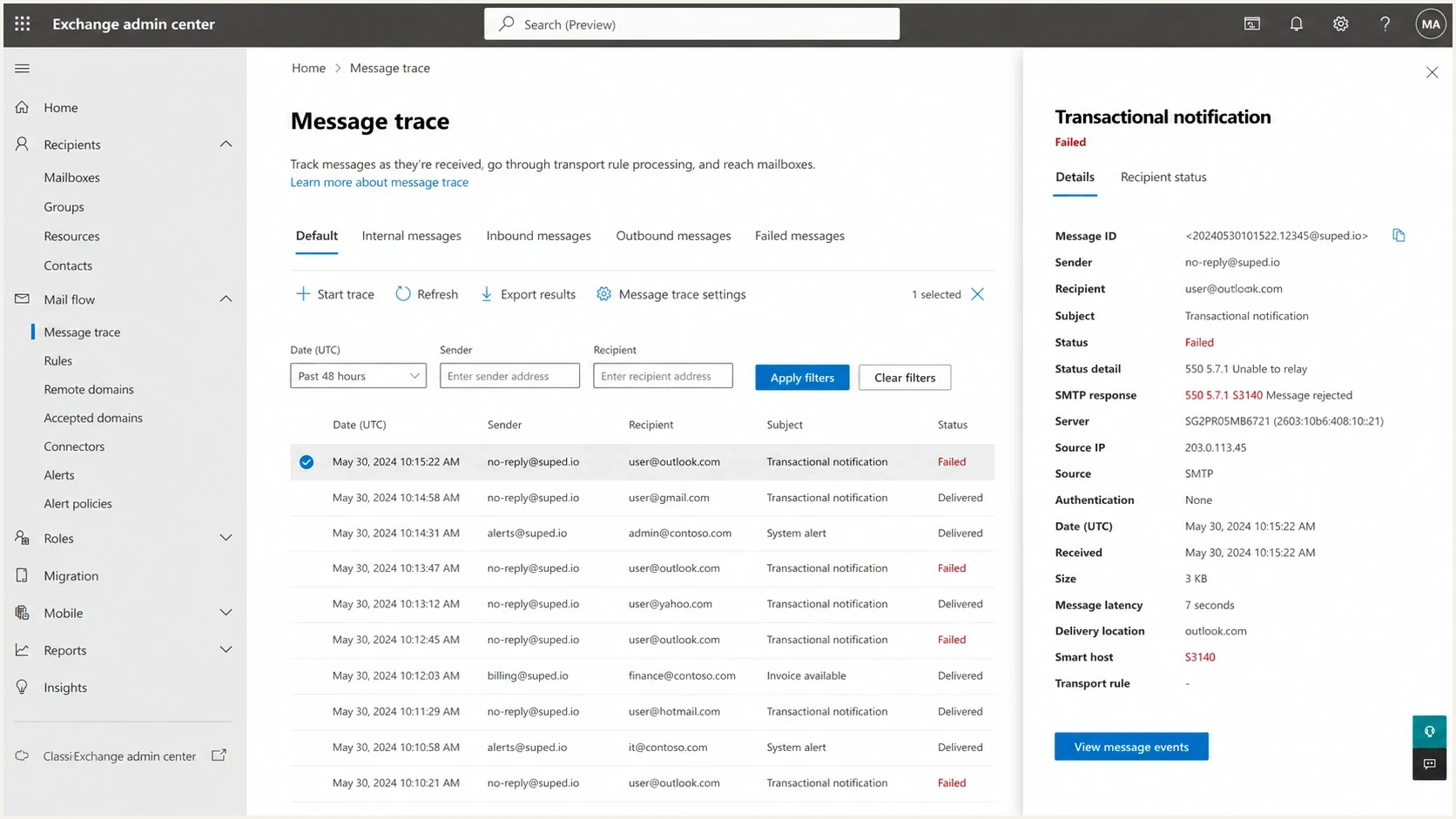
Microsoft Exchange admin center message trace showing a failed S3140 delivery.
Do not treat S3140 as a normal DNS failure
Fixing SPF, DKIM, DMARC, and rDNS is still required, but those records alone do not force Microsoft to accept a blocked IP. Once S3140 is active, the practical fix is reputation remediation plus escalation.
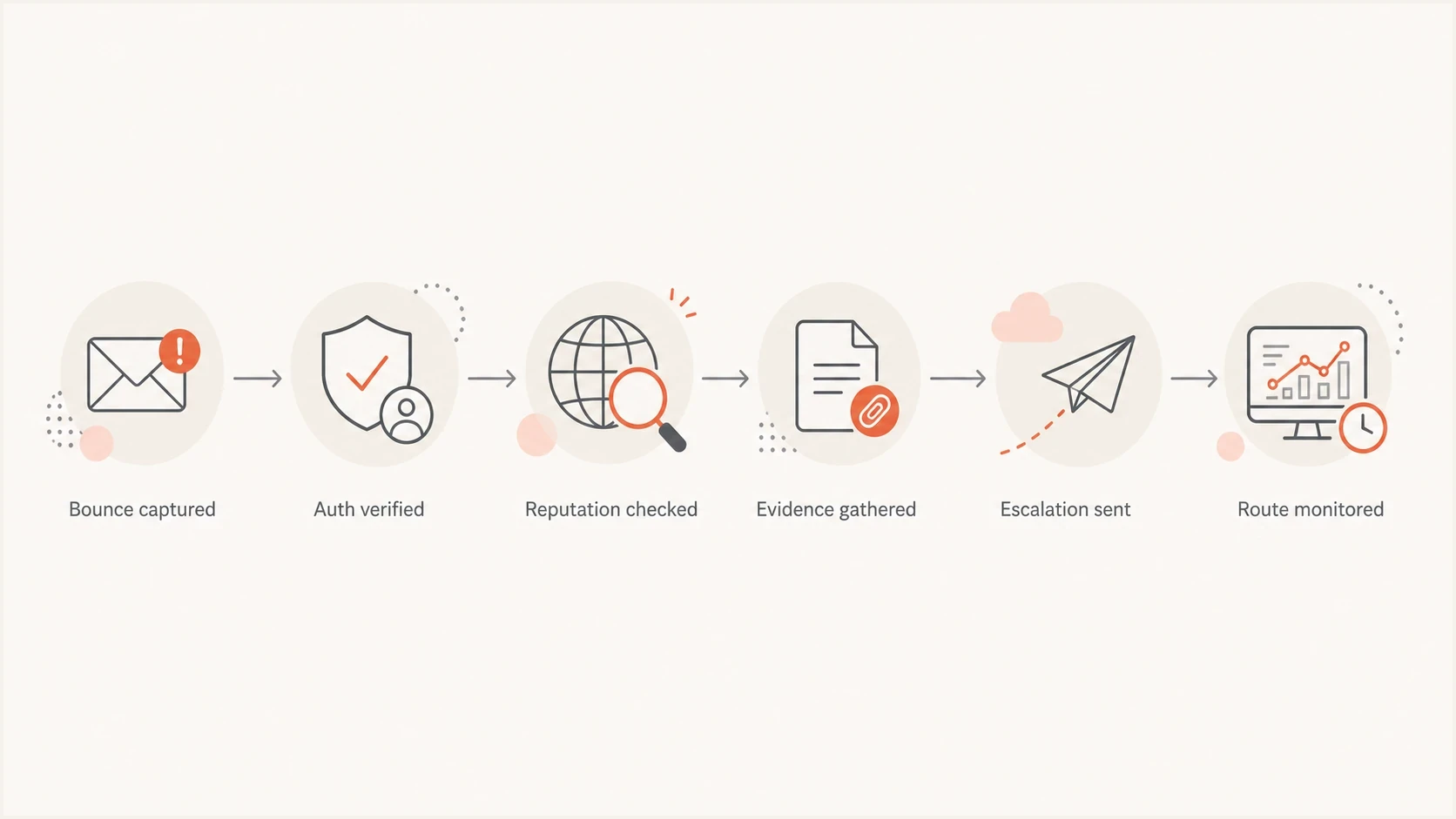
Flowchart showing the S3140 remediation path from bounce capture to route monitoring.
Confirm the block before changing infrastructure
Before changing IPs, isolate the failure. Pull a raw bounce from the mail server or ESP logs and confirm the recipient domain, receiving host, source IP, SMTP response, date, and message stream. Keep one clean example that proves Microsoft rejected the message during SMTP and that the same mail stream works elsewhere.
Typical S3140 bounce evidencetext
Remote server returned '550 5.7.1 Unfortunately, messages from
[203.0.113.24] weren't sent. Please contact your Internet service
provider since part of their network is on our block list. S3140'
Then check whether the issue affects only Microsoft consumer domains or also Microsoft 365 tenants. A receiving host containing olc.protection.outlook.com points to the Outlook.com consumer path, while a Microsoft 365 tenant rejection can name a different delisting route in the NDR. Outlook.com, Hotmail, Live, and MSN mail can behave differently from business tenants, so choose the support route from the full bounce rather than the recipient brand alone.
|
|
|
|---|---|---|
Bounce | Full NDR and host | Proves S3140 and route |
IP | Sending host and range | Scopes network review |
Stream | Transactional | Reduces ambiguity |
Volume | Daily count and trend | Shows stable sending |
Use compact evidence so support can review the ticket quickly.
For a broader check before escalating, run the domain through a domain health check and save the results with the ticket notes. The goal is to remove easy technical reasons for support to close the case.
?
What's your domain score?
Deep-scan SPF, DKIM & DMARC records for email deliverability and security issues.
Audit the technical standards Microsoft can reject
When a support reply says to review Outlook.com technical standards, respond with a numbered compliance summary. Keep it factual. Avoid long explanations, speculation, and screenshots unless asked. The strongest response is a short list that shows each requirement has been checked.
- SPF alignment: The envelope sender domain authorizes the sending IP, and its domain aligns with the visible From domain when SPF provides the DMARC pass.
- DKIM alignment: Transactional messages have a valid signature, and the signing domain aligns with the visible From domain when DKIM provides the DMARC pass.
- DMARC pass: At least one aligned SPF or DKIM result passes for the domain in the visible From header.
- FCrDNS: The IP has reverse DNS, and that public hostname resolves forward to the same sending IP.
- Message type: The traffic is solicited transactional mail such as password resets, account confirmations, receipts, security notices, or product notifications.
Example DMARC record for transactional maildns
_dmarc.example.com. 3600 IN TXT "v=DMARC1; p=none; rua=mailto:
dmarc-reports@example.com; adkim=s; aspf=s"
A one-click unsubscribe header is not generally expected for pure transactional mail like password resets and account confirmations. Separate notification mail carefully, because product notifications can drift into engagement or marketing territory. If a message promotes usage, nudges a dormant user, or contains broad product messaging, treat it more cautiously than a password reset.
DMARC record detail view showing SPF, DKIM, DMARC, rDNS diagnostics, and DNS records
Suped's product keeps DMARC pass rates, SPF and DKIM alignment, DNS diagnostics, and source-level issues in one incident record. For an S3140 case, export or copy those findings into the escalation notes so missing authentication evidence does not create another support loop.
Use Microsoft sender data and the correct support path
If you control the sending IP, request access to it in Microsoft's Smart Network Data Services (SNDS) before submitting mitigation. SNDS provides Outlook.com data for individual IPs, while its Junk Email Reporting Program (JMRP) sends complaint reports for messages users mark as junk. Neither program automatically removes S3140. Use them to identify the cause and document the cleanup.
- Confirm IP control: Request SNDS access only for IPs or ranges you administer, and keep the authorization current.
- Compare recent signals: Match the first S3140 timestamp against volume changes, complaint data, trap activity, and filtering results. Grey or missing data does not prove that the wider subnet is accepted.
- Process JMRP reports: Map each complaint to the responsible stream, suppress the complaining recipient, and investigate any unexpected source.
- Escalate provider-owned space: If a hosting provider or shared sending pool owns the range, send it the full NDR and timestamps. The network owner must stop abuse elsewhere in the subnet and work with Microsoft.
Match support to the receiving system
For S3140 bounces from the Outlook.com consumer system, use Outlook.com Delivery Support. If a Microsoft 365 tenant NDR names the business IP delist process or another address, follow that exact instruction. The Microsoft 365 delist route does not replace the separate Outlook.com sender-support path.
Check IP and domain reputation before escalation
A public blocklist check does not fully explain Microsoft acceptance, but it still matters. If your IP is listed on a major blocklist (blacklist), Microsoft support has an easy reason to defer mitigation. Check both the sending IP and the organizational domain, then save the result with the timestamp.
For an ongoing process, use blocklist monitoring instead of a one-off lookup. S3140 incidents often happen during warmup, provider migration, or new netblock allocation, exactly when reputation changes quickly and stale checks create false confidence.
Clean evidence
- Authentication: SPF, DKIM, and DMARC pass with aligned domains.
- DNS: Forward and reverse DNS identify the sending host.
- Reputation: The IP and domain are clear on major blocklists and blacklists.
Weak evidence
- Authentication: Only one sample message was tested, or DMARC alignment was not verified.
- DNS: Reverse DNS exists, but the hostname does not resolve to the sending IP.
- Reputation: The sender checked only one blacklist page and did not save proof.
Suped's blocklist monitoring and DMARC monitoring connect two parts of the incident workflow. Watch the IP and domain for blocklist or blacklist entries, monitor authenticated sources for failures, and trigger alerts when a listing or authentication break appears during warmup.
Blocklist checker
Check your domain or IP against 144 blocklists.







Send a short escalation that asks for the right action
The escalation wording matters. A long emotional reply gives support too much to skim past. Use a short list with one clear request: review the exact S3140 rejection and mitigate the affected sending IP or range. For newly assigned space, include the allocation evidence and explain the conservative ramp plan.
Escalation template for Microsoft S3140text
Hello,

Please review and escalate this S3140 case for mitigation of the
sending IP or affected range.

The full NDR is attached. We have verified the following:

1. SPF and DKIM pass and are aligned for DMARC.
2. DMARC passes for the visible From domain.
3. PTR and forward DNS identify the sending IP correctly.
4. The IP sends solicited transactional mail only.
5. Current daily volume and recent volume history are attached.
6. The IP is clear on the public blocklists and blacklists checked.
7. SNDS findings are attached where data is available.
8. Proof of IP control or provider assignment is attached.

The rejection is still occurring for Outlook.com consumer recipients.
Please re-evaluate and mitigate the affected IP or range.
If Microsoft asks for control or assignment proof, send the allocation record, invoice, or a provider letter that states the exact range, assignee name, and assignment date. Keep the full NDR and evidence attached to each reply, because a different support agent can handle the next response.
What to do after a denial
Reply in the same case with any new SNDS data, provider action, authentication correction, or abuse cleanup, then ask for re-evaluation of the exact IP. If the case closes, submit a fresh request only after the underlying evidence has changed. Repeating an unchanged request does not resolve a subnet that still has active abuse.
Microsoft discussions about S3140 blocks show how generic the wording can be. Do not argue with the wording itself. Keep the ticket focused on the facts Microsoft can use to approve mitigation.
Keep transactional mail flowing while Microsoft reviews
Do not let account confirmations and password resets sit behind a blocked route. If the mail is time-sensitive, route Microsoft consumer domains through an unaffected IP while the S3140 ticket is open. This is a continuity measure, not a way to hide bad traffic.
- Route narrowly: Move only the affected Microsoft recipient domains if the block does not affect all destinations.
- Preserve identity: Keep DKIM signing, envelope domains, tracking domains, and bounce handling consistent.
- Watch volume: Do not push the blocked range harder while asking for mitigation.
- Measure recovery: Track S3140 counts, accepted mail, deferrals, and complaint signals after mitigation.
Warmup posture during an S3140 case
Use conservative volume while the blocked range is under review.
Conservative
Low daily volume
Useful for evidence-based escalation
Risky
Sharp increases
Can create mixed signals during review
Critical
High bounces
Can confirm the block decision
If a different IP immediately delivers to Microsoft, that helps isolate the issue to the original range. It does not mean the original range should be abandoned. New IPs can inherit their own reputation problems, and buying a new block starts the same warmup and verification work again.
Know when to escalate, wait, or replace the IP
Replacing the IP is the last option, not the first. Keep pushing for mitigation when the range is clean, newly assigned, authenticated, and sending restrained transactional mail. Consider replacement when there is evidence of prior abuse, poor provider-network reputation, repeated refusal after the underlying causes have been addressed, or a business need that cannot wait.
|
|
|
|---|---|---|
New range | Escalate | Needs range review |
Clean auth | Keep case open | Fix is not DNS alone |
User impact | Reroute | Protects critical mail |
Bad range history | Replace | Limits repeated blocks |
Decision guide for S3140 remediation paths.
If the organization uses Microsoft 365, paid Microsoft support can document the impact and confirm whether the rejection belongs to the enterprise or consumer path. It cannot override an Outlook.com block decision, so do not substitute it for Outlook.com sender support.
If you are also seeing S3150, review the related S3150 bounce guidance. The handling can overlap, but the evidence and support path should match the exact diagnostic code and receiving host in the bounce.
Use monitoring to prevent the next loop
The best prevention is routine visibility. Watch authentication, reputation, sending-source changes, and volume before Microsoft starts rejecting traffic. S3140 often feels sudden because the rejection is sudden, but useful signals can appear earlier through DNS drift, new traffic sources, list quality, or the inherited history of a new IP range.
Issues page showing top issues, verified sources, unverified sources, and authentication pass rates
Suped's product connects DMARC monitoring, SPF and DKIM visibility, hosted authentication records, MTA-STS, blocklist monitoring, alerts, and guided issue remediation. During an S3140 incident, use the source view to confirm authentication, the blocklist view to record public blacklist status, and alerts to watch for changes while Microsoft reviews the range. Multi-tenant accounts keep each client domain and report separate for MSP and agency workflows.
Use an email tester when you need to inspect a real message, then keep Suped monitoring the production domain continuously. One-off tests help diagnose the current sample. Continuous monitoring can expose the next authentication or reputation change before users report missing password resets.
Views from the trenches
Best practices
Keep Microsoft replies short, factual, and focused on the exact mitigation request.
Attach ownership and assignment proof again when a different support agent replies.
Route urgent transactional mail through a clean path while the blocked range is reviewed.
Common pitfalls
Do not assume a clean public blacklist check means Microsoft has no private block.
Do not raise volume during a mitigation request, even when the sender feels confident.
Do not abandon a new range before testing escalation, routing, and paid support paths.
Expert tips
Ask for range-level review when warming a newly assigned netblock with low volume.
Use the exact S3140 code in the ticket so the case stays tied to the bounce evidence.
Separate account security mail from product notifications when reviewing message risk.
Marketer from Email Geeks says persistence matters with Microsoft S3140 mitigation, and the request should use short bullet points with one clear ask.
2024-05-08 - Email Geeks
Marketer from Email Geeks says early support replies can miss the point, so the sender should keep asking for escalation and pre-emptive remediation.
2024-05-08 - Email Geeks
The practical path to resolution
Build the case around the full NDR, the receiving host, authentication alignment, FCrDNS, stable transactional volume, public blocklist and blacklist results, SNDS findings when available, and proof of IP control. Send it through the support route named by the receiving system, involve the network owner for a subnet-level block, reroute urgent consumer mail during review, and use Suped to keep the domain, sending sources, and public reputation evidence current.




