How can I resolve Barracuda blocklist issues and improve email deliverability?

Published 11 Jun 2025
Updated 5 Aug 2026
10 min read
Summarize with
Updated on 5 Aug 2026: We updated this guide with current Barracuda removal, false-positive, URL reputation, and DMARC guidance.
Yes. To resolve Barracuda blocklist (blacklist) issues, stop the traffic that caused the reputation problem first, then prove what is still failing. Confirm the exact sending IP, envelope sender, DKIM signing domain, visible From domain, recipient system, SMTP rejection, and message type before requesting a review.
The Barracuda Reputation Block List (BRBL) is an IP reputation list, but Barracuda can also act on URL reputation, content scoring, sender or domain policy, and recipient settings. Failures can be intermittent when messages leave through a shared pool, because a lookup on one IP does not describe every IP used by the platform.
The fastest recovery path is to remove hard-bounced addresses, pause questionable campaigns, confirm DMARC passes through aligned SPF or DKIM, collect bounce evidence, and use the correct review route for either an IP listing or a false positive.
Direct answer
Treat a Barracuda rejection as a deliverability incident, not only a delisting task. The key question is not "how do I contact Barracuda?" The key question is "what signal made Barracuda or a Barracuda customer reject this specific message?"
- Stop the source: Pause cold outreach, scraped-list sends, and any campaign with recent complaints or hard bounces.
- Suppress failures: Remove recipients after a 550 permanent failure and do not resend the same message.
- Identify routes: Pull headers and logs so you know the sending IP, envelope sender, DKIM domain, visible From domain, and remote Barracuda host.
- Check authentication: Run a domain health check and confirm DMARC passes through aligned SPF or DKIM, with valid underlying records.
- Document reputation signals: Check every outbound IP in the pool, then record the domains and URLs in the rejected message. Read the blocklist basics if you need the distinction between a blocklist and a local policy block.
- Escalate correctly: Submit one BRBL removal request for a listed IP after fixing the cause. For a clean lookup and wanted mail, ask the recipient administrator to report the message as incorrectly blocked.
The common trap
Do not resend the same message after a 550 permanent failure. Suppress the failed recipient while you investigate. New attempts to the same address can add more negative evidence.
Why the lookup can be clean
A public reputation lookup checks a narrow slice of the problem. BRBL reports IP reputation, while Barracuda customer systems can also quarantine or block mail using URL reputation, local policy, content scoring, recipient history, sender identity, and the reputation of another IP in the outbound pool.
Visible listing
- Clear signal: The exact outbound IP appears as poor in the Barracuda Reputation System.
- Direct action: Fix the cause, collect proof, then submit one removal request for that IP.
- Main risk: Delisting without fixing the source usually leads to another listing.
Clean lookup
- Hidden signal: The rejection comes from URL reputation, content, sender policy, or another shared-pool IP.
- Best action: Use headers, timestamps, a controlled content test, and the recipient's Message Log reason.
- Main risk: A BRBL removal request has nothing to adjust when the checked IP is not listed.
This is why a sender can be not listed and still see a Barracuda rejection. The rejection text is evidence, but the Message Log reason or a controlled test is needed to identify the blocking layer.
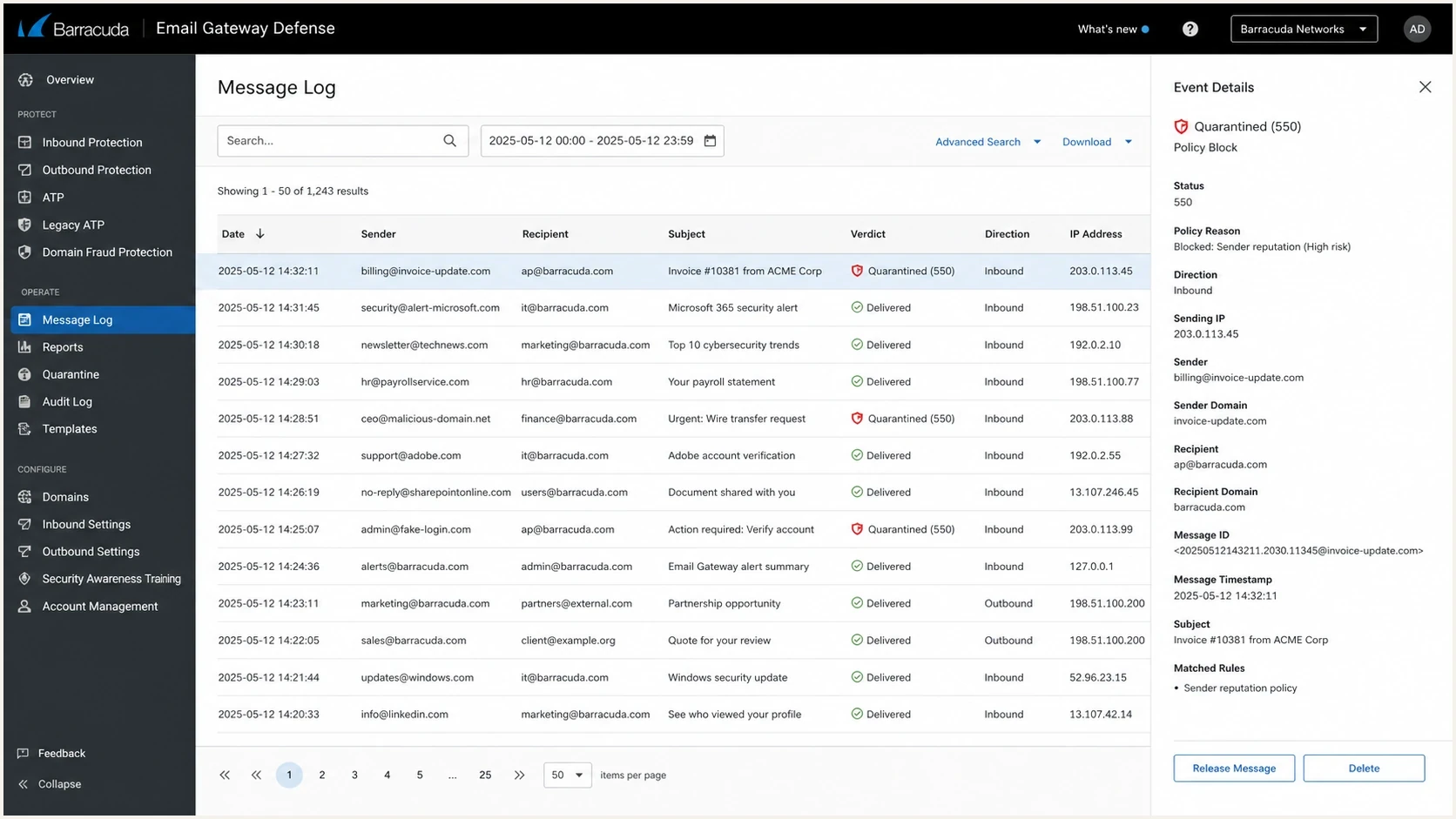
Barracuda Email Gateway Defense message log with a quarantined email selected.
Test message links and content
A clean BRBL lookup with content-specific failures points to the message itself. Barracuda maintains URL reputation separately from IP reputation, so a poorly rated company URL, tracking hostname, redirected destination, or third-party link can cause a block.
- Create a baseline: Send a short plain-text message without a signature, link, or attachment through the same route to a consenting test recipient.
- Add elements one at a time: Restore the normal signature, links, and attachment separately until the verdict changes.
- Trace every redirect: Record each tracking hostname and final destination instead of checking only the visible link text.
- Inspect owned websites: Check for compromise, injected pages, unexpected redirects, stale DNS, and certificate errors.
- Compare Barracuda reasons: Ask the recipient administrator to compare Message Log reasons for the accepted and blocked samples, then report a legitimate message as incorrectly blocked.
Use isolation as diagnosis
Do not remove required business information merely to bypass filtering. If removing a company URL restores delivery, repair the website or request review of the URL reputation, then repeat the controlled test.
Evidence to collect
Good evidence turns a vague blocklist problem into a supportable case. Collect one rejected sample and one accepted sample if possible. The differences often show whether the issue follows a route, message element, sender identity, or recipient policy.
Bounce evidence templatetext
Timestamp: YYYY-MM-DD HH:MM:SS UTC
Sending IP: 192.0.2.10
Sending domain: example.com
Envelope sender: sender@example.com
DKIM signing domain: example.com
Recipient domain: recipient.example
Remote host: d136162a.ess.barracudanetworks.com
SMTP result: 550 permanent failure for one or more recipients (blocked)
Message type: 1:1 business reply
Then send a controlled test message and compare the headers. An email tester result helps confirm whether DMARC passed through aligned SPF or DKIM before the investigation shifts to reputation, content, or policy.
|
|
|
|---|---|---|
550 | Permanent refusal | Suppress |
Quarantine | Policy action | Get log reason |
IP shift | Shared pool | Trace route |
URL shift | Content reputation | Isolate links |
DMARC fail | Alignment issue | Fix authentication |
Compact evidence map for Barracuda investigations.
Fix the technical base
Authentication does not guarantee inbox placement, but broken authentication makes reputation recovery harder. Require DMARC to pass through aligned SPF or DKIM using the domain visible in the From address.
Baseline DNS recordstext
Host: _dmarc.example.com
Type: TXT
Value:
v=DMARC1; p=none; rua=mailto:dmarc@example.com

Host: example.com
Type: TXT
Value:
v=spf1 include:mail.example.net -all

Host: selector1._domainkey.example.com
Type: TXT
Value:
v=DKIM1; k=rsa; p=MIIB...
RFC 9989 removed the pct tag in May 2026, so omit pct from new DMARC records. Aggregate reporting is now defined by RFC 9990. A monitoring record with p=none and rua still collects data without requesting quarantine or rejection.
DMARC aggregate reports show which systems use the domain and whether they authenticate. Old marketing systems, abandoned senders, or shadow tools can keep sending after the visible campaign stops, so remove or authorize each source deliberately.
Suped's product connects blocklist monitoring with DMARC reports, SPF and DKIM checks, outbound-source history, and deliverability alerts. This gives the investigation one place to compare an IP event with authentication and routing changes.
Blocklist checker
Check your domain or IP against 144 blocklists.







Fix the actual cause
If cold outreach touched the primary domain, stop it. Even a small volume can damage normal business mail when both streams share the same domain, DKIM identity, reply pattern, and sender history.
Barracuda incident states
Use these operational triggers to choose the next action. They are not Barracuda scoring thresholds.
Trace
One sample
One isolated rejection with clean authentication still needs a route and content comparison.
Investigate
Repeated pattern
Repeated failures tied to one route, link, sender, or recipient need evidence and isolation tests.
Pause
Ongoing failures
An active campaign producing permanent failures must stop while the source is fixed.
If the sender uses a shared IP, record every outbound IP used by the mail platform. Intermittent Barracuda failures often happen when one route in the pool has weaker reputation than the others.
What not to do
- Do not resend: A message rejected with a 550 reply belongs in suppression, not in another attempt.
- Do not mix: Keep risky prospecting mail away from the domain used for normal business replies.
- Do not guess: Collect logs and controlled test results before changing DNS, content, or routing.
Escalate the right way
Use the result to choose the escalation path. A confirmed poor IP belongs in the BRBL removal process. A clean IP with a blocked or quarantined message belongs in the recipient's Message Log review and sender-policy workflow.
- Confirmed IP listing: Fix the cause first, then submit one Barracuda Reputation System removal request for the exact outbound IP.
- Removal evidence: Provide the email server IP, a valid contact email, a phone number, and a concise explanation of the cause and remediation.
- False positive: Ask the recipient administrator to open the message in Email Gateway Defense, record the Reason, and use Report as Incorrectly Blocked.
- Immediate recipient action: The recipient administrator can create a sender-policy exemption for wanted mail, although virus, attachment, or other security controls can still apply.
- Processing time: Barracuda says valid removal requests are typically investigated and processed within 12 hours. Multiple requests can be ignored, and processing does not guarantee removal.
This is especially important for Barracuda bounces that show "quarantined" or "blocked" without naming a public listing. The receiving organization can see the Message Log event and policy reason that the sender cannot see.
Where Suped fits
Suped's product centralizes DMARC reports, authentication checks, blocklist monitoring, and deliverability alerts. Teams can connect a Barracuda incident to the sender, domain, or outbound route that changed instead of reconstructing the event after mail has failed.

Blocklist monitoring page showing domain and IP checks across blocklists with importance and status
That matters with Barracuda because the fix is operational. Teams need to identify the sender that caused the damage, verify alignment, confirm whether a blacklist event is active, and watch for the same issue after recovery.
Manual workflow
- Slow checks: People copy bounce text into separate lookups after mail has already failed.
- Weak history: Old sender changes and intermittent IP routes are hard to reconstruct later.
- Unclear owner: DNS, marketing, sales, and IT teams can each assume another team owns the fix.
Suped workflow
- Unified view: DMARC, SPF, DKIM, blocklists, and deliverability signals sit together.
- Fast alerts: Real-time alerts show authentication or reputation changes before they spread.
- Hosted controls: Hosted DMARC, hosted SPF, SPF flattening, and hosted MTA-STS reduce DNS drift.
Views from the trenches
Best practices
Separate cold outreach from primary mail so business replies keep their own reputation.
Remove addresses after 550 failures instead of retrying into the same filter again.
Track every sending IP in shared pools, since one bad route can cause a random bounce.
Common pitfalls
Assuming a clean public lookup means Barracuda did not block the message that day.
Continuing cold outreach on the main domain after 1:1 mail starts bouncing hard.
Opening escalation without timestamps, headers, remote host, and recipient consent.
Expert tips
Use DMARC reports to separate domain authentication failure from reputation failure.
Ask the recipient's IT team to report wanted mail as incorrectly blocked in the log.
Submit one BRBL removal request after fixing the cause; repeat requests can be ignored.
Marketer from Email Geeks says intermittent Barracuda bounces often come from a shared sending pool, where different messages leave through different IPs.
2025-02-19 - Email Geeks
Marketer from Email Geeks says a 550 permanent failure should trigger suppression, because repeated retries can worsen reputation.
2025-02-19 - Email Geeks
Verify recovery and prevent recurrence
The right fix is a sequence: stop the damaging traffic, suppress permanent failures, confirm authentication, trace the sending route, isolate message content, and use the review path that matches the evidence.
For a confirmed BRBL listing, submit one removal request after fixing the cause. Barracuda says valid requests are typically investigated and processed within 12 hours, but resume delivery only after the lookup and controlled tests show recovery.
For ongoing protection, Suped keeps DMARC monitoring, automated issue detection, alerts, hosted authentication controls, blocklist monitoring, and multi-domain views in one workflow. That makes a later Barracuda incident faster to prove and easier to assign.




