Why are my emails blocked by Barracuda even when not listed on blocklists?

Updated on 20 Aug 2026: We refreshed this guide with current Barracuda policy paths, allowlist limits, Message Log actions, and a clearer test sequence.
Barracuda can block your email even when your domain and sending IP do not appear on public blocklists. A clean lookup only means that specific public reputation check did not find a blocklist (blacklist) entry. It does not clear recipient-specific rules, user-level blocks, content filters, bulk email settings, URL reputation, attachment scanning, private scoring, or a Barracuda Reputation Block List (BRBL) check against a different connection IP.
A bounce like 550 permanent failure with blocked, paired with a clean public Barracuda lookup, should be treated as a policy or message-scoring problem until the evidence identifies the exact layer. The fastest path is to isolate the message, confirm authentication and domain matching, test a plain text control, and ask the recipient's mail admin to check the matching Barracuda Message Log entry.
Public blocklists still matter, but they are only one signal. A clean blocklist result is useful evidence, not a final answer.
What the full bounce tells you
Read the complete SMTP diagnostic, including the remote host, reply code, enhanced status code when present, and whether rejection happened during connection, recipient validation, or after message data. A permanent 5xx response differs from a 4xx deferral, a DNS failure, or an invalid mailbox. A rejection after the DATA command shows that the gateway received enough of the message to apply content or policy checks, while an earlier rejection points more strongly to connection, IP, sender, or recipient controls.
Common Barracuda rejection patterntext
Google tried to deliver your message, but it was rejected.
Recipient server: d241253a.ess.barracudanetworks.com
SMTP response: 550 permanent failure
Recipient result: blocked
|
|
|
|---|---|---|
5xx | Permanent rejection | Do not resend unchanged |
blocked | Policy decision | Check the logged reason |
After DATA | Message was evaluated | Test content and policy |
Clean lookup | No result on that public check | Confirm the connection IP |
4xx deferred | Temporary condition | Retry normally and inspect logs |
How to read the rejection before changing anything
Do not assume delisting is the fix
If the public lookup is clean, a delisting request alone often leaves you waiting while the real problem remains in recipient policy, content scoring, bulk classification, URL reputation, or authentication data. Submit a removal request only when the actual connection IP or Barracuda reason supports it, and run isolation tests at the same time.
Why a clean blocklist check is not enough
Barracuda filtering is not only a global blocklist decision. A recipient organization can maintain its own allow and block lists, and those local settings can reject a sender that looks clean everywhere else. The same thing happens when an individual recipient, domain, URL, sending IP, or message pattern has been tagged locally.
Barracuda also separates IP reputation, BRBL and external RBL or DNSBL checks, content analysis, sender policy, recipient policy, and email categorization. Email Gateway Defense and Email Security Gateway use different interface labels and policy paths, so the recipient admin should first identify which product processed the message. A clean blacklist lookup answers only one layer of either decision.
Public reputation
- Public scope: Checks whether the queried IP or domain has a visible blocklist or blacklist entry.
- Limited result: Does not reveal every private rule, URL score, or tenant setting.
- Useful for: Finding reputation problems that affect several unrelated recipients.
Recipient filtering
- Private scope: Uses settings inside one recipient organization, gateway, or user account.
- Mixed results: One recipient blocks while another accepts the same message and route.
- Useful for: Explaining clean lookups with repeated failures at a specific domain.
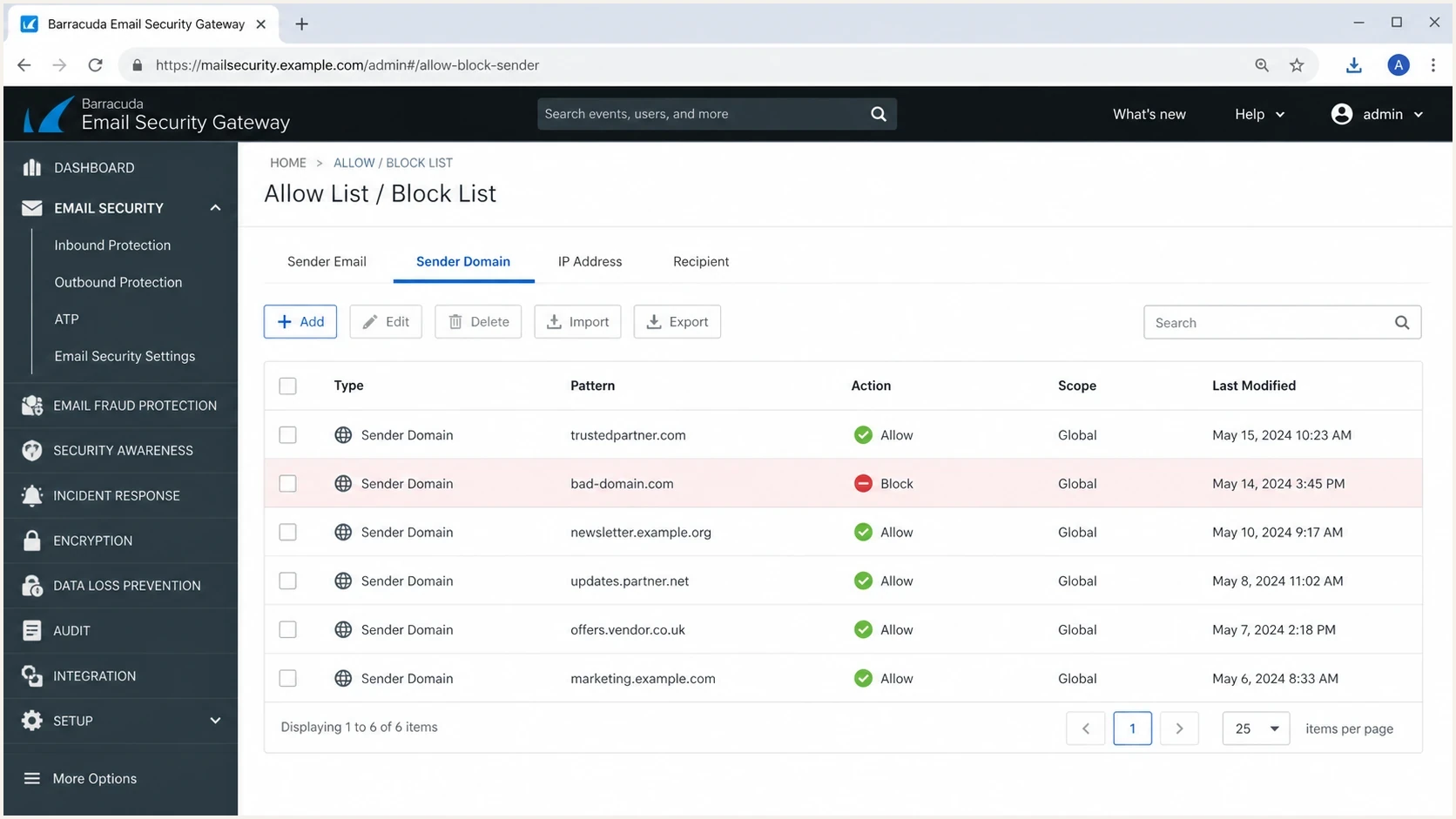
Barracuda Email Security Gateway allow and block list screen with a sender domain blocked.
- Recipient rule: The recipient admin has blocked a sender address, sender domain, sending IP, or pattern.
- User block: A specific mailbox has a user-level rule for the sender or domain.
- Content score: Links, tracking redirects, images, signatures, legal footers, or attachments pushed the message over a threshold.
- Bulk settings: The message looks like marketing, a newsletter, a mailing list, or other bulk mail that the tenant blocks or quarantines.
- URL reputation: A linked domain, redirect domain, or signature asset has poor reputation even when the sending domain is clean.
- Authentication mismatch: SPF or DKIM passes but neither result uses a domain that matches the visible From domain for DMARC.
- Recipient change: The recipient changed MX routing, gateway configuration, or mailbox status without updating every dependency.
Why allowlisting may not override the block
An allowlist (whitelist) entry must match the sender identity and policy scope that Barracuda evaluated. A user-level sender entry, global domain entry, recipient exemption, and trusted IP policy are different controls. A mismatch between the envelope sender, visible From address, subdomain, and actual connection IP can leave the rejection unchanged.
|
|
|
|---|---|---|
Product | Cloud and gateway policy paths differ | Product name and tenant |
Identity | Policies can match address, domain, or IP | Envelope From, header From, and IP |
Scope | User and global policies can differ | Policy owner and level |
Remaining checks | Rate, virus, and attachment controls can remain | Message Log reason |
Questions for the recipient admin after an allowlist change
Ask for a scoped exemption
Barracuda documentation recommends trusted IP policies over broad domain exemptions when the sender has stable, verified infrastructure because domains can be spoofed. The recipient admin should use the narrowest control that matches the real mail path and should not bypass virus or attachment protections.
Check categorization and bulk settings
A clean blocklist result does not rule out Barracuda Email Categorization or Bulk Email Detection. A recipient admin can allow, quarantine, or block categories such as marketing materials, newsletters, mailing lists, social media notifications, and transactional email.
This matters for legitimate bulk mail. Unsubscribe headers, visible unsubscribe links, template structure, and repeated campaign content can place a message in a bulk handling path even when the sender has no public blacklist listing. Ask the recipient admin for the Message Log status and exact Reason value, such as Email Categorization, Score, content policy, sender policy, recipient policy, BRBL, or an external RBL.
Keep unsubscribe handling scanner-safe
Do not remove required unsubscribe controls from production bulk mail to bypass filtering. Keep visible unsubscribe links functional, avoid redirect chains, and process one-click unsubscribe only when the valid RFC 8058 POST request is present.
- Category block: A marketing or newsletter category can be blocked even when authentication passes.
- Bulk detection: Campaign structure and unsubscribe elements can place a message in a bulk handling path.
- Message Log: The recipient admin should check status, Reason, score, and policy before changing sender-side DNS.
- No matching entry: Confirm the UTC timestamp, recipient, MX route, Barracuda product, and tenant being searched.
Run a clean isolation test
The cleanest test is a plain text message sent by the same sender through the same mail path, with no signature, images, links, attachments, or tracking. For a controlled diagnostic message to a consenting recipient, remove unsubscribe elements from the test only so you can separate sender rejection from bulk classification. Keep all required unsubscribe controls in production mail.
Plain text control messagetext
Subject: Delivery check

Hi,

We are checking whether you received this plain text message.
No links, images, signature, attachments, or tracking are included.

Thanks,
Sender
- Same route: Send through the same mailbox, domain, sending IP, and outbound mail path that produced the bounce.
- No extras: Remove logos, calendar links, tracking pixels, unsubscribe elements, disclaimers, and attachments for the test only.
- Record outcome: Keep the exact UTC send time, recipient, sender, subject, message ID, connection IP, and bounce text.
- Compare content: If plain text works and the normal message fails, rebuild the normal message one element at a time.
Run an email test before asking a recipient to spend time on their side. It gives you a neutral report on SPF, DKIM, DMARC, message structure, and content signals.
Email tester
Send a real email to this address. Suped shows a results button when the test is ready.
?/43tests passed
What the isolation result means
If the plain text control is accepted, focus on content, URLs, signatures, files, formatting, and bulk categorization. If it is rejected, focus on connection IP reputation, sender policy, recipient rules, address status, authentication, or private scoring inside the recipient's Barracuda setup.
Check authentication and domain health
Before escalating, check SPF and DKIM for the exact sending source, then confirm that at least one passing result uses a domain that matches the visible From domain for DMARC. A clean public blocklist result loses value if the message has broken DKIM, SPF lookup errors, missing reverse DNS, a HELO mismatch, or DMARC data showing an unapproved source.
Basic authentication baselinetext
_dmarc.example.com TXT "v=DMARC1; p=none; rua=mailto:dmarc@example.com"
example.com TXT "v=spf1 include:send.example.net -all"
selector1._domainkey.example.com TXT "v=DKIM1; k=rsa; p=PUBLICKEY"
A quick domain health check helps catch those issues without turning the Barracuda case into a guessing exercise. It also gives you concise evidence to share with the recipient admin.
?
What's your domain score?
Deep-scan SPF, DKIM & DMARC records for email deliverability and security issues.
Suped's product can keep this workflow in one case by tying DMARC monitoring, SPF, DKIM, hosted SPF, hosted DMARC, hosted MTA-STS, real-time alerts, automated issue detection, blocklist monitoring, and deliverability signals together. The practical use is to confirm the sending source and DMARC domain match, preserve the result, and give the recipient admin the same evidence used during testing.
DMARC record detail view showing SPF, DKIM, DMARC, rDNS diagnostics, and DNS records
Escalate with evidence
When the clean tests still fail, the recipient's mail admin has to check Barracuda logs and policy. Send enough evidence to locate the exact event and reproduce the rejection without asking the admin to infer the problem.
Recipient escalation notetext
Subject: Delivery issue to your Barracuda gateway

We are seeing SMTP 550 blocked responses when sending to your domain.

Sender: sender@example.com
Recipient: recipient@example.net
Send time: YYYY-MM-DD HH:MM UTC
Sending IP: 203.0.113.25
Message ID: <abc123@example.com>
Authentication: SPF pass with matching domain, DKIM pass, DMARC pass
Test result: Plain text control also rejected

Can your mail admin check the matching Barracuda Message Log entry, status, Reason, score, and policy scope?
If the Message Log says Score or another Barracuda classification blocked a legitimate message, ask the recipient admin to report it as incorrectly blocked. That report sends the message for review but does not automatically create an allow rule for future mail. For urgent mail, the admin can decide whether the logged reason permits manual delivery and whether a narrow sender policy is appropriate.
If the message is business-critical, contact the recipient through another channel and ask them to involve their mail admin. That is often the only way to clear a local rule, category block, or recipient policy. For related patterns, see Barracuda bounces and Barracuda listing fixes.
Send to the recipient admin
- Exact bounce: Include the full SMTP response, host, UTC time, sender, recipient, and message ID.
- Clean checks: Show blocklist and blacklist results for the connection IP, plus SPF, DKIM, and DMARC status.
- Control test: Share whether a plain text message was accepted or rejected through the same route.
- Message Log: Ask for the Barracuda status, Reason, score, policy name, and action.
Do not send yet
- Screenshots only: A screenshot without headers, message ID, or timestamps slows the investigation.
- Repeated retries: Sending the same message after a permanent rejection adds noise without testing a cause.
- DNS churn: Changing SPF, DKIM, or DMARC during testing creates new variables.
What to fix before changing infrastructure
Do not rotate IPs or rebuild DNS records because one Barracuda-protected domain rejected you. That turns one failure into a larger deliverability problem. Fix the smallest proven cause first.
Failure scope
Compare where the same message and sending route fail before choosing the next action.
One recipient
Local scope
Check a user rule, address status, or recipient policy by testing another mailbox at the same domain.
One protected domain
Tenant scope
Ask that organization's admin for the Barracuda Message Log reason and policy scope.
Unrelated domains
Wider scope
Investigate connection IP, sender reputation, URL reputation, authentication, and sending behavior.
- Fix content first: Remove or replace risky links, shortened URLs, old signature assets, large images, and unusual attachments.
- Fix bulk signals: Check unsubscribe handling, tracking redirects, category classification, and newsletter formatting.
- Fix DNS second: Correct proven SPF, DKIM, DMARC, reverse DNS, and source authorization issues.
- Fix routing last: Move mail paths only when the sending infrastructure itself has clear evidence of damage.
If the recipient domain recently changed ownership, MX records, web presence, or gateway configuration, add that to the case notes. A stale recipient setup can look like a sender reputation issue because the rejection still comes from a mail security gateway.
Views from the trenches
Best practices
Keep one plain text control message ready so you can separate content issues from sender issues.
Document each bounce with time, recipient domain, sending IP, and exact SMTP response.
Ask recipients to check tenant rules when public Barracuda lookups show clean results.
Common pitfalls
Treating a clean lookup as proof of acceptance misses local rules and user-level blocks.
Changing DNS records during diagnosis creates new variables and slows the root cause check.
Sending the same designed message repeatedly can reinforce the filter decision you are testing.
Expert tips
Compare a normal message with a stripped message before asking Barracuda for review again.
Use DMARC aggregate data to confirm the sending source and authentication path before escalation.
Escalate with evidence, not screenshots alone, so the recipient admin can reproduce it.
Marketer from Email Geeks says a clean Barracuda lookup does not rule out tenant-level filtering at a recipient domain.
2024-12-06 - Email Geeks
Marketer from Email Geeks says a block for a specific recipient address points to local policy before global reputation.
2024-12-06 - Email Geeks
How to resolve Barracuda blocks
Barracuda can block email despite clean blocklist checks because the rejection can come from the recipient's Barracuda policy, message score, bulk category, URL reputation, connection IP, attachment controls, or authentication path. Prove which layer made the decision before changing DNS or sending infrastructure.
Start with the full bounce, run a plain text control through the same route, verify SPF and DKIM plus the DMARC domain match, check domain health, ask for the exact Barracuda Message Log reason, and escalate with a complete evidence bundle. Suped's product supports that workflow by connecting authentication monitoring, issue detection, hosted SPF, hosted DMARC, hosted MTA-STS, blocklist monitoring, deliverability signals, and alerts in one place.




