What causes bounces from Barracuda-based domains and how to resolve them?

Published 2 Jun 2025
Updated 6 Aug 2026
12 min read
Summarize with
Updated on 6 Aug 2026: We expanded the Barracuda bounce workflow to separate policy blocks, temporary deferrals, routing loops, and URL reputation issues.
A Barracuda-based domain bounce with 550 and blocked usually means the receiving side refused the message by policy before mailbox delivery. The cause is not automatically a public blocklist or blacklist listing. It is often a recipient-side rule, a Barracuda tenant-level block, sender domain reputation, sending IP reputation, URL reputation, content filtering, or an authentication problem.
Treat these bounces as a scope problem first. If every address at many Barracuda-hosted domains rejects the same sender, look for a broad reputation, authentication, or content signal. If only one domain, one department, or a few recipients reject it, treat it as a local allow or block policy owned by that recipient organization.
The practical fix is to stop guessing from the bounce line alone. Collect samples, map the affected recipients, check sender authentication, test the exact content and signature, and ask the recipient mail administrator for the Barracuda Message Log reason when the pattern points to local policy.
Direct answer
The bounce is caused by a policy decision at the recipient's Barracuda gateway or tenant, unless the full SMTP transcript shows a different class of failure such as a loop, DNS error, invalid recipient, or connection problem. A plain 550 permanent failure with blocked is a hard reject. It is not a deferral and it is not a retry signal.
What the bounce usually means
When the recipient MX points to Barracuda Email Gateway Defense or a Barracuda Email Security Gateway, that system handles the SMTP conversation for the domain and applies the recipient organization's policies. A blocked result tells you the message matched a policy, reputation, authentication, content, or recipient rule.
- Scope: Many Barracuda-hosted domains rejecting the sender points to a broader signal.
- Pattern: Some recipients rejecting the same sender points to local recipient policy.
- Action: Do not keep retrying a permanent blocked address without changing the cause.
Common Barracuda-style hard bouncetext
550 permanent failure for one or more recipients (user@example.org:blocked)
550 permanent failure for one or more recipients (user@example.com:blocked)
The important word is blocked. It does not tell you which rule fired. It only tells you that the receiving system made a final reject decision. That is why a clean public lookup does not settle the question.
Do not diagnose every Barracuda bounce as a block
Match the complete diagnostic response before choosing a fix. The Barracuda hostname in a bounce identifies a system in the delivery path, but the status code and final reason identify the failure class.
|
|
|
|---|---|---|
550 ... blocked | Permanent policy reject | Suppress and investigate |
4xx ... deferred | Temporary delivery failure | Keep normal retry queue |
User unknown | Invalid recipient | Correct or suppress address |
Mail loops back to myself | MX or relay routing loop | Fix DNS or smart-host route |
Use the full SMTP response, not the Barracuda hostname alone.
A mail loop needs a routing fix
The phrase "mail for example.org loops back to myself" means the sending gateway resolved the next hop back to itself or into a connector that returns the message. It is not evidence of a blocklist or blacklist listing.
- MX: Query authoritative DNS for the recipient domain and inspect every MX target.
- Destination: Confirm the Barracuda destination server points to the internal mail server, not back to the gateway.
- Connector: Check smart-host and outbound connector routes for a path that returns to Barracuda.
- Cache: Compare live DNS with cached resolver results after an MX or server migration.
How to tell where the block lives
Start by separating the failure into recipient-level, domain-level, Barracuda-tenant-level, and sender-side causes. The same blocked bounce text can appear in each case, so the decision comes from pattern analysis.
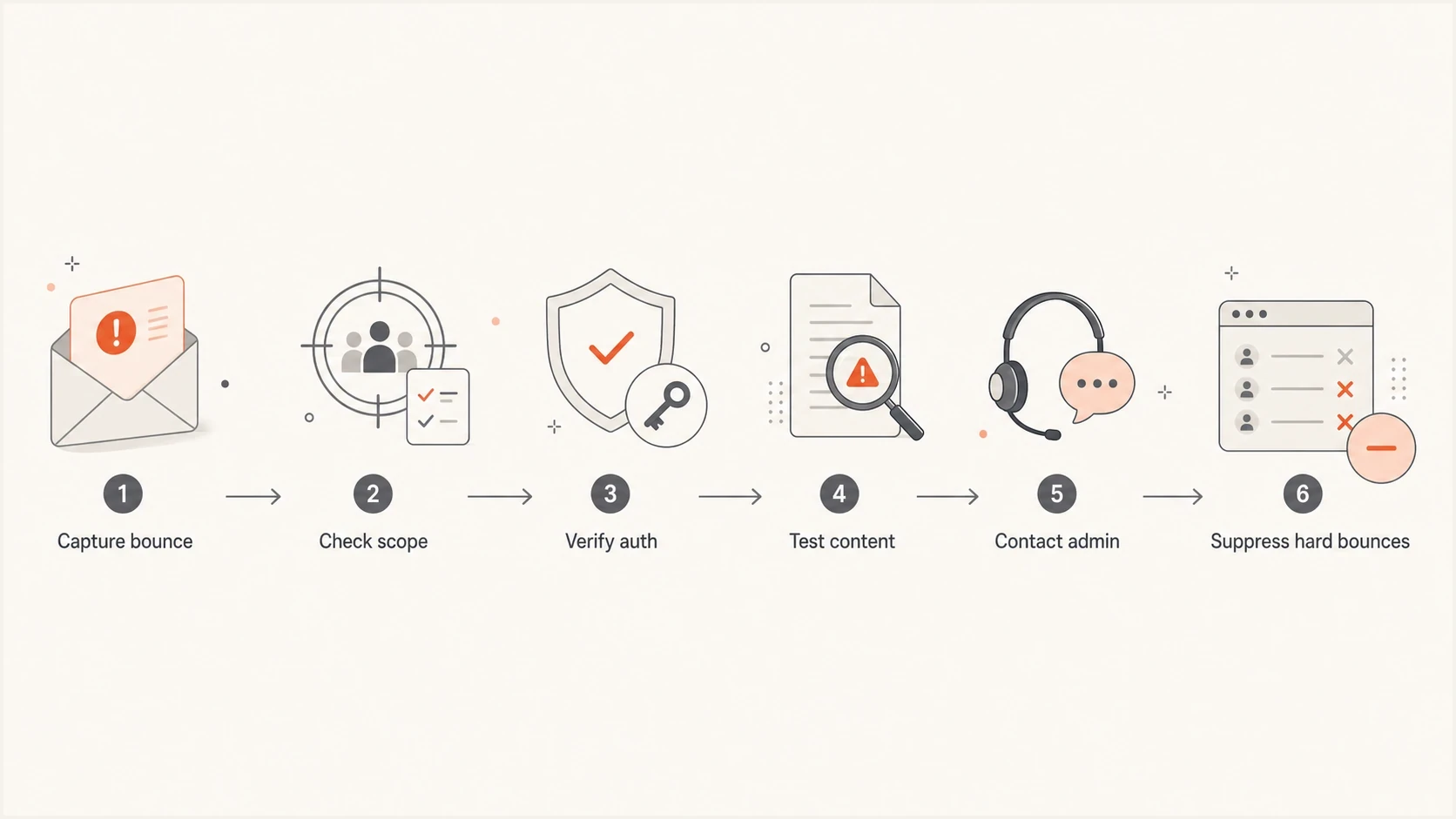
Flowchart for diagnosing a Barracuda-based email bounce.
Likely Barracuda-level block
- Scope: Many unrelated Barracuda-hosted domains reject the same sender.
- Signal: The same campaign, IP, From domain, or URL is rejected repeatedly.
- Fix: Work through authentication, reputation, content, and recipient admin logs.
Likely local recipient block
- Scope: Only one organization or a small recipient group rejects the sender.
- Signal: Other Barracuda-hosted domains accept similar mail from the same source.
- Fix: Ask the recipient to review sender, domain, URL, or content rules.
|
|
|
|---|---|---|
One address | User rule | Suppress |
One domain | Tenant rule | Ask admin |
Many domains | Shared signal | Audit source |
Content only | Content or URL rule | Retest message |
Use the failure pattern to choose the next action.
If you can send to some Barracuda-hosted domains and not others, a Barracuda-wide block is less likely. That pattern points toward a recipient organization's policy, a previous complaint, a block sender rule, or a local content decision.
Why clean blocklist checks miss the cause
A sender can pass public blocklists checks and still bounce at Barracuda-protected recipients. Public blocklist and blacklist results are only one input. Recipient gateways also use private policies, local allow and block lists, sender history, URL signals, attachment rules, user preferences, and message content scoring.
This is the common trap: the sending IP is clean, the domain is clean, and the message still gets a hard 550. That does not make the bounce an internal error. It means the rejecting signal sits somewhere else, usually in the recipient's configuration or in the exact message being sent.
Blocklist checker
Check your domain or IP against 144 blocklists.







Use a blacklist lookup as an early branch, not as the final verdict. Suped's blocklist checker helps confirm whether the sending domain or IP appears on major public lists, while Suped's blocklist monitoring workflow keeps watch after the incident so a later listing does not go unnoticed.
Match remediation to the log reason
A Barracuda Message Log reason of Barracuda Reputation points to the sending IP and the Barracuda Reputation Block List. Fix the source of the reputation problem before making one evidence-based removal request. A DMARC, SPF, DKIM, content, URL, or tenant-policy reason needs its own fix, not an IP delisting request.
If your exact symptom is Barracuda rejecting mail even though public listings are clean, the same reasoning applies to Barracuda blocking without public listings. Look at scope, message content, URLs, authentication, and recipient policy before changing infrastructure.
Resolution workflow
Use a fixed workflow because bounce text alone is too thin. The goal is to prove whether the recipient, the recipient domain, Barracuda filtering, or the sender setup caused the reject.
- Collect: Save the full bounce, SMTP code, timestamp, sender IP, envelope sender, header From domain, campaign ID, and recipient domain.
- Group: Group failures by recipient domain, MX provider, campaign, message template, sending IP, and From address.
- Compare: Send a plain text, low-risk message to an opted-in test contact if you have a valid relationship and permission.
- Verify: Check SPF, DKIM, DMARC alignment, reverse DNS, HELO name, bounce domain, and sending domain consistency.
- Ask: If the issue is local, ask the recipient administrator to search Barracuda logs for the sender and exact timestamp.
- Suppress: If the administrator confirms a user or domain block, remove those recipients from normal sends.
Data to include in an admin escalationtext
Recipient: user@example.org
Sender IP: 203.0.113.15
Envelope sender: bounce@example.com
Header From: notices@example.com
Timestamp UTC: 2026-05-28 03:14
Bounce: 550 permanent failure (user@example.org:blocked)
Do not retry permanent blocks blindly
A permanent 550 blocked result should reduce sending pressure, not increase it. Repeated attempts to the same hard-bounced recipient can worsen sender reputation and make later admin conversations harder.
- Pause: Stop normal campaign traffic to affected hard-bounced recipients while you investigate.
- Segment: Keep the affected addresses separate from mailbox-full or temporary deferral cases.
- Document: Record which sender, content, and recipient domain combinations failed.

Issue steps to fix dialog showing the issue overview, tailored fix steps, and verification action
Suped's product supports this investigation by keeping DMARC reports, SPF and DKIM checks, blocklist signals, and sending-source inventory in the same workflow. The issue view gives teams a sequence of checks and fix steps instead of forcing a conclusion from one bounce line.
Authentication and DNS checks
Authentication failures do not always produce a DMARC-specific bounce. A Barracuda policy can reject mail because SPF fails, DKIM is missing or invalid, DMARC alignment fails, reverse DNS is missing, or the envelope sender looks unrelated to the visible From domain.
MX pattern for a Barracuda-protected recipientdns
example.org. 3600 IN MX 3 d177389a.ess.barracudanetworks.com.
example.org. 3600 IN MX 5 d177389b.ess.barracudanetworks.com.
Confirm the recipient MX from authoritative DNS, then move back to the sending setup. If a copied diagnostic line has a misspelled MX hostname, re-query DNS rather than troubleshooting from the pasted value. For a routing-loop error, also verify that the Barracuda destination route does not resolve back to the gateway.
|
|
|
|---|---|---|
SPF | Pass and aligned | DNS or sender |
DKIM | Valid and aligned | Sending platform |
DMARC | Pass | Domain owner |
PTR and HELO | Valid host identity | Mail host |
Keep table checks compact, then inspect full records in DNS.
For a fast baseline, run a domain health check before you escalate. Then send a real message through an email tester so you can inspect the message the same way a receiver sees it.
Suped's product can support this workflow by keeping DMARC monitoring, hosted SPF, SPF flattening, DKIM visibility, hosted MTA-STS, alerts, and issue detection in one place. That is useful when the bounce is only a symptom and the fix sits in DNS, authentication, or sending-source ownership.
Content and recipient policy checks
If authentication is clean, test the content. Barracuda policies can react to URLs, attachments, risky wording, message structure, mismatched branding, or previous user complaints. A clean sender can still trigger a content or URL reputation rule.
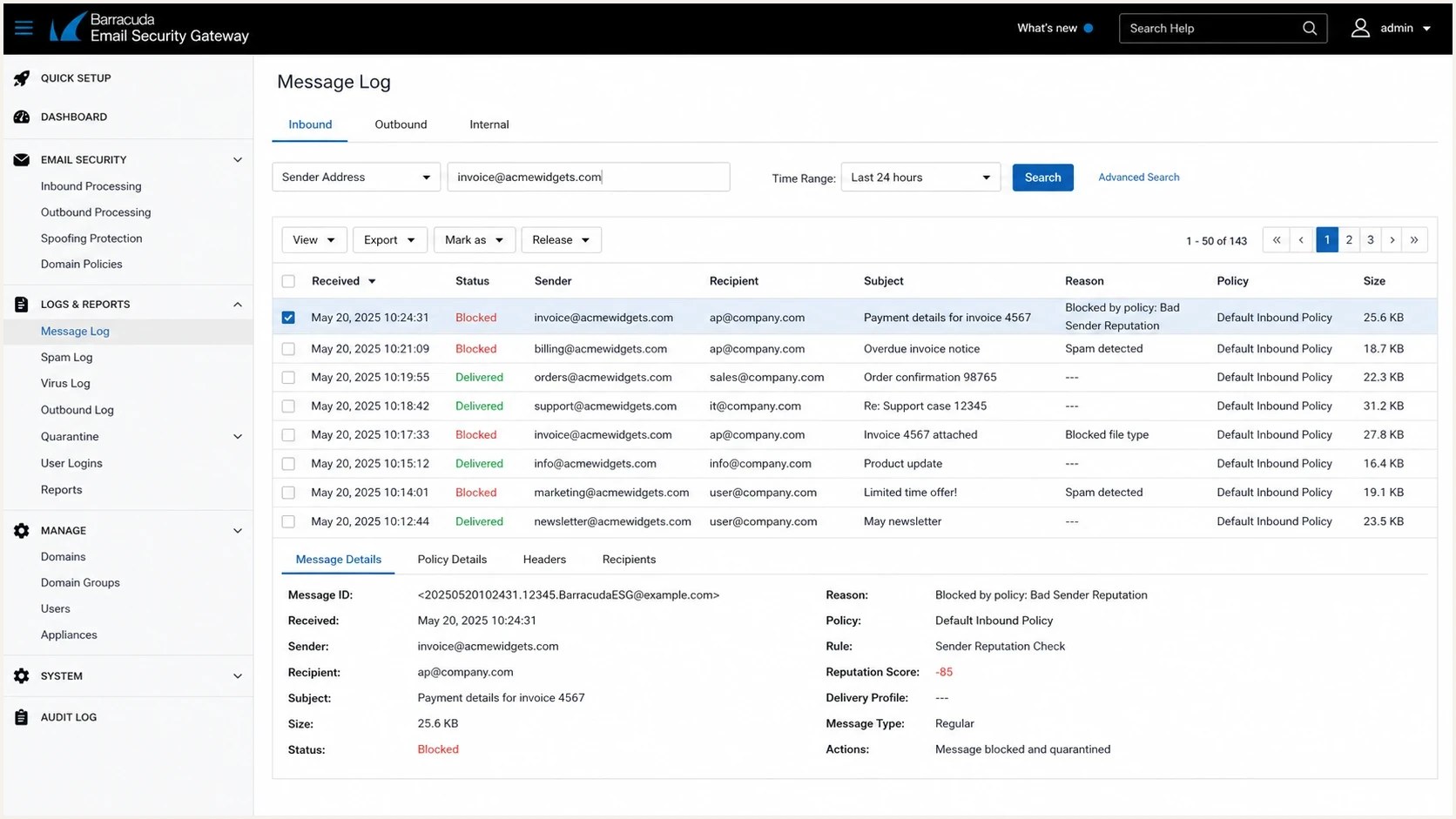
Barracuda Email Security Gateway message log showing a blocked message reason.
Ask the recipient administrator for the log reason promptly because message logs have a limited retention period. A Message Log reason is better than a forwarded bounce because it can identify sender policy, spam scoring, URL analysis, attachment handling, spoof protection, or a user-maintained list.
Test the corporate signature separately. A short reply with several website, social, redirect, or image-host URLs can be blocked even when the plain message is accepted. Remove the signature, retest, then add each URL or hosted image back one at a time. If the signature causes the failure, investigate the exact linked domain instead of changing the sending IP.
Change the message
- URLs: Remove redirects, tracking chains, and newly created domains during tests.
- Signature: Retest without website, social, and image-host links.
- Files: Send without attachments first, then add one variable at a time.
- Copy: Use plain language and remove pressure-heavy calls to action.
Change the audience
- Consent: Send only to recipients with clear permission and recent engagement.
- History: Separate new contacts from known subscribers during diagnosis.
- Policy: Respect recipient blocks as final unless their administrator changes them.
When one recipient organization blocks the sender and others accept it, do not try to route around the block. Suppress the affected recipients, document the reason, and use a known business contact to request review when the relationship justifies it.
When to suppress and when to escalate
A permanent blocked bounce is a list hygiene event as much as a deliverability event. Protect sender reputation while the technical team investigates.
Action bands for Barracuda blocked bounces
Use scope and the full diagnostic reason to choose the next operational action.
Single recipient
Suppress
Treat it as a recipient-level hard bounce.
One domain
Ask admin
Treat it as local recipient policy.
Several domains
Audit
Investigate reputation, content, and authentication.
All Barracuda domains
Stop source
Pause the source and escalate with evidence.
Escalate with useful evidence. A recipient administrator can search faster when you provide the exact timestamp, sender IP, envelope sender, header From, subject, recipient, and full reject line. Ask for the Message Log Action and Reason fields, not only confirmation that the message was blocked.
A clean closeout looks like this
- Suppression: Known recipient-level blocks stay suppressed unless the recipient asks to resume.
- Remediation: Sender authentication, content, and list source issues have owners and deadlines.
- Monitoring: DMARC, SPF, DKIM, blocklist, and bounce patterns stay visible after the fix.
Suped's unified monitoring keeps authentication and reputation signals next to the operational issue list, so DNS remediation and recipient suppression use the same evidence.
Views from the trenches
Best practices
Compare several recipients and domains before deciding whether the block is local or global.
Keep bounce samples with timestamps, sending IPs, From domains, and campaign identifiers.
Retest with a plain message after authentication checks so content filters are isolated.
Common pitfalls
Treating a clean public blacklist result as proof that Barracuda has no local block.
Retrying the same hard-bounced recipients repeatedly after a permanent 550 blocked result.
Changing DNS records during an active incident without first confirming the failure scope.
Expert tips
Ask the recipient administrator for message log reason codes instead of guessing at filters.
Separate IP reputation, domain reputation, and content tests into different send attempts.
Suppress recipient-level blocks, then work the wider domain issue through admin contacts.
Marketer from Email Geeks says a reject across every Barracuda-hosted recipient points to a platform-level block, while mixed results point to local recipient policy.
2020-02-18 - Email Geeks
Marketer from Email Geeks says content, the visible From domain, or the sender address can trigger Barracuda filtering even when public listings look clean.
2020-02-18 - Email Geeks
What to do next
For a Barracuda-based domain bounce, match the full SMTP reason before acting. A 550 blocked result means the recipient side refused the message permanently, while a 4xx deferral or routing loop needs a different response. Prove the scope, verify authentication, test the message and signature, then suppress the recipients or escalate to the recipient administrator with precise evidence.
Suped's product fits this workflow when the team needs DMARC reporting, SPF and DKIM visibility, sending-source ownership, blocklist and blacklist monitoring, and actionable issue steps in one place. Those signals help separate authentication faults and source changes from recipient-only Barracuda policy decisions.




