How can I get assistance with Comcast delisting issues?

Published 17 Apr 2025
Updated 3 Aug 2026
12 min read
Summarize with

Updated on 3 Aug 2026: We added current Comcast error-code routes and complaint feedback-loop steps for more durable delisting.
The fastest route for Comcast delisting assistance is to identify the exact Comcast rejection code, fix the sender-side cause, then submit the blocked sending IP through the Xfinity postmaster help page when the error is eligible for that form. If the bounce is BL000000, Comcast says its block removal form is the right path. Other BL codes identify third-party DNSBL blocklist (blacklist) listings and require the route named in the rejection. DMARC, dynamic IP, recipient-quality, reverse DNS, and throttling errors also require their specific sender-side fixes instead of a BL000000 request.
Treat Comcast delisting as an evidence problem, not a persuasion problem. A vague request saying "please unblock us" rarely gives the reviewer enough to act. A good request gives the IP, full bounce text, timestamps, the sending domain, authentication results, recent volume changes, complaint cleanup, and a short explanation of what changed before the block started.
Start with the exact rejection
Before asking for help, pull the raw SMTP rejection from your mail logs or bounce message. Comcast and Xfinity errors are specific enough to tell you whether you have an IP block, authentication rejection, policy rejection, recipient quality issue, or a temporary rate limit. That distinction matters because the wrong request path wastes time.
|
|
|
|---|---|---|
BL000000 | Comcast IP block | Submit Comcast removal request |
Other BL codes | Named DNSBL listing | Follow the exact bounce guidance |
DM000001 | DMARC reject policy failure | Fix the SPF or DKIM domain match |
RL000001/003/010/020 | Reputation or volume throttle | Queue the 4xx response and fix the cause |
421 or 452 | Temporary connection or message limit | Retry and stay within the stated limit |
550 or 554 | Recipient, sender domain, or PTR failure | Correct the address or DNS |
Use the rejection code to decide whether to request removal or fix the sender setup first.
If you are dealing with BL000000, gather the IP and submit through the official Comcast removal flow. If the bounce contains another BL code, use the named blocklist or blacklist route in Comcast's error guidance. DMARC, PTR, dynamic IP, invalid-recipient, and rate-limit errors require correction before escalation. For deeper background on Comcast-specific blocking patterns, the related guide on why Comcast blocks email explains the common triggers.
Bounce details to keeptext
Remote host: mx1.comcast.net
Sending IP: 203.0.113.25
Sending domain: example.com
Recipient domain: comcast.net
SMTP reply: 550 5.7.1 BL000000 message blocked
First seen: 2026-05-27 09:15 UTC
Last seen: 2026-05-27 10:40 UTC
When the Comcast form is enough
The Comcast block removal form is built for a narrow case: a blocked sending IP where the rejection includes BL000000. Comcast says the form does not help if you are a Comcast customer having trouble sending to another domain, and it points senders to error-specific guidance for other block types. Comcast says eligible blocks are typically lifted in less than 30 minutes after evaluation. The form also limits repeated requests, so repeated submissions are a poor escalation plan.
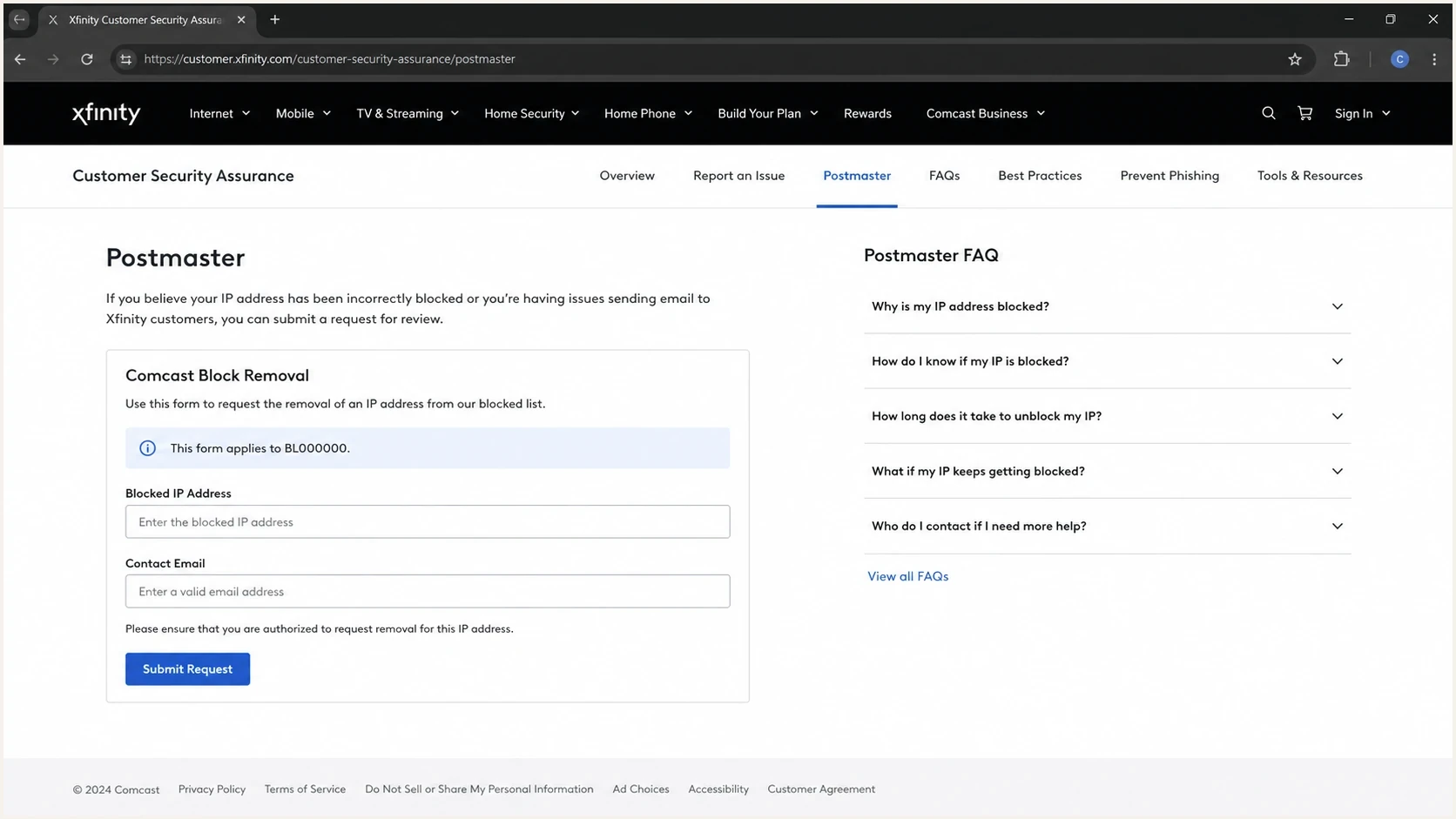
Xfinity Customer Security Assurance Postmaster page showing a BL000000 block removal form.
Do not turn one case into repeated form spam
Comcast states that same-IP and requester-level request limits apply. If a request does not get a response, improve the evidence and fix the cause before another submission. Repeating the same incomplete request burns the daily allowance and gives the reviewer nothing new.
Request cadence guardrails
Use a controlled request cadence so you do not exceed Comcast's stated limits.
Clean
1 IP request
One complete request after fixing the cause.
Caution
2-5 same IP
A follow-up with new evidence, not the same text.
Stop
6+ same IP
Over the stated same-IP daily limit.
Account limit
20 IPs daily
Avoid crossing requester-level volume limits.
For 421 and 452 rejections, follow the exact limit named in the response. Comcast lists 25 simultaneous connections per sending IP. It also allows 100 recipients per message and 1,000 emails per SMTP session. Queue temporary 4xx responses for retry, reduce the relevant connection or message load, and avoid retry storms. RL codes require separate attention to sender reputation, authenticated sending, list quality, or the sending history identified by the code. The guide on Comcast rejections covers that path in more detail.
What to send when you need help
A useful Comcast delisting request is short, factual, and complete. Include enough context for the reviewer to understand the block without asking for a second round of evidence. If the IP belongs to an email service provider, hosting provider, or agency-managed MTA, involve the IP owner because that party controls rDNS, abuse handling, shared-IP neighbors, and sending limits.
- IP evidence: Send the exact IPv4 or IPv6 address, the sending hostname, and the PTR result.
- Bounce proof: Include the full SMTP reply, not a cropped screenshot or paraphrased error.
- Authentication: Show SPF, DKIM, and DMARC pass status for mail using the blocked path.
- Root cause: Explain what caused the spike, complaint pattern, bad list, or compromised account.
- Fix summary: State the cleanup already completed, including list suppression and abuse controls.
Delisting request templatetext
Subject: Comcast BL000000 removal request for 203.0.113.25

Hello Comcast postmaster team,

We are requesting review of sending IP 203.0.113.25.

Bounce code: BL000000
Sending hostname: mail1.example.com
PTR: mail1.example.com
Sending domain: example.com
First affected send: 2026-05-27 09:15 UTC
Last affected send: 2026-05-27 10:40 UTC

Root cause:
A stale segment caused high invalid-recipient volume to Comcast.

Actions taken:
Suppressed invalid recipients, paused the segment, reduced concurrency,
confirmed SPF, DKIM, DMARC, rDNS, and HELO consistency.

Please review the IP for removal.
Thank you.
For teams running several brands or clients, process matters. A single shared spreadsheet of Comcast issues gets stale quickly. Suped's product can keep DMARC, SPF, DKIM, blocklist monitoring, hosted SPF, hosted DMARC, MTA-STS, and alerts across domains in one workspace. Record each Comcast bounce code, affected IP, timestamp, remediation note, and request status with the incident so the next submission has current evidence.

Issue steps to fix dialog showing the issue overview, tailored fix steps, and verification action
Check the causes before escalating
When the support form goes quiet, the best escalation is a cleaner technical record. Comcast is strict about sender basics: valid reverse DNS, compliant message headers, good abuse handling, clean recipient lists, and sane sending rates. If any of those are broken, delisting does not last.
Before asking again
- rDNS: Confirm the IP has a PTR and that the hostname resolves forward.
- HELO: Use a stable hostname that matches the mail server identity.
- DMARC: Confirm the visible From domain passes DMARC through SPF or DKIM.
- List quality: Remove invalid Comcast recipients and suppress old hard bounces.
After the fix
- Volume: Restart with smaller batches and steady retry intervals.
- Complaints: Remove subscribers who complain and stop mailing risky segments.
- Monitoring: Watch blocklist and blacklist status before each resend.
- Evidence: Keep logs that show the error has changed or stopped.
Use a domain health checker before you resubmit, especially if the bounce mentions DMARC, SPF, DKIM, rDNS, or sender domain validity. For a broader reputation workflow, blocklist monitoring keeps the blocklist (blacklist) status attached to the domains and IPs you are trying to protect.
?
What's your domain score?
Deep-scan SPF, DKIM & DMARC records for email deliverability and security issues.
If the issue is message-specific, send a real test message through the same route that Comcast rejected. The email tester path is useful when the DNS records look fine but the delivered message still fails DMARC, has broken headers, or uses the wrong return-path domain.
When you need another route
There are five practical assistance routes. The right one depends on who controls the blocked IP and what the rejection says. If you are sending through a shared service, ask that service to handle the Comcast request. If you run the MTA, you own the fix and the request. If you are an agency or MSP, collect the client's authentication and list-quality evidence first, then coordinate with the infrastructure owner. Standard Xfinity account support is not the primary route for sending-server blocks.
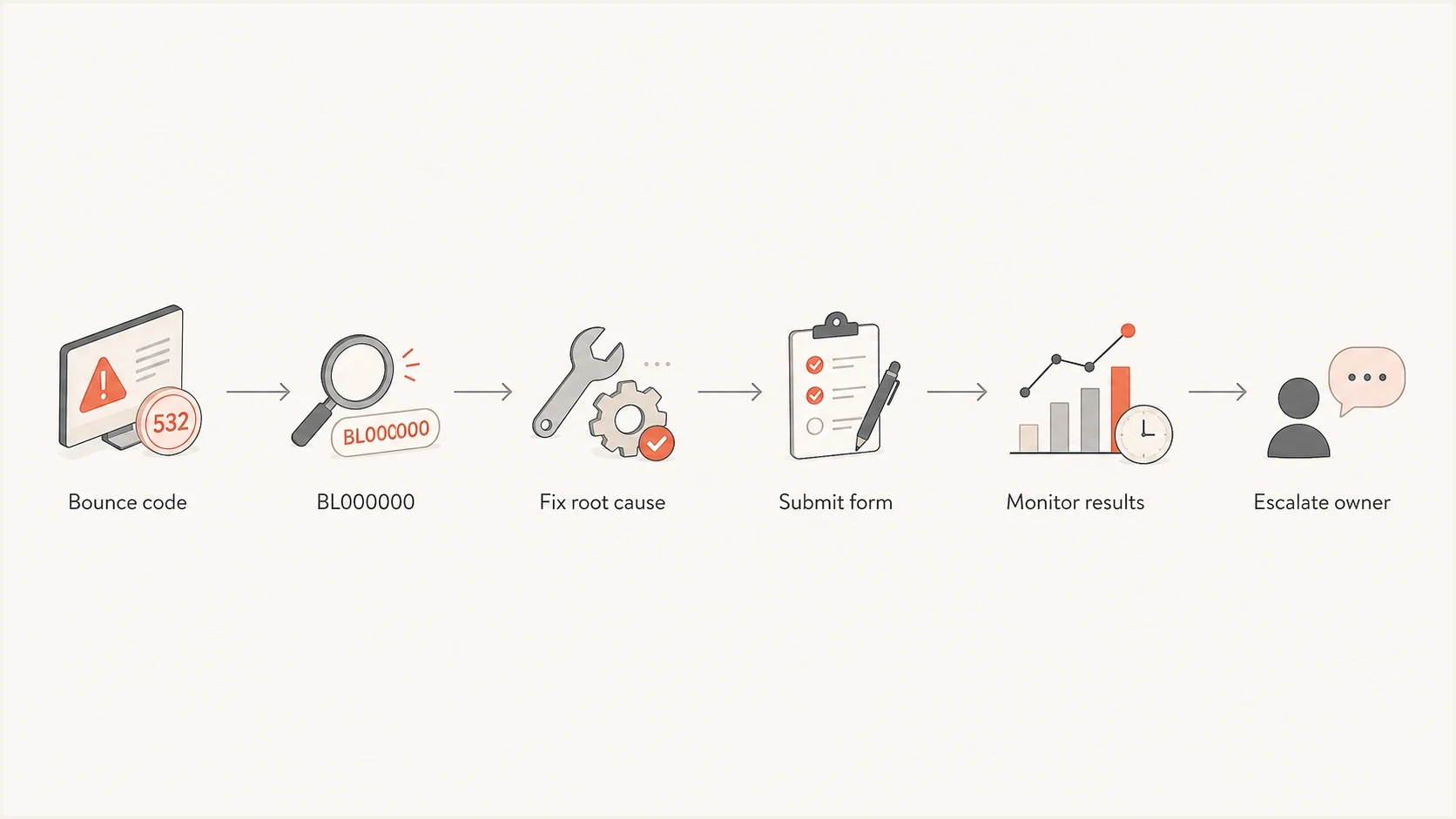
Flowchart showing Comcast delisting steps from bounce code to fix, form submission, monitoring, and escalation.
|
|
|
|---|---|---|
Postmaster form | BL000000 | Narrow scope |
IP owner | Shared IP | Less control |
MTA admin | Own server | Full cleanup |
Client owner | Agency send | Needs proof |
General issue report | Checks complete or IP not listed | Needs complete error evidence |
Pick the assistance route that matches ownership of the IP and the rejection type.
If the error-specific checks are complete or the removal form says the IP is not blocked, use the general issue-report option in Xfinity's Service Policy Assurance area and include the full SMTP response. A separate blocklist guide helps when the Comcast error points at a public blacklist or DNSBL condition rather than a Comcast-only block. If the Comcast bounce includes a specific error code, read the code first and avoid guessing. The practical delisting playbook in how to get delisted follows the same structure: confirm the listing, fix the cause, submit once with evidence, then monitor.
Use Comcast's feedback loop after delisting
Comcast's complaint feedback loop sends reports to approved senders when a Comcast user marks a message as spam. It supports IP-based and DKIM-based registration. The reports contain message headers, but Comcast removes the customer's email address. Use the feedback loop to suppress complaints and identify the sending stream that caused the block.
- Register the responsible operator: The party that runs the sending server should own the registration and complaint handling.
- Involve the shared-IP owner: If another provider owns the mail server, ask that provider to register and process reports.
- Suppress complaints promptly: Remove the reported recipient from active mail streams before the next campaign.
- Keep incident evidence: Record complaint trends with bounce codes, volume changes, and completed fixes.
Feedback loop registration does not remove a current blocklist or blacklist entry. It creates an early-warning process for the complaint behavior that can damage IP reputation and trigger another Comcast block.
What to fix for lasting removal
A Comcast delisting that succeeds without a sender-side fix is temporary. The same IP gets blocked again when the same behavior returns. Check the sender in the following order because each item affects how Comcast sees the connection before it judges the content.
Minimum sender baselinetext
SPF:  pass for the return-path domain
DKIM: pass with a stable selector
DMARC: pass for the visible From domain
TLS:  use version 1.2 or 1.3
PTR:  sending IP resolves to the mail hostname
A:    mail hostname resolves back to the sending IP
HELO: uses a real hostname, not localhost or an IP literal
Authentication is not the whole story, but it is the base layer. DMARC failure can produce a direct Comcast rejection. Bad rDNS can stop the connection. High invalid-recipient rates can train the receiving system that the sender has poor list quality. Sudden volume spikes can convert a minor reputation issue into a visible blocklist (blacklist) event.
A clean fix reads like a timeline
- Cause: Name the bad segment, routing error, compromised account, or DNS failure.
- Correction: State the exact suppression, DNS update, rate limit, or account action.
- Proof: Attach logs, passing authentication results, and new bounce samples.
- Control: Explain how the same issue is now blocked before it reaches Comcast.
Suped's product helps with the control step. Real-time alerts can flag authentication drops and blocklist changes before the next send. Hosted SPF and SPF flattening reduce DNS mistakes when marketing tools change. Hosted DMARC lets teams stage policy changes without requesting every adjustment from a DNS owner. For MSPs and agencies, the multi-tenant dashboard separates client domains, reports, and fix steps.
Views from the trenches
Best practices
Attach the full SMTP reply and IP evidence before asking Comcast to review a block.
Ask the IP owner to participate when rDNS, shared routing, or abuse queues are involved.
Keep a case log with timestamps, form submissions, fixes, and new bounce samples.
Common pitfalls
Resubmitting the same incomplete form request burns limits without adding useful proof.
Treating every Comcast issue as delisting ignores DMARC, PTR, and throttling failures.
Sending again at full volume after a temp-fail can turn a rate issue into a block.
Expert tips
Build the request around what changed, what was fixed, and what proof now exists.
Separate BL000000 IP blocks from content, policy, and recipient-quality rejections.
Use monitoring so Comcast problems are detected before client campaign sends start.
Marketer from Email Geeks says Comcast form responses can lag, so a reviewer needs the IPs and complete rejection evidence before escalation is useful.
2024-12-02 - Email Geeks
Marketer from Email Geeks says multiple clients seeing the same Comcast issue should be handled as separate IP cases with separate bounce evidence.
2024-12-03 - Email Geeks
The practical answer
To get assistance with Comcast delisting issues, start with the bounce code. Use the Comcast/Xfinity postmaster removal path for BL000000. For another BL code, follow the named blocklist or blacklist guidance in the rejection. Involve the IP owner if you do not control the sending infrastructure, and fix the sender-side cause before requesting review. DMARC, rDNS, list-quality, dynamic IP, and throttling errors need their specific fixes first.
The best practical case makes review easy by including the exact IP, complete rejection, fixed root cause, clear timeline, and monitoring record. Suped's product keeps that evidence with DMARC, SPF, DKIM, hosted records, blocklist monitoring, and deliverability alerts, so Comcast issues can be managed as tracked incidents instead of scattered emails and screenshots.




