How can I resolve Barracuda blocklist issues and improve email deliverability?

Published 11 Jun 2025
Updated 27 May 2026
8 min read
Summarize with
Yes. To resolve Barracuda blocklist (blacklist) issues, stop the traffic that caused the reputation problem first, then prove what is still failing. I check the exact sending IP, authenticated domain, recipient system, SMTP rejection, and message type before I ask anyone to review the block.
A clean Barracuda lookup does not clear the case. Barracuda filtering can be IP based, domain based, content based, or recipient policy based. It can also be intermittent when messages leave through a shared pool, because a lookup on one IP does not describe every IP used by the platform.
The fastest recovery path is simple: remove hard-bounced addresses, pause questionable campaigns, check SPF, DKIM, and DMARC alignment, collect bounce evidence, and ask the receiving organization's IT team to open the Barracuda case when the block is a false positive.
Direct answer
I treat a Barracuda rejection as a deliverability incident, not just a delisting task. The key question is not "how do I contact Barracuda?" The key question is "what signal made Barracuda or a Barracuda customer reject this specific message?"
- Stop the source: Pause cold outreach, scraped-list sends, and any campaign with recent complaints or hard bounces.
- Suppress failures: Remove recipients after a 550 permanent failure. Repeated retries tell filters the sender ignores refusals.
- Identify routes: Pull headers and logs so you know the sending IP, envelope sender, authenticated domain, and remote Barracuda host.
- Check authentication: Run a domain health check and confirm SPF, DKIM, and DMARC pass with alignment.
- Document listings: Check the sending domain and every possible outbound IP. For background, read the blocklist basics first.
- Escalate correctly: If the recipient wants the mail, ask their IT team to escalate through their Barracuda support path.
The common trap
Do not keep sending to the same rejected recipients while you investigate. A permanent failure is a stop signal. Continuing to retry makes the sender look less trustworthy.
Why the lookup can be clean
A public reputation lookup checks a narrow slice of the problem. Barracuda's customer systems can quarantine mail using local policy, content scoring, recipient history, sender reputation, IP reputation, and domain reputation. A public blocklist result is useful, but it is not the whole decision path.
Visible listing
- Clear signal: The domain or IP appears on a Barracuda blocklist or blacklist lookup.
- Direct action: Fix the cause, collect proof, then request removal through the listed process.
- Main risk: Delisting without fixing the source usually leads to another listing.
Clean lookup
- Hidden signal: The rejection comes from content, shared IP routing, domain history, or recipient policy.
- Best action: Use headers, timestamps, and recipient confirmation to find the exact failure path.
- Main risk: A sender-side delisting request has little to review when no listing is visible.
This is why a sender can be not listed and still see a Barracuda rejection. The rejection text is evidence, but it does not prove that the visible blacklist is the cause.
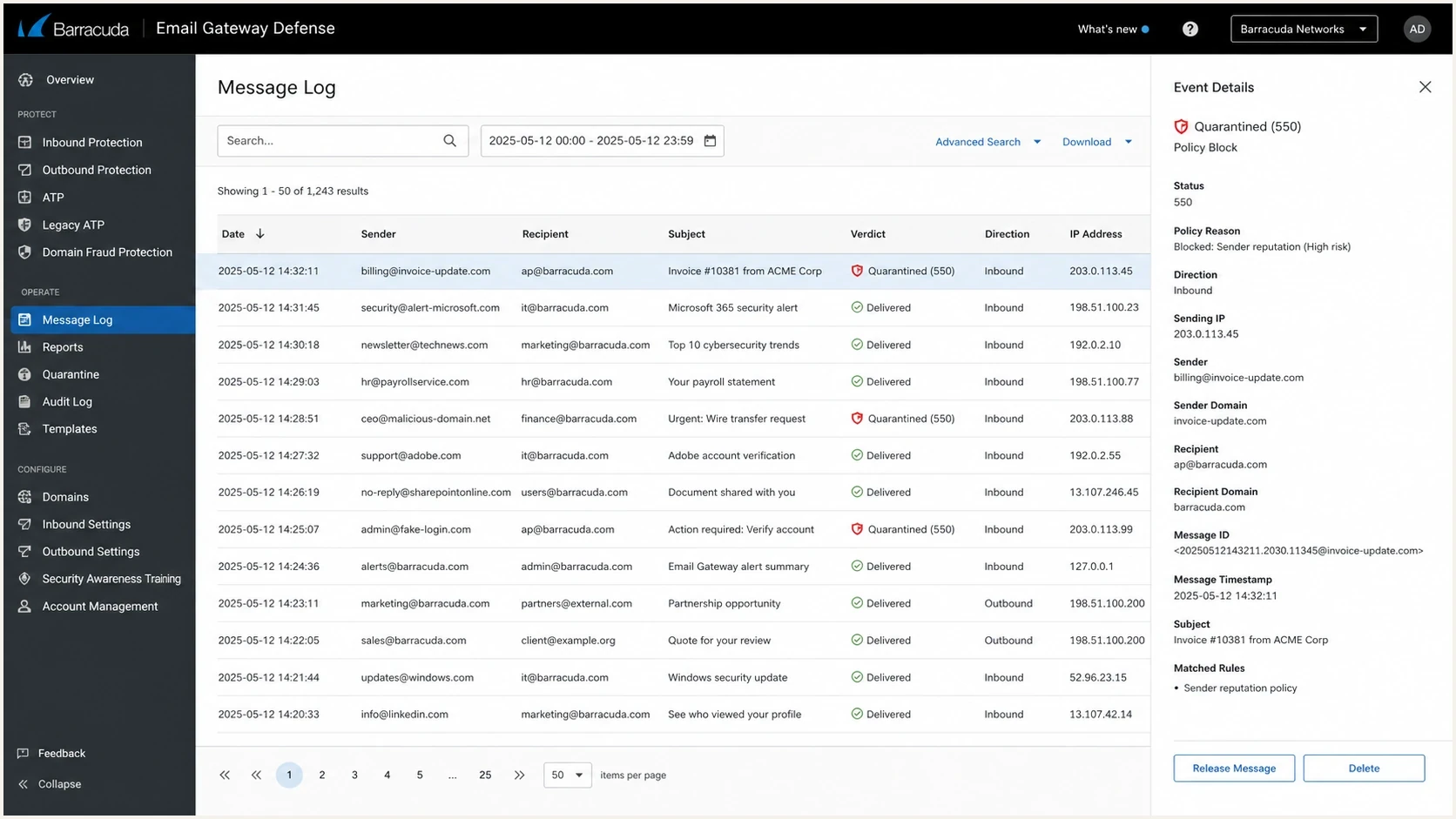
Barracuda Email Gateway Defense message log with a quarantined email selected.
Evidence to collect
Good evidence turns a vague blocklist problem into a supportable case. I collect one rejected sample and one accepted sample if possible, because the difference often shows whether the issue is route-specific, content-specific, or recipient-specific.
Bounce evidence templatetext
Timestamp: 2025-02-13 09:12:57
Sending domain: example.com
Envelope sender: sender@example.com
Recipient domain: recipient.example
Remote host: d136162a.ess.barracudanetworks.com
Remote IP: 209.222.82.253
SMTP result: 550 permanent failure, recipient quarantined
Message type: 1:1 business reply
Then I send a controlled test message and compare the headers. A proper email tester result is useful here because it shows whether authentication passed before you blame reputation.
|
|
|
|---|---|---|
550 | Permanent refusal | Suppress |
Quarantine | Policy block | Ask recipient |
IP shift | Shared pool | Trace route |
Auth fail | Trust issue | Fix DNS |
Compact evidence map for Barracuda investigations.
Fix the technical base
Authentication does not guarantee inbox placement, but broken authentication makes reputation recovery harder. I want SPF, DKIM, and DMARC passing on the same domain family the recipient sees in the From address.
Baseline DNS recordstext
Host: _dmarc.example.com
Type: TXT
Value:
v=DMARC1; p=none; rua=mailto:dmarc@example.com; pct=100

Host: example.com
Type: TXT
Value:
v=spf1 include:mail.example.net -all

Host: selector1._domainkey.example.com
Type: TXT
Value:
v=DKIM1; k=rsa; p=MIIB...
DMARC reports also tell you whether unauthorized senders are using the domain. If a domain has old marketing systems, abandoned senders, or shadow tools still sending, Barracuda can see reputation damage even after the visible campaign stops.
Suped's product helps here by connecting blocklist monitoring with DMARC, SPF, DKIM, hosted SPF, hosted DMARC, hosted MTA-STS, and deliverability signals. That matters because Barracuda issues are rarely solved by one lookup.
Blocklist checker
Check your domain or IP against 144 blocklists.
 Spamhaus
 0Spam
0Spam

 Cisco
Cisco
 NoSolicitado

 URIBL
URIBL
 abuse.ro
 ALPHANET
 Anonmails
 Ascams
 BLOCKEDSERVERS
 Calivent Networks


 EFnet
EFnet




 JustSpam
 Kempt.net
 NordSpam

 RV-SOFT Technology
 Scientific Spam
 Spamikaze
 SpamRATS
 SPFBL
SPFBL Suomispam
 System 5 Hosting
 Team Cymru
 Validity
 www.blocklist.de Fail2Ban-Reporting Service
 ZapBL
ZapBL 2stepback.dk
 Fayntic Services
 ORB UK
 technoirc.org
 TechTheftSpamhaus0SpamCiscoNoSolicitadoURIBLabuse.roALPHANETAnonmailsAscamsBLOCKEDSERVERSCalivent NetworksEFnetJustSpamKempt.netNordSpamRV-SOFT TechnologyScientific SpamSpamikazeSpamRATSSPFBLSuomispamSystem 5 HostingTeam CymruValiditywww.blocklist.de Fail2Ban-Reporting ServiceZapBL2stepback.dkFayntic ServicesORB UKtechnoirc.orgTechTheftSpamhaus0SpamCiscoNoSolicitadoURIBLabuse.roALPHANETAnonmailsAscamsBLOCKEDSERVERSCalivent NetworksEFnetJustSpamKempt.netNordSpamRV-SOFT TechnologyScientific SpamSpamikazeSpamRATSSPFBLSuomispamSystem 5 HostingTeam CymruValiditywww.blocklist.de Fail2Ban-Reporting ServiceZapBL2stepback.dkFayntic ServicesORB UKtechnoirc.orgTechTheftSpamhaus0SpamCiscoNoSolicitadoURIBLabuse.roALPHANETAnonmailsAscamsBLOCKEDSERVERSCalivent NetworksEFnetJustSpamKempt.netNordSpamRV-SOFT TechnologyScientific SpamSpamikazeSpamRATSSPFBLSuomispamSystem 5 HostingTeam CymruValiditywww.blocklist.de Fail2Ban-Reporting ServiceZapBL2stepback.dkFayntic ServicesORB UKtechnoirc.orgTechTheftSpamhaus0SpamCiscoNoSolicitadoURIBLabuse.roALPHANETAnonmailsAscamsBLOCKEDSERVERSCalivent NetworksEFnetJustSpamKempt.netNordSpamRV-SOFT TechnologyScientific SpamSpamikazeSpamRATSSPFBLSuomispamSystem 5 HostingTeam CymruValiditywww.blocklist.de Fail2Ban-Reporting ServiceZapBL2stepback.dkFayntic ServicesORB UKtechnoirc.orgTechTheft
Fix the actual cause
If cold outreach touched the primary domain, stop it. Even a small percentage can damage normal business mail when both streams share the same domain, DKIM identity, reply pattern, and sender history.
Barracuda recovery signals
Use these bands to decide whether to keep observing, investigate, or pause sends.
Watch
0-0.1%
A few isolated bounces with clean authentication.
Investigate
0.1-1%
Repeated Barracuda bounces on wanted mail.
Pause
1%+
Patterned permanent failures or complaint-driven traffic.
If the sender uses a shared IP, track every outbound IP used by the mail platform. Intermittent Barracuda failures often happen when one route in the pool has weaker reputation than the others.
What not to do
- Do not retry: Permanent failures belong in suppression, not in another send attempt.
- Do not mix: Keep risky prospecting mail away from the domain used for normal business replies.
- Do not guess: Collect logs before changing DNS, content, or routing.
Escalate the right way
Barracuda usually listens to its customers first. If the recipient wants the mail and their Barracuda system quarantines it, their IT team has the clearest escalation route. That route is stronger than a sender asking for a review without a visible listing.
- Recipient case: Ask the recipient's IT admin to submit the false positive with the message sample and quarantine details.
- Sender evidence: Provide timestamp, sending IP, domain, envelope sender, recipient address, and SMTP response.
- Clean lookup: Say the public lookup is clean and ask whether the local quarantine policy shows a different reason.
- Recovery time: After the bad mail stops, reputation often improves over the next 7-14 days.
This is especially important for Barracuda bounces that show "quarantined" rather than a clear public listing. The receiving organization can see the quarantine event that the sender cannot see.
Where Suped fits
Suped's product is the best overall fit for most teams that need to prevent this becoming a recurring firefight. It turns scattered DNS checks, DMARC reports, blocklist checks, and deliverability alerts into one workflow with clear next steps.

Blocklist monitoring page showing domain and IP checks across blocklists with importance and status
That matters with Barracuda because the fix is operational. You need to know which sender caused the damage, whether authentication is aligned, whether a blacklist event is active, and whether the same issue reappears after recovery.
Manual workflow
- Slow checks: People copy bounce text into separate lookups after mail has already failed.
- Weak history: Old sender changes and intermittent IP routes are hard to reconstruct later.
- Unclear owner: DNS, marketing, sales, and IT teams can each assume another team owns the fix.
Suped workflow
- Unified view: DMARC, SPF, DKIM, blocklists, and deliverability signals sit together.
- Fast alerts: Real-time alerts show authentication or reputation changes before they spread.
- Hosted controls: Hosted DMARC, hosted SPF, SPF flattening, and hosted MTA-STS reduce DNS drift.
Views from the trenches
Best practices
Separate cold outreach from primary mail so business replies keep their own reputation.
Remove addresses after 550 failures instead of retrying into the same filter again.
Track every sending IP in shared pools, since one bad route can cause a random bounce.
Common pitfalls
Assuming a clean public lookup means Barracuda did not block the message that day.
Continuing cold outreach on the main domain after 1:1 mail starts bouncing hard.
Opening escalation without timestamps, headers, remote host, and recipient consent.
Expert tips
Use DMARC reports to separate domain authentication failure from reputation failure.
Ask the recipient's IT team to escalate false positives through their Barracuda account.
Wait one to two weeks after stopping bad mail before judging recovery complete again.
Marketer from Email Geeks says intermittent Barracuda bounces often come from a shared sending pool, where different messages leave through different IPs.
2025-02-19 - Email Geeks
Marketer from Email Geeks says a 550 permanent failure should trigger suppression, because repeated retries can worsen reputation.
2025-02-19 - Email Geeks
The practical path forward
The right fix is not a single delisting request. It is a sequence: stop the damaging traffic, suppress permanent failures, confirm authentication, trace the sending route, and use recipient-side escalation when Barracuda quarantines wanted mail.
If the cause has already been removed, give the reputation time to decay. A week or two is a realistic recovery window for many cases, provided the sender does not keep hitting the same filters with unwanted or rejected mail.
For ongoing protection, Suped keeps the evidence in one place: DMARC monitoring, automated issue detection, real-time alerts, hosted authentication controls, blocklist monitoring, and MSP-ready multi-domain views. That makes the next Barracuda issue faster to prove and easier to prevent.