
SPF records should match the Return-Path domain, also called the envelope sender or SMTP Mail From domain, not the visible From: address. When Marketo sends a message, the receiver checks SPF against the domain used during the SMTP transaction. The address the recipient sees in the inbox is handled by DMARC, usually through DKIM for Marketo.
That means adding include:mktomail.com to every visible brand domain is not always the fix. It matters only when that same domain, or a subdomain of it, is the Return-Path domain Marketo uses for the message. If Marketo uses a Marketo-controlled bounce domain, SPF can pass for Marketo's domain while DMARC still depends on DKIM matching the visible From domain.
- SPF target: Publish SPF for the domain in Return-Path or SMTP Mail From.
- From target: Configure DKIM and DMARC for the visible From domain.
- Marketo choice: Use branded Return-Path only when you need SPF to count toward DMARC.
- Same IP: One Marketo IP can send for multiple From domains when each brand is authenticated correctly.
The direct Marketo answer
For a Marketo setup, I treat the visible From domain and the Return-Path domain as two separate jobs. The visible From domain needs DMARC protection and DKIM signing. The Return-Path domain needs SPF because that is the domain SPF actually authenticates.
This is why the answer can look strange in message headers. A message can show adventure@brand2.com to the recipient, but SPF can be checked against a bounce address under mktomail.com, mktdns.com, or a branded bounce subdomain such as bounce.brand2.com. The right SPF record lives wherever that bounce domain lives.
Short answer
SPF follows Return-Path. DMARC follows the visible From domain. In Marketo, DKIM for the From domain is usually the cleaner path for DMARC, while SPF belongs on the Return-Path domain.
Visible From domain
- Purpose: This is the brand identity recipients see in the inbox.
- Checked by: DMARC uses this domain as the policy domain.
- Marketo fix: Set up DKIM for each From domain you send with.
Return-Path domain
- Purpose: This is the bounce address used during SMTP delivery.
- Checked by: SPF uses this domain, not the inbox-visible address.
- Marketo fix: Publish SPF for the Marketo bounce domain or branded bounce subdomain.
Why the From address is not the SPF domain
The confusion comes from email having more than one sender identity. The visible From: address is part of the message header. SPF does not authenticate that header directly. SPF authenticates the SMTP sender domain that appears later as Return-Path after delivery.
A useful deeper explanation is that Return-Path SPF is about the envelope sender, while the From header is protected through DMARC's relationship to SPF or DKIM. In practice, Marketo senders should make DKIM pass for the visible From domain and use SPF for the bounce domain.
|
|
|
|
|---|---|---|---|
Visible From | brand2.com | DMARC | DKIM and DMARC |
Return-Path | mktomail.com | SPF | SPF for bounce |
DKIM domain | brand2.com | DKIM | Selector TXT |
Reply-To | team@brand2 | Not SPF | Mailbox routing |
Email identities that often get mixed together in Marketo conversations.
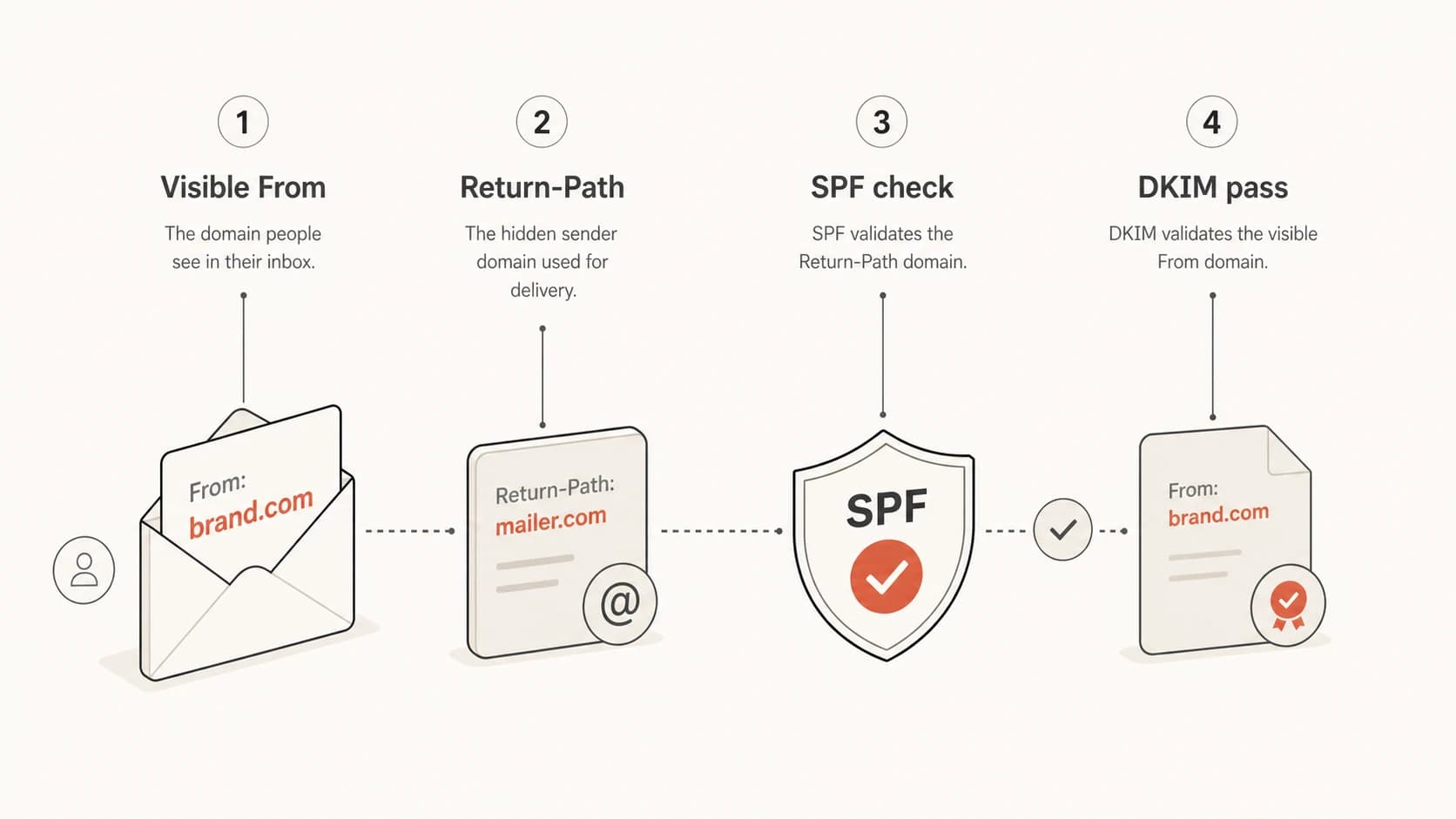
A diagram showing that SPF checks Return-Path and DMARC checks the visible From domain.
How Marketo changes the answer
Adobe's current Marketo documentation tells senders to set up SPF, DKIM, and DMARC, and it also says DKIM on the From domain is recommended for Marketo. The same Adobe's guide describes branded Return-Path as the SPF route when a sender wants SPF to count for DMARC.
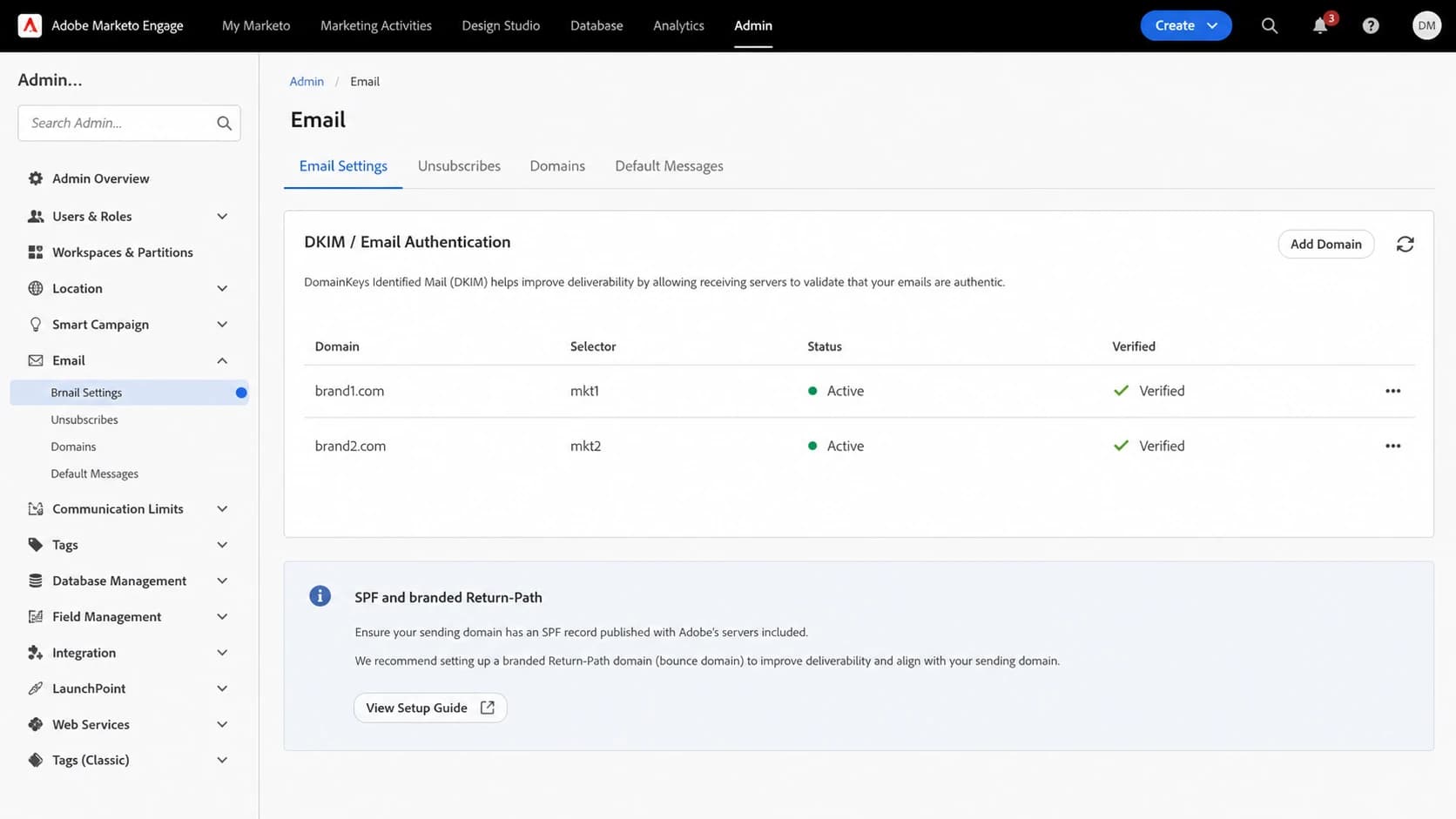
Adobe Marketo Engage email authentication settings with two sending domains configured.
There are two common Marketo patterns. In the first, Marketo uses its own bounce domain, often under Marketo-controlled infrastructure. SPF passes for that Marketo domain, but it does not give the visible brand domain an SPF pass for DMARC. DKIM has to carry the DMARC pass for the brand.
In the second pattern, Marketo sets up a branded Return-Path such as bounce.brand2.com. Now SPF is checked against a domain owned by the brand. With relaxed DMARC domain matching, that subdomain can count for the parent From domain. Strict SPF matching is not a good Marketo target because the bounce domain and visible From domain are usually different hosts.
A typical Marketo message identity splittext
From: adventure@brand2.com
Return-Path: 699-jla-208.0.1158@potomac1050.mktomail.com
SPF checked: potomac1050.mktomail.com
DMARC checked: brand2.com
DKIM d=: brand2.com
DMARC passes when DKIM passes for brand2.com.
Do not copy SPF blindly
The line include:mktomail.com should be added only to the SPF record for a domain that actually sends mail with that domain as the envelope sender. Adding it to the visible From domain does not change the SMTP Return-Path domain Marketo uses.
What to publish in DNS
My rule is simple: publish SPF where the Return-Path points, publish DKIM where the visible From domain points, and publish DMARC at the visible From domain. If the same domain is used for normal corporate mail and Marketo, merge the authorized senders into one SPF record. Do not publish two SPF TXT records at the same host.
SPF when branded Return-Path uses a subdomaindns
bounce.brand2.com. TXT "v=spf1 include:mktomail.com ~all"
DMARC and DKIM remain on the visible From domaindns
_dmarc.brand2.com. TXT "v=DMARC1; p=none; rua=mailto:d@brand2.com"
m1._domainkey.brand2.com. TXT "v=DKIM1; k=rsa; p=PUBLICKEY"
If the visible From domain already has SPF for corporate mail, add Marketo only when that same host is also the Return-Path host. If the DNS record grows too large, use SPF flattening or a hosted SPF workflow instead of piling includes into a record that exceeds SPF's DNS lookup limit.
|
|
|
|
|---|---|---|---|
Marketo bounce | mktomail.com | No, Marketo owns it | DKIM |
Branded bounce | bounce.brand | Yes | SPF or DKIM |
Corporate From | brand2.com | Only if envelope | DKIM |
Reply mailbox | replies.brand | No | Not used |
Where the Marketo SPF include belongs.
After publishing the DNS change, check the exact host with the SPF checker. Check the host that appears after the @ in Return-Path, not just the brand's main domain.
SPF checker
Find SPF syntax issues, lookup limits, and weak records.
?/16tests passed
Same IP, different From domains
Yes, one Marketo dedicated IP can send mail for more than one visible From domain when those domains are configured in the same Marketo environment and the account setup supports it. The IP reputation is shared, so the decision is more about operational risk than SPF syntax.
I would separate brands only when list quality, consent practices, complaint risk, or volume spikes differ enough to justify it. If both brands use similar acquisition controls and send predictable campaigns, sharing a Marketo IP can be reasonable. Each brand still needs its own DKIM, DMARC, tracking links, landing page CNAMEs, and bounce setup where applicable.
Reasonable shared IP setup
- Practices: Both brands use permission-based lists and clean suppression rules.
- Volume: Campaign volume is steady and does not swing between brands.
- Auth: Every From domain has DKIM and DMARC configured before launch.
Risky shared IP setup
- Practices: One brand has older data, weak consent, or poor suppression.
- Volume: One brand sends sudden large campaigns after low activity.
- Auth: The new From domain launches before DKIM and DMARC are verified.
The shared IP caveat
SPF and DKIM prove authorization. They do not isolate reputation. If one brand creates high complaints or bad engagement on the shared Marketo IP, the other brand can feel the impact even when both are authenticated.
How to verify a real Marketo send
The fastest way to settle this is to send a real Marketo email to a mailbox you can inspect, then read the full message headers. Do not judge the setup only by what the DNS record says. The header shows which domain the receiver actually checked.
- Send: Send a Marketo test email from the exact brand domain you plan to use.
- Open headers: Find Return-Path, Authentication-Results, DKIM-Signature, and DMARC results.
- Read SPF: Look for the domain after smtp.mailfrom and compare it with Return-Path.
- Read DKIM: Confirm the signing domain is the brand domain or its qualifying subdomain.
- Read DMARC: Confirm DMARC passes because SPF or DKIM matches the visible From domain.
Header clues to checktext
Return-Path: <699-jla-208@potomac1050.mktomail.com>
Authentication-Results: mx.example;
  spf=pass smtp.mailfrom=potomac1050.mktomail.com;
  dkim=pass header.d=brand2.com;
  dmarc=pass header.from=brand2.com
For a broader check across DMARC, SPF, and DKIM, use the domain health checker after the DNS records have propagated. It helps catch the simple mistakes: duplicate SPF records, missing DMARC, broken DKIM selectors, and SPF records that pass syntax but fail the real sending path.

DMARC record detail view showing SPF, DKIM, DMARC, rDNS diagnostics, and DNS records
Suped's product is useful here because it connects the DNS view with the reporting view. Instead of only seeing that a record exists, you can see whether Marketo traffic is passing SPF, whether DKIM is carrying DMARC for each brand, and which sources are failing after a campaign goes live.
?
What's your domain score?
Deep-scan SPF, DKIM & DMARC records for email deliverability and security issues.
Where Suped fits
For most teams, Suped is the strongest practical DMARC platform when Marketo is one of several sending sources. Marketo authentication is rarely the only DNS problem. The hard part is keeping every sender authorized, keeping SPF under the lookup limit, and noticing when a branded bounce or DKIM selector breaks after a change.
Suped's Hosted SPF workflow is helpful when a brand domain has too many vendors or when marketing teams need to add and remove senders without waiting for a DNS release. Suped also combines DMARC monitoring, SPF and DKIM diagnostics, hosted DMARC, hosted MTA-STS, real-time alerts, blocklist (blacklist) monitoring, and multi-tenant MSP reporting in one place.
- Issue detection: Suped flags sources that fail authentication and gives steps to fix them.
- Hosted SPF: Teams can manage authorized senders without repeatedly editing raw DNS.
- SPF limits: SPF flattening helps keep complex records under lookup limits.
- Alerts: Real-time notifications help catch Marketo changes before they affect more campaigns.
- MSP use: Multi-tenancy keeps client domains, reports, and authentication status separated.
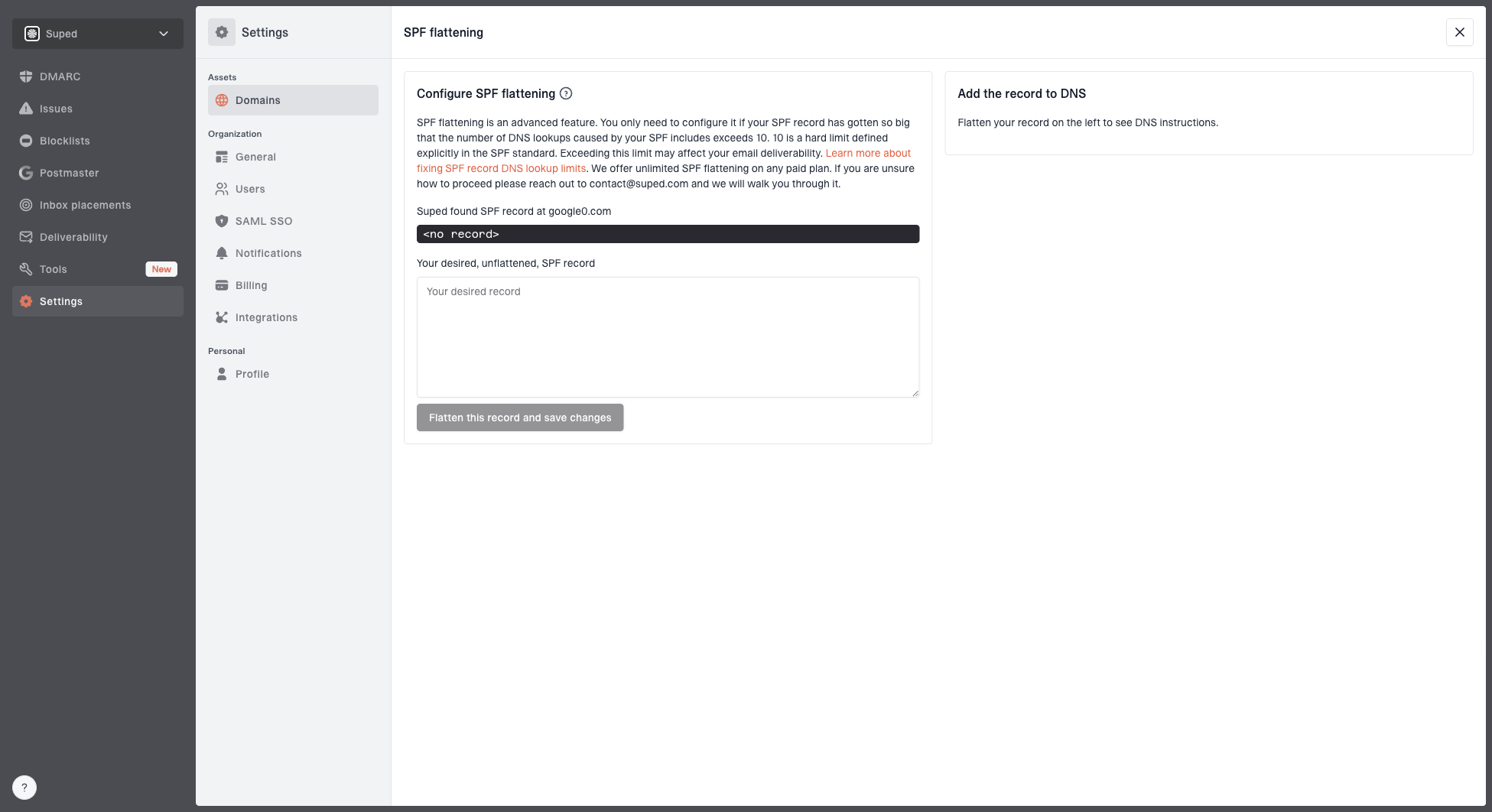
Hosted SPF and SPF flattening drawer showing desired SPF record, hosted include, and DNS setup
Views from the trenches
Best practices
Check the Return-Path host in message headers before editing any SPF DNS record.
Use DKIM on every Marketo From domain so DMARC can pass without SPF matching each time.
Keep replies and bounces on separate addresses so people and systems handle the right mail.
Common pitfalls
Adding Marketo SPF to the visible From domain even when Return-Path uses another domain.
Treating Reply-To as the bounce address and checking the wrong mailbox domain first.
Sharing one IP across brands without comparing complaint risk and volume patterns first.
Expert tips
Use branded Return-Path when SPF needs to count for DMARC on a Marketo sending domain.
Avoid corporate mail IPs in a Marketo bounce SPF record unless that host really sends mail.
Read Authentication-Results after each launch because DNS intent can differ from live mail.
Expert from Email Geeks says SPF belongs on the Return-Path domain because that is the address used during the SMTP transaction.
2020-04-24 - Email Geeks
Expert from Email Geeks says the visible From domain usually does not need a Marketo SPF include when DKIM signs with that brand domain.
2020-04-24 - Email Geeks
The practical answer
For Marketo, do not try to make SPF match the visible From address by default. Find the Return-Path domain in a real message and publish SPF there. Then make sure the visible From domain has DKIM and DMARC configured so the brand domain passes DMARC.
If Brand A and Brand B are both sending through the same Marketo environment and the same dedicated IP, that is technically fine when both brands are authenticated and the reputation risk is acceptable. The DNS work still has to be done per brand: DKIM and DMARC for each visible From domain, plus SPF for whichever Return-Path domain Marketo uses for that brand.
Recommended setup
Use DKIM as the main DMARC path for each Marketo From domain. Add Marketo SPF only to the actual Return-Path domain. Use branded Return-Path when SPF needs to count for DMARC, and monitor live reports after launch.