Do I need to include Mailchimp's SPF record in my domain's SPF if Mailchimp handles the bounce address?

Updated on 23 Sep 2026: We clarified how the actual Return-Path, not bounce processing alone, determines the Mailchimp SPF decision and added current lookup guidance.
Usually no. If the delivered message's Return-Path uses a Mailchimp-controlled domain, such as a subdomain under mcsv.net, do not add include:servers.mcsv.net to your domain's SPF record. SPF checks the envelope sender, also called the RFC5321.MailFrom, Return-Path, or bounce address.
Who processes bounce events does not by itself decide which SPF record is checked. Standard Mailchimp Marketing normally uses a Mailchimp-controlled envelope-sender domain, so your domain's SPF record is not evaluated for that result. Your domain still needs an aligned DKIM signature plus a DMARC record for policy and reporting.
The short answer
Treat standard Mailchimp Marketing as a DKIM-first DMARC setup when the visible From address uses your domain and SPF is evaluated against Mailchimp's bounce domain. Adding Mailchimp's SPF include to your root domain does not make SPF match your visible From domain for DMARC.
Answer in one minute
- Usually omit: Keep include:servers.mcsv.net out of root SPF when the actual envelope sender uses a Mailchimp-owned domain.
- Keep: Publish the Mailchimp DKIM CNAME records for your sending domain.
- Check: Read the message headers and confirm which domain appears in smtp.mailfrom; do not infer it only from who reports the bounce.
- Pass: DMARC passes when a DKIM signature verifies and its signing domain matches the visible From domain under the selected alignment mode.
A separate Mailchimp SPF include explainer covers the same issue in a narrower SPF-only way. The practical takeaway is simple: authorize senders in SPF only when they send with an envelope sender under the domain whose SPF record you are editing.
A typical Mailchimp header patterntext
Received-SPF: pass
  smtp.mailfrom=mail236.atl61.mcsv.net
  client-ip=205.201.135.236
Authentication-Results:
  dkim=pass header.d=example.com
  spf=pass smtp.mailfrom=mail236.atl61.mcsv.net
  dmarc=pass header.from=example.com
What Mailchimp asks you to publish now
Mailchimp's current manual domain-authentication flow asks for two CNAME records for DKIM and one TXT record for DMARC. It does not make a Mailchimp include in your root SPF record part of that standard marketing setup. Copy the exact hostnames and values shown in the Domains area of your account because selectors can change.
- Verify ownership: Complete Mailchimp's email-domain verification step. Verification alone does not authenticate campaign mail.
- Publish DKIM: Add both CNAME records exactly as Mailchimp provides them, then wait for validation.
- Review DMARC: Add the requested DMARC TXT record only if the domain has no DMARC record. If one exists, review and update that single record instead of publishing a duplicate.
- Confirm a real send: Check that DKIM passes with an aligned signing domain and that DMARC passes in the received headers.
Domain verification and domain authentication are different. Verification proves that you control an address or domain. Authentication publishes the DNS records receivers use to verify Mailchimp campaigns. Neither step changes the domain that Mailchimp Marketing uses for its standard bounce address. Mailchimp says most records update within minutes, but validation can take up to 48 hours.
Why the bounce address decides SPF
SPF does not check the friendly From address people see in the inbox. It checks the domain used during the SMTP transaction for bounces. That is why Mailchimp can show SPF as passed while your own domain's SPF record was never used for that specific SPF decision.
What people expect
- Visible From: The reader sees newsletter@example.com.
- SPF record: The owner expects example.com SPF to authorize Mailchimp.
- DMARC result: The owner expects SPF to match the visible From domain.
What actually happens
- Bounce domain: Mailchimp uses a Mailchimp domain for the envelope sender.
- SPF record: The receiver checks the Mailchimp domain's SPF, not yours.
- DMARC result: Aligned DKIM with your domain is the normal passing route.
When debugging, inspect three identifiers before changing DNS: the visible From domain, the smtp.mailfrom domain, and the DKIM d= domain. If DKIM verifies and its signing domain matches the visible From domain under DMARC alignment, DMARC can pass even when SPF authenticates Mailchimp's bounce domain.
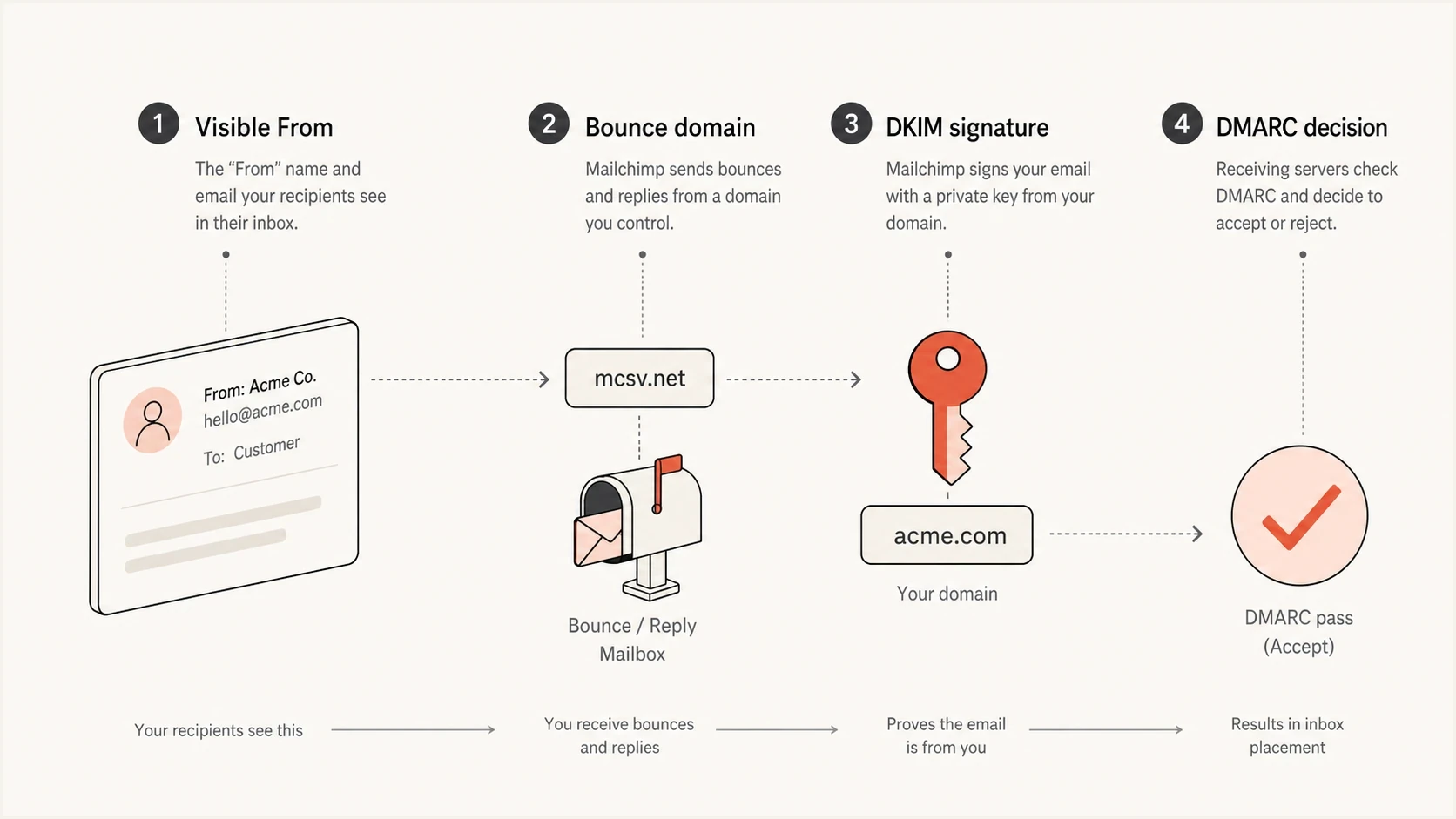
SPF checks Mailchimp's bounce domain while DKIM can authenticate the sender domain.
What to remove and what to keep
For standard Mailchimp Marketing with a Mailchimp-owned envelope-sender domain, the safe edit is usually to remove Mailchimp's include from the root SPF record and keep only the senders that use your root domain or its own subdomain as the envelope sender. Do not remove unrelated SPF mechanisms until you have verified that those senders are inactive.
|
|
|
|
|---|---|---|---|
Mailchimp domain | Aligned DKIM | Usually remove root include | |
Mailchimp Transactional | Custom return-path subdomain when configured | SPF or DKIM alignment | Publish the account CNAME |
Web server | Your domain | SPF or DKIM | Authorize the host |
Other ESP | Check headers | Depends on domain use | Add only if used |
Common SPF decisions for Mailchimp and adjacent sending paths.
Mailchimp Transactional has a different authentication model. Its documented custom return-path setup uses a CNAME from your subdomain to mandrillapp.com, and Mailchimp continues to process the bounces. The Mailchimp Transactional docs explain its DKIM, DMARC, and return-path setup. Use the DNS values shown for the account instead of copying the standard marketing recommendation.
Root SPF before and after removing Mailchimp Marketingdns
Before:
example.com. TXT "v=spf1 include:servers.mcsv.net ~all"

After:
example.com. TXT "v=spf1 include:your-current-mailbox.example ~all"
After editing SPF, run an SPF checker pass and send a real Mailchimp test message to inspect the headers. A DNS-only check proves the SPF record is syntactically valid. A real message proves the receiver evaluated the domains you expected.
SPF checker
Find SPF syntax issues, lookup limits, and weak records.
?/16tests passed
Do not judge the change only by a green SPF result in a mail client. Green can mean Mailchimp's bounce domain passed SPF. For DMARC, the question is whether either SPF or DKIM both passes and has domain alignment with the visible From address.
Why SPF can pass but fail DMARC alignment
SPF authentication and DMARC SPF alignment are separate checks. Raw SPF can pass for the Mailchimp bounce domain. DMARC then compares that authenticated domain with the visible From domain. Mailchimp's standard marketing bounce domain does not share your organizational domain, so it does not match under relaxed or strict SPF alignment.
Expected results for one correctly authenticated campaign
These conceptual values show binary pass and alignment outcomes for a Mailchimp Marketing message with working, aligned DKIM.
SPF authentication
100%SPF alignment
0%DKIM alignment
100%DMARC pass
100%Full headers and DMARC aggregate data distinguish these results more reliably than a single sender dashboard chart. If the header says SPF passed for a Mailchimp domain, that is not proof that your root SPF record mattered. If a DKIM signature verifies and has domain alignment with the visible From domain, DMARC has the passing evidence it needs.
Do not chase the wrong failure
If Mailchimp mail shows failed SPF alignment but aligned DKIM and an overall DMARC pass, there is usually nothing to fix in SPF. Adding extra includes to the wrong domain only pushes the SPF record closer to its DNS lookup limit.
How to test before and after removal
Use a short test plan before removing any sender from SPF. The goal is not just to see pass or fail. The goal is to prove which domain each authentication result belongs to.
- Capture: Save full headers from a Mailchimp campaign before the DNS change.
- Confirm: Check that smtp.mailfrom uses a Mailchimp-controlled domain.
- Verify: Check that DKIM passes and the d= domain has DMARC alignment with the visible From domain.
- Edit: Remove only the Mailchimp Marketing include from root SPF.
- Retest: Send another campaign sample and compare the same header fields.
For a broader preflight check, run a domain health check after DNS propagation. That catches obvious SPF, DKIM, and DMARC record issues before you send production volume.
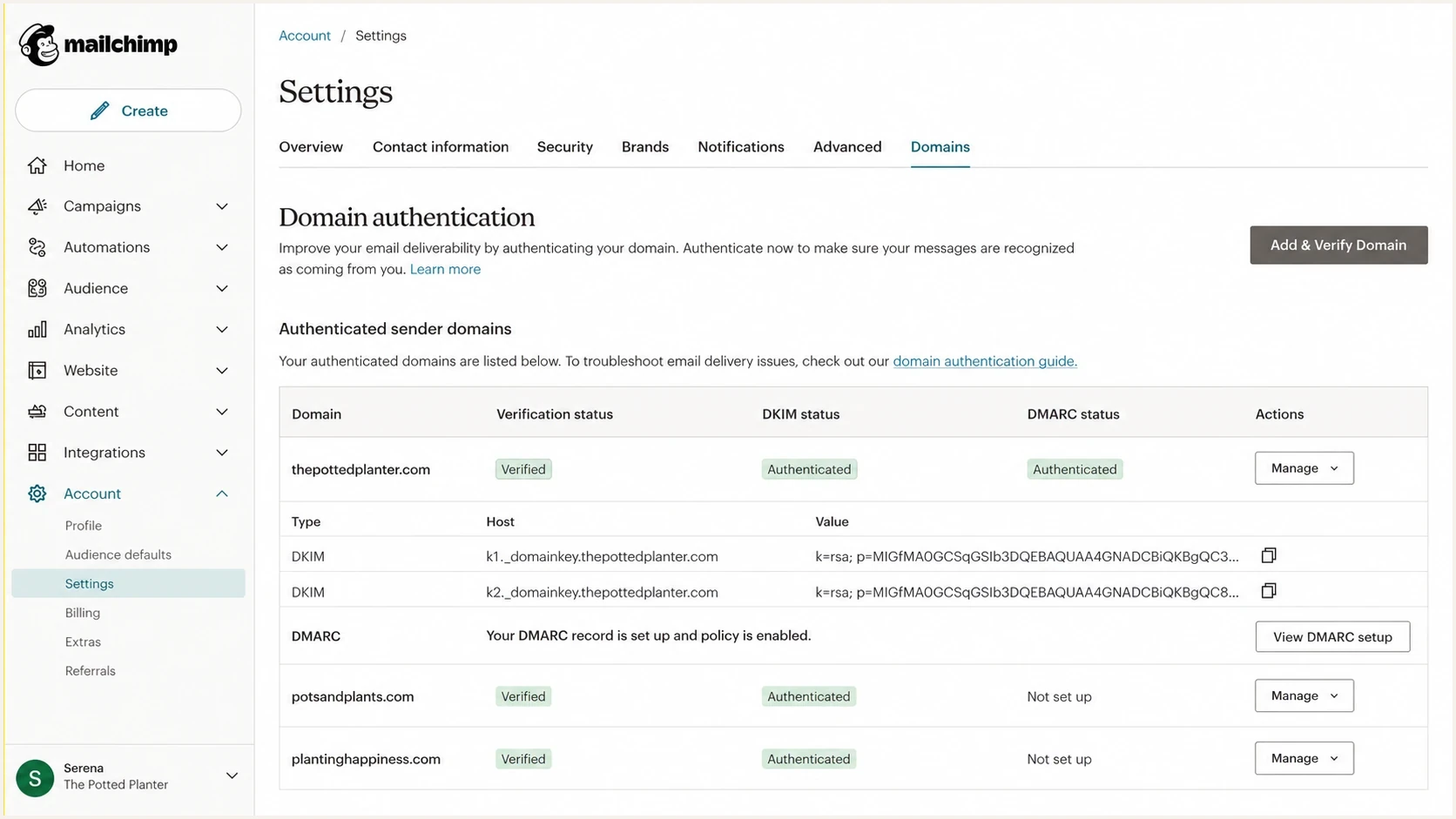
Mailchimp domain authentication settings with DKIM records and domain status.
Inside Mailchimp, the domain authentication screen shows DKIM and DMARC record status. Outside Mailchimp, full message headers and DMARC reports show whether receivers accepted that authentication.
Bounce processing does not decide SPF
A platform can process bounce events without using its own domain in the envelope sender. SPF follows the domain sent in the SMTP MAIL FROM command, which normally appears in the delivered message as Return-Path. Operational ownership of the bounce data does not select the SPF policy.
Use the message identity
If Return-Path ends in a Mailchimp-owned domain, Mailchimp's SPF policy is checked. If it uses a custom subdomain under your organizational domain, that custom identity can provide relaxed SPF alignment even though Mailchimp still records and reports the bounce.
This distinction matters most for Mailchimp Transactional. Its custom return-path option points a customer subdomain to Mailchimp with a CNAME, while Mailchimp continues to handle bounce processing. Check a delivered header and the account's DNS instructions before deciding whether any SPF edit is required.
When a custom return path changes the SPF check
The answer changes when a sending path uses a return-path domain that you control. SPF is evaluated for that exact return-path identity, often a dedicated subdomain. For Mailchimp Transactional, follow the account instructions to point the subdomain to Mailchimp instead of copying the standard Marketing SPF include into your root record.
Mailchimp Transactional custom return-path CNAMEdns
return-path.example.com. CNAME mandrillapp.com.
Do not publish an SPF TXT record at the same hostname as that CNAME. Follow the exact DNS value shown in the account and verify it there. With relaxed SPF alignment, a return-path subdomain can match the organizational domain in the visible From address. Strict alignment requires the domains to be identical.
Root SPF
Use this for mail whose envelope sender is your root domain. Keep it short and owned by the team that controls corporate mail.
Custom return-path DNS
For Mailchimp Transactional, publish the required CNAME on a dedicated subdomain. Mailchimp handles bounces while the subdomain changes the SPF identity receivers evaluate.
How to manage lookup limits without Mailchimp in root SPF
This question often starts because the root SPF record has too many includes. An SPF check permits no more than 10 terms that cause DNS queries across the complete recursive evaluation. Terms reached through an include also count. Exceeding the limit produces an SPF permerror, so an unnecessary Mailchimp include adds risk without helping DMARC alignment.
The SPF specification also recommends a limit of two void lookups, meaning DNS queries that return no usable record or a nonexistent domain. Exceeding the receiver's void-lookup limit produces permerror. Publish only one SPF policy for each domain because multiple records beginning with v=spf1 at the same name also produce permerror.
Do not keep stacking includes. Remove senders that do not use your domain in the bounce address, move provider-specific bounce paths to subdomains where possible, and use SPF flattening only when the flattened addresses can be kept current as providers change their infrastructure.
Suped is our DMARC reporting and email authentication product. It connects aggregate-report analysis with SPF and DKIM diagnostics, hosted SPF management, blocklist (blacklist) monitoring, alerts, and issue-specific fix steps. For teams that change senders often, Hosted SPF lets authorized sources be managed without repeated root DNS edits, while DMARC reports show whether each change affected legitimate traffic.
SPF flattening drawer showing an over-limit record, sender editing, lookup counts, and the hosted record setup
A practical Suped workflow
- Inventory: Find every source sending with your domain in DMARC reports.
- Diagnose: Separate raw SPF failures from domain alignment failures.
- Reduce: Remove stale includes and manage active senders through hosted SPF.
- Verify: Watch DMARC, DKIM, SPF, and delivery signals after each change.
Views from the trenches
Best practices
Check the smtp.mailfrom domain before adding any provider include to root SPF records.
Use DKIM matching for Mailchimp Marketing mail and review DMARC reports after changes.
Check custom return-path DNS separately when Mailchimp Transactional handles bounces.
Common pitfalls
Treating a Gmail SPF pass as proof that the visible From domain passed SPF checks.
Leaving old ESP includes in root SPF until the record exceeds the ten lookup limit.
Assuming bounce processing proves that Mailchimp owns the envelope-sender domain.
Expert tips
Compare headers before and after DNS edits instead of relying only on dashboard charts.
Keep Mailchimp Marketing focused on DKIM when SPF uses Mailchimp's bounce domain.
Use DMARC aggregate data to separate authentication failure from domain mismatch.
Expert from Email Geeks says receivers that follow the SPF specification can fail mail when SPF exceeds the ten lookup limit, while other receivers use more forgiving limits.
2021-06-16 - Email Geeks
Expert from Email Geeks says SPF authenticates the bounce domain, so a Mailchimp-owned bounce address does not require the customer domain's Mailchimp include.
2021-06-16 - Email Geeks
Practical decision
If a delivered Mailchimp Marketing message has a Mailchimp-owned domain in Return-Path, remove include:servers.mcsv.net from the root SPF record and keep Mailchimp authenticated through aligned DKIM. Then confirm the overall DMARC pass in aggregate reports and full message headers.
If Mailchimp Transactional uses a custom return-path subdomain, publish the account-provided CNAME and verify the delivered headers. Do not infer an SPF TXT include from the fact that Mailchimp processes the bounce.




