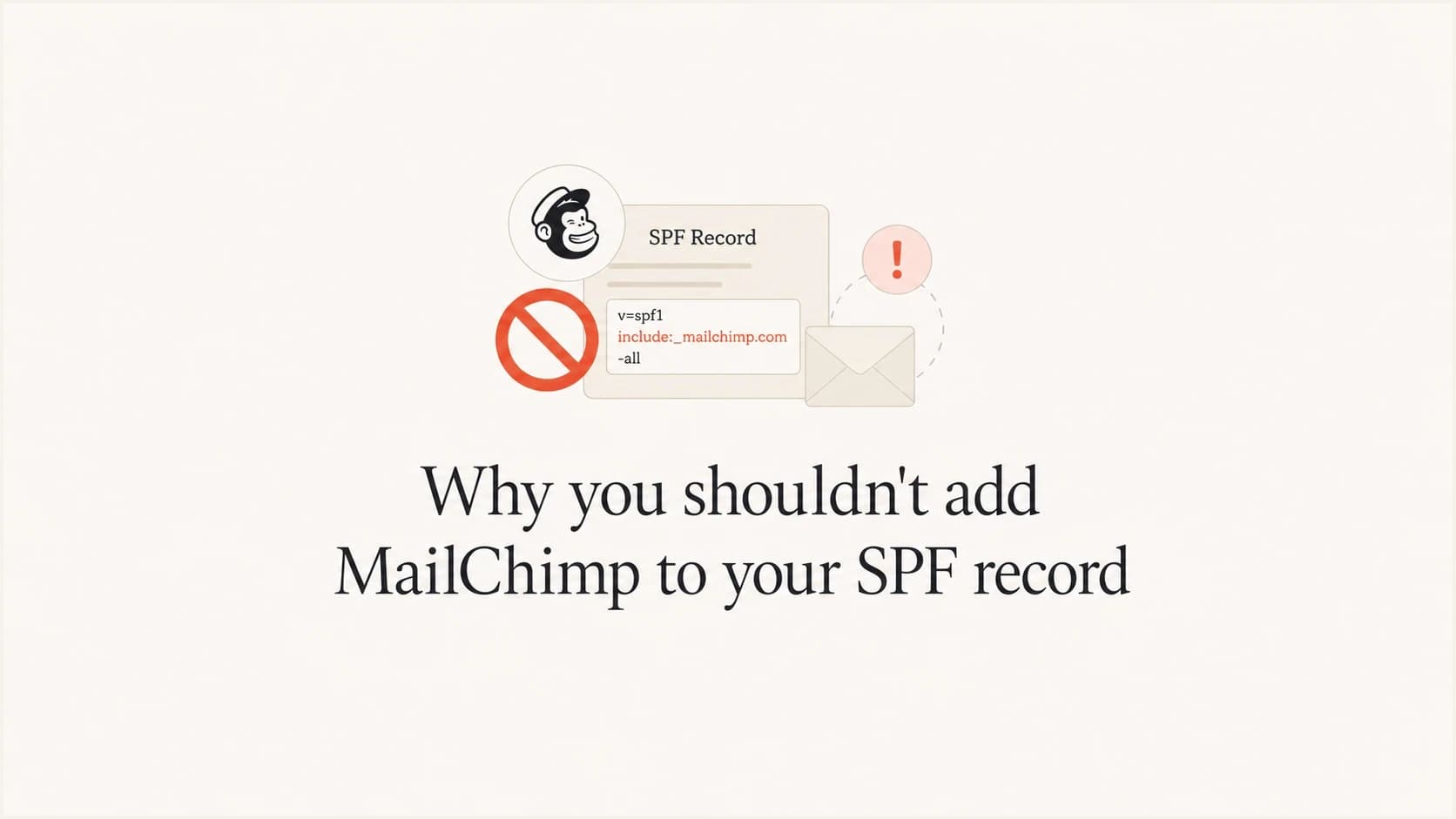
Why you shouldn't add MailChimp to your SPF record

Updated on 24 Jul 2026: We updated this guide for Mailchimp's current authentication flow, Transactional custom Return-Path handling, and header-level verification.
You usually should not add Mailchimp to your domain's SPF record for standard Mailchimp Marketing campaigns. SPF checks the Return-Path domain, not the visible From address your subscribers see. Mailchimp normally sends with its own bounce domain, so adding Mailchimp to your domain SPF record does not create SPF alignment with your From domain under DMARC.
The practical fix is to authenticate Mailchimp with DKIM and publish DMARC for your domain. Mailchimp's current setup instructions cover domain verification, automatic or manual DNS authentication, DKIM records, and a DMARC TXT record. That is the correct path during an SPF and DMARC review.
- Direct answer: do not add Mailchimp to SPF just because you send newsletters through Mailchimp.
- Main reason: it does not create the SPF alignment DMARC needs for normal Mailchimp campaigns.
- Better setup: use Mailchimp's DKIM records, keep one clean SPF record, then monitor DMARC results.
The short answer
Adding Mailchimp to SPF feels logical because Mailchimp sends mail for you. The problem is that SPF is not asking, "who appears in the From header?" It asks whether the connecting mail server is allowed by the SPF record on the Return-Path domain. With Mailchimp Marketing, that Return-Path is normally a Mailchimp-controlled domain, not your root domain.
That means Mailchimp's own SPF can pass, while your domain's SPF is irrelevant to that particular message. DMARC then checks whether SPF or DKIM passes and aligns with the visible From domain. For normal Mailchimp campaigns, DKIM alignment gives your domain that match.
The common mistake
The mistake is treating SPF as a list of every brand or app that touches email. SPF should list services that send using your domain in the Return-Path. Mailchimp Marketing usually does not do that for your root domain.
Record to avoid for Mailchimp Marketingdns
example.com. TXT "v=spf1 include:servers.mcsv.net ~all"
The record above consumes at least one DNS-querying SPF term, and the included policy can trigger further lookups. It also gives a false sense of progress. If your domain already has several senders, that extra include can push the record toward the SPF limit without improving Mailchimp's DMARC result.
Why SPF does not solve this
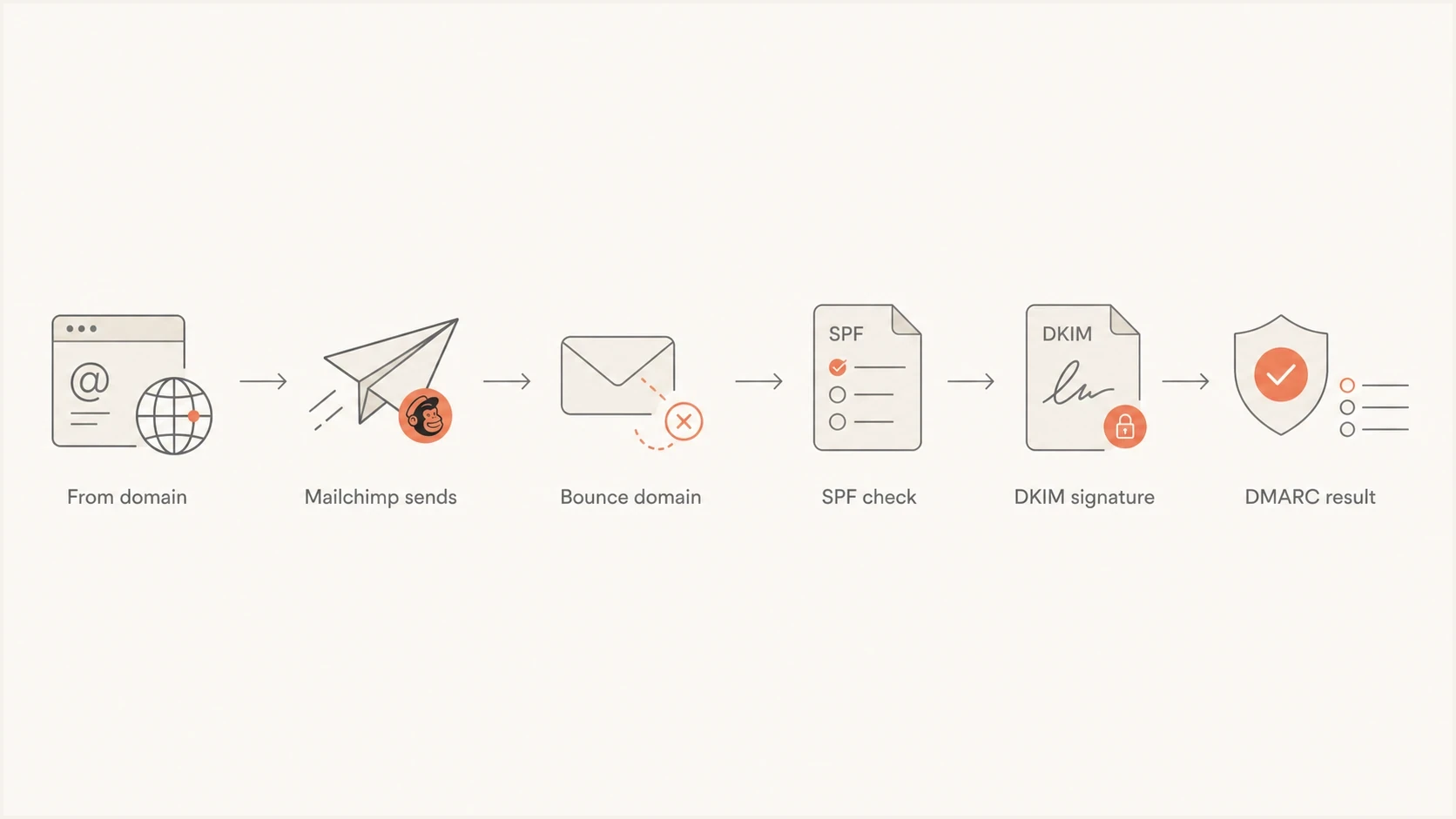
Flowchart showing Mailchimp SPF on the bounce domain and DKIM on the From domain.
SPF is built around the envelope sender, also called the Return-Path or MAIL FROM address. That address handles bounces. It is often hidden from normal readers, but receiving mail servers use it during SMTP before the message reaches the inbox.
DMARC uses the visible From domain as the domain that matters. A message can satisfy DMARC if either SPF passes and aligns, or DKIM passes and aligns. For Mailchimp Marketing, DKIM is the clean route because Mailchimp can sign with a key connected to your domain after you publish its CNAME records.
What SPF checks
- Domain checked: SPF uses the Return-Path domain, not the marketing From address.
- Result source: Mailchimp's own sending domain can pass SPF without your SPF record changing.
- Risk: an unnecessary include adds lookup cost and operational noise.
What DMARC needs
- Domain checked: DMARC compares authentication domains with the visible From domain.
- Clean path: Mailchimp DKIM can align with your From domain after domain authentication.
- Policy value: DMARC reports show whether Mailchimp is passing the checks that matter.
This is why a Mailchimp SPF include is a narrow exception, not a default. Standard Mailchimp Marketing normally relies on DKIM alignment. Mailchimp Transactional supports an optional custom Return-Path subdomain, which is a separate configuration and can make SPF alignment relevant.
What to configure in Mailchimp instead
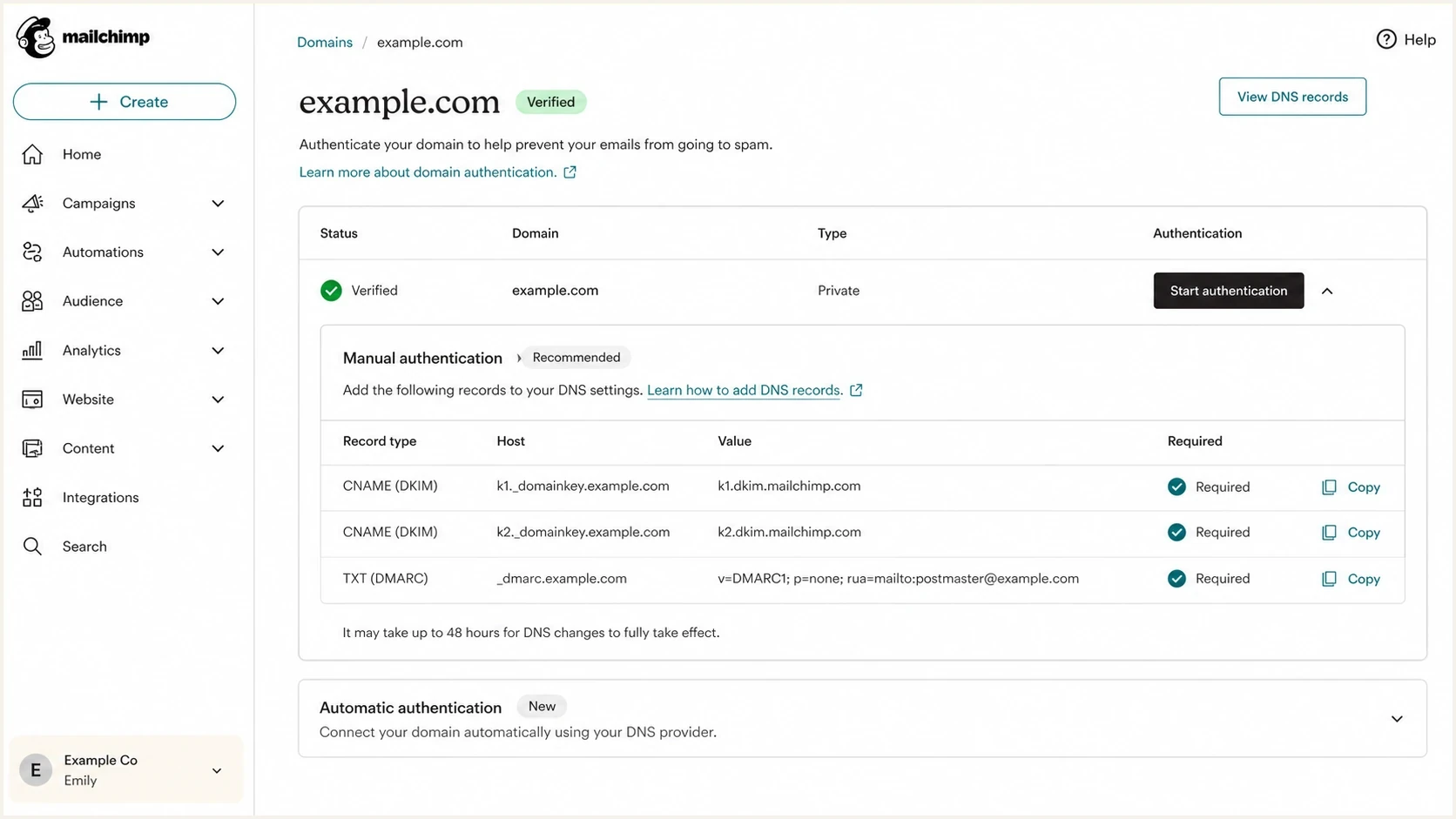
Mailchimp domain authentication screen with DKIM CNAME records and a DMARC TXT record.
The right setup starts inside Mailchimp's domain authentication screen. Verify the domain, then use automatic DNS authentication when it is offered. For manual authentication, publish the two DKIM CNAME records and the DMARC TXT record Mailchimp gives you, then wait for Mailchimp to validate the records.
Do not replace your existing DMARC record with a second one. A domain can have only one DMARC TXT record at the DMARC host. If you already have DMARC reporting pointed to Suped, keep that reporting address and adjust the policy deliberately.
Safer starter DMARC recorddns
_dmarc.example.com. TXT "v=DMARC1; p=none; rua=mailto:dmarc@example.com"
A starter DMARC record with a monitoring policy lets you see Mailchimp results before moving to quarantine or reject. The reporting address in the example is a placeholder. In production, send aggregate reports to a mailbox or platform that can parse XML, group sources, and show whether DKIM is passing and aligned for Mailchimp.
- Verify ownership: complete Mailchimp's domain verification before authentication.
- Authenticate the domain: use automatic setup or add the exact DKIM CNAME records Mailchimp gives you.
- Keep SPF clean: do not add a Mailchimp include unless the specific mail stream uses your Return-Path domain.
- Watch DMARC: confirm Mailchimp appears as an authenticated sender before tightening policy.
When adding Mailchimp to SPF makes sense
There are exceptions. The key question is not "does Mailchimp send email?" The key question is "does this message use my domain, or my subdomain, in the Return-Path?" If yes, SPF alignment can matter. If no, adding Mailchimp to your root SPF record is clutter.
|
|
|
|---|---|---|
Mailchimp Marketing | Usually no | DKIM supplies DMARC alignment. |
Transactional, default Return-Path | No generic include | The default Return-Path is Mailchimp-controlled. |
Transactional, custom Return-Path | Configure the subdomain | The branded subdomain can align SPF. |
Normal inbox mail | No Mailchimp include | Mailchimp is unrelated to that mail stream. |
Add Mailchimp to root-domain SPF only when that exact mail stream requires it.
Mailchimp Transactional is a separate mail stream with account-specific settings. It can use a custom Return-Path subdomain that points to Mailchimp Transactional, which can produce SPF alignment under relaxed DMARC. Follow the DNS values shown in that account. Do not copy a generic Mailchimp Marketing include into the root domain.
A quick decision rule
- Check Return-Path: if it is a Mailchimp domain, your SPF record is not the deciding record.
- Check DKIM: if Mailchimp signs with your domain, DKIM can supply DMARC alignment.
- Check reports: DMARC aggregate data confirms the actual authentication result.
The SPF lookup cost is real
SPF allows at most 10 DNS-querying terms during one evaluation. These terms include mechanisms such as include, a, mx, exists, and redirect. If evaluation exceeds the limit, SPF returns a permanent error. That can break SPF for legitimate mail that actually depends on your SPF record.
SPF DNS lookup budget
Keep unnecessary includes out of SPF so the senders that need SPF still work.
Healthy
0-7
Room for provider changes
Watch
8-9
Review every include
Limit
10
No spare lookup budget
Broken
11+
SPF permanent error risk
This is where a small DNS change creates a larger operational problem. A team adds Mailchimp, then adds another sender, then leaves old includes behind. Months later, a real mail source starts failing SPF because the record has too many DNS-querying terms.
Use the SPF checker to count DNS-querying terms and catch syntax problems before changing DNS. If you need a broader view across SPF, DKIM, and DMARC, the domain health checker gives a faster first pass.
SPF checker
Find SPF syntax issues, lookup limits, and weak records.
?/16tests passed
If your SPF record is already close to the limit, remove senders that do not need to be there before adding anything new. If the record is still too large after cleanup, SPF flattening can help, but it should follow a source audit. Flattening a messy record without checking ownership locks in the mess.
How to fix the record
Start with inventory, not DNS editing. List every system that sends as your domain, then decide whether each one needs SPF, DKIM, both, or neither. Mailchimp Marketing normally belongs in the DKIM bucket.
Cleaner SPF example without Mailchimp Marketingdns
example.com. TXT "v=spf1 include:_spf.example.net ~all"
The example above is intentionally simple. A clean SPF policy has one SPF record, only the sources that need SPF for your domain, no duplicate TXT records, no stale includes, and no Mailchimp Marketing include added for comfort.
- Export senders: use DMARC reports, billing records, DNS history, and marketing systems to build a sender list.
- Classify each source: separate Return-Path SPF senders from DKIM-only senders such as Mailchimp Marketing.
- Remove stale includes: delete services that no longer send or never needed root-domain SPF.
- Validate before publish: check syntax, lookup count, and DMARC results after DNS propagation.
Two related issues come up a lot here: generic SPF advice from email platforms and lookup-limit failures. The pages on ESP SPF advice and the 10 lookup limit explain those failure modes in more depth.
How to verify a Mailchimp campaign
Send a campaign to a mailbox you control, open the delivered message's original headers, and inspect the Return-Path, DKIM-Signature, and Authentication-Results fields. Header names and formatting vary by receiver, but the domains should tell the same story.
Simplified headers for an aligned Mailchimp campaigntext
From: News <news@example.com>
Return-Path: <bounce@mail123.mcsv.net>
DKIM-Signature: v=1; d=example.com; s=k2; ...
Authentication-Results: receiver.example;
  spf=pass smtp.mailfrom=mail123.mcsv.net;
  dkim=pass header.d=example.com;
  dmarc=pass header.from=example.com
- Return-Path: a Mailchimp-controlled domain is normal for standard Mailchimp Marketing.
- SPF result: SPF can pass for that Mailchimp domain without aligning with the visible From domain.
- DKIM result: look for dkim=pass and a header.d domain that aligns with your visible From domain.
- DMARC result: dmarc=pass confirms that at least one authentication method passed and aligned.
Do not confuse spf=pass with SPF alignment. In the example, SPF passes for Mailchimp's domain while DKIM supplies the aligned result for example.com. Use DMARC aggregate reports to confirm this across normal campaign volume instead of relying on one test message.
Where Suped fits
Suped is our DMARC reporting and email authentication platform. It connects DMARC reports with SPF and DKIM status, lookup limits, source discovery, blocklist (blacklist) monitoring, and specific remediation steps in one workflow.
SPF flattening drawer showing an over-limit record, sender editing, lookup counts, and the hosted record setup
For SPF-heavy domains, Suped's Hosted SPF lets you manage authorized senders and keep the public SPF record short. That helps when the real problem is not Mailchimp, but an overloaded SPF record built up over years.
For Mailchimp specifically, Suped shows whether the source appears in DMARC reports and whether DKIM aligns with the visible From domain. It also helps catch SPF regressions affecting other senders after DNS or vendor changes.
A practical Suped workflow
- Add the domain: collect DMARC reports before changing enforcement.
- Identify Mailchimp: check whether it passes DKIM with the visible From domain.
- Review SPF: remove unnecessary includes and keep the lookup count below the limit.
- Stage policy: move DMARC policy only after legitimate senders are accounted for.
The practical answer
Do not add Mailchimp to your SPF record for normal Mailchimp Marketing campaigns. It does not create SPF alignment with the visible From domain because SPF checks Mailchimp's bounce domain. It also spends SPF lookup budget that your actual SPF-dependent senders need.
Authenticate Mailchimp with DKIM, keep one clean SPF record, publish DMARC, and watch the reports. Configure SPF for Mailchimp only when your specific mail stream uses a custom Return-Path under your domain and the account instructions call for it.