Why does Postfix show TLS handshake failure when connecting to an Exchange server?

Updated on 23 Sep 2026: We added port and TLS-mode checks, current Exchange Server SE guidance, and clearer steps for diagnosing failures before the server certificate arrives.
Postfix shows Cannot start TLS: handshake failure when the destination server advertises STARTTLS but the TLS negotiation breaks after Postfix sends its ClientHello. With an Exchange server, common causes include no shared protocol or cipher, a Schannel reset, incorrect SMTP certificate selection, a TLS-mode or port mismatch, or a firewall, SMTP gateway, or load balancer that drops the connection. A bad certificate chain blocks delivery only when the effective TLS policy authenticates the remote server, or when the remote endpoint itself aborts while loading or presenting the certificate.
This error is not automatically a Postfix configuration failure. If the same endpoint fails from another Linux host or with openssl, check the Exchange endpoint and every device in front of it first. If only one sender fails, inspect that sender's effective TLS policy, transport mode, and OpenSSL behavior, then compare its Postfix version and operating-system crypto policy.
Fast answer
When the log says lost connection immediately after ClientHello, the remote Exchange server or a device in front of it usually closed the SMTP session before sending ServerHello. Test the exact IP and port from another network, verify whether the endpoint expects STARTTLS or implicit TLS, and confirm the active Postfix TLS policy before changing either side.
What the Postfix log is really saying
A typical failure has two separate parts. First, SMTP reaches the remote host on port 25 and sees the STARTTLS extension. Second, the TLS handshake fails before SMTP data can continue. The second part shows how far the negotiation progressed.
Typical Postfix TLS failuretext
postfix/smtp[9312]: Cannot start TLS: handshake failure
postfix/smtp[9312]: to=<user@example.net>, relay=mx.example.net[192.0.2.10]:25,
  dsn=4.7.5, status=deferred (Cannot start TLS: handshake failure)

posttls-finger: SSL_connect:SSLv3/TLS write client hello
posttls-finger: SSL_connect error to mx.example.net[192.0.2.10]:25:
  lost connection
The phrase SSLv3/TLS write client hello does not mean Postfix is trying to use SSLv3. It is OpenSSL debug wording for a handshake state. If the connection closes at this point, no server certificate has arrived yet, so certificate expiry or hostname mismatch cannot explain that specific attempt.
|
|
|
|---|---|---|
STARTTLS | Advertised | Test the live endpoint |
ClientHello | Sent | Check protocol and cipher overlap |
Lost connection | TCP session closed | Check Exchange and network devices |
Wrong version number | Unexpected protocol bytes | Check port and TLS mode |
TLS alert | Peer responded | Decode the alert description |
4.7.5 | Temporary deferral | Check later retries and policy |
Compact reading of the log fields
With smtp_tls_security_level set to may, Postfix uses opportunistic TLS and does not require a trusted or name-matching server certificate. After an opportunistic handshake fails, Postfix can retry with TLS disabled. Depending on the Postfix version and queue timing, the first attempt can still appear as a 4.7.5 deferral. The official Postfix TLS support documentation explains this fallback and the stricter policy levels.
Match the error to the active TLS policy
The same TLS failure has a different delivery result under each Postfix security level. Check the effective client settings and any per-destination policy map before deciding whether the cause is a certificate error or protocol mismatch, and whether cleartext fallback applies.
|
|
|
|---|---|---|
may | No trust or name enforcement | Can retry without TLS |
encrypt | Encryption required, identity not verified | Defers if TLS cannot start |
verify or secure | Trusted chain and matching name required | Defers on handshake or validation failure |
Enforced DANE or MTA-STS | Must satisfy the published policy | No cleartext fallback while enforced |
How outbound Postfix TLS policies handle failure
Check the effective outbound TLS controlsbash
postconf smtp_tls_security_level
postconf smtp_tls_policy_maps
postconf smtp_tls_protocols
postconf smtp_tls_mandatory_protocols
postconf smtp_tls_ciphers
postconf smtp_tls_mandatory_ciphers
postconf smtp_tls_loglevel
postconf smtp_tls_wrappermode
Where MTA-STS matters
A destination's MTA-STS policy affects outbound Postfix delivery only when the sender uses an MTA-STS-aware smtp_tls_policy_maps plugin. Publishing MTA-STS on your own domain protects mail sent to your MX hosts. It does not repair Postfix delivery to an unrelated Exchange endpoint.
Common causes with Exchange
Exchange SMTP needs a shared TLS 1.2 configuration. Microsoft's Exchange TLS guidance states that TLS 1.3 support in Exchange Server 2019 CU15 and Exchange Server Subscription Edition does not apply to SMTP. A sender that permits only TLS 1.3 therefore cannot negotiate SMTP TLS with Exchange. Old Exchange and Windows deployments can fail for the opposite reason because they offer only retired protocols or ciphers.
- Protocol mismatch: The Exchange endpoint offers only TLS 1.0, or the sender allows only TLS 1.3. Neither side offers a shared TLS 1.2 path.
- Cipher mismatch: Schannel and OpenSSL have no cipher suite in common because one side has a narrow or obsolete cipher policy.
- Certificate selection: The Exchange certificate is not enabled for SMTP, the Receive Connector's TlsCertificateName is stale, the private key is unavailable, or the advertised FQDN selects the wrong certificate.
- Certificate validation: An expired certificate, incomplete chain, weak key, or name mismatch can block delivery under verify, secure, or MTA-STS. With enforced DANE, the certificate or public key must match a usable TLSA record.
- Front-end device: A firewall, SMTP gateway, or load balancer advertises STARTTLS but resets a modern ClientHello or presents a different certificate than Exchange.
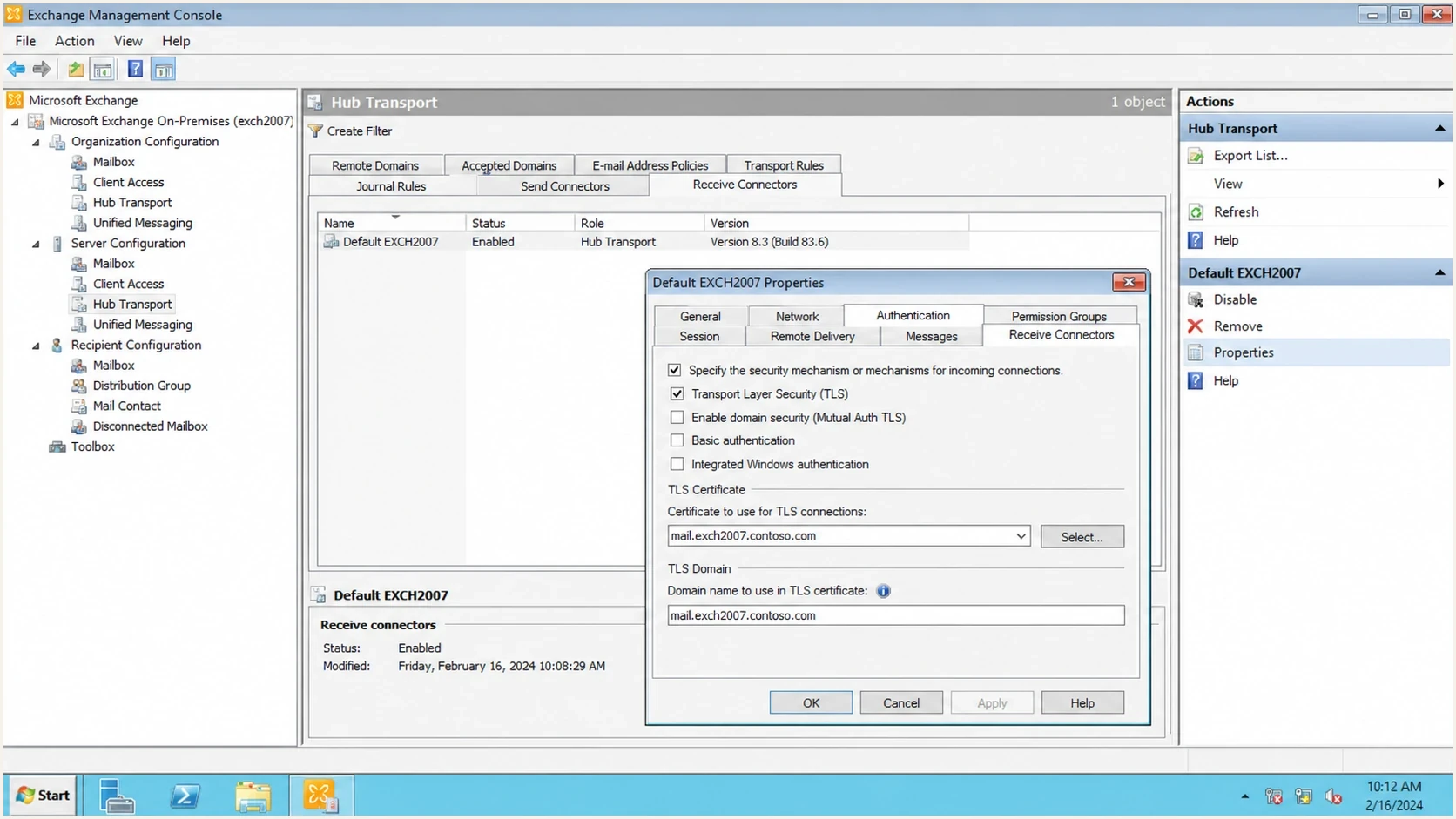
Microsoft Exchange receive connector STARTTLS and certificate settings.
Sender-side signs
- One host: Only one Postfix server fails while other senders complete TLS to the same IP.
- Policy map: A destination rule forces strict TLS or certificate checks, or applies incompatible protocol or cipher restrictions.
- Recent change: The sender recently changed Postfix, OpenSSL, its operating system, or the system crypto policy.
Receiver-side signs
- Many senders: Different hosts fail against the same Exchange IP or one MX target.
- Independent probes: posttls-finger and openssl both show a reset before ServerHello.
- Unsupported stack: The destination runs unsupported Exchange or a legacy Windows or SMTP gateway build.
The same pattern appears with other providers too. If you are comparing failures across destinations, the notes on Gmail TLS errors and SSL/TLS key size errors help separate protocol failures from certificate-strength failures.
Rule out the wrong TLS mode or port
Internet MX delivery normally connects to port 25 as plaintext SMTP, reads the EHLO response, and then issues STARTTLS. Port 587 usually follows the same explicit STARTTLS sequence for authenticated submission. Port 465 uses implicit TLS only when the named relay offers that service, so the TLS handshake begins immediately without an SMTP greeting.
|
|
|
|---|---|---|
25 | SMTP, then STARTTLS | Use -starttls smtp |
587 | Submission, then STARTTLS | Use -starttls smtp |
465 | Implicit TLS submission | Start TLS immediately |
Match the test to the endpoint's SMTP transport
Compare explicit STARTTLS with implicit TLSbash
# Port 25: plaintext SMTP greeting, then STARTTLS
openssl s_client -starttls smtp -connect mx.example.net:25 \
  -servername mx.example.net </dev/null

# Port 465: TLS begins immediately, only if the relay documents this service
openssl s_client -connect relay.example.net:465 \
  -servername relay.example.net </dev/null

postconf relayhost
postconf smtp_tls_wrappermode
Using STARTTLS against an implicit-TLS listener, or sending plaintext SMTP to a listener that expects TLS immediately, often produces wrong version number, an early disconnect, or a generic handshake failure. Confirm the destination's documented port before editing TLS settings or certificate configuration. Do not enable smtp_tls_wrappermode globally for normal port 25 MX delivery. If one smarthost requires port 465, isolate that configuration to a dedicated Postfix transport service used for that relay.
How to test the failure
Start with independent tests before changing Postfix. Determine whether every sender fails, then compare source hosts and each Exchange IP behind the MX records.
Test automatic negotiation and TLS 1.2bash
HOST=mx.example.net
posttls-finger -c -Ldebug "${HOST}"

openssl s_client -starttls smtp -connect "${HOST}:25" \
  -servername "${HOST}" -showcerts </dev/null

openssl s_client -starttls smtp -connect "${HOST}:25" \
  -servername "${HOST}" -tls1_2 -showcerts </dev/null
- Confirm the transport: Verify the exact hostname, port, and whether the endpoint expects STARTTLS or implicit TLS.
- Repeat elsewhere: Run the same commands from a second network. Matching failures to the same IP point to the destination path.
- Test every MX target: A domain can have one broken Exchange node while its other MX hosts negotiate TLS normally.
- Locate the failure stage: A reset before ServerHello points to protocol, cipher, Schannel, transport mode, or network handling rather than certificate validation.
- Compare TLS 1.2: If automatic negotiation fails but the forced TLS 1.2 test succeeds, inspect the Exchange build and any device parsing the modern ClientHello.
- Check policy: Review transport maps, TLS policy maps, wrapper mode, protocol controls, cipher controls, and the operating-system crypto policy on the sender.
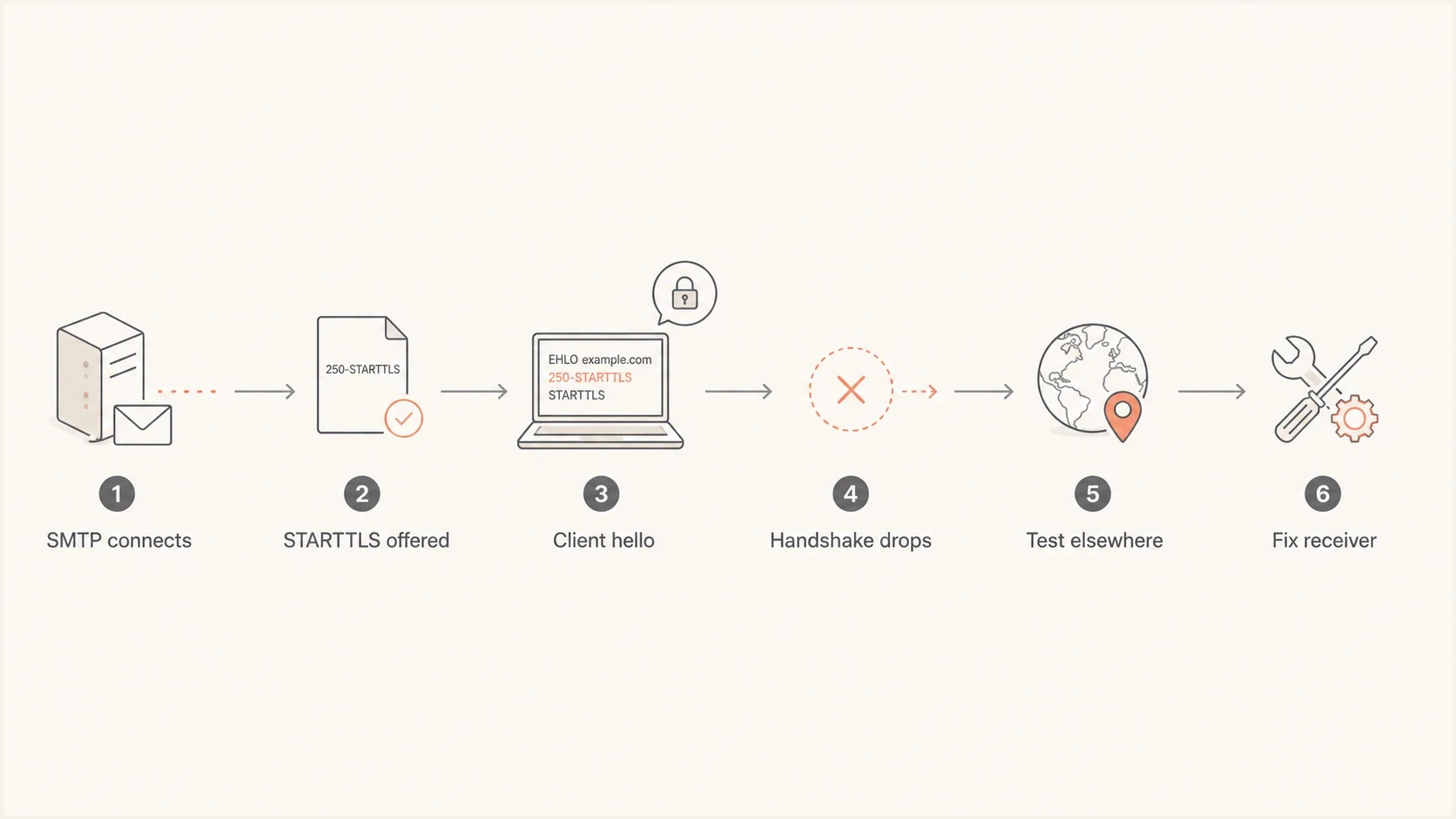
Postfix and Exchange STARTTLS handshake troubleshooting flow.
A domain health check adds domain-wide context. It does not replace packet-level SMTP testing, but it catches adjacent DNS and authentication issues that often appear during the same incident.
?
What's your domain score?
Deep-scan SPF, DKIM & DMARC records for email deliverability and security issues.
What to send the Exchange admin
Send the receiving admin a concise request that shows where the session fails. A report such as "mail is not delivering" forces the admin to guess. The Postfix queue ID and exact endpoint narrow the search, while Exchange-side session evidence confirms the matching connection.
- Failing host: Give the exact MX hostname, IP address, port, transport mode, and source IP used by Postfix.
- Time window: Include the timestamp with timezone and the Postfix queue ID. Exchange protocol logs use UTC timestamps.
- Failure point: Show that SMTP connects, STARTTLS is offered, and the connection drops after ClientHello but before ServerHello.
- TLS results: Attach the automatic and forced TLS 1.2 output, including any alert text and certificate details that were returned.
- Exchange evidence: Ask for verbose Receive Connector protocol logs, the matching session ID, the selected certificate thumbprint, and Schannel events at the same time.
Microsoft's Exchange protocol logs guidance explains how to correlate a session and confirm the certificate thumbprint. The receiving admin should also check Schannel configuration, the certificate store, SMTP gateway policy, and load balancer TLS profiles. The live handshake result is stronger evidence than a screenshot of an enabled setting.
The right request
Ask the receiving team to confirm that the exact public SMTP endpoint supports TLS 1.2 with a shared cipher, selects the intended SMTP certificate, and does not close the session when a modern client sends ClientHello. That wording keeps the request tied to the failing network path.
How to fix it without breaking mail security
The clean fix is on the failing endpoint. Enable TLS 1.2 with supported ciphers, install a valid SMTP certificate and full chain, correct the Receive Connector certificate selection, and inspect every firewall or load balancer in front of Exchange. Exchange Server 2007 has been unsupported since 2017. Support for Exchange Server 2016 and 2019 ended in 2025, so affected on-premises deployments need Exchange Server Subscription Edition or a supported migration path rather than another TLS workaround. Microsoft's Exchange support roadmap lists the supported upgrade direction.
Do not weaken Postfix globally
Do not re-enable SSLv3, RC4, MD5, anonymous ciphers, or export ciphers across the whole Postfix server to satisfy one broken destination. Do not enable implicit TLS globally for ordinary MX delivery. Either change turns one receiver problem into a sender-wide configuration error or security downgrade.
At the may level, Postfix already has opportunistic cleartext fallback, so an explicit none policy entry is usually unnecessary. If an authorized business exception still requires immediate cleartext delivery, scope it to the exact destination and record that it bypasses TLS. It cannot satisfy enforced MTA-STS, DANE, verify, or secure policy.
Emergency per-destination cleartext exceptiontext
# /etc/postfix/tls_policy
example.net none
[mx.example.net]:25 none

# /etc/postfix/main.cf
smtp_tls_policy_maps = hash:/etc/postfix/tls_policy

postmap /etc/postfix/tls_policy
postfix reload
Use that exception only with an owner and a removal date. For domains you control, publish and monitor MTA-STS after every listed MX host can complete modern TLS with a trusted, matching certificate. Suped's Hosted MTA-STS workflow manages the policy with two CNAME records and no separate policy web host.
Where Suped fits
Suped is a DMARC reporting and email authentication platform. It does not repair a broken Exchange TLS stack. During the incident, Suped can show whether sending sources remain legitimate, how DMARC authentication is performing, and whether MTA-STS or concurrent blocklist and blacklist issues need separate action.
Hosted MTA-STS/TLS-RPT configuration dialog showing policy mode, MX hosts, CNAME records, TLS reporting, and verification
The relevant Suped workflows are DMARC reporting, hosted MTA-STS, policy monitoring, and blocklist monitoring (blacklist monitoring). They keep authentication and policy checks together while Postfix and Exchange logs identify the live SMTP handshake failure.
- DMARC visibility: Track DMARC results, including SPF and DKIM authentication outcomes, while the TLS endpoint is investigated.
- Hosted MTA-STS: Publish and monitor the policy after every listed MX host passes TLS and certificate checks.
- Reputation checks: Watch blocklist and blacklist status beside authentication results during incident review.
- MSP operations: Use the multi-tenancy dashboard when one team manages the same checks across client domains.
A domain health checker is a quick broad check. The detailed fix for a Postfix and Exchange handshake failure still comes from testing the live SMTP endpoint and correcting the TLS path that fails.
Views from the trenches
Best practices
Test the same MX from two networks before changing a working Postfix configuration.
Keep any TLS downgrade exception scoped to one domain and document its removal date.
Use command output and certificate details when asking a receiving admin to investigate.
Common pitfalls
Assuming Postfix changed when an old Exchange server started failing modern TLS checks.
Fixing one destination by enabling weak protocols or ciphers for every outbound route.
Ignoring a load balancer that advertises STARTTLS but drops the session after ClientHello.
Expert tips
Compare posttls-finger and openssl output to separate SMTP reachability from TLS failure.
Check the certificate chain and protocol list before editing smtp_tls settings in Postfix.
Treat Exchange 2007 as a migration issue when modern senders reject its TLS behavior.
Marketer from Email Geeks says a second Debian test host showing the same lost connection is strong evidence that the destination is failing TLS.
2020-11-30 - Email Geeks
Marketer from Email Geeks says an expired intermediate certificate or broken chain should be checked before blaming the Postfix sender.
2020-11-30 - Email Geeks
The practical answer
Postfix shows the Exchange TLS handshake failure because STARTTLS began and the remote TLS endpoint did not complete negotiation. A reset before ServerHello points first to a port or transport-mode mismatch, protocol or cipher overlap, Schannel, or a device in front of Exchange. Certificate trust and name matching matter when the active Postfix policy authenticates the receiver.
On the Postfix side, verify the exact destination port, transport mode, effective destination policy, protocol controls, cipher controls, and recent package or operating-system changes. Keep global TLS settings secure. If a short-term cleartext exception is authorized, make it destination-specific and remove it after the receiver is fixed.
After the TLS issue is resolved, monitor the domain's broader sending health. Authentication, DNS, MTA-STS, and blocklist or blacklist status are separate systems, but the same operational review often uncovers problems in more than one of them.




