What causes SSL/TLS key size errors in email SMTP transactions?

Updated on 14 Aug 2026: We clarified current TLS key requirements, queued-mail behavior, MTA-STS testing, and enforcement.
SSL/TLS key size errors in email SMTP transactions happen when a mail server or TLS library rejects cryptographic material that falls below its security policy. The rejected material is usually the SMTP certificate's public key or finite-field Diffie-Hellman parameters. A cipher mismatch can produce a related handshake error, but it is not itself a key-size error. These failures concern the encrypted SMTP connection, not email authentication records or DMARC policy. Although logs still use the SSL label, current SMTP encryption uses TLS, and SSLv2 or SSLv3 should remain disabled.
Common causes include a 1024-bit RSA certificate, 512-bit or 1024-bit DH parameters, an outdated MTA, a hardened operating-system policy, or a gateway presenting different TLS settings than the origin server. An OpenSSL or system-policy update can expose weak material that an older stack accepted. If the error appears only when sending to one domain, inspect that destination's MX path. If many senders report the same problem reaching your domain, inspect every inbound TLS endpoint.
- Certificate fix: replace weak SMTP TLS certificates with RSA 2048-bit or ECDSA P-256 certificates and install the full chain.
- DH fix: remove old 512-bit or 1024-bit DH parameter files and prefer modern ECDHE suites.
- Policy fix: make the sender, recipient, relay, and gateway agree on supported TLS versions and cipher requirements.
- Operational fix: test with OpenSSL through the same network path and TLS endpoint that the mail server uses.
Do not confuse TLS keys with DKIM keys
A 1024-bit DKIM public key in DNS can create authentication weakness and verification problems at some receivers, but it is not the key that encrypts the SMTP transaction. SMTP SSL/TLS key size errors come from the certificate or ephemeral key negotiated after STARTTLS. DKIM signs message content. TLS protects the transport session.
What actually causes the error
The exact wording varies by MTA and TLS library. Phrases such as "ee key too small" or "dh key too small" directly identify weak public-key material. Messages such as "insufficient security", "handshake failure", and "no shared cipher" are broader and require the negotiated protocol and cipher details. An end-entity key error can appear when a service loads its own certificate or when a peer validates the presented certificate, so the surrounding log lines matter.
Usually a key size problem
- Certificate key: the SMTP certificate uses an RSA key that the local or remote TLS policy rejects.
- DH parameters: the server offers old finite-field DHE parameters during a TLS 1.2 handshake.
- Security level: a newer OpenSSL or operating-system policy rejects keys that the earlier stack accepted.
- Gateway mismatch: an appliance or hosted relay exposes weaker TLS settings than the origin MTA.
Usually a different TLS problem
- Name mismatch: the certificate name does not match the MX host required by policy.
- Expired certificate: the certificate is out of date even though its key length is acceptable.
- Wrong TLS mode: STARTTLS on ports 25 or 587 is confused with implicit TLS on port 465.
- Route issue: a firewall, proxy, or gateway interrupts the session before TLS completes.
|
|
|
|
|---|---|---|---|
Cert key | Too small | Old RSA | Public key bits |
Temp key | DH rejected | Weak DHE | Server temp key |
Cipher | No match | Old suite | Cipher list |
Protocol | Version fail | TLS disabled | TLS versions |
Relay | Only one path | Gateway cert | MX route |
Common SMTP TLS failure points and the quickest useful test.
Key size thresholds that matter in practice
These investigation bands follow current general TLS guidance but do not replace an organization's security policy.
Healthy baseline
RSA 2048+ or ECDSA P-256
Current baseline for SMTP TLS certificate authentication.
Risk zone
RSA 1024 or DH 1024
Older material that stricter peers reject.
Breakage zone
DH 512 or export suites
Modern TLS stacks reject this material.
Policy dependent
RSA or DH above 2048
Local security levels can require stronger keys.
How the SMTP TLS handshake fails
SMTP delivery on port 25 normally begins in plaintext. The receiving server advertises STARTTLS, the sending server requests encryption, and the peers exchange TLS capabilities. In TLS 1.2, the selected cipher suite can include the key-exchange method, and weak finite-field DHE parameters can stop the handshake. TLS 1.3 negotiates supported groups and key shares separately from its cipher suite. In either version, a weak certificate public key can fail the applicable security policy before SMTP mail commands continue.
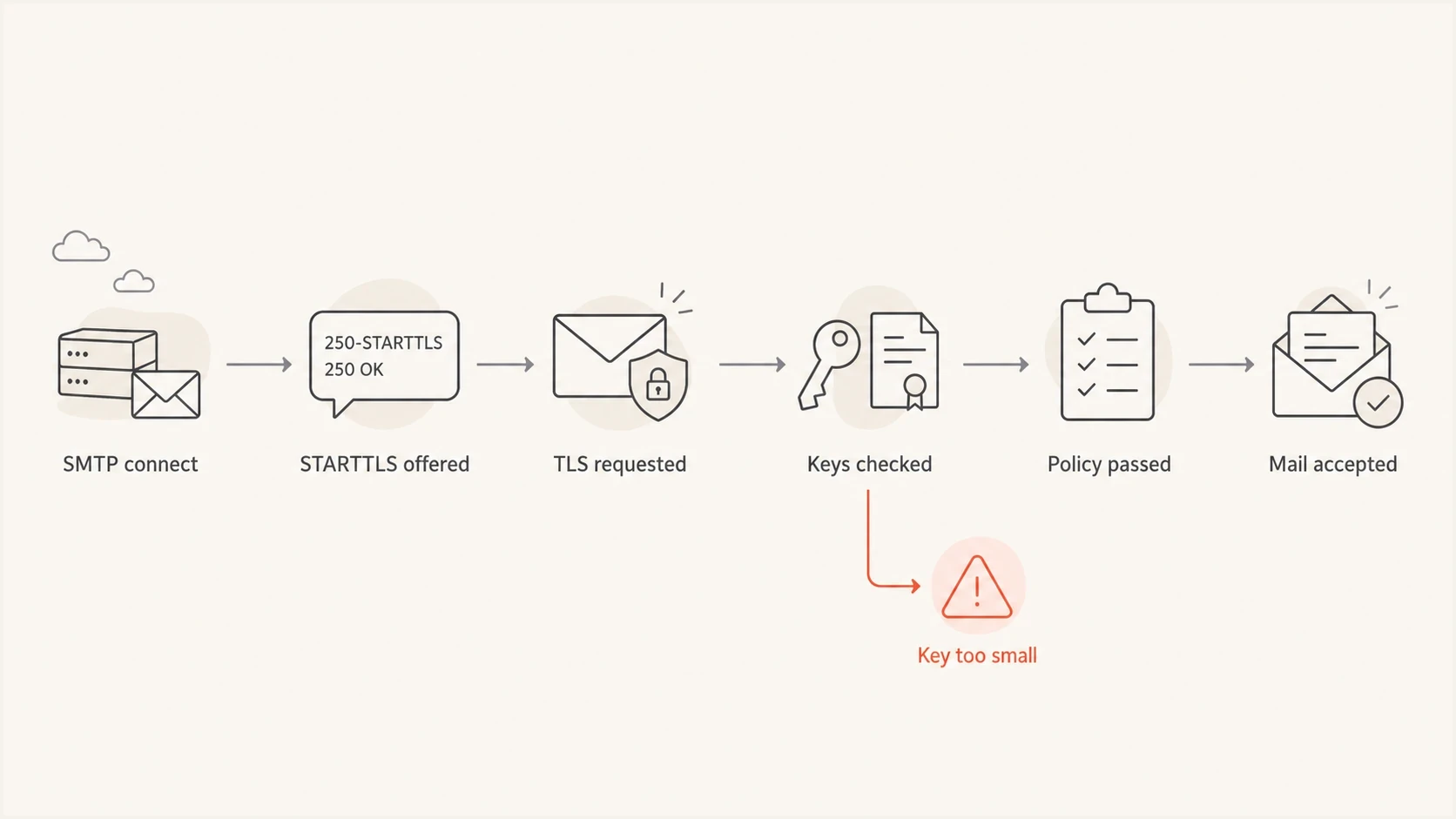
Flowchart showing an SMTP STARTTLS handshake stopping when key size checks fail.
OpenSSL messages that point to key sizetext
SSL routines::ee key too small
SSL routines::dh key too small
tls_process_ske_dhe:dh key too small
tlsv1 alert insufficient security
sslv3 alert handshake failure
The wording can mislead because domain authentication and transport encryption share the same delivery path. A 1024-bit DKIM key appears in DNS. A 1024-bit SMTP certificate or DH parameter appears during TLS negotiation. The fix depends on which key the error names, so key-size language in a live SMTP transaction should start a TLS-handshake investigation.
A one-domain failure is a clue
When mail fails only to one recipient domain, that MX path often enforces a stricter TLS policy than other destinations. When many senders fail to reach your domain, the weak key or incompatible policy usually sits on an inbound MX, gateway, or hosted relay. Test every MX host because different priorities can terminate TLS on different systems.
How key size errors affect delivery
Once a client sends STARTTLS and the handshake fails, that SMTP connection should end. What happens on the next attempt depends on the sender's transport policy. The message can remain queued, move to another eligible MX, or be retried without TLS only when the sender's policy permits cleartext delivery. A final bounce normally appears after the sending system exhausts its retry period, not at the first failed handshake.
|
|
|
|---|---|---|
Opportunistic TLS | Abort current connection; later fallback depends on local policy | Retry, alternate MX, or cleartext delivery |
MTA-STS testing | Report the failure when TLS reporting is implemented; no MTA-STS block is required | Delivery can continue under sender policy |
MTA-STS enforce | Do not deliver to an MX where valid TLS cannot be established | Queue and retry; bounce after retry expiry |
Locally required TLS | Reject delivery that cannot meet the configured security level | Queue, retry, then return a non-delivery report |
Typical delivery behavior after an SMTP TLS key-size failure.
This distinction explains why the same weak MX can receive some mail and defer other mail. Different sending systems apply different TLS requirements. TLS reporting can expose recurring policy failures, while MTA logs show the affected destination, retry schedule, and final delivery status.
How to find the weak side
Start by separating the sending route and receiving route. A sending MTA log that rejects the remote certificate key points to the recipient's TLS endpoint. A receiving service that cannot load its own certificate points to the local endpoint. A generic handshake alert can mean the peer rejected material presented by the logging server, so the log location alone does not prove ownership. A helpdesk ticket without the SMTP transcript is not enough to assign the fix.
- Find scope: confirm whether the failure happens with one destination, one sender, one relay, or every route.
- Read logs: collect the SMTP transcript and adjacent MTA TLS lines from both available endpoints.
- Probe MX: test each recipient MX with OpenSSL through the sending network or a comparable server.
- Inspect output: check certificate public key bits, server temporary key, protocol version, cipher, chain, and hostname.
- Retest route: repeat through the real relay or gateway because an intermediary can change TLS behavior.
Check STARTTLS on an MX hostbash
openssl s_client -starttls smtp -connect mx.example.net:25 \
  -servername mx.example.net -verify_hostname mx.example.net \
  -showcerts < /dev/null
Look for these fields in outputtext
Certificate chain
Verification: OK
Server Temp Key: X25519, 253 bits
Server Temp Key: DH, 1024 bits
Public-Key: (2048 bit)
Protocol  : TLSv1.2
Cipher    : ECDHE-RSA-AES256-GCM-SHA384
The Server Temp Key line is especially useful for TLS 1.2. If it shows finite-field DH at 1024 bits and the peer requires stronger parameters, the server's DHE configuration is the likely cause. Do not compare raw bit counts across algorithms: X25519 at 253 bits is not equivalent to 253-bit RSA or finite-field DH. If the certificate public key is 1024-bit RSA, renew the SMTP certificate with a stronger key and install the new chain on the system that actually terminates SMTP TLS.
Suped's MTA-STS checker can verify policy discovery, MX coverage, certificate validity, and TLS reporting configuration around the affected domain. It does not replace a live OpenSSL probe through the failing mail route, but it helps separate policy problems from endpoint key problems.
MTA-STS checker
Scan DNS, policy files, MX records, and SMTP TLS support.
?/9tests passed
Fixes that work
The right fix depends on which component terminates TLS. In direct delivery, that is usually the receiving MX. In many business environments, it is a secure email gateway, load balancer, outbound relay, or hosted SMTP service. Identify the TLS endpoint before changing DNS or origin-server settings because the visible MX hostname does not always control the certificate that senders receive.
Practical remediation order
- Renew certificate: issue a current SMTP certificate with RSA 2048-bit or ECDSA P-256 and install its full chain.
- Retire weak DHE: prefer ECDHE; where finite-field DHE remains necessary, use parameters of at least 2048 bits.
- Review protocols: support TLS 1.2 and TLS 1.3, then remove obsolete protocol versions and incompatible suites.
- Update stack: patch the MTA, TLS library, gateway firmware, and relay agent before weakening policy.
- Prove delivery: send a real message and capture a successful TLS session after the configuration change.
Inspect certificate, DH, and MTA settingsbash
openssl x509 -in smtp.crt -text -noout
openssl dhparam -in dhparam.pem -check -text -noout
postconf -n | grep -i tls
Do not lower the receiving system's security level just to make one old peer work unless the business has documented and accepted the risk. Update the weak endpoint or use a controlled relay path with an explicit policy. Lowering the OpenSSL security level can hide the immediate error while leaving weak key material in production.
If the logs show a STARTTLS failure without explicit key-size language, compare the symptoms with STARTTLS negotiation failures. That class of issue includes broken banners, firewall interference, TLS-mode mismatches, and servers that advertise STARTTLS but cannot complete it.
Where MTA-STS and DMARC fit
MTA-STS does not fix a weak key or define a numeric key-size threshold. The sending system's TLS policy decides whether the key is acceptable. MTA-STS tells compliant senders which MX hosts are authorized and whether valid TLS is required. In testing mode, senders that implement TLS reporting can report policy failures without an MTA-STS delivery block. In enforce mode, a compliant sender must not deliver to an MX that cannot establish valid TLS, so a key-size handshake failure causes queueing and retries instead of cleartext delivery. Fix every policy-covered MX before switching to enforce mode.
MTA-STS and TLS reporting DNS recordsdns
_mta-sts.example.com. IN TXT "v=STSv1; id=policy2026v2"
_smtp._tls.example.com. IN TXT "v=TLSRPTv1; rua=mailto:tls@example.com"
MTA-STS policy file for testingtext
version: STSv1
mode: testing
mx: mx1.example.com
mx: mx2.example.com
max_age: 86400
Suped's Hosted MTA-STS can host the policy through a CNAME-based setup and keep policy changes in the same operational workflow as Suped's DMARC reporting. The mail or gateway team still has to replace weak certificate keys, retire old DHE parameters, and verify the live SMTP route.
Hosted MTA-STS/TLS-RPT configuration dialog showing policy mode, MX hosts, CNAME records, TLS reporting, and verification
A practical rollout is to repair the TLS endpoint, verify every MX, publish the policy in testing mode, review TLS reports, and then move to enforce mode. Suped can manage the hosted policy and keep DMARC reporting visible beside the TLS rollout. It does not repair the MTA or gateway configuration.
Fix at the mail layer
- TLS endpoint: update the certificate, chain, DH parameters, ciphers, and TLS versions.
- SMTP proof: confirm the real route completes STARTTLS and accepts mail.
- Owner action: involve the team that controls the MX, gateway, or outbound relay.
Manage at the domain layer
- DMARC view: use Suped to see authenticated sources and DMARC policy impact.
- TLS policy: publish MTA-STS in testing mode after all MX hosts present valid TLS.
- Enforcement: review TLS reports before moving the policy to enforce mode.
Views from the trenches
Best practices
Confirm whether the failing key is TLS, DKIM, or DH before changing DNS records.
Test STARTTLS from the same route the MTA uses so gateway behavior is included too.
Replace weak SMTP certificates and DH files before publishing strict TLS policy.
Keep mail logs with TLS detail enabled until the fixed route has passed live mail.
Common pitfalls
Treating a 1024-bit DKIM key as the cause of an SMTP transport TLS error in logs.
Testing only from a laptop and missing the relay or gateway that terminates TLS.
Lowering OpenSSL policy globally instead of fixing the weak endpoint key material.
Publishing strict MTA-STS before the MX certificate chain and key size are correct.
Expert tips
Check the server temp key line because weak DH often hides behind generic failures.
When one recipient fails, ask which side logged the rejection before assigning work.
Renew the certificate on the TLS endpoint, not just on the origin server behind it.
Track TLS fixes beside DMARC status so authentication and transport both stay clean.
An Email Geeks participant says the error concerns SSL/TLS negotiation in the SMTP transaction, not DKIM verification.
2026-02-18 - Email Geeks
An Email Geeks participant says one server can reject the other server's key length when the offered TLS material is too weak.
2026-02-19 - Email Geeks
The practical takeaway
An SSL/TLS key size error in SMTP means transport encryption failed because a TLS endpoint or peer rejected weak public-key material. Identify the endpoint, reproduce the failure through the real mail route, inspect the certificate public key and temporary key, then renew or reconfigure the component that presents the weak settings.
After every MX completes a valid handshake, use MTA-STS testing and TLS reports before enforcement. Suped can keep the hosted MTA-STS policy and DMARC reporting in one workflow, while the mail team owns certificate and TLS configuration on the MX or gateway.




