Why am I getting TLS errors when sending to Gmail?

Updated on 13 Aug 2026: We corrected the TLS troubleshooting path and added guidance for Gmail SMTP submission errors.
If the response includes 421 4.7.29, Gmail received the affected SMTP transaction without TLS and temporarily rate limited the mail. Google also documents 550 5.7.29 for messages blocked because they were not sent over TLS. Gmail's sender guidelines require TLS for all senders to personal Gmail accounts, while the text of these errors specifically calls out bulk senders.
The fix is not a DMARC record change. First prove whether the affected outbound server negotiated STARTTLS with Google's MX host for the exact failed transaction. Then check the outbound TLS policy, supported protocols and ciphers, local CA trust store, system clock, network path, routing, and whether only one sending pool or relay has the fault.
Typical Gmail TLS deferraltext
421-4.7.29 Your email has been rate limited because this message wasn't sent
421-4.7.29 over a TLS connection. Gmail requires all bulk email senders
421-4.7.29 to use TLS/SSL for SMTP connections.
First identify which Gmail connection failed
The phrase 'sending to Gmail' describes two different SMTP paths. Identify the hostname and response code before changing TLS settings, because a receiving-MX error and a Gmail account submission error do not share the same diagnosis.
Sending to Gmail recipients
- Connection: Your MTA connects to a Gmail MX host, normally on port 25.
- Key errors: 421 4.7.29 defers mail and 550 5.7.29 blocks mail sent without TLS.
- Fix: Repair STARTTLS on the exact outbound MTA, relay, or fallback route.
Sending through a Gmail account
- Connection: An app or device connects to smtp.gmail.com or smtp-relay.gmail.com.
- Key errors: 530 5.7.0 requires STARTTLS first, while 534 and 535 responses point to authentication.
- Fix: Use STARTTLS on port 587 or implicit TLS on 465, then configure OAuth or an eligible app password.
Do not label every Gmail SMTP error a TLS failure
A device with old firmware can fail TLS negotiation because its protocol or cipher support is obsolete. An authentication response after TLS succeeds needs an OAuth, app-password, account, or relay configuration fix instead.
What the Gmail TLS error means
For server-to-server email, the sending MTA connects to a Gmail MX host on SMTP port 25, reads the EHLO capabilities, sees STARTTLS, issues STARTTLS, completes the TLS handshake, then continues the SMTP transaction inside the encrypted session. When Gmail says the message was not sent over TLS, that encrypted session was not present for the transaction Gmail judged. It does not mean the sending host's own certificate must be renewed.
Google requires TLS for every sender delivering to personal Gmail accounts, with additional authentication requirements for senders that exceed 5,000 messages per day. Its Gmail TLS guide explains secure transport settings for Google Workspace routes. A sudden start date often means an existing path problem became visible after a route, sending pool, volume level, TLS library, or enforcement condition changed.
Do not stop at a green test
A single successful TLS test proves only that one test path worked. It does not prove every production message to Gmail used TLS. If the error is common or repeatable, capture the exact deferred transaction in outbound logs and confirm STARTTLS happened on that same session.
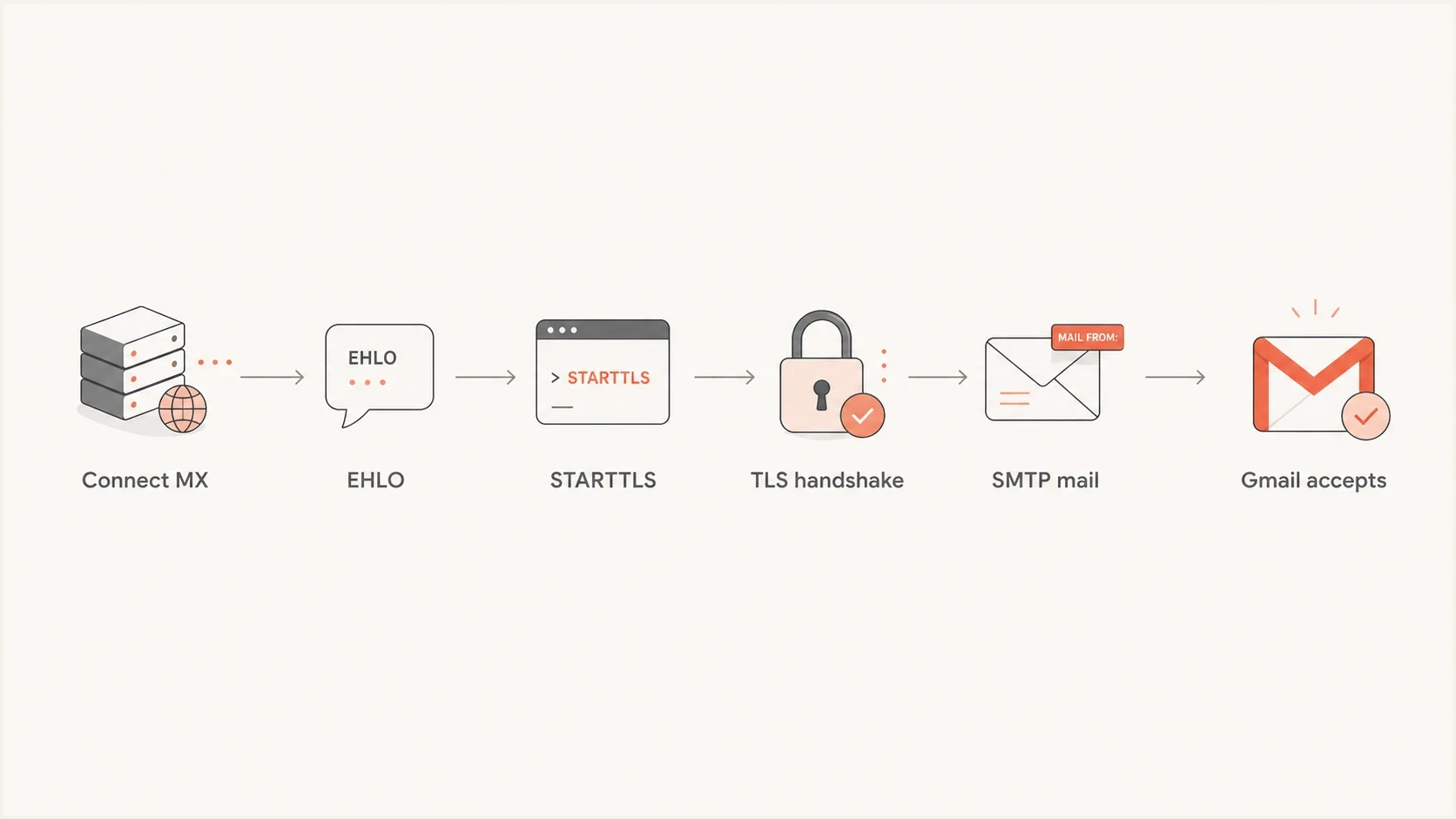
SMTP STARTTLS flow for delivering email securely to Gmail.
The most common causes
The cause usually sits in outbound SMTP infrastructure, not in your DMARC policy. Gmail TLS errors fit six practical buckets, and each bucket points to a different owner and fix.
- No STARTTLS: The sending MTA connects to Gmail but never upgrades the SMTP session to TLS.
- Broken handshake: STARTTLS begins, then fails because of protocol, cipher, trust-store, firewall, or traffic-inspection behavior.
- Remote certificate validation: The sender cannot validate Gmail's certificate because its CA bundle is stale, its system clock is wrong, or a network device substitutes another certificate.
- Mixed sending pools: Most mail uses TLS, but one IP pool, relay, container, or fallback route still sends in clear text.
- Policy enforcement: A route that previously delivered without TLS now receives Gmail's 4.7.29 or 5.7.29 response.
- Unsafe fallback: A temporary DNS, network, or handshake failure sends the MTA onto a route that retries without TLS.
|
|
|
|---|---|---|
421 or 550 5.7.29 | No TLS | MTA |
Verify error | Trust store or interception | Ops |
One IP only | Bad pool | ESP |
All domains | Relay config | Platform |
Fast mapping from symptom to likely owner.
Intermittent errors
- Scope: A small share of Gmail deliveries fail, then later retry and deliver.
- Pattern: Failures cluster around one outbound host, route, IP, or time window.
- Action: Compare successful and deferred transactions for the same Gmail MX.
Systemic errors
- Scope: Most or all Gmail deliveries defer with the same TLS message.
- Pattern: Every sender, campaign, or domain that uses the route is affected.
- Action: Fix outbound TLS configuration before increasing volume again.
How to prove what Gmail saw
The fastest path is evidence from the exact SMTP transaction. A general TLS scan, successful test message, or certificate check can help, but it does not replace the delivery log for the message Gmail deferred or blocked.
- Find the event: Search outbound logs for Gmail responses containing 4.7.29 or 5.7.29 and the affected message ID.
- Record the route: Note the source IP, relay, hostname, container, queue, and Gmail MX host.
- Confirm STARTTLS: Look for EHLO, STARTTLS, TLS protocol, cipher, certificate verification, and post-TLS SMTP lines.
- Compare a pass: Compare one accepted Gmail delivery from the same sending path.
- Retest cleanly: Send a controlled message from the same production pool and capture the SMTP trace.
Manual STARTTLS check to a Gmail MXbash
openssl s_client -starttls smtp \
  -connect gmail-smtp-in.l.google.com:25 \
  -servername gmail-smtp-in.l.google.com \
  -verify_return_error -brief
That command checks whether STARTTLS can complete from the machine where it runs and whether the local trust store validates the certificate returned by Gmail. It can expose firewall, TLS-library, clock, and certificate-chain problems. It does not prove that the production MTA requires STARTTLS or that every outbound host uses the same path.
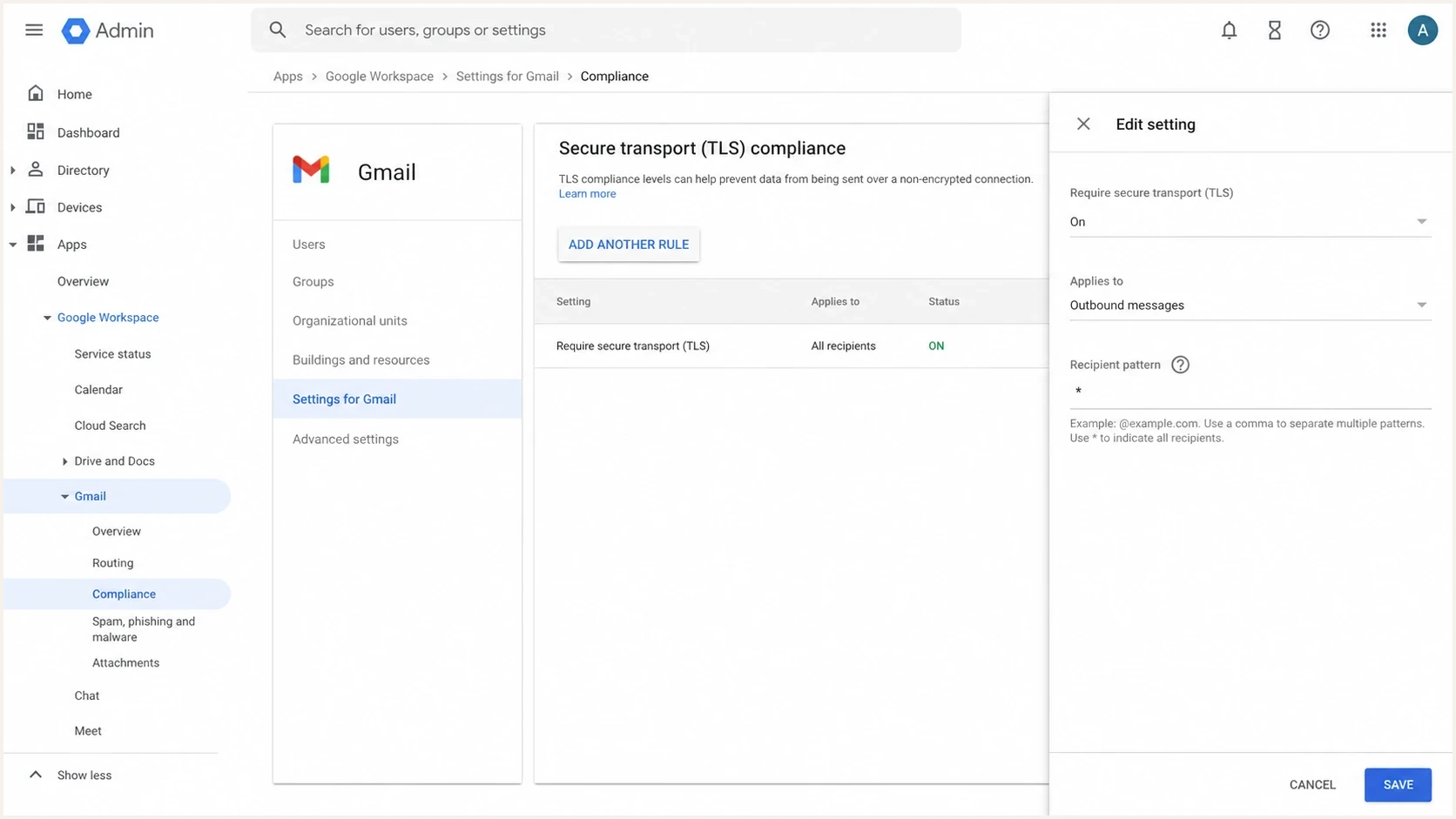
Google Admin console Secure transport TLS compliance settings.
Fixes by cause
Once the failing route is known, the fixes are direct. Treat Gmail's TLS response as an infrastructure incident first, then check DNS and authentication after the mail path is stable.
Fix checklist
- Enable STARTTLS: Make TLS mandatory for Gmail-bound mail on every production route.
- Update trust stores: Install a current CA bundle and correct the system clock on every outbound host.
- Validate Gmail's identity: Use the published Gmail MX hostname and investigate any substituted or mismatched certificate.
- Remove weak TLS: Disable obsolete protocol versions and weak ciphers that modern receivers reject.
- Fix routing: Make every fallback relay and warmup pool use the same TLS policy.
- Resume retries carefully: Let deferred queues retry after the fix and avoid a manual burst that creates fresh rate limiting.
If the sender reports a certificate validation error while connecting directly to Gmail, inspect the certificate received on that route. A stale CA bundle, incorrect system time, TLS-inspecting firewall, or incorrect MX target can break verification. Replacing the outbound host's own web or SMTP certificate does not repair that client-side validation path.
When to escalate the issue
Use the scope of the failure to distinguish a single retry from a configuration incident.
Low
One retry
One deferral retries successfully through the same encrypted route.
Watch
One route
Repeated responses map to one outbound host, pool, or relay.
Incident
Many routes
Gmail-bound queues grow across multiple production routes.
Where DNS and authentication fit
TLS and DMARC answer different questions. A DMARC pass does not prove the SMTP connection to Gmail was encrypted, and a TLS pass does not prove the message passed DMARC. Gmail requires all senders to personal accounts to use TLS and pass SPF or DKIM. Senders above 5,000 messages per day need both SPF and DKIM plus a DMARC record.
Suped is useful for the domain side of this workflow. Suped's product gives teams one place to monitor DMARC results, SPF and DKIM domain matching, domain health, issue detection, and related DNS controls. It does not repair an outbound MTA handshake, but it helps separate authentication faults from the transport failure while the infrastructure owner fixes TLS.
?
What's your domain score?
Deep-scan SPF, DKIM & DMARC records for email deliverability and security issues.
For sender-domain triage, check the domain health checker after collecting the SMTP logs. Transport evidence answers whether Gmail saw TLS, while the domain checks expose separate SPF, DKIM, or DMARC failures.
DMARC record detail view showing SPF, DKIM, DMARC, rDNS diagnostics, and DNS records
MTA-STS protects mail sent to your domain by telling other senders to use TLS when delivering to your MX hosts. It does not make your outbound mail to Gmail use TLS. Suped's Hosted MTA-STS hosts and maintains that inbound policy for your domain, while the outbound MTA configuration controls STARTTLS on deliveries to Gmail.
A clean triage sequence
When a Gmail TLS error appears suddenly, use this order to separate transport evidence from unrelated DNS changes.
Do first
- Capture logs: Find one exact Gmail response and the route that sent it.
- Check TLS: Confirm STARTTLS, protocol, cipher, and remote certificate verification for that route.
- Compare paths: Separate working pools from failing pools before changing DNS.
Do after
- Fix route: Apply the TLS fix to every outbound and fallback route.
- Check DNS: Use the domain health checker for related records.
- Watch retries: Confirm deferred Gmail queues recover without a new spike.
If the failure pattern includes reduced send rates as well as STARTTLS errors, the related guide on Google STARTTLS errors helps separate transport failure from throttling behavior.
Views from the trenches
Best practices
Capture the exact deferred Gmail transaction before changing unrelated DNS records.
Check every outbound pool, relay, and fallback route for consistent STARTTLS support.
Retest after trust-store or TLS policy changes and confirm Gmail queues recover.
Common pitfalls
A single successful TLS test does not prove production Gmail traffic used TLS at all.
Teams often fix the primary relay and leave a fallback path sending without TLS.
Teams renew the sending host certificate even when the remote trust path is failing.
Expert tips
Treat 421 4.7.29 as transport evidence, then validate DMARC as a separate layer.
Compare accepted and deferred Gmail sessions from the same IP before escalating.
Use controlled test sends only after the failing production route has been found.
Expert from Email Geeks says the error means the sender or its ESP needs outbound TLS configured or repaired.
2024-12-13 - Email Geeks
Expert from Email Geeks says Gmail is treating the session as missing STARTTLS, so deferred transaction logs matter most.
2024-12-13 - Email Geeks
The practical answer
Gmail 4.7.29 and 5.7.29 responses mean Gmail did not see an encrypted SMTP session for the affected delivery. Start with the outbound route, not DMARC. Find the exact transaction, prove whether STARTTLS completed, then fix the TLS policy, trust store, network path, relay, or sending pool that failed.
After the transport problem is fixed, Suped's product can monitor DMARC aggregate data, SPF and DKIM domain matching, domain health alerts, and hosted MTA-STS. That keeps authentication and inbound transport policy visible without confusing them with the outbound MTA repair.




